

Muvic Toolbar is a browser hijacker, which is promoted via other free downloads, and once installed it will add the Muvic Smartbar, change your browser homepage to search.snap.do, and set your default search engine to Snap.do Search.
![[Image: Muvic Toolbar virus]](https://malwaretips.com/blogs/wp-content/uploads/mwt-media/ce/ce4cbd6895d97bd5f681548ff0c6873403387d924b311a1c5036755554b48324/43d0b63771681865043e8e4d5d313d8bcbb88c477a9575d736df2010ca05f9e2-705.webp "Muvic Toolbar")
The Snap.do Search will display advertisements and sponsored links in your search results, and may collect search terms from your search queries. The Muvic Toolbar infection is used to boost advertising revenue, as in the use of blackhat SEO, to inflate a site’s page ranking in search results.
The Muvic Toolbar it’s technically not a virus, but it does exhibit plenty of malicious traits, such as rootkit capabilities to hook deep into the operating system, browser hijacking, and in general just interfering with the user experience. The industry generally refers to it as a “PUP,” or potentially unwanted program.
Muvic Toolbar got on your computer after you have installed a freeware software (video recording/streaming, download-managers or PDF creators) that had bundled into their installation this browser hijacker. This browser hijacker is also bundled within the custom installer on many download sites (examples: CNET, Brothersoft or Softonic), so if you have downloaded a software from these websites, chances are that Muvic Toolbar was installed during the software setup process.
For example, when you install VAFPlayer, you will also agree to change your browser homepage to search.snap.do, set your default search engine to Snap.do Search, and install the Muvic Toolbar.
However when you uninstall VAFPlayer from your computer, your web browser’s default settings will not be restored. This means that you’ll have to remove Muvic Toolbar and search.snap.do from your favorite web browser manually.
You should always pay attention when installing software because often, a software installer includes optional installs, such as this Muvic Toolbar. Be very careful what you agree to install.
Always opt for the custom installation and deselect anything that is not familiar, especially optional software that you never wanted to download and install in the first place. It goes without saying that you should not install software that you don’t trust.
How to remove Muvic Toolbar (Virus Removal Guide)
STEP 1: Remove Muvic Toolbar browser hijacker with AdwCleaner
The AdwCleaner utility will scan your computer for Muvic Toolbar malicious files that may have been installed on your computer without your knowledge.
- You can download AdwCleaner utility from the below link.
Download AdwCleanerFree official download. Nothing to install. - Before starting AdwCleaner, close all open programs and internet browsers, then double-click on the AdwCleaner icon.
![[Image: AdwCleaner Icon]](https://malwaretips.com/blogs/wp-content/uploads/mwt-media/ae/ae54421358390681d3945c646380e19b34d03e4827a53073e49cc8cb31911a4e/99f0dd93a9d513cc4b0c7955a0c5f93786f74d9bcc472950819fe74af1d6f342-123.webp "AdwCleaner Icon")
If Windows prompts you as to whether or not you wish to run AdwCleaner, please allow it to run. - When the AdwCleaner program will open, click on the Scan button as shown below.
![[Image: Adwcleaner Scan]](https://malwaretips.com/blogs/wp-content/uploads/mwt-media/1d/1d7a61e03e9b975ca506c46364844867f265a178724d30e4ed025f8533673b08/e92584319c6274f525f060b4e0428fff8a5610ea04170027fd89556c5dc718b7-530.webp "Click on Scan button to search for Muvic Toolbar infection")
AdwCleaner will now start to search for Muvic Toolbar malicious files that may be installed on your computer. - To remove the Muvic Toolbar malicious files that were detected in the previous step, please click on the Clean button.
![[Image: AdwCleaner removing infections]](https://malwaretips.com/blogs/wp-content/uploads/mwt-media/f1/f153068da4256c4a86039c0d8bf75f9853f3e0615a05e30315dcb4e6c64f3c1f/3e94c26efa83f0b307a8ede30a8e1c2ca514d5a57523aa57e04b282a88c163e8-530.webp "Click on the Clean button to remove Muvic Toolbar virus")
AdwCleaner will now prompt you to save any open files or data as the program will need to reboot the computer. Please do so and then click on the OK button.
STEP 2: Remove Muvic Toolbar malicious files from your computer with Malwarebytes Anti-Malware Free
Malwarebytes Anti-Malware Free utilizes Malwarebytes powerful technology to detect and remove all traces of malware including worms, trojans, rootkits, rogues, dialers, spyware and more.
- You can download Malwarebytes Anti-Malware Free from the below link,then double click on it to install this program.
Download MalwarebytesFree official installer. Your download starts right away. - When the installation begins, keep following the prompts in order to continue with the setup process.
Do not make any changes to default settings and when the program has finished installing, click on the Finish button.
![[Image: Malwarebytes Anti-Malware final installation screen]](https://malwaretips.com/blogs/wp-content/uploads/mwt-media/47/471448d4dd5aa1d55ea545effccf0ac9c8ccb5a29622da4e38ac677b5d8c37b5/9f473303c15a00262451cc5a56b904de929157b59e19e3cfb2c03ec88f643390-402.webp "Malwarebytes Anti-Malware final installation screen")
- On the Scanner tab, select Perform quick scan and then click on the Scan button to start scanning your computer.
![[Image: Malwarebytes Anti-Malware Quick Scan]](https://malwaretips.com/blogs/wp-content/uploads/mwt-media/1e/1eb209597ca2f06e596fd060345ac7e3100355f1ec8fc8ea2d9dec7abbb05ea0/3afba9b0b97b56945ffc33817ac48f7433c799241a22e422966180b76473a906-521.webp "Run a Quick Scan with Malwarebytes Anti-Malware")
- Malwarebytes’ Anti-Malware will now start scanning your computer as shown below.
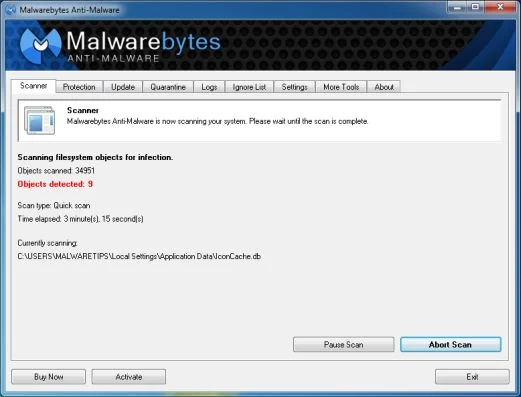
- When the Malwarebytes scan will be completed,click on Show Result.
![[Image: Malwarebytes Anti-Malware scan results]](https://malwaretips.com/blogs/wp-content/uploads/mwt-media/84/84c62dd46289424dbc686abc53672cb0810111920c8c0bbd69e973844d0a9ab0/a4c04aa700e641f47afec9965f79ff346740668e5952955ccbe5b4c3658b5897-521.webp "Malwarebytes when the system scan has completed")
- You will now be presented with a screen showing you the malware infections that Malwarebytes’ Anti-Malware has detected.Please note that the infections found may be different than what is shown in the image.Make sure that everything is Checked (ticked) and click on the Remove Selected button.
![[Image:Malwarebytes removing malware]](https://malwaretips.com/blogs/wp-content/uploads/mwt-media/d8/d86b6a8bac0e4ece9fd2d259a83db71487943f6b04b567edb0e9adcc3200f492/4eb94651b0e34cc99689c56dc71cd0a49444498ed05c5803ea55fda1cfee1b1f-521.webp "Click on Remove Selected to get rid of malware")
STEP 3: Double check for the Muvic Toolbar infection with HitmanPro
HitmanPro is a second opinion scanner, designed to rescue your computer from malware (viruses, trojans, rootkits, etc.) that have infected your computer despite all the security measures you have taken (such as anti virus software, firewalls, etc.).
- You can download HitmanPro from the below link, then double click on it to start this program.
Download HitmanProOfficial Sophos download. Free scan, free 30-day trial to remove threats. - HitmanPro will start and you’ll need to follow the prompts (by clicking on the Next button) to start a system scan with this program.
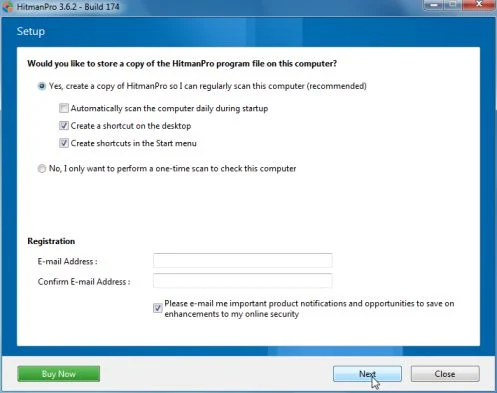
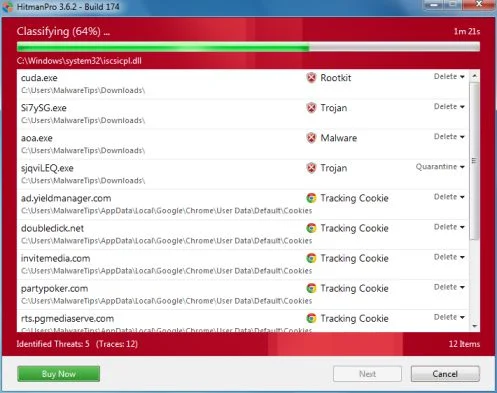
- HitmanPro will start scanning your computer for malware, as seen in the image below.
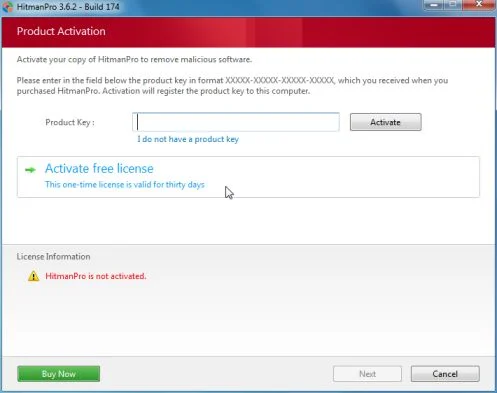
- Once the scan is complete,you’ll see a screen which will display all the infected files that this utility has detected, and you’ll need to click on Next to remove these malicious files.
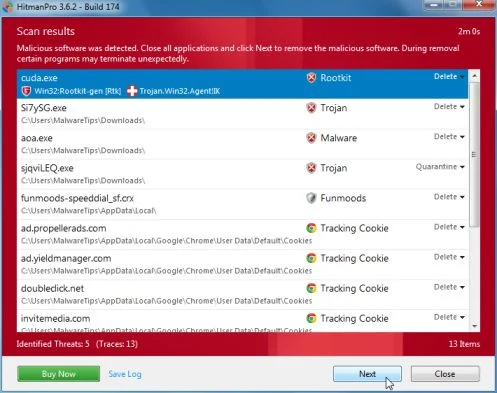
- Click Activate free licenseto start the free 30 days trial and remove all the malicious files from your computer.
Your computer should now be free of the Muvic Toolbar infection. If your current anti-virus solution let this infection through, you may want to consider purchasing the PRO version of Malwarebytes Anti-Malware to protect against these types of threats in the future.
If you are still experiencing problems while trying to remove Muvic Toolbar hijacker from your machine, please start a new thread in our Malware Removal Assistance forum.

Join the discussion
6 commentsShare your experience or ask a question about this article.
Your progress
Did these steps help?
Let us know how the guide worked for you.
Describe what you see and the step you reached. Keep passwords and other private information out.
Discussion
Thank you very much STELIAN ! Worked a treat.
WOW!!! Stelian, fantastic help and removed Muvic after I had spent hours trying to get rid of it. Made a donation for all the hard work and time you saved me. Thank you very much!!!
Thank you for this article Stelian. This process removed an incredible amount of crap that my anti-virus software clearly didn’t pick up on. I had removed the Muvic toolbar myself before coming to this article, but there were other things messing with my computer taking up 100% CPU almost all the time. If anyone else is wondering about this, these programs are fantastic. They search every file including registry files and actually DELETE bad files instead of just quarantine them like most anti-virus software.
And Brohdaw, I deleted the Muvic toolbar from my computer completely by going to start/run: regedit; opening up the registry and searching out every file with “muvic” in it and deleting it. Next time I looked at add or remove programs it was no longer available. If nothing else worked for you, perhaps that will.
This removes it but it does not uninstall it. Now that I did this (With Malewarebytes) I cannot uninstall it and it’s taken over my IE, also my searching. I also noticed that a few of my programs are showing as installed the same date as this was put on my computer – which is not the case; for example Yahoo Messenger is showing as installed 4/27/14 when in fact it has been on my computer “forever.” I need help getting rid of this.
In reply to Brohdaw
Hello Brohdaw,
You can try to remove this program with Revo Uninstaller:
Download : http://www.revouninstaller.com/revo_uninstaller_free_download.html
How to use Revo Uninstaller : http://www.revouninstaller.com/revo_uninstaller_how_to.html
Stay safe!
In reply to Stelian Pilici
Thank you for replying however, this did not work – it’s telling me resources for the uninstall are not available, which I was afraid of – I think malewarebytes got rid of the uninstall files and the only way I might get rid of this is to reinstall it but I’m not sure if I really want to do that. I did a restore twice but it took away other things I needed…I might do another restore and see if I can find one that has everything I need or at least things I can re-download at another time
****spoke too soon – I tried “advanced” search in Revo and it seems to have helped, I wont know for sure until I restart everything.