


eGdpSvc.exe is a potentially unwanted program that is designed to protect its bundled programs and make sure they remain installed or unchanged by other third party programs.
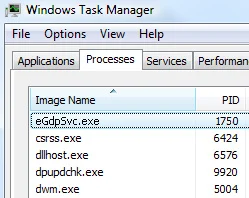
eGdpSvc.exe is a part of eSafe Security Control and Wsys Control programs. The file has a valid certificate issued to Banyan Tree Technology Limited by GlobalSign.
eGdpSvc.exe runs as Windows service with extensive privileges which means that it may connect to remote servers and download additional files onto your computer in the background without your permission and knowledge.
egdpsvc.exe has 3 known versions, the most recent one is 1.0.0.2522. It is started as a Windows Service called ‘eSafeSvc’ with the name ‘eSafeSvc’ and described as “System eSafe update service”. . In addition, it is run under the context of the SYSTEM account with extensive privileges (the administrator accounts have the same privileges). The average file size is about 550.56 KB. It is an authenticode code-signed executable issued to Banyan Tree Technology Limited by the certification authority GlobalSign nv-sa. During the process’s lifecycle, the typical CPU resource utilization is about 0.0020% including both foreground and background operations, the average private memory consumption is about 4.6 MB with the maximum memory reaching around 7.36 MB.
The eGdpSvc.exe process is typically added when you install another free software (video recording/streaming, download-managers or PDF creators) that had bundled into their installation this program. Very often users have no idea where did it come from, so it’s not surprising at all that most of them assume that eGdpSvc.exe is a virus.
This program is also bundled within the custom installer on many reputable download sites, so if you have downloaded a software from these websites, chances are that eGdpSvc.exe was installed during the software setup process.
eGdpSvc.exe it’s technically not a virus, but it does exhibit plenty of malicious traits, such as rootkit capabilities to hook deep into the operating system, browser hijacking, and in general just interfering with the user experience. The industry generally refers to it as a “PUP,” or potentially unwanted program.
Once installed, eGdpSvc.exe program will display advertising banners on the webpages that you are visiting, and as you browse Internet, it will show coupons and other deals available on different websites. Furthermore, this malicious program will also hijack your browswer homepage and default search engine to other third party web pages.
eGdpSvc.exe is bundled within the installer of many toolbars, adware and other potentially unwanted programs, with the sole purpose of making the removal process of this programs more difficult.
Some examples of infections that will install the eGdpSvc.exe program are: Aartemis Toolbar, Do-Search Toolbar, NationZoom Toolbar, DealPly, LyricsFan, BetterSurf, Yontoo, SelectionLinks and many more programs.
You should always pay attention when installing software because often, a software installer includes optional installs, such as this eGdpSvc.exe hijacker. Be very careful what you agree to install.
Always opt for the custom installation and deselect anything that is not familiar, especially optional software that you never wanted to download and install in the first place. It goes without saying that you should not install software that you don’t trust.
How to remove eGdpSvc.exe (Virus Removal Guide)
This page is a comprehensive guide, which will remove eGdpSvc.exe pop-ups from your computer, and any other adware program that may have been installed during the setup process.
Please perform all the steps in the correct order. If you have any questions or doubt at any point, STOP and ask for our assistance.
STEP 1: Uninstall eGdpSvc.exe programs from your computer
STEP 2: Remove eGdpSvc.exe adware with AdwCleaner
STEP 3: Remove eGdpSvc.exe virus with Malwarebytes Anti-Malware Free
STEP 4: Double-check for the eGdpSvc.exe infection with HitmanPro
STEP 1 : Uninstall eGdpSvc.exe program from your computer
egdpsvc.exe runs as a service under the name eSafeSvc (eSafeSvc) within the local user context. It is installed with a couple of know programs including eSafe Security Control 1.0.0.2522 published by eSafe Security Co., Ltd. and Wsys Control 1.0.0.2557 published by Wsys Co., Ltd.. The file is digitally signed by Banyan Tree Technology Limited which was issued by the GlobalSign nv-sa certificate authority (CA).
In this first step, we will try to identify and remove any malicious program that might be installed on your computer.
- To uninstall the eGdpSvc.exe program from your computer, click the Start button, then select Control Panel, and click on Uninstall a program.
If you are using Windows 8, simply drag your mouse pointer to the right edge of the screen, select Search from the list and search for “control panel“. Or you can right-click on a bottom left hot corner (formerly known as the Start button) and select Control Panel from there, then select Uninstall a program.
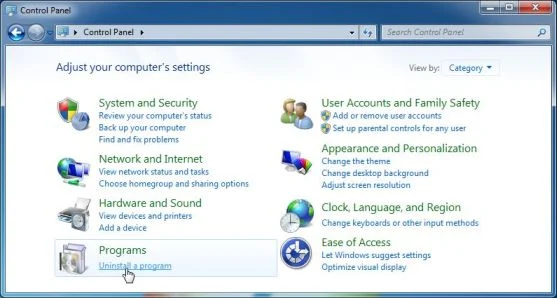
- When the Add/Remove Programs or the Uninstall a Program screen is displayed, scroll through the list of currently installed programs and uninstall Wsys Control, Extended Protection, eSave Security Control, Desk 365 and any other recently installed or unknown programs from your computer.
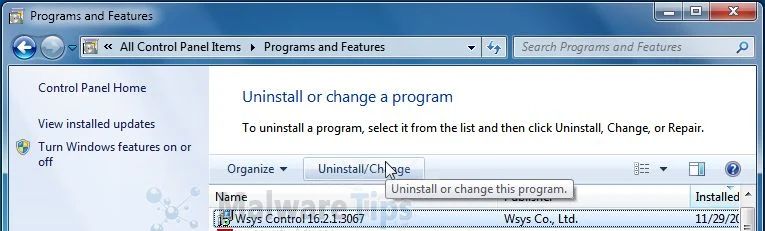
If you are having issues while trying to uninstall the eGdpSvc.exe malicious programs, you can use Revo Uninstaller to completly remove the unwated programs from your machine.
Depending on what program has installed the eGdpSvc.exe infection, the above program may have a different name or not be installed on your computer. If you cannot find any unwanted or unknown programs on your machine, then you can proceed with the next step.
STEP 2: Remove eGdpSvc.exe adware from your computer with AdwCleaner
The AdwCleaner utility will scan your computer for eGdpSvc.exe adware, that may have been installed on your computer without your knowledge.
- You can download AdwCleaner utility from the below link.
Download AdwCleanerFree official download. Nothing to install. - Before starting AdwCleaner, close all open programs and internet browsers, then double-click on the AdwCleaner icon.
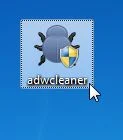
If Windows prompts you as to whether or not you wish to run AdwCleaner, please allow it to run. - When the AdwCleaner program will open, click on the Scan button as shown below.
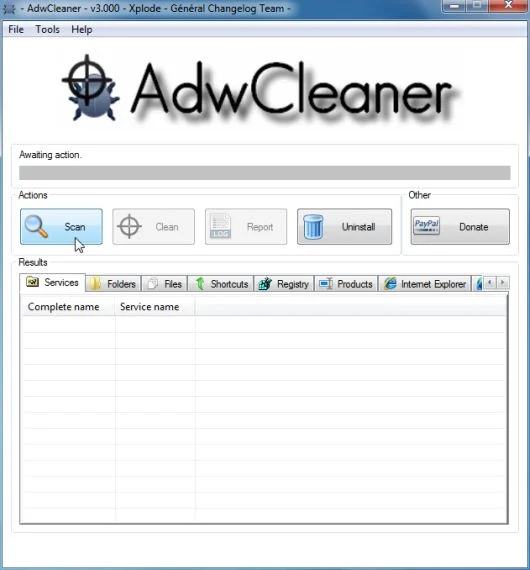
AdwCleaner will now start to search for eGdpSvc.exe malicious files that may be installed on your computer. - To remove the eGdpSvc.exe malicious files that were detected in the previous step, please click on the Clean button.
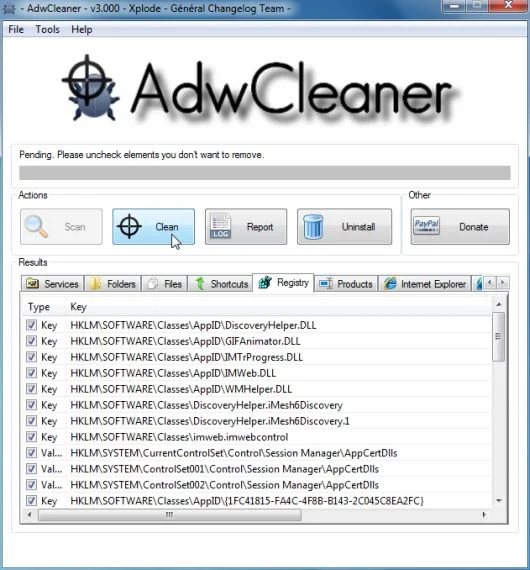
AdwCleaner will now prompt you to save any open files or data as the program will need to reboot the computer. Please do so and then click on the OK button.
STEP 3: Remove eGdpSvc.exe virus with Malwarebytes Anti-Malware Free
Malwarebytes Anti-Malware Free utilizes Malwarebytes powerful technology to detect and remove all traces of malware including worms, trojans, rootkits, rogues, dialers, spyware and more.
- You can download Malwarebytes Anti-Malware Free from the below link, then double-click on the icon named mbam-setup.exe to install this program.
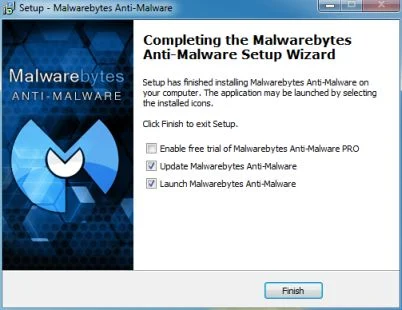
Download MalwarebytesFree official installer. Your download starts right away. - When the installation begins, keep following the prompts in order to continue with the setup process, then at the last screen click on the Finish button.
- On the Scanner tab, select Perform quick scan, and then click on the Scan button to start searching for the eGdpSvc.exe malicious files.
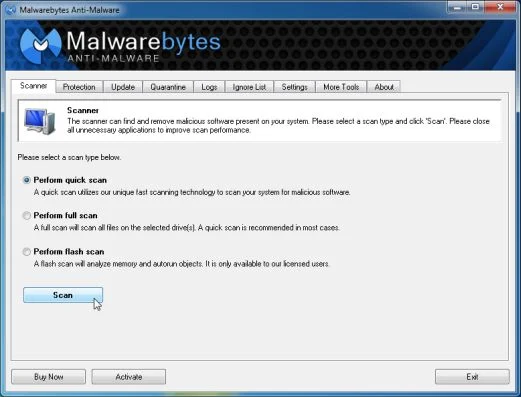
- Malwarebytes’ Anti-Malware will now start scanning your computer for eGdpSvc.exe as shown below.
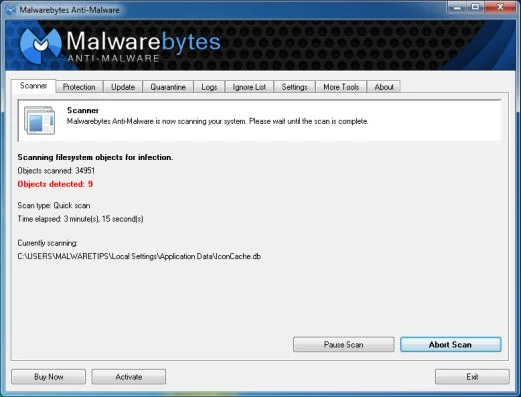
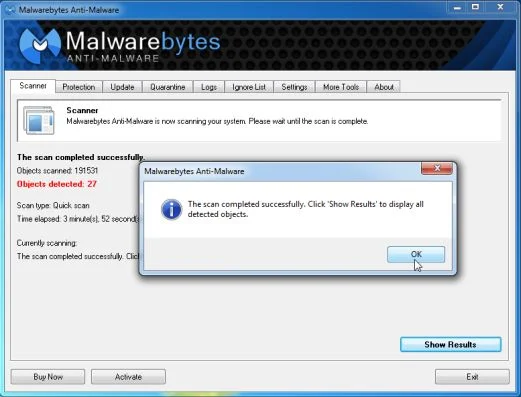
- When the Malwarebytes Anti-Malware scan has finished, click on the Show Results button.
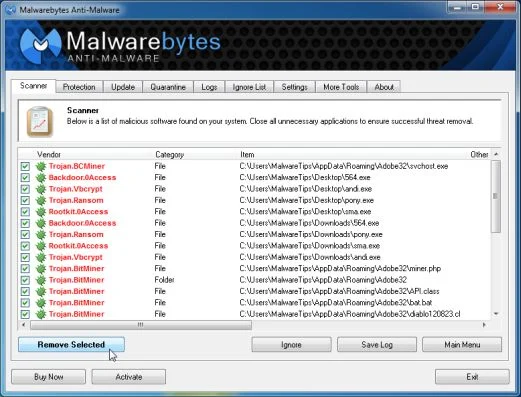
- You will now be presented with a screen showing you the computer infections that Malwarebytes Anti-Malware has detected. Make sure that everything is Checked (ticked), then click on the Remove Selected button.
STEP 4: Double-check for the eGdpSvc.exe infection with HitmanPro
- You can download HitmanPro from the below link:
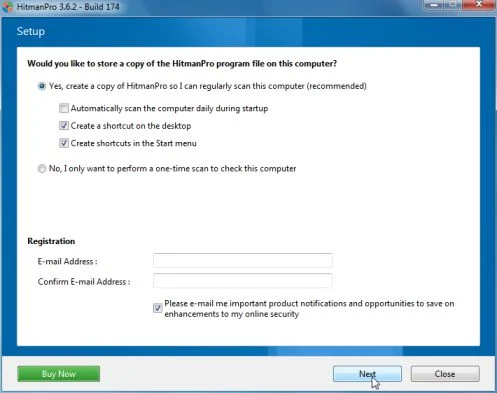
Download HitmanProOfficial Sophos download. Free scan, free 30-day trial to remove threats. - Double-click on the file named HitmanPro.exe (for 32-bit versions of Windows) or HitmanPro_x64.exe (for 64-bit versions of Windows). When the program starts you will be presented with the start screen as shown below.
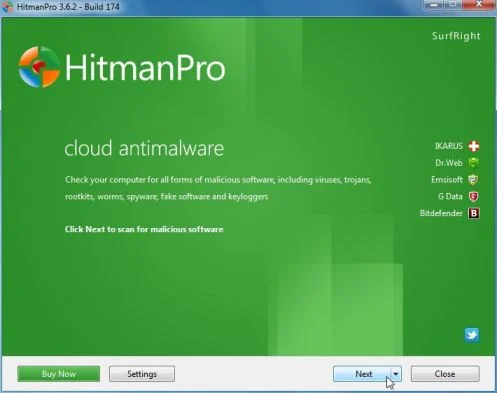
Click on the Next button, to install HitmanPro on your computer.
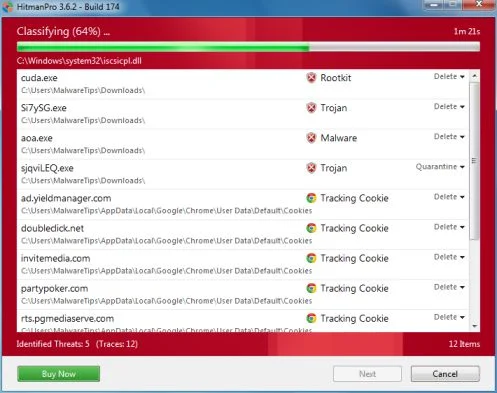
- HitmanPro will now begin to scan your computer for eGdpSvc.exe malicious files.
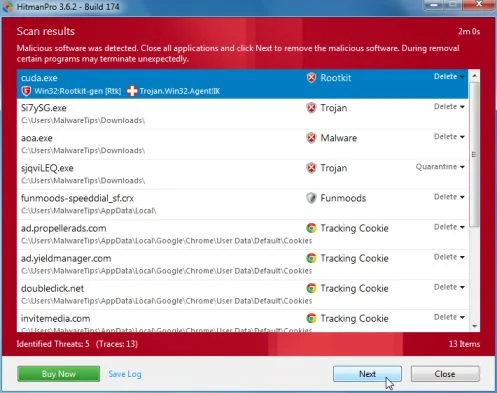
- When it has finished it will display a list of all the malware that the program found as shown in the image below. Click on the Next button, to remove eGdpSvc.exe adware.
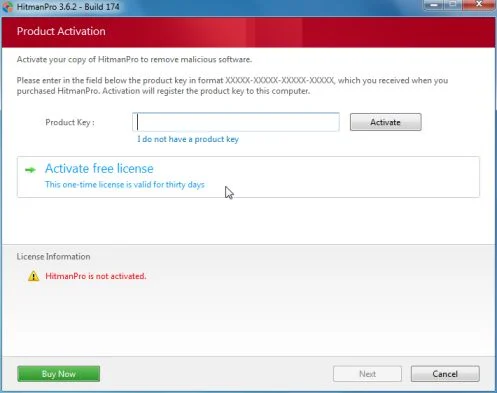
- Click on the Activate free license button to begin the free 30 days trial, and remove all the malicious files from your computer.
Your computer should now be free of the eGdpSvc.exe infection. If your current anti-virus solution let this infection through, you may want to consider purchasing the PRO version of Malwarebytes Anti-Malware to protect against these types of threats in the future, and perform regular computer scans with HitmanPro.
If you are still experiencing problems while trying to remove eGdpSvc.exe virus from your machine, please start a new thread in our Malware Removal Assistance

Join the discussion
0 commentsShare your experience or ask a question about this article.
Your progress
Did these steps help?
Let us know how the guide worked for you.
Describe what you see and the step you reached. Keep passwords and other private information out.
Discussion
Start the conversation
Have a question or something useful to share? Add the first comment.