

Elaborate fraudulent websites impersonating Tesco are proliferating online and deceiving customers with fake “store closing” and “liquidation” sales promising unbelievable discounts up to 90% off. However, research indicates these sites are part of an interconnected scam network based overseas. Victims receive either nothing after payment or low-quality counterfeits. This comprehensive guide will examine how this pervasive scam works, techniques for identifying fake sites, steps to take if you are victimized, and tips for safely shopping on the real Tesco site.
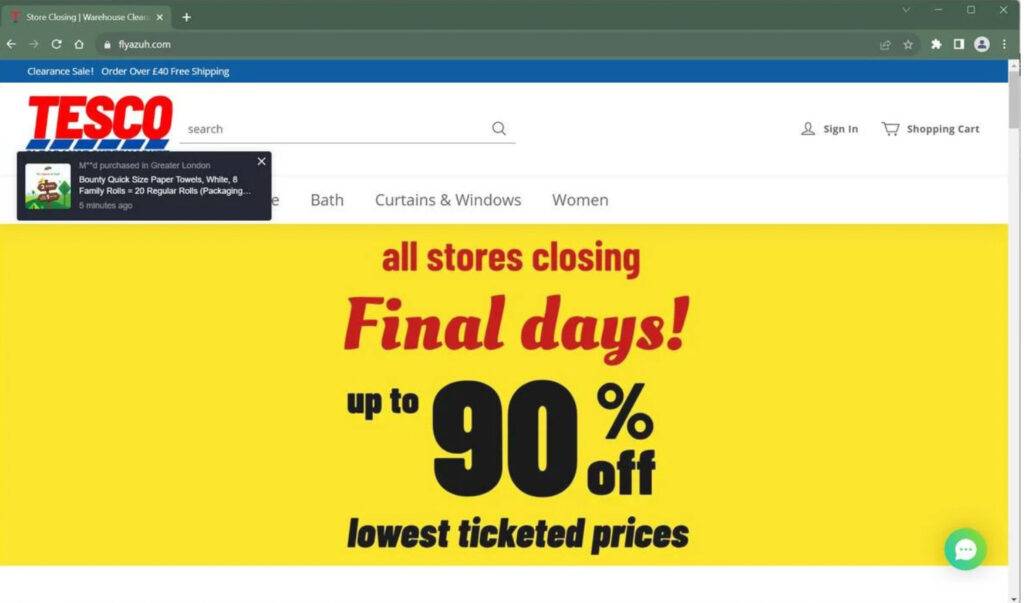
Overview of the Fake Tesco Closing Sale Websites Scam
Online shopping scams involving highly sophisticated fake websites impersonating Tesco are rapidly proliferating. These fraudulent sites are deceiving customers by claiming Tesco is having massive “closing down” or “liquidation” sales with unbelievable discounts up to 90% off on groceries, home goods, and other products found on the real Tesco site.
In-depth analysis indicates these elaborate fake websites are part of an extensive interconnected scam network based overseas. The operators are completely anonymous, lacking transparency about who owns or manages these unauthorized counterfeit sites.
They display the actual Tesco logo and branding, imitating the website design and featuring images of top-selling products identical to those on the legitimate Tesco site. However, the real Tesco brand has not authorized the scam sites to utilize the branding in this misleading manner.
These fraudulent sites bait customers with unrealistic rock-bottom pricing on coveted products that could never be profitable for a real retailer. All product images, descriptions, and content are stolen from the authentic Tesco site, demonstrating the lack of originality.
Once payments are submitted, customers either receive nothing after endless delays or inferior knockoff items made with substandard materials if any shipment even arrives. The sophisticated scam network relies on social media ads to funnel traffic to their fake websites mimicking Tesco and promoting fake closing sales.
This intricate scam aims to steal money through fraudulent orders, compromise users’ personal and payment data for potential identity theft, and avoid accountability through anonymity. Many scammed shoppers end up losing funds through failed chargebacks and some even have their information misused later on.
How the Fake Tesco Closing Sale Scam Unfolds
Here is how the scam typically plays out for victims:
Step 1: See Social Media Ads for Tesco’s “Closing Down Sale”
The scam starts with enticing ads on Facebook, Instagram, or TikTok with messages like “Tesco Closing Down Sale! Up to 90% off everything!” Links go to counterfeit sites.
Step 2: Visit Deceptive High-Quality Website
The website claims Tesco is “closing down” and mimics Tesco’s branding and site design. Prices are suspiciously low to further the deception. All content is stolen from legitimate sources.
Step 3: Submit Order and Personal Information
During checkout, users enter shipping address, email, payment info, and other personal data which exposes them to potential identity theft down the line.
Step 4: No Products Ever Arrive After Payment
Weeks pass with endless delays and zero shipment arrival. Emails and calls go unreturned as the criminals have already captured the payments.
Step 5: Chargebacks Fail Through Banks
Banks often cannot identify the phantom merchant, so fraudulent chargeback attempts fail. Users lose money and some have personal information stolen.
Red Flags to Identify Fake Sites
While the sites appear convincing, several key signs can help identify fake Tesco sellers:
- Unbelievable “closing down” deals like 90% off everything
- Stock photos instead of unique product images
- Bad grammar/spelling throughout the site
- No physical address listed for the “company”
- No working customer service phone number or email
- No reviews or suspiciously fake-looking reviews
- High-pressure sales tactics urging immediate purchase
- Temporary-looking URL instead of permanent domain
Steps if Scammed by a Fake Tesco Website
If you ordered from an unauthorized fake Tesco retailer and either got nothing or knockoffs, take these steps immediately:
If you made a purchase or entered personal information this website, acting quickly can help you minimize financial loss, secure your accounts, and prevent further misuse of your data. Follow these steps carefully:
- Contact your bank or payment provider immediately
If you paid with a credit or debit card, call your bank’s customer service line and explain that you placed an order on a website that may be fraudulent. Request to dispute the transaction or initiate a chargeback.
If you used PayPal or another payment processor, file a dispute through their resolution center and provide order confirmations, emails, or screenshots as supporting evidence.
Fast action gives you the best chance of recovering your money and preventing additional unauthorized charges. - Freeze or replace your payment method
If your card or account details were entered on this website, it’s safest to have your bank or provider issue a replacement card. This prevents future unauthorized transactions and protects your financial accounts.
Some banks may also offer temporary holds or fraud alerts, ensuring no additional transactions can be made without your consent. - Run a personal data removal scan
Fraudulent websites often collect personal information such as names, phone numbers, addresses, and emails. This data may be shared with third parties or added to marketing and phishing lists.
A trusted service such as Malwarebytes Personal Data Remover can identify where your information is listed across data broker networks and help you request its removal. - Check your digital footprint
Even if you didn’t lose money, your personal data could already be circulating online. Running a digital footprint scan can help reveal whether your email address, phone number, or other personal information is present in leaks or broker databases.
This allows you to take proactive measures such as changing credentials, monitoring accounts, or setting up alerts before your data is misused. - Change your passwords and enable 2FA
If the same email or password used during checkout is also used on other websites or services, update those credentials immediately.
Choose strong, unique passwords and enable two-factor authentication (2FA) on all important accounts, especially your primary email, banking apps, and social media. This extra security layer makes unauthorized access significantly harder. - Scan your device for potential threats
Many fraudulent sites contain hidden tracking scripts, phishing pop-ups, or files designed to compromise your security.
Run a full system scan using a trusted security solution such as Malwarebytes Free or ESET Online Scanner to make sure your device hasn’t been exposed to malware or spyware during the visit.
If any suspicious files are found, remove them and restart your device. - Check your accounts and statements regularly
Monitor your bank and credit card statements closely for any unauthorized activity. Look for unfamiliar charges, subscription renewals, or repeated small test transactions.
Also review your email inbox and online accounts for password reset notices or sign-in alerts you didn’t initiate. Report anything unusual to your bank or account provider immediately. - Report the incident to the appropriate authorities
Reporting helps law enforcement track fraudulent websites and can support your claim if needed.- In the U.S., file a report with FTC ReportFraud.ftc.gov.
- In the EU, contact Europol or your national cybercrime unit.
- Globally, you can also submit the site to ScamAdviser to help warn other consumers.
Providing the website URL, order details, and communications increases the impact of your report.
- Save all evidence and communication
Keep copies of order confirmations, emails, payment records, chat logs, and screenshots of the website. This documentation can be crucial for supporting your chargeback request, reporting the case, or pursuing legal remedies if needed.
Store everything in one secure folder so you can easily provide it to your bank or relevant agencies. - Be cautious of follow-up contact
After incidents like this, affected individuals may receive fake refund messages, phishing emails, or phone calls pretending to offer “assistance.”
Do not click on unsolicited links, download attachments, or provide additional personal information. If you receive any message related to this website, verify its authenticity directly through your bank or official payment provider channels.
Safely Shopping at the Real Tesco Online
Protect yourself from scams and ensure your Tesco purchases are legitimate by following these tips:
- Only shop at Tesco.com – Never trust any other site claiming to be Tesco, especially with closing sales
- Avoid social media ads – Navigate directly to Tesco.com; don’t click ad links
- Purchase with a credit card – Provides fraud protection and ability to dispute charges
- Verify site security – Look for “https” URL and lock icon in browser
- Trust your instincts – If you suspect a scam, do not purchase
Fake Tesco Closing Sale Scam FAQs
How can scam sites offer such deep discounts?
Fake sites offer unrealistic “closing” prices to lure customers. Scammers don’t actually send any products, just steal money. Tesco could never offer 90% off all products.
What arrives after ordering from a fake website?
Most often, victims receive nothing at all after payment. In some cases, victims receive used or defective products, completely wrong random items, or poor quality knockoffs.
Can I get a refund if I was scammed?
Contact your credit card company immediately to report fraudulent charges and request a chargeback. Provide details and documentation. If you wired funds, recovery is very difficult.
How do I report a fake website?
Submit complaints to the FTC, FBI IC3, BBB, Tesco, Ripoff Report, and your state attorney general. Provide the site name, URL, screenshot evidence, and your experience.
How can I verify a site is really Tesco?
Fake sites have grammar errors, no HTTPS URL, unbelievable deals, stock photos, and other red flags. The real Tesco site does not claim to be closing down or liquidating.
Is it safe to buy from Tesco closing sales on Instagram?
No, Instagram carries risks for scams. Only purchase directly at Tesco.com. Tesco is not closing down. Never trust deals promoting store closures.
What should I do if the scammers stole my data?
Monitor bank activity and check credit reports if you fear your information was compromised. Consider freezing accounts and enable credit monitoring. Report identity theft to the FTC.
Can the scammers be punished or stopped?
It’s very difficult. The sites conceal details and payments are laundered cryptically. Reporting fake sites helps get them taken down to prevent future victims. Avoid “recovery services”.
The Bottom Line
When seeing unbelievable deals promoting a fake Tesco closing down or liquidation sale online, consumers must verify it is the real Tesco site and avoid being tricked by scams. Tesco is not going out of business. Only purchase directly from Tesco.com, not through social media ads. If you land on a suspicious site, look for red flags, verify details, and trust your instincts – if it seems fake, do not buy. Reporting fraudulent websites can get them removed and prevent future victims. With knowledge of their tactics and scam avoidance savvy, shoppers can safely access authentic Tesco bargains.








