

Want to get paid and score free H&M vouchers for reviewing clothes? Social media ads promising this tantalizing opportunity have gone viral, but the reality is much darker.
A highly deceptive scam is utilizing the popular fashion brand’s name to bait unsuspecting shoppers. This con ensnares victims through bogus “clothing reviewer” offers designed to harvest data and expose people to unwanted charges.
With convincing fake ads and lookalike websites, scammers are aggressively impersonating H&M to peddle their phony rewards program. Once they reel users in with the chance at gift cards, the crooks get access to email addresses and personal information.
From there, things only get shadier as victims encounter pushy third-party “offers” aimed at driving up profits for the fraudsters. H&M has confirmed that these too-good-to-be-true ads are completely unauthorized and fake.
So what’s really behind this trending social scam? Let’s unravel the clever scheme and equip ourselves to stay two steps ahead of these hustlers. Knowledge is power against manipulation, so keep reading to uncover the truth…
An Overview of the Scam
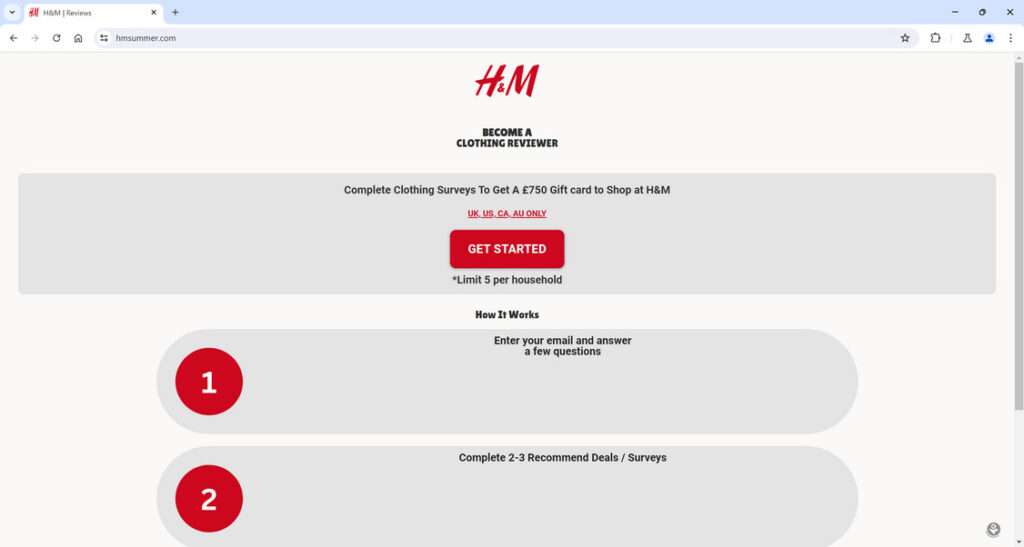
This scam is being spread far and wide through social media ads and messages directing victims to fake H&M websites. The fraudulent sites pretend to offer opportunities to become an H&M “clothing reviewer” and receive gift cards worth hundreds of pounds for shopping. However, it is all an elaborate ruse to steal personal information and money.
The offers typically claim that H&M needs regular people to review their clothes and provide feedback. In exchange, they promise rewards like £750 gift cards that can be used for future H&M purchases.
The ads are formatted to look official with H&M branding and stock images. They use enticing headlines like “Get Paid to Shop at H&M!” or “Become an H&M VIP Reviewer”. Some also include fake reviews with people raving about how easy it was to get free vouchers.
To lend credibility, some versions falsely claim the opportunity is only available to residents of certain countries like the UK, USA, Canada or Australia. Others say there is limited availability with only a certain number of reviewer spots open. These tactics convince victims they are accessing an exclusive deal.
Once individuals click on the link, they are taken to a fake H&M website. The scam sites closely mimic the look of hm.com using copied elements like fonts, colors, navigation menus, logos, and stock photos. But the URL will be slightly different, often containing “hmreview” or “clothingreviewer”.
On the fraudulent site, users are prompted to enter their email address to register as a reviewer. They are led to believe this will initiate the process of H&M sending free clothes and gift cards. But in reality, it only gives scammers access to contact info.
Immediately after submitting an email, victims receive messages guiding them through more steps to “redeem” the promised rewards. These subsequent pages trick users into entering personal information, signing up for SMS messages, downloading suspicious apps, or completing “free trial” offers.
H&M has confirmed none of these sites or offers are associated with them in any way. They are not currently operating any program for consumers to review products in exchange for gift cards. The scam is simply deceptive marketing from unknown fraudsters misusing the brand.
Some examples of the specific scam websites and campaigns reported include:
- Hamreviews.com – Claims to offer £750 gift cards for reviewing 2-3 products. Prompts email submission to register.
- Dashingreviews.com – Promises extra rewards if you refer friends. Requires completing offers to unlock gift card.
- Official H&M Reviewer Portal – Telegram channel pretends to provide reviewer opportunities. Links lead to data harvesting surveys.
- H&M Clothing Tester Jobs – Fake Facebook ads use imagery of gift cards and claim limited reviewer spots available.
- VIP H&M Review Program – WhatsApp messages pretend to be from an H&M employee recruiting for secret shopper opportunities.
These sites or offers may change or evolve over time as scammers alter tactics. But the same steady stream of scams continues to impersonate H&M in order to access user data and expose them to various subscription scams or malware downloads.
The fake rewards they dangle like gift cards or shopper perks never materialize. Ultimately, the H&M name is simply being hijacked by dishonest marketers to mislead consumers for profit.
How the H&M Reviewer Scam Actually Works
Now that you know the basic premise, let’s break down exactly how the scammers operate the clothing reviewer con step-by-step:
Step 1: Scam Ads on Social Media
The scam begins with ads posted on social platforms like Facebook, Instagram, WhatsApp, and Telegram. The ads use eye-catching images of H&M clothing and gift cards. Headlines promise users they can earn up to £750 for reviewing clothes.
To lend credibility, the ads use H&M branding and legal disclaimers like “Limit 5 per household”, making it seem official. Some versions pretend to be posted by influencers sharing a “secret way” to get free H&M vouchers.
Step 2: Fake H&M Reviewer Website
Once users click the link in the ads, they are taken to a website dressed up to look like the real H&M site. However, upon inspection, the URL clearly does not belong to H&M.
The scam site uses a URL slightly altered from hm.com, often containing the words “reviewer”, “rewards”, “vip”, or “gifts”. For example:
- hmvipreviewers.com
- hm-reviewrewards.com
- clothingreviewerhm.com
These sites mimic the visual design of the real H&M site using copied images and logos. This tricks users into thinking they are in the right place to sign up as a reviewer.
Step 3: Submit Email to Get Started
The fake site prompts visitors to enter their email address to register as a clothing reviewer. Users are led to believe this will start the process of shipping them free products to review.
In reality, submitting an email simply gives the scammers an active address to target. Almost immediately after registering, users receive an email telling them the next steps to earn their H&M gift card.
Step 4: Complete Deals, Surveys, or Downloads
The email directs recipients to another website or landing page to “verify eligibility” for the program. These pages require completing 2-3 “deals”, surveys, or downloads to unlock the rewards.
Examples of what users might be asked to do:
- Take paid survey offers
- Sign up for subscription services
- Enter credit card info for “free trials”
- Download and install unknown apps
- Subscribe to SMS services
- Provide personal information
None of these offers are actually associated with H&M in any way. They are designed to generate illicit profits for scammers through commissions, stolen personal info, and unwanted charges.
Step 5: No Gift Card is Ever Sent
After jumping through hoops on scam offer pages, users expect H&M to make good on sending the promised £750 gift card. Unfortunately, it never arrives.
The H&M clothing reviewer scam ultimately only exists to harvest email addresses and expose victims to affiliate offers, malware, and data theft. No free products or rewards are ever dispensed.
Recognizing This Type of Scam
While the H&M scam may seem convincing at first glance, there are some clear indicators that should raise red flags:
- Requirement to complete third-party offers – Legitimate market research would never involve unrelated paid subscriptions or downloads.
- Asking for personal information – H&M would never request sensitive personal or financial details just to ship products for review.
- Poor grammar/spelling – Phishing sites often contain typos and other textual errors that the real brand would not have.
- Scam URL – Double check that any link matches the real hm.com domain.
- No verification of identity – H&M would properly vet reviewers, not blindly ship high-value packages to any email address.
Essentially, if it seems too good to be true, it always is. Real rewards programs require more than just an email address to earn hundreds in gift cards. Judge every step of the process with skepticism before providing the scammers what they want.
What to Do If You Fell For the Clothing Reviewer Scam
If you already supplied your email or completed questionable third-party offers related to the H&M scam, here are the steps you should take right away:
- Contact H&M customer service to notify them of the scam and use of their brand name. Provide details that could aid them in pursuing legal action.
- Mark emails as spam or phishing. This trains your email provider to block future scam messages.
- Run anti-virus software. Scan all devices used to visit scam sites or download files to check for malware.
- Place fraud alerts and monitor your credit. If you shared financial information, alert your bank and credit agencies to watch for suspicious activity.
- Change passwords on any sites that you accessed through the scam offers. Use strong, unique passwords for all important accounts.
- Cancel or dispute unnecessary subscriptions or charges. Act swiftly to halt recurring fees from shady “free trial” offers. Notify your payment provider of possible fraud.
- Be vigilant about sharing personal info going forward. The scammers may attempt to contact you again under different pretenses now that they have your email.
Is Your Device Infected? Run a Free Malware Scan
Slow performance, constant pop-ups, or strange behavior? These are classic signs of a malware infection. The fastest way to find out is to scan your device with Malwarebytes Free — one of the most trusted malware removal tools available.
The free version detects and removes the most common threats, including:
- Adware — the cause of those annoying pop-ups
- Browser hijackers — unwanted redirects and changed homepages
- Trojans and spyware — hidden programs stealing your data
- Potentially unwanted programs (PUPs) — software you never asked for
👉 Select your device below — Windows, Mac, or Android — then follow the simple steps to download Malwarebytes, scan your system, and remove any threats it finds. The scan usually takes 5 to 20 minutes.
Run a Malware Scan with Malwarebytes for Windows
Malwarebytes is one of the most popular and trusted anti-malware tools for Windows — and it’s completely free for removing infections. It catches threats that many antivirus programs miss, including adware, browser hijackers, and trojans. Follow the steps below to scan and clean your PC in just a few minutes.
Download Malwarebytes
Click the button below to download the latest version of Malwarebytes for Windows from the official source. The free version is all you need — it will scan your computer and remove adware, browser hijackers, and other malicious software at no cost.
Download MalwarebytesOfficial installer for Windows 11 and 10. Your download starts right away.Want real-time protection? See Malwarebytes Premium Malwarebytes Free for WindowsScans and removes malware at no cost
-
Install Malwarebytes
When the download finishes, open your Downloads folder and double-click the MBSetup file. If Windows shows a User Account Control pop-up, click “Yes” to allow the installation.
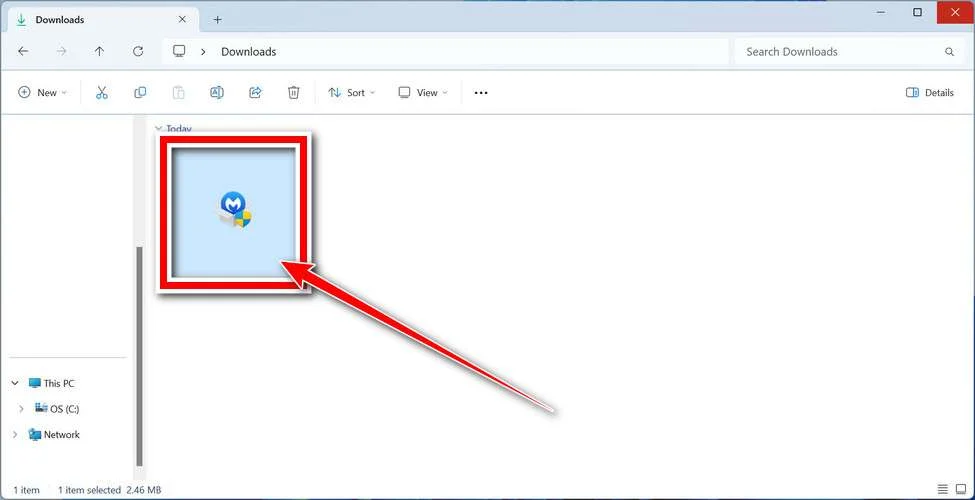
Follow the On-Screen Prompts to Install Malwarebytes
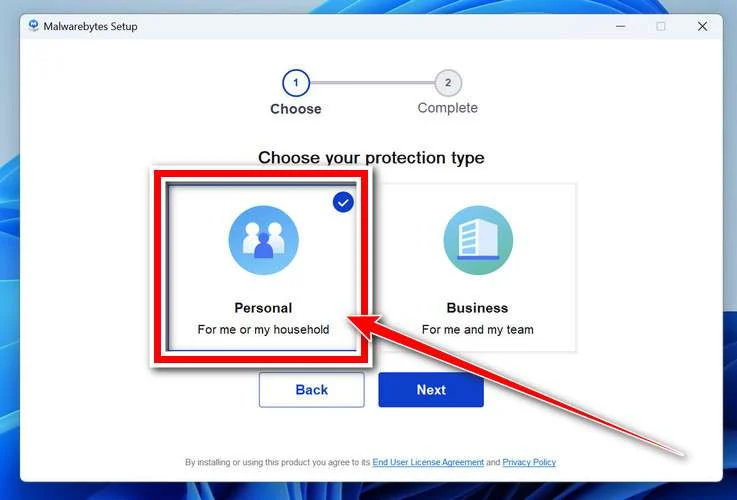
The setup wizard will walk you through a few quick screens:
-
Choose where you’re installing the program — “Personal Computer” or “Work Computer” — then click Next.
-
Malwarebytes will now install on your device. This usually takes under a minute.

-
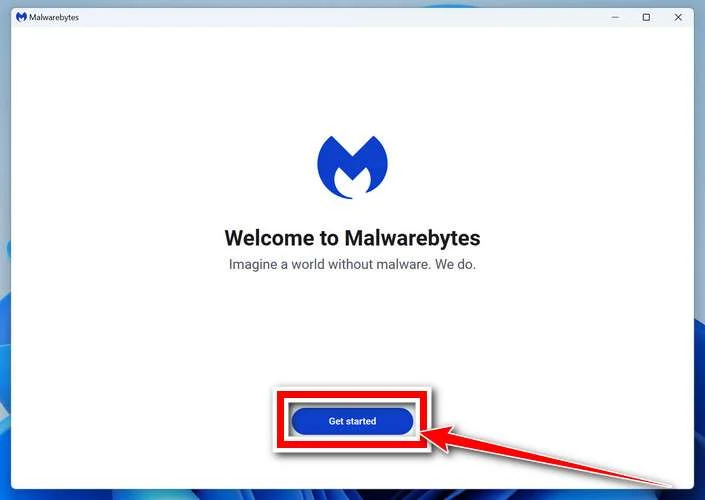
When installation is complete, the “Welcome to Malwarebytes” screen will open automatically.
-
On the final screen, click Open Malwarebytes to launch the program.

-
Enable “Scan for Rootkits”
Before scanning, turn on rootkit detection so Malwarebytes can find even the most hidden threats. Click the Settings gear icon on the left side of the screen.
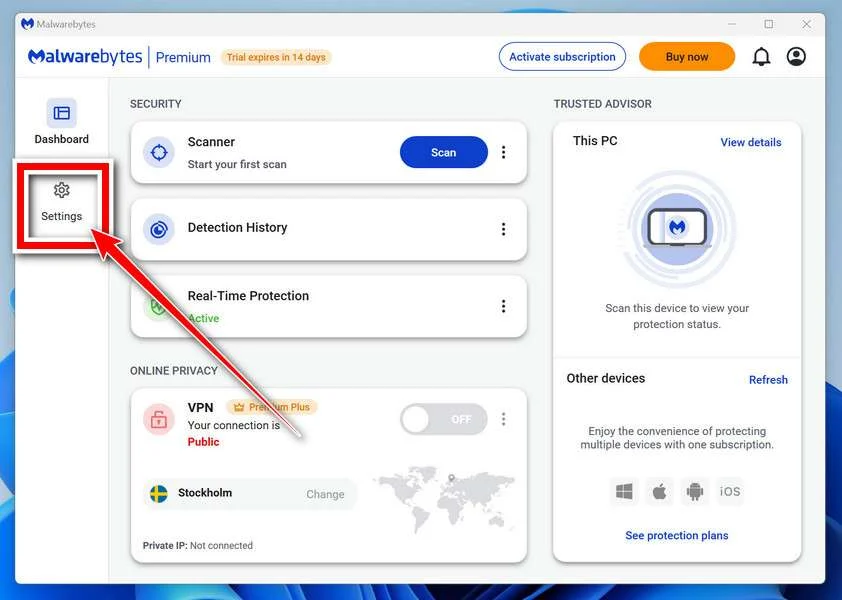
In the settings menu, find “Scan for rootkits” and click the toggle so it turns blue.

Done? Click “Dashboard” in the left pane to return to the main screen.
Start the Scan
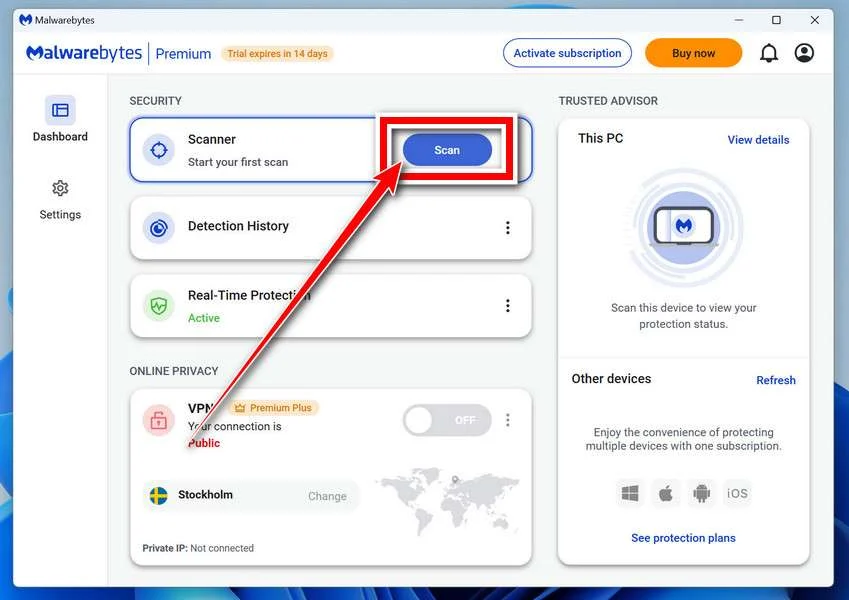
Click the blue Scan button. Malwarebytes will automatically update its virus database and start checking your computer for malware.
-
Wait for the Scan to Finish
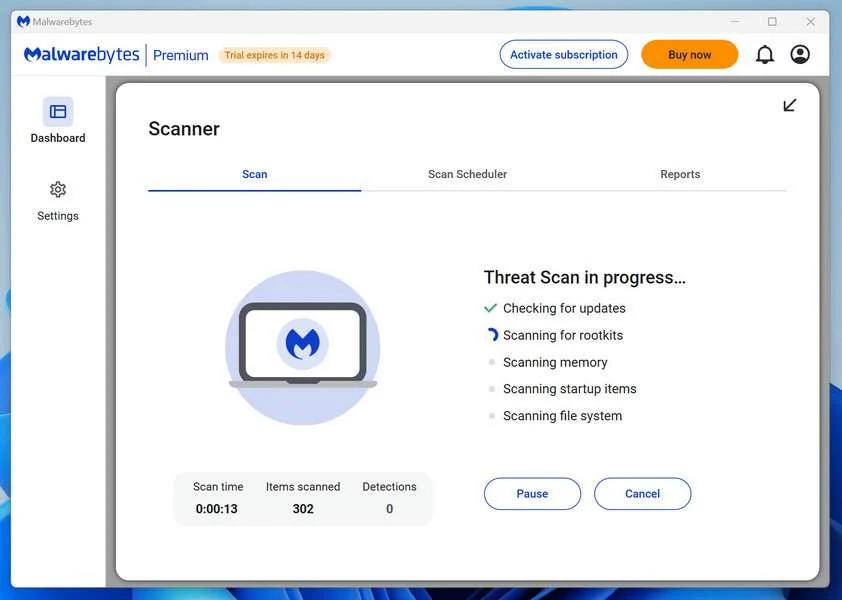
The scan checks your entire system for browser hijackers and other malicious programs, so it can take 5 to 20 minutes depending on your computer. Feel free to do something else — just check back occasionally to see the progress.
-
Quarantine the Detected Threats
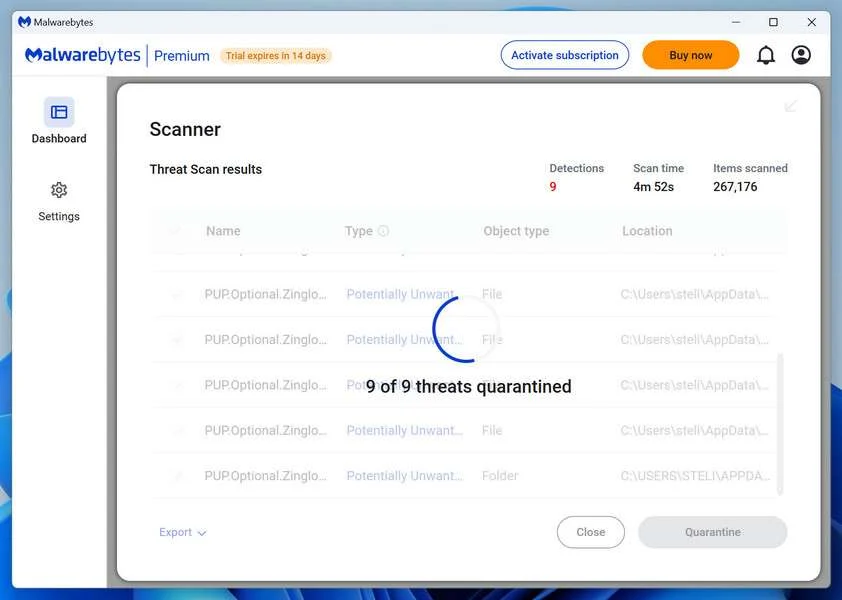
When the scan is done, you’ll see a list of everything Malwarebytes found — malware, adware, and potentially unwanted programs. Click the “Quarantine” button to remove all of them at once.
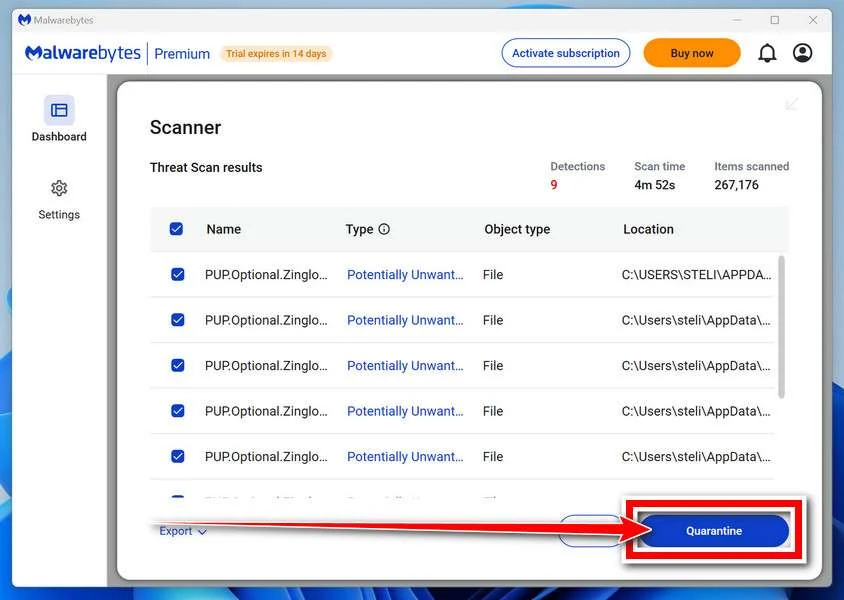
Malwarebytes will now remove the malicious files and registry entries and move them safely into quarantine.
-
Restart Your Computer
Some threats can only be fully removed after a reboot. If Malwarebytes asks you to restart, click Yes. Once you’re logged back in, Malwarebytes has finished removing the threats it found.
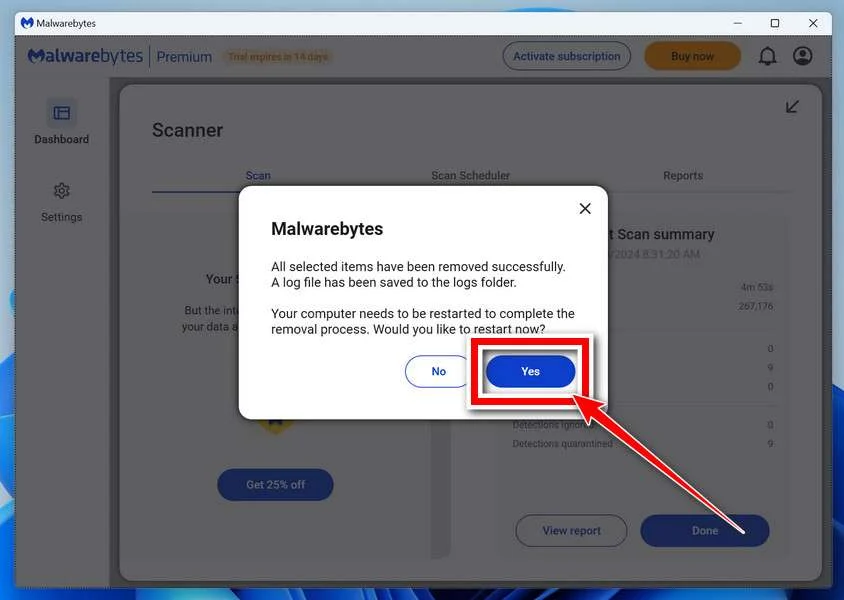
That’s it — your Windows PC is now clean of trojans, adware, and other malware, and should be back to running smoothly.
If you are still having problems with your computer after completing these instructions, then please follow one of the steps:
- Run a computer scan with ESET Online Scanner
- Ask for help in our Windows Malware Removal Help & Support forum.
Run a Malware Scan with Malwarebytes for Mac
Malwarebytes for Mac is a free on-demand scanner that removes the malware other security software tends to miss — adware, browser hijackers, and unwanted programs included. Cleaning an infected Mac with Malwarebytes has always been completely free, and it’s our go-to recommendation. Follow the steps below to scan and clean your Mac in just a few minutes.
-
Download Malwarebytes for Mac
Click the button below to download the latest version of Malwarebytes for Mac.
Download MalwarebytesOfficial installer for macOS. Your download starts right away.Want real-time protection? See Malwarebytes PremiumMalwarebytes Free for MacScans and removes malware at no cost -
Open the Malwarebytes setup file
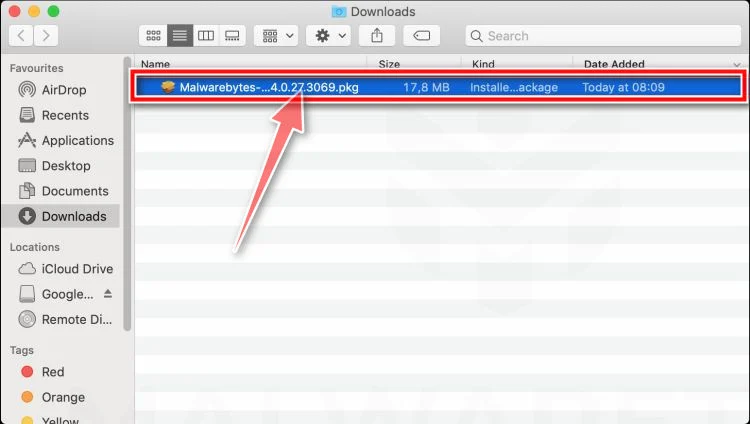
When the download finishes, open your Downloads folder and double-click the setup file to begin the installation.
-
Follow the On-Screen Prompts to Install Malwarebytes
The Malwarebytes for Mac Installer will guide you through a few quick screens. Click “Continue” and keep following the prompts until the installation completes.
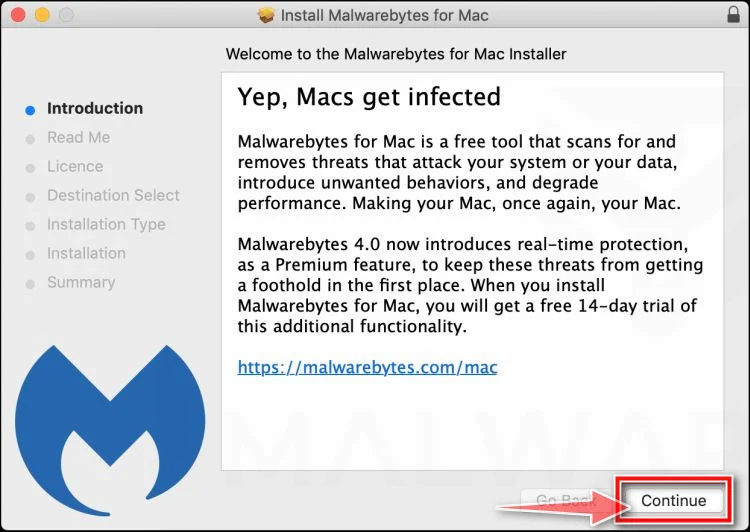
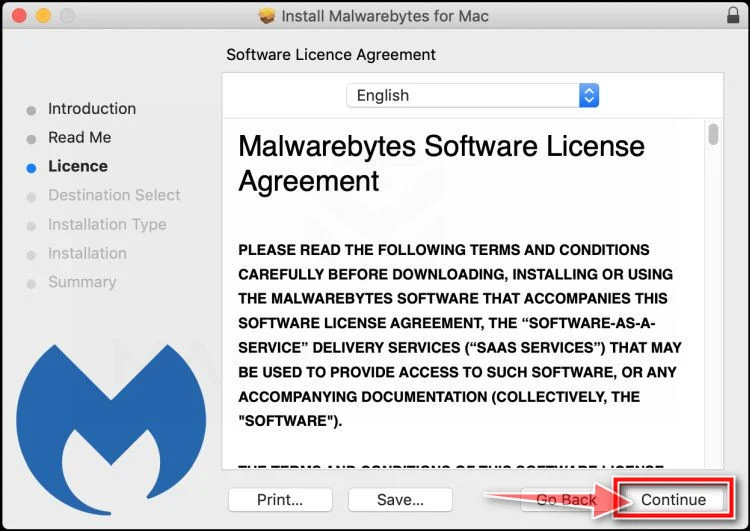
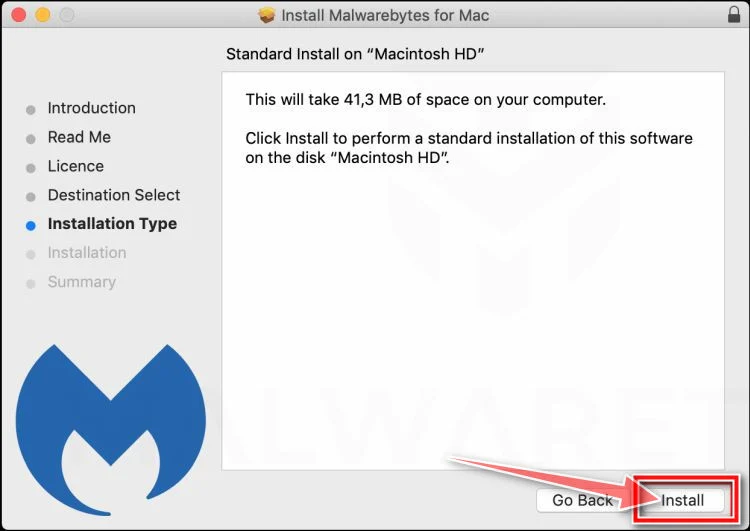
When the installation is complete, Malwarebytes opens to the Welcome to Malwarebytes screen. Click “Get started“.
-
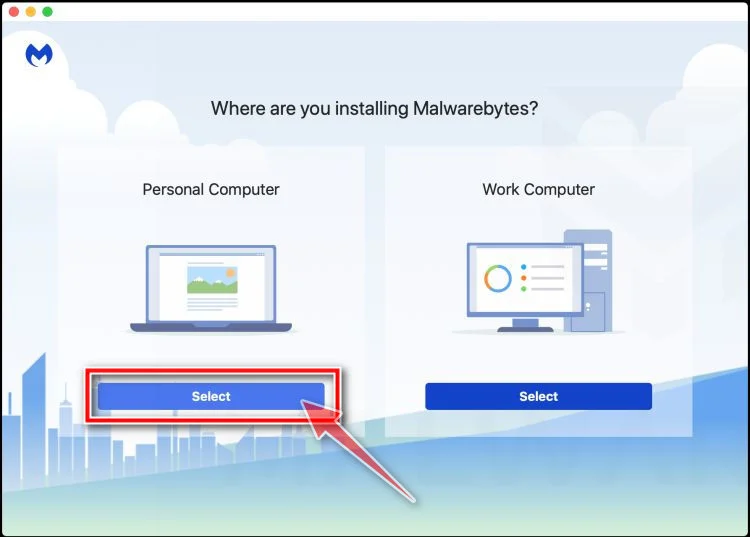
Select “Personal Computer” or “Work Computer”
Malwarebytes will ask what type of computer you’re installing it on. Click either Personal Computer or Work Computer, whichever applies.
-
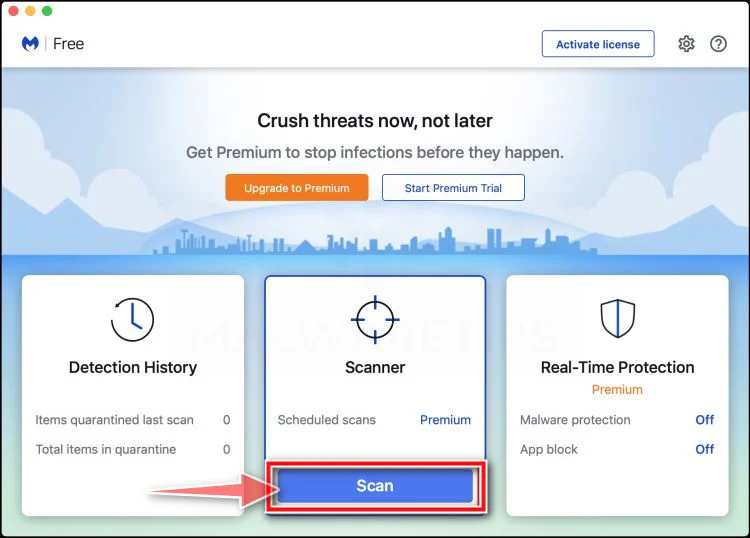
Start the Scan
Click the “Scan” button. Malwarebytes will automatically update its detection database and begin checking your Mac for malware.
-
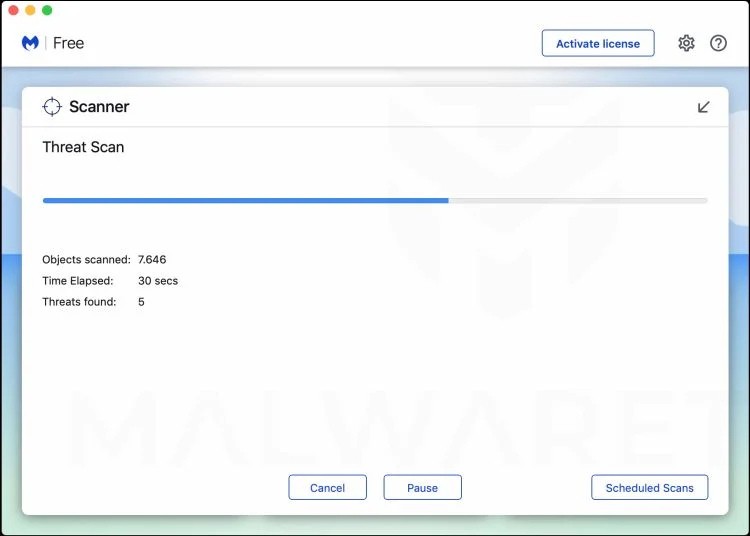
Wait for the Scan to Finish
Malwarebytes will scan your Mac for adware, browser hijackers, and other malicious programs. This can take a few minutes, so feel free to do something else — just check back occasionally to see the progress.
-
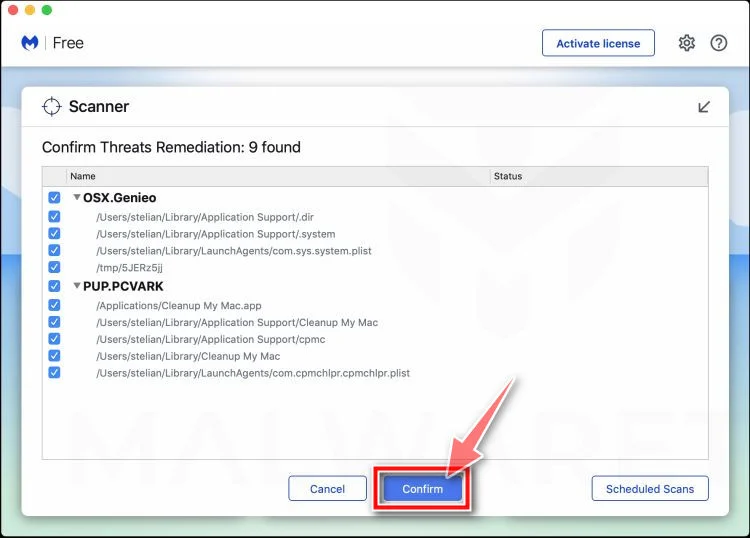
Quarantine the Detected Threats
When the scan is done, you’ll see a list of everything Malwarebytes found. Click the “Quarantine” button to remove all the threats at once.
-
Restart Your Mac
Malwarebytes will now remove all the malicious files it found. Some threats can only be fully removed after a reboot — if Malwarebytes asks you to restart, allow it. Once you’re logged back in, your Mac is clean.
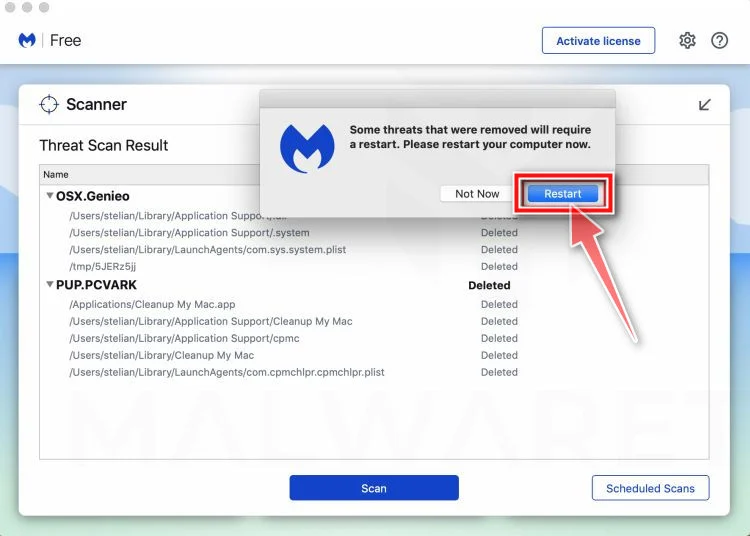
That’s it — your Mac is now free of adware, rogue browser extensions, and other potentially harmful software.
If you are still experiencing problems while trying to remove a malicious program from your computer, please ask for help in our Mac Malware Removal Help & Support forum.
Run a Malware Scan with Malwarebytes for Android
Malwarebytes for Android automatically detects and removes dangerous threats like malware and ransomware so you don’t have to worry about your most-used device being compromised. Aggressive detection of adware and potentially unwanted programs keeps your Android phone or tablet running smooth.
-
Download Malwarebytes for Android.
You can download Malwarebytes for Android by clicking the link below.
Get Malwarebytes for AndroidOpens Google Play in a new tab.Want real-time protection? See Malwarebytes Premium for AndroidMalwarebytes for AndroidScans your phone and removes malware at no cost -
Install Malwarebytes for Android on your phone.
In the Google Play Store, tap “Install” to install Malwarebytes for Android on your device.

When the installation process has finished, tap “Open” to begin using Malwarebytes for Android. You can also open Malwarebytes by tapping on its icon in your phone menu or home screen.

-
Follow the on-screen prompts to complete the setup process
When Malwarebytes will open, you will see the Malwarebytes Setup Wizard which will guide you through a series of permissions and other setup options.
This is the first of two screens that explain the difference between the Premium and Free versions. Swipe this screen to continue.
Tap on “Got it” to proceed to the next step.
Malwarebytes for Android will now ask for a set of permissions that are required to scan your device and protect it from malware. Tap on “Give permission” to continue.
Tap on “Allow” to permit Malwarebytes to access the files on your phone.
-
Update database and run a scan with Malwarebytes for Android
You will now be prompted to update the Malwarebytes database and run a full system scan.

Click on “Update database” to update the Malwarebytes for Android definitions to the latest version, then click on “Run full scan” to perform a system scan.

-
Wait for the Malwarebytes scan to complete.
Malwarebytes will now start scanning your phone for adware and other malicious apps. This process can take a few minutes, so we suggest you do something else and periodically check on the status of the scan to see when it is finished.

-
Click on “Remove Selected”.
When the scan has been completed, you will be presented with a screen showing the malware infections that Malwarebytes for Android has detected. To remove the malicious apps that Malwarebytes has found, tap on the “Remove Selected” button.

-
Restart your phone.
Malwarebytes for Android will now remove all the malicious apps that it has found. To complete the malware removal process, Malwarebytes may ask you to restart your device.
That’s it — your Android phone is now clean — no more malicious apps, adware, or browser redirects.
If you are still having problems with your phone after completing these instructions, then please follow one of the steps:
- Restore your phone to factory settings by going to Settings > General management > Reset > Factory data reset.
- Ask for help in our Mobile Malware Removal Help & Support forum.
Stay Protected: Block Ads and Malicious Sites
Now that your device is clean, keep it that way. Most infections start with a malicious ad or a fake download button — so blocking them at the source is your best defense.
We recommend AdGuard, which blocks malicious ads, phishing pages, and dangerous redirects before they can reach you.
👉 Download AdGuard and browse safely
How to Avoid Falling For Similar Scams
The H&M reviewer scam takes advantage of people’s desire to get something for nothing. Here are some tips to avoid being bamboozled by fakes:
- Beware of “free” offers requiring upfront information. Legitimate giveaways don’t make you jump through hoops, disclose personal/financial details, or complete sketchy offers before sending a prize.
- Verify URLs match real brand domains. Scam sites use slight variations or misspellings. Double check that any link matches the official site.
- Search online for similar scams. You’ll often find warnings about current cons on consumer protection sites. Knowledge is power.
- Look for faulty grammar/design. Professional brands put more care into proper spelling, punctuation, graphics, and branding.
- Report suspicious ads. Notify social platforms or Google about ads that seem like scams impersonating real companies.
- Go directly to a company’s official site/channel. Don’t trust third-party ads promising deals. Verify directly with the brand if an offer is real.
- Read terms and conditions. disambiguator Don’t just blindly click through. Actually take time to read the fine print to understand what you’re agreeing to.
Staying vigilant against increasingly sophisticated phishing ploys takes concerted effort. But avoiding online scams is far easier than trying to recover once your data or funds have been compromised.
Frequently Asked Questions About the H&M Reviewer Scam
1. How does the H&M reviewer scam work?
The scammers post ads on social media or messaging platforms promoting a fake opportunity to review H&M clothing for rewards. The ads convince victims to click suspicious links taking them to websites dressed up to look like official H&M pages. These scam sites tell users to input an email address to register as a product reviewer.
Soon after, victims receive messages guiding them through more steps to “redeem” promised gift cards. These later pages aim to harvest personal information or have users complete bogus offers. H&M confirms they are not associated with any such reviewer programs or offers.
2. What tricks do the scammers use?
The scam ads use fake H&M branding and stock photos to look real. Websites copy H&M’s visual design with slight URL variations like “hmreview”. They craft enticing messages promising easy free gift cards for reviewing products. False claims of limited spots or country restrictions create urgency. The goal is to quickly convince people to click and submit their email address.
3. What happens after submitting your email?
Right after registering at the fake review site, users receive messages to continue completing steps to get their promised rewards. These next pages have users complete “deals”, “surveys” or “free trials” by entering personal info, downloading apps, signing up for SMS lists, or similar activities. The goal is to generate illicit profits through harvested data, affiliate commissions, or subscription fees.
4. Do you actually get an H&M gift card?
No, users who comply with all steps of the scam never receive any H&M gift cards or products for review. The offers of free vouchers for being a reviewer are completely bogus. H&M is not distributing any rewards through third-party affiliate programs or offers.
5. How can you spot these fake H&M reviewer ads and sites?
Warning signs include unbelievable offers, artificial scarcity claims, incorrect URLs, poor grammar/spelling, or requests for personal info upfront. Real H&M pages have hm.com addresses. Legit rewards programs would never link out to shady third-party offers. Always verify directly with H&M if an ad seems suspicious.
6. What should you do if you already fell for the scam?
If you supplied any info, place fraud alerts, scan devices for malware, monitor credit reports, change passwords, and contact H&M to report the activity. Be vigilant about sharing data going forward now that scammers have your email. Report the ads or fake pages to have them removed.
7. How can you avoid these clothing reviewer scams?
Be wary of free offers requiring upfront info. Always verify URLs match real brand domains exactly. Search online for scam reports. Avoid clicking links in unsolicited messages. Report suspicious ads or offers instead of engaging. If it seems too good to be true, it always is.
8. Who is behind the fake H&M reviewer scam?
The entities behind these scams remain unknown, but they are fraudulent affiliate marketers misusing the H&M brand. They have no actual relationship with H&M and are simply impersonating the company to profit from stolen data and commissions.
The Bottom Line
The promise of easy money and free H&M vouchers is enticing bait. But there is no shortcut to getting hundreds in legit free gift cards. When an offer seems rife with red flags, trust your instincts.
No major retailer would authorize a random site to give away high-value rewards without oversight. By falling for the clothing reviewer scam, best case you’ll waste time on bait-and-switch surveys. Worst case they steal your information for identity theft.
If an unbelievable deal lands in your inbox, don’t get lured in. Report fake ads, warn others, and delete suspicious messages.

Join the discussion
0 commentsShare your experience or ask a question about this article.
Discussion
Start the conversation
Have a question or something useful to share? Add the first comment.