“Let Me Tell You, You Are One Of A Kind” Email Scam Explained
Written by: Stelian
Published on:
Picture this: you’re going about your day when suddenly, an email catches your eye. “Let me tell you, you are one of a kind!” it reads. Intrigued, you click on it, only to discover that the sender claims to have hacked into your computer, recorded your most intimate moments, and is now threatening to expose you unless you pay a hefty ransom. Your heart races, your palms sweat, and panic sets in. This is the reality for countless victims of the “Let Me Tell You, You Are One Of A Kind” email scam, a sinister scheme designed to prey on people’s deepest fears and insecurities.
In this comprehensive article, we will go into the details of this scam, explore how it works, and provide valuable insights on what to do if you find yourself targeted.
Scam Overview
The “Let Me Tell You, You Are One Of A Kind” email scam is a type of extortion attempt that has been making the rounds in recent months. The scammer sends an email to the victim, claiming to have hacked into their computer and gained access to their webcam, microphone, and private data. The email often begins with a seemingly complimentary statement, such as “Let me tell you, you are one of a kind!” or “It is hard to impress me, but now I am really impressed.” This tactic is designed to catch the victim’s attention and make them more likely to continue reading the email.
The scammer then proceeds to claim that they have been monitoring the victim’s online activities for several months, particularly focusing on their visits to adult websites. They allege to have recorded the victim’s screen, webcam, and microphone during these visits, creating a compromising video that shows the victim engaging in intimate acts while viewing explicit content.
To add credibility to their claims, the scammer may mention that they have gained access to the victim’s emails, chat messages, and other confidential information. They often attribute their success to the supposed ineffectiveness of antivirus and spyware defense software, claiming that these programs are no longer capable of protecting users from advanced hacking techniques.
The scammer then presents the victim with an ultimatum: pay a ransom in Bitcoin within 48 hours, or the compromising video will be sent to all of the victim’s email and messenger contacts, and their private information will be made public. The ransom amount varies but is typically in the range of a few hundred to a few thousand dollars.
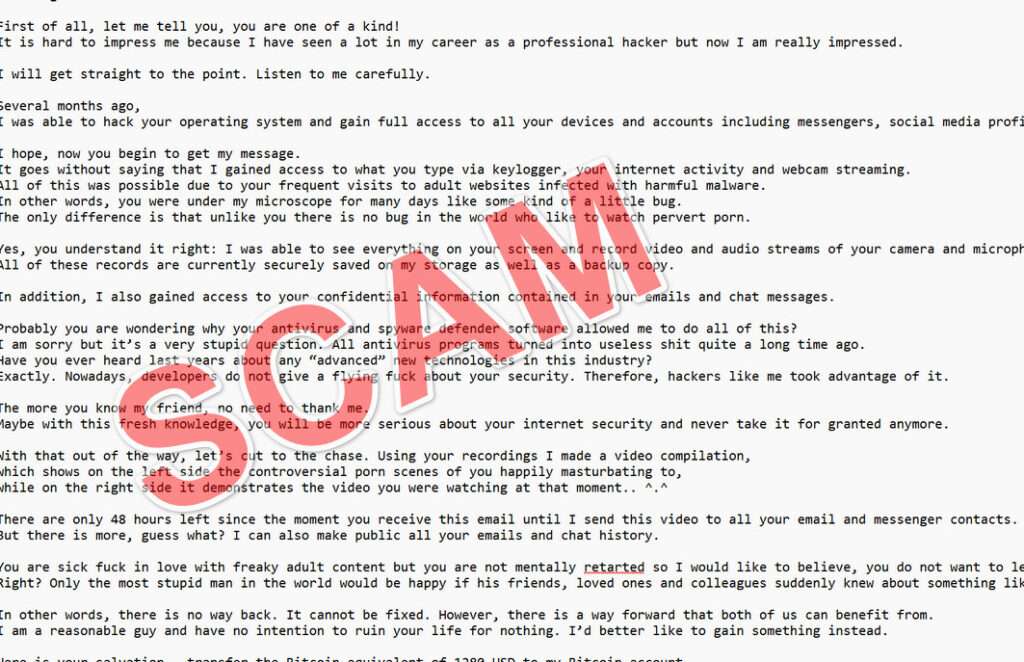
Here is how “Let Me Tell You, You Are One Of A Kind” email scam looks:
Greetings!
First of all, let me tell you, you are one of a kind! It is hard to impress me because I have seen a lot in my career as a professional hacker but now I am really impressed.
I will get straight to the point. Listen to me carefully.
Several months ago, I was able to hack your operating system and gain full access to all your devices and accounts including messengers, social media profiles, etc.
I hope, now you begin to get my message. It goes without saying that I gained access to what you type via keylogger, your internet activity and webcam streaming. All of this was possible due to your frequent visits to adult websites infected with harmful malware. In other words, you were under my microscope for many days like some kind of a little bug. The only difference is that unlike you there is no bug in the world who like to watch pervert porn.
Yes, you understand it right: I was able to see everything on your screen and record video and audio streams of your camera and microphone. All of these records are currently securely saved on my storage as well as a backup copy.
In addition, I also gained access to your confidential information contained in your emails and chat messages.
Probably you are wondering why your antivirus and spyware defender software allowed me to do all of this? I am sorry but it’s a very stupid question. All antivirus programs turned into useless shit quite a long time ago. Have you ever heard last years about any “advanced” new technologies in this industry? Exactly. Nowadays, developers do not give a flying fuck about your security. Therefore, hackers like me took advantage of it.
The more you know my friend, no need to thank me. Maybe with this fresh knowledge, you will be more serious about your internet security and never take it for granted anymore.
With that out of the way, let’s cut to the chase. Using your recordings I made a video compilation, which shows on the left side the controversial porn scenes of you happily masturbating to, while on the right side it demonstrates the video you were watching at that moment.. ^.^
There are only 48 hours left since the moment you receive this email until I send this video to all your email and messenger contacts. But there is more, guess what? I can also make public all your emails and chat history.
You are sick fuck in love with freaky adult content but you are not mentally retarted so I would like to believe, you do not want to let this happen. Right? Only the most stupid man in the world would be happy if his friends, loved ones and colleagues suddenly knew about something like this.
In other words, there is no way back. It cannot be fixed. However, there is a way forward that both of us can benefit from. I am a reasonable guy and have no intention to ruin your life for nothing. I’d better like to gain something instead.
Here is your salvation – transfer the Bitcoin equivalent of 1280 USD to my Bitcoin account (you can google the process in case you don’t know how to do that).
Here is my Bitcoin address: 16UqxYLX49MkFkgqsj1NcKiNVQMRCL8pnp
Once I am notified of receiving it, I will delete all those videos and disappear from your life for good. As I mentioned, you have only 48 hours to make a transaction after you open this email.
Believe me, I am always one step ahead so no way in hell you could fool me. If I discover that you shared this message with others, I will send and publish your videos in no time.
P.S. It’s in your power to make it nice for both of us.
How The Scam Works
The “Let Me Tell You, You Are One Of A Kind” email scam relies on several psychological tactics to convince the victim to pay the ransom. Here’s a step-by-step breakdown of how the scam typically unfolds:
Step 1: Crafting the Email
The scammer begins by composing an email that is designed to grab the victim’s attention and instill a sense of fear. They often use a subject line that is both complimentary and threatening, such as “You are one of a kind!” or “I have something that will ruin your life.” The body of the email is carefully crafted to include a mix of flattery, technical jargon, and dire warnings about the consequences of not complying with the scammer’s demands.
Step 2: Sending the Email
The scammer sends the email to a large number of potential victims, often using a list of email addresses that they have obtained through various means, such as data breaches or phishing scams. They may use a spoofed email address or a disposable account to avoid being traced.
Step 3: Exploiting Fear and Shame
Upon receiving the email, the victim is likely to experience a range of emotions, including fear, shame, and panic. The scammer’s claims about having access to the victim’s private information and intimate moments can be deeply distressing, especially if the victim has indeed visited adult websites in the past.
Step 4: Establishing Credibility
To make their claims seem more believable, the scammer may include specific details about the victim’s online activities, such as the names of adult websites they have visited or the dates and times of their visits. They may also mention the supposed ineffectiveness of antivirus software to explain how they were able to gain access to the victim’s device.
Step 5: Demanding Payment
The scammer then presents the victim with an ultimatum: pay a ransom in Bitcoin within a short timeframe (usually 48 hours), or face the consequences of having their private information and compromising video shared with their contacts and made public. The scammer often provides a Bitcoin address for the victim to send the payment to.
Step 6: Exploiting the Time Pressure
The short deadline for payment is designed to pressure the victim into acting quickly, without taking the time to think rationally or seek help. The scammer may claim that they are monitoring the victim’s actions and will know if they attempt to seek assistance or report the scam to authorities.
Step 7: Disappearing with the Money
If the victim does pay the ransom, the scammer simply disappears with the money. They do not actually possess any compromising information or videos, and they have no intention of following through on their threats. The victim is left feeling violated, ashamed, and financially harmed.
What to Do If You Have Fallen Victim to This Scam
If you have received an email that fits the description of the “Let Me Tell You, You Are One Of A Kind” scam, or if you have already fallen victim to this scam and paid the ransom, here are some steps you can take:
Do not panic. Remember that the scammer is unlikely to actually possess any compromising information or videos. Their threats are empty, and their goal is simply to extort money from you.
Do not reply to the email or engage with the scammer in any way. This will only encourage them to continue their attempts at extortion.
Report the email to your email provider as spam or phishing. This will help them to identify and block similar emails in the future.
If you have paid the ransom, contact your bank or credit card company immediately. Explain the situation and ask them to reverse the transaction if possible. You should also report the scam to your local law enforcement agency and the FBI’s Internet Crime Complaint Center (IC3).
Change your passwords for all of your online accounts, especially those that may have been mentioned in the scammer’s email. Use strong, unique passwords for each account, and enable two-factor authentication whenever possible.
Run a full scan of your computer with an up-to-date antivirus program to check for any malware or spyware that may have been installed on your device.
If you are feeling distressed or anxious as a result of the scam, consider reaching out to a trusted friend, family member, or mental health professional for support.
Is Your Device Infected? Run a Free Malware Scan
Slow performance, constant pop-ups, or strange behavior? These are classic signs of a malware infection. The fastest way to find out is to scan your device with Malwarebytes Anti-Malware Free — one of the most trusted malware removal tools available.
The free version detects and removes the most common threats, including:
Adware — the cause of those annoying pop-ups
Browser hijackers — unwanted redirects and changed homepages
Trojans and spyware — hidden programs stealing your data
Potentially unwanted programs (PUPs) — software you never asked for
👉 Select your device below — Windows, Mac, or Android — then follow the simple steps to download Malwarebytes, scan your system, and remove any threats it finds. The whole process takes about 5 minutes.
Malwarebytes for WindowsMalwarebytes for MacMalwarebytes for Android
Run a Malware Scan with Malwarebytes for Windows
Malwarebytes is one of the most popular and trusted anti-malware tools for Windows — and it’s completely free for removing infections. It catches threats that many antivirus programs miss, including adware, browser hijackers, and trojans. Follow the steps below to scan and clean your PC in just a few minutes.
Download Malwarebytes
Click the button below to download the latest version of Malwarebytes for Windows from the official source. The free version is all you need — it will scan your computer and remove adware, browser hijackers, and other malicious software at no cost.
(The link opens in a new page where your download will start)
Install Malwarebytes
When the download finishes, open your Downloads folder and double-click the MBSetup file. If Windows shows a User Account Control pop-up, click “Yes” to allow the installation.
Follow the On-Screen Prompts to Install Malwarebytes
The setup wizard will walk you through a few quick screens:
Choose where you’re installing the program — “Personal Computer” or “Work Computer” — then click Next.
Malwarebytes will now install on your device. This usually takes under a minute.
When installation is complete, the “Welcome to Malwarebytes” screen will open automatically.
On the final screen, click Open Malwarebytes to launch the program.
Enable “Scan for Rootkits”
Before scanning, turn on rootkit detection so Malwarebytes can find even the most hidden threats. Click the Settings gear icon on the left side of the screen.
In the settings menu, find “Scan for rootkits” and click the toggle so it turns blue.
Done? Click “Dashboard” in the left pane to return to the main screen.
Start the Scan
Click the blue Scan button. Malwarebytes will automatically update its virus database and start checking your computer for malware.
Wait for the Scan to Finish
The scan checks your entire system for browser hijackers and other malicious programs, so it can take several minutes. Feel free to do something else — just check back occasionally to see the progress.
Quarantine the Detected Threats
When the scan is done, you’ll see a list of everything Malwarebytes found — malware, adware, and potentially unwanted programs. Click the “Quarantine” button to remove all of them at once.
Malwarebytes will now remove the malicious files and registry entries and move them safely into quarantine.
Restart Your Computer
Some threats can only be fully removed after a reboot. If Malwarebytes asks you to restart, click Yes. Once you’re logged back in, your PC is clean and you can continue with the next steps in this guide.
When the scan finishes, click Quarantine to remove everything Malwarebytes found. That’s it — your Windows PC is now clean of trojans, adware, and other malware, and should be back to running smoothly.
If your current antivirus allowed this malicious program on your computer, you may want to consider purchasing Malwarebytes Premium to protect against these types of threats in the future. If you are still having problems with your computer after completing these instructions, then please follow one of the steps:
Malwarebytes for Mac is a free on-demand scanner that removes the malware other security software tends to miss — adware, browser hijackers, and unwanted programs included. Cleaning an infected Mac with Malwarebytes has always been completely free, and it’s our go-to recommendation. Follow the steps below to scan and clean your Mac in just a few minutes.
Download Malwarebytes for Mac
Click the button below to download the latest version of Malwarebytes for Mac.
When the download finishes, open your Downloads folder and double-click the setup file to begin the installation.
Follow the On-Screen Prompts to Install Malwarebytes
The Malwarebytes for Mac Installer will guide you through a few quick screens. Click “Continue” and keep following the prompts until the installation completes.
When the installation is complete, Malwarebytes opens to the Welcome to Malwarebytes screen. Click “Get started“.
Select “Personal Computer” or “Work Computer”
Malwarebytes will ask what type of computer you’re installing it on. Click either Personal Computer or Work Computer, whichever applies.
Start the Scan
Click the “Scan” button. Malwarebytes will automatically update its detection database and begin checking your Mac for malware.
Wait for the Scan to Finish
Malwarebytes will scan your Mac for adware, browser hijackers, and other malicious programs. This can take a few minutes, so feel free to do something else — just check back occasionally to see the progress.
Quarantine the Detected Threats
When the scan is done, you’ll see a list of everything Malwarebytes found. Click the “Quarantine” button to remove all the threats at once.
Restart Your Mac
Malwarebytes will now remove all the malicious files it found. Some threats can only be fully removed after a reboot — if Malwarebytes asks you to restart, allow it. Once you’re logged back in, your Mac is clean.
Once the scan is done, remove every threat it detected. Your Mac is now free of adware, rogue browser extensions, and other potentially harmful software.
If your current antivirus allowed a malicious program on your computer, you might want to consider purchasing the full-featured version of Malwarebytes Anti-Malware to protect against these types of threats in the future. If you are still experiencing problems while trying to remove a malicious program from your computer, please ask for help in our Mac Malware Removal Help & Support forum.
Run a Malware Scan with Malwarebytes for Android
Malwarebytes for Android automatically detects and removes dangerous threats like malware and ransomware so you don’t have to worry about your most-used device being compromised. Aggressive detection of adware and potentially unwanted programs keeps your Android phone or tablet running smooth.
Download Malwarebytes for Android.
You can download Malwarebytes for Android by clicking the link below.
In the Google Play Store, tap “Install” to install Malwarebytes for Android on your device.
When the installation process has finished, tap “Open” to begin using Malwarebytes for Android. You can also open Malwarebytes by tapping on its icon in your phone menu or home screen.
Follow the on-screen prompts to complete the setup process
When Malwarebytes will open, you will see the Malwarebytes Setup Wizard which will guide you through a series of permissions and other setup options. This is the first of two screens that explain the difference between the Premium and Free versions. Swipe this screen to continue. Tap on “Got it” to proceed to the next step. Malwarebytes for Android will now ask for a set of permissions that are required to scan your device and protect it from malware. Tap on “Give permission” to continue. Tap on “Allow” to permit Malwarebytes to access the files on your phone.
Update database and run a scan with Malwarebytes for Android
You will now be prompted to update the Malwarebytes database and run a full system scan.
Click on “Update database” to update the Malwarebytes for Android definitions to the latest version, then click on “Run full scan” to perform a system scan.
Wait for the Malwarebytes scan to complete.
Malwarebytes will now start scanning your phone for adware and other malicious apps. This process can take a few minutes, so we suggest you do something else and periodically check on the status of the scan to see when it is finished.
Click on “Remove Selected”.
When the scan has been completed, you will be presented with a screen showing the malware infections that Malwarebytes for Android has detected. To remove the malicious apps that Malwarebytes has found, tap on the “Remove Selected” button.
Restart your phone.
Malwarebytes for Android will now remove all the malicious apps that it has found. To complete the malware removal process, Malwarebytes may ask you to restart your device.
After the scan, tap Remove Selected to delete all detected threats. Your Android phone is now clean — no more malicious apps, adware, or browser redirects.
If your current antivirus allowed a malicious app on your phone, you may want to consider purchasing the full-featured version of Malwarebytes to protect against these types of threats in the future. If you are still having problems with your phone after completing these instructions, then please follow one of the steps:
Restore your phone to factory settings by going to Settings > General management > Reset > Factory data reset.
Now that your device is clean, keep it that way. Most infections start with a malicious ad or a fake download button — so blocking them at the source is your best defense.
We recommend AdGuard, which blocks malicious ads, phishing pages, and dangerous redirects before they can reach you.
Frequently Asked Questions About the “Let Me Tell You, You Are One Of A Kind” Email Scam
Q1: What is the “Let Me Tell You, You Are One Of A Kind” email scam?
A: The “Let Me Tell You, You Are One Of A Kind” email scam is a type of extortion attempt where a scammer sends an email claiming to have hacked into the recipient’s computer, gained access to their webcam, microphone, and private data, and recorded compromising videos of the recipient engaging in intimate acts while visiting adult websites. The scammer threatens to share this alleged video with the recipient’s contacts unless a ransom is paid in Bitcoin within a short timeframe, usually 48 hours.
Q2: How do I know if I have received a “Let Me Tell You, You Are One Of A Kind” scam email?
A: The scam email typically begins with a complimentary statement, such as “Let me tell you, you are one of a kind!” or “It is hard to impress me, but now I am really impressed.” The email then claims that the scammer has been monitoring your online activities, particularly your visits to adult websites, and has recorded your screen, webcam, and microphone during these visits. The scammer may also claim to have access to your emails, chat messages, and other confidential information.
Q3: Is the scammer’s claim of having compromising information and videos true?
A: No, the scammer’s claims are false. They do not actually possess any compromising information or videos. Their goal is simply to exploit your fears and insecurities to pressure you into paying a ransom.
Q4: What should I do if I receive a “Let Me Tell You, You Are One Of A Kind” scam email?
A: If you receive this scam email, do not panic or engage with the scammer in any way. Do not reply to the email or pay the ransom. Instead, report the email to your email provider as spam or phishing, and delete it from your inbox. If you are feeling distressed, consider reaching out to a trusted friend, family member, or mental health professional for support.
Q5: What should I do if I have already paid the ransom?
A: If you have already paid the ransom, contact your bank or credit card company immediately and explain the situation. Ask them to reverse the transaction if possible. You should also report the scam to your local law enforcement agency and the FBI’s Internet Crime Complaint Center (IC3).
Q6: How can I protect myself from falling victim to this scam in the future?
A: To protect yourself from this and similar scams, maintain good online hygiene practices, such as using strong, unique passwords for each of your accounts and enabling two-factor authentication whenever possible. Keep your antivirus software up to date and run regular scans of your devices. Be cautious when opening emails from unknown senders, and avoid clicking on suspicious links or downloading attachments from these emails.
Q7: Can the scammer actually access my computer, webcam, or microphone?
A: It is highly unlikely that the scammer has actually gained access to your computer, webcam, or microphone. These claims are usually empty threats designed to scare you into paying the ransom. However, if you are concerned about your device’s security, run a full scan with an up-to-date antivirus program to check for any malware or spyware.
Q8: What should I do if I am feeling anxious or distressed about the scam?
A: Falling victim to a scam can be a distressing experience. If you are feeling anxious or upset, it is important to remember that you are not alone and that there is support available. Consider reaching out to a trusted friend, family member, or mental health professional to discuss your concerns and get the help you need. Remember, the scammer’s threats are empty, and you have done nothing wrong.
The Bottom Line
The “Let Me Tell You, You Are One Of A Kind” email scam is a disturbing reminder of the lengths that cybercriminals will go to in order to exploit and extort innocent victims. By preying on people’s fears and insecurities, these scammers seek to pressure their targets into paying a ransom to avoid the alleged consequences of having their private information and intimate moments exposed.
However, it is crucial to remember that these threats are empty, and the scammers do not actually possess any compromising information or videos. By staying calm, refusing to engage with the scammer, and taking proactive steps to protect your online accounts and devices, you can safeguard yourself against this and similar scams.
As technology continues to advance, it is likely that we will see more sophisticated and convincing variations of this scam in the future. Therefore, it is more important than ever to stay informed about the latest cybersecurity threats, maintain good online hygiene practices, and approach any unsolicited emails or messages with a healthy dose of skepticism.
By working together to raise awareness about scams like the “Let Me Tell You, You Are One Of A Kind” email and supporting those who have fallen victim to these crimes, we can create a safer and more secure online environment for everyone.
10 Rules to Avoid Online Scams
Here are 10 practical safety rules to help you avoid malware, online shopping scams, crypto scams, and other online fraud. Each tip includes a quick “if you already got hit” action.
Stop and verify before you click, log in, download, or pay.
Most scams win by creating urgency. Verify using a trusted method: type the website address yourself, use the official app, or call a known number (not the one in the message).
If you already clicked: close the page, do not enter passwords, and run a malware scan.
Keep your operating system, browser, and apps updated.
Updates patch security holes used by malware and malicious ads. Turn on automatic updates where possible.
If you saw a scary “update now” pop-up: close it and update only through your device settings or the official app store.
Use layered protection: antivirus plus an ad blocker.
Antivirus helps block malware. An ad blocker reduces scam redirects, phishing pages, and malvertising.
If your browser is acting weird: remove unknown extensions, reset the browser, then run a full scan.
Install apps, software, and extensions only from official sources.
Avoid cracked software, “keygens,” and random downloads. During installs, choose Custom/Advanced and decline bundled offers you do not recognize.
If you already installed something suspicious: uninstall it, restart, and scan again.
Treat links and attachments as untrusted by default.
Phishing often impersonates delivery services, banks, and popular brands. If it is unexpected, do not open attachments or log in through the message.
If you entered credentials: change the password immediately and enable 2FA.
Shop safely: research the store, then pay with protection.
Be cautious with brand-new stores, “closing sale” stories, and prices that make no sense. Prefer credit cards or PayPal for dispute options. Avoid wire transfers, gift cards, and crypto payments.
If you already paid: contact your card issuer or PayPal quickly to dispute the transaction.
Crypto rule: never pay a “fee” to withdraw or recover money.
Common patterns include fake profits, then “tax,” “gas,” or “verification” fees. Another is a “recovery agent” who demands upfront crypto.
If you already sent crypto: stop paying, save evidence (wallet addresses, TXIDs, chats), and report the scam to the platform used.
Secure your accounts with unique passwords and 2FA (start with email).
Use a password manager and unique passwords for every account. Enable 2FA using an authenticator app when possible.
If you suspect an account takeover: change passwords, sign out of all devices, and review recent logins and recovery settings.
Back up important files and keep one backup offline.
Backups protect you from ransomware and device failure. Keep at least one backup on an external drive that is not always connected.
If you suspect infection: do not connect backup drives until the system is clean.
If you think you are a victim: stop losses, document evidence, and escalate fast.
Move quickly. Speed matters for disputes, account recovery, and limiting damage.
Stop payments and contact: do not send more money or respond to the scammer.
Call your bank or card issuer: block transactions, replace the card if needed, and start a dispute or chargeback.
Secure your email first: change the email password, enable 2FA, and remove unfamiliar recovery options.
Secure other accounts: change passwords, enable 2FA, and log out of all sessions.
Scan your device: remove suspicious apps or extensions, then run a full malware scan.
Save evidence: screenshots, emails, order pages, tracking pages, wallet addresses, TXIDs, and chat logs.
Report it: to the payment provider, marketplace, social platform, exchange, or wallet service involved.
These rules are intentionally simple. Most online losses happen when decisions are rushed. Slow down, verify independently, and use payment methods and account controls that give you recourse.
Stelian leverages over a decade of cybersecurity expertise to lead malware analysis and removal, uncover scams, and educate people. His experience provides insightful analysis and valuable perspective.