

Your heart races as you read the alarming text message on your phone: “Binance Alert: A new login detected in Paris, France. If this was NOT you, call us immediately at [phone number]” Panic sets in as you wonder if your Binance account and hard-earned cryptocurrency have been compromised. But before you hastily dial that number, STOP! This is a scam designed to trick you out of your money and sensitive information.
In this article, we’ll dive deep into the Binance “New Login Detected” text scam, uncovering how it works, what to do if you’ve fallen victim, and most importantly – how to protect yourself from these fraudsters.
Scam Overview
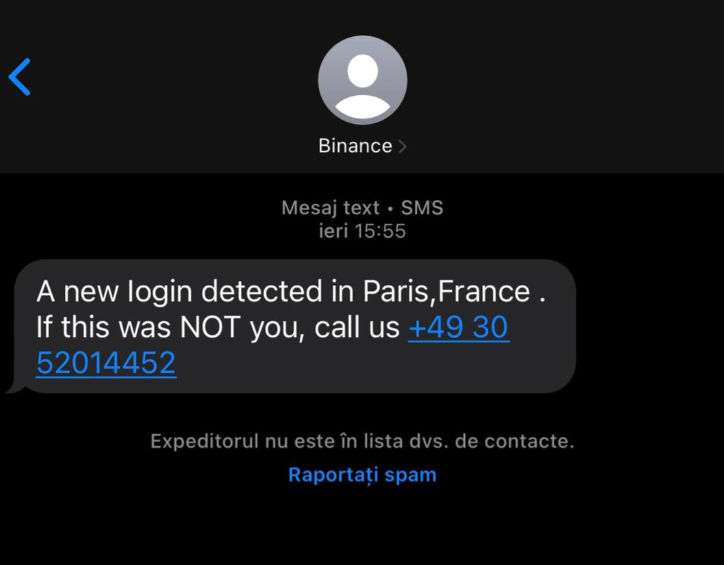
The Binance “New Login Detected” text scam is a scheme that has recently surged in prevalence, targeting unsuspecting cryptocurrency investors and traders. The scam revolves around sending out mass text messages that appear to come from Binance, one of the world’s largest and most trusted cryptocurrency exchanges. These fraudulent texts aim to create a sense of urgency and panic, leading the recipient to believe that their Binance account has been accessed from an unknown location, often in a foreign country like France, Russia, China or Germany.
The scammers craft their messages to be as convincing as possible, often using Binance’s logo and branding to lend an air of legitimacy. They may even spoof the sender ID to make it appear as though the text is coming from “Binance” itself. The message typically includes a warning about a suspicious login and provides a phone number for the victim to call to resolve the issue.
However, this phone number does not belong to Binance’s real customer support team. Instead, it directs the caller to a fake call center run by the scammers themselves. These fraudsters are highly skilled at social engineering and will use every psychological trick in the book to manipulate their victims into handing over sensitive information or even transferring funds directly to the scammers.
One of the most insidious aspects of this scam is how it preys on people’s fears and uncertainties surrounding the relatively new and often confusing world of cryptocurrencies. Many Binance users may not be fully confident in their understanding of how the platform works or how to properly secure their accounts, making them more susceptible to falling for these types of scams.
Moreover, the global and decentralized nature of cryptocurrencies means that these scams can be perpetrated from anywhere in the world, making it difficult for law enforcement to track down and prosecute the criminals behind them. This only emboldens the scammers, who often operate with impunity, raking in millions of dollars from their innocent victims.
It’s crucial for anyone invested in cryptocurrencies to be aware of the Binance “New Login Detected” text scam and others like it. By understanding how these scams work and taking proactive steps to protect your accounts and information, you can avoid becoming another statistic in the growing list of crypto fraud victims. Stay vigilant, trust your instincts, and remember – if something seems too good (or in this case, too bad) to be true, it probably is.
How the Scam Works
The Binance “New Login Detected” text scam is a multi-layered scheme designed to extract as much money and sensitive information from victims as possible. Let’s break down the scam step-by-step to better understand how these fraudsters operate:
Step 1: The Bait
The scam begins with a carefully crafted text message designed to instill fear and urgency in the recipient. A typical message might read:
“Binance Alert: A new login detected in Paris, France. If this was NOT you, call us immediately at +49 30 52014452.”
The scammers use a variety of tactics to make the message seem legitimate, such as:
- Using Binance’s logo and branding
- Spoofing the sender ID to appear as “Binance”
- Mentioning a foreign location to add credibility to the claim of a suspicious login
- Providing a phone number for the victim to call to “resolve” the issue
The goal of this initial message is to get the victim to call the provided phone number in a panic, believing their Binance account has been compromised.
Step 2: The Hook
Once the victim calls the provided number, they are connected to a fake customer support center run by the scammers. The fraudsters on the other end of the line are highly trained in social engineering and will use a variety of psychological tactics to build trust and extract information from the victim.
The scammer may:
- Claim to be a Binance security specialist tasked with helping the victim secure their account
- Ask the victim to verify their identity by providing sensitive information such as their full name, email address, Binance login credentials, or even government-issued ID numbers
- Insist that the victim’s account has been compromised and that immediate action is necessary to prevent further unauthorized access
- Scare the victim by claiming their funds are at risk of being stolen if they don’t act quickly
The scammer’s goal in this stage is to gather as much sensitive information as possible while simultaneously convincing the victim that they are a legitimate Binance representative who is there to help.
Step 3: The Sting
Once the scammer has gained the victim’s trust and obtained their sensitive information, they move in for the kill. The scammer may employ various tactics to steal the victim’s money, such as:
- Requesting the victim to grant remote access to their device using screen-sharing software like AnyDesk or TeamViewer, claiming it’s necessary to “secure” the account. Once granted access, the scammer can install malware, steal data, or even transfer funds out of the victim’s Binance account.
- Instructing the victim to transfer their cryptocurrency holdings to a “secure” wallet address provided by the scammer, claiming it’s necessary to protect the funds from hackers. In reality, this wallet belongs to the scammer, and any funds sent there will be stolen.
- Pressuring the victim to purchase gift cards (such as Google Play, iTunes, or Amazon) and provide the redemption codes to the scammer as a means of “verifying” their account. The scammer may claim this is a temporary security measure and that the funds will be returned once the account is secured. Of course, any money sent in this way is gone forever.
- Tricking the victim into installing remote access software on their device, which the scammer can then use to monitor the victim’s activities, steal sensitive data, or even access their online banking and cryptocurrency exchange accounts.
The scammer will often create a sense of urgency throughout this process, claiming that the victim’s funds are at imminent risk and that any delay could result in total loss. This pressure tactic is designed to override the victim’s better judgment and lead them to comply with the scammer’s increasingly unreasonable demands.
Step 4: The Getaway
Once the scammer has successfully stolen the victim’s funds or sensitive information, they quickly sever all contact and disappear. They may block the victim’s number, delete any social media profiles used in the scam, or simply stop responding to messages altogether.
The scammer will then launder the stolen funds through a complex network of cryptocurrency wallets and exchanges, making it virtually impossible for the victim to recover their money. In some cases, the scammer may even sell the victim’s sensitive data on the dark web, leading to further identity theft and financial fraud down the line.
By the time the victim realizes they’ve been scammed, it’s often too late. They may be left feeling ashamed, frustrated, and helpless, unsure of where to turn for help or how to recover their losses.
It’s important to remember that this scam is highly sophisticated and that even savvy cryptocurrency investors can fall victim to these tactics. The scammers are constantly adapting their methods to stay one step ahead of the authorities and to exploit the latest vulnerabilities in the crypto space.
The best defense against the Binance “New Login Detected” text scam is education and awareness. By understanding how these scams work and being vigilant in protecting your sensitive information, you can reduce your risk of falling victim to these insidious fraudsters.
Binance Will Never Call or Text You Directly
It’s important to understand that Binance will never proactively contact you via phone, text message, or unofficial social media channels like Telegram or Twitter. If you receive a call or text claiming to be from Binance Support, it is a scam.
For security reasons, Binance Support is only available through the official channels on the Binance website. Binance has strict policies in place to protect user privacy and security. Legitimate Binance representatives will never call, text or direct message you to request sensitive information, offer investment advice, or ask you to send funds to an external wallet address.
Scammers often impersonate Binance Support staff and reach out to potential victims through unofficial channels in an attempt to steal login credentials, trick users into installing malware, or convince them to send cryptocurrency to fraudulent wallet addresses.
Always be cautious of anyone claiming to represent Binance on social media, messaging apps, or over the phone. Binance Support would never:
- Call or text you claiming there is an urgent problem with your account
- Offer you entry into an exclusive free giveaway or investment opportunity
- Ask for your account login credentials, 2FA codes, or API keys
- Provide a “backdoor” to unlock your Binance account if you’ve lost access
- Pressure you to send coins or tokens directly to a wallet address they provide
If you are ever unsure whether a communication is legitimately from Binance, contact Binance Support directly through the official request form on the Binance website. Report any suspicious calls, texts or messages from people impersonating Binance staff to help protect others from these scams.
What to Do If You’ve Fallen Victim to This Scam
If you’ve fallen victim to the Binance “New Login Detected” text scam, it’s essential to act quickly to minimize your losses and prevent further damage. Here are the steps you should take:
- Immediately cease all communication with the scammer. Block their number, delete any associated emails, and do not respond to any further attempts at contact.
- If you’ve provided your Binance login credentials to the scammer, log in to your Binance account from a trusted device and change your password immediately. Enable two-factor authentication (2FA) if you haven’t already done so.
- If you’ve given the scammer access to your device through remote access software like AnyDesk or TeamViewer, uninstall the software immediately and run a full malware scan using reputable antivirus software.
- If you’ve transferred any funds to the scammer’s wallet address, contact Binance support immediately and provide them with the transaction details. While it’s unlikely that you’ll be able to recover the stolen funds, Binance may be able to use this information to help prevent future scams.
- If you’ve purchased any gift cards and provided the redemption codes to the scammer, contact the relevant company (e.g., Google, Apple, or Amazon) and explain the situation. They may be able to cancel the cards and refund your money, although this is not guaranteed.
- Report the scam to the relevant authorities, such as your local police department, the FBI’s Internet Crime Complaint Center (IC3), and the Federal Trade Commission (FTC). While individual cases may not always be investigated due to resource constraints, reporting the scam helps law enforcement track patterns and build cases against the scammers.
- Reach out to your bank and any affected credit card companies to alert them of the fraud. They may be able to reverse any unauthorized charges or provide additional protection against future fraud attempts.
- Consider sharing your experience with others in the cryptocurrency community to help raise awareness and prevent others from falling victim to similar scams. Many online forums and social media groups exist where you can share your story and learn from others who have gone through similar experiences.
It’s important to remember that falling victim to a scam is not your fault. These scammers are highly skilled at what they do and use sophisticated psychological tactics to manipulate their victims. Don’t be ashamed to seek help and support from trusted friends, family members, or mental health professionals as you work through this difficult experience.
Is Your Device Infected? Run a Free Malware Scan
Slow performance, constant pop-ups, or strange behavior? These are classic signs of a malware infection. The fastest way to find out is to scan your device with Malwarebytes Free — one of the most trusted malware removal tools available.
The free version detects and removes the most common threats, including:
- Adware — the cause of those annoying pop-ups
- Browser hijackers — unwanted redirects and changed homepages
- Trojans and spyware — hidden programs stealing your data
- Potentially unwanted programs (PUPs) — software you never asked for
👉 Select your device below — Windows, Mac, or Android — then follow the simple steps to download Malwarebytes, scan your system, and remove any threats it finds. The scan usually takes 5 to 20 minutes.
Run a Malware Scan with Malwarebytes for Windows
Malwarebytes is one of the most popular and trusted anti-malware tools for Windows — and it’s completely free for removing infections. It catches threats that many antivirus programs miss, including adware, browser hijackers, and trojans. Follow the steps below to scan and clean your PC in just a few minutes.
Download Malwarebytes
Click the button below to download the latest version of Malwarebytes for Windows from the official source. The free version is all you need — it will scan your computer and remove adware, browser hijackers, and other malicious software at no cost.
Download MalwarebytesOfficial installer for Windows 11 and 10. Your download starts right away.Want real-time protection? See Malwarebytes Premium Malwarebytes Free for WindowsScans and removes malware at no cost
-
Install Malwarebytes
When the download finishes, open your Downloads folder and double-click the MBSetup file. If Windows shows a User Account Control pop-up, click “Yes” to allow the installation.
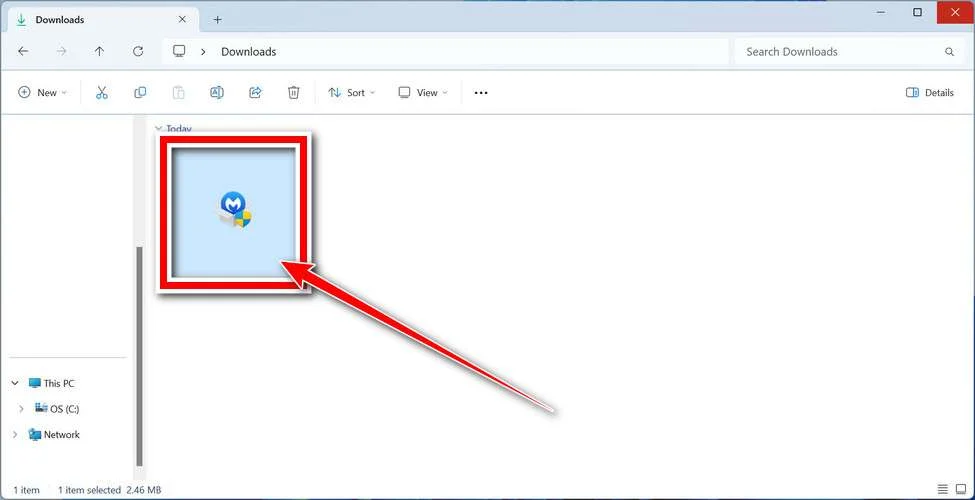
Follow the On-Screen Prompts to Install Malwarebytes
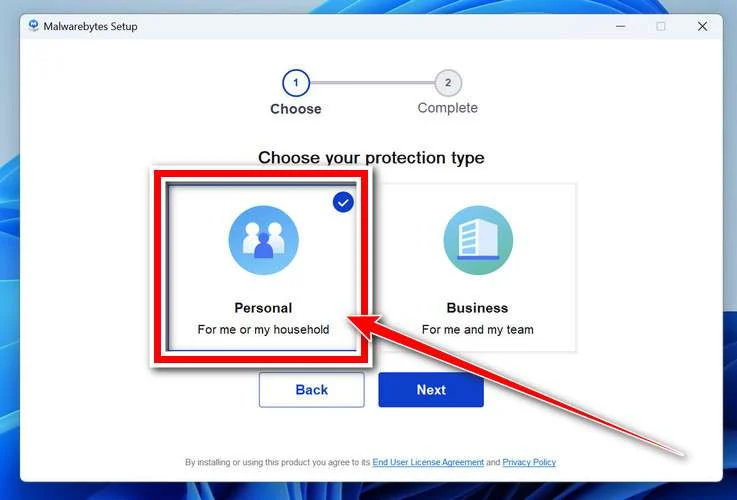
The setup wizard will walk you through a few quick screens:
-
Choose where you’re installing the program — “Personal Computer” or “Work Computer” — then click Next.
-
Malwarebytes will now install on your device. This usually takes under a minute.

-
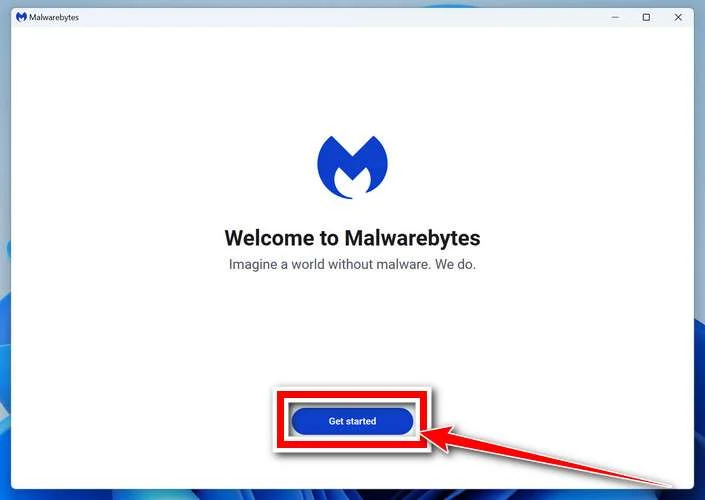
When installation is complete, the “Welcome to Malwarebytes” screen will open automatically.
-
On the final screen, click Open Malwarebytes to launch the program.

-
Enable “Scan for Rootkits”
Before scanning, turn on rootkit detection so Malwarebytes can find even the most hidden threats. Click the Settings gear icon on the left side of the screen.
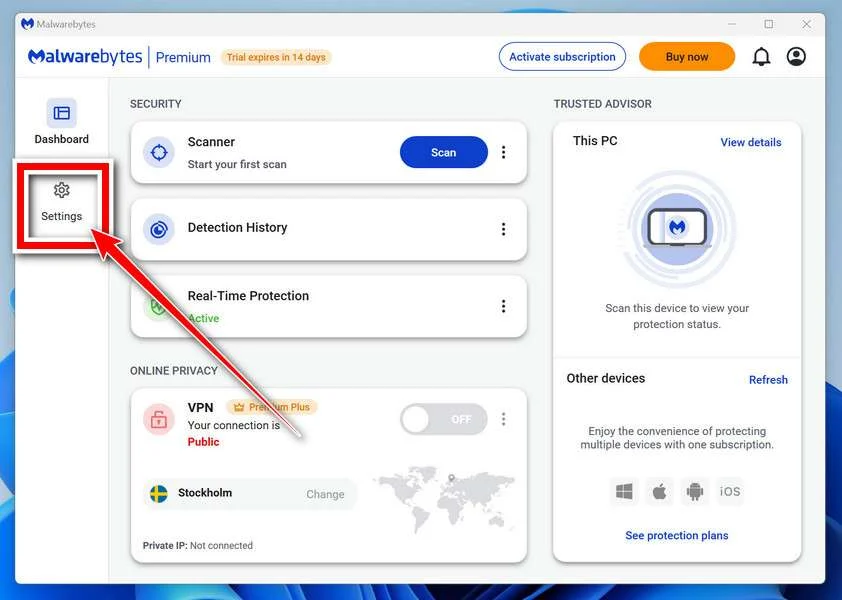
In the settings menu, find “Scan for rootkits” and click the toggle so it turns blue.

Done? Click “Dashboard” in the left pane to return to the main screen.
Start the Scan
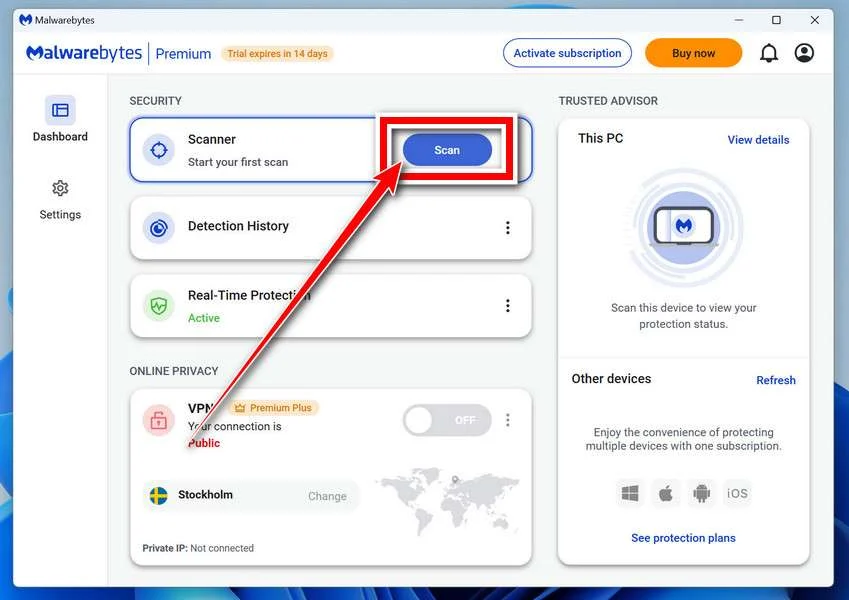
Click the blue Scan button. Malwarebytes will automatically update its virus database and start checking your computer for malware.
-
Wait for the Scan to Finish
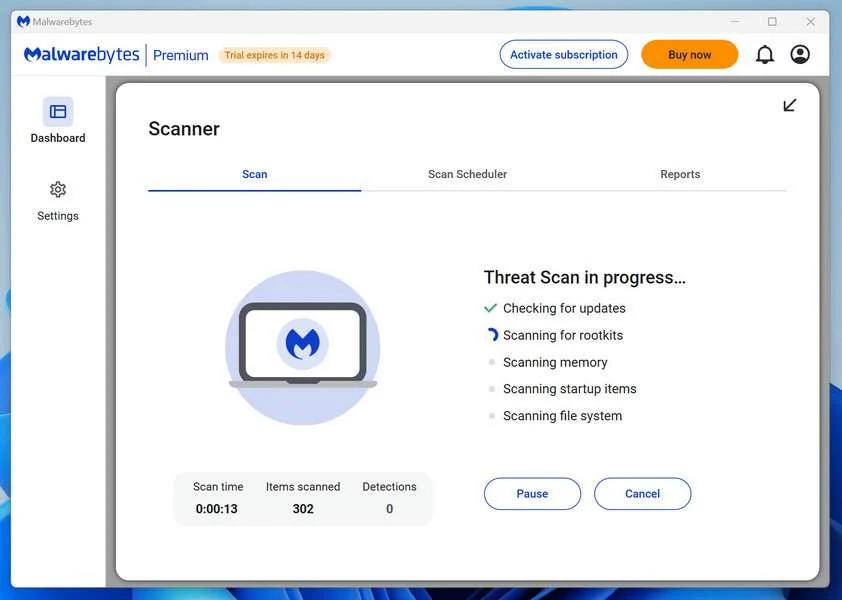
The scan checks your entire system for browser hijackers and other malicious programs, so it can take 5 to 20 minutes depending on your computer. Feel free to do something else — just check back occasionally to see the progress.
-
Quarantine the Detected Threats
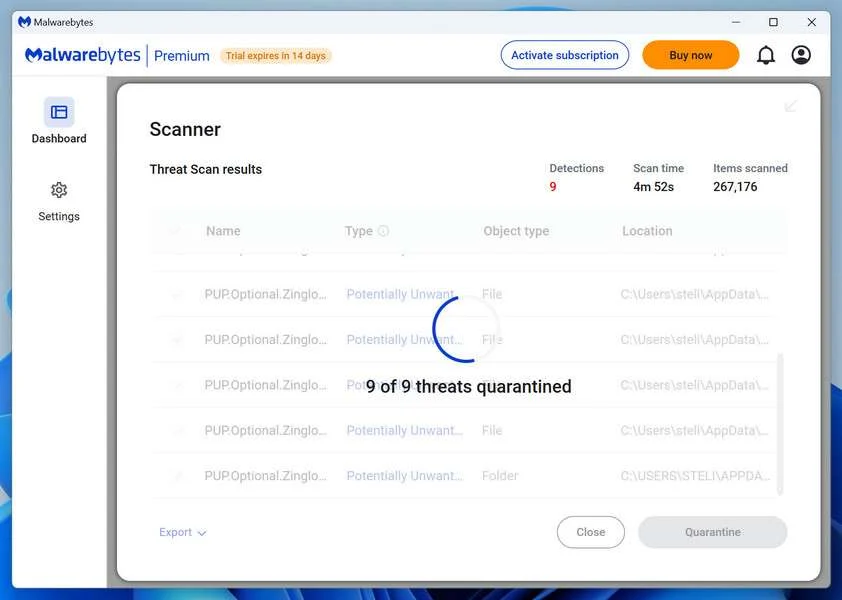
When the scan is done, you’ll see a list of everything Malwarebytes found — malware, adware, and potentially unwanted programs. Click the “Quarantine” button to remove all of them at once.
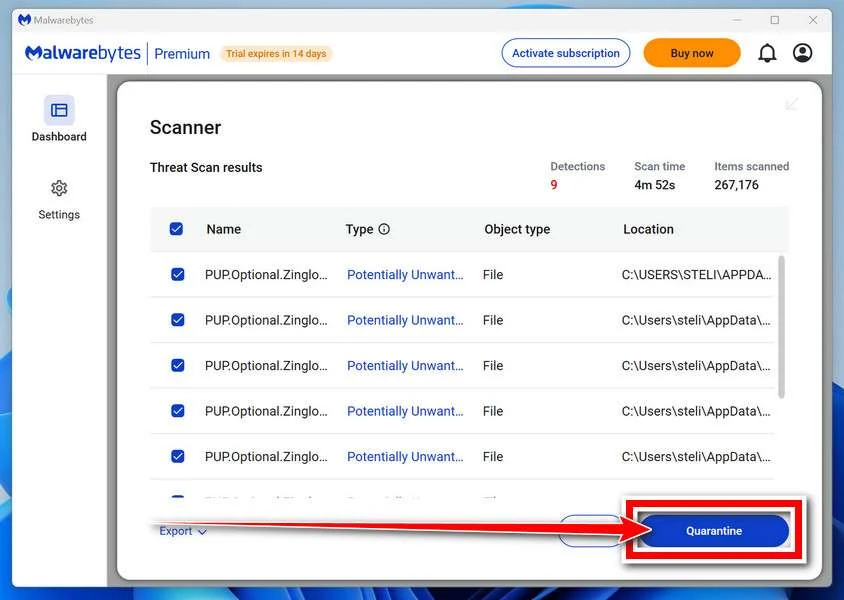
Malwarebytes will now remove the malicious files and registry entries and move them safely into quarantine.
-
Restart Your Computer
Some threats can only be fully removed after a reboot. If Malwarebytes asks you to restart, click Yes. Once you’re logged back in, Malwarebytes has finished removing the threats it found.
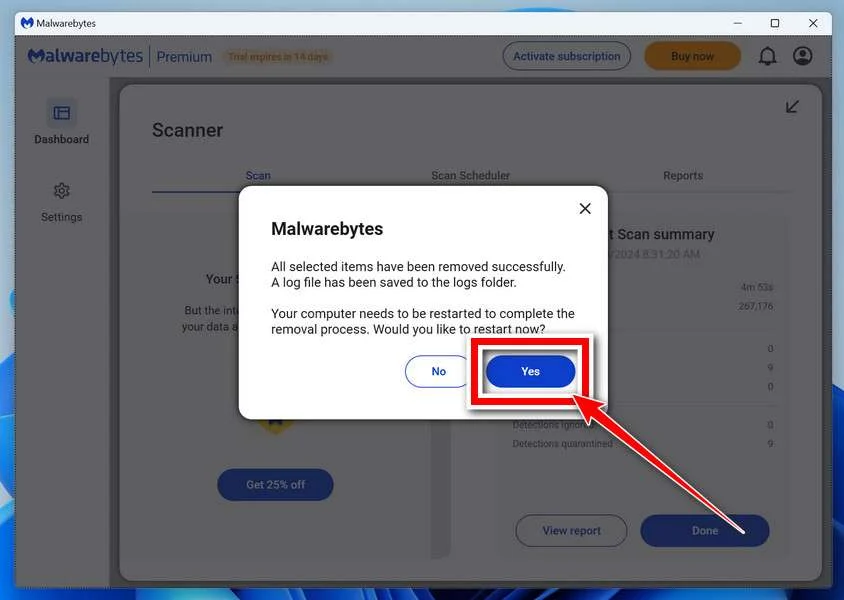
That’s it — your Windows PC is now clean of trojans, adware, and other malware, and should be back to running smoothly.
If you are still having problems with your computer after completing these instructions, then please follow one of the steps:
- Run a computer scan with ESET Online Scanner
- Ask for help in our Windows Malware Removal Help & Support forum.
Run a Malware Scan with Malwarebytes for Mac
Malwarebytes for Mac is a free on-demand scanner that removes the malware other security software tends to miss — adware, browser hijackers, and unwanted programs included. Cleaning an infected Mac with Malwarebytes has always been completely free, and it’s our go-to recommendation. Follow the steps below to scan and clean your Mac in just a few minutes.
-
Download Malwarebytes for Mac
Click the button below to download the latest version of Malwarebytes for Mac.
Download MalwarebytesOfficial installer for macOS. Your download starts right away.Want real-time protection? See Malwarebytes PremiumMalwarebytes Free for MacScans and removes malware at no cost -
Open the Malwarebytes setup file
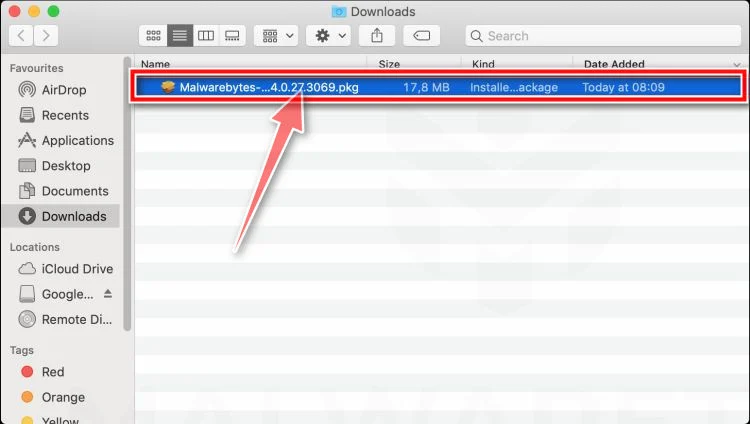
When the download finishes, open your Downloads folder and double-click the setup file to begin the installation.
-
Follow the On-Screen Prompts to Install Malwarebytes
The Malwarebytes for Mac Installer will guide you through a few quick screens. Click “Continue” and keep following the prompts until the installation completes.
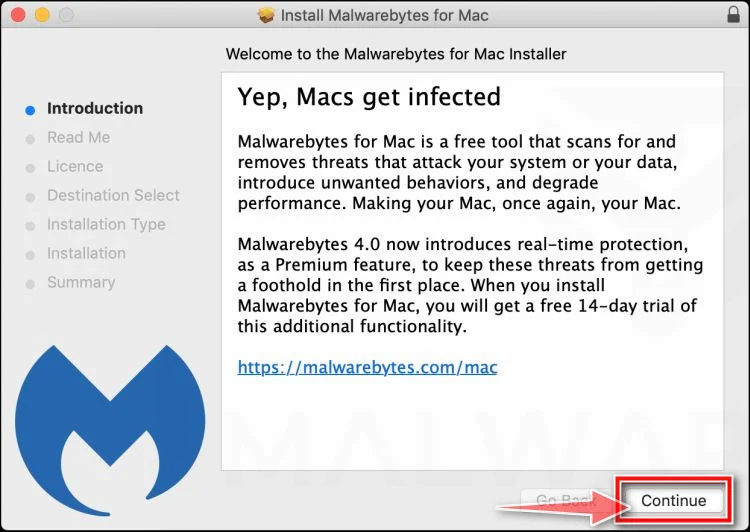
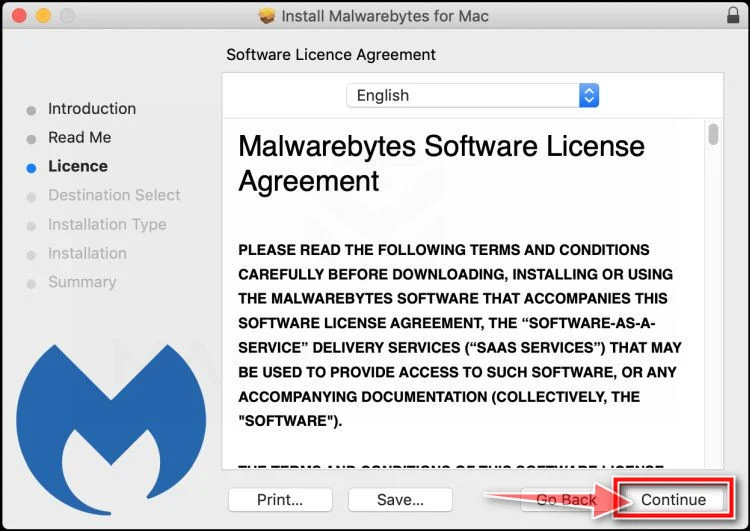
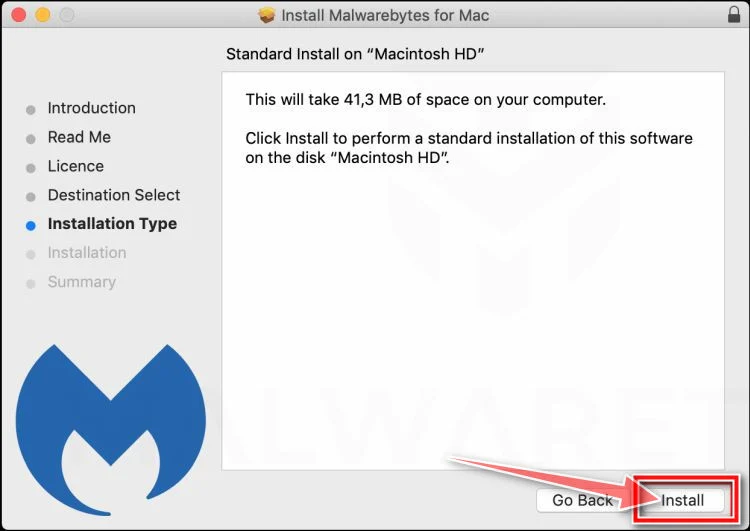
When the installation is complete, Malwarebytes opens to the Welcome to Malwarebytes screen. Click “Get started“.
-
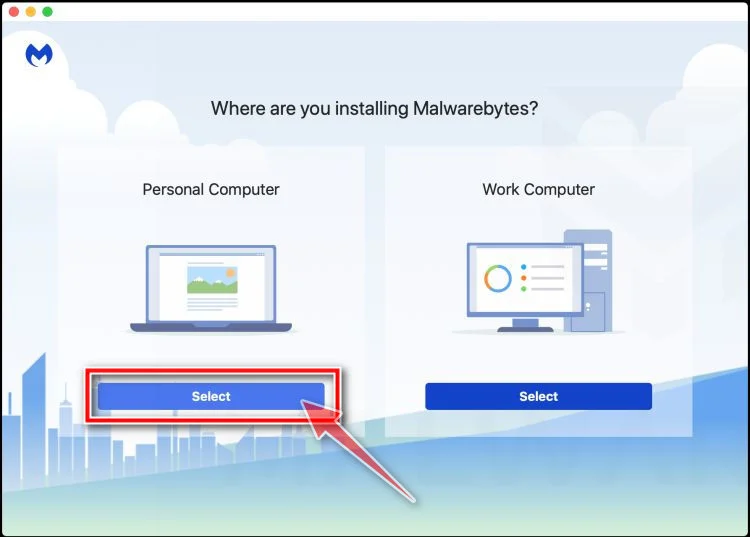
Select “Personal Computer” or “Work Computer”
Malwarebytes will ask what type of computer you’re installing it on. Click either Personal Computer or Work Computer, whichever applies.
-
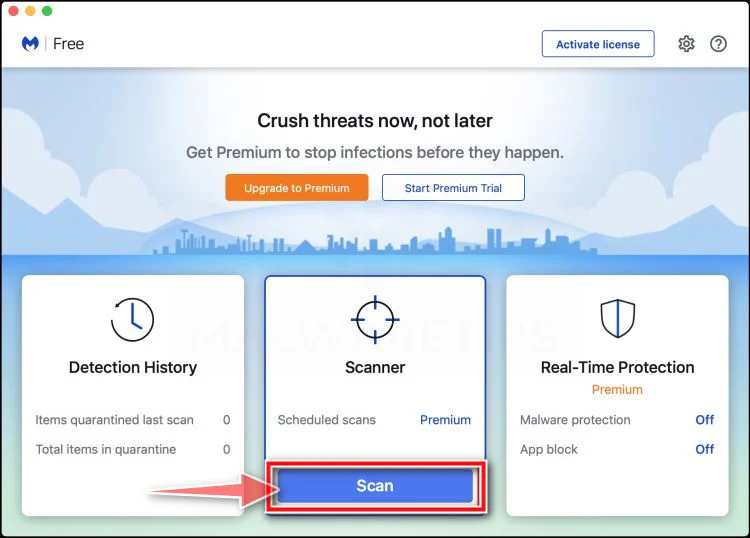
Start the Scan
Click the “Scan” button. Malwarebytes will automatically update its detection database and begin checking your Mac for malware.
-
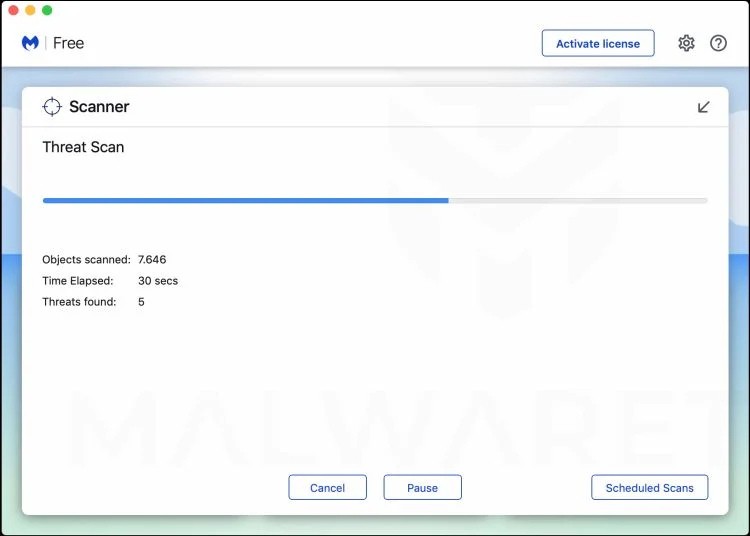
Wait for the Scan to Finish
Malwarebytes will scan your Mac for adware, browser hijackers, and other malicious programs. This can take a few minutes, so feel free to do something else — just check back occasionally to see the progress.
-
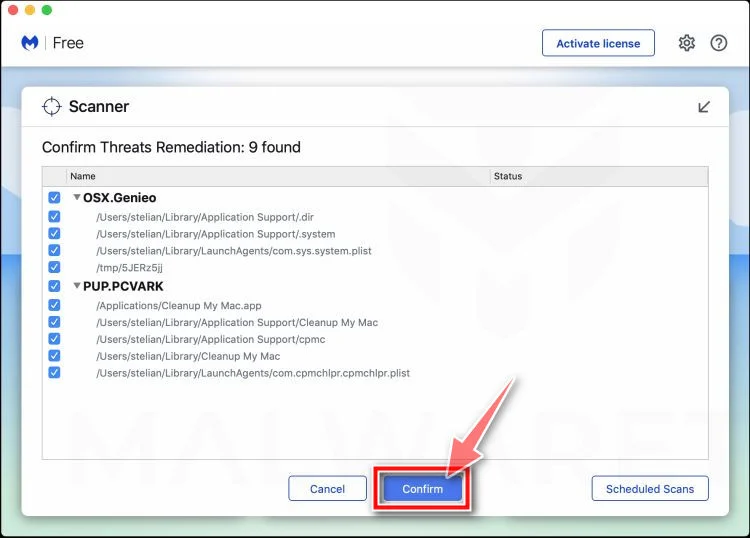
Quarantine the Detected Threats
When the scan is done, you’ll see a list of everything Malwarebytes found. Click the “Quarantine” button to remove all the threats at once.
-
Restart Your Mac
Malwarebytes will now remove all the malicious files it found. Some threats can only be fully removed after a reboot — if Malwarebytes asks you to restart, allow it. Once you’re logged back in, your Mac is clean.
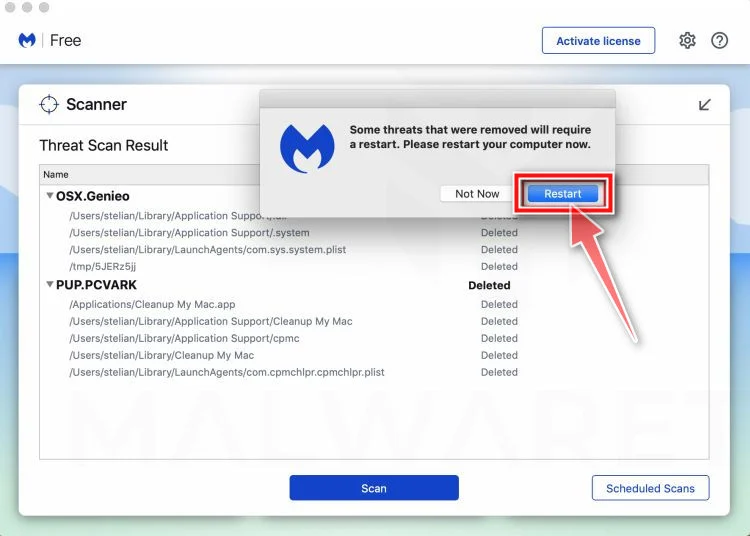
That’s it — your Mac is now free of adware, rogue browser extensions, and other potentially harmful software.
If you are still experiencing problems while trying to remove a malicious program from your computer, please ask for help in our Mac Malware Removal Help & Support forum.
Run a Malware Scan with Malwarebytes for Android
Malwarebytes for Android automatically detects and removes dangerous threats like malware and ransomware so you don’t have to worry about your most-used device being compromised. Aggressive detection of adware and potentially unwanted programs keeps your Android phone or tablet running smooth.
-
Download Malwarebytes for Android.
You can download Malwarebytes for Android by clicking the link below.
Get Malwarebytes for AndroidOpens Google Play in a new tab.Want real-time protection? See Malwarebytes Premium for AndroidMalwarebytes for AndroidScans your phone and removes malware at no cost -
Install Malwarebytes for Android on your phone.
In the Google Play Store, tap “Install” to install Malwarebytes for Android on your device.

When the installation process has finished, tap “Open” to begin using Malwarebytes for Android. You can also open Malwarebytes by tapping on its icon in your phone menu or home screen.

-
Follow the on-screen prompts to complete the setup process
When Malwarebytes will open, you will see the Malwarebytes Setup Wizard which will guide you through a series of permissions and other setup options.
This is the first of two screens that explain the difference between the Premium and Free versions. Swipe this screen to continue.
Tap on “Got it” to proceed to the next step.
Malwarebytes for Android will now ask for a set of permissions that are required to scan your device and protect it from malware. Tap on “Give permission” to continue.
Tap on “Allow” to permit Malwarebytes to access the files on your phone.
-
Update database and run a scan with Malwarebytes for Android
You will now be prompted to update the Malwarebytes database and run a full system scan.

Click on “Update database” to update the Malwarebytes for Android definitions to the latest version, then click on “Run full scan” to perform a system scan.

-
Wait for the Malwarebytes scan to complete.
Malwarebytes will now start scanning your phone for adware and other malicious apps. This process can take a few minutes, so we suggest you do something else and periodically check on the status of the scan to see when it is finished.

-
Click on “Remove Selected”.
When the scan has been completed, you will be presented with a screen showing the malware infections that Malwarebytes for Android has detected. To remove the malicious apps that Malwarebytes has found, tap on the “Remove Selected” button.

-
Restart your phone.
Malwarebytes for Android will now remove all the malicious apps that it has found. To complete the malware removal process, Malwarebytes may ask you to restart your device.
That’s it — your Android phone is now clean — no more malicious apps, adware, or browser redirects.
If you are still having problems with your phone after completing these instructions, then please follow one of the steps:
- Restore your phone to factory settings by going to Settings > General management > Reset > Factory data reset.
- Ask for help in our Mobile Malware Removal Help & Support forum.
Stay Protected: Block Ads and Malicious Sites
Now that your device is clean, keep it that way. Most infections start with a malicious ad or a fake download button — so blocking them at the source is your best defense.
We recommend AdGuard, which blocks malicious ads, phishing pages, and dangerous redirects before they can reach you.
👉 Download AdGuard and browse safely
Frequently Asked Questions About the Binance “New Login Detected” Text Scam
Q1: What is the Binance “New Login Detected” text scam?
A: The Binance “New Login Detected” text scam is a fraudulent scheme where scammers send out text messages claiming to be from Binance, alerting recipients of a suspicious login attempt from a foreign location. The messages often urge the recipient to call a provided phone number to resolve the issue, but in reality, the number connects to a fake customer support center run by the scammers.
Q2: How can I spot a Binance “New Login Detected” text scam?
A: There are several red flags to look out for:
- Unsolicited text messages claiming to be from Binance
- Messages that create a sense of urgency or panic
- Requests to call a provided phone number to resolve a security issue
- Claims of a suspicious login attempt from a foreign location
- Poor grammar, spelling, or punctuation in the message
Remember, Binance will never contact you unsolicited and ask for sensitive information such as your login credentials.
Q3: What should I do if I receive a suspicious text message claiming to be from Binance?
A: If you receive a text message that you believe to be a scam, do not engage with the scammer. Do not call the provided phone number or click on any links in the message. Instead, report the message to your local authorities and contact Binance support directly through their official channels to report the incident and seek guidance on securing your account.
Q4: What information are the Binance text scammers trying to obtain?
A: The scammers behind the Binance “New Login Detected” text scam are looking to obtain sensitive information such as:
- Binance login credentials (email address and password)
- Two-factor authentication (2FA) codes
- Government-issued ID numbers
- Credit card numbers or bank account information
- Cryptocurrency wallet addresses and private keys
With this information, the scammers can gain access to your Binance account, steal your funds, and potentially even commit identity theft.
Q5: What should I do if I’ve fallen victim to the Binance “New Login Detected” text scam?
A: If you’ve fallen victim to this scam, take the following steps immediately:
- Cease all communication with the scammer and block their number.
- Change your Binance account password and enable two-factor authentication (2FA).
- Uninstall any remote access software the scammer may have instructed you to install on your device, and run a full malware scan.
- Contact Binance support and provide them with details of the scam and any associated transactions.
- Report the scam to the relevant authorities, such as your local police department, the FBI’s Internet Crime Complaint Center (IC3), and the Federal Trade Commission (FTC).
- Alert your bank and any affected credit card companies of the fraud, and request a reversal of any unauthorized charges.
- Consider sharing your experience with others in the cryptocurrency community to help raise awareness and prevent future scams.
Q6: Can I recover my funds if I’ve sent them to a scammer’s wallet address?
A: Unfortunately, it is very difficult (if not impossible) to recover funds that have been sent to a scammer’s cryptocurrency wallet address. Once a transaction is confirmed on the blockchain, it is irreversible. This is why it’s crucial to always double-check the legitimacy of any request to transfer funds and to only send cryptocurrencies to wallet addresses you know and trust.
Q7: How can I protect myself from falling victim to cryptocurrency scams like the Binance “New Login Detected” text scam?
A: There are several steps you can take to protect yourself from cryptocurrency scams:
- Enable two-factor authentication (2FA) on all your cryptocurrency exchange accounts.
- Never share your login credentials, private keys, or 2FA codes with anyone.
- Be wary of unsolicited messages, emails, or phone calls claiming to be from cryptocurrency exchanges or support staff.
- Always double-check the legitimacy of any request to transfer funds or provide sensitive information.
- Keep your device’s software and antivirus programs up-to-date to protect against malware and hacking attempts.
- Educate yourself on the latest scams and frauds in the cryptocurrency space, and stay informed about best practices for securing your accounts and funds.
Q8: Are there any other cryptocurrency scams I should be aware of?
A: Yes, there are many other types of cryptocurrency scams to watch out for, including:
- Phishing emails or websites that mimic legitimate cryptocurrency exchanges or wallets
- Social media scams that promise free cryptocurrency giveaways or investment opportunities
- Ponzi schemes disguised as legitimate cryptocurrency projects or investment funds
- Fake ICOs (Initial Coin Offerings) that disappear with investors’ money
- Pump-and-dump schemes that artificially inflate the price of a low-market-cap cryptocurrency before selling off and causing the price to crash
Always do your own research and exercise caution before investing in any cryptocurrency project or sending funds to an unfamiliar wallet address.
Q9: What should I do if I suspect someone I know has fallen victim to a cryptocurrency scam?
A: If you suspect that someone you know has fallen victim to a cryptocurrency scam, encourage them to take the following steps:
- Cease all communication with the scammer immediately.
- Report the scam to the relevant authorities and cryptocurrency exchanges.
- Change their account passwords and enable two-factor authentication (2FA) on all their accounts.
- Run a malware scan on their devices to check for any malicious software.
- Seek support from trusted friends, family members, or mental health professionals to cope with the emotional impact of the scam.
Remember, it’s important to approach the situation with empathy and understanding, as falling victim to a scam can be a traumatic and embarrassing experience.
Q10: How can I report a cryptocurrency scam or fraudulent activity?
A: If you’ve encountered a cryptocurrency scam or suspect fraudulent activity, you should report it to the following authorities:
- Your local police department
- The FBI’s Internet Crime Complaint Center (IC3): https://www.ic3.gov/
- The Federal Trade Commission (FTC): https://www.ftccomplaintassistant.gov/
- The relevant cryptocurrency exchange (if applicable)
By reporting scams and fraudulent activity, you can help protect others from falling victim and assist law enforcement in their efforts to combat cryptocurrency fraud.
Human: Give me similar articles and topics to write about that are related to the Binance Scams but different enough to be unique
The Bottom Line
The Binance “New Login Detected” text scam is a stark reminder of the importance of staying vigilant in the world of cryptocurrencies. As the popularity and mainstream adoption of digital assets continue to grow, so too will the prevalence of scams and frauds designed to separate investors from their hard-earned money.
By understanding how these scams work and taking proactive steps to protect your accounts and sensitive information, you can minimize your risk of falling victim to these insidious schemes. Remember, Binance (or any other legitimate cryptocurrency exchange) will never contact you unsolicited and ask for your login credentials or instruct you to transfer funds to a “secure” wallet.
If you receive a suspicious text message or phone call claiming to be from Binance, do not engage with the scammer. Instead, contact Binance support directly through their official channels to report the incident and seek guidance on how to secure your account.
Stay informed, stay vigilant, and stay safe in your cryptocurrency journey. Together, we can build a more secure and trustworthy crypto ecosystem that benefits everyone, not just the scammers and fraudsters looking to exploit the vulnerable.

Join the discussion
0 commentsShare your experience or ask a question about this article.
Discussion
Start the conversation
Have a question or something useful to share? Add the first comment.