

The Coinbase Alert Text Scam has quickly become one of the most widespread phishing tactics targeting cryptocurrency users. These fraudulent messages pretend to be urgent security alerts from Coinbase, urging recipients to click on malicious links and hand over sensitive account information. Because they closely mimic real Coinbase alerts, these scams can be difficult to spot—especially for users who actively trade or hold crypto on the platform.
This comprehensive guide will explain in detail what the Coinbase Alert Text Scam is, how it works step by step, and what to do if you’ve fallen victim. You’ll also learn practical security measures to protect yourself from these phishing attempts and similar scams in the future.
What Is the Coinbase Alert Text Scam?
The Coinbase Alert Text Scam is a phishing scam that uses SMS messages disguised as security notifications from Coinbase, the popular cryptocurrency exchange. The texts often claim there’s an urgent issue with your account, such as:
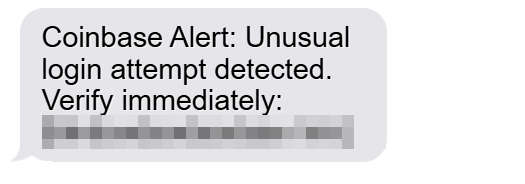
- “Coinbase Alert: Unusual login attempt detected. Verify immediately: [fake link]”
- “Coinbase Security: Your account has been temporarily locked. Click here to secure it.”
- “Coinbase: Suspicious activity detected. Please update your security settings.”
The goal of these messages is to trick you into clicking on a phishing link that leads to a fake Coinbase login page. Once you enter your credentials, the scammers immediately use them to access your real account, often withdrawing funds within minutes.
Because Coinbase is a trusted and well-known platform, scammers exploit its name to give their messages legitimacy. These phishing operations are often highly organized, using carefully crafted texts, cloned websites, and sometimes even automated phone call follow-ups to further convince victims.
Scam Overview
The Coinbase Alert Text Scam is a classic example of social engineering—a tactic where criminals manipulate people into giving up confidential information. These scams are not random; they’re strategically designed to exploit your trust and sense of urgency.
1. Why Coinbase Is a Target
Coinbase is one of the largest and most trusted cryptocurrency exchanges in the world. Millions of users rely on it for trading and storing digital assets like Bitcoin, Ethereum, and stablecoins. Because Coinbase is linked to people’s financial assets, the stakes are high. Scammers know that when users see a text message warning about “unusual activity” or “account suspension,” they’re more likely to panic and act quickly without double-checking the source.
2. How the Messages Look
The scam messages mimic real Coinbase alerts and often contain:
- A spoofed sender name like “Coinbase” or “Coinbase Security”
- A short, urgent warning message
- A fake link that looks similar to Coinbase’s official URL
- A call to action urging the recipient to act immediately
For example:
Coinbase Alert: Unusual login attempt detected. Verify your account immediately at [coinbase-secureauth.com].
This message may look legitimate, but the URL is not Coinbase’s official site.
3. Common Phrases Used in These Texts
- “Your Coinbase account has been restricted.”
- “Suspicious login detected. Please verify.”
- “Your account is under review due to unusual activity.”
- “Immediate verification required to prevent suspension.”
The language is urgent, brief, and alarming, which is exactly how scammers manipulate victims into reacting quickly.
4. How Phishing Sites Trick Victims
The link in the text typically leads to a clone of the Coinbase login page. These pages are often near-perfect copies, with the same logo, colors, and login fields. When users enter their email and password, the credentials are sent directly to the scammers, not Coinbase.
Many phishing sites also ask for:
- Two-factor authentication (2FA) codes
- Backup phrases or private keys (which Coinbase never asks for)
- Identity verification information like IDs or passports
5. Global Operation
Many Coinbase phishing campaigns are run by organized cybercriminal groups. They use automated SMS services to blast out thousands of messages simultaneously, often rotating through different fake domains to bypass spam filters and takedowns. Some domains only stay active for a few hours before being replaced.
These campaigns are not isolated. Similar phishing schemes target other platforms like Binance, Kraken, and PayPal, but Coinbase remains one of the most popular targets because of its wide user base and association with digital assets.
How the Coinbase Alert Text Scam Works
Phishing scams follow a calculated structure. The Coinbase Alert Text Scam typically unfolds in several predictable stages, making it possible to identify and stop the attack if you know what to look for.
Step 1: Sending the Fake Text Message
The first step involves the delivery of the phishing message to the victim. Scammers use:
- Bulk SMS services
- Spoofed sender IDs
- Disposable phone numbers
The message contains an alarming statement like “Your Coinbase account is locked” and a link to a phishing site. Some messages even contain a fake ticket number or security code to appear more authentic.
Step 2: Creating a False Sense of Urgency
These scams rely on emotion over logic. By warning about “unauthorized logins,” “account suspension,” or “security breaches,” scammers push the victim into acting immediately. This prevents the person from taking the time to verify whether the message is legitimate.
This is why most messages contain words like:
- “Immediate”
- “Urgent”
- “Act now”
- “Secure your account”
Step 3: Redirecting to a Fake Coinbase Site
When the victim clicks the link, they are redirected to a fraudulent website designed to mimic Coinbase’s official login portal. These sites usually:
- Use similar domain names like
coinbase-secureauth.comorcoinbaseverify.net - Have SSL certificates (https) to appear legitimate
- Include identical fonts, logos, and layouts
The presence of the lock icon in the browser bar (https) is not proof of legitimacy. Many phishing sites use SSL to build trust.
Step 4: Stealing Login Credentials
Once on the phishing page, the victim is asked to enter their:
- Email address
- Coinbase password
The credentials are then captured in real-time by the attackers.
Step 5: Requesting Two-Factor Authentication Codes
After entering credentials, the victim may see a fake 2FA prompt. If they input the code from their authenticator app or SMS, the attackers can immediately log into the real Coinbase account. Some phishing kits are sophisticated enough to forward these codes instantly to the scammer’s server.
This allows criminals to bypass Coinbase’s built-in security measures.
Step 6: Taking Over the Account
Once they have access, scammers typically:
- Change the account’s email or phone number
- Disable security features
- Withdraw funds to crypto wallets they control
- Transfer funds through mixers or privacy coins to cover their tracks
All of this can happen in minutes after the victim enters their information.
Step 7: Covering Their Tracks
To make recovery difficult, scammers may:
- Delete account recovery options
- Add new 2FA devices
- Initiate large crypto transfers
By the time the victim realizes what happened, the funds are usually gone and cannot be reversed because cryptocurrency transactions are irreversible.
What to Do If You Have Fallen Victim to the Coinbase Alert Text Scam
If you’ve already clicked on a fake link or entered your credentials, time is critical. You should act immediately to minimize damage and try to secure your account.
1. Change Your Coinbase Password Immediately
- Go to the official Coinbase website by typing the URL manually (not through a link in the message).
- Change your password to something unique and strong.
- If scammers haven’t yet logged in, this may prevent unauthorized access.
2. Revoke Unauthorized Sessions
- Log in to your Coinbase account and check active sessions.
- Revoke any unfamiliar logins or devices.
- Enable session alerts if they’re not already active.
3. Reset Two-Factor Authentication
- If scammers obtained your 2FA code, reset your 2FA method immediately.
- Consider switching to an authenticator app instead of SMS for stronger security.
- Remove any devices you don’t recognize.
4. Contact Coinbase Support
- Submit a support ticket through the official Coinbase Help Center.
- Clearly state that your account may have been compromised.
- Provide any details you have, including the phishing URL or text message content.
Coinbase can temporarily lock your account to prevent further damage while they investigate.
5. Report the Phishing Site
- Forward the phishing message to Coinbase at phish@coinbase.com.
- You can also report phishing websites to:
- Google Safe Browsing
- Anti-Phishing Working Group (APWG)
- Your mobile carrier’s spam reporting number (e.g., 7726 in the US)
Reporting the scam helps protect other users from falling victim.
6. Contact Your Mobile Carrier (Optional)
If the scammers spoofed your number or your SIM is at risk, contact your carrier to:
- Lock your SIM card
- Enable additional security measures
- Prevent SIM swapping
7. Monitor Your Email and Bank Accounts
Phishing attacks often involve multiple platforms. Once scammers have your Coinbase credentials, they might try:
- Accessing your email account
- Resetting passwords to other services
- Launching further attacks
Enable 2FA on all important accounts and monitor for suspicious activity.
8. Consider a Full Security Review
If you entered sensitive information like backup phrases or ID documents, your risk is higher. In this case:
- Contact Coinbase to flag your account as compromised
- Replace any exposed information where possible
- Consider hardware security keys for maximum protection
9. File a Complaint with Relevant Authorities
You can report the scam to:
- Federal Trade Commission (FTC) [in the U.S.]
- Internet Crime Complaint Center (IC3)
- Your local cybercrime unit or consumer protection agency
While crypto scams are often hard to trace, reporting increases the chances of the phishing network being disrupted.
10. Stay Alert for Follow-Up Scams
Once someone falls victim, their information may be sold or shared on scammer networks. Expect potential follow-up attempts like:
- Fake “recovery” services offering to get your funds back
- Impersonators pretending to be Coinbase support
- Additional phishing messages
Do not engage with anyone promising guaranteed recovery for a fee.
How to Protect Yourself from Coinbase Alert Text Scams
Preventing phishing scams requires awareness and security hygiene. These steps can help you avoid falling victim in the first place.
1. Know What Coinbase Will Never Do
Coinbase will never:
- Ask for your password or 2FA code in a text message or email
- Ask you to click a link to “verify” suspicious activity
- Threaten to suspend your account unless you act immediately
Legitimate security alerts from Coinbase usually come via email, not text, and direct you to log in manually—not through embedded links.
2. Always Check the URL
Before entering any credentials:
- Look at the domain name carefully. Official Coinbase URL:
https://www.coinbase.com - Be cautious of lookalike domains like:
coinbase-authentication.comcoinbaseverify.netcoinbase-alert.com
- Don’t trust links sent through SMS.
3. Type URLs Manually
Instead of clicking links in messages:
- Open your browser and type
coinbase.commanually. - Access your account through the official Coinbase app.
- Bookmark the correct login page.
4. Use Hardware Security Keys
Hardware security keys (such as YubiKey) offer an extra layer of protection that makes phishing nearly impossible. Even if scammers obtain your password and 2FA code, they can’t access your account without the physical key.
5. Enable Strong 2FA
Use an authenticator app like:
- Google Authenticator
- Authy
- Microsoft Authenticator
Avoid using SMS-based 2FA, which can be intercepted through SIM swapping or phishing.
6. Be Skeptical of Urgent Messages
If a message says:
- “Immediate action required”
- “Your account will be suspended”
- “Login attempt detected”
Take a step back. Scammers rely on panic. Log in separately through the official app or website to verify whether there’s really a problem.
7. Report Suspicious Messages
- Forward phishing texts to Coinbase at phish@coinbase.com
- Report spam to your mobile carrier
- Block the sender
8. Use a Security Extension or Anti-Phishing Tool
Browser extensions and security tools like Malwarebytes Browser Guard or AdGuard can detect and block known phishing domains, providing extra protection.
9. Keep Your Devices Secure
- Update your phone and browser regularly
- Avoid installing unknown apps
- Use biometric or PIN protection on your device
10. Educate Yourself and Others
Phishing scams evolve constantly. The best defense is staying informed and helping others recognize the signs of a scam. Many phishing victims could have avoided losses with basic scam awareness.
Common Fake URLs Used in Coinbase Alert Text Scams
While scammers frequently rotate domains, some common patterns have been reported:
coinbase-secureauth.comcoinbaselogin-verification.netcoinbase-alert.iocb-alertverify.comcoinbase-helpdesk.support
These domains may look professional, but they are not owned by Coinbase. Always verify domain ownership and check for exact spelling.
Examples of Scam Text Messages
To help you spot these scams faster, here are real-world examples of Coinbase phishing texts:
Coinbase Alert: Unusual login attempt detected. Verify your account immediately at
coinbase-secureauth.com.
Coinbase Security: Your account has been locked due to suspicious activity. Click here to restore access:
coinbase-alert.io.
Coinbase Account Notification: “Your account will be suspended in 24 hours if not verified. Log in here to keep access:
cb-verifywallet.net.”
If you ever receive a text like this, do not click the link. Log in directly through the official Coinbase website or mobile app.
Why These Scams Are So Effective
Coinbase alert text scams are successful because they combine psychological manipulation with technical deception.
1. They Exploit Fear and Urgency
Messages that warn about unauthorized access or suspension create a fight-or-flight response, pushing victims to act quickly.
2. They Look Professional
The phishing websites often use:
- Identical branding
- Valid SSL certificates
- Realistic login flows
Many victims believe they are on the real Coinbase site.
3. They Bypass Basic Security Measures
Because Coinbase relies on email and password logins with 2FA, phishing sites that capture both can instantly compromise accounts.
4. They Spread Quickly
SMS phishing (smishing) can reach thousands of users in seconds, making these campaigns highly scalable for scammers.
How to Report Coinbase Phishing Scams
If you receive a suspicious text:
- Forward the message to Coinbase at
phish@coinbase.com - Report the scam to your mobile carrier (e.g., 7726 in the U.S.)
- File a report with:
Include:
- The full message
- Any links
- Screenshots if possible
The more data Coinbase and regulators have, the easier it is to identify and dismantle phishing networks.
Red Flags That a Coinbase Alert Text Is a Scam
- The text contains grammar or spelling mistakes
- The domain looks similar but not identical to coinbase.com
- It includes urgent language or threats
- It arrives unexpectedly
- It asks you to click a link or share sensitive information
- It comes from a suspicious number or alphanumeric sender
Legitimate Coinbase communications will not pressure you or use scare tactics.
Frequently Asked Questions (FAQ)
Is Coinbase sending me text messages about suspicious activity?
Coinbase does not typically send security alerts via SMS. They communicate through the app or official email. If you receive an SMS claiming to be from Coinbase, assume it’s phishing unless verified through the official site.
How can I verify if a Coinbase message is real?
Go to https://www.coinbase.com by typing the URL manually. Log in to your account and check your security notifications. Do not click on any links in the message.
What happens if I entered my Coinbase login on a fake site?
Immediately change your password, reset your 2FA, and contact Coinbase support. If scammers have not already accessed your account, this may prevent losses.
Can Coinbase recover stolen crypto?
Unfortunately, cryptocurrency transactions are irreversible. If scammers have already withdrawn funds, Coinbase cannot reverse the transfer. Reporting the scam can help track the criminals but does not guarantee recovery.
Should I trust a message that includes a legitimate-looking link?
No. Scammers can create convincing fake domains with SSL certificates. Always type the URL manually or use a bookmark.
What’s the best way to protect my Coinbase account?
- Use hardware security keys
- Enable 2FA with an authenticator app
- Never click links in texts
- Regularly review your security settings
Can I report Coinbase phishing to someone?
Yes. Forward the message to phish@coinbase.com and report it to your mobile carrier and cybercrime authorities.
Are Coinbase phishing scams common?
Yes. Coinbase alert text scams have become increasingly common as crypto adoption grows. They’re part of a larger global phishing ecosystem targeting major exchanges.
The Bottom Line
The Coinbase Alert Text Scam is a sophisticated phishing scheme designed to steal your account credentials and empty your cryptocurrency wallet. By sending fake SMS messages that
appear to come from Coinbase, scammers trick users into clicking malicious links and entering sensitive information on fake login pages.
Recognizing the warning signs—such as suspicious URLs, urgent language, and unexpected alerts—is the most effective way to protect yourself. If you ever receive a message claiming there’s a problem with your Coinbase account, do not click the link. Instead, log in directly through the official website or app to verify your account status.
If you’ve already fallen victim, act fast: change your credentials, contact Coinbase support, and report the phishing site. While recovering stolen crypto can be difficult, taking immediate steps can prevent further damage.
Staying informed and cautious is the best defense. As phishing campaigns become more advanced, users must stay a step ahead. By understanding how these scams work and spreading awareness, you can protect yourself—and help protect the crypto community—from this growing threat.








