

If you’ve recently received a strange text message from “Coinbase” about a withdrawal code, you’re not alone. The Coinbase withdrawal scam text is making the rounds again — and it’s more deceptive than ever. Scammers have started using messages that look eerily authentic, complete with fake verification codes, reference numbers, and even phone numbers that seem to connect to real customer support lines.
I got one of these messages myself this morning, and out of curiosity (and a little bit of mischief), I decided to call the number to see what would happen. Spoiler alert: it was 100% a scam.
In this detailed guide, we’ll break down how the Coinbase withdrawal scam text works, why it’s so effective, what happens when you call or respond, and most importantly, what you should do if you’ve fallen victim.
This isn’t just a phishing text — it’s a tech support scam, a social engineering trap, and a financial theft attempt rolled into one.
Scam Overview
A new twist on an old trick
The Coinbase withdrawal scam text combines the oldest scam tactics — fear, urgency, and authority — with modern crypto culture. Coinbase is one of the most popular cryptocurrency exchanges in the world, with over 100 million verified users. Scammers know this, which makes it an ideal disguise for fraud.
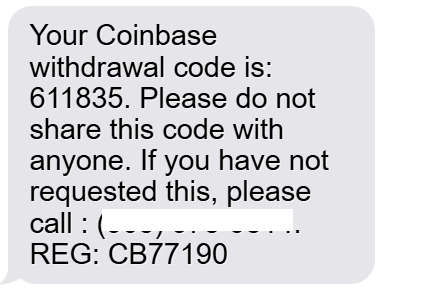
The text message you might receive usually looks like this:
“Your Coinbase withdrawal code is: 611835. Please do not share this code with anyone. If you have not requested this, please call : (908) 975-xxxx. REG: CB77190.”
At first glance, it seems like a genuine security alert. It includes:
- A six-digit withdrawal code,
- A warning not to share it,
- A fake support phone number,
- And a “registration” code or “reference number.”
It’s structured in a way that mimics Coinbase’s real two-factor authentication (2FA) or security notifications, which usually include similar phrasing. However, there’s one huge difference — Coinbase doesn’t send text messages with verification codes unless you are actively logging in or authorizing a transaction yourself.
That one line — “If you have not requested this, please call (908) 975-xxxx” — is the bait.
This is how scammers lure victims into making contact. Once you call the number, you’re not talking to Coinbase. You’re speaking with a fraudulent call center that impersonates Coinbase’s security or fraud department.
Why this scam works so well
The Coinbase withdrawal scam works because it preys on fear and confusion. Most users panic when they think their crypto might be leaving their account without permission. The instinct is to act fast — and that’s exactly what scammers exploit.
Here’s what makes the scam so effective:
- It looks real.
The wording matches Coinbase’s tone and layout for genuine notifications. - It creates urgency.
The message implies that funds are being withdrawn right now and you need to act immediately. - It offers a solution.
The fake support number gives users a direct way to “fix” the issue, lowering skepticism. - It plays on authority.
By using Coinbase’s name and a “REG: CB77190” code, the message feels official. - It combines multiple scam tactics.
What starts as a phishing text can evolve into a remote-access or refund scam once the victim calls.
What happens if you call the number
When you dial the number, you’ll reach a fake Coinbase tech support representative. The scammer will sound professional, using terms like “security hold,” “account verification,” or “suspicious login attempt.”
They’ll claim that your Coinbase account was compromised and needs to be “secured immediately.” Then they’ll guide you through a series of steps designed to give them control over your device or accounts.
Typically, the scammer will:
- Ask you to download remote-access software like AnyDesk, TeamViewer, or UltraViewer.
- Pretend to “check your account” while actually exploring your computer or phone for sensitive files.
- Claim they need to transfer your crypto to a “safe wallet” while actually sending it to themselves.
- Request that you verify your identity or account by giving them personal details, login credentials, or even 2FA codes.
Some scammers go further and say they “accidentally sent too much money” and need you to refund part of it by purchasing gift cards or wiring funds.
Others will direct you to a fake “Coinbase refund page,” where you unknowingly enter your login credentials into a cloned site.
The red flags
Even if the message or the voice on the phone sounds convincing, these are guaranteed signs of a scam:
- Coinbase never calls or texts users directly about suspicious activity.
- No real support representative will ever ask for remote access.
- You will never be asked to move funds for security purposes.
- Gift cards are never part of legitimate support procedures.
- The phone numbers used are not official Coinbase support lines.
If you received this message, delete it immediately. Do not call, click, or reply.
How The Scam Works
Let’s take a closer look at exactly how the Coinbase withdrawal scam text unfolds. Understanding these steps will help you recognize it instantly — and protect yourself or others from becoming victims.
Step 1: The phishing text arrives
It all begins with a text message sent from a random number, often spoofed to look like it’s from Coinbase or a U.S. area code.
The message usually includes:
- A fake “withdrawal code”
- A reference or registration number
- An urgent warning not to share the code
- A phone number to call if you didn’t request the withdrawal
It’s designed to look like a legitimate 2FA verification message.
For example:
“Your Coinbase withdrawal code is 739402. Do not share this code. If you have not requested this transaction, call (888) 376-9007 immediately. REG: CB98172.”
Scammers send thousands of these messages using SMS spamming software or bot networks, often targeting phone numbers leaked in old data breaches.
Step 2: Victim calls the fake number
Panicked and confused, the victim calls the number listed in the message.
On the other end, a calm, professional voice answers:
“Thank you for calling Coinbase Support. This is Alex from the Fraud Prevention Department. How can I assist you today?”
The goal is to establish authority and build trust immediately.
They’ll ask you to confirm your name, phone number, or email — information that might seem harmless but is enough to start profiling you.
Step 3: The “verification” and fake security talk
The scammer now switches to fear-based persuasion. They’ll claim there has been “unauthorized withdrawal activity” on your Coinbase account.
They’ll say something like:
“Someone just tried to withdraw $3,000 worth of Bitcoin from your wallet in Texas. We’ve temporarily frozen your account to protect your funds.”
To make it more convincing, they might even “read out” fake transaction IDs or reference codes that sound official.
They then insist you need to “verify your identity” or “confirm account ownership” before they can stop the transfer.
Step 4: The remote access trap
This is the critical moment when the scam escalates.
The fake support agent will say:
“To help you secure your account, I’ll need you to download a Coinbase Security Tool. It’s free and takes just two minutes.”
They’ll direct you to install AnyDesk, TeamViewer, UltraViewer, or Zoho Assist.
What you’re really doing is granting them full remote access to your device.
Once connected, they can:
- Access your saved passwords or browser autofill data.
- Open your Coinbase account and transfer crypto.
- Browse your files or bank documents.
- Install malware or keyloggers for ongoing theft.
Step 5: The fake refund or “safe wallet” move
Next, they’ll pretend to “move your crypto to a secure temporary wallet.”
“We’re transferring your funds to a Coinbase Security Vault for protection. You’ll see the balance restored in 24 hours.”
In reality, they’re moving your assets into their own wallets — and once crypto leaves your wallet, there’s no reversing it.
Alternatively, some scammers claim they accidentally overpaid you during a test transfer and ask you to refund the difference using gift cards or bank transfers.
Step 6: The final squeeze — gift cards and personal data
If the victim still has money left, scammers might push for one final score.
They’ll claim there are verification or recovery fees, or that your refund requires “activation cards.”
They’ll tell you to buy Apple Gift Cards, Google Play Cards, or Steam Wallet codes and read the numbers over the phone.
These codes are instantly resold or converted into cryptocurrency.
Step 7: Disappearing act
Once they’ve drained your accounts or collected what they can, the scammers vanish.
The phone number stops working, the remote session is disconnected, and your “Coinbase support ticket” disappears.
You’re left with lost funds, compromised devices, and potentially identity theft — all from one text message that looked legitimate.
What To Do If You Have Fallen Victim to the Coinbase Withdrawal Scam
If you’ve called the number, shared information, installed remote software, or sent funds, time is critical. Here’s exactly what you should do, step by step.
1. Disconnect and remove remote access tools
If you downloaded AnyDesk, TeamViewer, or any other remote software at the scammer’s request, uninstall it immediately.
Then, revoke permissions and end all active sessions:
- Disconnect your device from the internet.
- Open the remote access app and check for any active sessions.
- End them manually.
- Uninstall the software completely.
If you’re not sure, factory-reset your device or run a full malware scan using trusted tools like Malwarebytes or Microsoft Defender Offline.
2. Change your Coinbase password immediately
Log in directly from coinbase.com or the official Coinbase app, not from any links in messages or emails.
Change your password and enable two-factor authentication (2FA) using an authenticator app like Google Authenticator or Authy — not SMS.
Then, check your account activity log for unauthorized logins or withdrawals.
If you see anything suspicious, report it to Coinbase Support through the official Help page: https://help.coinbase.com
3. Report the phone number and messag
Report the scam to:
- Coinbase Security Team via security@coinbase.com
- FTC (Federal Trade Commission) at reportfraud.ftc.gov
- FCC (Federal Communications Commission) at fcc.gov/complaints
- Your mobile carrier (forward the text to 7726, which spells “SPAM”)
If you’re outside the U.S., report to your national cybercrime division or consumer protection agency.
4. Contact your bank or card provider
If you shared banking details or made any payments (including buying gift cards), notify your bank immediately.
Ask them to:
- Freeze your accounts or flag unusual transactions.
- Reverse any pending transfers if possible.
- Issue new cards if necessary.
Provide them with screenshots of the scam text and call logs.
5. Check for identity theft
If you gave out personal details like your name, address, date of birth, or ID number, assume that information may be used for identity theft.
Take these steps:
- Place a fraud alert with one of the credit bureaus (Experian, Equifax, or TransUnion).
- Monitor your credit report for new accounts you didn’t open.
- Use an identity monitoring service or freeze your credit if available.
6. Secure your email and other linked accounts
Since Coinbase logins often rely on email verification, scammers who access your email can reset your Coinbase password.
Immediately:
- Change your email password.
- Enable 2FA on your email account.
- Check for unauthorized forwarding rules or connected devices.
If your email was accessed, consider creating a new secure email for your financial accounts.
7. File a police or cybercrime report
Even if the funds are irretrievable, filing an official report helps authorities track these operations.
Include:
- The full text message.
- Phone numbers involved.
- Any payment receipts or transaction hashes.
- The names used by scammers.
In the U.S., you can also file with:
- IC3.gov (Internet Crime Complaint Center)
- Your state attorney general’s office
In other countries, report to local police or national fraud reporting systems.
8. Warn others
Share your experience publicly — on social media, crypto communities, or scam-reporting sites.
The more people are aware of how this scam works, the fewer victims it will claim.
9. Learn how to spot future scams
Protect yourself from future scams by following these best practices:
- Coinbase will never ask for remote access.
- Always type coinbase.com manually in your browser.
- Never trust phone numbers in unsolicited messages.
- Don’t share codes, passwords, or wallet keys.
- Use hardware wallets for large crypto holdings.
10. Consider legal and cybersecurity assistance
If your losses are significant, consult a cybercrime attorney or blockchain forensics expert who specializes in crypto recovery.
While most crypto transfers are irreversible, experts can trace transactions to wallets and exchanges — sometimes helping freeze assets or identify perpetrators.
The Bottom Line
The Coinbase withdrawal scam text is one of the most sophisticated phishing campaigns currently circulating. It combines social engineering, remote access fraud, and identity theft into a single, convincing package.
The message looks real because it mirrors Coinbase’s actual 2FA alerts — but the number it gives you is fake, and the people on the other end are criminals.
If you receive one of these texts:
- Do not call the number.
- Do not click any links.
- Delete the message immediately.
And if you’ve already interacted with it, take action fast — secure your accounts, report it, and warn others.
Remember: Coinbase will never send you a text asking you to confirm a withdrawal you didn’t make, nor will they ever ask you to install software or share access to your device.
Stay skeptical, stay informed, and you’ll stay safe.
Frequently Asked Questions
1. Is Coinbase really sending withdrawal code text messages?
No. Coinbase does not send unsolicited withdrawal code text messages.
You will only receive a verification code or withdrawal confirmation message if you have initiated a transaction or sign-in on your Coinbase account yourself.
If you get a text that says something like:
“Your Coinbase withdrawal code is: 611835. If you did not request this, call (908) 975-xxxx.”
…it’s 100% a scam. Coinbase never includes phone numbers in their texts and will never ask you to call or verify unexpected withdrawals. All real Coinbase security alerts are sent from their official email domain (@coinbase.com) or appear inside your Coinbase dashboard or mobile app.
2. What should I do if I received a fake Coinbase withdrawal text
If you received the message but didn’t interact with it, you’re safe — but you should still take precautions:
- Do not click links or call any phone numbers in the text.
- Take a screenshot of the message for reporting purposes.
- Delete the message to prevent accidental clicks.
- Report it to Coinbase at security@coinbase.com or help.coinbase.com.
- Forward the text to 7726 (SPAM) to alert your carrier.
This helps Coinbase and telecom providers block similar messages for other users.
3. What happens if I call the number in the scam text?
When you call the number, you’ll be connected to a fraudulent call center, not Coinbase.
These scammers are trained to sound professional and convincing. They’ll claim your account was hacked or that someone is trying to withdraw your funds.
From there, they’ll try to:
- Get you to install remote-access apps like AnyDesk or TeamViewer.
- Ask for your login credentials, 2FA codes, or email access.
- Request that you transfer crypto to a “safe wallet” (which actually belongs to them).
- Demand gift cards or refund verification fees.
If you’ve already called them, hang up immediately, block the number, and follow the recovery steps outlined earlier — especially uninstalling remote-access tools and changing your passwords.
4. Why does the scam text include a “withdrawal code” or “REG number”?
That’s part of the psychological manipulation. Scammers know that people trust messages that look structured and official. By including elements like:
- “Withdrawal code: 611835”
- “REG: CB77190”
- “Security Notice” or “Fraud Department” references
…the message feels more authentic. It mimics the structure of legitimate Coinbase notifications while hiding the fact that it’s fraudulent.
The “withdrawal code” doesn’t do anything — it’s a fake number designed to confuse you into thinking the withdrawal is real. And the “REG number” is just a random tag meant to look like a case ID or transaction reference.
5. How do I verify if a Coinbase alert or message is real?
Here’s how to confirm whether a Coinbase message is legitimate:
- Go directly to coinbase.com (not through links in the message).
- Log into your account and check your notifications or recent activity.
- Check the sender’s address or phone number. Real Coinbase emails always end with
@coinbase.com. - Never call numbers listed in a message. Use the support page on the official Coinbase website.
- Check the Coinbase Status page (status.coinbase.com) to see if there’s a known issue or notice.
If the message doesn’t appear in your Coinbase account, it’s a scam.
6. I entered my Coinbase login details on a fake page. What should I do?
If you entered your email, password, or 2FA code on a phishing website, act immediately:
- Go to coinbase.com/password_reset and reset your password.
- Enable two-factor authentication (2FA) via an authenticator app like Google Authenticator or Authy.
- Check your account login activity for unknown sessions or devices.
- Revoke any API connections you don’t recognize (in Account Settings → API).
- Report the incident to Coinbase through their Security Center: help.coinbase.com.
If any funds were stolen, Coinbase’s team may investigate and track wallet activity, but remember that crypto transactions are irreversible.
7. What if I gave the scammer remote access to my computer or phone?
If you installed AnyDesk, TeamViewer, or any other software at the scammer’s request, they may still have remote access. Here’s what to do:
- Disconnect your device from the internet immediately.
- Uninstall the remote access program completely.
- End all active sessions inside the app (important!).
- Scan your device for malware using a trusted security tool like Malwarebytes, Microsoft Defender Offline, or Bitdefender.
- Change all your passwords from a separate, clean device.
- Contact your bank if you logged into any financial websites while the scammer was connected.
Never reinstall or open those tools again unless you initiated the connection yourself for legitimate tech support.
8. Can scammers steal my crypto if I didn’t give them my password?
In most cases, no, they can’t steal your crypto unless you shared your login credentials, 2FA codes, or granted remote access.
However, if you shared your email, phone number, or personal details, scammers could use that information in future phishing attempts.
They might send targeted emails or texts that seem personalized (“Hello John, your Coinbase account ending in .gmail.com was flagged for withdrawal”).
Treat every unsolicited message or call as suspicious, even if it includes familiar details.
9. How can I report a fake Coinbase withdrawal text?
You can report it through multiple channels to help authorities block the campaign:
- To Coinbase: security@coinbase.com
- To the FTC (U.S.): reportfraud.ftc.gov
- To the FCC: www.fcc.gov/complaints
- To your carrier: Forward the text to 7726 (SPAM)
- To Google: If the scam used a fake website, report it at safebrowsing.google.com/safebrowsing/report_phish
Include screenshots, the full text, and any phone numbers or URLs. This helps investigators trace and block the scam networks responsible.
10. How can I protect myself from future Coinbase scams?
Here are essential security habits every crypto user should follow:
- Bookmark official websites (e.g., coinbase.com) and never use links in texts.
- Use an authenticator app, not SMS, for two-factor authentication.
- Store crypto in a hardware wallet (Ledger, Trezor) instead of keeping large balances on exchanges.
- Keep your devices updated and run regular malware scans.
- Monitor your accounts for unfamiliar logins or withdrawals.
- Learn to identify spoofed domains, like “coinbase-login.com” or “co1nbase.support.”
- Be skeptical of urgency. Any message saying “act now” or “funds at risk” is likely a scam.
Staying cautious and verifying through official channels is your best defense.








