

Bloxdrop.com has been appearing everywhere online, from in-game Roblox chat messages to YouTube shorts, TikTok promotions, and Discord mentions. It markets itself as a platform where users can earn or win Robux almost instantly through minigames, paid packs, reward offers, and coins. The promise is simple and attractive. Play a game, open a case, or complete an offer and receive Robux faster than through official Roblox options.
But the more a platform advertises quick rewards, especially to younger players, the more important it becomes to examine how it works, what users report, and what risks may be involved. Many Roblox players have started questioning whether Bloxdrop is safe, reliable, or potentially misleading. This article explores everything from domain transparency to payout behavior, user complaints, and game mechanics that resemble chance based systems.
By the end, you will have a clear understanding of what Bloxdrop offers, what warning signs users should notice, and why caution is strongly advised before using any unofficial Robux reward site.
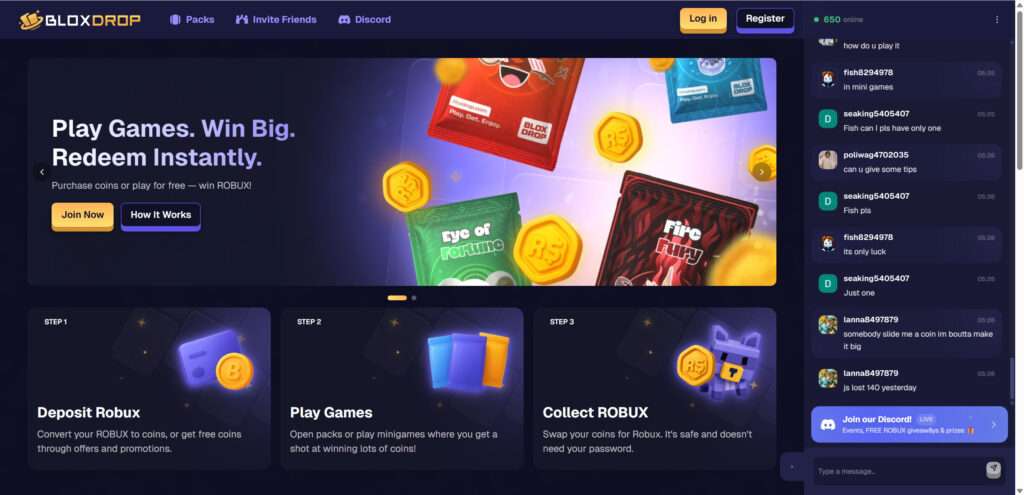
Overview
Bloxdrop is not a typical reward platform. It operates in a space that attracts very large numbers of young players who want Robux quickly and without going through official channels. While some users claim to receive payouts successfully, many others describe difficulties that raise concerns about reliability, transparency, and long term safety.
Aggressive Promotion Across Roblox Games
One of the first major concerns is Bloxdrop’s method of promotion. Players report that automated bots appear inside Roblox games, sending messages that advertise the website, display promo codes, or claim someone just redeemed a reward. These bots quickly leave the server before they can be reported.
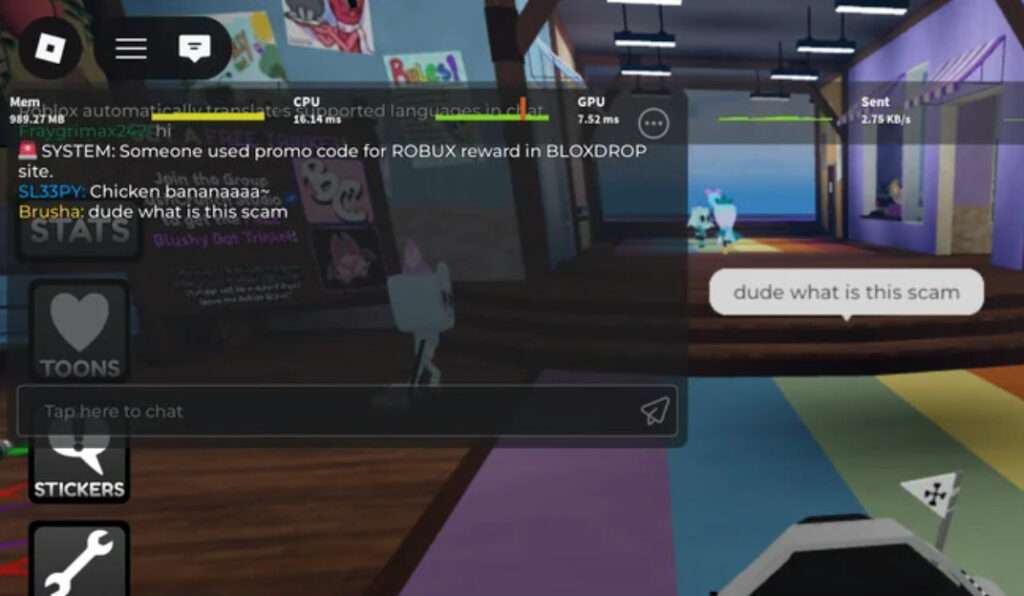
This type of promotion pattern creates several risks:
- It exposes younger players to external websites without supervision
- It encourages impulsive behavior by promising quick rewards
- It bypasses normal advertising rules within the Roblox ecosystem
- It suggests heavy reliance on scripted automation rather than organic growth
Most legitimate digital services do not need to flood game chats with automated messages. When a platform repeatedly uses in-game bots to reach users, it signals that the operators prioritize rapid traffic growth over respectful marketing. From a safety perspective, this is a red flag.
Trustpilot Activity That Appears Unbalanced
Bloxdrop currently shows a high Trustpilot score. However, the pattern of reviews raises questions. The majority of positive reviews are extremely short, generic, and similar to each other. These short reviews often sound almost identical, with vague praise and no specific details.
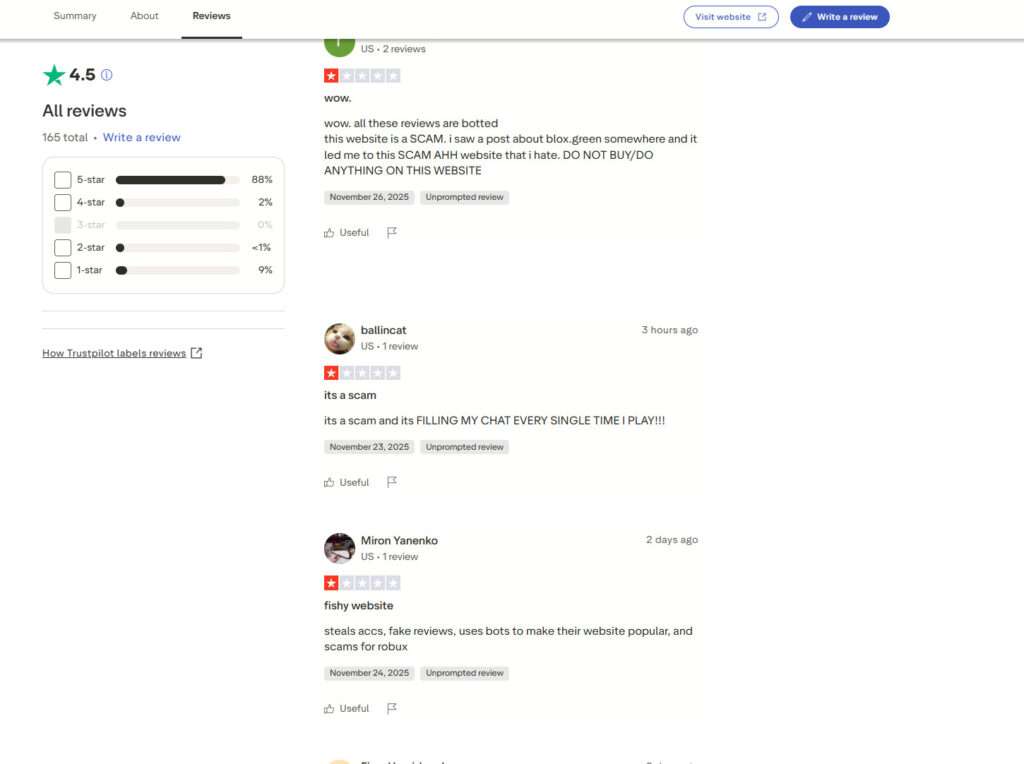
Examples of typical five star reviews include:
- Very good site
- Fast payout
- It works great
- Got Robux instantly
Meanwhile, negative reviews tend to be much longer, more detailed, and more consistent. These reports mention issues such as:
- Delayed or missing payouts
- Problems with deposits
- Difficulty getting support responses
- In-game spam messages promoting the site
- Suspicious chat activity within the platform
- Concerns about the fairness of case opening systems
These contrasting review styles create an imbalance that careful readers should pay attention to. A healthy review ecosystem always contains a mix of detailed positive and negative experiences. When positive reviews feel repetitive while negative reviews are rich in detail, it suggests the possibility of boosted reputation rather than organic satisfaction.
In-Site Chat Activity That Appears Automated
Bloxdrop features a live chat feed on the right side of the website, showing hundreds of users talking at any given moment. However, many messages follow repetitive patterns such as:
- Asking for coins
- Claiming they won large amounts
- Talking about doubling someone’s coin
- Sharing simplistic reactions
The speed and style of these messages resemble automated scripts rather than normal user conversations. This type of artificial social proof is commonly used by high pressure reward platforms to create an illusion of activity and success, even when real user interactions might be minimal.
The presence of automated chat behavior does not automatically prove wrongdoing, but it does raise concerns about transparency and trustworthiness.
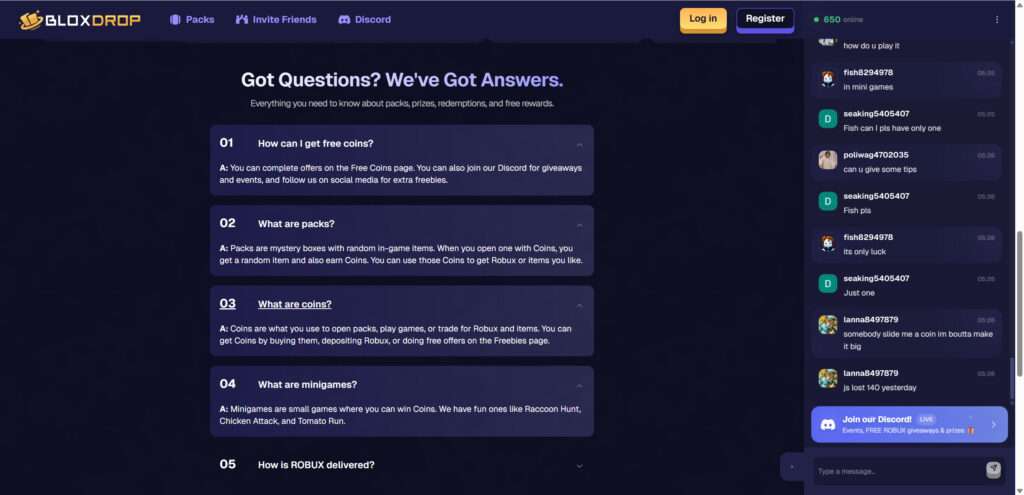
A Gambling Style System Targeted at Younger Users
The core of Bloxdrop revolves around opening packs, spinning cases, and participating in chance based minigames. These mechanics heavily resemble gambling. Players spend coins to open cases and the result is determined by internal algorithms that users cannot verify.
Important safety concerns include:
- Younger players may develop gambling tendencies
- Users may spend more coins than intended
- Odds are not regulated or publicly disclosed
- Rare wins can psychologically encourage further spending
These types of systems are not inherently illegal, but they require careful examination when they involve younger audiences who may not understand the risks.
Reports of Payout Problems
While some users state that they received Robux successfully, many others report unresolved issues. These include:
- Pending withdrawals that stay stuck
- Missing Robux after completing offers
- Low support responsiveness
- Repeated verification requests
- Unclear payout timelines
A platform can still appear active and legitimate while failing to deliver consistent payouts. Mixed user experiences are one of the strongest reasons people urge caution.
Why Players Should Be Careful
Bloxdrop offers attractive promises and uses polished visuals to look trustworthy. But a combination of:
- Automated promotion
- Repetitive positive reviews
- Complex withdrawal requirements
- Chance based mechanics
- New domain age
- Lack of company transparency
- Repeated user complaints
creates a situation where it is wise to approach the platform cautiously. This does not mean the site is entirely nonfunctional, but it does mean that users should protect themselves and carefully consider the risks before depositing Robux or linking accounts.
How the Operation Works
This section provides a detailed, step by step breakdown of how the Bloxdrop system operates, why it draws in so many users, and how the platform benefits even when it pays out a small percentage of players.
Step 1: Attraction Through Bots, Ads, and Social Media
Bloxdrop’s first objective is to get users onto the site. It does this using several aggressive techniques:
- Bots inside Roblox games
- Sponsored influencer videos
- TikTok clips showing fake winnings
- Discord promotional messages
- YouTube shorts showing instant Robux withdrawals
Most Roblox players encounter Bloxdrop involuntarily when chat bots flood game lobbies with promo codes or discount offers. This is not standard marketing. It is closer to spam networking, which is commonly used by scam websites.
Step 2: The Initial Signup Process
Once a user arrives on the site, the design and atmosphere are intentionally friendly, colorful, and familiar. It looks like a typical gaming platform. This reduces suspicion. The signup process usually requires:
- Linking your Roblox username
- Creating an account on Bloxdrop
- Agreeing to the terms
The site does not normally request your Roblox password, but some versions of these platforms in the past have been known to run phishing variations. Even without requesting a password, linking your username is enough for them to track participation and direct payouts if needed.
Step 3: The Introduction to Coins and Packs
The platform uses its own virtual currency, called coins. To get coins, users can:
- Deposit Robux
- Deposit money with card or crypto
- Complete offers
- Enter promo codes
- Participate in in-site minigames
Once users earn coins, they can spend them on:
- Packs
- Cases
- Minigames
- Chance based drops
All of these function similarly to gambling mechanics. You pay coins to open a case, and the result is determined by internal programmed odds. These odds are not certified by any regulatory authority, which means the site can freely manipulate outcomes.
Step 4: The Illusion of Frequent Wins
Sites like Bloxdrop rely on a psychological effect that makes players believe they are winning frequently. This is accomplished by:
- Showing win animations
- Highlighting big wins in the chat
- Allowing small early wins
- Offering bonus coins for the first deposit
However, the algorithm is built to favor the platform long term. Players may win a few times at the beginning, but once they spend real Robux or money, the odds typically decrease. This is similar to casino behavior where early wins encourage more investment.
Step 5: Withdrawal Requirements
When users want to withdraw Robux, they encounter the next step of the system. Withdrawals require:
- Completing promo tasks
- Reaching a certain coin balance
- Waiting periods
- Completing verification steps
- Entering your Roblox username
- Joining a specific gamepass group
These additional steps create friction and reduce the number of users who successfully withdraw. In many cases, users report that withdrawals:
- Stay pending
- Require extra fees
- Are denied due to unspecified reasons
- Never arrive
Some users do receive payouts. This is intentional. Providing a small percentage of successful withdrawals keeps the site looking legitimate and encourages users to submit positive reviews.
Step 6: The Economic Model Behind the Platform
Reward sites tend to operate using three main profit channels:
1. Affiliate reward offers
The site earns money when users complete tasks from advertisers. These tasks generate revenue for Bloxdrop. The user, however, may not receive the promised Robux because the site keeps most of the revenue.
2. Case opening losses
Players often spend more money on coins than they receive in return. The gambling system is designed to favor the house.
3. Deposits
Some users deposit Robux directly into the system. These deposits can be used to fund small payouts for others, creating a cycle where a few are paid to make the platform look legitimate.
Step 7: Why the Website Appears Legit at First
The website looks legitimate for several reasons:
- Professional graphic design
- Well structured interface
- Fast loading speeds
- Paid advertisements
- A Discord community
- A high Trustpilot rating
- Visible payouts in chat
- Streamer promotions
These layers of legitimacy help hide the risks. However, many scam operations today invest in polished design. Professional visuals do not guarantee trustworthiness.
Step 8: The Real Secret of the System
The main reason Bloxdrop is controversial is that it does not need to scam every user. It only needs to:
- Pay a small portion of users
- Create the illusion of large consistent payouts
- Attract massive traffic from Roblox players
- Profit from deposits and affiliate tasks
- Use a percentage of revenue to pay a few winners
This hybrid model allows the site to continue operating without being considered fully fake. It is not a total scam, but it is not a transparent, regulated, or reliable platform either.
Step 9: Why Many Users Lose More Than They Gain
Most users do not receive meaningful payouts. This happens because:
- Odds are unfavorable
- Withdrawals fail
- Tasks do not credit properly
- Verification loops delay payments
- The system wants users to deposit repeatedly
Players end up spending more time and money than they gain, which is the hallmark of a high risk reward operation.
What To Do If You Encounter Problems
If you attempted to use Bloxdrop and experienced missing payouts, delayed withdrawals, suspicious activity, or account problems, take the following steps to protect your Roblox account and financial information.
1. Strengthen Your Roblox Account Security
Even if the website never requested your password, it is wise to secure your account.
Take the following actions:
- Change your Roblox password
- Enable two factor authentication
- Review your account’s authorized devices
- Check your purchase history
This prevents any potential risk of unauthorized access.
2. Stop Interacting With the Platform
If you notice any warning signs such as:
- Pending withdrawals
- Missing Robux
- Repeated verification loops
- Requests to deposit more
- Confusing payout instructions
Discontinue all activity immediately.
3. Contact Your Bank or Payment Provider
If you paid using a card or payment app, contact your financial institution.
Explain that:
- You paid for digital goods
- The goods were not delivered
- You would like to dispute the transaction
Chargebacks for non delivered digital goods are often successful.
4. Warn Friends or Children
Many affected users are younger players.
If a child in your household used the site:
- Explain how these sites work
- Encourage them not to trust quick reward promises
- Warn their friends
- Prevent them from linking accounts to unofficial platforms
Education is one of the most important protection methods.
5. Report In-Game Spam
Roblox does not approve third party reward platforms.
If you see Bloxdrop messages inside games:
- Report the message
- Report the user or bot if visible
- Notify Roblox Support
Roblox regularly removes accounts that spam external promotions.
6. Reset Browser Settings
Some reward websites prompt users to:
- Enable notifications
- Install extensions
- Visit numerous external pages
Remove any suspicious browser extensions and clear your cache.
Is Your Device Infected? Run a Free Malware Scan
Slow performance, constant pop-ups, or strange behavior? These are classic signs of a malware infection. The fastest way to find out is to scan your device with Malwarebytes Free — one of the most trusted malware removal tools available.
The free version detects and removes the most common threats, including:
- Adware — the cause of those annoying pop-ups
- Browser hijackers — unwanted redirects and changed homepages
- Trojans and spyware — hidden programs stealing your data
- Potentially unwanted programs (PUPs) — software you never asked for
👉 Select your device below — Windows, Mac, or Android — then follow the simple steps to download Malwarebytes, scan your system, and remove any threats it finds. The scan usually takes 5 to 20 minutes.
Run a Malware Scan with Malwarebytes for Windows
Malwarebytes is one of the most popular and trusted anti-malware tools for Windows — and it’s completely free for removing infections. It catches threats that many antivirus programs miss, including adware, browser hijackers, and trojans. Follow the steps below to scan and clean your PC in just a few minutes.
Download Malwarebytes
Click the button below to download the latest version of Malwarebytes for Windows from the official source. The free version is all you need — it will scan your computer and remove adware, browser hijackers, and other malicious software at no cost.
Download MalwarebytesOfficial installer for Windows 11 and 10. Your download starts right away.Want real-time protection? See Malwarebytes Premium Malwarebytes Free for WindowsScans and removes malware at no cost
-
Install Malwarebytes
When the download finishes, open your Downloads folder and double-click the MBSetup file. If Windows shows a User Account Control pop-up, click “Yes” to allow the installation.

Follow the On-Screen Prompts to Install Malwarebytes
The setup wizard will walk you through a few quick screens:
-
Choose where you’re installing the program — “Personal Computer” or “Work Computer” — then click Next.

-
Malwarebytes will now install on your device. This usually takes under a minute.

-
When installation is complete, the “Welcome to Malwarebytes” screen will open automatically.

-
On the final screen, click Open Malwarebytes to launch the program.

-
Enable “Scan for Rootkits”
Before scanning, turn on rootkit detection so Malwarebytes can find even the most hidden threats. Click the Settings gear icon on the left side of the screen.

In the settings menu, find “Scan for rootkits” and click the toggle so it turns blue.

Done? Click “Dashboard” in the left pane to return to the main screen.
Start the Scan
Click the blue Scan button. Malwarebytes will automatically update its virus database and start checking your computer for malware.

-
Wait for the Scan to Finish
The scan checks your entire system for browser hijackers and other malicious programs, so it can take 5 to 20 minutes depending on your computer. Feel free to do something else — just check back occasionally to see the progress.

-
Quarantine the Detected Threats
When the scan is done, you’ll see a list of everything Malwarebytes found — malware, adware, and potentially unwanted programs. Click the “Quarantine” button to remove all of them at once.

Malwarebytes will now remove the malicious files and registry entries and move them safely into quarantine.

-
Restart Your Computer
Some threats can only be fully removed after a reboot. If Malwarebytes asks you to restart, click Yes. Once you’re logged back in, Malwarebytes has finished removing the threats it found.

That’s it — your Windows PC is now clean of trojans, adware, and other malware, and should be back to running smoothly.
If you are still having problems with your computer after completing these instructions, then please follow one of the steps:
- Run a computer scan with ESET Online Scanner
- Ask for help in our Windows Malware Removal Help & Support forum.
Run a Malware Scan with Malwarebytes for Mac
Malwarebytes for Mac is a free on-demand scanner that removes the malware other security software tends to miss — adware, browser hijackers, and unwanted programs included. Cleaning an infected Mac with Malwarebytes has always been completely free, and it’s our go-to recommendation. Follow the steps below to scan and clean your Mac in just a few minutes.
-
Download Malwarebytes for Mac
Click the button below to download the latest version of Malwarebytes for Mac.
Download MalwarebytesOfficial installer for macOS. Your download starts right away.Want real-time protection? See Malwarebytes PremiumMalwarebytes Free for MacScans and removes malware at no cost -
Open the Malwarebytes setup file
When the download finishes, open your Downloads folder and double-click the setup file to begin the installation.

-
Follow the On-Screen Prompts to Install Malwarebytes
The Malwarebytes for Mac Installer will guide you through a few quick screens. Click “Continue” and keep following the prompts until the installation completes.



When the installation is complete, Malwarebytes opens to the Welcome to Malwarebytes screen. Click “Get started“.
-
Select “Personal Computer” or “Work Computer”
Malwarebytes will ask what type of computer you’re installing it on. Click either Personal Computer or Work Computer, whichever applies.

-
Start the Scan
Click the “Scan” button. Malwarebytes will automatically update its detection database and begin checking your Mac for malware.

-
Wait for the Scan to Finish
Malwarebytes will scan your Mac for adware, browser hijackers, and other malicious programs. This can take a few minutes, so feel free to do something else — just check back occasionally to see the progress.

-
Quarantine the Detected Threats
When the scan is done, you’ll see a list of everything Malwarebytes found. Click the “Quarantine” button to remove all the threats at once.

-
Restart Your Mac
Malwarebytes will now remove all the malicious files it found. Some threats can only be fully removed after a reboot — if Malwarebytes asks you to restart, allow it. Once you’re logged back in, your Mac is clean.

That’s it — your Mac is now free of adware, rogue browser extensions, and other potentially harmful software.
If you are still experiencing problems while trying to remove a malicious program from your computer, please ask for help in our Mac Malware Removal Help & Support forum.
Run a Malware Scan with Malwarebytes for Android
Malwarebytes for Android automatically detects and removes dangerous threats like malware and ransomware so you don’t have to worry about your most-used device being compromised. Aggressive detection of adware and potentially unwanted programs keeps your Android phone or tablet running smooth.
-
Download Malwarebytes for Android.
You can download Malwarebytes for Android by clicking the link below.
Get Malwarebytes for AndroidOpens Google Play in a new tab.Want real-time protection? See Malwarebytes Premium for AndroidMalwarebytes for AndroidScans your phone and removes malware at no cost -
Install Malwarebytes for Android on your phone.
In the Google Play Store, tap “Install” to install Malwarebytes for Android on your device.

When the installation process has finished, tap “Open” to begin using Malwarebytes for Android. You can also open Malwarebytes by tapping on its icon in your phone menu or home screen.

-
Follow the on-screen prompts to complete the setup process
When Malwarebytes will open, you will see the Malwarebytes Setup Wizard which will guide you through a series of permissions and other setup options.
This is the first of two screens that explain the difference between the Premium and Free versions. Swipe this screen to continue.
Tap on “Got it” to proceed to the next step.
Malwarebytes for Android will now ask for a set of permissions that are required to scan your device and protect it from malware. Tap on “Give permission” to continue.
Tap on “Allow” to permit Malwarebytes to access the files on your phone.
-
Update database and run a scan with Malwarebytes for Android
You will now be prompted to update the Malwarebytes database and run a full system scan.

Click on “Update database” to update the Malwarebytes for Android definitions to the latest version, then click on “Run full scan” to perform a system scan.

-
Wait for the Malwarebytes scan to complete.
Malwarebytes will now start scanning your phone for adware and other malicious apps. This process can take a few minutes, so we suggest you do something else and periodically check on the status of the scan to see when it is finished.

-
Click on “Remove Selected”.
When the scan has been completed, you will be presented with a screen showing the malware infections that Malwarebytes for Android has detected. To remove the malicious apps that Malwarebytes has found, tap on the “Remove Selected” button.

-
Restart your phone.
Malwarebytes for Android will now remove all the malicious apps that it has found. To complete the malware removal process, Malwarebytes may ask you to restart your device.
That’s it — your Android phone is now clean — no more malicious apps, adware, or browser redirects.
If you are still having problems with your phone after completing these instructions, then please follow one of the steps:
- Restore your phone to factory settings by going to Settings > General management > Reset > Factory data reset.
- Ask for help in our Mobile Malware Removal Help & Support forum.
Stay Protected: Block Ads and Malicious Sites
Now that your device is clean, keep it that way. Most infections start with a malicious ad or a fake download button — so blocking them at the source is your best defense.
We recommend AdGuard, which blocks malicious ads, phishing pages, and dangerous redirects before they can reach you.
👉 Download AdGuard and browse safely
The Bottom Line
Bloxdrop is a highly visible Robux reward platform that attracts many users through fast paced advertising, in-game promotions, and social media presence. While some users claim they received payouts, many others describe issues that raise significant concerns. These include inconsistent withdrawals, complex verification steps, automated chat behavior, aggressive promotion through bots, and gambling style case opening mechanics aimed at younger audiences.
The platform’s limited transparency, unusual review patterns, and repeated reports of payout problems make it necessary to approach it with caution. Bloxdrop presents itself with a polished design and strong marketing strategies, but surface level polish should never replace user safety.
The most reliable and secure way to purchase Robux is through official Roblox channels. Any external platform that promises quick and easy rewards introduces unnecessary risk. For safety, privacy, and account protection, users are strongly encouraged to avoid depositing Robux or money into any unofficial reward site.

Join the discussion
0 commentsShare your experience or ask a question about this article.
Discussion
Start the conversation
Have a question or something useful to share? Add the first comment.