

A text message arrives with what looks like an official court notice. It may say “Court Enforcement Action,” “Notice of Default,” “Final Notice,” or “Immediate Action Required.” It claims you owe money for a traffic, toll, parking, or speeding violation and tells you to scan a QR code or click a link to resolve the matter.
It looks legal. It sounds urgent. It is designed to scare you.
But these messages are scams built to steal your money, credit card details, and personal information.
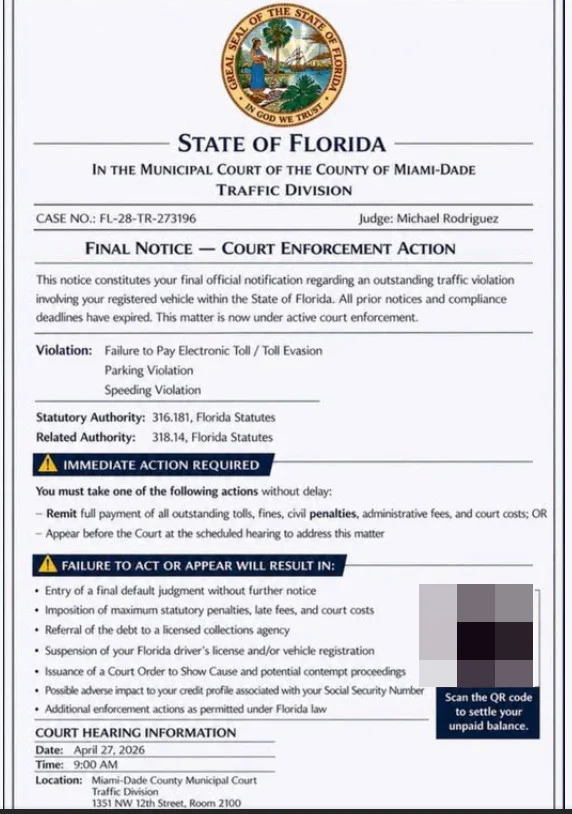
Scam Overview
The Court Enforcement Action Notice scam text is a phishing scam that impersonates courts, traffic divisions, DMV offices, toll agencies, and local government departments. Scammers send text messages with fake legal notices that claim a traffic-related matter has entered enforcement status.
The notice may look like a real court document. It may include:
- A state seal
- A court or county name
- A traffic division heading
- A case number
- A judge or clerk name
- A hearing date
- A QR code
- A warning about fines, default judgments, or license suspension
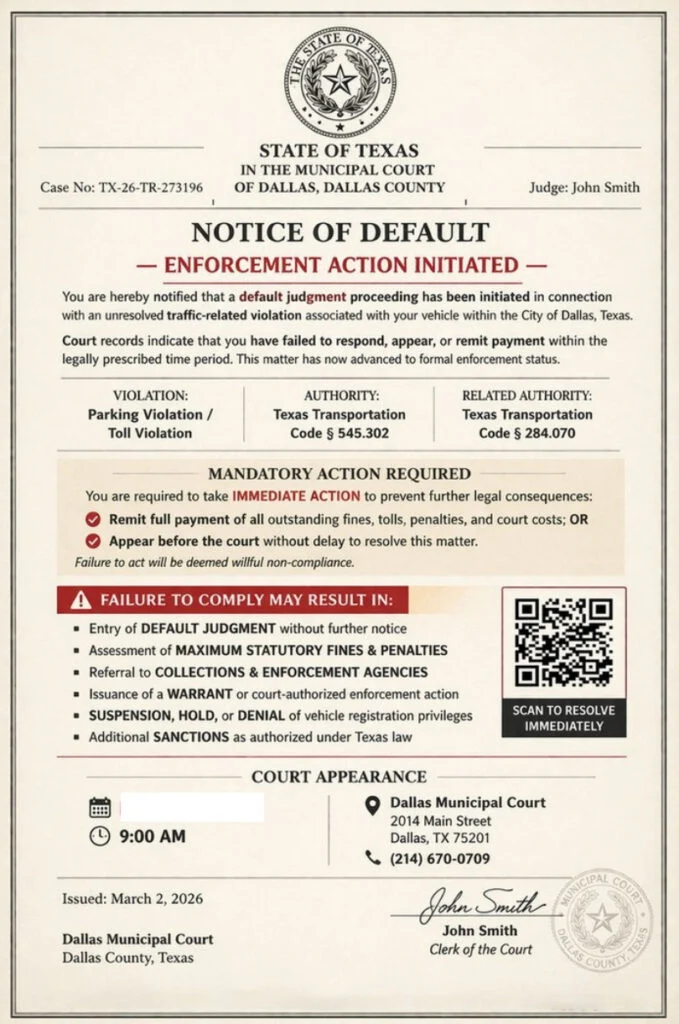
What these scam texts usually claim
Most Court Enforcement Action scam texts follow the same pattern. They claim you have failed to resolve a traffic-related issue, such as:
- Failure to pay a toll
- Parking violation
- Speeding violation
- Traffic citation
- Vehicle registration issue
- Court fine
- Administrative penalty
The notice may say that prior deadlines have expired and that the matter has now moved into court enforcement. This wording is meant to make you feel late, guilty, and under pressure.
Common phrases include:
- Final Notice
- Notice of Default
- Court Enforcement Action
- Enforcement Action Initiated
- Immediate Action Required
- Failure to Act or Appear Will Result In
- Scan to Resolve Immediately
These phrases are not there to inform you. They are there to make you react.
Why the scam looks official
Scammers know that most people do not see court documents often. So they copy the visual style of legal paperwork.
A fake notice may include:
- A court-style border
- A seal or emblem
- A serious-looking case number
- Legal code references
- A judge’s name
- A clerk signature
- A QR code payment box
- A fake court appearance section
This design creates instant authority. Even if the details are wrong, the overall look can make the recipient pause and worry.
The QR code is the trap
Many of these messages include a QR code instead of a visible link. That makes the scam feel more official and hides the destination website.
The QR code may be labeled:
- Scan to pay
- Scan to resolve
- Official secure portal
- Settle unpaid balance
- Avoid court enforcement
But a QR code is just a hidden link. If it came from an unexpected court or traffic notice, it should be treated as unsafe.
The FTC says these traffic violation scam texts often tell recipients to scan a QR code to pay a fake balance and avoid court. If scanned, scammers may try to steal personal information, credit card details, and money.
The fake payment website
If you scan the QR code or click the link, you may be taken to a fake website that looks like a court, DMV, traffic, or toll payment portal.
The site may show:
- Case number
- Citation number
- Violation details
- Amount due
- Payment deadline
- Vehicle information fields
- Credit card form
Some sites ask for a small payment, such as $6.99, $9.99, or $14.95.
That small amount is bait. It lowers suspicion and makes victims think paying is easier than verifying.
The real goal is to steal:
- Credit card number
- Expiration date
- CVV
- Billing ZIP code
- Full name
- Address
- Phone number
- Vehicle or license plate details
How the Court Enforcement Action Notice Scam Works
Step 1: You receive a fake legal notice by text
The scam starts with a text message from an unknown number. It may include an image attachment that looks like a court notice.
The message may claim:
- You failed to pay a traffic fine
- A toll violation is unresolved
- Your case is in default
- Court enforcement has started
- You must pay or appear in court
The goal is to make the situation feel serious before you have time to verify anything.
Step 2: The notice uses authority to build trust
The document may use:
- State names
- County names
- Court names
- Traffic division labels
- Judge names
- Legal codes
- Case numbers
Some of these details may be real public information. Others may be fake. Either way, the purpose is the same: to create the impression that the notice came from an official source.
A real court name or real address does not make the message legitimate. Scammers often mix real details with fake claims.
Step 3: It creates urgency with legal threats
The scam usually warns that failure to act may result in:
- Default judgment
- Maximum fines
- Late penalties
- Collections
- License suspension
- Registration problems
- Court enforcement
- Credit damage
This is pressure language. It is designed to make you feel that delaying even a few hours could make the situation worse.
Step 4: It offers a fast payment option
After creating fear, the message gives you a quick escape:
- Scan the QR code
- Click the link
- Pay now
- Resolve immediately
- Settle your balance
This is the turning point. The scam moves you from panic into the fake payment flow.
Step 5: The fake website collects your information
The website may ask you to confirm your identity before payment.
It may request:
- Name
- Address
- Phone number
- License plate
- Vehicle details
Even if you stop before entering card details, the personal information you typed may already be captured.
Step 6: The payment form steals your card details
The fake payment page then asks for card information.
Once you enter the card number, expiration date, CVV, and billing address, the card should be treated as compromised.
The site may show:
- A fake confirmation page
- A fake receipt
- A payment error
- A request to try another card
A fake error can be especially dangerous because it may push victims to enter a second card.
Step 7: Fraud may happen later
The damage may not appear immediately.
Scammers may:
- Run small test charges
- Attempt larger purchases later
- Sell your card data
- Use your personal details in future scams
- Send more fake court or DMV notices
That delay is why fast action matters if you entered any information.
Red Flags of Court Enforcement Action Notice Scam Texts
The notice arrives by random text
A serious court matter should not arrive as a surprise text demanding immediate payment through a QR code.
It includes a QR code or payment link
This is one of the strongest warning signs. Courts and traffic agencies should be verified through official websites you access yourself.
It uses extreme legal language
Phrases like “Notice of Default,” “Court Enforcement Action,” “Final Notice,” and “Immediate Action Required” are used to trigger fear.
The payment amount is very small
A tiny balance can be a trick to get you to enter your card details.
The notice lists multiple violations
Fake notices often list several violations at once, such as toll evasion, parking, and speeding. Real citations are usually more specific.
The case number looks generic
Many scams reuse similar case number formats across different states and counties.
It pushes you to act before verifying
Scammers want you to stay inside their link or QR code flow. A real issue should be independently verifiable.
What To Do If You Receive One
Do not scan the QR code
Do not scan it out of curiosity. A QR code from an unexpected legal notice is unsafe.
Do not click links
Do not open links from the message. Go directly to official websites instead.
Do not reply
Replying may confirm that your number is active and lead to more scam attempts.
Do not pay
Do not enter card details through the message, QR code, or linked site.
Verify independently
If you are worried the notice might be real:
- Go directly to the official court website
- Use an official case lookup tool
- Call the court using a number from the official website
- Check DMV, toll, or citation accounts through official portals
- Never use contact details from the suspicious text
The FTC advises people who receive these messages to check the court’s website or call the court directly using contact information they know is correct, not information from the text message. (Consumer Advice)
What To Do If You Already Paid or Entered Information
1. Call your card issuer immediately
If you entered card details, call the number on the back of your card.
Tell them:
- You entered your card details on a fraudulent court or traffic payment site
- The site came from a scam text
- You need the card blocked and replaced
- You want recent transactions reviewed
2. Review recent transactions
Look for:
- Small test charges
- Unknown purchases
- New subscriptions
- Repeated declined attempts
- Charges from unfamiliar merchants
Dispute anything you do not recognize.
3. Turn on transaction alerts
Enable alerts for:
- Every purchase
- Online payments
- Transactions over $1
- International transactions, if available
4. Change passwords if needed
If the fake site asked you to create an account or sign in, change that password immediately.
Also change it anywhere else you reused it.
5. Save evidence
Take screenshots of:
- The original text
- Sender number
- Fake court notice
- QR code
- Fake website
- Payment page
- Confirmation or error screen
6. Watch for follow-up scams
After one interaction, scammers may contact you again pretending to be:
- A court clerk
- A DMV agent
- A collections office
- A refund department
- A bank fraud investigator
Do not trust follow-up messages just because they mention the same fake case.
7. Report the scam
You can:
- Mark the message as spam or junk
- Block the sender
- Forward the text to 7726 (SPAM) if supported by your carrier
- Report the scam to the FTC at ReportFraud.gov
The FTC tells recipients not to respond and not to scan the QR code, and says people who paid or shared information should report the scam. (Consumer Advice)
The Bottom Line
The Court Enforcement Action Notice text scam is a fake legal notice designed to make you panic, scan a QR code, and pay through a fraudulent website.
It may use court names, state seals, judge names, fake case numbers, legal threats, and official-looking formatting. But those details are part of the deception.
If you receive one of these messages:
- Do not scan
- Do not click
- Do not reply
- Do not pay
Verify any real traffic, toll, parking, or court matter only through official websites and phone numbers you find yourself.

Join the discussion
0 commentsShare your experience or ask a question about this article.
Discussion
Start the conversation
Have a question or something useful to share? Add the first comment.