

An unexpected “Your shipment is on the way” email is built to make you click. If you never ordered from Best Mama Kitchen, the message creates instant panic: was your card charged, is a parcel coming, or did someone steal your details?
Do not use the tracking or cancellation button to find out. Check your real shopping accounts, payment history and the carrier’s official website independently.
Until those checks confirm a genuine order, treat the email as phishing—even when the layout looks polished.
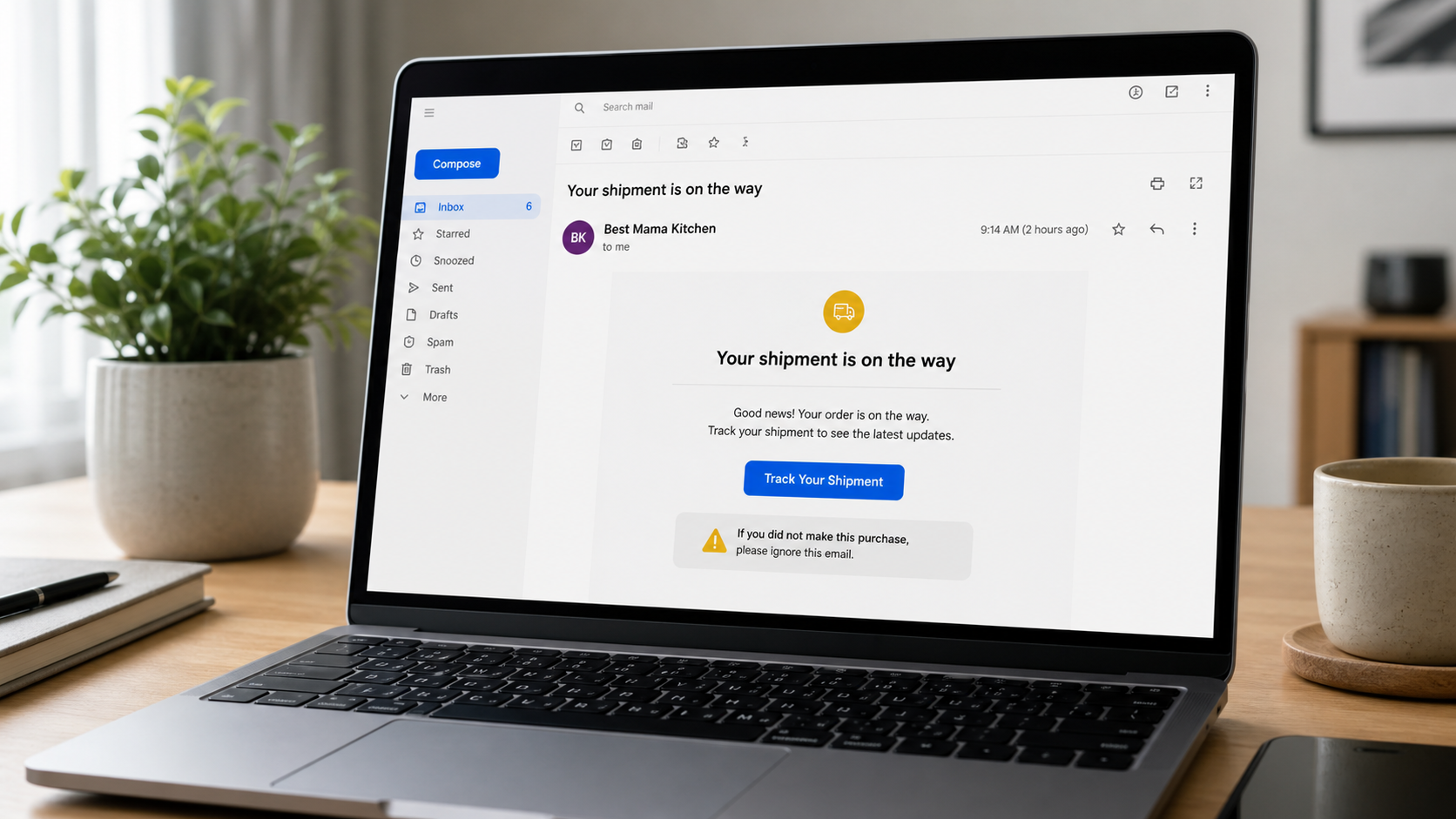
Overview of the Best Mama Kitchen Email
The Best Mama Kitchen email usually appears as an unexpected shipping notice with a subject such as “Your shipment is on the way.” The recipient did not place an order, yet the message suggests that a parcel is moving and offers a button to track it, review an invoice or correct delivery details. That contradiction is the main reason to treat the email as suspicious.
There are several possible explanations. It may be a phishing message designed to steal a password or payment card. It may be a brushing shipment in which a seller sends an inexpensive item to create a transaction record. It may be a genuine notice sent to the wrong email address, or evidence that someone used your details for an unauthorized purchase. The email alone cannot tell you which explanation is correct.
There is not enough verified evidence to accuse a business called Best Mama Kitchen of operating the phishing campaign. Brand names and sender labels are easy to copy, and scammers frequently insert a plausible store name into mass-mailed templates. The correct subject of the warning is the unsolicited shipping message and the destination behind its links.
Do not click the tracking button, open an invoice attachment or reply with personal information. Check your cards, payment accounts and shopping histories through apps or addresses you already know. If no matching purchase exists, mark the email as phishing. If a real unauthorized charge appears, contact the payment provider immediately.
The absence of an immediate charge does not make the email safe. A fake tracking page can be designed only to harvest credentials, while a brushing parcel may arrive without billing you at all. Verification should therefore cover both sides of the story: look for a real financial transaction and confirm whether the claimed carrier recognizes the tracking number.
Is the Best Mama Kitchen Shipping Email a Scam?
If you did not place an order, you should treat the message as phishing until independent checks prove otherwise. A legitimate merchant can make a typing mistake, and a family member may use a shared email address, but neither possibility requires you to trust the button inside the message.
The strongest scam indicator is a mismatch between the email and your real account activity. If no order appears in your shopping accounts, no matching charge appears on your payment methods and the carrier cannot recognize the tracking number on its official site, the message has no credible transaction behind it.
Avoid making a broader claim that the named store is necessarily responsible. Email display names can be forged, logos can be copied and the visible “From” field can hide an unrelated sending domain. Judge the technical destination and the requested action, not the brand label alone.
How the Fake Shipping Email Works
Step 1: A routine subject line wins attention
The subject announces that a shipment is on the way, delayed or waiting for confirmation. It sounds like a normal automated update. Because many people shop from multiple small stores, the recipient may not immediately remember every order name.
Step 2: The message supplies believable order details
A fake order number, estimated delivery date and product description make the email feel specific. Some versions show a low total so the charge seems plausible. Others show an expensive order to create panic and push the recipient toward a “Cancel Order” link.
Step 3: The tracking or cancellation button hides the real destination
The visible button may say Track Package, View Order, Update Address or Cancel Shipment. The underlying link can point to a newly registered domain, a compromised website or a redirect service that forwards visitors to different pages based on device and location.
Step 4: The landing page asks for information
One page may imitate a carrier and request a small redelivery fee. Another copies a retailer login. A third displays a fake support form that asks for a card number to “verify” or cancel the transaction. The shipment story is only the pretext.
Step 5: Stolen details support further fraud
A reused email password can expose shopping receipts and password-reset links. Card details can be tested with small transactions. A home address and phone number can support more convincing follow-up texts in which a scammer pretends to be a carrier or fraud department.
Four Explanations for an Unexpected Shipping Notice
1. A phishing campaign
This is the highest-risk explanation. The message was sent broadly and no package exists. The goal is to make recipients visit a phishing site, call a fake support number or open an attachment. Poor grammar is possible, but many modern templates are professionally written.
2. A brushing shipment
In a brushing scheme, a seller sends a cheap item to a real address and may use the delivery record to support a fake verified review. The recipient usually is not charged, but the shipment indicates that personal contact details are circulating in commercial databases.
3. A mistyped email address
A real customer may have entered your address accidentally. A genuine email in this situation should still be handled cautiously. Do not use account-management links that could expose another person’s order. Contact the merchant through an independently located address if the notice contains credible details.
4. An unauthorized purchase
Someone may have used your card, payment account or shopping profile. The shipment notice could then be real even though the order is not yours. Check transaction histories immediately. If a charge exists, contact the payment provider before contacting an unfamiliar merchant.
Red Flags Inside the Message
- You did not place the order and no one in your household recognizes it.
- The sender domain does not match the store name shown in the email.
- The Reply-To address is different from the From address without a clear reason.
- The tracking number is invalid on the carrier’s independently opened website.
- A button leads to a shortened, misspelled or unrelated domain.
- The email demands a small redelivery, customs or address-correction payment.
- An HTML, ZIP, ISO or unusual document attachment claims to contain the invoice.
- A cancellation number connects to an agent asking for remote access or bank details.
- The message says you must act within minutes to stop the charge or shipment.
How to Verify the Shipment Without Clicking
- Search your email for the supposed order number, but do not assume repeated messages are genuine.
- Open shopping apps and merchant websites from your bookmarks or by typing the address yourself.
- Review every card, digital wallet and buy-now-pay-later account that could have funded the order.
- Copy only the tracking number as plain text and enter it on the carrier’s official site.
- Check whether the sender domain is an exact match for a business you know.
- Ask household members whether they used your email for a gift or shared purchase.
- If no independent record exists, report the message as phishing and delete it.
Do not call a phone number printed in a suspicious invoice. Fake support centers often turn an email lure into a refund scam, asking the victim to install remote-access software or move money to “protect” an account.
What to Do If You Clicked the Best Mama Kitchen Email
You clicked but entered nothing
Close the page, update the browser and review the downloads folder. Delete anything the page downloaded automatically. A click does not automatically mean your accounts are compromised, but do not return to the site to investigate further.
You entered an email password
Go directly to the real email provider and change the password. Sign out unknown sessions, review recovery addresses and forwarding rules, and enable two-factor authentication. Email access is especially valuable because it can reset passwords for other accounts.
You entered card information
Contact the card issuer using the number on the card or the official app. Ask whether the card should be replaced and monitor both pending and completed charges. A `$1` or similarly small transaction may be a test rather than the final loss.
You installed an app or remote-access tool
Disconnect the device from the internet and remove the software only after documenting its name. If a stranger viewed your banking screen or directed transfers, call the bank from a different trusted device. Run a reputable security scan and change important passwords from a clean device.
A real unordered package arrives
Photograph the label and contents without scanning unknown QR codes. You generally should not pay an unexpected invoice included in an unordered package. Do not use a return label or contact method inside the parcel until you verify the merchant independently.
How to Report the Email
Use the Report phishing option in your email service rather than only deleting the message. That gives the provider technical headers and link information that can help block related copies. If a company is being impersonated, forward the message to the fraud address published on its real website.
In the United States, fraudulent shopping and phishing attempts can also be reported to ReportFraud.ftc.gov. If money was taken, report the transaction to the payment provider first because financial recovery deadlines are more urgent than general reporting.
The Bottom Line
An unexpected Best Mama Kitchen “shipment is on the way” email should not be trusted simply because it looks like an ordinary order update. It may be phishing, brushing, a mistyped address or a real unauthorized purchase. Every explanation can be checked without using the message’s link.
Open payment accounts, retailer profiles and carrier sites independently. If no matching order or charge exists, report the email as phishing. If a charge does exist, contact the payment provider immediately and preserve the message as evidence.

Join the discussion
0 commentsShare your experience or ask a question about this article.
Discussion
Start the conversation
Have a question or something useful to share? Add the first comment.