

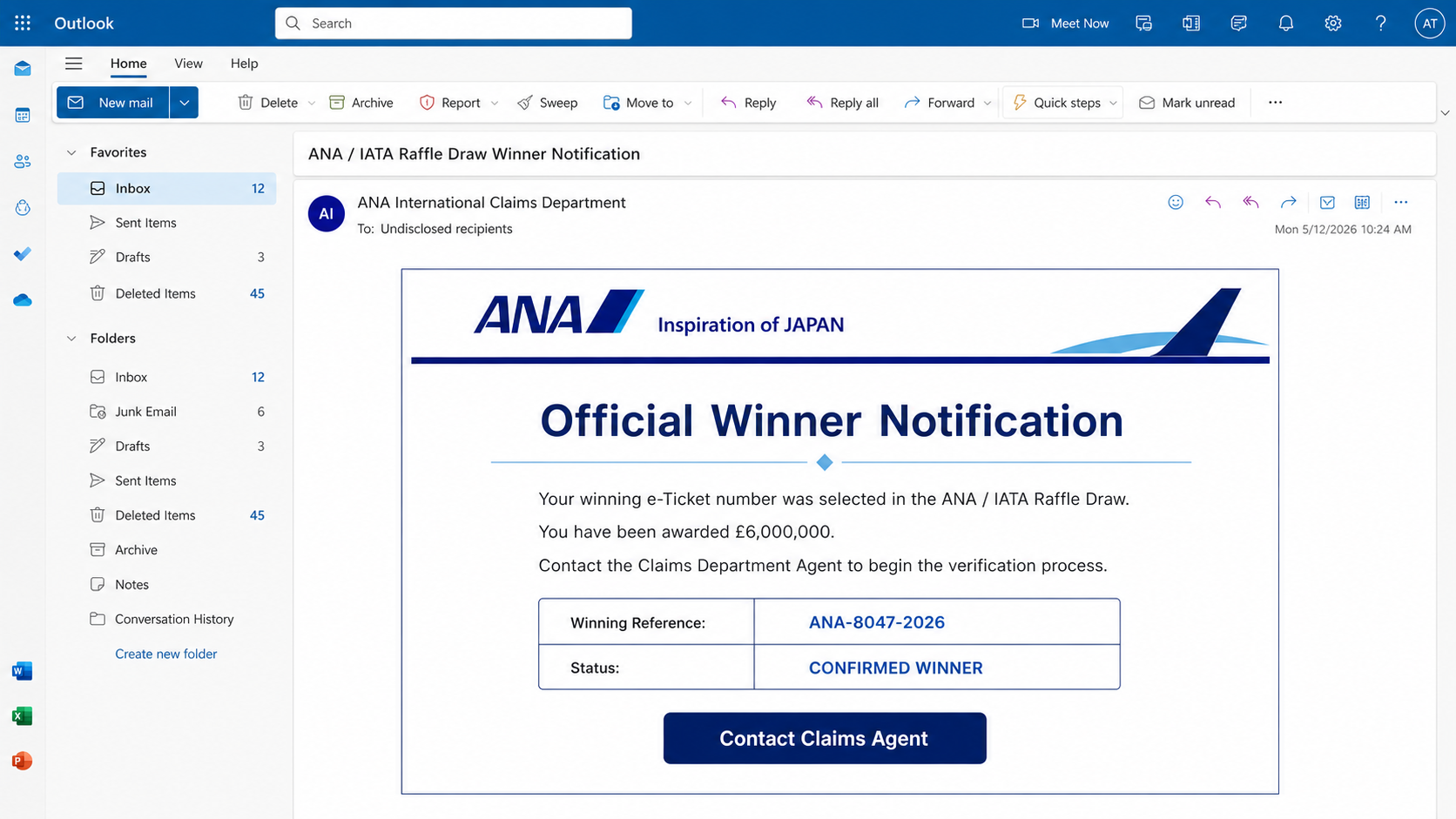
An email says your ticket number was selected in an international airline raffle and you have won £6,000,000. It carries the names of All Nippon Airways and IATA, assigns a claims agent, and makes the prize sound like an official global promotion.
The All Nippon Airways Raffle Draw scam is an advance-fee fraud. There is no prize, ANA and IATA are not involved, and the supposed claims process is designed to collect personal information and a growing series of payments.
Overview
This campaign impersonates All Nippon Airways, commonly known as ANA, and the International Air Transport Association. It claims a “winning e-Ticket number” was randomly chosen and tells the recipient to contact a claims department agent.
An observed version promises £6,000,000 and directs replies to a personal Gmail address. It may use the name of a real public figure or airline executive in the signature to make the message look authoritative.
You cannot win a raffle you never entered
The email does not identify a legitimate entry form, purchase date, published rules, drawing administrator, or verifiable winner list. It substitutes a random ticket story for proof of participation.
Airline travel history or an email address does not silently enroll someone in an enormous raffle. A surprise prize from an unfamiliar promotion is a classic fraud signal.
The personal claims address breaks the official story
Large airlines and international trade associations do not administer enormous prizes through a stranger’s free webmail account. A Gmail address is especially inconsistent with a formal ANA or IATA claims department.
The scammer controls the reply channel. Responding confirms that the address is active and that the recipient may be willing to continue.
The nonexistent prize leads to real losses
- Processing, tax, insurance, courier, and release fees
- Passport copies, identity documents, and signatures
- Bank-account and card information
- Money transfers through hard-to-reverse methods
- Follow-up scams aimed at the victim and their contacts
The FTC explains that real prizes are free. If a recipient must pay taxes, shipping, customs, or processing charges before receiving winnings, the demand is part of the scam.
Why the ANA Raffle Story Can Feel Convincing
Recognizable organizations lend borrowed trust
ANA is a real airline and IATA is a real aviation trade association. The campaign uses their reputations without permission so the prize appears connected to an established industry.
A real name, logo, or postal address inside a message does not establish authorization. Scammers can copy these details from official websites.
A ticket number creates a false link to travel
Many people have booked flights, joined loyalty programs, or entered an email address on a travel website. The phrase “winning e-Ticket number” encourages the recipient to connect the message with an old reservation.
The email does not need to know whether the person flew with ANA. Its broad story works because airline tickets are familiar and records can be hard to remember precisely.
The first request may appear harmless
The initial message often asks only for a reply. It may request a full name, phone number, country, and reference code rather than demanding money immediately.
This gradual approach reduces resistance. Once the victim has invested time and shared information, later fees can feel like the final step instead of a new warning.
How the All Nippon Airways Raffle Draw Scam Works
Step 1: A mass winner notification is distributed
Attackers send the same prize message to many addresses. The greeting may be generic because the supposed selection is tied to an email or ticket number rather than a known person.
A subject line announcing a winner is designed to stand out from ordinary inbox traffic. The enormous amount encourages the recipient to keep reading before questioning the premise.
Step 2: ANA and IATA identities are combined
The message presents the airline and association as organizers or supervisors of one draw. Combining two recognized entities makes the promotion sound international and independently regulated.
Neither organization is connected to the campaign. The partnership exists only in the scammer’s text.
Step 3: A winning e-ticket is invented
The recipient is told that a ticket or entry number was selected from a competitive pool. Reference numbers, batch codes, and certificate language may be included to simulate administrative records.
Random strings are easy to generate. A valid promotion would provide rules and a verification route published on the organizer’s own official domain.
Step 4: The victim is moved to a private claims agent
The email supplies a person’s name and a free mail address. The agent may call themselves a fiduciary, claims officer, payment director, or diplomatic courier.
Moving the conversation into one-to-one correspondence allows the criminal to tailor the pressure, answer doubts, and send fabricated documents.
Step 5: Personal and banking information is collected
The supposed verification form may ask for name, address, date of birth, occupation, phone number, passport details, bank information, and a signature.
None of this proves eligibility because no raffle exists. The data can support identity theft, account attacks, targeted phishing, and convincing follow-up impersonation.
Step 6: The first advance fee appears
The agent claims the winnings are ready but cannot be released until a charge is paid. The fee may be described as tax, insurance, anti-money-laundering clearance, notarization, bank conversion, or courier delivery.
Real prize organizers do not require winners to send money to unlock a prize. A demand to pay first is the defining mechanism of advance-fee fraud.
Step 7: New obstacles create additional payments
After one payment, another official-looking problem appears. A bank certificate may need a stamp, a transfer may be held at customs, or a regulator may require a clearance code.
The demands continue because the prize never needs to be delivered. Prior payment is used as leverage: the victim is told that refusing one final fee would waste everything already spent.
Step 8: The criminals disappear or recycle the victim
When the victim stops paying, the agent may threaten legal trouble, suspend the fake claim, or vanish. Money sent through wire transfer, cryptocurrency, gift cards, or cash services can be difficult to recover.
The contact information may later be sold to other criminals. A “recovery agent” can then promise to retrieve the lost funds for another upfront payment.
How to Verify an Airline Prize Claim
Ask when and how you entered
A legitimate contest has an entry method, eligibility rules, opening and closing dates, and a privacy notice. If you cannot identify the entry, do not treat the prize as real.
Purchasing a flight does not automatically validate an unrelated raffle story. Search your own records rather than accepting details supplied by the sender.
Find the promotion on the official website
Type ana.co.jp yourself and look for published announcements. Do the same with IATA if the association is named. Do not use links inside the winner email.
A genuine £6,000,000 promotion would have public rules and contact information on official domains. A private Gmail conversation cannot replace them.
Contact the organizations independently
Use support details obtained from official websites. Ask whether the promotion, reference number, and named employee are genuine.
Do not call a number printed in the email or in documents sent by the claims agent. That number can connect to another member of the same operation.
Refuse every pay-to-claim demand
Taxes on legitimate winnings are handled under applicable law, not through secret transfers to an unknown agent. Processing, delivery, or insurance fees do not make a nonexistent prize real.
If any payment is required before the prize is released, stop communication. Do not let a smaller first fee make the claim seem affordable or safe.
Warning Signs in the ANA Raffle Email
- You did not enter an ANA or IATA raffle.
- The prize is extraordinarily large.
- No official rules or public promotion page is supplied.
- The recipient is addressed generically.
- A personal Gmail address handles the claim.
- The message borrows names of real executives or organizations.
- Secrecy or a short deadline is imposed.
- Identity documents or bank details are requested by email.
- Any fee must be paid before the winnings are released.
Official-looking certificates, seals, signatures, and reference numbers can all be fabricated. Documents created by the claimant are not independent verification of the claimant’s story.
Common Fees Used in Advance-Fee Prize Scams
Tax and regulatory clearance
The agent may claim a government office requires a payment before funds can cross a border. A forged letter can name a real regulator or bank to support the demand.
Do not use contact information on that letter. Look up the institution independently and remember that a legitimate authority does not make an unexpected lottery real.
Insurance and transfer charges
The prize may supposedly need insurance because of its size, or a bank may need an international transfer fee. The recipient is told that payment must come from outside the prize itself.
That restriction exists so the victim sends real money before receiving anything. The promised fund remains a number in fake correspondence.
Courier and certificate delivery
Scammers may say a cheque, debit card, or prize certificate is ready for delivery. A courier payment begins small and grows through storage, customs, or missed-delivery charges.
Fake tracking websites can make the nonexistent parcel appear to move between countries. Verify couriers through their official sites and do not pay based on links from the agent.
Anti-money-laundering documentation
Legal terminology gives the payment a serious tone. The victim may be asked to buy a clearance certificate or prove ownership of funds that do not exist.
Criminals use compliance language because unfamiliar procedures are difficult for victims to challenge. A real bank can explain requirements through verified staff and official accounts.
How Stolen Identity Documents May Be Misused
A passport or driver’s license copy contains durable personal data. Unlike a password, the date of birth, document image, and signature cannot be replaced easily.
Criminals can use the material to create accounts, pass weak verification checks, impersonate the victim, or produce more persuasive fraud documents. Bank information can support unauthorized debits or targeted calls.
The victim may also be asked to receive and forward money. Participating can expose the person to financial loss and legal risk, even if they believed they were helping release a prize.
If documents were shared, contact the issuing authority and follow local identity-theft guidance. Monitor credit and accounts for activity that may appear long after the original email.
What ANA Says About Impersonation Scams
ANA warns that fraudulent emails and calls misuse the names of ANA and group companies to obtain personal information. The airline advises recipients to delete unfamiliar or suspicious messages and not to click their links.
ANA also explains that its staff will not ask for a PIN or password through email or phone. The company has documented campaigns that imitate official addresses, promise bonuses, and send users to fake sites.
These warnings do not validate every message that happens to use an ANA logo. They provide a trusted standard: reach ANA through its official domain and do not surrender information to an unsolicited claimant.
What to Do if You Have Fallen Victim to This Scam
- Stop all communication. Do not argue with the claims agent, pay another fee, or follow instructions to preserve the supposed prize.
- Contact the payment provider immediately. Ask the bank, card issuer, wire service, or cryptocurrency platform whether the transaction can be stopped or traced.
- Do not pay a recovery service that contacts you. Criminals may return with a second promise to recover the loss for an upfront charge.
- Secure exposed accounts. Change any password shared or reused, revoke sessions, and enable stronger multi-factor authentication.
- Protect financial accounts. Replace exposed cards, review transactions, and ask the institution about additional monitoring or account changes.
- Respond to identity-document exposure. Contact the passport, license, or identity authority and follow its instructions for compromised documents.
- Preserve evidence. Save emails, headers, phone numbers, documents, receipts, wallet addresses, and conversation records without continuing the exchange.
- Report identity theft. In the US, use IdentityTheft.gov for a tailored recovery plan; use the appropriate national service elsewhere.
- Report the fraud. Submit details to the FTC, local police when money was lost, and the organizations being impersonated.
- Warn close contacts. Scammers may use your identity or address to approach relatives and colleagues with a related story.
- Scan devices if files were opened. Run Malwarebytes and check for malware if the agent sent attachments or downloads.
- Monitor for follow-up attempts. Be cautious of new recovery messages, and consider AdGuard to block known phishing and redirect domains.
Is Your Device Infected? Run a Free Malware Scan
Slow performance, constant pop-ups, or strange behavior? These are classic signs of a malware infection. The fastest way to find out is to scan your device with Malwarebytes Free — one of the most trusted malware removal tools available.
The free version detects and removes the most common threats, including:
- Adware — the cause of those annoying pop-ups
- Browser hijackers — unwanted redirects and changed homepages
- Trojans and spyware — hidden programs stealing your data
- Potentially unwanted programs (PUPs) — software you never asked for
👉 Select your device below — Windows, Mac, or Android — then follow the simple steps to download Malwarebytes, scan your system, and remove any threats it finds. The scan usually takes 5 to 20 minutes.
Run a Malware Scan with Malwarebytes for Windows
Malwarebytes is one of the most popular and trusted anti-malware tools for Windows — and it’s completely free for removing infections. It catches threats that many antivirus programs miss, including adware, browser hijackers, and trojans. Follow the steps below to scan and clean your PC in just a few minutes.
Download Malwarebytes
Click the button below to download the latest version of Malwarebytes for Windows from the official source. The free version is all you need — it will scan your computer and remove adware, browser hijackers, and other malicious software at no cost.
Download MalwarebytesOfficial installer for Windows 11 and 10. Your download starts right away.Want real-time protection? See Malwarebytes Premium Malwarebytes Free for WindowsScans and removes malware at no cost
-
Install Malwarebytes
When the download finishes, open your Downloads folder and double-click the MBSetup file. If Windows shows a User Account Control pop-up, click “Yes” to allow the installation.

Follow the On-Screen Prompts to Install Malwarebytes
The setup wizard will walk you through a few quick screens:
-
Choose where you’re installing the program — “Personal Computer” or “Work Computer” — then click Next.

-
Malwarebytes will now install on your device. This usually takes under a minute.

-
When installation is complete, the “Welcome to Malwarebytes” screen will open automatically.

-
On the final screen, click Open Malwarebytes to launch the program.

-
Enable “Scan for Rootkits”
Before scanning, turn on rootkit detection so Malwarebytes can find even the most hidden threats. Click the Settings gear icon on the left side of the screen.

In the settings menu, find “Scan for rootkits” and click the toggle so it turns blue.

Done? Click “Dashboard” in the left pane to return to the main screen.
Start the Scan
Click the blue Scan button. Malwarebytes will automatically update its virus database and start checking your computer for malware.

-
Wait for the Scan to Finish
The scan checks your entire system for browser hijackers and other malicious programs, so it can take 5 to 20 minutes depending on your computer. Feel free to do something else — just check back occasionally to see the progress.

-
Quarantine the Detected Threats
When the scan is done, you’ll see a list of everything Malwarebytes found — malware, adware, and potentially unwanted programs. Click the “Quarantine” button to remove all of them at once.

Malwarebytes will now remove the malicious files and registry entries and move them safely into quarantine.

-
Restart Your Computer
Some threats can only be fully removed after a reboot. If Malwarebytes asks you to restart, click Yes. Once you’re logged back in, Malwarebytes has finished removing the threats it found.

That’s it — your Windows PC is now clean of trojans, adware, and other malware, and should be back to running smoothly.
If you are still having problems with your computer after completing these instructions, then please follow one of the steps:
- Run a computer scan with ESET Online Scanner
- Ask for help in our Windows Malware Removal Help & Support forum.
Run a Malware Scan with Malwarebytes for Mac
Malwarebytes for Mac is a free on-demand scanner that removes the malware other security software tends to miss — adware, browser hijackers, and unwanted programs included. Cleaning an infected Mac with Malwarebytes has always been completely free, and it’s our go-to recommendation. Follow the steps below to scan and clean your Mac in just a few minutes.
-
Download Malwarebytes for Mac
Click the button below to download the latest version of Malwarebytes for Mac.
Download MalwarebytesOfficial installer for macOS. Your download starts right away.Want real-time protection? See Malwarebytes PremiumMalwarebytes Free for MacScans and removes malware at no cost -
Open the Malwarebytes setup file
When the download finishes, open your Downloads folder and double-click the setup file to begin the installation.

-
Follow the On-Screen Prompts to Install Malwarebytes
The Malwarebytes for Mac Installer will guide you through a few quick screens. Click “Continue” and keep following the prompts until the installation completes.



When the installation is complete, Malwarebytes opens to the Welcome to Malwarebytes screen. Click “Get started“.
-
Select “Personal Computer” or “Work Computer”
Malwarebytes will ask what type of computer you’re installing it on. Click either Personal Computer or Work Computer, whichever applies.

-
Start the Scan
Click the “Scan” button. Malwarebytes will automatically update its detection database and begin checking your Mac for malware.

-
Wait for the Scan to Finish
Malwarebytes will scan your Mac for adware, browser hijackers, and other malicious programs. This can take a few minutes, so feel free to do something else — just check back occasionally to see the progress.

-
Quarantine the Detected Threats
When the scan is done, you’ll see a list of everything Malwarebytes found. Click the “Quarantine” button to remove all the threats at once.

-
Restart Your Mac
Malwarebytes will now remove all the malicious files it found. Some threats can only be fully removed after a reboot — if Malwarebytes asks you to restart, allow it. Once you’re logged back in, your Mac is clean.

That’s it — your Mac is now free of adware, rogue browser extensions, and other potentially harmful software.
If you are still experiencing problems while trying to remove a malicious program from your computer, please ask for help in our Mac Malware Removal Help & Support forum.
Run a Malware Scan with Malwarebytes for Android
Malwarebytes for Android automatically detects and removes dangerous threats like malware and ransomware so you don’t have to worry about your most-used device being compromised. Aggressive detection of adware and potentially unwanted programs keeps your Android phone or tablet running smooth.
-
Download Malwarebytes for Android.
You can download Malwarebytes for Android by clicking the link below.
Get Malwarebytes for AndroidOpens Google Play in a new tab.Want real-time protection? See Malwarebytes Premium for AndroidMalwarebytes for AndroidScans your phone and removes malware at no cost -
Install Malwarebytes for Android on your phone.
In the Google Play Store, tap “Install” to install Malwarebytes for Android on your device.

When the installation process has finished, tap “Open” to begin using Malwarebytes for Android. You can also open Malwarebytes by tapping on its icon in your phone menu or home screen.

-
Follow the on-screen prompts to complete the setup process
When Malwarebytes will open, you will see the Malwarebytes Setup Wizard which will guide you through a series of permissions and other setup options.
This is the first of two screens that explain the difference between the Premium and Free versions. Swipe this screen to continue.
Tap on “Got it” to proceed to the next step.
Malwarebytes for Android will now ask for a set of permissions that are required to scan your device and protect it from malware. Tap on “Give permission” to continue.
Tap on “Allow” to permit Malwarebytes to access the files on your phone.
-
Update database and run a scan with Malwarebytes for Android
You will now be prompted to update the Malwarebytes database and run a full system scan.

Click on “Update database” to update the Malwarebytes for Android definitions to the latest version, then click on “Run full scan” to perform a system scan.

-
Wait for the Malwarebytes scan to complete.
Malwarebytes will now start scanning your phone for adware and other malicious apps. This process can take a few minutes, so we suggest you do something else and periodically check on the status of the scan to see when it is finished.

-
Click on “Remove Selected”.
When the scan has been completed, you will be presented with a screen showing the malware infections that Malwarebytes for Android has detected. To remove the malicious apps that Malwarebytes has found, tap on the “Remove Selected” button.

-
Restart your phone.
Malwarebytes for Android will now remove all the malicious apps that it has found. To complete the malware removal process, Malwarebytes may ask you to restart your device.
That’s it — your Android phone is now clean — no more malicious apps, adware, or browser redirects.
If you are still having problems with your phone after completing these instructions, then please follow one of the steps:
- Restore your phone to factory settings by going to Settings > General management > Reset > Factory data reset.
- Ask for help in our Mobile Malware Removal Help & Support forum.
Stay Protected: Block Ads and Malicious Sites
Now that your device is clean, keep it that way. Most infections start with a malicious ad or a fake download button — so blocking them at the source is your best defense.
We recommend AdGuard, which blocks malicious ads, phishing pages, and dangerous redirects before they can reach you.
👉 Download AdGuard and browse safely
Frequently Asked Questions
Did ANA or IATA organize this raffle?
No. The campaign uses their names without authorization. Verify promotions only through official domains and independently obtained contact information.
Can I win from a ticket number without entering?
A legitimate raffle requires defined participation and published rules. A random email claiming that an old ticket won £6,000,000 is not evidence of an entry.
Why is the claims agent using Gmail?
Because the criminal controls that address. A free personal mailbox is inconsistent with a formal claim supposedly administered by major international organizations.
What if the agent sent an official-looking certificate?
Certificates, seals, signatures, and executive names can be copied or fabricated. Verify the claim through the named organization’s official contact details.
Are taxes or processing fees normal for prizes?
Real prizes are not unlocked by secret advance payments to an agent. The FTC identifies pay-to-claim taxes, shipping, customs, and processing charges as signs of prize fraud.
Can I recover money already sent?
Contact the payment provider immediately. Recovery is not guaranteed, but quick action may help. Avoid anyone who promises a guaranteed refund for another upfront fee.
The Bottom Line
The All Nippon Airways Raffle Draw scam promises £6,000,000 from a promotion the recipient never entered. Its private claims agent turns the fake win into identity collection and repeated advance-fee demands.
Do not reply, provide documents, or pay to release a prize. Verify promotions on official websites, remember that real prizes are free, and act quickly with payment providers and identity authorities if information or money was sent.

Join the discussion
0 commentsShare your experience or ask a question about this article.
Discussion
Start the conversation
Have a question or something useful to share? Add the first comment.