

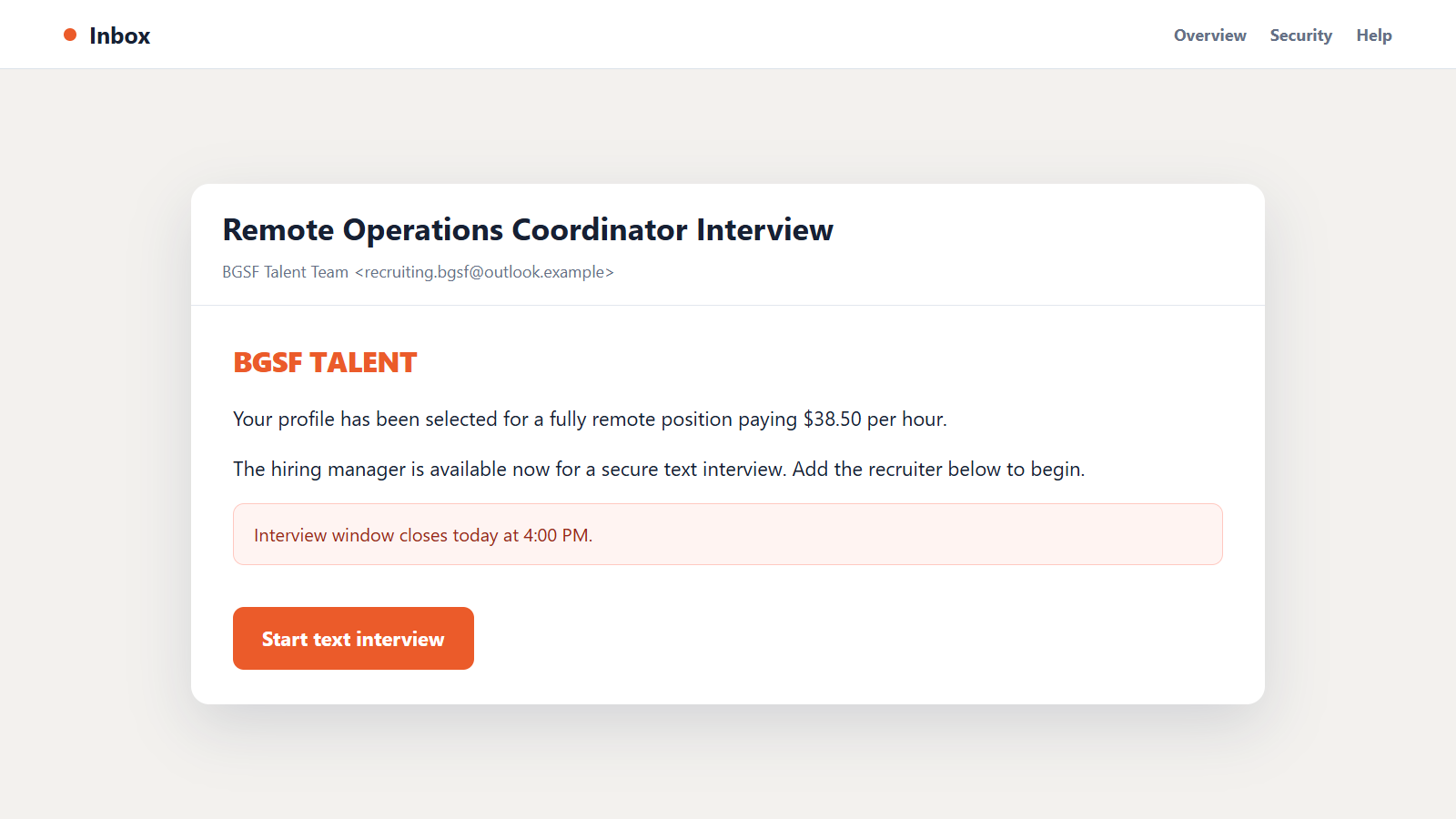
The BGSF talent scam can begin with a polished job offer, a generous salary, and an interview that can happen almost immediately. For someone actively looking for work, it can feel like the message they have been waiting to receive.
The details often begin to shift only after the conversation moves away from normal hiring channels. That is where a promising opportunity can turn into a carefully staged theft of money and identity data.
Overview
Scammers borrow the name of a real staffing company
BGSF, also known from its earlier BG Staffing name, is a legitimate staffing and consulting company. The BGSF talent scam is an impersonation campaign, not evidence that the real company sent the message.
Fraudsters may copy employee names, logos, job descriptions, and public company information. They can approach applicants through email, LinkedIn, Facebook, text messages, or chat apps while pretending to represent a genuine recruiting team.
The fake job is a route to personal information or payment
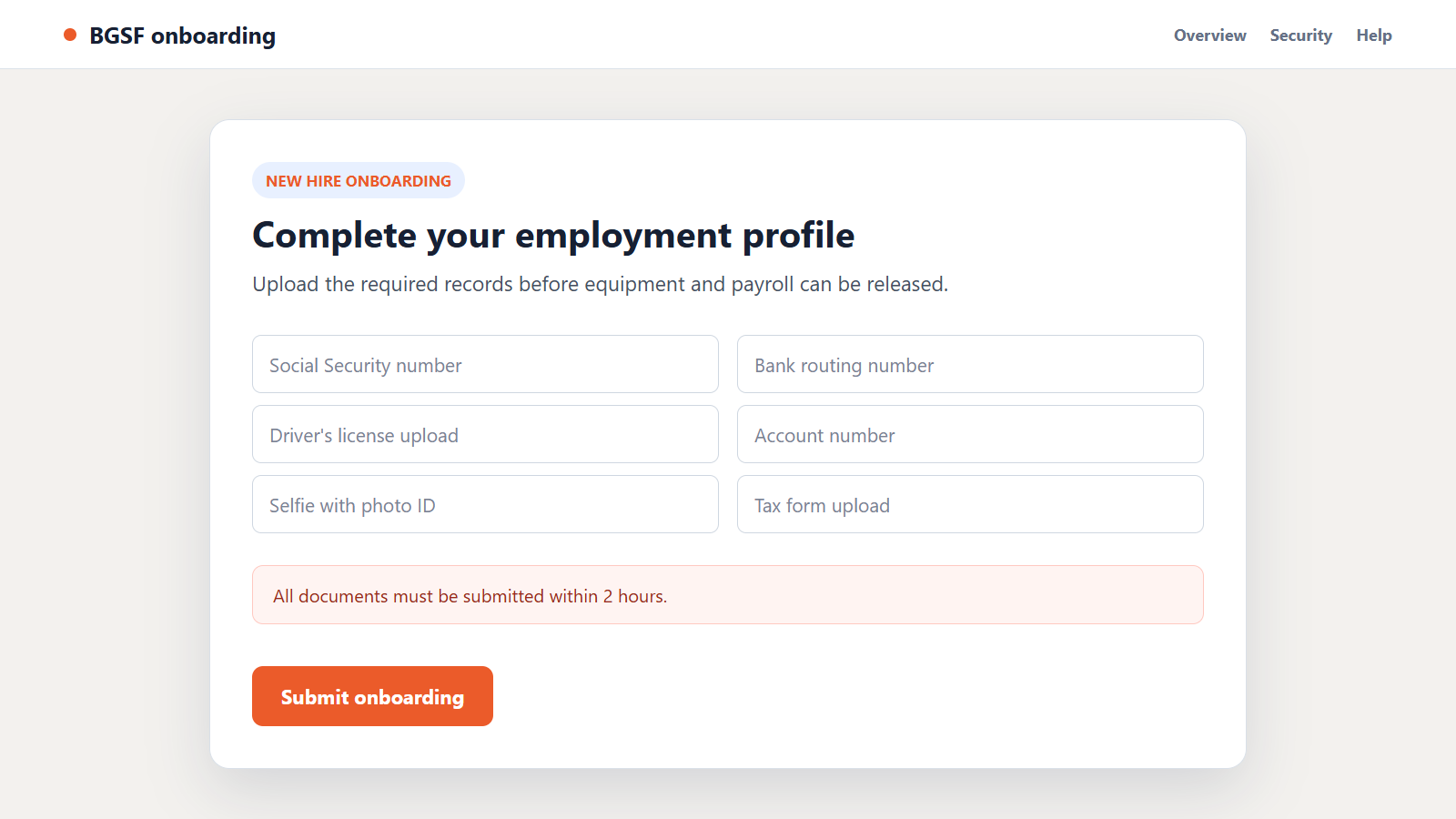
The supposed recruiter may request a driver’s license, Social Security number, bank details, tax form, selfie, or other onboarding records before the applicant has completed a normal interview. Another version asks the applicant to pay an application, training, background-check, or equipment fee.
A fake-check variation sends money for office equipment and directs the new hire to buy from a selected vendor. The check later bounces, while the real money sent to the vendor is already gone.
The hiring process is designed to prevent independent verification
The scammer may insist that every conversation remain inside a messaging app and may explain away an unofficial email address as a temporary recruiting account. Quick interviews and same-day offers leave little time to contact BGSF through its real website.
The most useful facts to remember are:
- BGSF says it does not charge job applicants an application fee.
- The company says its recruiters do not use Gmail or similar consumer email accounts for business.
- BGSF does not ask applicants to upload documents to unsecured websites.
- A legitimate employer will not send a check and require part of it to be forwarded to a vendor.
- A recruiter should be verifiable through the company’s official directory or contact channel.
- A job offer that depends on immediate payment is not normal employment.
The safest response is to leave the conversation and verify the vacancy independently. Do not let the person who contacted you provide the only proof that the person is real.
The Main Versions of the Fake BGSF Job Offer
An unexpected remote position with unusually generous terms
The message may advertise data entry, customer support, payroll, property management, accounting, or administrative work. The salary is often high for an entry-level role, the schedule is flexible, and no specialized experience is required.
Those terms expand the number of people who might respond. The criminal is less interested in matching skills to a real vacancy than in moving an applicant into the next stage.
A text-only interview followed by an immediate offer
The interview may take place entirely through Signal, Telegram, WhatsApp, Microsoft Teams chat, or another messaging service. Questions sound professional but are generic enough to reuse with every target.
Within minutes, the applicant receives an offer letter and onboarding instructions. The speed creates excitement and makes the request for documents feel like an ordinary next step.
A fake equipment purchase funded by a bad check
The recruiter says the employee needs a computer, printer, software, or home-office supplies. A digital check arrives with instructions to deposit it and pay an approved vendor before training begins.
A bank may show some funds as available before the check has fully cleared. When the check is rejected days or weeks later, the applicant owes the bank while the payment to the scammer’s vendor remains lost.
A fraudulent onboarding portal collects identity records
A copied website can request an ID image, Social Security number, date of birth, home address, bank routing details, and tax information. The page may use HTTPS and a professional template, but neither feature proves BGSF controls it.
The collected records can support account takeover, new-account fraud, tax fraud, or later impersonation. A criminal may also sell the package to other fraud groups.
Why the BGSF Impersonation Can Look Convincing
Recruiting naturally involves strangers contacting applicants. That makes an unexpected message feel less unusual than an unsolicited banking or tax notice.
Public professional profiles give scammers realistic names, titles, photographs, and employment histories to copy. A profile that matches a real BGSF employee can still be controlled by an impersonator.
Job listings are also easy to duplicate. Fraudsters can copy a genuine description from BGSF or another employer, then change the contact address and onboarding link.
Documents such as offer letters, confidentiality agreements, and direct-deposit forms do not prove legitimacy. Logos and electronic signatures can be inserted into a template in minutes.
The emotional timing matters too. A person who has submitted many applications may be eager to believe that a fast offer finally arrived, particularly when the recruiter speaks confidently and responds without delay.
How to Check a BGSF Recruiter Safely
Start with the complete email address, not the display name. A message from a free mailbox or a lookalike domain should not be treated as official company communication.
Search for the position on the official BGSF site without using the message link. A copied job may exist, so verify both the vacancy and the person claiming to manage it.
Contact BGSF through a number or form you find independently. The company’s fraud warning page provides a dedicated route for checking suspicious recruiting messages.
Ask for a live conversation and a clear explanation of the hiring process. A video call is not perfect proof because stolen video and synthetic media exist, but a refusal to use any verifiable company channel is a serious warning.
Do not send sensitive documents while verification is incomplete. A real recruiter can wait while an applicant confirms where records are stored and why each item is needed.
How the BGSF Talent Scam Works
Step 1: The criminal finds people who may be looking for work
Targets can come from job boards, professional networks, public resumes, social-media posts, or large messaging lists. Some recipients recently applied for similar jobs, making the approach feel timely.
The scammer may know the person’s name, occupation, location, and past employers before the first message is sent.
Step 2: A real company identity is copied
The operation selects BGSF because the name belongs to an established staffing business. The fraudster copies branding, an employee identity, and a plausible vacancy.
A lookalike email domain or newly created social profile completes the first layer of credibility.
Step 3: The conversation moves to a controlled channel
The applicant is asked to continue through a chat app or private meeting link. This removes the conversation from the safeguards and reporting tools of the original job platform.
It also makes it easier for one operator to manage many victims with scripted replies.
Step 4: A shallow interview creates the appearance of selection
The recruiter asks familiar questions about availability, work habits, equipment, and desired pay. There may be no detailed discussion of the team, manager, customers, or technical requirements.
The applicant is quickly congratulated and told that the hiring manager approved the application.
Step 5: The offer creates trust and urgency
A formal-looking letter lists salary, benefits, training, and a start date. The applicant may be told that paperwork must be completed that day to reserve the position.
This artificial deadline turns the victim’s attention from verification to compliance.
Step 6: Money or identity documents are requested
One route asks for onboarding records through an unofficial portal. Another asks for a fee, or sends a check that must be used with a designated equipment supplier.
Both routes give the criminal something valuable before any real work begins.
Step 7: The payment is lost or the identity package is abused
Funds sent by wire, gift card, cryptocurrency, payment app, or vendor checkout are difficult to recover. A deposited check may be reversed after the applicant has spent real money.
Stolen identity records can be used long after the fake recruiter disappears.
Step 8: The operation invents another requirement or vanishes
A victim who pays once may face new charges for insurance, software activation, taxes, or account verification. Someone who submitted documents may receive more fake jobs targeted to the same profile.
When questions become difficult, the account is deleted and a new recruiter identity replaces it.
Company, Address, and Fulfillment Checks
The company name must connect to an official recruiting channel
Finding a real BGSF website does not authenticate the person in your inbox. Begin a separate contact through the official site and ask whether the recruiter and requisition are genuine.
BGSF specifically warns about impersonation and says suspicious messages can be reported to its fraud team.
The sender address must use a genuine company-controlled domain
Read the address after the @ symbol carefully. Extra words, substituted letters, and free email services can expose a lookalike account.
Do the same check for interview, document-upload, and electronic-signature links. One genuine-looking link does not make every later destination safe.
The physical and managerial details must be verifiable
Ask which office, business unit, and manager own the role. Compare those details with public company information rather than an address printed only on the offer letter.
A virtual office, copied headquarters address, or real employee name can be used without permission.
The promised job must produce normal employment activity
Real hiring produces scheduled interviews, role-specific discussion, verifiable colleagues, secure onboarding, and work that matches the stated position. It does not begin with forwarding money.
If every step exists only inside the recruiter’s chat, the job has not been independently fulfilled or verified.
Warning Signs That the Recruiter Is an Impostor
- The recruiter uses Gmail, Outlook, or another consumer email account.
- The interview is text-only and the offer arrives almost immediately.
- The pay is unusually high for simple remote work.
- You are asked to pay an application, training, equipment, or background-check fee.
- A check must be deposited and part of the money sent to a preferred vendor.
- Identity documents must be uploaded to an unfamiliar or unsecured page.
- The recruiter claims to work globally as a freelance BGSF representative.
- Questions about the office, manager, or official vacancy receive vague answers.
Any one warning deserves a pause. A request for money, a check-forwarding arrangement, or an unverifiable document portal is enough to end the process.
What to Do if You Have Fallen Victim to This Scam
- Stop communicating with the recruiter. Do not send more documents or money, even if the person threatens legal action or says the offer will be withdrawn.
- Contact BGSF through its official site. Send the full sender address, profile link, telephone number, job description, and screenshots to the fraud-reporting channel listed by the real company.
- Notify your bank immediately. Explain whether you deposited a check, sent a transfer, or disclosed account details. Ask the fraud team what can be frozen, recalled, or replaced.
- Do not spend money from a suspicious check. Tell the bank that it may be connected to employment fraud. Funds appearing as available do not mean the check has cleared.
- Protect your identity. If you shared a Social Security number or ID, use IdentityTheft.gov to build a recovery plan and consider credit freezes with all major bureaus.
- Secure the email and job-board accounts. Change reused passwords, enable multi-factor authentication, review logged-in devices, and remove unfamiliar forwarding rules.
- Scan any device used for downloads. Run a full scan with Malwarebytes if you opened files, installed interview software, or visited an untrusted onboarding portal.
- Block known malicious pages. AdGuard can reduce exposure to phishing domains and deceptive redirects, although it cannot undo data already submitted.
- Report the fake account. Notify the job board, social network, email provider, and the FTC. Preserve case numbers and copies of every report.
- Watch for follow-up fraud. Be suspicious of new recruiters, debt collectors, or recovery agents who know details from this incident and ask for another payment.
Frequently Asked Questions
Is BGSF a real company?
Yes. BGSF is a real staffing and consulting business. The scam works by impersonating the company and its employees, so the existence of the business does not authenticate a message.
Does BGSF charge an application fee?
BGSF says it never asks a job applicant for an application fee. A person demanding payment to submit, approve, or activate an application should not be trusted.
Can a fake recruiter copy a real BGSF employee?
Yes. Names, titles, photographs, and job histories are public on many professional networks. Verify the person through a separate official company channel.
What if the check is already showing in my account?
Do not assume it has cleared. Contact the bank’s fraud department and explain the employment-scam context before spending or forwarding any of the funds.
Is it safe to upload my ID after receiving an offer letter?
Only after the employer, recruiter, role, and secure onboarding system have been independently verified. An offer letter can be forged as easily as an email.
Can I recover money sent to a fake equipment vendor?
Recovery is not guaranteed, but fast action helps. Contact the bank or payment provider immediately, ask for a recall or dispute, and preserve the vendor, account, and transaction details.
The Bottom Line
The BGSF talent scam turns the normal excitement of a job offer into pressure to pay, deposit a check, or surrender identity records before the recruiter has been verified.
Slow the process down. Confirm the role through BGSF’s official channels, keep sensitive documents off unfamiliar portals, and remember that legitimate employment does not require you to send money to get paid.

Join the discussion
0 commentsShare your experience or ask a question about this article.
Discussion
Start the conversation
Have a question or something useful to share? Add the first comment.