

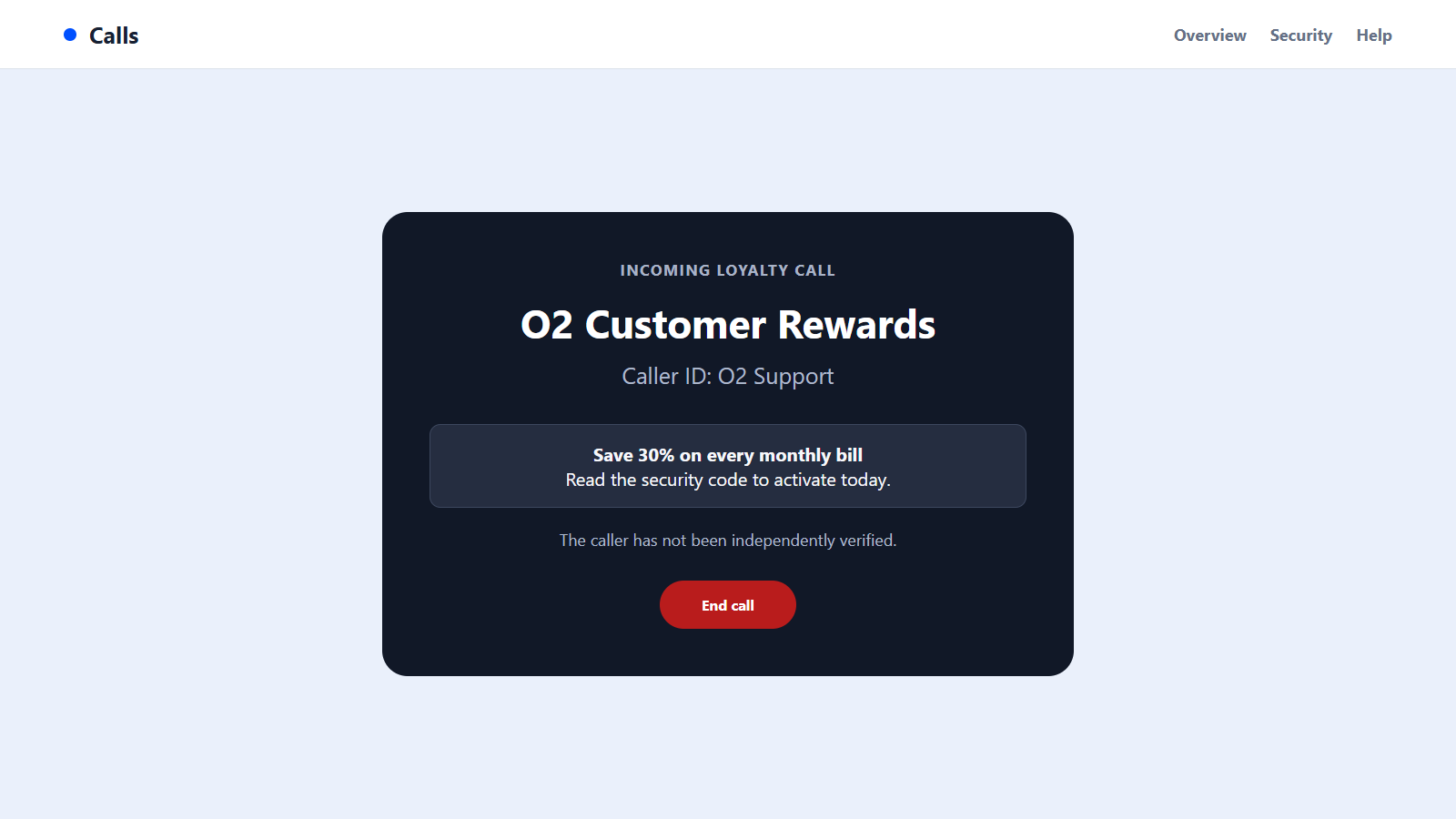
The caller says O2 has selected you for a 30% loyalty discount. The offer sounds routine, and a genuine-looking security code arrives while the representative is still on the line.
O2 scam calls do not use that code to approve a discount. In the hands of an impostor, it can become the final step needed to enter your account, order a device, change a SIM, or collect more personal information.
Overview
Fraudsters impersonate O2 with discounts and urgent account stories
O2 scam calls often begin with a welcome offer: a lower monthly bill, a loyalty reward, an upgrade, or a better contract. Other calls use fear by claiming the SIM will be deactivated or the account has a security problem.
The incoming number may look local or may even resemble a genuine business line. Caller ID can be spoofed, so the name on the screen is not proof that O2 placed the call.
The one-time passcode is usually the real target
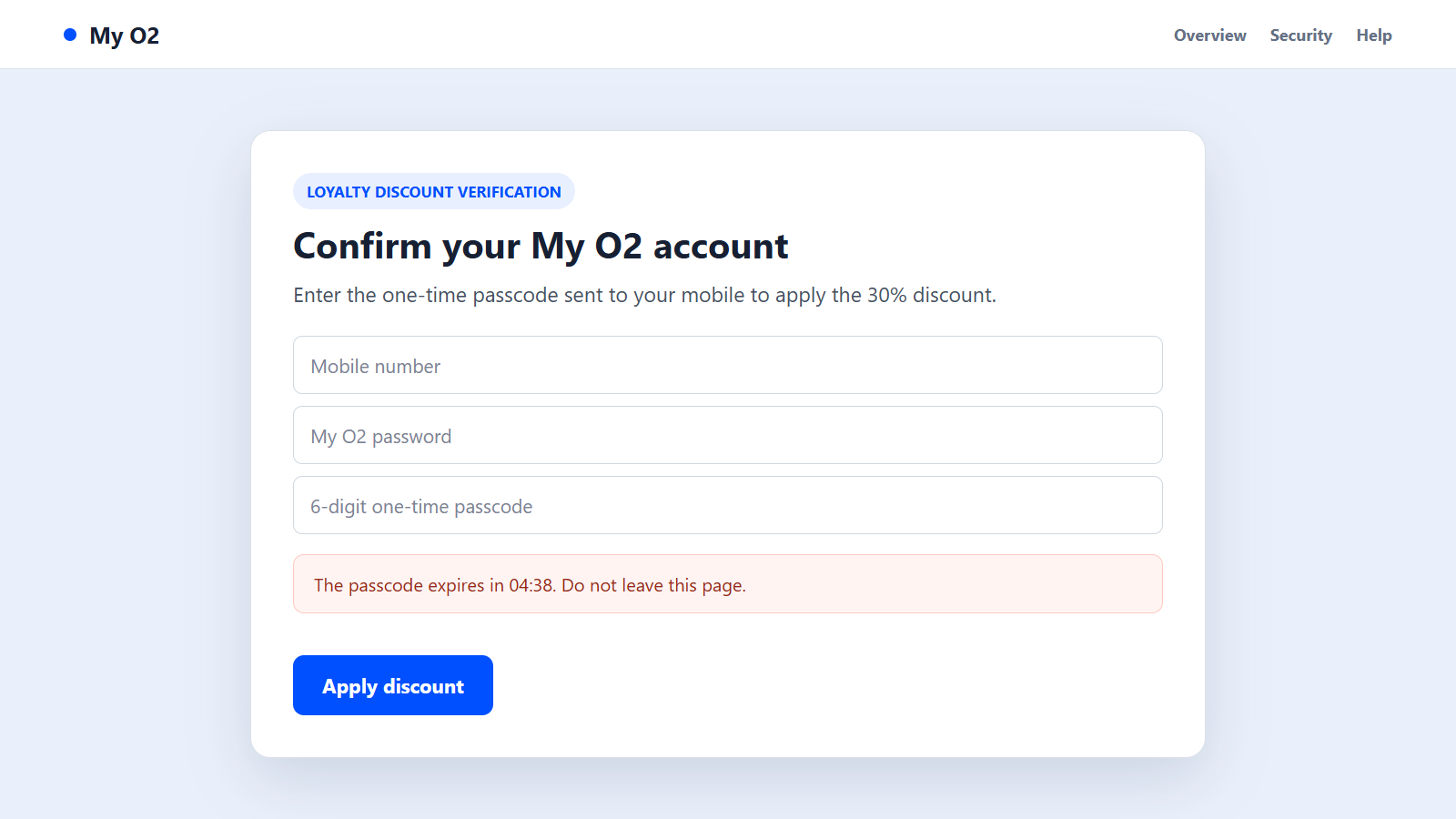
While speaking with the victim, the scammer may attempt a real login, password reset, order, or account change. That action causes O2 to send a genuine one-time passcode to the customer’s phone.
The caller then asks for the code to confirm the discount. Sharing it can authorize the attacker’s action rather than the offer described in the conversation.
A stolen account can lead to device, SIM, and payment fraud
Once inside My O2, a criminal may view account data, change contact details, order a high-value handset, add services, or prepare a SIM-swap attempt. Access can also reveal enough personal information for fraud against other accounts.
Remember these practical rules:
- O2 says it will not call unexpectedly and ask for a one-time passcode.
- Passwords, PINs, and bank details should not be shared with an incoming caller.
- A real security code can be triggered by a scammer.
- Caller ID can be cloned and should not be used as authentication.
- A discount can be checked by ending the call and opening My O2 independently.
- Suspicious UK mobile calls and texts can be reported to 7726.
A genuine company representative will not object when you end an unexpected call and start a new conversation through an official contact route.
The Main Versions of the O2 Impersonation Scam
The fake 30% loyalty discount
The caller thanks the customer for staying with O2 and offers a large reduction on future bills. To apply it, the representative claims to need a code that will arrive by text.
The code may actually approve a login or sensitive account action. The discount never appears because the caller was not changing the tariff.
A SIM deactivation or terms update warning
A call or message says the SIM will stop working unless the customer accepts new terms, confirms identity, or updates billing details. A short deadline makes the routine-sounding request feel urgent.
The link can open a copied My O2 page that collects the username, password, card information, and one-time code.
A fraudulent upgrade or replacement-handset offer
The caller offers a new device at an unusually low monthly cost. After collecting details, the operation may place a real order on the compromised account or send the wrong phone.
A follow-up caller can then claim the delivery was an error and arrange collection. The handset goes to the criminal while the contract remains attached to the victim.
A fake O2 support number appears in search results
Fraudulent advertisements and lookalike support pages can place an impostor’s number above organic results. In this version, the victim initiates the call but still reaches a scam operation.
The agent asks for account credentials, a code, remote access, or payment to solve a problem that may not exist.
Why the Call and Text Can Look Genuine Together
The caller may know the customer’s name, mobile number, provider, or recent upgrade date. That information can come from data breaches, marketing records, social profiles, stolen email, or an earlier phishing attempt.
A genuine O2 text arriving during the call is especially persuasive. The message proves that someone initiated an account action, but it does not prove the person on the phone is authorized.
Scammers often keep talking while the code arrives. Constant conversation reduces the chance that the recipient will pause to read warnings in the text.
The caller can also spoof a familiar area code or business number. Returning the call through the recent-calls list may reconnect to the operation rather than O2.
Some callers add a convincing account detail, such as the last digits of a number or an old address. That information may be stolen or purchased, and it does not prove the caller can legitimately manage the account.
When a handset is involved, the fraud may continue after the call. A courier story can be used to collect a device that was ordered through the victim’s real account.
Finally, the offer is plausible. Mobile companies do provide upgrades and retention deals, so the scam depends less on an outrageous promise and more on using the wrong verification process.
How to Verify an O2 Call Without Exposing the Account
Do not answer security questions or read out a code. Tell the caller you will check the offer in My O2, then end the call without using any number they provide.
Open the O2 app or type the official website address yourself. Review recent orders, profile changes, upgrades, connected devices, and security messages.
If you need help, use the number shown on O2’s official site or call 202 from an O2 mobile. O2’s phishing and smishing guidance confirms that unexpected callers should not ask for passcodes, passwords, PINs, or bank details.
Read the entire text that contains the code. It may describe the action being approved and explicitly warn that staff will not ask for it.
Check the account again after the call, even if nothing was shared. An unfamiliar password-reset message, order, or SIM notice should be reported through O2’s genuine support channel.
How O2 Scam Calls Work
Step 1: The operation builds a list of mobile customers
Numbers may be dialed randomly or selected from leaked and marketing datasets. The scammer may know the provider, but a wrong guess is inexpensive when thousands of calls are placed.
Some operations use automated messages to identify people willing to speak with a live agent.
Step 2: A discount or account problem starts the conversation
The caller introduces a reward, contract update, SIM issue, or suspicious activity. Each story gives the victim a reason to stay on the line.
A time limit discourages independent checking and makes refusal feel costly.
Step 3: The caller collects enough details to attempt access
The victim may be asked for a name, postcode, date of birth, email address, or partial account information. The questions are presented as standard identity checks.
Combined with previously stolen data, those answers can support a login or reset request.
Step 4: The scammer triggers a genuine O2 code
The criminal begins an action on the real O2 system. The platform sends the customer a legitimate code because someone is trying to authenticate.
The caller falsely says the number applies the discount or confirms the customer is eligible.
Step 5: The victim reads the code aloud or enters it on a fake page
The attacker submits the code before it expires. That can complete a login, password change, order, or other protected action.
The victim may hear a reassuring confirmation while the account is being taken over.
Step 6: Account controls and contact details are changed
The criminal may add an email address, change a password, alter delivery information, or gather account data. A SIM change can help intercept future calls and messages.
Fast changes make it harder for the real customer to regain control.
Step 7: Devices, payments, or other accounts are targeted
A handset can be ordered and redirected, while saved payment details may support charges. Control of the mobile number can also weaken security on email, banking, and social accounts.
The scam can therefore continue beyond the original O2 account.
Step 8: A second caller manages the aftermath
If a device arrives, another impostor may arrange a collection. If the victim notices the takeover, fake support may ask for more codes to supposedly reverse it.
Every recovery step must begin through an independently verified O2 channel.
Company, Address, and Fulfillment Checks
The caller must be verified through O2, not by caller ID
End the incoming call and contact O2 using its official app, website, or published number. A spoofed display can show a genuine-looking identity while the call comes from elsewhere.
Do not let the caller transfer you to another supposed department as proof.
The message link must stay on an official O2 domain
Read the registered domain from right to left. Replacing the letter O with zero, adding support words, or using O2 inside a subdomain can create a convincing imitation.
It is safer to open My O2 independently than to repair a suspicious URL.
The delivery address must match the account holder’s instruction
Review any new device order and shipping destination directly in the account. An unfamiliar address, collection arrangement, or delivery change should be reported immediately.
Do not hand a mistakenly delivered phone to a courier arranged by an unsolicited caller.
The promised discount or upgrade must appear in My O2
A real tariff change leaves a record with clear terms, duration, device cost, and monthly payment. A verbal promise is not fulfillment.
If the offer cannot be confirmed in the official account or by verified support, treat it as nonexistent.
Warning Signs During an O2 Scam Call
- An unexpected caller offers a large discount for an immediate decision.
- The representative asks for a one-time passcode, password, PIN, or bank details.
- A SIM or account suspension will supposedly happen within minutes.
- The caller tells you not to read the full security message.
- You are directed to a link or number supplied during the call.
- The offer cannot be viewed in My O2.
- A delivered device must be returned through the caller’s courier.
- The representative becomes hostile when you say you will call O2 yourself.
The request for a security code is the clearest warning. No discount is worth bypassing the protection that code provides.
What to Do if You Have Fallen Victim to This Scam
- Contact O2 immediately. Use 202 from an O2 mobile or the verified contact details on the official site. Explain which codes, credentials, and personal details were shared.
- Ask O2 to secure the account. Check for password changes, new devices, upgrades, SIM requests, forwarding, delivery addresses, and added services.
- Change the My O2 password. Use a clean device and a unique password. Secure the linked email account as well because it may be used for recovery.
- Protect the mobile number. If service suddenly disappears, contact O2 from another phone and report a possible SIM swap without delay.
- Notify the bank or card issuer. Report exposed payment details and unfamiliar transactions. Ask whether cards should be blocked or replaced.
- Secure other accounts tied to the number. Review email, banking, social-media, and shopping accounts for password resets or unfamiliar sessions.
- Scan any device used with the scam. Run Malwarebytes if you installed software, opened a suspicious attachment, or followed instructions for remote access.
- Block malicious destinations. AdGuard can help stop many known phishing pages and deceptive redirects, but it cannot invalidate a code already shared.
- Report the call or text. Send the number and message to 7726, report the account to O2, and file a case with Action Fraud if money or identity data was taken.
- Keep the device or delivery evidence. Save order numbers, packaging, courier details, call logs, messages, and account notifications. Do not send a phone to an address supplied by the scammer.
Frequently Asked Questions
Does O2 ever call customers with offers?
Marketing contact can occur, but O2 says an unexpected caller should never ask for one-time passcodes, passwords, PINs, or bank details. Verify any offer through My O2.
Why did a genuine O2 code arrive during a scam call?
The scammer may have triggered a real account action. The code authenticates that action, not the caller’s story about a discount.
Can caller ID show the real O2 number?
Yes. Numbers can be spoofed, so a familiar display is not reliable proof. End the call and dial an official number yourself.
What if I shared personal details but not the code?
Tell O2 what was disclosed, change exposed credentials, and watch for follow-up attempts. The information can be combined with other stolen records.
Should I return a phone sent by mistake?
Contact O2 independently and follow only the return process confirmed through the official account. Do not use a courier or address arranged by an incoming caller.
What does forwarding a message to 7726 do?
It sends the suspicious number or message to the mobile industry’s reporting system so providers can investigate and take action against abusive senders.
The Bottom Line
O2 scam calls use a believable discount or account warning to make a genuine security code feel like routine customer-service paperwork.
Never share that code with an unexpected caller. End the call, open My O2 yourself, and verify every offer, order, SIM change, and delivery through a channel you know belongs to O2.

Join the discussion
0 commentsShare your experience or ask a question about this article.
Discussion
Start the conversation
Have a question or something useful to share? Add the first comment.