

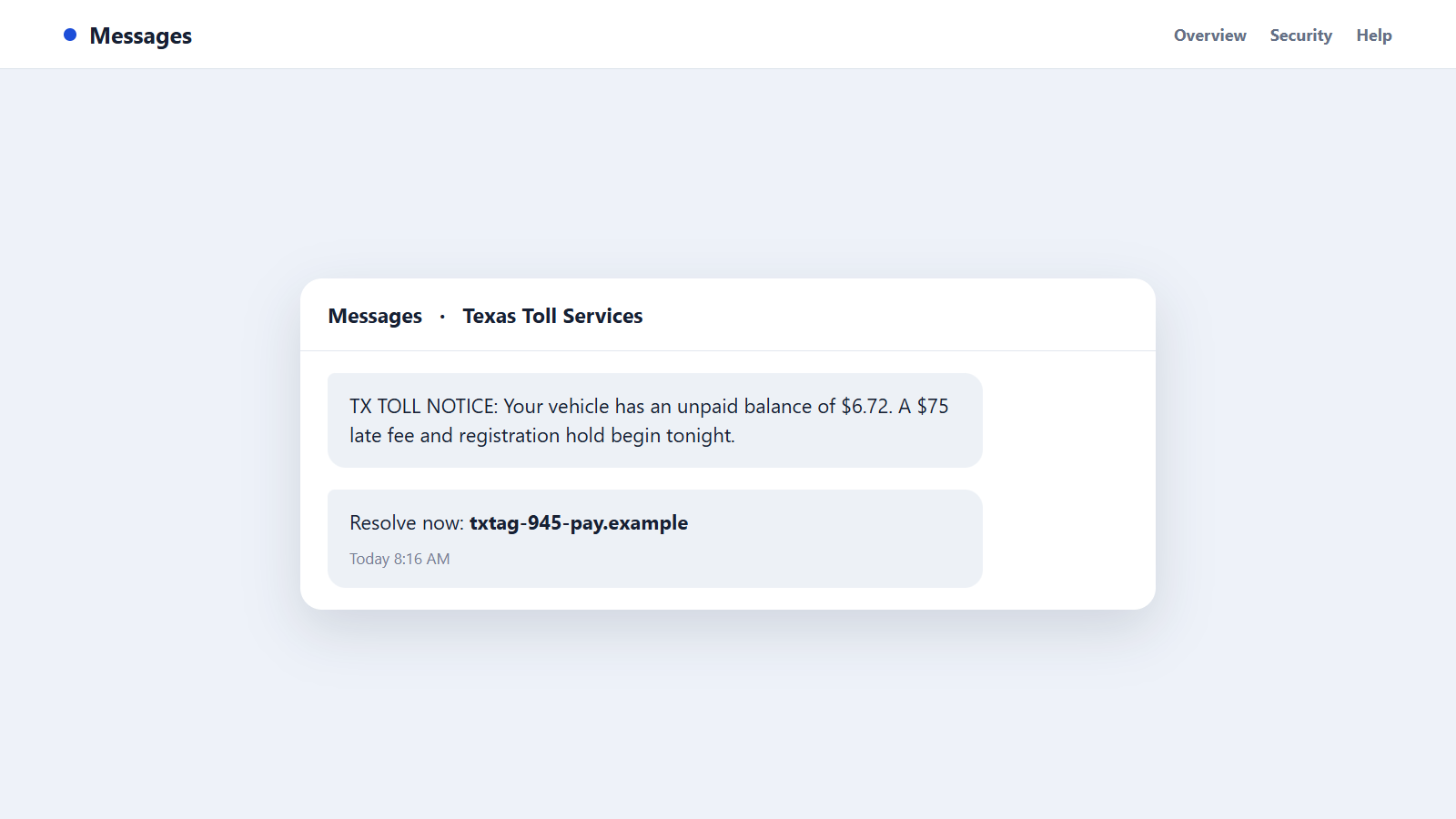
The text says a Texas toll balance of $6.72 will become a $75 penalty tonight. The sender uses a 945 number, mentions Dallas, and gives you only hours to protect your vehicle registration.
The 945 area code scam makes a tiny invented problem feel easier to pay than investigate. That quick payment can expose far more than the amount written in the message.
Overview
A genuine Dallas-area prefix can carry a fabricated claim
The 945 area code is part of the Dallas-Fort Worth overlay region. Scammers use spoofed caller ID, temporary internet numbers, and compromised messaging accounts to make their contact appear nearby.
The prefix tells you what number was displayed, not where the sender sits or which organization owns the message.
Toll, bank, and government stories create familiar pressure
Common 945 area code scam messages involve unpaid tolls, account locks, mobile-wallet enrollment, tax debt, warrants, or package fees. Each script offers a convenient link or callback number.
The amount may start small because a $6 or $12 payment feels easier to settle. The fake page then asks for card, identity, and account information.
The operation profits from both payment and captured data
A phishing page can take the stated fee, store the full card number, and collect a name, address, telephone number, email, and driver’s license details. Later charges can be much larger.
Keep these boundaries when a 945 contact claims urgency:
- Open toll and bank accounts independently instead of tapping a message link.
- Do not assume a Dallas prefix belongs to a Texas agency.
- Never give a one-time code to an incoming caller.
- Government fines do not require gift cards or cryptocurrency.
- Compare the claimed transaction with the official account.
- End the conversation if the sender prevents independent verification.
A legitimate balance will still be present when you reach the provider through its verified website. The scam needs you to remain inside its invented route.
Common 945 Area Code Scam Messages
Unpaid toll and registration threats
The message lists a small balance and warns about late fees, license suspension, collection, or a registration hold. A link opens a page styled to resemble a Texas toll provider.
The page may accept any license plate, which reveals that it is collecting payments rather than checking a real account.
Bank fraud and mobile-wallet alerts
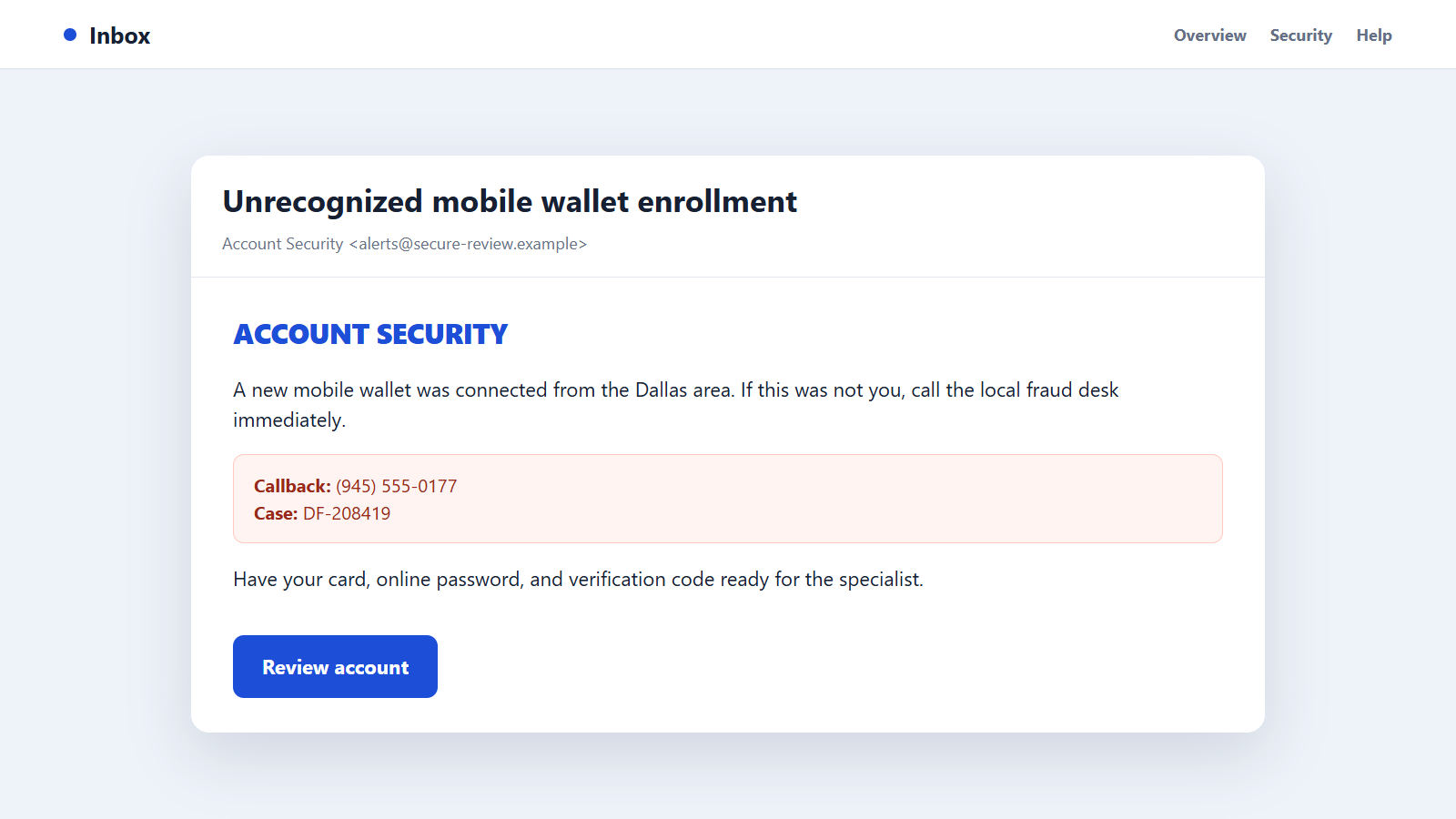
A text or call reports an unrecognized purchase, Zelle transfer, or digital-wallet registration. A supposed security representative asks the customer to verify the account.
Credentials and security codes can then be used for a genuine takeover while the victim believes a fraudulent transaction is being cancelled.
Police, court, and tax impersonation
The caller claims that a fine, warrant, or tax balance must be handled immediately. Real local names and addresses are copied to make the threat sound connected to Dallas County or a nearby city.
The requested payment method often exposes the fraud: kiosks, gift cards, cryptocurrency, or a personal transfer.
Delivery, refund, and account-verification links
Other messages claim a package needs an address update, a merchant owes a refund, or an account will close. The link asks for a small fee or sign-in.
These stories can be sent nationally while displaying a local number to improve response rates.
Why Small Toll Demands Work So Well
Many drivers use several toll systems and cannot remember every road, trip, or mailed notice. A modest balance falls into the uncomfortable space between believable and not worth investigating.
The deadline adds a larger consequence. Paying $6.72 seems rational when the message threatens a $75 fee, collections, or a registration problem.
Scammers also imitate the compressed language of real service alerts. Short sentences, a case number, and a payment button can look ordinary on a small screen.
The 945 number reinforces the story for North Texas residents. Someone who recently drove in Dallas may assume the message was generated by a local road authority.
A copied page can use logos, colors, maps, and support text from the genuine provider. The browser padlock only means the connection is encrypted; the criminal can obtain encryption too.
Once the card is entered, an error message may request a second card. The operation can capture both and still claim no payment succeeded.
An identity form may ask for a driver’s license or date of birth under the pretext of locating the vehicle. That information is valuable even if the card transaction is blocked.
Finally, the sender can follow up as the bank’s fraud team after trying the stolen card. A second 945 call then uses the victim’s own declined-payment alert as evidence.
Seasonal travel and rental cars increase uncertainty. A recipient may wonder whether a family member used the vehicle or whether an old toll was delayed, making the generic claim harder to dismiss immediately.
Scammers exploit that uncertainty by avoiding precise details. The message may omit the road, toll plaza, timestamp, and plate because the sender does not possess a real transaction record.
A cloned page can also display a fake countdown or increasing fee. Those elements are created by the website and do not show that any government deadline is actually approaching.
Real toll disputes also provide a documented route for review. A message that threatens punishment but offers no statement, transaction history, mailing address, or appeal process is substituting urgency for evidence.
The cheapest safe choice is to ignore the supplied link and spend a few minutes checking the official account.
How to Check a 945 Toll or Bank Alert
Do not open the link in the message. Use the toll provider’s app, a saved bookmark, or an address printed on a previous statement.
Review the balance, vehicle, plate, transaction date, and official notifications. A real account should show the alleged toll without requiring card information first.
If you do not know which provider operates the road, use an official Texas transportation site to identify it. Avoid calling telephone numbers found in sponsored search advertisements.
For a bank warning, open the official banking app and compare the amount, merchant, and device activity. Call the number printed on the card if anything remains unclear.
Do not reply STOP to a suspicious toll message. While legitimate programs honor opt-outs, a fraud campaign may use the reply to confirm that the number is active.
The FTC warns about fake toll texts that direct drivers to phishing pages. Its advice is to check the account through the real toll service.
Search the complete web address carefully if you need to document it, but do not visit it from a device holding sensitive accounts. Misspellings and extra words around a brand name are warning signs.
How the 945 Area Code Scam Works
Step 1: The campaign obtains Texas telephone numbers
Numbers may come from breached records, marketing databases, public listings, or automatic generation. The operation may know only that the recipient is likely connected to North Texas.
Large campaigns accept many inaccurate messages because sending them costs little.
Step 2: A local-looking sender is selected
The criminal spoofs or rents a 945 number. A recognizable Dallas-area prefix makes the toll, bank, or government identity feel geographically consistent.
The same displayed line can change its claimed organization from one victim to the next.
Step 3: A low initial amount lowers resistance
The toll or delivery fee is deliberately small. The target may decide that paying is faster than searching through statements.
A large threatened penalty makes immediate action appear economical.
Step 4: A copied page collects more than the fee
The form requests the vehicle plate, name, address, mobile number, email, and full card details. Some versions also request a driver’s license.
Every field expands the value of the stolen record beyond the original payment.
Step 5: The card is tested or a bank login is attempted
The operation may run a small authorization, attempt a purchase, or use captured credentials to access an account. A genuine bank alert can appear.
The scammer may then telephone the victim while the concern is fresh.
Step 6: A verification code completes the next action
The fake fraud representative asks for a code, saying it will reverse the charge. In reality, the code can approve a login, password reset, or digital-wallet enrollment.
Security messages should be read literally, not through the caller’s explanation.
Step 7: Funds and identity data are distributed
Stolen cards can be used for purchases, while complete personal records may be sold or reused. Account access supports transfers and additional phishing.
The visible 945 number may be abandoned before complaints accumulate.
Step 8: Related impersonations target the same victim
Follow-up messages may pose as the toll service, bank, police, or a refund company. Each new role refers to details captured earlier.
The second contact is not independent proof. It is often the continuation of the first compromise.
Company, Address, and Fulfillment Checks
The toll operator must match the road and transaction
Confirm which authority operates the claimed road, then sign in through that provider’s official site. A vague Texas toll department without a verifiable transaction is not enough.
Check the plate, travel date, location, and account history together.
The domain must belong to the actual organization
Scam sites place TxTag, toll, pay, or Texas inside an unrelated web address. The important part is the registered domain ending, not the brand words at the beginning.
Open the genuine website independently and compare its payment route.
The payment recipient and support number must be official
Government and toll payments use named processors and documented receipts. They do not go to personal payment handles, crypto wallets, or gift cards.
A local callback number is not sufficient when the provider does not publish it.
The promised result must appear in the real account
A genuine payment reduces a documented balance and produces a traceable confirmation. A fake page may show success while the actual toll account remains unchanged.
Verify fulfillment inside the official account rather than through an emailed receipt alone.
Warning Signs of a 945 Area Code Impostor
- A toll text arrives without a vehicle, road, or transaction date.
- A tiny balance is paired with an extreme same-day penalty.
- The link uses an unfamiliar domain instead of the provider’s official site.
- The form accepts incorrect plate or account information.
- A local caller asks for a bank password or one-time code.
- Payment must use gift cards, cryptocurrency, or a personal account.
- The caller refuses to let you check the app or statement.
- A second supposed agency repeats details entered on the phishing page.
A legitimate 945-area business can explain its identity without demanding that you trust the prefix.
What to Do if You Have Fallen Victim to This Scam
- Call the card issuer or bank immediately. Report that details were entered on a phishing page and ask to block the card, stop pending payments, and review account access.
- Replace exposed cards and credentials. A declined transaction does not make the card safe. Change any password submitted to the site.
- Contact the real toll provider. Confirm the genuine balance and warn that its name is being used in fraudulent 945 messages.
- Review mobile-wallet and account devices. Remove unfamiliar enrollments, recipients, sessions, and recovery details.
- Protect identity documents. If license or Social Security information was entered, follow IdentityTheft.gov and consider credit freezes.
- Preserve the phishing evidence. Save the message, full URL, screenshots, payment records, and call times without revisiting the page.
- Scan the device. Run Malwarebytes if the page downloaded a file, requested an app, or produced unusual browser behavior.
- Limit future malicious links. AdGuard can help block known phishing domains and deceptive ads, although careful account verification remains necessary.
- Report the campaign. Forward suspicious texts to 7726, notify the impersonated provider, and submit details to the FTC.
- Ignore paid recovery promises. A caller who guarantees a refund for an advance charge is attempting another loss, not completing the original dispute.
Frequently Asked Questions
Is 945 a legitimate Texas area code?
Yes. It serves the Dallas-Fort Worth overlay region, but criminals can spoof or temporarily rent numbers using that prefix.
Do Texas toll agencies send any text messages?
Communication policies vary, so check the real account directly. Never treat an unexpected payment link as proof of a balance.
What if I paid only the small toll amount?
The stolen card details may support later purchases. Contact the issuer, replace the card, and review transactions even if the first loss was small.
Can the scam page use HTTPS and still be fake?
Yes. HTTPS protects the connection to the site but does not prove that the operator is a legitimate toll authority.
Should I reply STOP to a suspicious 945 text?
No. Block and report it instead. A reply can confirm that the campaign reached an active telephone number.
Why did a real bank alert arrive after I used the toll page?
The criminals may have tested the captured card or attempted account access, causing the bank to send an authentic warning.
The Bottom Line
The 945 area code scam uses a Dallas-area number and a believable small balance to lead victims into a page that captures payment and identity information.
Ignore the message route, open the real toll or bank account yourself, and verify the claimed activity there. If details were entered, treat the card and credentials as compromised immediately.

Join the discussion
0 commentsShare your experience or ask a question about this article.
Discussion
Start the conversation
Have a question or something useful to share? Add the first comment.