

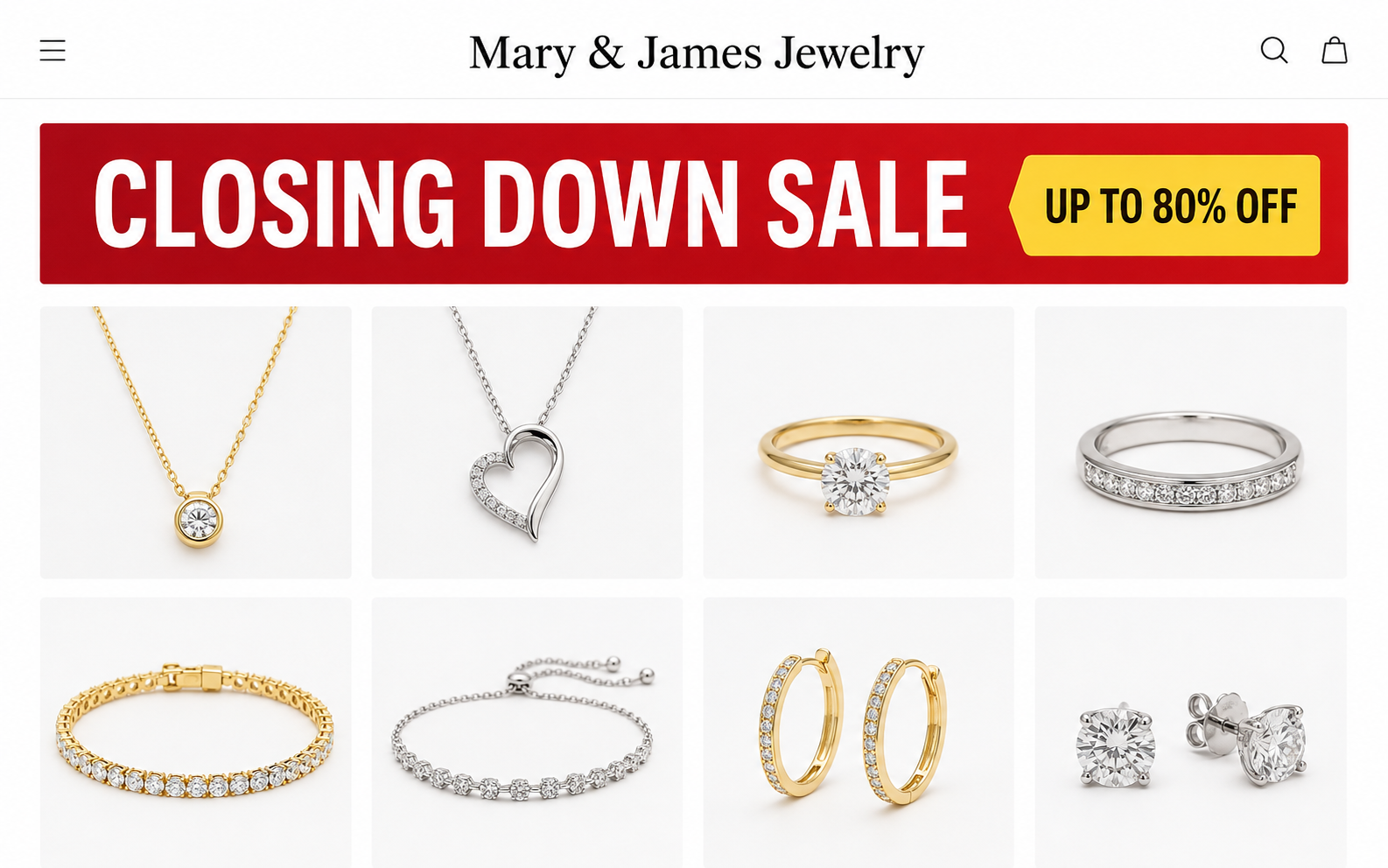
A tender retirement story, a nearly empty workshop, and jewelry marked down by as much as 80% can feel like a rare final opportunity.
Mary and James Jewelry used exactly that atmosphere. The storefront’s history, catalog, company details, and current disappearance tell a far harsher story.
Overview
The store sold a family legacy rather than ordinary costume jewelry
Mary and James Jewelry presented itself as a long-running workshop created by a devoted couple with more than 30 years of experience.
The language was intimate. Pieces were described as meaningful designs connected with love, memories, tradition, and a lifetime of craftsmanship.
Social advertisements framed the discount as a farewell. Shoppers were encouraged to support the owners before the business closed permanently.
That story changes how a person evaluates price. A clearance from retiring artisans feels different from a newly assembled online catalog.
It can also discourage comparison. Buyers may feel they are preserving someone’s legacy rather than purchasing a mass-market necklace.
The evidence conflicts with the heritage narrative
Independent domain reporting dates mary-jewelry.com to November 8, 2025. A recent website cannot prove a business never existed offline.
However, a claimed three-decade operation should leave verifiable traces: an old address, local press, business registration, archived catalog, or named craftspeople.
The store did not provide that history clearly. Instead, reviewers described AI-looking owner images, generic products, and a persistent closing-down message.
- The catalog reportedly contained thousands of products rather than a finite workshop inventory.
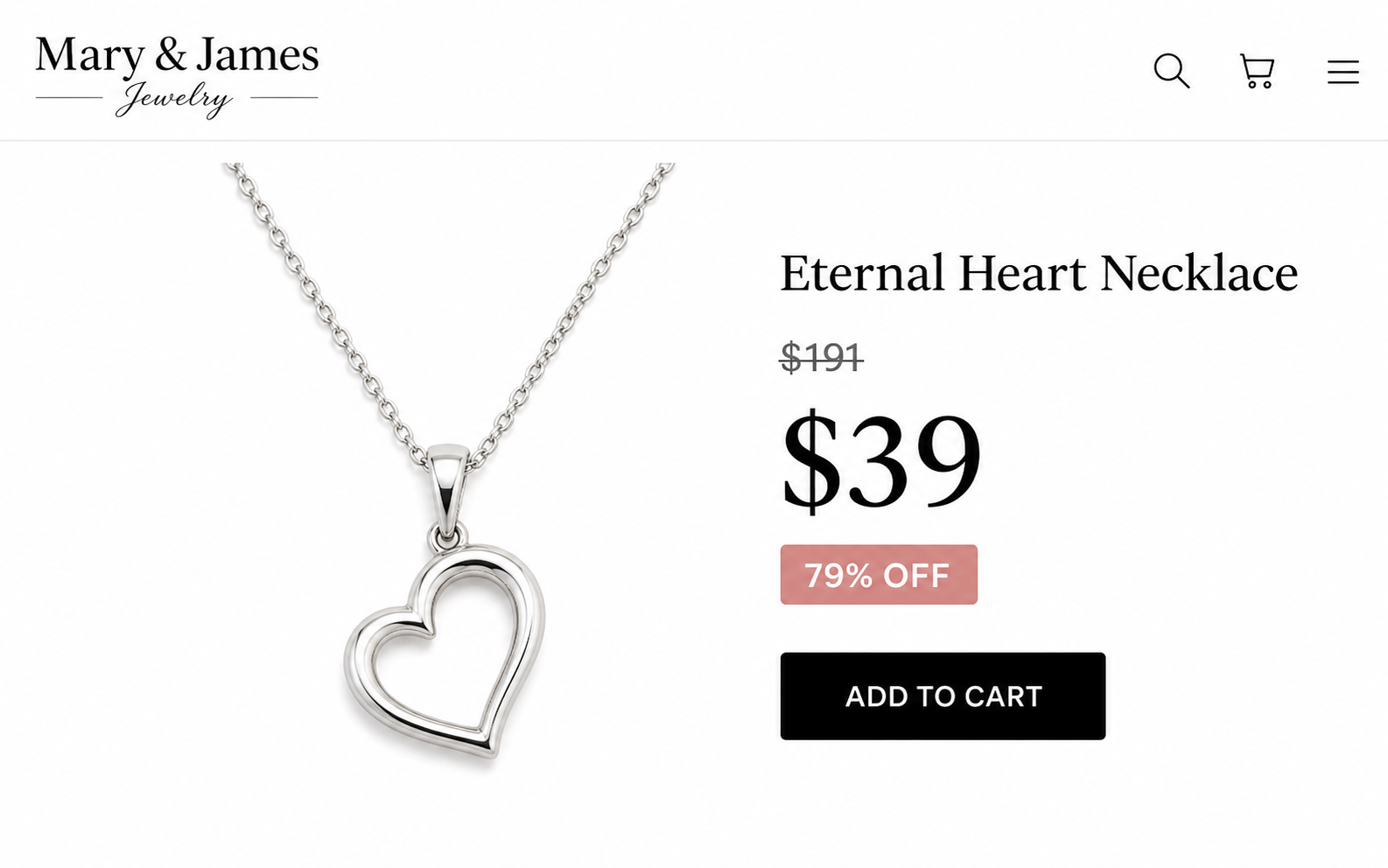
- Many items carried discounts around 74% to 79%.
- Product styles resembled inexpensive designs found through wholesale marketplaces.
- The visible support channel was primarily an email address.
- A clear workshop address, public telephone number, and manufacturer identity were missing.
- The domain no longer resolved during our September 2026 check.
A disappearing domain is especially important after payment. It can remove product descriptions, guarantees, tracking links, and policy language needed for a dispute.
Our verdict: avoid this closing-sale operation
The strongest evidence points to a deceptive dropshipping-style offer, not the multigenerational artisan shop described in its advertising.
A parcel may have reached some buyers. Customer reports commonly describe cheap, costume-like items or products that did not match the emotional sales presentation.
Receiving something does not validate the story that caused the purchase. Misleading origin, quality, scarcity, and business-history claims can still produce real harm.
We found no sound evidence of an automatic subscription tied specifically to mary-jewelry.com. Do not add that allegation without a receipt or checkout record.
The documented concerns are already serious: fabricated heritage, extreme markdowns, opaque ownership, questionable imagery, mass inventory, and weak post-sale recourse.
The Emotional “Closing Down” Story
Closing-sale advertising works because it combines urgency with sympathy. The buyer is not merely offered a discount; they are invited into someone’s personal ending.
A video may show an older couple, a quiet bench, half-packed shelves, or emotional text about retirement after decades of work.
Modern image and video generators make these scenes inexpensive to fabricate. Faces, hands, reflections, tools, lettering, and jewelry details may change unnaturally.
Visual errors can support suspicion, but no single odd finger proves the entire business story false. The surrounding records must also be examined.
Here, the surrounding picture does not support a genuine closing inventory. Thousands of in-stock listings are difficult to reconcile with a final workshop liquidation.
A real jeweler retiring after 30 years should be able to identify the shop location, legal owner, business history, materials, makers, and realistic remaining stock.
Mary and James Jewelry leaned heavily on emotion while leaving those ordinary verification points unusually thin.
How the Mary and James Jewelry Scheme Works
Step 1: An AI-styled social ad introduces the supposed owners
The campaign begins away from the store, commonly on a social platform where a dramatic personal story can travel faster than a conventional advertisement.
Viewers meet “Mary” and “James” as people rather than a company. Their apparent age and sadness make skepticism feel unkind.
The message says the shop must close after decades, so deeply discounted pieces are available only while the last inventory remains.
No independent evidence accompanies the biography. The story itself functions as the credential.
Step 2: The landing page repeats heritage and scarcity
The visitor reaches a polished store filled with sentimental product names, crossed-out prices, low-stock cues, and repeated claims about craftsmanship.
Every design appears connected with a memory or relationship. This language shifts attention from metal composition, plating thickness, stone identity, and manufacturer.
The countdown or closing date suggests that researching the domain could mean losing the opportunity.
A genuine liquidation usually reduces available inventory over time. A catalog that remains enormous and fully stocked contradicts that pattern.
Step 3: Inflated reference prices manufacture the bargain
A simple necklace may appear beside a much higher crossed-out amount, then receive a 70% or 80% reduction.
The customer evaluates the saving against that reference, not against comparable mass-produced jewelry sold for ordinary prices elsewhere.
A reference price should reflect a genuine recent selling price. It should not exist merely to make the current amount look extraordinary.
Reverse-image searches and product-shape comparisons can reveal visually similar pieces across multiple storefronts, sometimes for far less.
Step 4: The vast catalog disguises generic sourcing
An artisan workshop can produce many designs, but thousands of unrelated in-stock products suggest a supplier feed rather than handcrafted remaining inventory.
Generic sourcing is common and not automatically unlawful. The deception begins when imported commodity jewelry is represented as a couple’s personal lifetime work.
Shoppers may believe they are paying for original design, skilled labor, durable materials, and a local business relationship that do not exist.
Step 5: Checkout captures payment before the story is tested
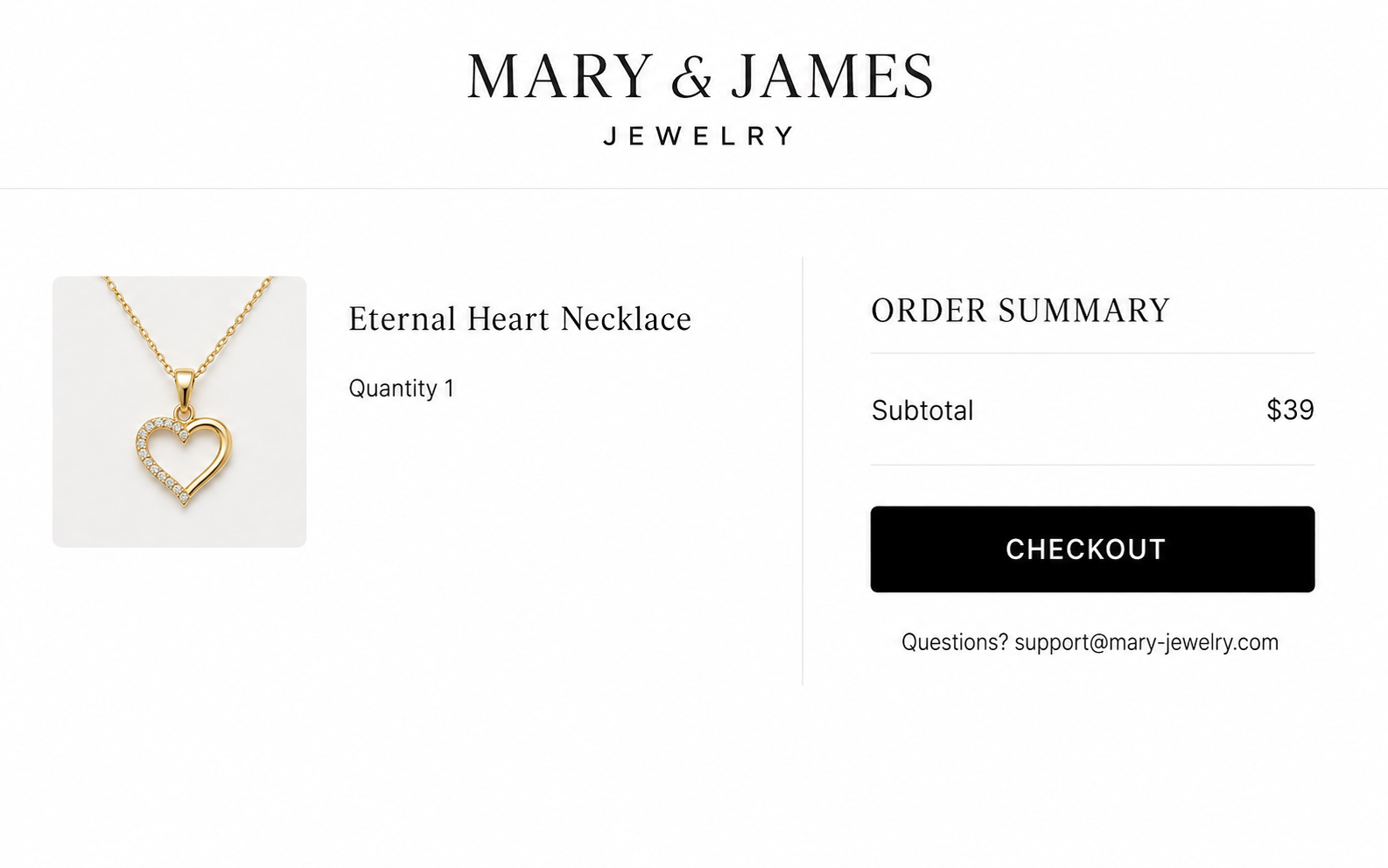
The final order page looks familiar because it uses standard ecommerce components and recognized payment logos. Neither proves the claims on the preceding advertisement.
At this moment, record the complete total, merchant name, shipping charge, currency, delivery estimate, and any optional protection or membership.
We found no verified basis to say every order created recurring billing. Buyers should still examine their own receipt for any continuing authorization.
Step 6: A low-cost item may be shipped from overseas
Sending a parcel gives the merchant tracking and makes the transaction look fulfilled. The contents can still differ materially from what was promised.
Buyer reports involving similar closing-sale stores describe thin plating, lightweight alloys, imitation stones, rough finishing, and packaging associated with inexpensive marketplace goods.
Some customers are satisfied with costume jewelry at a low price. The problem is paying under a false artisan and fine-material impression.
Step 7: The return process becomes the final barrier
When quality disappoints, the customer may discover that support exists only through email and the return address was not disclosed before payment.
The seller can offer a partial refund, require international tracked shipping, demand photographs, or insist the item be unused despite needing inspection.
Now the original domain no longer resolves. That makes preserving old receipts and screenshots even more important for anyone with an unresolved order.
Why the Product Catalog Raises Serious Questions
A long-established jewelry studio normally develops a recognizable design language. Materials, hallmarks, sizing, stone treatment, repair, and care information should be consistent.
The Mary and James catalog reportedly stretched across thousands of pieces. Such scale is more characteristic of an imported catalog than two retiring makers.
Quantity alone is not proof. Large jewelry companies can maintain huge inventories, but they also identify their corporate structure and supply chain.
The store’s emotional narrative specifically relied on personal craftsmanship. That makes catalog scale directly relevant, not a minor stylistic complaint.
Look closely at product descriptions. Generic wording, inconsistent material names, repeated measurements, and identical emotional stories can reveal bulk-imported listings.
Terms such as “gold,” “silver,” and “diamond” must be precise. Gold-colored, gold-plated, sterling silver, stainless steel, zircon, and diamond are not interchangeable.
If a listing avoids metal purity, hallmark, plating thickness, gemstone identity, and care instructions, the buyer cannot evaluate durability or fair value.
Extreme discounts across nearly every item create another contradiction. A true final sale should have varied remaining quantities and believable historical prices.
AI Images and Fake-Shop Storytelling
AI-generated shop owners have become common in dropshipping advertisements because they provide a human story without hiring actors or documenting a real business.
Warning signs include changing facial features, malformed jewelry, inconsistent backgrounds, unreadable signs, impossible reflections, and tools blending into fingers or tables.
Video can hide flaws through quick cuts, emotional music, subtitles, and compression. Pause several frames and compare earrings, clothing, hands, and room geometry.
Do not stop at visual detection. Search the supposed owners’ names with the city, shop address, and claimed business age.
Check whether the same farewell text appears under unrelated names in other countries. Recycled scripts strongly weaken the claim of a unique personal story.
Legitimate owners can use AI in advertising. The decisive issue is whether synthetic people are used to create a false history and obtain money.
In this case, the absence of a strong independent business trail and the implausible catalog reinforce concerns raised by AI-looking promotional material.
Company, Address, and Fulfillment Checks
No clear legal company stood behind the sentimental brand
A trade name is not enough. Buyers need the registered entity responsible for descriptions, payments, warranties, data handling, and refunds.
Mary and James Jewelry did not prominently provide the operating identity needed to verify its claimed history or pursue formal complaints confidently.
The advertised workshop lacked a verifiable location
A supposed 30-year jeweler should have an address connected with customers, repairs, tax records, local directories, or archived business references.
Without a public workshop location, the warm local-business presentation becomes impossible to confirm.
Email-only support makes accountability fragile
The visible contact was support@mary-jewelry.com, with no dependable public telephone number. That channel depends on the same domain that stopped resolving.
When the domain fails, messages can bounce and customers may lose access to order management. Save every earlier email outside the seller’s portal.
Overseas fulfillment appears more plausible than artisan production
Catalog scale, product similarity, and buyer reports align with mass-produced jewelry moving through cross-border fulfillment, often associated with Chinese supply chains.
That does not prove every unit came from one factory. It does contradict the expectation created by a personal workshop liquidation.
What to Do if You Ordered From Mary and James Jewelry
- Save every remaining record. Export confirmation emails, payment receipts, product descriptions, tracking, guarantees, and support conversations because the original domain is unavailable.
- Inspect the parcel before discarding anything. Photograph the shipping label, customs data, packaging, material markings, defects, and the item beside a ruler or scale.
- Compare specific promises. Note whether metal, stone, size, finish, origin, craftsmanship, or quantity differs from the advertisement. Precision strengthens a dispute.
- Contact the payment provider quickly. Explain that the merchant site disappeared and provide evidence for non-delivery, defective goods, or items materially not described.
- Review statements for unexpected charges. We found no proven universal subscription, but your receipt controls. Report any unauthorized transaction rather than assuming its purpose.
- Do not pay a second fee for a refund. Reject requests for gift cards, cryptocurrency, account access, remote-control software, or a separate release payment.
- Check for digital exposure. If the ad opened suspicious downloads or extensions, remove them and run Malwarebytes on the device used for ordering.
- Cut off malicious advertising paths. AdGuard can reduce deceptive social redirects and pop-ups, although it cannot recover a jewelry payment.
Is Your Device Infected? Run a Free Malware Scan
Slow performance, constant pop-ups, or strange behavior? These are classic signs of a malware infection. The fastest way to find out is to scan your device with Malwarebytes Free — one of the most trusted malware removal tools available.
The free version detects and removes the most common threats, including:
- Adware — the cause of those annoying pop-ups
- Browser hijackers — unwanted redirects and changed homepages
- Trojans and spyware — hidden programs stealing your data
- Potentially unwanted programs (PUPs) — software you never asked for
👉 Select your device below — Windows, Mac, or Android — then follow the simple steps to download Malwarebytes, scan your system, and remove any threats it finds. The scan usually takes 5 to 20 minutes.
Run a Malware Scan with Malwarebytes for Windows
Malwarebytes is one of the most popular and trusted anti-malware tools for Windows — and it’s completely free for removing infections. It catches threats that many antivirus programs miss, including adware, browser hijackers, and trojans. Follow the steps below to scan and clean your PC in just a few minutes.
Download Malwarebytes
Click the button below to download the latest version of Malwarebytes for Windows from the official source. The free version is all you need — it will scan your computer and remove adware, browser hijackers, and other malicious software at no cost.
Download MalwarebytesOfficial installer for Windows 11 and 10. Your download starts right away.Want real-time protection? See Malwarebytes Premium Malwarebytes Free for WindowsScans and removes malware at no cost
-
Install Malwarebytes
When the download finishes, open your Downloads folder and double-click the MBSetup file. If Windows shows a User Account Control pop-up, click “Yes” to allow the installation.

Follow the On-Screen Prompts to Install Malwarebytes
The setup wizard will walk you through a few quick screens:
-
Choose where you’re installing the program — “Personal Computer” or “Work Computer” — then click Next.

-
Malwarebytes will now install on your device. This usually takes under a minute.

-
When installation is complete, the “Welcome to Malwarebytes” screen will open automatically.

-
On the final screen, click Open Malwarebytes to launch the program.

-
Enable “Scan for Rootkits”
Before scanning, turn on rootkit detection so Malwarebytes can find even the most hidden threats. Click the Settings gear icon on the left side of the screen.

In the settings menu, find “Scan for rootkits” and click the toggle so it turns blue.

Done? Click “Dashboard” in the left pane to return to the main screen.
Start the Scan
Click the blue Scan button. Malwarebytes will automatically update its virus database and start checking your computer for malware.

-
Wait for the Scan to Finish
The scan checks your entire system for browser hijackers and other malicious programs, so it can take 5 to 20 minutes depending on your computer. Feel free to do something else — just check back occasionally to see the progress.

-
Quarantine the Detected Threats
When the scan is done, you’ll see a list of everything Malwarebytes found — malware, adware, and potentially unwanted programs. Click the “Quarantine” button to remove all of them at once.

Malwarebytes will now remove the malicious files and registry entries and move them safely into quarantine.

-
Restart Your Computer
Some threats can only be fully removed after a reboot. If Malwarebytes asks you to restart, click Yes. Once you’re logged back in, Malwarebytes has finished removing the threats it found.

That’s it — your Windows PC is now clean of trojans, adware, and other malware, and should be back to running smoothly.
If you are still having problems with your computer after completing these instructions, then please follow one of the steps:
- Run a computer scan with ESET Online Scanner
- Ask for help in our Windows Malware Removal Help & Support forum.
Run a Malware Scan with Malwarebytes for Mac
Malwarebytes for Mac is a free on-demand scanner that removes the malware other security software tends to miss — adware, browser hijackers, and unwanted programs included. Cleaning an infected Mac with Malwarebytes has always been completely free, and it’s our go-to recommendation. Follow the steps below to scan and clean your Mac in just a few minutes.
-
Download Malwarebytes for Mac
Click the button below to download the latest version of Malwarebytes for Mac.
Download MalwarebytesOfficial installer for macOS. Your download starts right away.Want real-time protection? See Malwarebytes PremiumMalwarebytes Free for MacScans and removes malware at no cost -
Open the Malwarebytes setup file
When the download finishes, open your Downloads folder and double-click the setup file to begin the installation.

-
Follow the On-Screen Prompts to Install Malwarebytes
The Malwarebytes for Mac Installer will guide you through a few quick screens. Click “Continue” and keep following the prompts until the installation completes.



When the installation is complete, Malwarebytes opens to the Welcome to Malwarebytes screen. Click “Get started“.
-
Select “Personal Computer” or “Work Computer”
Malwarebytes will ask what type of computer you’re installing it on. Click either Personal Computer or Work Computer, whichever applies.

-
Start the Scan
Click the “Scan” button. Malwarebytes will automatically update its detection database and begin checking your Mac for malware.

-
Wait for the Scan to Finish
Malwarebytes will scan your Mac for adware, browser hijackers, and other malicious programs. This can take a few minutes, so feel free to do something else — just check back occasionally to see the progress.

-
Quarantine the Detected Threats
When the scan is done, you’ll see a list of everything Malwarebytes found. Click the “Quarantine” button to remove all the threats at once.

-
Restart Your Mac
Malwarebytes will now remove all the malicious files it found. Some threats can only be fully removed after a reboot — if Malwarebytes asks you to restart, allow it. Once you’re logged back in, your Mac is clean.

That’s it — your Mac is now free of adware, rogue browser extensions, and other potentially harmful software.
If you are still experiencing problems while trying to remove a malicious program from your computer, please ask for help in our Mac Malware Removal Help & Support forum.
Run a Malware Scan with Malwarebytes for Android
Malwarebytes for Android automatically detects and removes dangerous threats like malware and ransomware so you don’t have to worry about your most-used device being compromised. Aggressive detection of adware and potentially unwanted programs keeps your Android phone or tablet running smooth.
-
Download Malwarebytes for Android.
You can download Malwarebytes for Android by clicking the link below.
Get Malwarebytes for AndroidOpens Google Play in a new tab.Want real-time protection? See Malwarebytes Premium for AndroidMalwarebytes for AndroidScans your phone and removes malware at no cost -
Install Malwarebytes for Android on your phone.
In the Google Play Store, tap “Install” to install Malwarebytes for Android on your device.

When the installation process has finished, tap “Open” to begin using Malwarebytes for Android. You can also open Malwarebytes by tapping on its icon in your phone menu or home screen.

-
Follow the on-screen prompts to complete the setup process
When Malwarebytes will open, you will see the Malwarebytes Setup Wizard which will guide you through a series of permissions and other setup options.
This is the first of two screens that explain the difference between the Premium and Free versions. Swipe this screen to continue.
Tap on “Got it” to proceed to the next step.
Malwarebytes for Android will now ask for a set of permissions that are required to scan your device and protect it from malware. Tap on “Give permission” to continue.
Tap on “Allow” to permit Malwarebytes to access the files on your phone.
-
Update database and run a scan with Malwarebytes for Android
You will now be prompted to update the Malwarebytes database and run a full system scan.

Click on “Update database” to update the Malwarebytes for Android definitions to the latest version, then click on “Run full scan” to perform a system scan.

-
Wait for the Malwarebytes scan to complete.
Malwarebytes will now start scanning your phone for adware and other malicious apps. This process can take a few minutes, so we suggest you do something else and periodically check on the status of the scan to see when it is finished.

-
Click on “Remove Selected”.
When the scan has been completed, you will be presented with a screen showing the malware infections that Malwarebytes for Android has detected. To remove the malicious apps that Malwarebytes has found, tap on the “Remove Selected” button.

-
Restart your phone.
Malwarebytes for Android will now remove all the malicious apps that it has found. To complete the malware removal process, Malwarebytes may ask you to restart your device.
That’s it — your Android phone is now clean — no more malicious apps, adware, or browser redirects.
If you are still having problems with your phone after completing these instructions, then please follow one of the steps:
- Restore your phone to factory settings by going to Settings > General management > Reset > Factory data reset.
- Ask for help in our Mobile Malware Removal Help & Support forum.
Stay Protected: Block Ads and Malicious Sites
Now that your device is clean, keep it that way. Most infections start with a malicious ad or a fake download button — so blocking them at the source is your best defense.
We recommend AdGuard, which blocks malicious ads, phishing pages, and dangerous redirects before they can reach you.
👉 Download AdGuard and browse safely
How to Recognize the Next Fake Closing-Sale Store
Search the owner names and supposed street location. A genuine decades-old retailer should exist outside its own recent website.
Check the domain age, but use it as one factor. An established offline shop can launch a new domain, provided it offers verifiable history.
Reverse-search product photographs. Finding the same design across wholesale catalogs can expose the difference between original craftsmanship and generic resale.
Read materials literally. “Luxury,” “premium,” and “heirloom-inspired” do not tell you whether the item is plated alloy or solid precious metal.
Locate the return destination before paying. If the store refuses to disclose even the country, the guarantee may be economically meaningless.
Watch the closing deadline for several days. A midnight timer that resets repeatedly is a sales device, not evidence of imminent closure.
Count supposedly sold-out items. A real liquidation normally develops gaps in sizes, metals, colors, and designs as remaining stock disappears.
Search the farewell paragraph inside quotation marks. Identical wording attached to different owners can reveal a reusable advertising script.
Examine the payment descriptor before confirming. A company name unrelated to the store deserves research, even when the checkout itself uses encryption.
Ask whether repairs, resizing, or replacement stones are available. An actual long-running jeweler usually understands after-sale service beyond a generic refund promise.
Compare weight and dimensions, not only photographs. Macro product images can make a tiny, lightweight pendant appear substantial.
For precious-metal claims, look for purity, hallmark, plating, and gemstone disclosures. Avoid any listing that substitutes sentimental adjectives for material facts.
Pay with a method offering disputes. Debit transfers, gift cards, and cryptocurrency provide weaker protection when the seller vanishes.
Frequently Asked Questions
Is Mary and James Jewelry legit?
The evidence does not support its claimed artisan history. We consider the storefront a deceptive, high-risk dropshipping-style operation and recommend avoiding it.
Did customers receive jewelry?
Some similar-store reviewers report receiving products, often described as inexpensive costume jewelry. Delivery does not validate the heritage, material, or discount claims.
Was the closing-down story real?
We found no convincing independent record supporting the farewell narrative. Persistent clearance messaging and a huge catalog conflict with a finite liquidation.
Were the owner pictures made with AI?
Independent observers describe AI artifacts in promotional people. Visual suspicion alone is not conclusive, but it fits the wider lack of verifiable ownership.
Does Mary and James Jewelry use subscriptions?
We did not verify a universal recurring plan for this domain. Check your individual receipt and statement, then challenge any charge you did not authorize.
Why is mary-jewelry.com unavailable?
The domain failed to resolve during our September 2026 check. The exact cause is unknown, but customers should preserve evidence and act promptly.
The Bottom Line
Mary and James Jewelry asked shoppers to believe in retiring artisans, handcrafted memories, and a rare final sale. The available evidence points elsewhere.
A recent domain, implausible inventory, generic-looking jewelry, opaque company details, AI-style storytelling, and a vanished website make this an offer readers should avoid.

Join the discussion
0 commentsShare your experience or ask a question about this article.
Discussion
Start the conversation
Have a question or something useful to share? Add the first comment.