

A new purchase order appears to be waiting on a shared workspace, complete with an Excel filename, uploader, date, size, and review deadline.
For a busy sales or accounts team, that combination can look like ordinary business arriving at exactly the right moment.
Overview
The email imitates a procurement notification
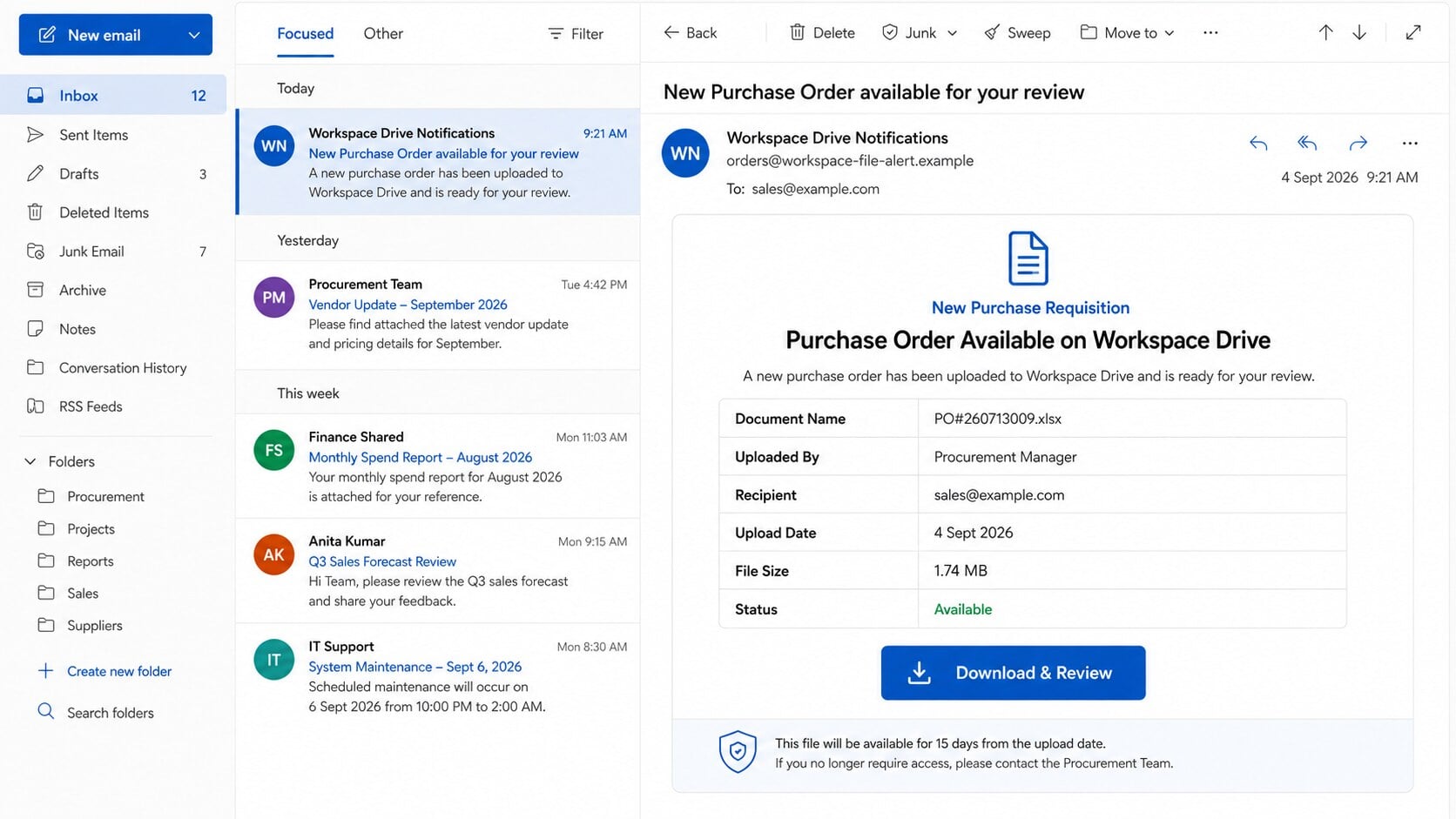
The Purchase Order Workspace Drive email scam announces a “New Purchase Requisition” and says an Excel purchase order is ready for download and review.
It lists believable document properties, including an order number, file size, upload date, recipient, and a generic Procurement Manager as the uploader.
The document button leads to an authentication trap
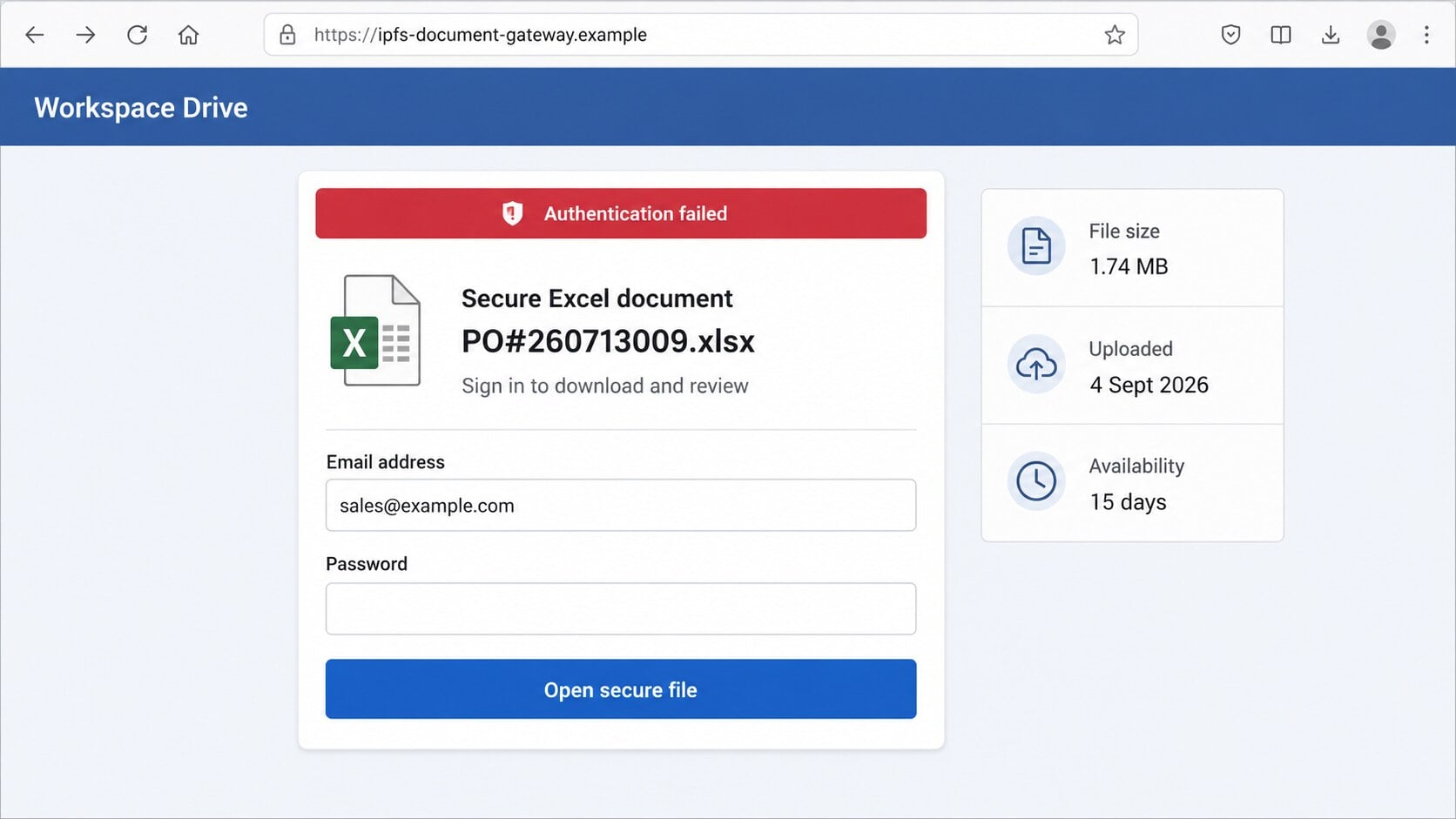
Instead of opening a genuine company drive, the link sends visitors to a remotely hosted page that claims authentication failed before showing any spreadsheet.
The supposed secure document viewer asks for an email address and password. Those credentials are collected by criminals, not checked by a legitimate workspace.
The business context raises the stakes
A compromised sales mailbox can reveal customers, quotes, invoices, tax documents, delivery schedules, and ongoing negotiations that attackers can exploit.
Criminals may remain quiet until they find a real payment conversation. They can then alter bank instructions while impersonating a known supplier or employee.
- No supplier, buyer, company, or purchasing department is clearly identified.
- The file appears without a related quotation or prior conversation.
- The link uses decentralized or unrelated hosting instead of a recognized workspace.
- The viewer demands mailbox credentials to access an Excel purchase order.
- A 15-day availability window creates unnecessary pressure to download quickly.
What Makes the Fake Purchase Order Convincing
It speaks the language of routine procurement
Purchase orders are familiar documents in sales, manufacturing, construction, wholesale, logistics, and professional services. Receiving one rarely feels inherently suspicious.
The lure avoids an outrageous promise. It asks the recipient to perform a normal work task: review an order that someone supposedly uploaded.
That restraint matters. Business phishing often works best when it blends into established workflows rather than announcing an obvious emergency.
The spreadsheet filename looks operational
A name such as PO#260713009.xlsx resembles an internal numbering system. The extension implies a structured order containing quantities, prices, addresses, and delivery terms.
Yet a filename is only text inside an email. It proves neither that a spreadsheet exists nor that any procurement system created it.
Scammers choose familiar extensions because recipients recognize them instantly. The expectation of a useful document carries attention past the sender and link details.
Document metadata supplies false specificity
The message may list 1.74 MB, an upload date, and an “Available” status. These fields resemble a notification automatically generated by cloud software.
None can be verified from the email itself. The numbers are inexpensive props that make a fabricated event appear recorded inside a real system.
A legitimate purchase order should connect to an identifiable buyer, established vendor relationship, delivery address, quotation, or contact who can confirm the request.
A broad “Workspace Drive” avoids naming a platform
The phrase sounds familiar without committing to Google Drive, Microsoft SharePoint, Dropbox, Box, or a company’s private document portal.
This ambiguity allows one template to reach organizations using different services. Recipients may mentally substitute whichever platform their workplace normally uses.
Real document notices identify the service, organization, document owner, and access method. Generic workspace language should prompt verification before any login attempt.
How the Scam Works
Step 1: Attackers target addresses likely to handle commercial documents
Addresses such as sales, accounts, purchasing, quotes, office, and info are easy to discover on company websites, directories, invoices, and data-breach collections.
The criminals may also send the lure broadly. A recipient who never handles orders deletes it, while someone awaiting business may see an immediate opportunity.
Seasonal purchasing and month-end activity increase plausibility. The email requires no knowledge of a specific deal when the organization processes many orders.
More targeted campaigns can incorporate an employee name, company domain, or supplier identity gathered from public records and compromised correspondence.
Step 2: The message presents an order as ready for action
The notification says the document has already been uploaded. This framing makes the recipient feel they are continuing a process rather than starting an unknown interaction.
An uploader labeled Procurement Manager sounds authoritative but cannot be called or verified. There is no full name, department number, or buyer organization.
The download button becomes the easiest way to answer unanswered questions. That is precisely the path the attacker controls.
A limited availability period adds mild urgency. It encourages immediate review while appearing less dramatic than a threat of account closure.
Step 3: The link opens an unrelated or distributed hosting location
The observed destination used content-addressed hosting reached through an IPFS gateway. IPFS is legitimate technology, but its presence does not authenticate a business document.
Decentralized hosting helps criminals move content between gateways and complicates simple domain blocking. The visible address may contain a long, unfamiliar content identifier.
A secure padlock only confirms encryption between browser and current host. It does not prove that the buyer, workspace provider, or claimed uploader owns that content.
Recipients should compare the complete destination with the service their company actually uses. Visual design cannot repair a domain mismatch.
Step 4: A fake error creates a reason to re-enter credentials
The page may display “Authentication failed” before the visitor has meaningfully authenticated. That contradiction is easy to miss because errors commonly occur in real portals.
It then claims a secure Excel file awaits and requests an email address plus password. The form imitates access control without contacting the recipient’s provider.
Some phishing kits change logos according to the submitted email domain. Others prefill the address from a parameter embedded in the original link.
The page’s job is not to open PO#260713009.xlsx. Its job is to make credential submission feel like the final step before the file appears.
Step 5: Submitted credentials are captured and validated
When the victim clicks sign in, the form sends the values to infrastructure chosen by the attacker. A genuine identity service never receives the request.
The kit may reject the first password and request it again. Capturing two entries helps criminals filter typing mistakes and compare which value was intended.
Afterward, the page can show a harmless document, a broken-file message, or the real provider’s homepage. Each outcome delays recognition of the theft.
Attackers test credentials quickly because providers may detect the campaign. They often use residential proxies or familiar regions to reduce automated login challenges.
Step 6: Criminals search the mailbox for payment opportunities
Inside a business inbox, attackers look for terms such as invoice, remittance, wire, ACH, overdue, bank details, purchase order, and payment confirmation.
They map reporting relationships and communication habits. Signature blocks reveal titles, phone numbers, vendors, colleagues, and the language normally used for approvals.
A hidden forwarding rule can copy future mail while allowing the owner to keep working. Deletion rules may suppress security alerts and replies that expose interference.
The criminals can also use the account to send new phishing messages. Recipients trust a familiar address, especially when the request continues an existing thread.
Step 7: A document lure can become invoice diversion fraud
The most damaging follow-up may arrive later. Criminals wait for a genuine transaction, then insert replacement bank details shortly before payment.
They may register a look-alike domain, imitate a supplier, or send directly from the compromised mailbox. Small spelling differences disappear inside long reply chains.
If payment is redirected, recovery becomes harder with every hour. The victim may also face contractual disputes because both sides believed they communicated normally.
Even without a transfer, exposed contracts and customer information create privacy, regulatory, and competitive risks that require an organized incident response.
Why Purchase Order Phishing Is Dangerous for Businesses
Frontline inboxes often receive legitimate unknown contacts
A personal user can reject unexpected business files easily. A sales team cannot ignore every message from a new buyer without losing genuine opportunities.
Attackers exploit that openness. The lure looks like work, and the employee may have authority to view documents but limited security context.
Organizations should give externally facing staff a safe verification process that does not punish caution or require difficult technical judgments.
Cloud document habits normalize repeated sign-ins
Employees move among many portals, each with different session lengths and authentication screens. An unexpected password prompt may therefore feel annoying rather than dangerous.
Single sign-on should occur on the organization’s recognized identity domain. Training should focus on that destination, not merely on whether the page logo looks correct.
Password managers provide another signal. They usually will not offer saved credentials when the domain differs from the legitimate service.
Payment conversations contain actionable intelligence
An attacker does not need to invent every detail after entering a mailbox. Real correspondence supplies amounts, timing, contacts, order references, and approval patterns.
This is why credential theft and payment fraud are closely connected. The initial fake spreadsheet may be worth far less than the genuine transactions it exposes.
Separation of duties and callback verification can stop a stolen mailbox from authorizing a changed beneficiary or bank account.
Sender, Purchase Order, Domain, and Procurement Checks
Identify the buyer behind the order
A valid purchase order should name the purchasing organization, buyer, billing entity, delivery destination, and a contact who understands the proposed transaction.
Search company records independently and call a published number. Ask to be connected with procurement instead of replying to the unverified sender.
If nobody can confirm the order number or uploader, do not authenticate, download, quote, reserve inventory, or disclose pricing information.
Compare the order with prior commercial activity
Check whether your organization issued a quotation, received a request, discussed quantities, approved credit, or recognized the buyer before the notification arrived.
Large unsolicited orders can be bait for credential theft, counterfeit checks, overpayment fraud, or reshipping schemes even when a document eventually appears.
Ask a colleague who handles the account. Independent confirmation is stronger than any filename, logo, timestamp, or “Available” badge inside the email.
Examine the destination before opening it
Preview the link and identify the registered domain or hosting method. A long IPFS gateway address is not automatically malicious, but it is not buyer verification.
Recognized services still require caution because criminals abuse legitimate cloud platforms. Confirm that the invitation appears inside your normal workspace when opened separately.
Never submit company email credentials to a generic document page. Authentication should return to the known identity provider through an expected sign-in flow.
Validate payment and bank changes outside email
Create a policy requiring telephone verification through a previously recorded number whenever invoices, beneficiary names, routing numbers, or payment instructions change.
Do not accept a new number contained in the same email requesting the change. Attackers can control both the message and its fraudulent contact details.
Record who confirmed the change, when, and through which independent channel. That discipline protects both the payer and supplier when accounts are compromised.
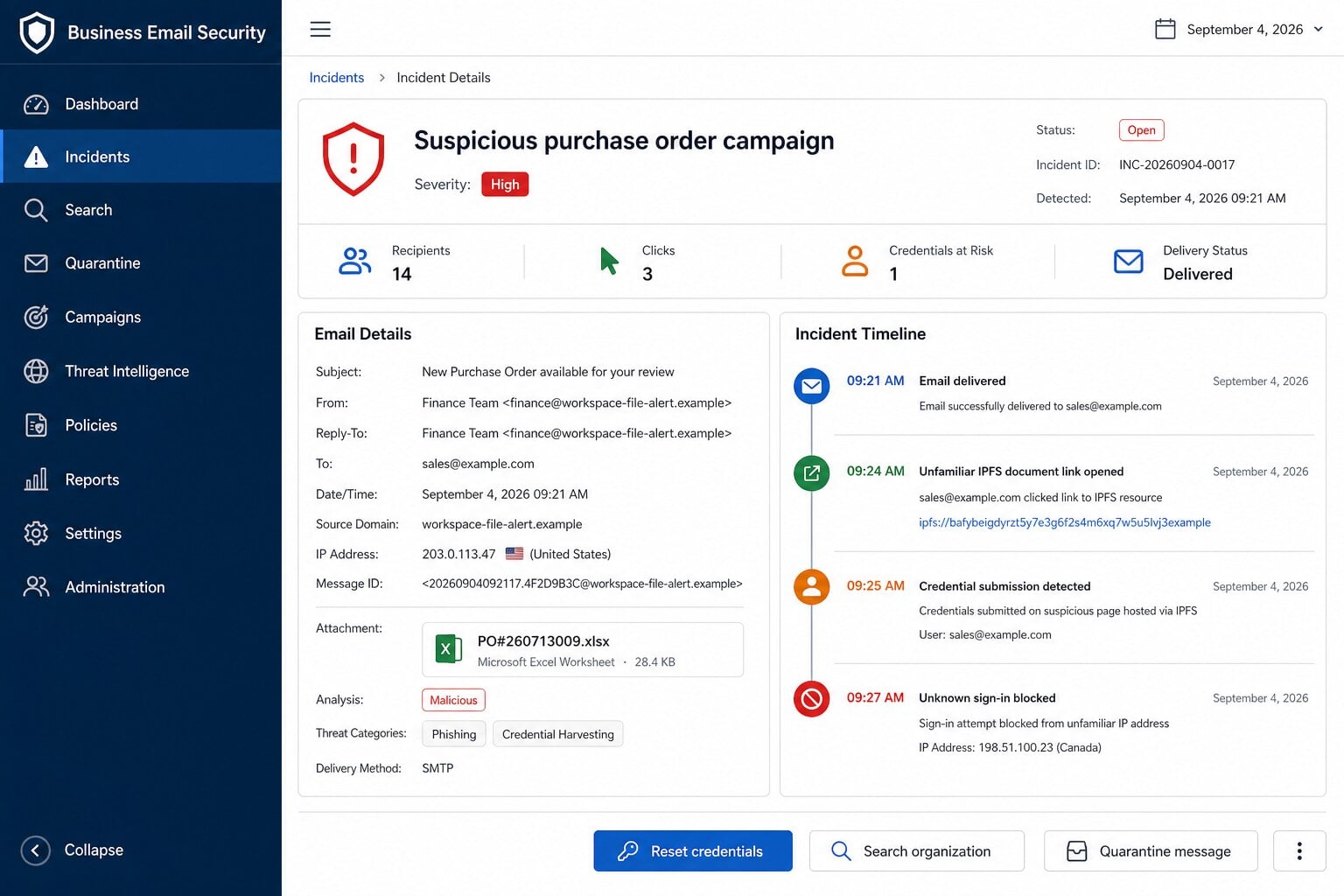
Red Flags in the Workspace Drive Purchase Order Email
- The notification does not identify a real buyer or purchasing company.
- A generic Procurement Manager replaces a named document owner.
- The order arrives without an inquiry, quotation, or established transaction.
- The filename and size are visible, but the purchase details are absent.
- The link opens unfamiliar hosting rather than the company’s normal workspace.
- An authentication error appears before a legitimate sign-in occurs.
- The document viewer requests the recipient’s mailbox password directly.
- The availability deadline pressures staff to act before confirming the buyer.
Any one item could have an innocent explanation. Together, they show a document-access story that cannot establish who created the supposed order.
The correct response is commercial verification, not technical experimentation. Confirm the buyer and order through records your organization already trusts.
What to Do if You Have Fallen Victim to This Scam
- Exit the fraudulent viewer and disconnect any downloaded file from your workflow. Do not forward it internally as a normal purchase order.
- Change the submitted email password from a clean device using the official provider portal. Replace every reused password with a separate credential.
- Revoke active sessions and unfamiliar connected applications. Remove unknown forwarding rules, delegates, recovery methods, app passwords, filters, and multifactor registrations.
- Notify your security, finance, sales, and procurement teams. Ask them to pause unusual payment changes and verify recent instructions associated with your mailbox.
- Contact banks immediately if funds moved. Request a recall, freeze affected payment methods, and preserve transaction identifiers for investigators and insurers.
- Run a complete Malwarebytes scan if a spreadsheet, archive, script, or installer was downloaded or opened. Use AdGuard to block many malicious redirects.
- Warn customers and suppliers through established channels if the account sent messages. Explain that payment and document requests require fresh confirmation.
- Save the original email, full headers, destination address, screenshots, login alerts, and related conversations. Report the incident through appropriate cybercrime channels.
Is Your Device Infected? Run a Free Malware Scan
Slow performance, constant pop-ups, or strange behavior? These are classic signs of a malware infection. The fastest way to find out is to scan your device with Malwarebytes Free — one of the most trusted malware removal tools available.
The free version detects and removes the most common threats, including:
- Adware — the cause of those annoying pop-ups
- Browser hijackers — unwanted redirects and changed homepages
- Trojans and spyware — hidden programs stealing your data
- Potentially unwanted programs (PUPs) — software you never asked for
👉 Select your device below — Windows, Mac, or Android — then follow the simple steps to download Malwarebytes, scan your system, and remove any threats it finds. The scan usually takes 5 to 20 minutes.
Run a Malware Scan with Malwarebytes for Windows
Malwarebytes is one of the most popular and trusted anti-malware tools for Windows — and it’s completely free for removing infections. It catches threats that many antivirus programs miss, including adware, browser hijackers, and trojans. Follow the steps below to scan and clean your PC in just a few minutes.
Download Malwarebytes
Click the button below to download the latest version of Malwarebytes for Windows from the official source. The free version is all you need — it will scan your computer and remove adware, browser hijackers, and other malicious software at no cost.
Download MalwarebytesOfficial installer for Windows 11 and 10. Your download starts right away.Want real-time protection? See Malwarebytes Premium Malwarebytes Free for WindowsScans and removes malware at no cost
-
Install Malwarebytes
When the download finishes, open your Downloads folder and double-click the MBSetup file. If Windows shows a User Account Control pop-up, click “Yes” to allow the installation.

Follow the On-Screen Prompts to Install Malwarebytes
The setup wizard will walk you through a few quick screens:
-
Choose where you’re installing the program — “Personal Computer” or “Work Computer” — then click Next.

-
Malwarebytes will now install on your device. This usually takes under a minute.

-
When installation is complete, the “Welcome to Malwarebytes” screen will open automatically.

-
On the final screen, click Open Malwarebytes to launch the program.

-
Enable “Scan for Rootkits”
Before scanning, turn on rootkit detection so Malwarebytes can find even the most hidden threats. Click the Settings gear icon on the left side of the screen.

In the settings menu, find “Scan for rootkits” and click the toggle so it turns blue.

Done? Click “Dashboard” in the left pane to return to the main screen.
Start the Scan
Click the blue Scan button. Malwarebytes will automatically update its virus database and start checking your computer for malware.

-
Wait for the Scan to Finish
The scan checks your entire system for browser hijackers and other malicious programs, so it can take 5 to 20 minutes depending on your computer. Feel free to do something else — just check back occasionally to see the progress.

-
Quarantine the Detected Threats
When the scan is done, you’ll see a list of everything Malwarebytes found — malware, adware, and potentially unwanted programs. Click the “Quarantine” button to remove all of them at once.

Malwarebytes will now remove the malicious files and registry entries and move them safely into quarantine.

-
Restart Your Computer
Some threats can only be fully removed after a reboot. If Malwarebytes asks you to restart, click Yes. Once you’re logged back in, Malwarebytes has finished removing the threats it found.

That’s it — your Windows PC is now clean of trojans, adware, and other malware, and should be back to running smoothly.
If you are still having problems with your computer after completing these instructions, then please follow one of the steps:
- Run a computer scan with ESET Online Scanner
- Ask for help in our Windows Malware Removal Help & Support forum.
Run a Malware Scan with Malwarebytes for Mac
Malwarebytes for Mac is a free on-demand scanner that removes the malware other security software tends to miss — adware, browser hijackers, and unwanted programs included. Cleaning an infected Mac with Malwarebytes has always been completely free, and it’s our go-to recommendation. Follow the steps below to scan and clean your Mac in just a few minutes.
-
Download Malwarebytes for Mac
Click the button below to download the latest version of Malwarebytes for Mac.
Download MalwarebytesOfficial installer for macOS. Your download starts right away.Want real-time protection? See Malwarebytes PremiumMalwarebytes Free for MacScans and removes malware at no cost -
Open the Malwarebytes setup file
When the download finishes, open your Downloads folder and double-click the setup file to begin the installation.

-
Follow the On-Screen Prompts to Install Malwarebytes
The Malwarebytes for Mac Installer will guide you through a few quick screens. Click “Continue” and keep following the prompts until the installation completes.



When the installation is complete, Malwarebytes opens to the Welcome to Malwarebytes screen. Click “Get started“.
-
Select “Personal Computer” or “Work Computer”
Malwarebytes will ask what type of computer you’re installing it on. Click either Personal Computer or Work Computer, whichever applies.

-
Start the Scan
Click the “Scan” button. Malwarebytes will automatically update its detection database and begin checking your Mac for malware.

-
Wait for the Scan to Finish
Malwarebytes will scan your Mac for adware, browser hijackers, and other malicious programs. This can take a few minutes, so feel free to do something else — just check back occasionally to see the progress.

-
Quarantine the Detected Threats
When the scan is done, you’ll see a list of everything Malwarebytes found. Click the “Quarantine” button to remove all the threats at once.

-
Restart Your Mac
Malwarebytes will now remove all the malicious files it found. Some threats can only be fully removed after a reboot — if Malwarebytes asks you to restart, allow it. Once you’re logged back in, your Mac is clean.

That’s it — your Mac is now free of adware, rogue browser extensions, and other potentially harmful software.
If you are still experiencing problems while trying to remove a malicious program from your computer, please ask for help in our Mac Malware Removal Help & Support forum.
Run a Malware Scan with Malwarebytes for Android
Malwarebytes for Android automatically detects and removes dangerous threats like malware and ransomware so you don’t have to worry about your most-used device being compromised. Aggressive detection of adware and potentially unwanted programs keeps your Android phone or tablet running smooth.
-
Download Malwarebytes for Android.
You can download Malwarebytes for Android by clicking the link below.
Get Malwarebytes for AndroidOpens Google Play in a new tab.Want real-time protection? See Malwarebytes Premium for AndroidMalwarebytes for AndroidScans your phone and removes malware at no cost -
Install Malwarebytes for Android on your phone.
In the Google Play Store, tap “Install” to install Malwarebytes for Android on your device.

When the installation process has finished, tap “Open” to begin using Malwarebytes for Android. You can also open Malwarebytes by tapping on its icon in your phone menu or home screen.

-
Follow the on-screen prompts to complete the setup process
When Malwarebytes will open, you will see the Malwarebytes Setup Wizard which will guide you through a series of permissions and other setup options.
This is the first of two screens that explain the difference between the Premium and Free versions. Swipe this screen to continue.
Tap on “Got it” to proceed to the next step.
Malwarebytes for Android will now ask for a set of permissions that are required to scan your device and protect it from malware. Tap on “Give permission” to continue.
Tap on “Allow” to permit Malwarebytes to access the files on your phone.
-
Update database and run a scan with Malwarebytes for Android
You will now be prompted to update the Malwarebytes database and run a full system scan.

Click on “Update database” to update the Malwarebytes for Android definitions to the latest version, then click on “Run full scan” to perform a system scan.

-
Wait for the Malwarebytes scan to complete.
Malwarebytes will now start scanning your phone for adware and other malicious apps. This process can take a few minutes, so we suggest you do something else and periodically check on the status of the scan to see when it is finished.

-
Click on “Remove Selected”.
When the scan has been completed, you will be presented with a screen showing the malware infections that Malwarebytes for Android has detected. To remove the malicious apps that Malwarebytes has found, tap on the “Remove Selected” button.

-
Restart your phone.
Malwarebytes for Android will now remove all the malicious apps that it has found. To complete the malware removal process, Malwarebytes may ask you to restart your device.
That’s it — your Android phone is now clean — no more malicious apps, adware, or browser redirects.
If you are still having problems with your phone after completing these instructions, then please follow one of the steps:
- Restore your phone to factory settings by going to Settings > General management > Reset > Factory data reset.
- Ask for help in our Mobile Malware Removal Help & Support forum.
Stay Protected: Block Ads and Malicious Sites
Now that your device is clean, keep it that way. Most infections start with a malicious ad or a fake download button — so blocking them at the source is your best defense.
We recommend AdGuard, which blocks malicious ads, phishing pages, and dangerous redirects before they can reach you.
👉 Download AdGuard and browse safely
How Organizations Can Reduce Purchase Order Phishing
Give shared inboxes stronger protection
Require multifactor authentication, restrict legacy login methods, monitor forwarding changes, and alert administrators when new applications or recovery methods are added.
Shared credentials make accountability difficult. Assign individual access where possible so suspicious sessions can be identified and revoked precisely.
Separate document access from payment approval
The person reviewing a purchase order should not be able to change payment beneficiaries alone. Independent approval limits the damage from one compromised account.
Payment changes should trigger an out-of-band callback, regardless of how convincing the email thread appears.
Report lures while they are still active
Early reporting lets defenders block the sender, content identifier, gateway, and related login infrastructure before more employees interact with the campaign.
Security teams should search mailboxes for matching subjects and links, then identify anyone who submitted credentials or downloaded content.
Frequently Asked Questions
Is the Purchase Order Available on Workspace Drive email real?
The analyzed email is a credential-phishing lure. Its download button opens a fake authentication page instead of a verifiable buyer’s purchase order.
Confirm any unexpected order through an independently located company contact before opening files or entering account information.
Does the Excel filename prove a spreadsheet exists?
No. Attackers can type any filename, size, status, uploader, and date into an email template or landing page.
A genuine file should appear inside your established workspace and connect to a recognizable buyer, project, quote, or conversation.
Is IPFS itself malicious?
No. IPFS is a legitimate distributed system for storing and retrieving content. Criminals can misuse it just as they misuse ordinary websites and cloud services.
Its presence neither proves fraud nor establishes trust. Judge the invitation, owner, authentication flow, and business context together.
What if I clicked but did not enter my password?
Close the page and tell your security team which link opened. Clear that site’s data and check whether the browser downloaded anything unexpectedly.
Changing the password is prudent if credentials autofilled, a session was approved, or you cannot confirm what information the page received.
Could the email install malware?
The observed path focused on credential theft, but document lures can also deliver malicious spreadsheets, archives, scripts, or installers through changing destinations.
Scan the device if anything downloaded or ran. Do not enable macros or follow instructions inside an unexpected business file.
Why do criminals want a procurement mailbox?
It contains valuable commercial context and communicates with people authorized to place orders or send money. That access supports invoice diversion and supplier impersonation.
The mailbox can also distribute more believable phishing because messages appear to come from a real business relationship.
The Bottom Line
The Purchase Order Workspace Drive scam hides credential theft inside a familiar procurement task. Specific document metadata cannot replace a verifiable buyer and trusted portal.
Treat an unexpected order as a business-verification problem. Confirm the organization and contact separately before following links, downloading files, or entering credentials.
If the fake viewer captured a password, secure the mailbox quickly and alert payment teams. That response can prevent a small phishing mistake from becoming invoice fraud.

Join the discussion
0 commentsShare your experience or ask a question about this article.
Discussion
Start the conversation
Have a question or something useful to share? Add the first comment.