

An Etsy coupon can feel like a lucky break, especially when it promises a steep discount on something already sitting in your cart. That familiar little rush is exactly what makes a fake offer so easy to open before you have time to question it.
The Etsy promo code scam turns that moment of excitement into a route toward a fake sign-in page, a bogus payment form, or an off-platform conversation. The offer looks simple. What happens after the click is where the real danger begins.
Overview
What the Etsy promo code scam claims
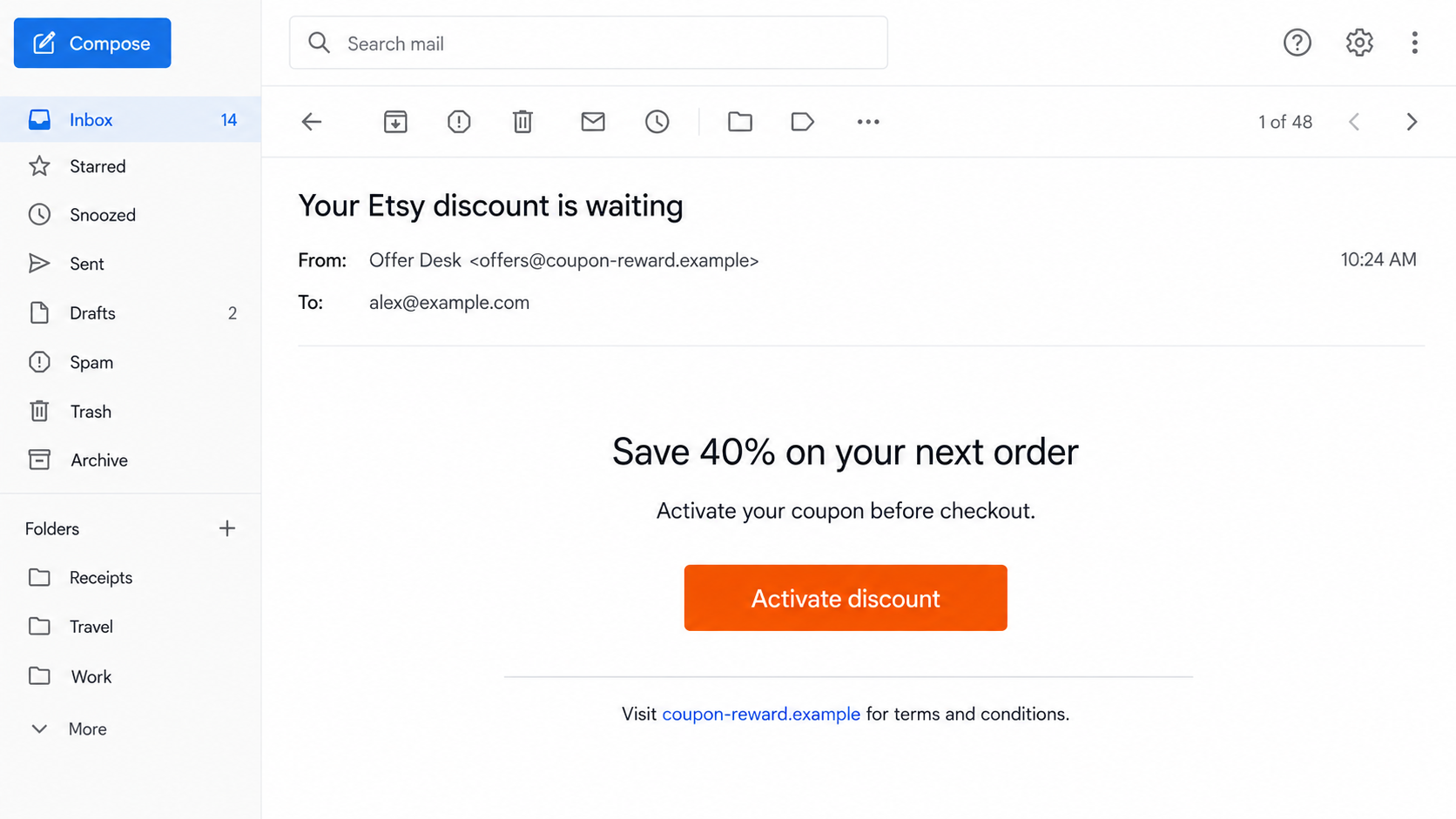
The message usually says that an exclusive Etsy coupon, account credit, buyer reward, or limited-time discount is waiting. Some versions promise 40% off, free shipping, a refund credit, or a special code that supposedly expires within hours.
Scammers may deliver the bait by email, text message, social media ad, search result, or a direct message. A seller can also receive a fake buyer message claiming that a coupon or payment must be “confirmed” outside Etsy before an order can proceed.
What the scam is actually trying to do
The discount is a pretext. The real goal is to move you away from Etsy and onto a page controlled by the scammer. That page may collect your Etsy password, email credentials, card information, billing address, or a small “activation” payment.
Some campaigns take a slower approach. They first ask for an email address or phone number, then send a more convincing payment link. Others use a fake survey or prize wheel so the request for personal information feels like part of claiming the reward.
Why the message can look convincing
Real Etsy and seller coupons do exist. Etsy explains that legitimate codes can be entered in the cart and that some offers come from individual shops, while Etsy-funded coupons have their own eligibility and timing rules. That genuine feature gives criminals a believable story to copy.
A polished logo, familiar colors, a product photo, and a realistic discount do not prove that an offer came from Etsy. The sender, destination, and payment path matter far more than the design.
- The offer arrives unexpectedly and creates a short deadline.
- The button opens a domain that is not Etsy’s official website.
- The page asks you to sign in before showing the coupon terms.
- You are asked to pay a small activation, reservation, or verification fee.
- A supposed buyer or support agent asks to continue by email, text, or another app.
- The message says a seller must provide card details to receive money.
How the Etsy Promo Code Scam Works
Step 1: A valuable discount catches your attention
The opening message is designed to feel useful rather than threatening. It may mention an item category you recently browsed, a seasonal sale, an abandoned cart, or a general “member reward.” Even when the timing is accidental, it can feel personal.
The promised savings are usually large enough to trigger interest but not always so extreme that they look impossible. A 20% or 40% coupon can sound plausible on a marketplace where individual sellers regularly run promotions.
The deadline supplies the pressure. Phrases such as “expires tonight,” “one use only,” or “claim before checkout” encourage you to act from the message instead of opening Etsy independently and checking the cart.
Step 2: The link sends you outside Etsy
The button may display words such as “Apply coupon,” “Activate discount,” or “Reveal code.” Its visible text tells you nothing about the actual destination. On a phone, the full address is especially easy to miss.
The fraudulent domain may include words such as etsy, coupon, reward, checkout, account, or support. It can also use a shortened link or a redirect chain that briefly passes through an unrelated service before reaching the fake page.
Etsy’s phishing guidance warns users to be cautious when a message asks them to follow a link that takes them away from Etsy.
The safest test is simple: close the message, open the Etsy app or type the address yourself, and see whether the same offer appears in your account or cart.
Step 3: A copied page asks you to sign in
The landing page often resembles an Etsy sign-in screen. It may ask for an email address and password, then deliberately show an error so you enter the credentials again. Both attempts can be recorded.
If you reuse that password, the damage can spread beyond Etsy. Criminals may try the same combination on your email, payment accounts, social media profiles, and other shopping services. Access to email is particularly valuable because it can be used to reset other passwords.
A fake page may also request a one-time verification code. That is not an extra layer of protection when the code is being typed into a criminal’s website. It can let the attacker complete a real login while you are still looking at the imitation screen.
Step 4: The coupon turns into a payment request
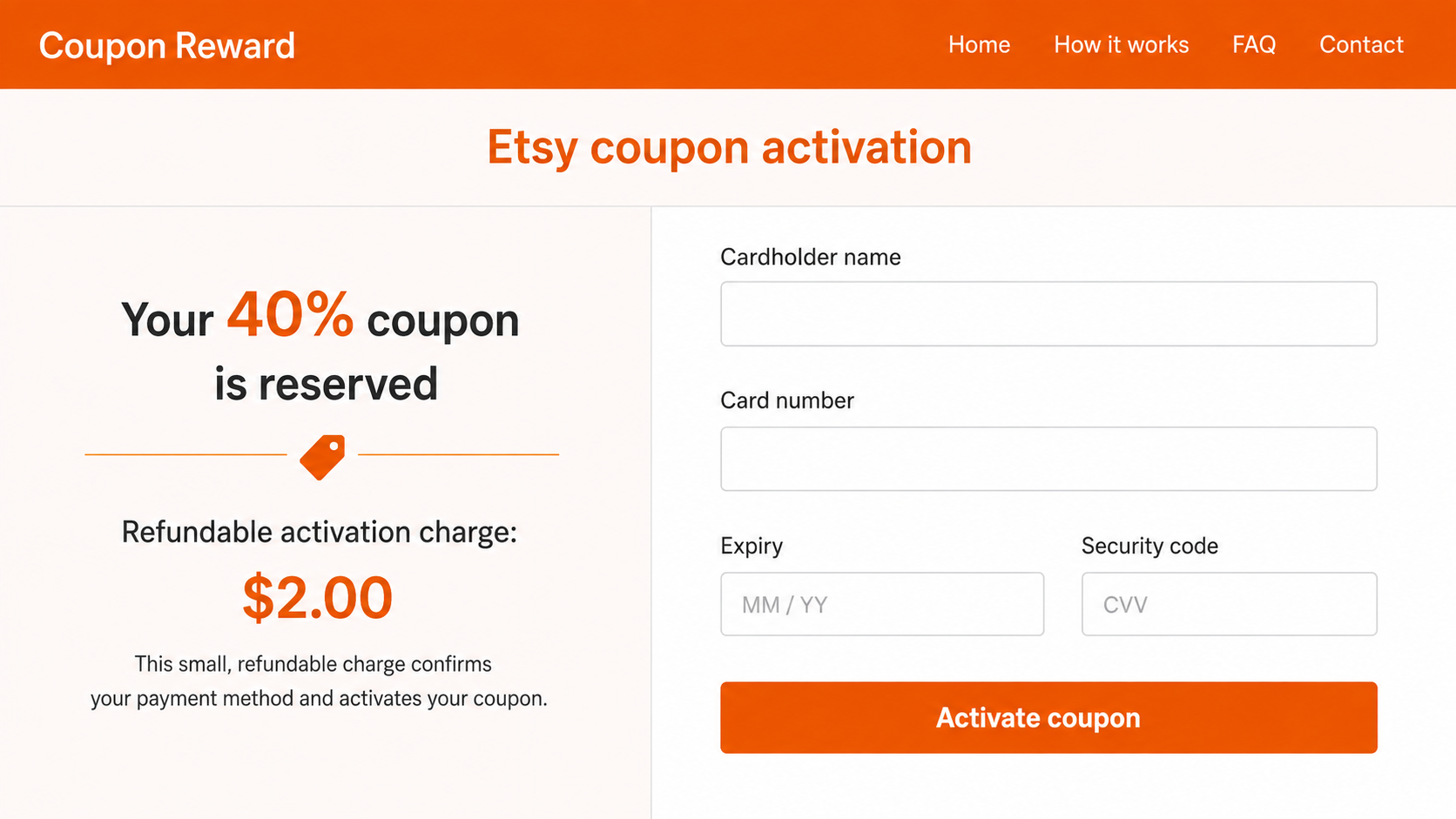
After the fake login, the page may claim that a refundable $2 activation charge is needed to connect the coupon to your card. Another version says the card must be verified before a discount can be applied.
This request reverses the logic of a coupon. A discount should reduce the amount charged during a legitimate checkout. It should not require a separate card payment on an unrelated website.
The small amount is meant to lower your guard. The attacker may charge more than displayed, enroll the card in recurring payments, or simply collect the card number, expiration date, security code, name, and address for later fraud.
Step 5: The scammer tries to keep you off the platform
If the scheme begins through a marketplace message, the scammer may claim Etsy’s payment system is delayed or that the order will appear only after verification. They may ask for your email address because they supposedly need it to “send the payment.”
A fake confirmation email then says the sale is complete and directs you to a payment-release page. Sellers can be targeted this way even when no real order exists. If an order does not appear inside the seller’s Etsy account, an email or screenshot does not create one.
Moving the conversation away from the platform also removes useful warning banners and makes the exchange harder for marketplace support to review. The FTC advises marketplace users to use the site’s payment system and avoid requests for payment outside it.
Step 6: Stolen information is used quickly
Once credentials are submitted, an attacker may change account details, view saved information, send scam messages, or take over a seller profile. A hijacked account with real history can make the next scam look more trustworthy.
Card information may be tested with small transactions before larger attempts follow. If email credentials were captured, the criminal may search the inbox for receipts, reset links, financial accounts, and personal details that make further impersonation easier.
Victims may then receive a second call or message from someone pretending to investigate the fraud. That follow-up is often another attempt to collect a verification code, remote access, or a payment for “recovery.”
Company, Address, and Fulfillment Checks
A real coupon works inside the cart
Etsy’s official help page explains that shoppers can apply a shop coupon or Etsy coupon from the shopping cart. The discount and any eligibility conditions should be visible as part of the normal checkout flow.
A code that is expired, limited to one shop, or restricted by a minimum order may simply fail. That alone is not evidence of a scam. The critical question is whether someone used the code as bait to send you to an outside login or payment form.
The domain tells you where you really are
A page can display the Etsy name while being hosted on an unrelated domain. Read the registered domain from right to left and ignore reassuring words placed in subdomains or page paths.
For example, an address containing “etsy” before an unrelated ending still belongs to that unrelated domain. Do not rely on a padlock icon either. Encryption only means the connection to that site is protected; it does not make the site legitimate.
Support should begin inside your account
If a message claims there is a coupon, order, refund, or account problem, open Etsy independently and check your notifications, purchases, messages, or seller dashboard. Do not use the phone number or support link supplied in the suspicious message.
Etsy says authentic staff messages are labeled in the “From Etsy” section of Messages. A person who merely types “Etsy Support” in a profile name or email signature has not passed that check.
The payment trail should stay on Etsy
A shopper pays through checkout. A seller sees a genuine order in the platform. Neither side needs to enter card details on a separate page to activate a coupon, accept a payment, or prove that an account can receive money.
Be especially cautious with bank transfers, gift cards, cryptocurrency, payment links, and requests to send a refundable deposit. Those methods can bypass marketplace protections and make recovery much harder.
Warning Signs You Can Check Before Clicking
- The greeting is vague: The message calls you “customer” or “member” and provides no account-specific detail you can verify.
- The savings require activation: You must pay, complete a survey, or submit a card before the actual coupon appears.
- The destination is hidden: A button, QR code, or shortened URL prevents you from seeing the real website clearly.
- The sender creates urgency: The reward will disappear unless you act immediately or keep the conversation private.
- The order exists only in a message: A buyer says they paid, but the sale is absent from your Etsy account.
- The process moves elsewhere: You are asked to continue on WhatsApp, Telegram, text message, or personal email.
- The form wants too much: A coupon page requests your password, full card information, banking login, or one-time code.
Spelling errors can be a clue, but flawless writing is not proof of safety. Modern scam pages often use clean templates and natural language. Verify the process, not the polish.
What to Do if You Have Fallen Victim to This Scam
- Stop communicating with the sender. Do not send another payment, verification code, photo, or identity document. Save the message, address, URL, receipts, and screenshots before blocking the account.
- Change your Etsy password from the real app or website. Use a new, unique password. If the same password was used elsewhere, change those accounts too, starting with your email.
- Secure your email account. Review recovery addresses, phone numbers, forwarding rules, active sessions, and recently sent messages. Sign out unfamiliar sessions and enable multifactor authentication.
- Contact your card issuer or bank immediately. Explain that card data may have been entered on a phishing page. Ask whether the card should be locked or replaced and dispute unauthorized charges.
- Review your Etsy account. Check profile details, saved addresses, connected payment methods, purchases, listings, and messages. Report changes or orders you do not recognize to Etsy through its official help center.
- Scan the device if you downloaded anything. Run a full scan with a trusted security product such as Malwarebytes, especially if the page installed a file, extension, or app. Remove suspicious browser extensions and notification permissions.
- Block malicious ads and follow-up pages. A reputable blocker such as AdGuard can reduce exposure to known malicious redirects, but it does not replace changing compromised passwords or contacting the bank.
- Report the scam. Use Etsy’s reporting tools and report the incident to the FTC at ReportFraud.ftc.gov. Your report can help connect the domain, message, and payment account to a wider campaign.
- Watch for recovery scammers. Anyone who guarantees a refund for an upfront fee or asks for remote access should be treated as another potential scammer.
Frequently Asked Questions
Are Etsy promo codes real?
Yes. Sellers can issue shop coupons, and Etsy can fund eligible offers. A real coupon should work through Etsy’s cart and checkout. It should not require a separate activation payment or an off-platform login.
Why does my Etsy coupon say it is invalid?
The code may be expired, limited to a particular shop, restricted to certain items, or subject to a minimum purchase. Check the terms in your cart. An invalid code is not automatically fraudulent.
Will Etsy ask for my card to receive a seller payment?
A seller should not have to enter card details on a buyer-supplied link to receive money. Confirm sales and payment status inside the seller account. If no order appears there, do not ship the item.
Can a fake Etsy page steal a one-time code?
Yes. A phishing site can relay your password to the real service and then ask for the code sent to you. Never enter a security code on a page reached through an unexpected coupon message.
What if I clicked but did not enter anything?
Close the page and clear any notification permissions it requested. If nothing was downloaded and no information was entered, the risk is lower. Still check the address and run a scan if the browser behaved unexpectedly.
How can I check an Etsy discount safely?
Open the Etsy app yourself or type Etsy’s address into the browser. Review the cart, coupon terms, account messages, and seller details there. Do not return through the promotional link.
The Bottom Line
The Etsy promo code scam works because legitimate marketplace discounts are common. The criminal only has to add urgency, a convincing button, and one extra “verification” step to turn a familiar promotion into a credential or card theft attempt.
Treat every coupon as unverified until it appears in the real Etsy cart. Keep conversations and payments on the platform, inspect the destination before entering information, and remember that a discount should never require you to pay a separate fee to receive it.

Join the discussion
0 commentsShare your experience or ask a question about this article.
Discussion
Start the conversation
Have a question or something useful to share? Add the first comment.