

An email saying your internet service is about to stop can turn an ordinary morning into a small emergency. If the message also says a payment failed or your mailbox will be closed, clicking the blue button can feel like the responsible thing to do.
That reaction is what the EarthLink email scam is built around. The notice borrows the name of a real provider, invents a problem that demands attention, and places a fraudulent page between you and the account you are trying to protect.
Overview
What the fake EarthLink message says
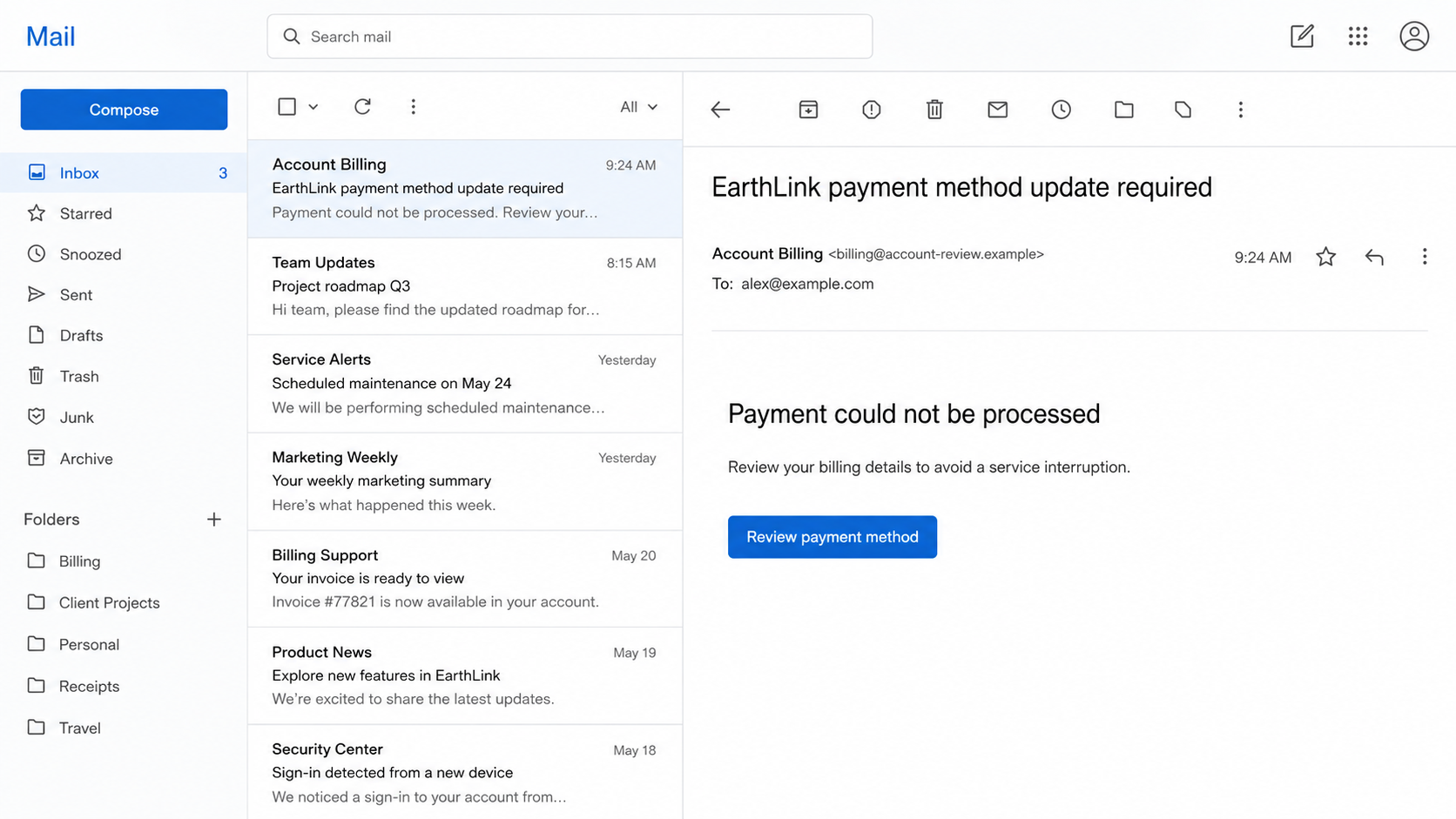
Most versions claim that EarthLink could not process a payment, detected unusual activity, needs a password update, or will suspend email service. The recipient is instructed to review billing information, restore access, or verify the account through a prominent link.
The story changes, but the pressure stays the same. There is supposedly a narrow window to prevent lost email, interrupted service, or a late charge. Some messages also include a fake invoice number or partial account reference to make the notice feel administrative.
What the criminals want
The first target is often an EarthLink email address and password. An inbox can reveal personal correspondence, bills, password-reset messages, contacts, and the names of other services the victim uses.
Billing-themed versions may also collect full card information, bank details, address data, and a phone number. A page can ask for both login and payment details in one flow, allowing the scammer to pursue account takeover and financial fraud at the same time.
Why this phishing email feels urgent
Email access is important enough that the threat of losing it can override normal caution. A recipient may also be unsure whether a subscription renewed, a stored card expired, or a family member changed a billing setting.
EarthLink’s own fraud guidance says the company will not ask for a password by email. A genuine service issue should be checked by opening the official account portal independently, not by trusting the contact details embedded in an unexpected alert.
- The message threatens suspension or service interruption.
- The sender’s display name says EarthLink, but the actual address does not match an official domain.
- A button opens an unrelated account-review or billing website.
- The page asks for an email password, full card details, or a one-time code.
- The greeting is generic and the account facts are vague.
- The recipient is told to act before a very short deadline.
How the EarthLink Email Scam Works
Step 1: A routine account problem is invented
The phishing email usually begins with a familiar service problem. It might say “payment could not be processed,” “mailbox storage exceeded,” “password expires today,” or “new sign-in requires review.” None of those claims should be accepted solely because they arrived in an inbox.
Billing alerts are especially effective because cards really do expire and banks sometimes decline recurring payments. Security alerts work for the same reason: legitimate providers do notify customers about unusual sign-ins.
The scammer does not need to know whether the recipient currently uses EarthLink. Bulk campaigns can send thousands of messages and wait for the small portion that reaches current or former customers.
Step 2: The email is dressed to resemble a service notice
The message may use a clean layout, a customer-service signature, brand colors, and a footer filled with privacy or legal language. These elements can be copied from legitimate communications in minutes.
The display name beside the sender can be set to “EarthLink Billing” or “EarthLink Support.” To see the useful evidence, expand the sender details and inspect the complete address. A branded display name is only a label chosen by the sender.
Even an address that resembles a company domain deserves caution if the message is unexpected. Attackers use lookalike spelling, extra words, deceptive subdomains, and compromised third-party mailboxes.
Step 3: Urgency pushes you toward the supplied button
The email says the problem must be fixed now, often without explaining how the recipient can verify it from the normal account page. A large “Update payment method” or “Keep my account active” button becomes the easiest path.
On a desktop, hovering over a link may reveal its destination. On a phone, holding the link can show a preview. If the address is hidden, shortened, misspelled, or unrelated, do not open it.
The safer habit is to treat the message only as a prompt to investigate. Open a new browser tab and use EarthLink’s known account portal or a saved bookmark. If there is a real billing or security issue, it should be visible there.
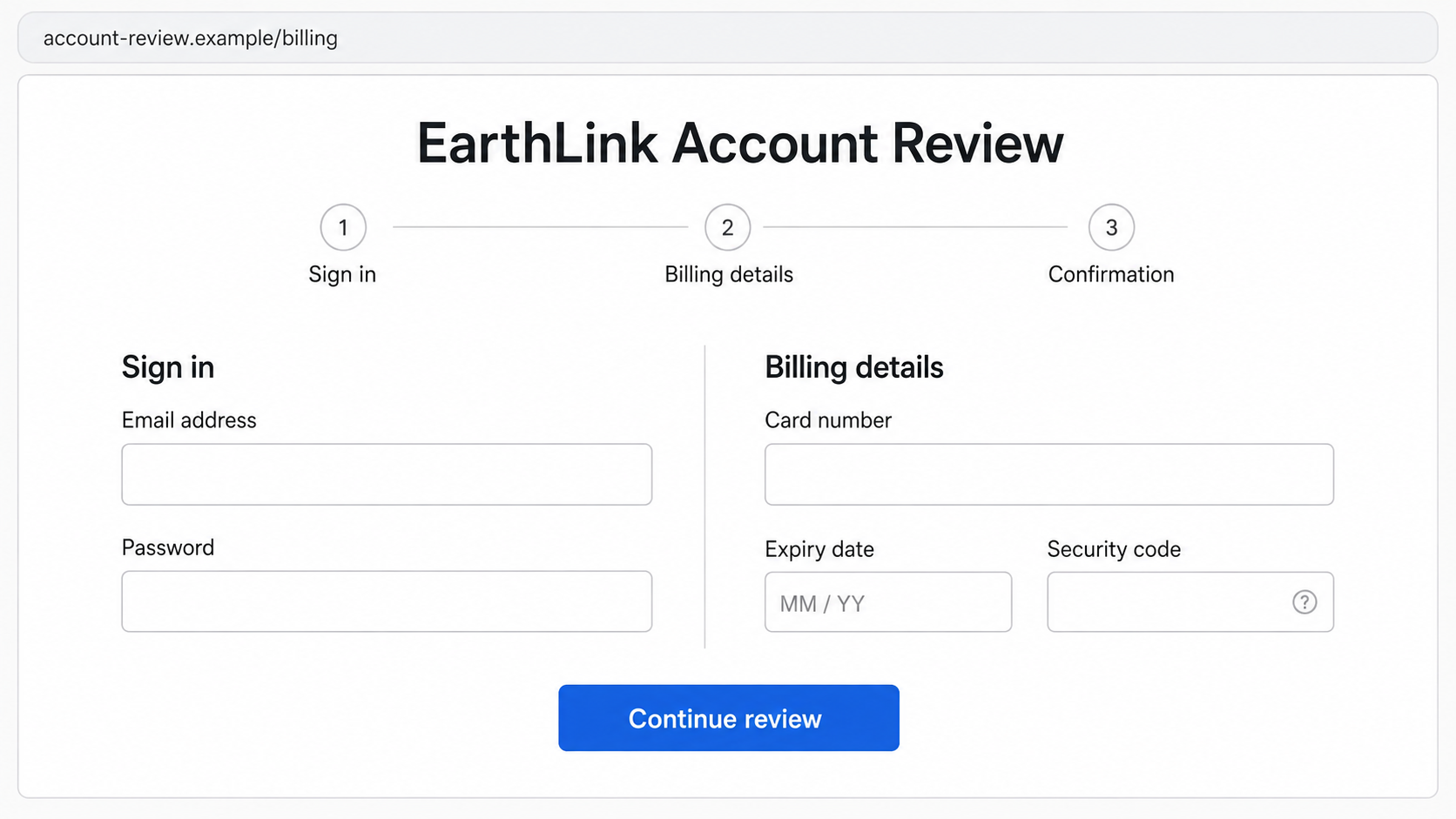
Step 4: A counterfeit portal collects the password
The fake site may place “EarthLink Account Review” above a standard sign-in form. The page can look modern and professional without having any connection to EarthLink.
After a victim enters an email address and password, the form may claim that the credentials were incorrect. This encourages a second attempt and helps the scammer rule out a typing mistake. The page can then advance regardless of what was entered.
Some sites ask for a one-time code sent by the real provider. The attacker may be trying the stolen password in real time. Handing over that code can complete the account takeover even when multifactor authentication was enabled.
Step 5: The billing form captures financial details
A second screen says the card on file must be replaced. It asks for the cardholder name, number, expiration date, security code, billing address, and sometimes a phone number.
There may be no immediate charge. Quiet collection can make the victim believe the account was repaired, giving criminals more time to use or sell the data. In other cases, the page submits an unauthorized payment or enrolls the card in recurring charges.
A legitimate-looking confirmation at the end proves nothing. The scammer controls every message displayed on the fake site and can redirect the victim to a real homepage afterward to make the process seem complete.
Step 6: Inbox access opens the door to more accounts
An email account is often the recovery key for online banking, shopping, social media, cloud storage, and other services. Once inside, an intruder can request password resets and delete the resulting alerts.
The attacker may create forwarding rules that silently copy future messages, add an unfamiliar recovery address, or send phishing messages to contacts. Because the messages come from a real account, friends and family may be more likely to trust them.
Reused passwords make the damage wider. Automated tools can test the same credentials against other popular services within minutes of a submission.
Step 7: Follow-up scams exploit the first incident
A victim may receive a call from supposed billing support or fraud prevention. The caller already knows the email address, phone number, or last transaction, which makes the contact sound credible.
The follow-up may request a security code, remote access to the device, or a payment to reverse the fraudulent charge. Real support staff do not need gift cards, cryptocurrency, or access to an online banking session to investigate phishing.
Company, Address, and Fulfillment Checks
The sender name is not proof of identity
Expand the message header and read the full sender address. Look for subtle spelling changes, extra hyphens, unfamiliar endings, and reply-to addresses that differ from the visible sender.
Authentication indicators such as SPF or DKIM can help advanced users, but they do not make every email safe. A criminal can authenticate mail sent from a domain they own, and legitimate third-party platforms can be abused.
The destination must match the official service
Do not judge a link by the words printed on the button. Check the real destination and pay attention to the registered domain. A URL that contains “earthlink” somewhere in a long address can still belong to a stranger.
A padlock means the connection is encrypted. Free certificates are available to legitimate businesses and phishing sites alike, so the icon does not confirm who owns the page.
Support should be reached independently
Use a trusted bookmark, the official website you type yourself, or contact information from a previous bill. Do not call a number contained in the suspicious email because it may connect directly to the scammer.
EarthLink publishes instructions for reporting fraudulent and junk email. Its help center says suspicious messages can be marked as spam and the original can be forwarded as an attachment to its designated reporting mailbox.
A billing problem should exist inside the account
Sign in through the known portal and review account status, invoices, payment methods, and recent notices. If the alleged problem appears only in the email, that contradiction is important.
If you are still uncertain, contact the provider through a separately verified channel. Do not give the caller or chat agent a password or one-time code. Support can help verify an account without asking you to surrender the secrets used to access it.
Common Variations of the EarthLink Phishing Email
- Payment failed: The card supposedly expired or a renewal was declined.
- Password expiration: The mailbox will stop receiving messages unless the password is updated.
- Storage limit reached: Incoming email is being held until the account is upgraded or validated.
- Unusual sign-in: A new device or location supposedly accessed the account.
- Mailbox migration: The user must sign in to keep messages during a platform upgrade.
- Refund or credit: Billing support claims money is waiting and requests card or bank details.
The subject line may change from one campaign to the next, but the dangerous action remains recognizable: the recipient is pushed from an unexpected message to a login or payment form.
What to Do if You Have Fallen Victim to This Scam
- Close the fraudulent page and stop contact. Do not submit another code or payment. Record the sender, full URL, time, screenshots, and any transaction details before deleting the message.
- Change the EarthLink password from the official portal. Choose a long, unique password that has never been used on another site. Sign out other sessions if that option is available.
- Protect every account using the same password. Change the email account first, then financial, shopping, social, and cloud services. Password reuse can turn one phishing form into several takeovers.
- Review mailbox settings. Check forwarding rules, filters, recovery contacts, app passwords, connected applications, and sent mail. Remove anything you did not create.
- Contact the bank or card issuer. If payment details were entered, ask whether the card should be frozen or replaced. Review pending transactions and dispute unauthorized charges promptly.
- Run a security scan. If you opened an attachment, installed software, or granted permissions, scan the device with a trusted product such as Malwarebytes. Remove unknown browser extensions and apps.
- Reduce malicious redirects. A reputable content blocker such as AdGuard can stop many known phishing and advertising domains, but it cannot undo credentials already shared.
- Report the phishing attempt. Follow EarthLink’s official abuse-reporting instructions and submit a report to the FTC at ReportFraud.ftc.gov. Also report the domain to the browser or security service that flagged it.
- Monitor for secondary fraud. Watch for password-reset notices, new forwarding rules, card tests, and calls from fake support agents. Treat anyone requesting a verification code as suspicious.
Frequently Asked Questions
Does EarthLink send billing emails?
A provider may send legitimate account notices, but an email should never be treated as proof of a billing problem. Open the official account portal independently and confirm the status there.
Will EarthLink ask for my password by email?
EarthLink’s fraud guidance says it will not ask for a password in an email. Do not reply with credentials and do not enter them on a page opened from an unexpected alert.
How can I identify a fake EarthLink login page?
Check the registered domain, not the logo or page colors. Look for unrelated domains, misspellings, extra words, and a request that began with an unsolicited message. Use the known portal instead.
What if I entered only my email address?
The scammer now knows the address is active and may send more targeted messages. Be alert for follow-ups. Change nothing solely because you entered the address, but secure the account if a password or code was also submitted.
What if I clicked the link but entered no information?
Close the page, remove any notification permission it requested, and delete downloaded files. The risk is lower if you entered nothing and installed nothing, though a security scan is sensible after unusual browser behavior.
Where should I report an EarthLink scam email?
Use the current instructions in EarthLink’s official help center to report spam or fraud. You can also report phishing and financial loss to the FTC and notify your bank if payment information was exposed.
The Bottom Line
The EarthLink email scam turns a routine billing or security notice into a race against an invented deadline. Its success depends on getting you to use the message’s link before checking the claim through a trusted route.
Open your account independently, inspect the real sender and destination, and never provide an email password or one-time code in response to an unexpected alert. A minute spent verifying the problem can prevent a much longer account-recovery process.

Join the discussion
0 commentsShare your experience or ask a question about this article.
Discussion
Start the conversation
Have a question or something useful to share? Add the first comment.