

A sold-out concert can make an unfamiliar ticket site feel like a lucky break. The seats appear available, the checkout looks polished, and a countdown makes waiting seem riskier than paying.
That is exactly when a ticket buyer needs to slow down. A convincing order page can collect a large payment in seconds, yet the real test does not come until the barcode is scanned at the venue door.
Overview
What is the Eticketsy ticket scam warning about?
Eticketsy presents itself as an online marketplace for concert, sports, theatre, and festival tickets. The site advertises downloadable tickets and tells buyers that listed inventory is authentic, creating the same familiar experience offered by established resale platforms.
The concern comes from buyer reports describing tickets that could not be used as promised. One public complaint says two purchases for different seats produced the same QR code, while other reports describe nonexistent rows, unavailable seats, and refunds that did not arrive.
A complaint is not a court judgment, and it cannot establish what happened in every transaction. It does show why shoppers should not treat a professional design, an order confirmation, or a visible QR code as proof that a ticket is valid.
Why the website can look convincing
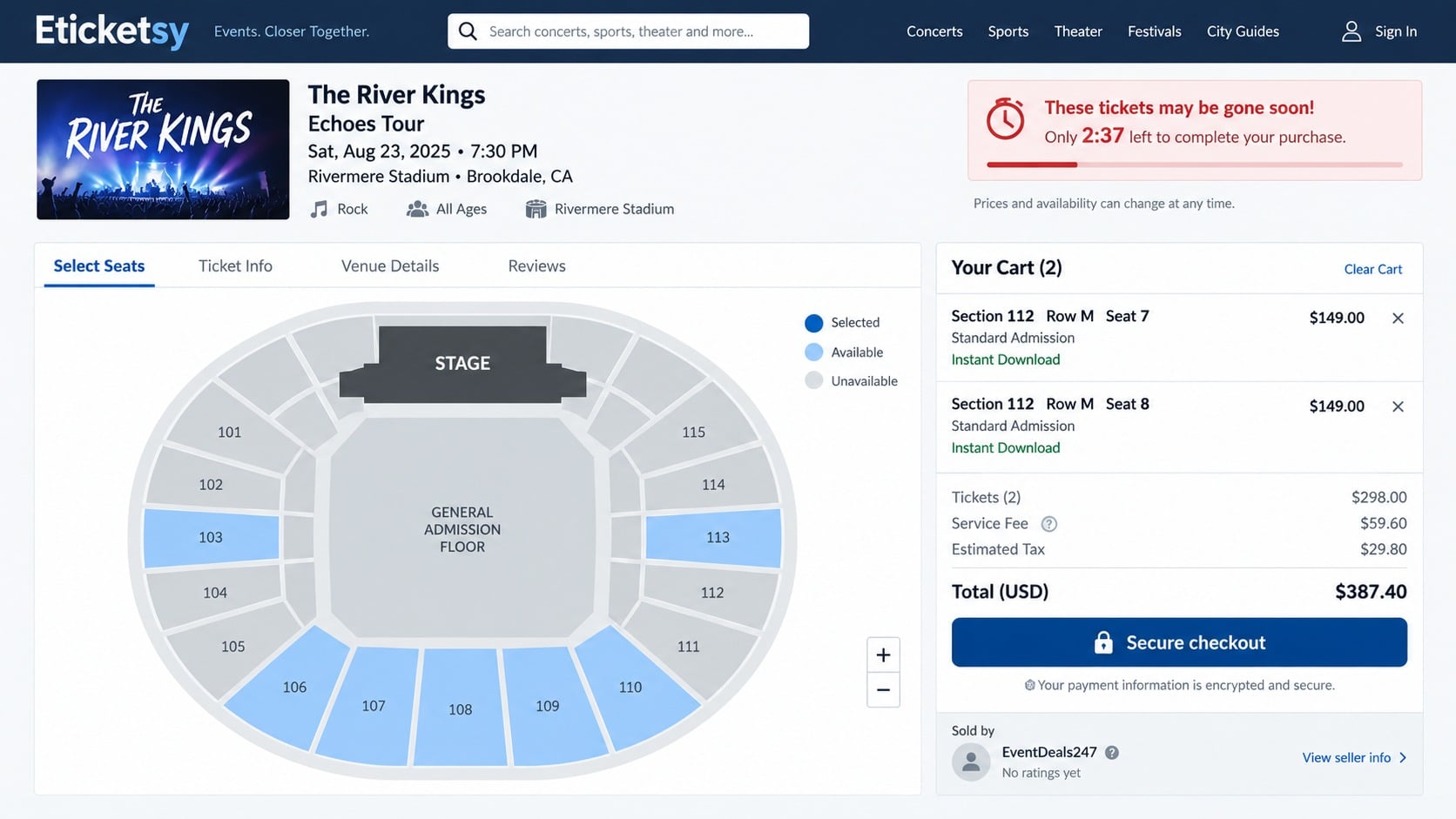
A ticket checkout has many details that create confidence: venue maps, seat numbers, timers, delivery labels, service fees, payment logos, and electronic ticket files. None of those elements require access to a venue’s actual ticket inventory.
Digital delivery also removes the physical signs buyers once inspected. A PDF can be generated instantly and may look perfect, but its barcode could be duplicated, fabricated, canceled, or tied to a seat the seller never controlled.
The emotional context matters too. People often reach a resale site after official tickets are scarce. The desire to secure a seat before someone else does can push ordinary verification to the background.
Red flags buyers should check before paying
No single detail proves fraud on its own. Several mismatched or unverifiable details together, however, should be enough to leave the checkout and investigate independently.
- The event is sold out elsewhere, yet a little-known seller has unusually broad inventory.
- A timer claims the seats will disappear within minutes, then resets when the page reloads.
- The seller’s legal name, address, telephone number, and operating country do not align.
- The seating map contains rows or sections the official venue map does not show.
- Refund promises sound broad, but the detailed terms contain narrow exclusions.
- Support is difficult to reach before purchase or answers only with scripted replies.
- The site wants bank transfer, cryptocurrency, gift cards, or another payment with weak dispute rights.
- Independent searches reveal repeated reports of duplicate codes, rejected tickets, or missing refunds.
The Federal Trade Commission’s ticket scam guidance warns that fake sites may sell the same seat to more than one person. The safest inventory is traceable through an official organizer, venue, team, or authorized seller.
How the Eticketsy Ticket Scam Can Work
Step 1: A search result or social post reaches an anxious buyer
The path often begins with a search for a specific artist, match, or sold-out event. Sponsored ads, social posts, marketplace listings, and search results can place an unfamiliar seller beside names the buyer already recognizes.
The page may use event artwork and precise venue information copied from public listings. That accuracy makes the inventory feel connected to the organizer even when the website has no verified relationship with the venue.
A buyer may also receive a direct link from someone claiming to have found remaining seats. Opening the link inside a social app can hide part of the address, making a confusing domain easier to overlook.
Step 2: Scarcity turns browsing into a rushed decision
Once seats are selected, the site may display a short reservation window. Messages such as high demand, only two left, or another buyer is viewing these tickets are designed to make comparison shopping feel dangerous.
Some scarcity notices are ordinary ecommerce features, but they should never replace verification. Reload the page and see whether the timer resets, then compare the section and row against the official venue seating chart.
Search the event’s authorized ticketing page in a separate tab. Do not assume that a familiar event name, logo, or seat map means the reseller received inventory from that source.
Step 3: The checkout collects payment and identity details
The form typically asks for a name, email address, billing address, telephone number, and payment card. Those details are valuable even if no valid ticket is ever delivered.
A card payment may go to a descriptor that differs from the website name. That can make the charge difficult to recognize and complicate a later dispute if the buyer cannot connect the descriptor to the order.
Before submitting, save the event page, seat description, full price, refund terms, and promised delivery date. These records matter because inventory pages and policies can change after a complaint begins.
Step 4: A polished confirmation creates false reassurance
After payment, the buyer may receive an order number, email receipt, and downloadable PDF. That immediate delivery feels like fulfillment, even though it only proves that the website generated a file.
A fraudulent or unreliable seller can copy the visual structure of a real ticket. Logos, perforation effects, seat labels, and barcode graphics are easy to reproduce without creating an admission credential in the venue’s system.
Some tickets are not delivered until shortly before the event. Delayed transfer can be legitimate in certain markets, but it also shortens the time available to challenge a questionable order.
Step 5: The ticket fails verification or duplicates another code
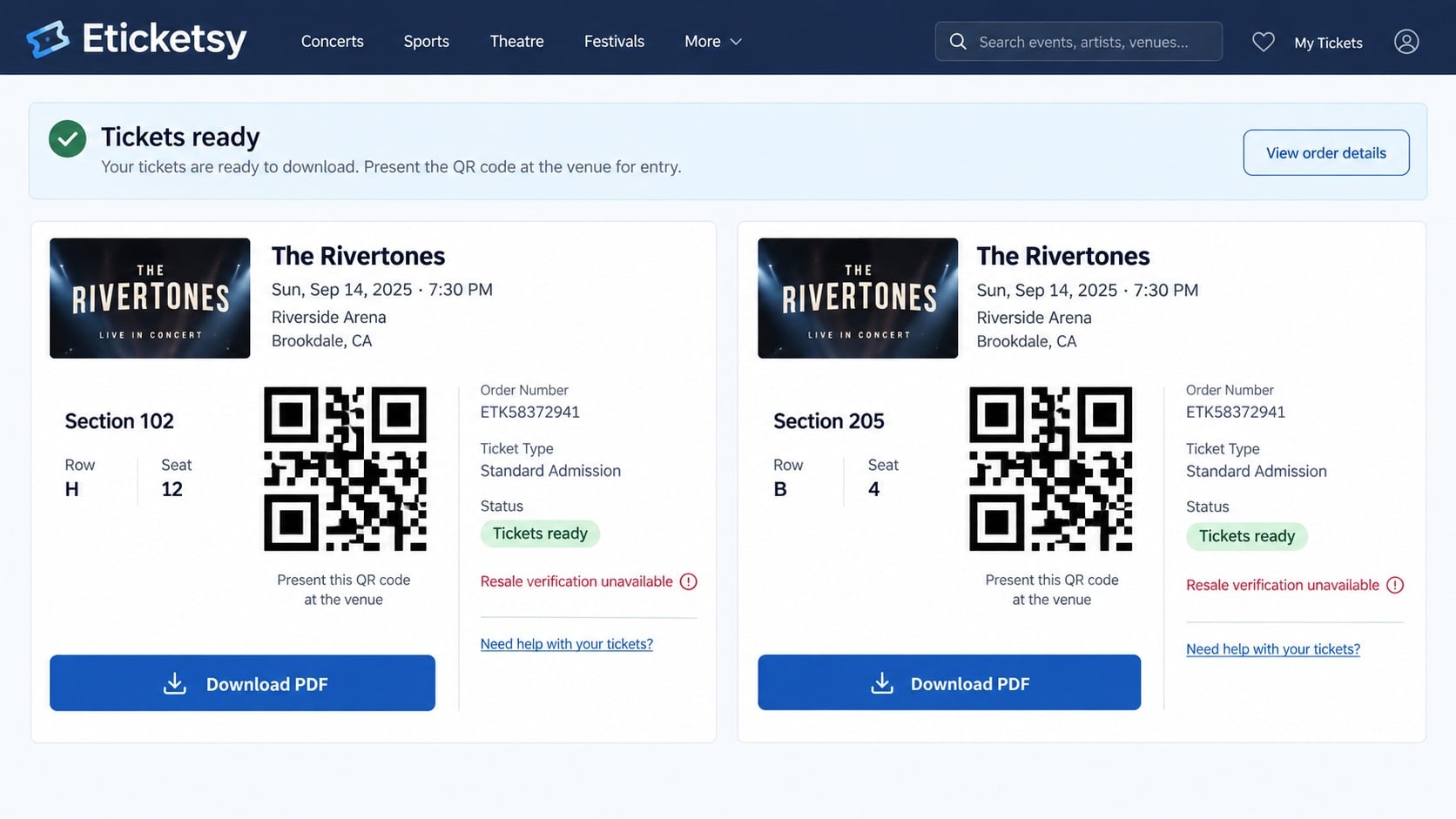
The problem may surface when the buyer compares tickets and notices identical QR codes for different seats. It may also appear at the entrance, where the scanner reports that a barcode is invalid, canceled, or already used.
With duplicated codes, the first person through the gate might be admitted while later buyers are rejected. A PDF that scans visually cannot reveal which copy, if any, is connected to a valid original ticket.
Venue employees usually cannot repair a purchase made through an unknown seller. They may confirm that the code is unusable, but the buyer still has to pursue the merchant or payment provider for reimbursement.
Step 6: Support delays the refund process
When the buyer complains, support may ask for screenshots, gate reports, identity documents, or repeated explanations. Reasonable evidence can be part of a genuine investigation, but endless requests can run down dispute deadlines.
The seller may blame the venue, the buyer’s screen brightness, a transfer delay, or another marketplace. A replacement ticket offered after an event has started may have little practical value.
Do not rely solely on informal promises that a refund is being processed. Ask for a written amount, method, reference number, and completion date, then monitor the payment account until the credit actually posts.
Step 7: Stolen details support follow-up fraud
A compromised ticket order exposes more than the ticket price. The email address, telephone number, billing information, event preference, and payment history can support convincing follow-up messages.
A criminal may pose as the venue, a refund department, or a chargeback specialist. The message can reference the real event and amount, then request another fee or a one-time bank code.
Never pay a recovery service that unexpectedly contacts you. Work directly with the card issuer, the official venue, and consumer protection authorities using contact details you locate yourself.
Why a QR Code and PDF Do Not Prove a Ticket Is Real
A QR code is simply a way to encode data. Anyone can create a QR image, place it on a professional PDF, and label it with a section and seat number.
The venue decides whether the encoded identifier corresponds to a valid ticket. Modern platforms may rotate barcodes inside an official app, restrict screenshots, or require a transfer into the buyer’s own account.
If a seller delivers a static PDF for an event that officially uses changing barcodes, that mismatch deserves immediate investigation. Check the venue’s entry policy instead of accepting the reseller’s general explanation.
Identical codes on tickets for different seats are another serious warning. A group order can sometimes share order information, but each individual admission credential should follow the organizer’s documented format.
Do not publish a ticket barcode while asking for help online. A visible code can be copied and used by someone else, turning a legitimate ticket into a rejected one.
Company, Address, and Fulfillment Checks
Match the legal identity across every page
Write down the company name in the terms, the name on the card statement, and the operator named on the contact page. They should form a coherent chain rather than point to unrelated entities.
Eticketsy’s public-facing legal information has presented details connected to more than one country. Cross-border operation is not automatically suspicious, but a buyer should be able to understand which entity accepted the payment and where a dispute must be directed.
Look for a registration number in the relevant government business registry. A valid registration proves that an entity exists, not that it owns tickets or will honor every order, so continue with the remaining checks.
Verify the address and support channels
Search the stated address independently. Determine whether it is an operating office, mailbox service, residential property, shared workspace, or address used by many unrelated businesses.
Test support before making an expensive purchase. Ask a specific question about transfer method, venue restrictions, and the seller of record. Vague answers or pressure to pay immediately reveal more than a polished FAQ.
A telephone number should match the country and entity described in the legal pages. Placeholder-looking numbers, inconsistent international prefixes, and support hours without a time zone deserve closer review.
Confirm the exact seat with the venue
Open the venue’s official seating chart through its own website. Confirm that the section, row, and seat format exist for that event configuration, because stages can change which sections are usable.
Ask whether the venue accepts PDF tickets or requires an account transfer with a moving barcode. Staff may not validate a specific resale code in advance, but they can explain the approved delivery format.
When a site lists inventory in rows that do not exist or promises a delivery method the venue rejects, do not assume support will fix the conflict later. Leave before paying.
Inspect refund terms and payment protection
Read the detailed policy for canceled events, postponed dates, obstructed views, duplicate tickets, and denied entry. A broad guarantee banner may be narrowed substantially in the actual contract.
Pay by credit card when possible. Avoid wire transfers, cryptocurrency, gift cards, or payment methods that tell you the transaction is for friends and family.
Check how long your card issuer allows disputes and what evidence it needs. The event date may fall outside a simple statement cycle, so waiting for repeated merchant promises can weaken your options.
How to Buy Resale Tickets More Safely
Start at the performer’s, team’s, promoter’s, or venue’s official website. Follow its link to the primary ticket seller or named resale partner rather than searching for a checkout by event title alone.
If you use another marketplace, research the exact domain and legal operator. Search for recent complaints involving the same delivery method, not just a general star rating.
- Compare the full price after fees instead of focusing on the first advertised amount.
- Confirm the venue’s accepted ticket format and transfer process.
- Keep payment inside the platform and use a credit card.
- Reject sellers who move the conversation to private messaging or request off-platform payment.
- Save screenshots of the seat, guarantee, delivery deadline, and order receipt.
- Transfer tickets into the official event account as soon as the organizer permits it.
- Never share a barcode publicly or send it to an unverified support account.
A discount is not valuable if the seat cannot be authenticated. Paying slightly more through a verified channel can be far cheaper than losing the full purchase and missing the event.
What to Do if You Have Fallen Victim to This Scam
A failed Eticketsy order is easier to challenge when the timeline is documented. Combine prompt contact with clear records showing what the seller promised and what the venue actually accepted.
- Contact the card issuer immediately. Explain that the ticket was misrepresented, duplicated, not delivered, or rejected. Ask about blocking further charges and opening a dispute. Provide the order, event date, merchant communications, and proof from the venue.
- Secure the email account used for the order. Change its password if it was reused anywhere, enable multifactor authentication, review forwarding rules, and sign out unknown sessions. A ticket scammer can use mailbox access to intercept disputes and reset other accounts.
- Replace the payment card when exposure is possible. If card details were entered on a suspicious checkout, ask whether the issuer recommends a new number. Monitor statements for small test charges and unfamiliar subscription descriptors.
- Preserve the complete evidence trail. Save the URL, PDFs, QR images, checkout screenshots, terms, receipts, emails, chat transcripts, card descriptor, and the time venue staff rejected the ticket. Do not alter the original files.
- Notify the official venue or organizer. Ask for written confirmation of the ticket’s status and whether the section exists. The organizer may also want the barcode and seller details privately to investigate duplicate inventory.
- Report the incident. File a report at ReportFraud.ftc.gov and with the relevant state or national consumer agency. If a marketplace, advertising platform, or search ad led to the seller, report the account or advertisement there as well.
- Check the device used for payment. If the site prompted a download, browser extension, or support tool, disconnect from sensitive accounts and run a full scan with Malwarebytes. A normal ticket PDF alone does not require cleanup, but unexpected software does.
- Reduce further malicious contact. Block related senders and use AdGuard to help filter deceptive domains and intrusive ads. Filtering is an extra layer, not a substitute for checking the official seller and venue.
- Watch for recovery scams. Ignore strangers who promise a guaranteed refund for an upfront fee. A genuine card dispute is handled through the issuer, and no investigator needs gift cards, cryptocurrency, or remote access to return your money.
Frequently Asked Questions
Is Eticketsy definitely a scam?
Public complaints raise serious concerns about unusable or duplicate ticket details, but they do not prove that every Eticketsy order has the same outcome. Buyers should assess the exact event, seller identity, delivery method, and payment protection before deciding.
Can two legitimate tickets have the same QR code?
Separate admission credentials normally need distinct identifiers, even if order details are shared. Identical visible codes for different seats should be checked directly with the official ticket issuer before either ticket is used or resold.
Will a venue verify my resale ticket before the event?
Policies differ. Some venues will explain accepted formats but cannot guarantee a third-party barcode in advance. Ask whether the ticket should appear in an official account and whether static PDFs are accepted.
Can I get a refund if the barcode is rejected?
You may have remedies through the seller’s guarantee or your payment provider. Act quickly, keep written proof from the venue, and follow the card issuer’s dispute procedure rather than waiting indefinitely for merchant support.
Is a padlock in the address bar proof the ticket site is safe?
No. The padlock only means the connection is encrypted. It does not verify that the seller owns the inventory, that the company details are accurate, or that a delivered barcode will work.
What is the safest way to buy a sold-out ticket?
Begin with the official event or venue page and use its named resale channel. Pay by credit card, keep the transaction on-platform, verify the transfer method, and save every promise shown at checkout.
The Bottom Line
The Eticketsy warning is a reminder that a realistic ticket page and an instant PDF are not the same as verified admission. Conflicting company details, questionable seats, duplicate codes, and unresolved refund reports justify careful scrutiny before payment.
When the event matters, trace the ticket through the organizer, confirm how entry credentials are delivered, and use a payment method with dispute protection. If anything does not line up, losing a supposed bargain is safer than losing both the money and the night out.

Join the discussion
0 commentsShare your experience or ask a question about this article.
Discussion
Start the conversation
Have a question or something useful to share? Add the first comment.