

A video call update scam can start when a prospective client sends a meeting link to discuss a project. The browser opens a familiar-looking conference page, but the call will not start.
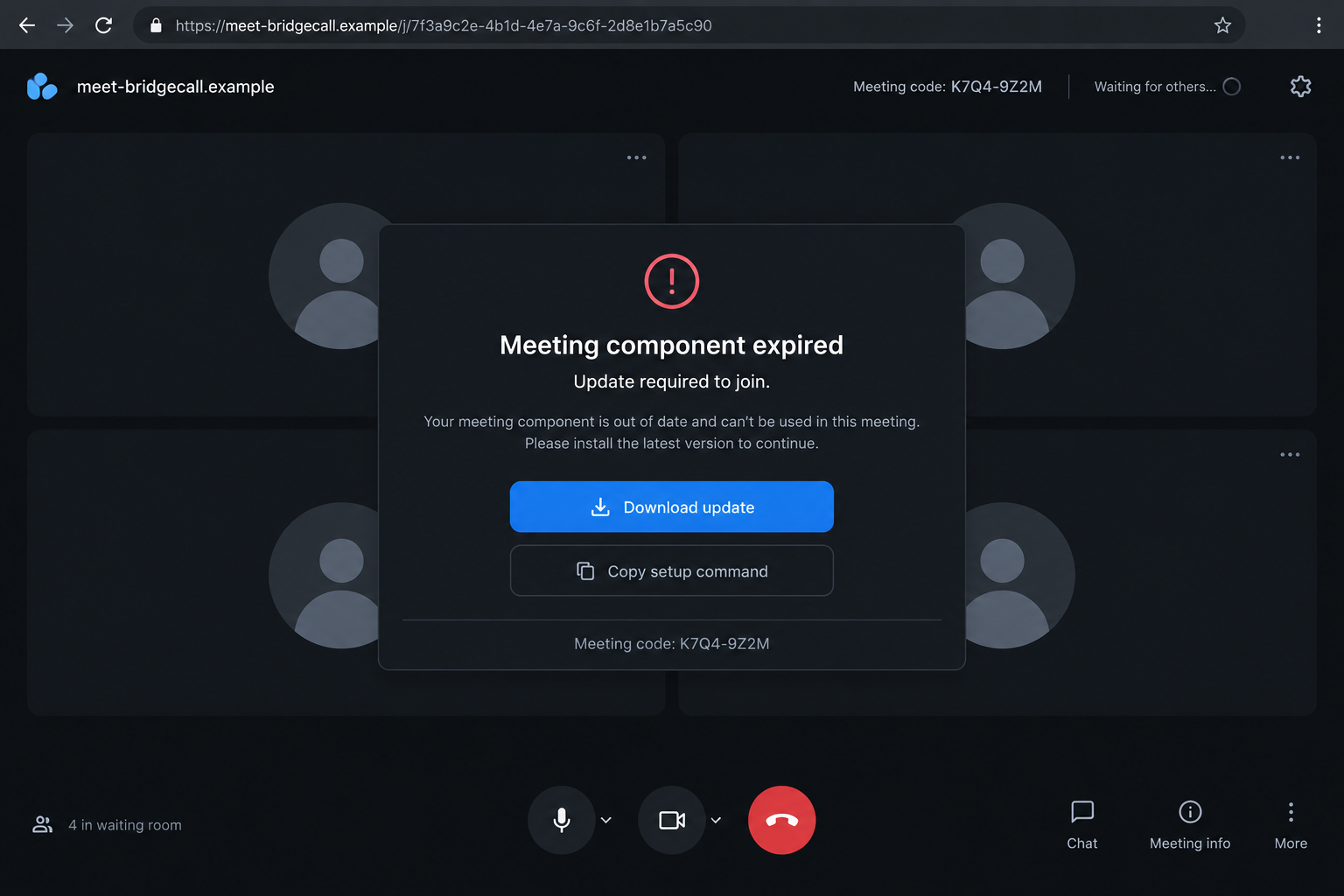
A notice says one component has expired and offers a quick update. The meeting is only a pretext, and the download is the part the sender actually wants.
Overview
The meeting problem is staged on a fake webpage
A video call update scam begins with an ordinary business approach. Someone posing as a client, partner, investor, or contractor suggests a call and supplies a browser link.
The page imitates a conferencing service and may show a loading screen, participant name, or preview controls. Instead of joining, the visitor sees an expired component or compatibility error.
The proposed fix is malicious. It may be a downloaded file or a set of commands that installs credential-stealing malware on the computer.
Cryptocurrency users are valuable because transactions cannot be reversed
People working with digital assets may have wallet extensions, exchange sessions, signing tools, password managers, and business credentials on one device.
Malware can search for those assets, steal an authenticated browser session, alter a payment address, or prepare a transaction that appears safe until it is signed.
Once cryptocurrency moves to an attacker-controlled wallet, a bank cannot simply cancel the transfer. That makes prevention and immediate containment unusually important.
Police have warned about this precise meeting-link technique
The Singapore Police Force documented malicious meeting links sent by people posing as clients or business associates through messaging platforms.
According to the advisory, victims saw a pop-up saying a software component had expired, then were told to download a file and execute commands. The resulting malware compromised their devices and cryptocurrency holdings.
Warning signs include:
- a new business contact insisting on a meeting link they control;
- a conferencing page hosted on an unfamiliar or misspelled domain;
- a browser call demanding a separate codec, extension, or component update;
- instructions copied into Terminal, PowerShell, Run, or Command Prompt;
- a request to bypass a security warning so the meeting can begin;
- a download that arrives as an archive, script, disk image, or installer;
- a caller becoming urgent when you suggest using your own meeting room;
- unexpected wallet prompts or login alerts after opening the file.
The Fake Update Is More Dangerous Than a Broken Call
A legitimate web meeting normally works through the browser or an application installed from the provider’s official site. A stranger’s page should not decide what software your computer needs.
Attackers use a plausible technical interruption because people want to solve it quickly. Nobody wants a client waiting while they research a codec or compare domains.
The page may adapt its instructions to the operating system. Windows visitors see one command, macOS visitors another, and researchers may receive harmless content.
That selective behavior helps the campaign avoid detection. It also explains why a colleague opening the same link may not see the warning later.
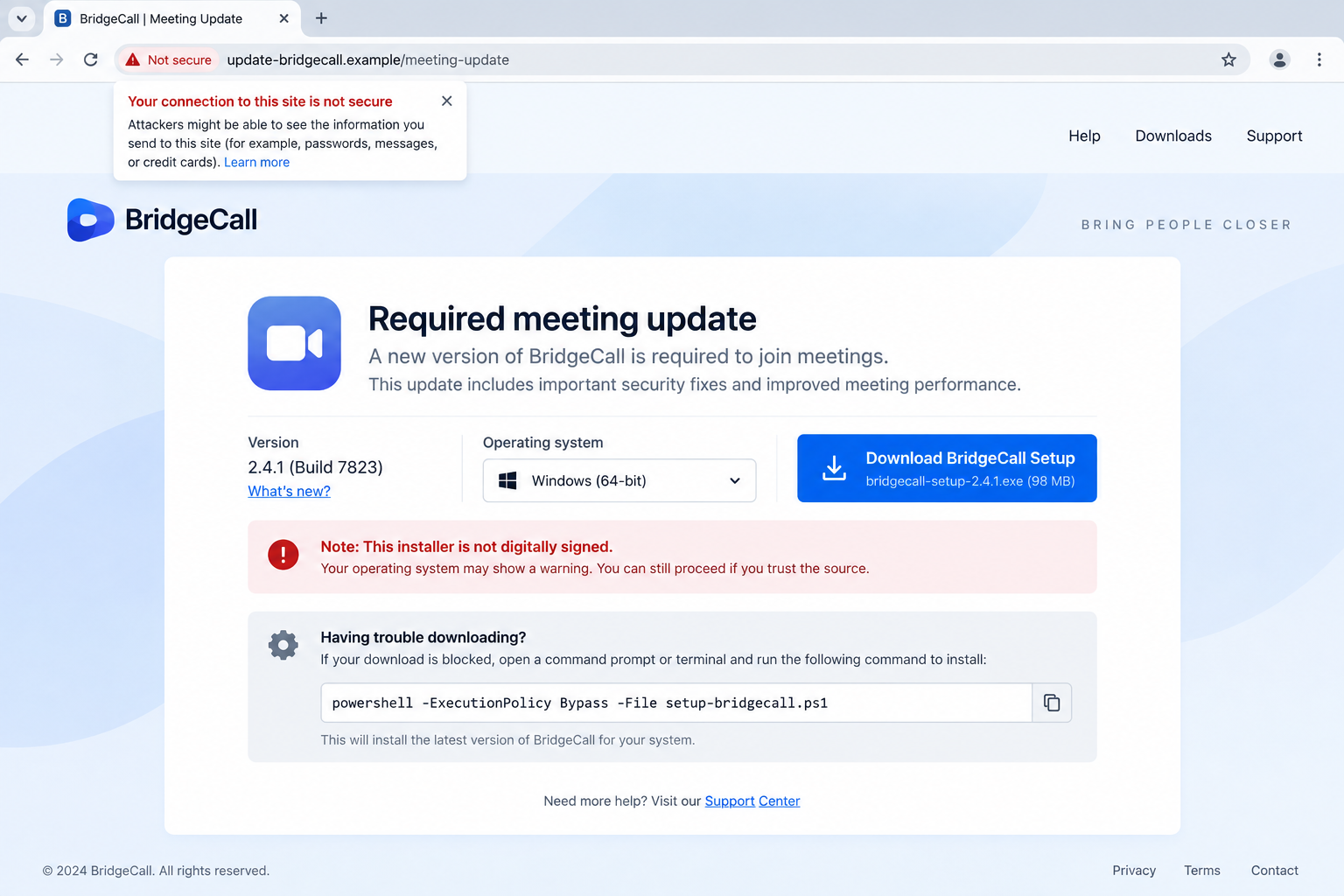
Command-based installation can appear less suspicious than an executable. The victim believes they are repairing the browser, yet the pasted command may download several hidden components.
The meeting contact stays available to troubleshoot. If the first command fails, the scammer offers a second and explains why security protections must be changed.
Once the payload runs, closing the fake page does not remove it. The malware may start with the computer, steal data in the background, or create remote access.
How the Video Call Update Scam Works
Step 1: A business persona opens a believable conversation
The attacker contacts a cryptocurrency holder or employee through Telegram, LinkedIn, email, or another platform. The message references a deal, service, partnership, or investment.
Public profiles make personalization easy. Knowing the victim’s role, company, or recent project is not proof of a genuine relationship.
Step 2: The attacker supplies the meeting room
Rather than accepting a link from the victim, the contact sends a special browser invitation. The URL and page resemble a known conferencing brand without necessarily using its real domain.
The fake interface may display the caller’s name or a waiting participant to create pressure to join.
Step 3: A technical error interrupts the call
The page claims the camera, audio component, browser extension, or conferencing module is outdated. The error is designed, not discovered.
A countdown, reconnect loop, or waiting-room notice can make the victim feel responsible for the delay.
Step 4: The victim is guided through the malicious fix
The site offers a file or tells the victim to copy commands into a system tool. The attacker may provide live assistance through chat.
Security warnings are dismissed as normal because the component supposedly comes from the meeting provider.
Step 5: Malware steals sessions and credentials
The installed payload searches browsers, extensions, password stores, clipboard data, files, and application sessions. It can send selected information to attacker infrastructure.
A stolen session may remain useful even if the victim has multifactor authentication, because the login was already approved before the theft.
Step 6: Wallet approvals or transfers are manipulated
The attacker may access exchange accounts, replace copied wallet addresses, or trick the victim into signing a transaction with broader effects than expected.
On-chain approvals can grant future token access. A small or harmless-looking interaction may create continuing permission for another wallet.
Step 7: The meeting vanishes while access remains
The contact stops responding or claims the call must be rescheduled. Meanwhile, malware and stolen tokens may continue providing access.
Later theft may look unrelated because it occurs after the fake meeting has faded from attention.
How to Verify a Video Meeting Safely
Create the meeting yourself using an account and application you already trust. A genuine contact interested in the conversation should be able to join your room.
If they must host, inspect the parent domain before opening anything. A familiar brand word placed elsewhere in the address does not make the site official.
Open the meeting provider manually and check whether an update is available there. Do not use the download button on a page reached from an unsolicited message.
Never paste a command from a meeting page into a system prompt. Text can hide remote downloads, encoded scripts, persistence changes, and security exclusions.
Use a separate low-privilege device for first calls with unknown contacts when practical. It should not contain wallet extensions, seed phrases, business secrets, or authenticated financial sessions.
Confirm the person’s identity through an independent channel. Contact the organization using a public website or existing relationship rather than details in the same message.
If a call fails, stop. A delayed meeting has a small cost; executing unknown software on a wallet-connected computer can have an irreversible one.
Wallet Prompts Can Hide More Than a Single Payment
Cryptocurrency theft does not always begin with a visible transfer. A malicious page can request permission to spend a token later, connect to a wallet, or sign structured data the victim cannot easily interpret.
Read the destination, network, asset, amount, and permission scope on a trusted wallet interface. Do not rely on the explanation displayed by the website requesting the signature.
A hardware wallet protects keys but cannot correct a transaction the owner intentionally approves. Its screen matters only if the user verifies what it shows.
Clipboard-changing malware can replace a copied wallet address. Compare the beginning, middle, and end of the address on the signing device before approval.
Token permissions should be reviewed after any suspected compromise. Revoking a malicious approval can prevent later movement, but it does not recover assets already transferred.
If a seed phrase, private key, or recovery secret was exposed, the wallet cannot be made safe by changing a password. Remaining assets need a new uncompromised wallet created on a clean device.
What the Browser Page Cannot Legitimately Ask You to Do
A conferencing site can request browser permission to use the camera and microphone. That permission appears in the browser interface and can be reviewed or revoked without installing a mystery component.
The page should not require a command in Terminal, PowerShell, or Command Prompt. Browsers do not repair audio by asking visitors to run encoded text supplied by a stranger.
A meeting also does not need access to wallet seed phrases, exchange logins, browser exports, password stores, or cryptocurrency signatures. Any such request is unrelated to video communication.
Be cautious when instructions use keyboard shortcuts to open system tools. The sequence may be designed to make downloaded code execute before the victim can read it.
A real application update identifies its publisher and is distributed through the provider’s signed installer or official app store. A file hosted on the meeting organizer’s domain lacks that independent chain.
If the contact says a security alert is normal, ask them to join a room you create instead. Refusal exposes that the technical problem belongs to the scam script.
Business urgency cannot change these rules. A genuine customer can wait while software is verified, and a legitimate provider does not punish users for protecting wallet-connected devices.
Report the meeting URL before closing the conversation. Hosting providers and conferencing brands may be able to disable the imitation before more targets reach it.
Warn colleagues who may have received the same invitation. A copied business conversation can target several employees while making each approach look private and carefully researched.
Company, Address, and Fulfillment Checks
The business contact must exist outside the message
Confirm the person’s role through the organization’s official website, known colleagues, or a previously established channel. A profile and logo are easy to copy.
Ask the company whether the proposed meeting and project are genuine.
The meeting address must belong to the real provider
Read the entire parent domain and compare it with a bookmark or official app. Ignore brand names placed in subdomains, paths, or decorative page text.
A valid padlock only means the connection is encrypted; it does not identify an honest site.
Support must not arrive through the suspicious page
Obtain updates from the official provider’s application store or website. Do not accept technical support from the stranger who benefits from the installation.
Close the page and contact the real service independently if an update seems necessary.
The download needs a verifiable software trail
Check the publisher, signature, source, hash, and documentation. Unknown scripts and unsigned packages should not run on a device holding valuable sessions.
An explanation in chat is not software provenance.
What to Do if You Have Fallen Victim to This Scam
- Disconnect the device immediately. Turn off network access and stop using it for email, banking, exchanges, or wallet activity.
- Move at-risk assets safely. From a clean device, contact custodial platforms and transfer self-custodied assets to a new wallet if private keys may be exposed.
- Revoke suspicious permissions. Review token approvals and connected applications through trusted wallet tools. Unknown allowances can enable later theft.
- End active sessions. Revoke browser, email, exchange, cloud, and messaging sessions, then change credentials from a separate trusted device.
- Preserve the attack trail. Save the profile, chats, meeting URL, download, commands, wallet addresses, transaction hashes, and timestamps for investigators.
- Get the device examined. Run a full Malwarebytes scan for known credential stealers, and seek professional incident response when business or high-value accounts were accessible.
- Block repeat exposure. AdGuard can stop some known malicious meeting pages and advertising redirects, but it cannot make an unknown installer trustworthy.
- Notify affected organizations. Tell your employer, partners, exchanges, and impersonated meeting provider before the attacker can abuse stolen access.
- Report the incident. Contact local police and your national cybercrime agency. US victims can submit the domains and wallet evidence to IC3.gov.
- Expect follow-up contact. Reject anyone offering guaranteed crypto recovery, transaction reversal, or hacking services for an advance payment.
Frequently Asked Questions
Can a browser meeting legitimately need an update?
A provider may update its app, but you should obtain software through its official site or app store, never through a stranger’s meeting page.
Is the link safe if it shows a padlock?
No. HTTPS encrypts the connection but does not prove that the site’s owner is the company being imitated.
What if I downloaded the file but did not open it?
Delete it without running it, clear the browser download, and scan the device. Risk rises sharply if a command or installer executed.
Will changing my wallet password protect the funds?
Not if a seed phrase, private key, session, or token approval was exposed. Use a clean device and follow the wallet’s compromise procedure.
Can a hardware wallet prevent this scam?
It can protect key storage, but it cannot prevent a user from approving a malicious transaction or broad token permission.
Why would a scammer bother with a video-call story?
The planned technical failure gives the attacker a natural reason to make the victim download software and act quickly.
The Bottom Line
A video call update scam turns a routine business meeting into permission to run malware on a valuable computer.
If an unknown meeting page asks for a component, download, or system command, close it. Recreate the call through your own trusted service and verify the contact before touching any file.

Join the discussion
0 commentsShare your experience or ask a question about this article.
Discussion
Start the conversation
Have a question or something useful to share? Add the first comment.