

The offer sounds like work you could actually do: cut a creator’s videos into short clips, post them, and get paid for the views.
Then a new message arrives about your earnings. A clipping campaign scam can become much harder to spot once you’ve already invested an evening of editing.
Overview
The job promises to pay you, then asks you to pay
A fraudulent clipping campaign borrows a real creator-business model. It offers payment for short videos, then uses access charges, invented payout obstacles, or credential requests.
The warning concerns the false offer, not clipping itself. Editing authorized footage for a genuine campaign can be legitimate paid work.
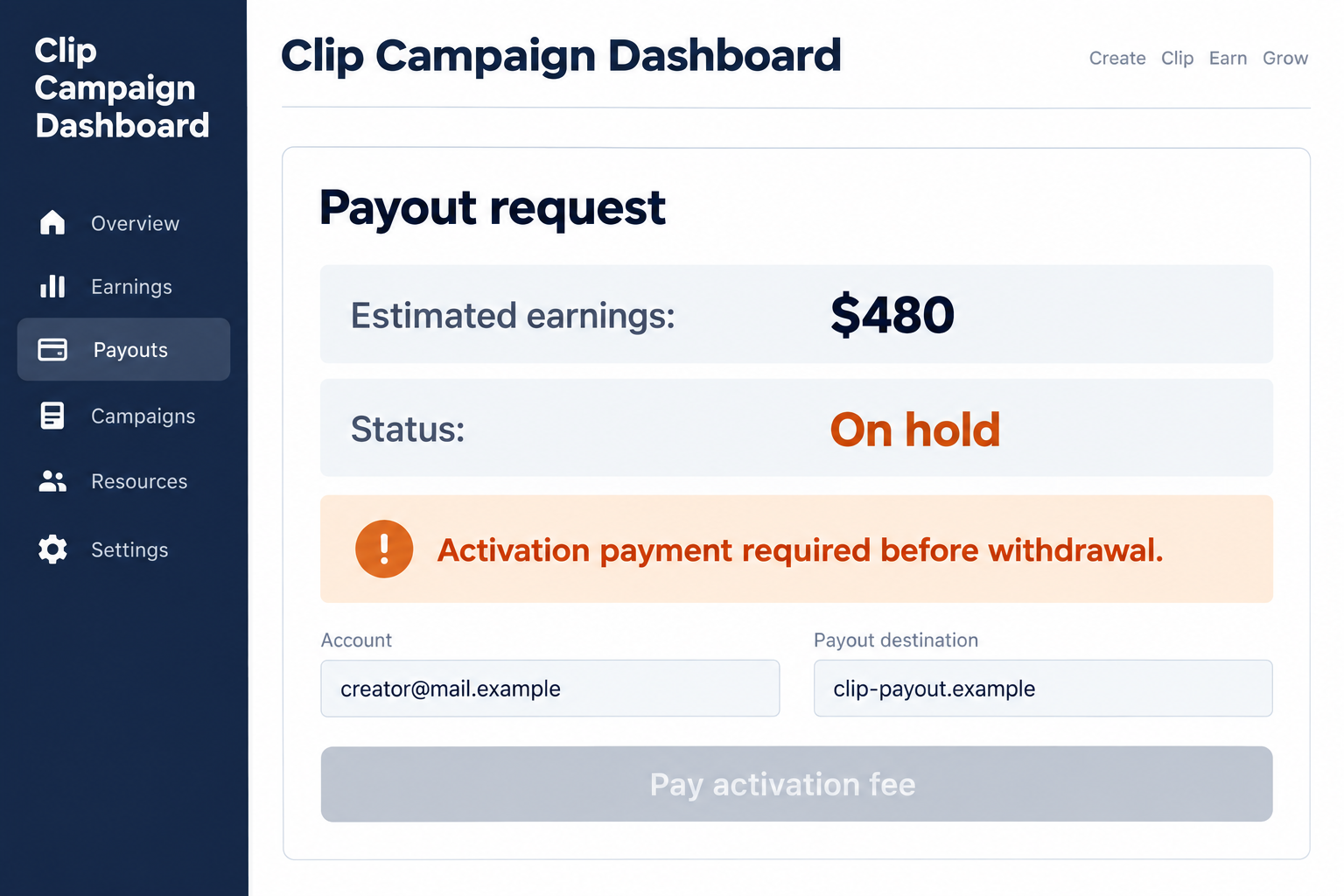
The dashboard illustration shows a fictional fee demand. Its balance, account, and wording are examples, not evidence that a particular creator or marketplace made those requests.
An activation fee becomes especially dangerous when it supposedly unlocks money already earned. You risk a real payment to obtain a balance controlled by the requester.
Real campaign rules explain what earns a payout
Whop’s Content Rewards terms provide one example of a legitimate framework: an offer, eligible submissions, a rate, and payment limits.
Approval and available budget matter. A public view count is not automatically a promise that every view will be paid.
The existence of that service does not authenticate someone using its name in a private message. Check the actual offer through the platform independently.
Likewise, a rejected submission or disclosed budget cap is not automatically fraud. The question is whether the advertised work and payment conditions were honestly represented.
Your time, channel access, and money need separate protection
You might lose editing time without losing an account. You might also disclose credentials or pay a fee, creating problems beyond unpaid work.
Before starting, look for these essentials:
- An independently confirmed campaign organizer and creator connection.
- Permission covering the supplied footage and intended posting channels.
- A written brief explaining approval, eligible views, budget, and deadlines.
- A payout process that does not require sending a stranger release money.
- Account connections you understand, without handing someone passwords or security codes.
A polished dashboard cannot replace those checks. The attractive number on screen matters only if the agreement and payment route are genuine.
What You Should Know Before Editing the First Video
A recognizable creator is not proof of permission
Anyone can link a popular channel or reuse its thumbnails. That shows which creator they want you to recognize, not whether the creator hired them.
Reach the creator or campaign through a separately found official channel. Don’t rely on a second contact supplied by the same person making the offer.
A promoter should be able to explain which footage is licensed and which campaign rules apply. Vague permission to copy whatever you find is inadequate.
Music, guest appearances, and third-party footage may introduce additional rights questions. Ask about approved source material before investing hours in a clip that cannot be used.
The headline rate is only part of the deal
Imagine an illustrative offer of $2 per 1,000 eligible views. A clip with 50,000 eligible views would produce $100 before any separately disclosed adjustments.
But total public views and eligible campaign views may differ. The measurement period, approval rules, minimum threshold, and remaining budget can change the amount.
Get those conditions in writing before posting. A recruiter should not introduce an unrelated payment obligation only after you’ve reached the advertised target.
Also ask whether removing or changing a post affects payment. Preserve the agreed brief so a later disagreement can be compared with the actual instructions.
How the Clipping Campaign Scam Works
Step 1: An easy creative opportunity reaches you
The pitch may appear in a social group, direct message, advertisement, or apparent campaign listing. It offers a familiar activity rather than an obscure technical task.
You already know how to trim a video, add subtitles, or choose a hook. That makes the job feel achievable and the earnings worth considering.
The organizer may name a streamer, podcast, or brand you recognize. Popularity supplies the excitement while the supposed organizer remains poorly identified.
Look beyond the creator’s name. Who approves the work, funds it, and handles disputes? Those roles should be clear before you accept the offer.
Unexpected contact is a reason to check, not proof by itself that a real freelance opportunity is impossible. Independent confirmation is what matters.
Don’t let a limited-spaces message decide for you. A genuine campaign may close, but losing an unverified opportunity is safer than buying your way into it.
Step 2: The brief gets replaced by reassurance
Instead of clear rules, you receive screenshots of earnings, excited community comments, or repeated claims that other editors have already been paid.
That material can make asking basic questions feel unnecessary. You may be encouraged to start immediately and sort out the details once views arrive.
A payout screenshot cannot show whether the sender controls the account, whether funds arrived, or whether the depicted transaction belongs to this campaign.
A community chat is also not independent verification when the organizer controls membership and removes difficult questions. Treat enthusiasm as commentary, not a contract.
Request the source-footage permission, rate, submission method, and payout conditions together. Missing one of those pieces can make the work impossible to evaluate.
If the answer is simply to trust the creator’s reputation, stop. The real creator’s reputation does not explain the unidentified recruiter’s authority.
Step 3: Work or a dashboard makes the earnings feel real
You may spend time cutting videos or submitting public post links. An apparent dashboard then displays views, commissions, or a pending balance.
Doing real work can make a false payment claim convincing. The footage exists and your post exists, so the earnings seem like the natural next step.
In related task scams, the FTC describes fabricated earnings and small initial payments used to build confidence before deposits are demanded.
That does not prove every clipping offer follows the same script. It explains why a small payment or a growing counter cannot authenticate later charges.
Check whether the platform independently records your approved submission. A screenshot sent in chat is different from an offer visible inside your genuine account.
Keep your own post links, submission dates, and brief. Your records should not depend entirely on a dashboard the organizer can change or remove.
Step 4: Collecting the money requires a fee or access
The turning point is a request to pay before receiving compensation. It may be called activation, verification, membership, clearance, or withdrawal processing.
You’ve done the editing, so walking away feels unfair. But sending a fee doesn’t turn that dashboard balance into money the organizer actually owes or can pay.
A separate paid editing tool or course is not automatically fraudulent. It should be sold transparently, without misrepresenting it as mandatory access to promised wages.
Some approaches instead request your social password or a one-time code. The claim may be that account access is needed to verify views or arrange payment.
Legitimate services can use official account connections. Read the actual permission screen; that is different from entering credentials into a stranger’s form.
Never read out a sign-in code just because someone describes it as a creator verification. The code may authorize account access rather than validate a post.
If a connection requests broad publishing or management rights, ask why. Public view verification alone does not explain unlimited control of your channel.
Step 5: Another obstacle keeps the payout out of reach
After a fee is paid, the promised transfer may still not arrive. A new requirement can appear, or the organizer can become difficult to reach.
The first payment makes stopping emotionally harder. You may hope one final step will recover both the editing effort and the money already sent.
More payment is not proof of progress. Compare what happened with the original agreement rather than accepting a new explanation each time.
If a real platform is involved, use its published support and dispute process. Don’t move to an outside contact who demands another payment to release funds.
Preserve the campaign identity and submission records before the page disappears. Avoid continuing risky account connections merely to monitor the promised balance.
Protect Your Channel Without Abandoning Genuine Work
Use an agreement you can check later
Keep the approved footage, permitted platforms, required disclosures, deadlines, rate, and payment method in one place. Save changes with their dates.
A legitimate dispute is easier to resolve when the rejected post can be compared with specific rules. Vague assurances create little to work with.
Don’t manufacture views or buy engagement to meet a target. That can breach campaign and platform rules while adding another cost to an uncertain offer.
Be honest about sponsored content. A campaign should explain relevant disclosures instead of asking you to make paid promotion look like an independent recommendation.
Separate the editing tool from the recruiter
If you need software, obtain it through the developer’s official source. A private download link labeled a premium campaign tool deserves scrutiny.
Don’t install a cracked editor or unfamiliar extension to qualify. The job pitch should not dictate unnecessary access to your computer or browser accounts.
Check subscription terms before buying a legitimate editing service. Its fee and cancellation policy are separate from whether the campaign will pay you.
Paying for useful software does not validate a recruiter, and rejecting an unsafe recruiter doesn’t mean your existing editing software is malicious.
What to Do if You Have Fallen Victim to This Scam
-
Stop activation and withdrawal payments. Don’t transfer another amount to finish verification or remove a payout hold. Ask for help outside the campaign chat.
Write down whether the loss involved money, editing time, account access, or downloaded software. Each needs a different response.
A supposed balance should not keep you funding the person who controls it. Save the displayed request without attempting another withdrawal payment.
-
Save evidence of the work and agreement. Preserve the listing, organizer profile, brief, source permission, public post links, submissions, and payment requests.
Keep original project files and timestamps where available. Redact private credentials from anything you share with platform support.
Record what was approved and what was promised. An unpaid-work dispute becomes clearer when expectations are tied to specific documents.
-
Contact the company handling your payment. Explain the claimed employment or payout-release fee and provide the transaction reference.
Ask which reversal or dispute options apply. Be accurate about payments you authorized rather than describing every deceptive transfer as unauthorized card use.
The FTC’s payment-recovery guide gives payment-specific contacts. A complaint does not guarantee that funds can be returned.
-
Review exposed social and email accounts. Change disclosed passwords through genuine settings, inspect sessions, and replace reused credentials where needed.
Remove unfamiliar connected apps or permissions you no longer trust. Password changes may not remove a separately authorized app’s access.
Check whether posts, profile information, recovery details, or payment destinations changed. Report actual unauthorized changes rather than assuming every account was entered.
-
Check the device if you installed campaign software. End any remote connection and use a trusted device for sensitive account recovery.
Malwarebytes can help inspect unwanted programs after a suspicious installation. AdGuard can reduce some malicious-ad exposure, but neither retrieves creator earnings.
If you only saw a message and installed nothing, receiving the offer alone is not evidence of device infection.
-
Report the organizer through the relevant platform. Include the fee demand and the account or listing used, not just a screenshot of your balance.
If a real creator’s identity was used, notify them through an independently verified route. Avoid sending them sensitive identity or payment documents unnecessarily.
For a U.S. financial scam, use ReportFraud.ftc.gov. Report the false job as well as asking your payment provider about the transfer.
-
Review what remains posted. If permission was unclear, pause further uploads and seek guidance from the platform or actual rights holder.
Preserve evidence before changing posts. Don’t keep circulating questionable promotional claims simply because you’re hoping the campaign will eventually pay.
If the dispute concerns legitimate contract work, consider appropriate professional advice. A scam warning cannot decide every unpaid freelance invoice.
-
Reject paid recovery promises. A new contact offering to unlock the dashboard or trace your earnings may be extending the same pressure.
Use the existing platform case and payment-provider reference. You don’t need to buy a new campaign membership to complain about the first one.
Keep your evidence, protect the channel, and evaluate the next opportunity before giving it another evening of unpaid effort.
Frequently Asked Questions
Is paid video clipping always a scam?
No. Authorized campaigns can pay for approved clips. Check the organizer, rights, written rules, and payout process rather than assuming the whole activity is fraudulent.
Does an earnings screenshot prove a campaign paid someone?
No. A screenshot does not independently confirm the owner, transaction, or campaign. Check the actual listing and agreement through a separately reached platform.
Should I pay to unlock a pending clipping payout?
Don’t send a stranger an activation or release payment to collect promised earnings. Use the genuine platform’s support process to verify any claimed restriction.
Can legitimate platforms connect to my social account?
Yes, through an understood official authorization process. Inspect the permissions. Never substitute sharing your password or sign-in code with a recruiter.
Why might a real campaign reject my views?
Approval criteria, eligible views, budget caps, or deadlines may apply. Those should be disclosed before work begins, not invented afterward to demand money.
What if I lost time but never paid anything?
Preserve the brief and submitted work, report the false offer, and review posting permission. You don’t need payment-loss steps for a transfer that never happened.
The Bottom Line
Don’t pay to release earnings from a clipping campaign scam or surrender your channel login. Confirm the organizer, source permission, and payout rules before working.
If you already responded, protect the channel and preserve your submissions. Contact the payment provider about fees sent, not the recruiter demanding another payment.

Join the discussion
0 commentsShare your experience or ask a question about this article.
Discussion
Start the conversation
Have a question or something useful to share? Add the first comment.