

You found a few things worth buying, placed an order, and moved on with your day. Then a message arrives saying one more detail needs attention.
Amazon Prime Day scams can meet shoppers at either moment. The offer that starts the conversation and the update that follows deserve the same careful look.
Overview
The real sale gives an impostor a believable opening
Prime Day is a genuine Amazon shopping event. A message using its name is not automatically a real promotion, order notice, or request from customer service.
During busy shopping periods, people expect more messages. An ordinary-looking update can fit neatly among actual purchases even when its sender knows nothing about them.
Amazon’s own scam guidance describes impersonated order confirmations, shipping notifications, and refund offers around major shopping activity.
The point is not to distrust a genuine sale. It is to avoid letting a sale-themed message decide where you sign in, provide information, or pay.
The risky request can arrive before or after an apparent purchase
A tempting offer can lead away from the real store. A later message can claim an order needs attention, a payment failed, or a refund is available.
Those stories create different emotions, but each supplies a reason to follow the sender’s route. Check the actual task before accepting that route.
Be particularly wary when a message wants you to:
- Sign in on an unfamiliar page to retain a sale price.
- Enter payment information again through an unexpected order update.
- Call a number embedded in a warning about a purchase.
- Provide a security code to obtain a refund.
- Install software or move money to fix a shopping-account problem.
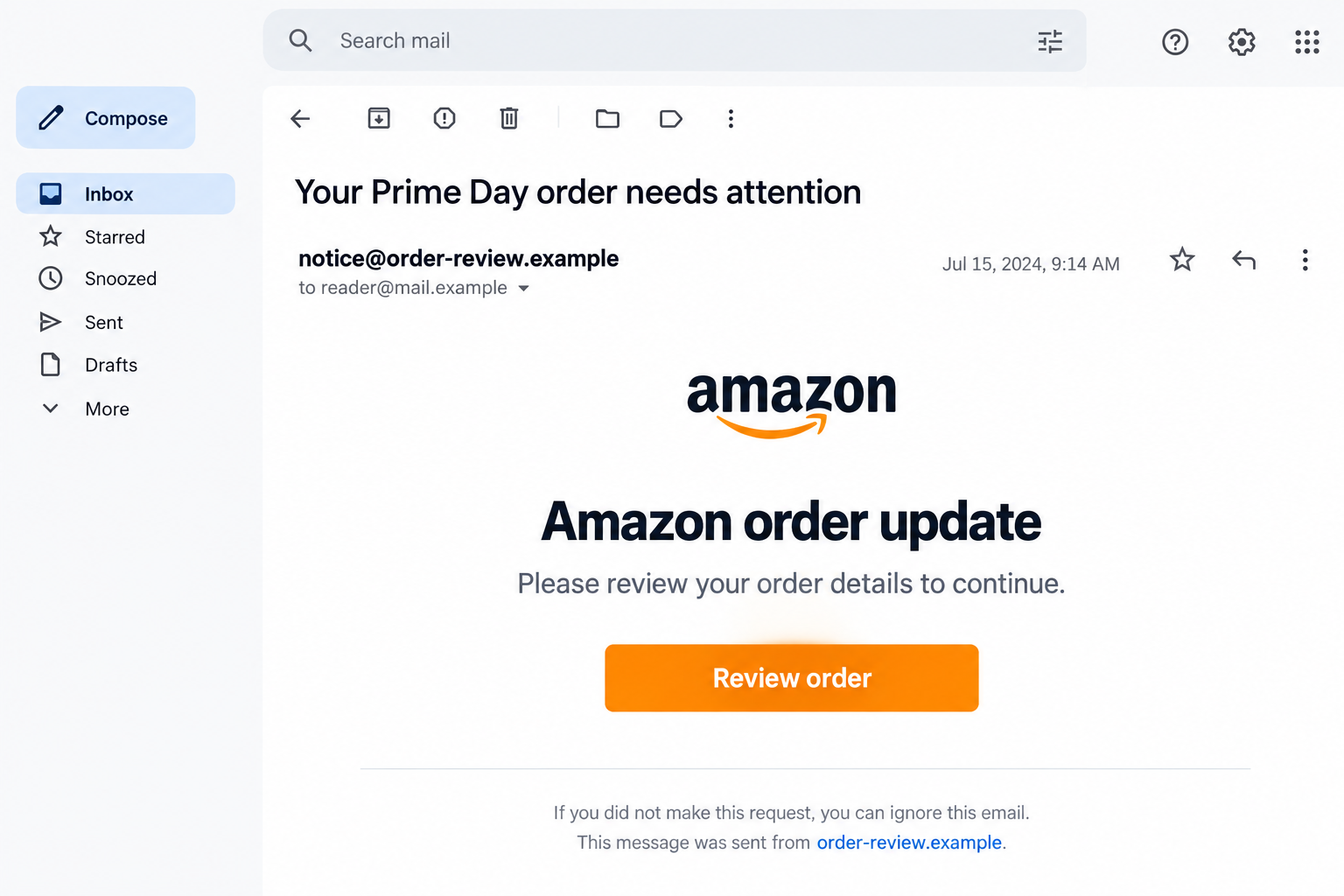
The lead email is a fictional illustration, including its displayed date and sender. It does not establish an actual order, a live offer, or a particular campaign.
Your real account is the better place to check the story
Open the Amazon app you already use or navigate independently to its website. Start with your orders and account messages, not the notice’s action button.
Check the exact purchase being discussed. Finding some genuine order in your account does not connect every delivery or payment message to that order.
If the notice refers to something you never bought, do not call its cancellation number. Look for an actual transaction and contact genuine support if necessary.
Amazon’s June 2026 warning refers to shopping-season observations from 2025. This guide explains the recurring tactic, not a claim that one newly discovered website controls every version.
Why the Messages Can Feel Like Part of Your Shopping
A sale changes what you expect to hear
When several purchases are underway, you may be looking for dispatch times, payment updates, and return instructions. More notifications no longer seem unusual.
A fraudulent update can benefit from that expectation without knowing your order history. You may supply the missing connection when a message simply says your recent purchase.
Look for the item and order inside your own account. The sender’s confidence is not a substitute for a matching record.
A low price can distract from a changed destination
You may compare colors, delivery dates, and the advertised discount while paying less attention to where the final button sends you.
A familiar product photo is easy to repeat on another page. It does not mean the page is part of Amazon or that a purchase will appear in your account.
Open the store independently and look for the offer there. If you cannot confirm it, do not enter your login simply to see whether the price is genuine.
A disappointing discount or an ordinary delivery delay is not automatically fraud. The concern here is impersonation and the unverified request attached to it.
A refund can sound safer than another charge
After ordering, you may be more receptive to money coming back than money going out. A supposed refund can make a request for sensitive information seem helpful.
Read what the form or account notification actually asks you to do. An instruction to approve access or send money is not made safe by the word refund.
For a recall notice, check the information within the genuine account. Real product-safety concerns deserve attention through the correct service, not a stranger’s replacement form.
How Amazon Prime Day Scams Work
Step 1: A sale-related message supplies the initial hook
The message might praise a deal, warn of a failed purchase, or offer to solve a delivery problem. It arrives dressed as normal shopping.
You might be browsing offers or already waiting for a parcel. Either situation gives the message a plausible place in your day.
Pause before connecting it to a purchase. Compare the claim with your own shopping activity instead of letting the sender tell you what happened.
Step 2: Familiar branding makes the next click look ordinary
The message or destination can borrow the retailer’s name, colors, and sign-in layout. Recognizing those details is different from recognizing who operates the page.
Buttons are especially convenient at hiding the full address. A label about reviewing an order does not tell you where the review will take place.
A website address can include Amazon-related wording without belonging to Amazon. The same is true of the name displayed above an email’s actual sender address.
You do not have to become an expert at spotting copied design. Leaving the message and opening your normal account removes much of that guesswork.
Step 3: A counterfeit sign-in turns curiosity into account exposure
A page may ask for your email and password before showing the alleged deal or issue. That can feel like a normal barrier to a private account.
On an imitation, the entry can go to someone else. The page does not need to complete a genuine login to collect information you typed into it.
Stop if you realize the destination is unfamiliar. Do not keep retrying because the first attempt appeared to fail or the page suddenly returned to a genuine website.
A familiar screen afterward cannot explain what happened on the earlier form. Protect any password entered there through the real account’s security controls.
Step 4: A payment or verification request asks for something more
Some versions request a card update, personal information, or an account code. Others aim primarily at the initial login. Do not assume every message contains every stage.
The request should fit a confirmed transaction. An unfamiliar notice about payment does not give its sender authority to collect information saved in your shopping account.
Read any genuine security prompt separately. Check whether it approves access, changes a setting, or authorizes money rather than accepting the explanation on the suspect page.
If a charge concerns you, involve the financial provider through your established contact. The email’s supposed fraud department should not control that conversation.
Step 5: An apparent order creates room for later problems
A confirmation from an unverified site can leave you waiting for an item that never appears in your real account. Check which company actually took the order.
Alternatively, a genuine purchase may be followed by an unrelated shipping or refund lure. The existence of the purchase does not authenticate the later contact.
Compare the item, amount, destination, and status through the proper service. Avoid supplying extra information to help an unknown sender make its story fit.
Step 6: A support conversation can turn into a second request
A message may introduce a phone number or chat agent to cancel a supposed charge. The person answering can then build pressure that the original email did not contain.
Do not grant computer access, buy gift cards, or move money to protect a shopping account. An ordinary order question does not require that kind of intervention.
Close the conversation and find help inside the actual website or app. If information was already shared, explain the sequence to the genuine provider.
Separate the Offer, the Order, and the Refund
Check a promotion where you would normally shop
Search within the genuine store for the item and promotion. Compare the full purchase, including the seller and delivery conditions, rather than only the number in an advertisement.
Do not let a disappearing timer choose where you authenticate. A benefit that exists only through an unfamiliar message should remain unclaimed until its source is confirmed.
A late parcel or price dispute deserves a customer-service conversation. Do not treat it as proof of phishing; check whether anyone is impersonating the retailer.
Check the purchase against its actual record
Look in Your Orders for the exact item or purchase being referenced. Ask other authorized household users about activity you do not recognize before declaring it unauthorized.
If you ordered elsewhere, inspect that merchant’s receipt and your payment record. Do not assume an Amazon logo means Amazon accepted the order.
For a delivery issue, use tracking reached from the genuine transaction. A separate text should not become the authority for an extra payment or replacement address form.
Keep refunds and recalls inside the established process
Use the retailer’s account and verified support for returns, refunds, and product-safety concerns. The unusual message may be exploiting a real purchase without being part of it.
Ask what action is actually required and where the result will appear. Keep written case details so a later caller cannot simply replace the process with another story.
A refund does not require trusting a new person because they sound helpful. You can verify the assistance through a channel you chose yourself.
What to Do if You Have Fallen Victim to This Scam
-
Stop using the message’s links, numbers, and chat. Preserve the original contact and note which destination or conversation followed it.
Record the information you entered and any payment or security action you approved. Do not reopen a risky page solely to make the evidence more complete.
If another household member received the same message, warn them in your own words. Avoid forwarding an active link as the warning.
-
Recover any account whose password was exposed. Open Amazon independently and use its genuine security or account-recovery controls.
Check contact details, delivery addresses, available account access information, and recent activity. Ask official support about changes or purchases you cannot explain.
If you gave away a verification code too, mention that specifically. Tell support what the prompt was approving rather than describing every code as the same event.
-
Replace reused passwords and protect the mailbox. A password shared across services can turn a shopping mistake into a wider account problem.
Start with services that hold money or receive recovery messages. Use unique replacements and review stronger sign-in options where available.
Do not put actual old passwords into an email report or public comment. The provider needs to understand the exposure, not receive the secret again.
-
Ask the payment provider about financial exposure. Contact the issuer or service you normally use if you entered a card, paid an impostor, or found unexplained charges.
Identify the merchant shown on the transaction and keep the receipt. Ask about replacement, disputes, and any available recovery attempt appropriate to the payment method.
The FTC’s payment-recovery advice explains why the provider matters. Reporting a scam does not automatically refund an order.
-
Get help for any software or remote access involved. End the untrusted connection and stop following the supposed support agent’s instructions.
Malwarebytes can help check for malicious software after a relevant download or installation. It cannot cancel an order, reverse a transfer, or establish the merchant’s identity.
AdGuard can limit intrusive ads and some unsafe browsing destinations. It is an additional safeguard, not a guarantee that a sale message is genuine.
-
Report the impersonation through Amazon’s genuine route. Find its reporting tool from the official service, or use its published reportascam@amazon.com address where appropriate.
Include useful message details without sending private account records unnecessarily. Keep your genuine support case separate from replies arriving in the suspicious email thread.
For broader fraud reporting in the U.S., use ReportFraud.ftc.gov. Continue any payment dispute directly with the relevant provider.
-
Resolve the real shopping issue and watch for recovery offers. Verify whether your genuine order, return, or refund needs further action inside its established process.
Reject strangers promising guaranteed refunds for an advance fee. A new caller knowing your purchase amount or complaint does not make them part of the real case.
Retain records until the actual account and payment questions are settled. Do not let a reassuring email replace confirmation from the services holding those records.
Frequently Asked Questions
Is Amazon Prime Day itself a scam?
No. It is a genuine shopping event. This warning concerns outsiders impersonating Amazon or using sale-related stories to request information or money.
Can a fake order alert arrive after a real purchase?
Yes. The timing can make an unrelated message seem relevant. Check the exact purchase through your genuine account rather than assuming the connection.
Does a copied Amazon logo identify the website owner?
No. Check the destination and access the account independently. Branding on a page or message can be reproduced by someone else.
Should I call the cancellation number in an unexpected order email?
Do not use that number. Look for the transaction yourself and contact customer service from within the real website or app if help is needed.
Are genuine recall notices possible?
Yes. Check product-safety information through your actual account and the established service. An unverified refund form is not the proper substitute.
What if I entered a password but never ordered anything?
Protect that account and any reused password now. A counterfeit form can collect credentials without producing a purchase or an obvious charge.
The Bottom Line
Do not sign in or provide payment details through an unverified sale message. Amazon Prime Day scams rely on making a stranger’s request feel like normal shopping.
If you already responded, secure exposed accounts and contact the relevant payment provider. Verify the real order or refund separately through Amazon or the merchant you actually used.

Join the discussion
0 commentsShare your experience or ask a question about this article.
Discussion
Start the conversation
Have a question or something useful to share? Add the first comment.