

An invitation to Amazon Family should be easy to understand. Someone you know wants to share benefits, and you decide whether to join.
But what if that invitation also warns about a login and tells you to call? The Amazon Family invitation scam turns that confusing combination into its opening.
Overview
A security warning appears inside an invitation story
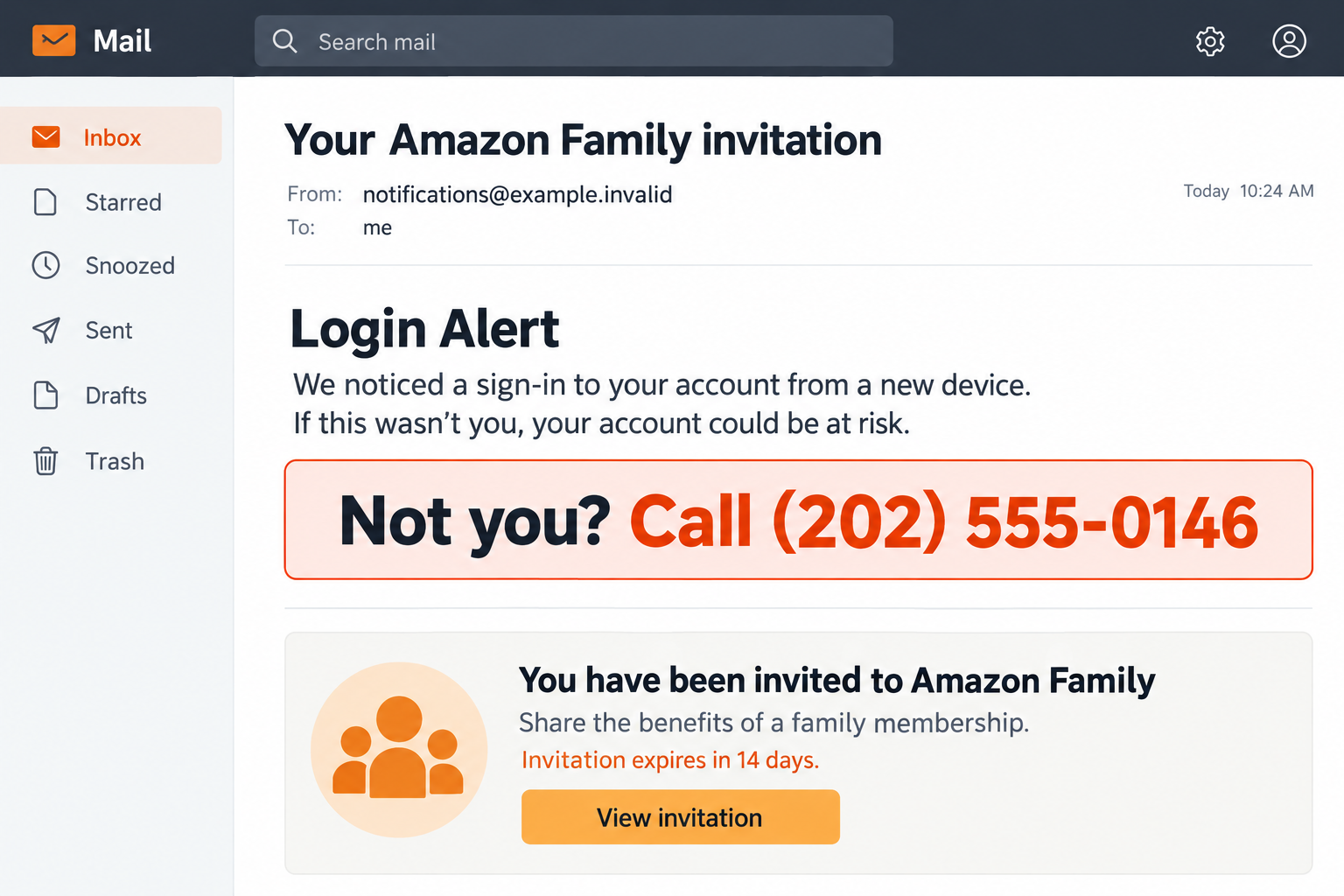
The reported message combines a login alert, password-assistance wording, and an invitation to Amazon Family. It directs recipients to call 812-266-8263 if the activity was not theirs.
It also includes ordinary-sounding information about sharing digital content and an invitation lasting 14 days. Those familiar details make the unrelated warning easier to overlook.
A genuine feature does not authenticate every instruction
Amazon Family is real. Its existence does not make a security claim or phone number appearing in an unexpected invitation trustworthy.
The illustration uses a fictional sender and reserved example number to show the mixed-message tactic. It is not an original email or proof of Amazon’s involvement.
Check who invited you and what the message asks
The useful questions are straightforward:
- Did someone in your household actually invite you?
- Can you inspect the invitation independently in your Amazon account?
- Is the message asking you to call a number rather than simply manage family sharing?
- Does a supposed support agent want a password, code, payment, or remote session?
The original headers and delivery route were not authenticated here. The available text cannot establish whether the sender forged an email or abused an invitation feature.
Why a Family Invitation Can Make a Security Warning Look Believable
The surrounding copy supplies borrowed credibility
A message can contain accurate information and still carry a deceptive instruction. Readers often recognize one correct detail and extend that trust to everything else.
In this case, the invitation language provides the familiar setting. The login warning supplies the anxiety, and the number offers an immediate way to resolve it.
You might focus on whether Amazon Family exists rather than whether a family-sharing invitation should also function as a security hotline notice.
Family sharing and an emergency hotline are different subjects. The invitation does not explain why its telephone number should be trusted with an account problem.
Invitation text and security evidence are different things
Consider what would actually prove a login occurred: activity in your independently opened account, a verified security notification, or confirmation through genuine support.
Words appearing in a message are not equivalent to those records. Even technical-looking labels can be typed into ordinary text.
A string described as a password-assistance code should not automatically be treated as a working recovery code. Its real purpose cannot be determined from wording alone.
If you receive a separate genuine code unexpectedly, protect it anyway. Do not send it to someone who contacted you or whose number came from this invitation.
Polished formatting can coexist with an unsafe callback
A logo, matching colors, or a working Amazon link somewhere in the footer does not validate an unrelated number higher in the message.
Likewise, a sender display name is not a complete authentication result. It tells you what the email application is displaying, not who authorized every sentence.
You do not have to become an email-forensics specialist to respond safely. Ignore the supplied callback and check the account through a route you already know.
How the Amazon Family Invitation Scam Works
Step 1: An unexpected invitation creates a reason to read
Family sharing is a plausible subject for an account notification. An invitation may seem less suspicious than an obvious demand for an immediate payment.
Perhaps a relative mentioned sharing benefits. Perhaps you simply assume another household member has changed a setting without telling you.
The recipient starts trying to understand the invitation. That attention gives the embedded warning a chance to interrupt an otherwise routine decision.
Before following any instructions, ask the supposed inviter using an existing conversation or known contact details. Do not reply to an unfamiliar address for confirmation.
Step 2: The text reframes the invitation as an account problem
A login alert suggests someone may already have access. Password-assistance wording adds the possibility that the person is changing your credentials.
These cues can make the invitation itself seem like evidence of a takeover, even when the message provides no independently verified account activity.
That fear narrows the reader’s attention. The family-sharing explanation becomes background, while the call instruction begins to look like the urgent part.
You can break that sequence by opening Amazon separately. Check security settings and family membership there before deciding whether any account action is necessary.
Step 3: A supplied number becomes the apparent help desk
The reported example directs the recipient toward a callback if the activity was not theirs. It asks the worried reader to initiate contact.
That matters because making the call yourself can feel safer than answering an unsolicited one. But you are still using contact details chosen by the suspicious sender.
A convincing answer, hold music, or knowledge of the invitation cannot independently verify the person. They may simply be repeating information from the same message.
Find assistance inside the genuine app or website instead. Explain the invitation without letting its telephone number determine whom you trust.
Step 4: The conversation may seek access rather than an explanation
A fake agent can describe a code request as stopping a login, removing an intruder, or confirming the rightful owner.
The danger is the action being approved, not the comforting name given to it. Read any separate verification prompt before entering a code anywhere.
Amazon’s scam-awareness updates say the company does not ask customers to share account passwords or sign-in codes over the phone.
No call to the reported number was conducted for this article. Requests described here are recognizable escalation risks, not a transcript of that particular line.
Step 5: The supposed fix may introduce money or device access
Be especially wary if the conversation shifts from family settings to a bank account, a refund, gift cards, or an application the caller wants installed.
None of those actions explains who invited you to share Amazon benefits. The problem has changed because the person is introducing a new demand.
You can end the call without resolving their story. A genuine account issue can be handled through independently reached customer service.
If you already followed instructions, record what you did instead of continuing to ask the caller whether everything is safe. Your next steps depend on the exposure.
How a Real Amazon Family Invitation Should Be Checked
Start with the person, not the email’s button
An invitation from a household member should be something that person can explain. Confirm their intention in a conversation you already trust.
Ask what they invited you to share and which email address they used. An unexpected invitation may be a mistake, not necessarily evidence of a hacked account.
Do not accept an invitation from an unknown person just to investigate. Family sharing involves account relationships and settings that deserve a deliberate decision.
Use the account’s own family-management area
Amazon’s Family setup guidance describes invitations initiated by an organizer and explains that an invitation can remain available for 14 days.
That period is a feature of the invitation process, not a deadline for calling an emergency support number or preventing an alleged withdrawal.
Review membership and sharing choices directly. Do not assume joining grants every possible permission, or that it has no consequences; inspect the actual settings shown.
If an unfamiliar family relationship is already present, contact verified support before making changes you do not understand. Avoid following a stranger’s removal instructions.
Treat a separate security incident on its own evidence
You may discover an actual unfamiliar sign-in, order, or payment while checking. Take that seriously without adopting the suspicious message’s explanation.
Note the activity, secure the account, and ask genuine support to investigate. A real problem does not make the sender’s chosen number legitimate after all.
Conversely, finding nothing unusual does not require proving how the email was sent. You can report an unwanted invitation or phishing attempt without solving its origin.
How to Handle a Confusing but Possibly Genuine Invitation
Ask the household member a specific question
Instead of forwarding the suspicious button, ask whether they sent an invitation from their own family-management settings and which address they intended to invite.
A relative may recognize a genuine mistake immediately. If they did not send anything, that answer is enough reason not to accept the unexpected invitation.
There is no need to involve the message’s purported security agent in that conversation. They have not earned a place in your household’s account decisions.
Separate receiving an invitation from accepting one
Receiving a message is not the same as joining a family group. Before assuming permissions changed, inspect whether you actually completed an acceptance process.
If you did join, review the relationship inside the genuine account. Note the organizer and sharing choices displayed, rather than guessing from the email’s description.
Do not repeatedly join and leave groups as a troubleshooting experiment. Ask verified support about any restrictions or consequences before making changes you do not understand.
If someone else in the household clicked, ask what appeared next without blaming them. A clear account of the actions helps distinguish an accidental acceptance from credential disclosure.
Keep the ordinary decision ordinary
A real invitation is a decision about sharing benefits with people you know. It should not require resolving somebody else’s bank transaction or installing a support tool.
If the message mixes those subjects, handle them separately. Your actual family settings belong in Amazon; unexplained banking activity belongs with your financial institution.
Save a screenshot of unfamiliar account relationships before contacting support, with private details protected. That gives the conversation a concrete starting point.
Once the issue is resolved, tell the household member which invitation was legitimate. This prevents another person from following the suspicious version during the same conversation.
What to Do if You Have Fallen Victim to This Scam
-
Stop using the invitation’s contact details. End any conversation with the supposed agent. Keep the original message privately and note whether you clicked, called, joined, disclosed, installed, or paid.
If you only received the email, reporting it and checking your account independently may be sufficient. Receipt alone is not proof that anyone obtained access.
-
Open Amazon through your usual trusted route. Review login and security information, current orders, payment methods, and the family-sharing area.
Look for changes you cannot explain, not just the words mentioned in the email. Save useful records before asking support to correct unfamiliar activity.
-
Replace exposed credentials and review account recovery. If you gave away your password or approved an unexpected security prompt, act from a device you trust.
Change reused passwords elsewhere, especially on your email account. Check recovery contacts and available sign-out controls so an unwanted session does not remain overlooked.
-
Address accidental family membership separately. If you accepted an unfamiliar invitation, inspect what actually changed and consult Amazon support about reversing the relationship safely.
Do not rely on a stranger’s claim that removal requires a fee, refund form, or another code. Keep records of any purchases or sharing changes.
-
Contact your bank about financial exposure. Report card details you revealed or payments you made. Describe whether the activity was unauthorized or you were deceived into approving it.
Use contact information from your financial institution, not a number the purported Amazon agent supplied. Ask about stopping pending payments and protecting the affected card.
-
Deal with installed software or remote control. If an agent was controlling your device, disconnect it from the network and use another trusted device for urgent account protection.
Have unwanted access tools removed and run a current security scan. Malwarebytes is an option for checking malicious or unwanted applications.
AdGuard can add browsing protection against some advertising and tracking threats. Neither product reverses an invitation, restores money, or proves exposed information remained private.
-
Report the message through genuine Amazon assistance. Use Amazon’s scam-reporting guidance and choose the response matching the information or access you shared.
US readers can also report attempted fraud to the FTC. Redact private data before warning others, but preserve the complete original for an appropriate official report.
Frequently Asked Questions
Does an unexpected Amazon Family invitation mean my account was hacked?
No. It could be an unwanted invitation, a mistake, or part of a deceptive message. Check actual account activity instead of treating receipt as takeover evidence.
Is 812-266-8263 a verified Amazon security number?
It is the callback shown in the reported suspicious example, not a support route verified by this report. Reach Amazon through its genuine app or website.
Can a real invitation feature be involved in a scam?
Yes, legitimate features can carry misleading user-supplied information. This example’s original delivery mechanism was not authenticated, so forgery and feature abuse should not be confused.
Should I share a code to cancel an invitation?
Do not disclose account security codes to a caller. Use family-management settings or verified support, and read what any authentication prompt actually authorizes.
Is the 14-day invitation period a warning sign by itself?
No. Amazon documents that invitation period. The concern is the unrelated security warning and callback request, not the existence of an invitation expiration date.
What if I have no Amazon account?
You do not need to create one to investigate an alarming invitation. Amazon’s reporting guidance provides reportascam@amazon.com for suspicious communications received by noncustomers.
The Bottom Line
Do not call a number embedded in an unexpected Amazon Family invitation to resolve a login warning. Verify the inviter and inspect your account independently.
If the Amazon Family invitation scam already drew you in, secure any exposed login, review unfamiliar sharing settings, and contact your bank promptly about payments or card disclosure.

Join the discussion
0 commentsShare your experience or ask a question about this article.
Discussion
Start the conversation
Have a question or something useful to share? Add the first comment.