

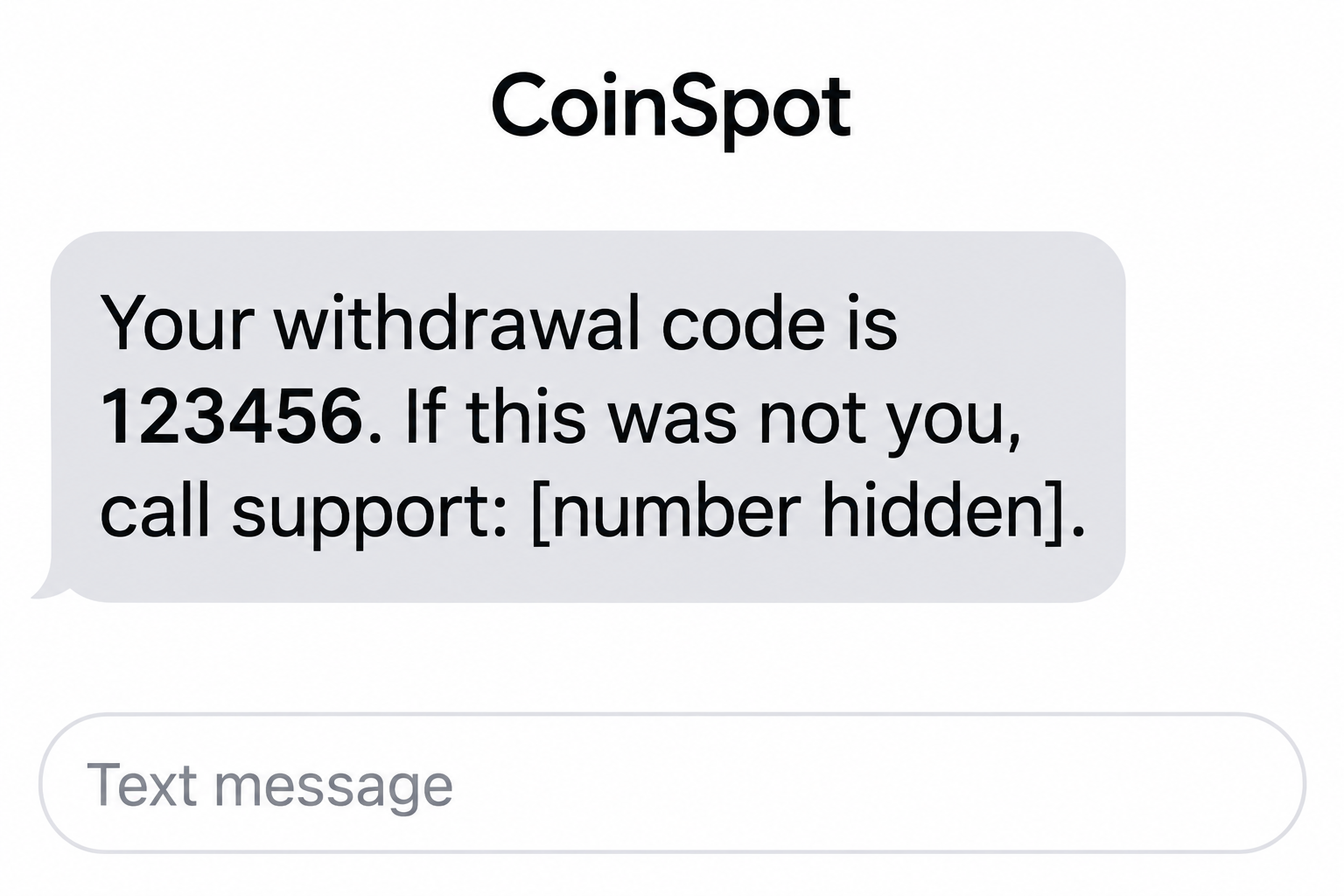
A withdrawal code appears when you have not tried to move any crypto. The next line offers a number to call if the request was not yours.
That convenient escape route is the detail to examine. The CoinSpot withdrawal code scam makes an apparent security problem the beginning of a fake support conversation.
Overview
A code and a callback arrive in the same message
The reported example poses as a CoinSpot withdrawal notification. It pairs a six-digit code with an instruction to telephone support if the recipient did not request it.
Related impersonation messages describe unfamiliar devices, logins, or transfers. Their practical aim is similar: make you use contact details supplied in the warning.
The genuine exchange is being impersonated
CoinSpot is a real Australian cryptocurrency exchange. This report concerns people pretending to represent its support team, not a claim that the exchange operates the scam.
The image is a fictional message illustration with a demonstration code and no callable number. It does not authenticate an individual victim’s SMS or transaction.
The requested action matters more than the sender label
Before responding, identify what the message wants:
- A call to a number contained in the alert.
- A code or password supposedly needed to stop unauthorized access.
- A transfer to a new wallet described as secure.
- Software installation or screen sharing to assist support.
CoinSpot’s own scam guidance warns about urgent callback texts and instructions to send funds to external wallets.
The reported example’s delivery and callback operator were not authenticated here. Its code does not establish that a real withdrawal was pending.
Why the Withdrawal-Code Message Creates Such a Strong Reaction
It suggests the attacker is already inside
An unexpected code can feel more convincing than a vague security warning. It resembles something a service might send during an actual protected action.
But there are different possibilities: a wholly invented message, an actual code triggered by an attempted action, or a legitimate notice you need to investigate.
You cannot reliably distinguish those situations by the displayed number alone. The safe response is independent account checking, not disclosure to the person offering an explanation.
Even if a genuine code exists, it does not authenticate a separate caller. Someone attempting access may know exactly when to expect that code to arrive.
The message can say not to share the code while encouraging contact
A warning against sharing codes makes a message sound security-conscious. That wording may reduce suspicion about the callback included beside it.
A later caller can then introduce an exception: this code is supposedly needed for cancellation, confirmation, or a protective account change.
Do not let the explanation redefine the action. A code belongs only in the genuine process for which you requested it, with the purpose clearly understood.
If you did not initiate that process, keep the code private and ask verified support to investigate the account activity.
A local-looking number is not the missing proof
Australian formatting can make a callback appear relevant to an Australian exchange. A familiar location does not establish who controls the line.
Likewise, a number appearing in search results may have been copied into pages, advertisements, or comments. Search visibility does not appoint it as official support.
Use the exchange’s published assistance route. Do not test a suspicious number just because you want to hear whether the person sounds professional.
How the CoinSpot Withdrawal Code Scam Works
Step 1: A surprise notification creates an immediate question
The message implies that a withdrawal or account change needs attention. You are encouraged to react before deciding whether the notification is authentic.
A crypto holder may worry about assets leaving the account. A person without a CoinSpot account may worry that someone registered one using their identity.
Neither situation requires calling the number in the message. Existing customers should open their trusted app; noncustomers can report the impersonation through verified contact information.
Step 2: The callback is presented as the protective action
The instruction often addresses the very person most likely to call: someone who did not request the transaction and wants it stopped.
This makes the proposed call feel defensive. You are not agreeing to a purchase, only trying to prevent one.
Making the call yourself does not verify who answers. The sender still chose the number and the story you are about to discuss.
Keep those two decisions separate. You can investigate the claimed withdrawal without speaking to anyone associated with the text.
Step 3: A fake agent takes control of the explanation
The person answering may claim to work in fraud prevention or account security. They can turn confusion into a sequence of apparently helpful tasks.
Requests for passwords, codes, remote access, or secrecy are warning signs. A job title and a case number do not justify them.
You may also hear that another team must take over. Being transferred between people does not establish that any of them represents the actual exchange.
No call was placed to test the reported campaign. These escalation patterns explain what to reject, not what every recipient necessarily experienced.
Step 4: Access or approval is reframed as verification
A caller can ask you to read a code aloud, approve a prompt, or log in while sharing the screen. Each action can expose something different.
Read the service’s own prompt before doing anything. If it describes a sign-in or withdrawal, a stranger cannot make it a cancellation by calling it one.
Remote viewing can also reveal balances and account details. You do not need to give full device control for a screen-sharing session to disclose sensitive information.
End the conversation if the caller insists that verifying them would jeopardize your funds. Independent confirmation is part of account protection, not an obstacle to it.
Step 5: A safe-wallet instruction turns protection into a transfer
The most consequential demand is moving crypto to a destination the caller supplies. It may be described as temporary storage, a reserve account, or a secure wallet.
The label does not determine who controls that destination. Sending assets to someone else’s wallet can hand control to the very person you meant to avoid.
Do not create a new wallet under a stranger’s coaching or use recovery words they provide. An account you can see is not necessarily one only you control.
A verified account-security review should not depend on obeying an unexpected caller’s transfer instructions.
Step 6: Recovery promises can extend the loss
After a transfer, another person may offer to retrieve it for an advance fee. They may know details from the first interaction.
That knowledge is not proof of investigative authority. Treat an unsolicited recovery approach as a separate request requiring independent verification.
Keep transaction references and report promptly. Do not send additional crypto to unlock a refund, validate tracing, or pay a supposed tax on recovered assets.
How to Check Your Account Without Following the Text
Open the app you already use
Review the actual account rather than searching for a login page through the message. Examine withdrawal history, balances, and any available account-security records.
A missing transaction does not require arguing with the sender. A transaction you do not recognize calls for urgent verified support, not the text’s chosen callback.
Be precise when reporting what you see. A pending request, a completed withdrawal, and an incoming message are different pieces of evidence.
Do not dismiss genuine security notifications
CoinSpot documents legitimate alerts concerning unfamiliar access. Its login-notification guidance explains that device or connection changes can also trigger messages.
For example, a new device or VPN may affect the observed connection. A location mismatch deserves investigation, not an automatic conclusion that a thief withdrew funds.
Use the account and verified assistance to resolve the discrepancy. Do not respond to every genuine-looking alert by disclosing credentials to a purported security agent.
Reach support from the published service
CoinSpot’s contact instructions provide live-chat and support-ticket routes, along with support@coinspot.com.au.
Choose those independently published options. If you already have a legitimate support case, confirm any unexpected follow-up through that existing conversation.
The distinction is not that no support professional can ever speak by phone. It is that an unverified message cannot nominate its own trusted emergency contact.
What Verified Support Needs to Know About the Incident
Give the sequence, not just the suspicious number
Explain whether the text arrived before a call, during a call, or after you had already opened the account. Timing can clarify what happened.
Note which actions were yours. Entering a password in your trusted app is different from typing it into a page supplied by the caller.
If several codes arrived, identify the services and purposes shown in their genuine messages. Do not post current codes publicly or assume they all concerned the same action.
Keep bank payments and blockchain transfers distinct
A bank payment used to buy crypto and a later withdrawal from an exchange are separate transactions. Each may require a report to a different provider.
For the exchange, identify the asset and network as well as the destination. Similar-looking addresses or asset names are not enough to describe a transfer accurately.
For your bank, explain whether you approved a payment under the caller’s instructions or discovered an unauthorized debit. Do not alter the description to fit a preferred outcome.
Ask each provider for a case reference and any next information needed. Keeping those references together reduces confusion when following up.
Be clear about what was not shared
A useful report includes limits. If you only received the message, say so; if you installed nothing and disclosed no credentials, keep that distinction intact.
Conversely, tell support about a code you read aloud even if the caller said it was harmless. The provider can assess the actual action involved.
Do not delete records out of embarrassment. A factual timeline helps the response, and being deceived is not a reason to keep important details from genuine assistance.
If a family member helped during the call, include their observations too. They may remember a destination, application, or instruction that explains an otherwise confusing change.
What to Do if You Have Fallen Victim to This Scam
-
Stop the call and halt further instructions. Do not disclose another code or initiate another transfer while the supposed agent explains how to fix the first problem.
Save the SMS, number, call times, and addresses involved. Record whether any action remains pending, so verified support can assess the immediate risk.
-
Contact CoinSpot through its genuine support route. Explain the suspected impersonation and what you approved. Ask about protecting the account and any withdrawal still awaiting processing.
Do not assume support can reverse a confirmed blockchain transfer. Contacting it promptly is still important for account protection and preservation of relevant records.
-
Secure credentials and review account permissions. Change an exposed password using a trusted device. Review available session controls, recovery details, and API access you do not recognize.
Follow the platform’s security recommendations and enable appropriate multifactor authentication. Keep the linked email account protected as well.
-
Separate financial reporting from the caller’s story. If you bought crypto through a bank transfer or exposed card details, notify the relevant financial institution directly.
For crypto transfers, retain the asset, network, destination address, amount, time, and transaction hash. Do not post a recovery phrase alongside those records.
-
Remove any unwanted remote access. Disconnect the device if a stranger still controls it, then use a different trusted device to address urgent account risks.
Have unfamiliar tools and extensions checked. A Malwarebytes scan can assist with malicious or unwanted software introduced during the interaction.
AdGuard may help reduce future exposure to some risky ads and tracking. It cannot retract a code or bring transferred crypto back.
-
Use Australian reporting and identity-support routes when relevant. Report suspicious contact to Scamwatch and use ReportCyber for an applicable cybercrime report.
If identity documents were disclosed, explain the exact exposure to the appropriate institutions. Follow official assistance rather than sending more documents to a purported recovery specialist.
-
Recheck the account after the immediate response. Confirm that security changes, contact details, and unresolved support questions are documented.
Warn household members if the caller learned information that could be used against them. Describe the tactic without forwarding a live link or an unredacted security code.
Frequently Asked Questions
Does a withdrawal code prove someone has moved my crypto?
No. A code can be fabricated or relate to an attempted action. Check your genuine account and contact verified support about any activity you cannot explain.
Should I call the number if the code was not requested?
No. That is the callback trap. Open the service independently and use its published assistance routes rather than the contact details inside the alarming message.
Could an unfamiliar-location alert be legitimate?
Yes. CoinSpot documents genuine access alerts, including notifications affected by device or connection changes. Investigate the actual account without trusting an unsolicited caller.
Should I transfer crypto to a safe wallet suggested by support?
Do not transfer to a destination supplied by an unexpected contact. A protective label does not establish who controls that wallet or whether you can recover anything.
What if I shared a code but changed my password afterward?
Tell verified support what the code authorized and check resulting activity. A later password change does not necessarily reverse an already approved withdrawal or account change.
Is this about Coinspotltd.net?
No. This report concerns impersonation of Australia’s CoinSpot support. A similarly named investment website is a separate subject and should not be confused with the legitimate exchange.
The Bottom Line
Do not use a withdrawal-code text to choose your support contact or transfer destination. The CoinSpot withdrawal code scam depends on turning concern into compliance.
If you already shared access or moved assets, contact verified CoinSpot support immediately, secure affected accounts, and preserve transaction details for your financial institution and appropriate authorities.

Join the discussion
0 commentsShare your experience or ask a question about this article.
Discussion
Start the conversation
Have a question or something useful to share? Add the first comment.