

An unexpected email says the fraudsters who wronged you have been caught. A senior official supposedly has your payment ready.
The sender even says you won’t pay first. Before replying, take a closer look at that reassuring promise.
Overview
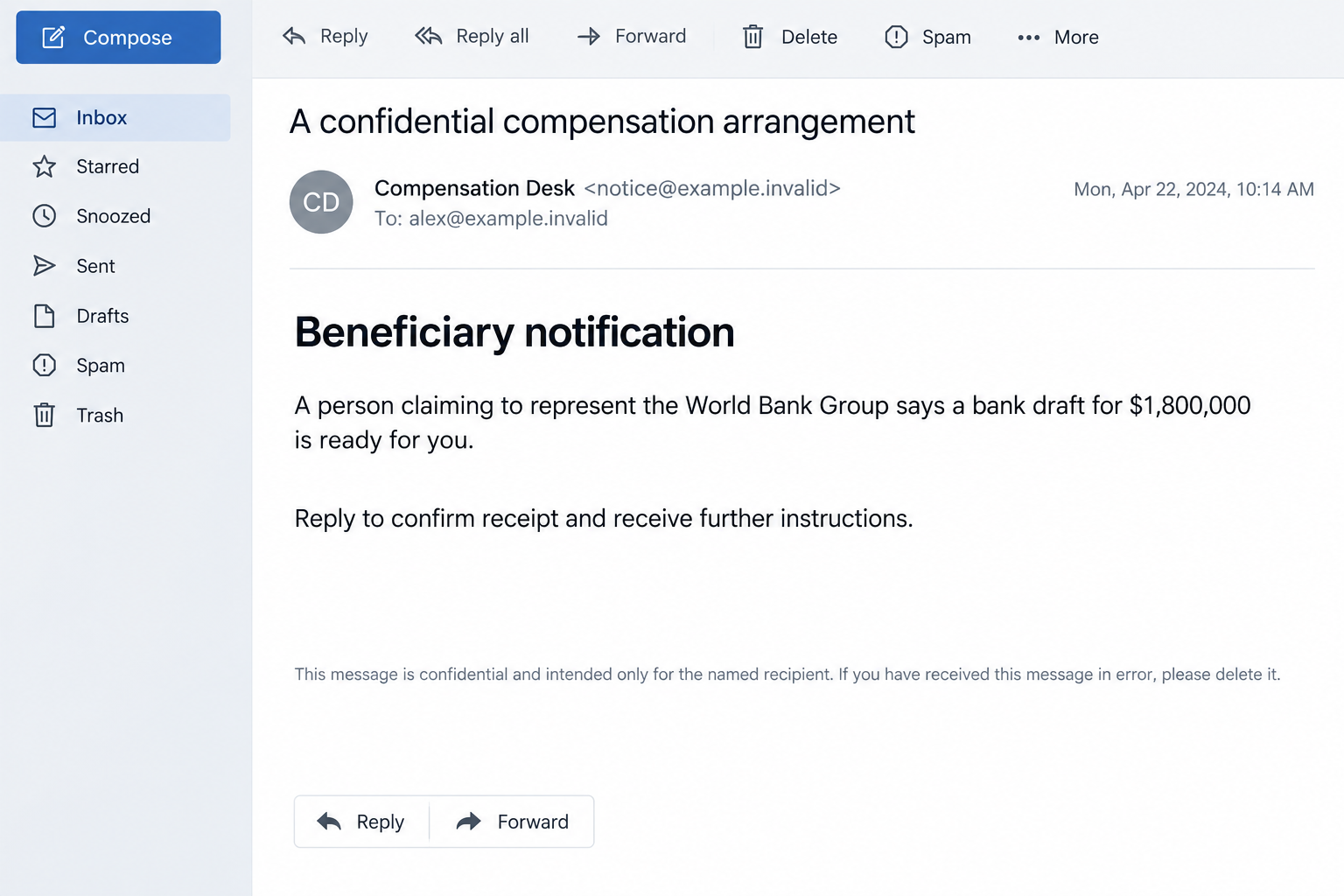
A supposed recovery arrangement promises $1,800,000
The World Bank $1.8 million email scam claims that an official has arranged a bank draft after discovering the recipient was previously defrauded.
The reported letter uses Makhtar Diop’s name and describes former fraudsters as men of underworld. It asks for a reply while insisting the arrangement remain confidential.
Do not engage with the offer. The institution’s identity is being used to make an unsupported personal windfall seem like an official recovery process.
No upfront payment is the opening promise, not proof
The initial message denies that advance money is required. That reassurance lowers resistance before the sender has established any genuine entitlement to funds.
- A real person’s name supplies authority without verifying who sent the letter.
- The large sum is presented as already arranged rather than something the recipient must substantiate.
- A confidential relationship discourages checking with people outside the conversation.
- Replying gives the sender a chance to request information or invent later obstacles.
The real World Bank Group and Makhtar Diop are not the scammers
The impersonation is the problem. A genuine official’s biography does not authenticate a stranger using that person’s name in your inbox.
The World Bank Group publishes warnings about fraudulent messages and advance-fee schemes misusing its identity. This promised bank draft is not a legitimate recovery opportunity.
The illustrative email uses fictional contact details. Its layout, wording, and displayed date are not evidence of a specific original message or official communication.
Why This Offer Can Feel Different From an Ordinary Windfall Scam
The story starts with something that may already hurt. If you lost money before, an offer to put matters right can feel more believable than a lottery win.
You are not being asked to celebrate a random prize. You are invited to believe that someone powerful has recognized an injustice and can resolve it.
That emotional difference can be exploited. A person who would refuse a stranger’s investment pitch may still listen to someone promising recovery.
The message can also reach people who were never defrauded. Its broad language lets the reader supply a personal explanation that the sender never actually demonstrated.
The message may describe how you feel without knowing anything about your case. Recognition is not verification, especially when the sender supplies no independently checkable connection.
There is no shame in wanting the offer to be real. The useful next move is to step outside the conversation before sharing anything further.
How the World Bank Compensation Email Scam Works
Step 1: A stranger presents a recovery story as an established fact
The reported email arrives with a brief thank-you subject rather than a clear, independently traceable case reference. Its body supplies the dramatic explanation.
It says the recipient has already been victimized and that an investigation has uncovered the problem. The reader is placed inside a story without having supplied evidence.
Ask whether you can connect the message to an actual report you made or a proceeding you can verify elsewhere.
That does not mean every legitimate notification must be expected. It means this stranger’s assertion cannot substitute for a verifiable process.
Step 2: An official identity makes a private arrangement sound authorized
The sender invokes Makhtar Diop and the World Bank Group. The hope is that you will recognize the names and stop checking the person behind the email.
Finding a real biography proves that the person exists. It does not show that the displayed sender address belongs to them or that they arranged your payment.
The official IFC leadership profile identifies Diop as its managing director. That is not an endorsement of correspondence borrowing his identity.
Do not contact a number or assistant supplied by the disputed letter to verify it. The second person may simply be part of the same conversation.
Step 3: The bank-draft promise replaces proof of entitlement
The offer focuses attention on the size and supposed readiness of the payment. A bank draft sounds more concrete than an unspecified future reimbursement.
However, naming a payment instrument does not establish that it exists, that the sender controls it, or that you are entitled to receive it.
A picture of a draft, certificate, or release document would need independent verification too. Official-looking paperwork can be created without any corresponding funds.
Keep the questions separate: who is communicating, what recognized process supports the payment, and what action is being requested from you?
Step 4: A reply turns a mass message into a personal conversation
The opening asks for a response. Even without payment, replying gives the sender an opportunity to learn your concerns and adjust the explanation.
They might ask for contact details, bank information, or identification documents under the language of beneficiary verification. These are possible follow-up requests, not genuine obligations.
Do not send a passport scan simply because a large payment would normally involve paperwork. The identity of the party collecting it must be established first.
A familiar signature across several emails does not create independent corroboration. Repetition from the same unverified source is still the same claim.
Step 5: New conditions can keep the promised money just out of reach
Recovery scams commonly introduce a payment requirement after the victim has become invested in the result. The first reassurance can disappear behind a newly invented exception.
A later demand might be described as clearance, document handling, tax, or release administration. The label is less important than paying to unlock an unverified windfall.
These demands are a known pattern, not a claim that every recipient of this particular email reached the same stage.
If you already paid once, stop before trying to rescue the payment with another fee. The sender’s next explanation is not evidence that recovery is closer.
Checking the Institution Without Entering the Sender’s Process
Use an official warning page reached independently
The World Bank Group’s scam alert guidance explains fraudulent uses of its name and the danger of advance-fee arrangements.
Use official institutional information to assess the claimed process. Do not follow an alleged verification link simply because it includes an institution’s name somewhere in the address.
Any organization can be mentioned inside a webpage or email. The relevant question is whether the institution actually publishes and administers the arrangement described.
Confidentiality should not prevent independent advice
A demand to keep the opportunity secret can isolate you from someone who would notice its inconsistencies. You can discuss a suspicious offer with a trusted person.
Respect privacy when sharing evidence. Remove personal account numbers from screenshots and avoid posting complete identification documents in public discussions.
A genuine confidentiality concern does not require handing a stranger money or secrets. Ask an independent qualified adviser if an actual legal process is involved.
A real fraud report follows the original loss
If money was stolen previously, the original bank, payment provider, investigating authority, or documented legal process remains the relevant route for assistance.
A stranger’s new compensation story should not replace existing case records. Keep the original report number and genuine contacts separate from this correspondence.
Real refunds and restitution can exist. Verify a specific program through its actual administrator rather than accepting this email as proof that one applies to you.
For example, an actual refund notice may correspond to a named enforcement action you can find through the responsible authority’s own website.
Do not let the sender choose that independent check. A copied announcement on their website, or a second email from their supposed colleague, provides no separate confirmation.
What to Do If You Replied to the Fake Compensation Offer
End the exchange without negotiating another condition. Do not send a fee, confirm a new payment, or offer more documents to prove you qualify.
Keep the conversation as evidence, then use your provider’s reporting and blocking controls. You do not owe the sender an explanation for stopping.
List what you disclosed. Separate ordinary contact information from passwords, identification scans, financial details, and any software you installed.
This helps the right institution respond. An email address alone does not mean a bank account is emptied, but identity documents merit specific follow-up.
Contact the payment provider quickly if you sent money. Explain the fraud and provide the payment reference. Ask what recall or dispute options remain available.
Use contact information from your own account or statement. Recovery depends on the payment method and circumstances; no one can promise a refund in advance.
Protect credentials and account access you exposed. Replace shared passwords through the real provider, review unfamiliar sessions, and check recovery contacts.
If a supposed official persuaded you to grant remote access, use another device for sensitive recovery and arrange an assessment of the affected computer.
Act on identification exposure through the appropriate authority. Tell the document issuer or relevant identity-protection service what was shared and follow its verified instructions.
Avoid sending a second copy to someone claiming to remove the first one from a criminal database. That creates another disclosure, not a reliable remedy.
Investigate device changes only when they occurred. Opening this text alone does not demonstrate an infection. Running an attachment or installing a recovery tool changes that assessment.
Malwarebytes can help check unwanted software. AdGuard can reduce some risky browsing exposure, but neither recovers a bank draft or reverses a fraudulent payment.
Report the offer and reconnect with genuine support. Provide the original email, sender details, payment evidence, and any relevant previous fraud case reference.
Use official reporting channels for your country. Tell a trusted person what happened so the next urgent message does not leave you dealing with it alone.
Is Your Device Infected? Run a Free Malware Scan
Slow performance, constant pop-ups, or strange behavior? These are classic signs of a malware infection. The fastest way to find out is to scan your device with Malwarebytes Free — one of the most trusted malware removal tools available.
The free version detects and removes the most common threats, including:
- Adware — the cause of those annoying pop-ups
- Browser hijackers — unwanted redirects and changed homepages
- Trojans and spyware — hidden programs stealing your data
- Potentially unwanted programs (PUPs) — software you never asked for
👉 Select your device below — Windows, Mac, or Android — then follow the simple steps to download Malwarebytes, scan your system, and remove any threats it finds. The scan usually takes 5 to 20 minutes.
Run a Malware Scan with Malwarebytes for Windows
Malwarebytes is one of the most popular and trusted anti-malware tools for Windows — and it’s completely free for removing infections. It catches threats that many antivirus programs miss, including adware, browser hijackers, and trojans. Follow the steps below to scan and clean your PC in just a few minutes.
Download Malwarebytes
Click the button below to download the latest version of Malwarebytes for Windows from the official source. The free version is all you need — it will scan your computer and remove adware, browser hijackers, and other malicious software at no cost.
Download MalwarebytesOfficial installer for Windows 11 and 10. Your download starts right away.Want real-time protection? See Malwarebytes Premium Malwarebytes Free for WindowsScans and removes malware at no cost
-
Install Malwarebytes
When the download finishes, open your Downloads folder and double-click the MBSetup file. If Windows shows a User Account Control pop-up, click “Yes” to allow the installation.

Follow the On-Screen Prompts to Install Malwarebytes
The setup wizard will walk you through a few quick screens:
-
Choose where you’re installing the program — “Personal Computer” or “Work Computer” — then click Next.

-
Malwarebytes will now install on your device. This usually takes under a minute.

-
When installation is complete, the “Welcome to Malwarebytes” screen will open automatically.

-
On the final screen, click Open Malwarebytes to launch the program.

-
Enable “Scan for Rootkits”
Before scanning, turn on rootkit detection so Malwarebytes can find even the most hidden threats. Click the Settings gear icon on the left side of the screen.

In the settings menu, find “Scan for rootkits” and click the toggle so it turns blue.

Done? Click “Dashboard” in the left pane to return to the main screen.
Start the Scan
Click the blue Scan button. Malwarebytes will automatically update its virus database and start checking your computer for malware.

-
Wait for the Scan to Finish
The scan checks your entire system for browser hijackers and other malicious programs, so it can take 5 to 20 minutes depending on your computer. Feel free to do something else — just check back occasionally to see the progress.

-
Quarantine the Detected Threats
When the scan is done, you’ll see a list of everything Malwarebytes found — malware, adware, and potentially unwanted programs. Click the “Quarantine” button to remove all of them at once.

Malwarebytes will now remove the malicious files and registry entries and move them safely into quarantine.

-
Restart Your Computer
Some threats can only be fully removed after a reboot. If Malwarebytes asks you to restart, click Yes. Once you’re logged back in, Malwarebytes has finished removing the threats it found.

That’s it — your Windows PC is now clean of trojans, adware, and other malware, and should be back to running smoothly.
If you are still having problems with your computer after completing these instructions, then please follow one of the steps:
- Run a computer scan with ESET Online Scanner
- Ask for help in our Windows Malware Removal Help & Support forum.
Run a Malware Scan with Malwarebytes for Mac
Malwarebytes for Mac is a free on-demand scanner that removes the malware other security software tends to miss — adware, browser hijackers, and unwanted programs included. Cleaning an infected Mac with Malwarebytes has always been completely free, and it’s our go-to recommendation. Follow the steps below to scan and clean your Mac in just a few minutes.
-
Download Malwarebytes for Mac
Click the button below to download the latest version of Malwarebytes for Mac.
Download MalwarebytesOfficial installer for macOS. Your download starts right away.Want real-time protection? See Malwarebytes PremiumMalwarebytes Free for MacScans and removes malware at no cost -
Open the Malwarebytes setup file
When the download finishes, open your Downloads folder and double-click the setup file to begin the installation.

-
Follow the On-Screen Prompts to Install Malwarebytes
The Malwarebytes for Mac Installer will guide you through a few quick screens. Click “Continue” and keep following the prompts until the installation completes.



When the installation is complete, Malwarebytes opens to the Welcome to Malwarebytes screen. Click “Get started“.
-
Select “Personal Computer” or “Work Computer”
Malwarebytes will ask what type of computer you’re installing it on. Click either Personal Computer or Work Computer, whichever applies.

-
Start the Scan
Click the “Scan” button. Malwarebytes will automatically update its detection database and begin checking your Mac for malware.

-
Wait for the Scan to Finish
Malwarebytes will scan your Mac for adware, browser hijackers, and other malicious programs. This can take a few minutes, so feel free to do something else — just check back occasionally to see the progress.

-
Quarantine the Detected Threats
When the scan is done, you’ll see a list of everything Malwarebytes found. Click the “Quarantine” button to remove all the threats at once.

-
Restart Your Mac
Malwarebytes will now remove all the malicious files it found. Some threats can only be fully removed after a reboot — if Malwarebytes asks you to restart, allow it. Once you’re logged back in, your Mac is clean.

That’s it — your Mac is now free of adware, rogue browser extensions, and other potentially harmful software.
If you are still experiencing problems while trying to remove a malicious program from your computer, please ask for help in our Mac Malware Removal Help & Support forum.
Run a Malware Scan with Malwarebytes for Android
Malwarebytes for Android automatically detects and removes dangerous threats like malware and ransomware so you don’t have to worry about your most-used device being compromised. Aggressive detection of adware and potentially unwanted programs keeps your Android phone or tablet running smooth.
-
Download Malwarebytes for Android.
You can download Malwarebytes for Android by clicking the link below.
Get Malwarebytes for AndroidOpens Google Play in a new tab.Want real-time protection? See Malwarebytes Premium for AndroidMalwarebytes for AndroidScans your phone and removes malware at no cost -
Install Malwarebytes for Android on your phone.
In the Google Play Store, tap “Install” to install Malwarebytes for Android on your device.

When the installation process has finished, tap “Open” to begin using Malwarebytes for Android. You can also open Malwarebytes by tapping on its icon in your phone menu or home screen.

-
Follow the on-screen prompts to complete the setup process
When Malwarebytes will open, you will see the Malwarebytes Setup Wizard which will guide you through a series of permissions and other setup options.
This is the first of two screens that explain the difference between the Premium and Free versions. Swipe this screen to continue.
Tap on “Got it” to proceed to the next step.
Malwarebytes for Android will now ask for a set of permissions that are required to scan your device and protect it from malware. Tap on “Give permission” to continue.
Tap on “Allow” to permit Malwarebytes to access the files on your phone.
-
Update database and run a scan with Malwarebytes for Android
You will now be prompted to update the Malwarebytes database and run a full system scan.

Click on “Update database” to update the Malwarebytes for Android definitions to the latest version, then click on “Run full scan” to perform a system scan.

-
Wait for the Malwarebytes scan to complete.
Malwarebytes will now start scanning your phone for adware and other malicious apps. This process can take a few minutes, so we suggest you do something else and periodically check on the status of the scan to see when it is finished.

-
Click on “Remove Selected”.
When the scan has been completed, you will be presented with a screen showing the malware infections that Malwarebytes for Android has detected. To remove the malicious apps that Malwarebytes has found, tap on the “Remove Selected” button.

-
Restart your phone.
Malwarebytes for Android will now remove all the malicious apps that it has found. To complete the malware removal process, Malwarebytes may ask you to restart your device.
That’s it — your Android phone is now clean — no more malicious apps, adware, or browser redirects.
If you are still having problems with your phone after completing these instructions, then please follow one of the steps:
- Restore your phone to factory settings by going to Settings > General management > Reset > Factory data reset.
- Ask for help in our Mobile Malware Removal Help & Support forum.
Stay Protected: Block Ads and Malicious Sites
Now that your device is clean, keep it that way. Most infections start with a malicious ad or a fake download button — so blocking them at the source is your best defense.
We recommend AdGuard, which blocks malicious ads, phishing pages, and dangerous redirects before they can reach you.
👉 Download AdGuard and browse safely
If You Have Already Lost Money, Do Not Pay for Hope Twice
After one loss, the desire to recover it can make a new offer feel unusually persuasive. Scammers may exploit that urgency without knowing every detail of the original incident.
The FTC’s recovery-scam guidance describes impostors posing as organizations that can supposedly return lost funds.
Be especially wary of a person contacting you first and promising guaranteed success. Ask how the claim can be verified outside their own paperwork.
Do not confuse another payment with progress. A receipt proves that money was sent, not that an official compensation process exists.
If shame is making it difficult to ask for help, start with a short factual account: the promise, the amount paid, and the method used.
Those details are enough to begin a useful conversation with your financial institution. You do not need to solve the entire scheme before reporting it.
Keep a Clear Record of Any Payment or Disclosure
Separate the original fraud loss from this new approach. They may involve different people, different payment methods, and different reporting options.
For each payment, retain the amount, date, destination, and reference. Label which promise prompted it rather than treating several transfers as one unexplained total.
If a supposed official changed the payment destination during the conversation, preserve that instruction too. It can help explain why money went somewhere different from the initial paperwork.
Keep copies of documents you sent, but store them privately. You may need to explain identification exposure without attaching the same sensitive scan to every report.
Tell your financial institution if another person still has remote access or knows login credentials. A disputed transfer and an ongoing account compromise need different immediate actions.
Do not delete correspondence in frustration before saving it. Blocking future contact is sensible, while retaining the existing record can support a payment-provider review or investigation.
If the sender returns under another official’s name, add it to the record rather than restarting the process. A changed signature does not erase the earlier unsupported promise.
Frequently Asked Questions
Is the World Bank offering me $1.8 million?
Not through this fraudulent email. Its claimed recovery arrangement is an impersonation story, not evidence of an approved payment in your name.
Is Makhtar Diop a real person?
Yes. That makes his name useful to an impersonator. The existence of a genuine official does not authenticate the person emailing you.
Why does the message say no money is needed in advance?
That reassurance encourages a reply. It does not verify the funds or prevent an impostor from introducing fees or information demands in later correspondence.
Does men of underworld mean this is a physical threat?
In this reported letter, the phrase describes alleged previous fraudsters. The central bait is a compensation payment, not a documented threat of physical harm.
What if I only replied that I was interested?
Stop the conversation and expect possible follow-ups. A reply alone is not proof of account theft, but do not supply documents or pay to continue.
Can legitimate authorities ever return money to fraud victims?
Yes. Genuine refund or restitution processes must be verified through their actual administrators. Their existence does not make this unsolicited confidential bank-draft story legitimate.
The Bottom Line
Do not reply to the World Bank $1.8 million email offer or pay to release its supposed draft. Borrowed official identities do not establish a real entitlement.
If you already responded, stop further disclosures and contact the relevant payment or account provider. Pursue an actual loss through verified channels, not this new promise.

Join the discussion
0 commentsShare your experience or ask a question about this article.
Discussion
Start the conversation
Have a question or something useful to share? Add the first comment.