

A Facebook password reset code arrives while you’re doing something else. You haven’t asked for it, but the message looks familiar enough to make you pause.
Then someone asks about that code. Before you answer, there’s an important difference between receiving a security notification and trusting the person who wants it.
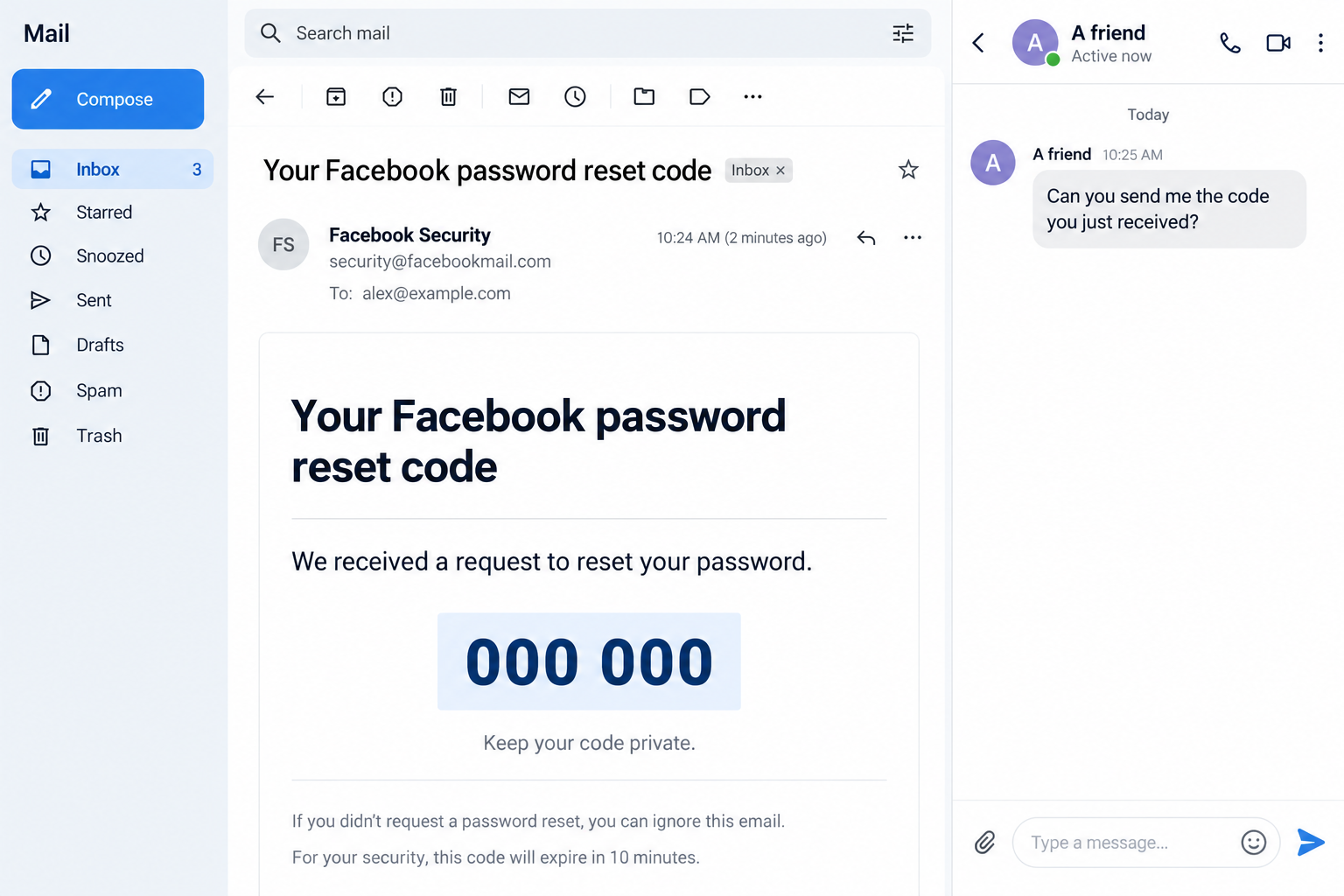
Overview
The email and the request are separate questions
The Facebook recovery code scam tricks someone into surrendering a code or signing into an imitation page, often under the pretext of helping or protecting them.
But an unexpected code isn’t automatically a fraudulent email. Facebook uses facebookmail.com for genuine security communications, including messages associated with account protection.
A real notification can reach you after somebody else starts a recovery request. It doesn’t mean that person has permission to finish it.
What puts your account at risk
The danger starts when you hand over something that unlocks access, or enter your login details on a page supplied by the requester.
- A contact asks you to send a code delivered to your own inbox.
- An alleged support account says it needs your password or recovery information.
- A warning sends you to an unfamiliar sign-in form.
- Repeated messages pressure you into approving a request you didn’t initiate.
These requests deserve more attention than the logo, the familiar name, or how convincingly the sender explains the supposed emergency.
What the example can and cannot show
The image above is a fictional illustration of an email and a separate code request. It isn’t an intercepted message or proof about a particular account.
Real versions differ. Some imitate Facebook outright; others use genuine notifications as props. A friend may be impersonated, but that needs checking rather than assuming.
The safe decision is consistent: keep account codes private and investigate from Facebook itself, not from directions supplied by the person requesting them.
Why a Genuine Facebook Email Can Be Involved
Someone can start a request without completing it
Recovery systems need a way to reach account owners who cannot sign in. Sending a code to an existing recovery address serves that purpose.
If another person begins a reset using information associated with your account, you might receive a legitimate notification without having requested one.
That notification alone doesn’t establish successful access. A mistaken entry, an unwanted recovery attempt, and a fraudulent email are different possibilities.
Check your account for unfamiliar sessions, changed contact information, or activity you don’t recognize. Those findings are more useful than guessing from one email.
A familiar sender line isn’t the whole test
The address security@facebookmail.com can appear in genuine communications. That doesn’t make every displayed sender label authentic or every surrounding instruction trustworthy.
Email apps often emphasize a display name while hiding address details. A copied logo or convincing subject line is equally easy to imitate.
Don’t turn address inspection into a technical puzzle you must solve before protecting yourself. Open the Facebook app you already use and check there.
If security settings offer recent email history, it can help you compare notifications. Don’t treat a missing entry alone as a complete diagnosis.
Different codes authorize different things
A password reset code, a sign-in verification code, and saved backup recovery codes aren’t interchangeable. Their purposes depend on the account flow generating them.
A reset code may help change a password. A login code may help complete sign-in. Backup codes provide another route when usual authentication isn’t available.
None should be handed to a friend or unsolicited support account. Their value comes from what they authorize, not whether somebody calls them harmless numbers.
How the Facebook Recovery Code Scam Works
Step 1: A message creates a reason to act
The first contact might arrive through Messenger, email, or another channel. It borrows something you recognize: Facebook security, a familiar friend, or an account problem.
You may be told that somebody needs help recovering their account. Another version claims your own profile will be restricted unless you verify ownership.
The story creates an obligation before explaining the request. Helping a friend feels kind; protecting your profile feels urgent.
Notice whether the conversation is trying to move you quickly from concern to compliance. You don’t need to decide the sender’s identity immediately.
You only need to avoid providing access while checking. A genuine friend can wait while you contact them another way.
Step 2: A code or convincing notification supplies credibility
A code arriving during the conversation can make the sender seem knowledgeable. The timing appears to confirm that they understand what’s happening.
Yet starting a recovery request and owning the account are different things. A genuine system message doesn’t authenticate the person talking to you.
In a fake-email version, there may be no genuine request at all. The email simply supplies a button leading toward a counterfeit login page.
The important distinction is where the next action takes place. Independently opened account settings are different from a link selected by a stranger.
If several codes arrive, don’t approve something just to stop the interruptions. Review security from your own account and avoid engaging with the requester.
Step 3: The sender asks you to cross the access boundary
This is where the supposed favor becomes dangerous. You are asked to read out a code, send a screenshot, approve a prompt, or enter credentials.
A screenshot can expose the same secret as typing it. Blurring your name doesn’t help if the usable code remains visible.
The sender may insist the code belongs to their account. Read the account notification privately; don’t let their explanation override what the message actually concerns.
Requests for backup codes are particularly revealing. Those codes exist to help you regain your own access, not to verify somebody else’s identity.
There is no need to debate. Stop the exchange, preserve the messages, and open Facebook through a trusted route.
Step 4: The attacker tries to use what you supplied
If a code is valid for the attempted action, an attacker may use it before it expires. The result depends on the account’s other protections.
Sharing one code doesn’t guarantee takeover, but it creates a reason to act promptly. Don’t wait for the person to confirm whether it worked.
A fraudulent login form can capture a password separately. Some attempts may seek an additional code after collecting it.
Messages such as code rejected or verification incomplete can encourage another submission. A page displaying an error doesn’t prove it discarded what you entered.
Stop supplying more information. Describe exactly what you shared when assessing the exposure, including passwords, screenshots, codes, and approval prompts.
Step 5: Access may be used beyond the original conversation
If an account is compromised, contacts may receive messages that appear to come from its owner. Familiarity can make the next request easier to trust.
Pages, business assets, saved payment arrangements, or linked services may also need attention where the affected account can manage them.
Those are possible consequences, not proof that every unsolicited recovery email caused financial loss. Check the permissions and records relevant to your account.
A later offer to recover everything for a fee deserves particular skepticism. Being locked out can make unofficial support promises sound unusually attractive.
Use Facebook’s own recovery process rather than giving another stranger access to repair the first incident.
How to Check Without Following the Message
Start with the app or address you already trust
Close the conversation. Open Facebook normally, rather than using its button, a shortened link, or a customer-service number supplied in the exchange.
Review security settings, available login activity, and the email addresses or phone numbers attached to the account. Menu wording can vary between versions.
If you find an unfamiliar session, follow the account’s controls to end it. Don’t sign out of your only usable session before understanding recovery options.
When a page asks you to reauthenticate, confirm you’re still within the official service. A security-themed browser tab isn’t itself evidence of legitimacy.
Check the person through a different channel
If a friend asks for help, call a number you already had for them. Don’t use a new number provided in the suspicious chat.
Ask whether they sent the request, without reading any code aloud. They can confirm a conversation without receiving your account secrets.
A contact who is genuinely locked out needs their own recovery route. Your code is not a substitute for proving ownership of their account.
Report the suspicious profile or message using the platform’s tools. Avoid publicly accusing the real person before checking whether somebody is impersonating them.
Protect the inbox behind the account
Your recovery email matters because it may receive password reset messages. Review its security if you entered its password, noticed unknown access, or reused compromised credentials.
Use a unique password for each important account. Otherwise, one exposed login can become a starting point for attempts elsewhere.
Meta recommends tools such as Security Checkup and supported passkeys. Choose available protections from within the real app, not a setup link sent by unsolicited support.
Store backup codes privately. Don’t keep sending copies between chats while trying to establish who can help.
What to Do if You Have Fallen Victim to This Scam
-
End the conversation and record the exposure. Save the message, account name, email details, and approximate time. Don’t include usable codes in public reports.
Write down what you actually supplied. Receiving a notification, clicking a link, entering a password, and sharing a login code require different responses.
You don’t need to continue talking to gather proof. The existing messages are enough to begin protecting the account.
-
Secure the account while you still have access. Open Facebook independently, change an exposed password, and examine security settings for unfamiliar sessions or altered recovery details.
Review connected apps and account permissions where relevant. Remove access you don’t recognize through the service’s own controls.
If you reused the exposed password elsewhere, replace those copies too. Start with the email account that can reset other passwords.
-
Use official recovery if you’re locked out. Follow Facebook’s compromised-account guidance, preferably from a device you’ve previously used with the account.
Keep recovery messages private and follow only the official process. Don’t pay someone on social media who promises a guaranteed restoration.
Recovery may involve additional checks. Save legitimate case information without assuming that every message mentioning your problem came from support.
-
Warn affected contacts and inspect managed assets. If unauthorized messages were sent, tell recipients through a reliable channel not to follow them or send codes.
Where you manage Pages or business accounts, check other administrators, access permissions, and relevant payment activity.
Contact the appropriate payment provider promptly about an actual unauthorized charge. Account recovery and financial disputes are separate jobs.
-
Match device checks to what happened. If you downloaded software, installed an extension, or opened a risky page, review downloads, extensions, and notification permissions.
Malwarebytes can help inspect potentially unwanted or malicious software. AdGuard can reduce some malicious advertising exposure; neither reverses a disclosed code.
A code email by itself doesn’t diagnose an infection. If no software was installed, prioritize account evidence rather than assuming the whole device is compromised.
-
Report through the service and relevant authorities. Use Facebook’s reporting controls for the account or message, keeping the original material available.
For financial or identity exposure, consult the FTC’s recovery guidance and follow the steps matching the information or money involved.
A report can document the event, but it doesn’t automatically restore an account, reverse a charge, or stop every follow-up attempt.
-
Watch for another approach disguised as assistance. Be suspicious of callers, direct messages, or search ads promising privileged access to Facebook’s recovery systems.
Never provide a fresh code to prove that the earlier theft occurred. That can give the next impersonator another opportunity.
Keep a short incident record so you can explain what happened without repeatedly reopening suspicious links or forwarding sensitive screenshots.
Frequently Asked Questions
Is security@facebookmail.com a real Facebook address?
It can be. Facebook uses facebookmail.com for legitimate security communications, but a displayed sender address doesn’t authenticate every email or the person asking about it.
Does an unsolicited reset code mean someone got into my account?
No. It can mean a recovery request was started. Check account activity and recovery details independently before concluding that someone successfully signed in.
Can I send the code to a friend who lost their account?
Don’t send it. A code delivered for your account can authorize actions affecting you. Your friend should use their own official recovery process.
Should I click a This Wasn’t Me link?
Genuine services may provide security links, but an unsolicited message can imitate them. Open Facebook separately and review the issue there instead of authenticating the button.
What if the code expired before I realized it was a scam?
Expiration doesn’t tell you whether it was used earlier. Review sessions, password changes, and recovery details, especially if you shared other information too.
Will changing my Facebook password fix everything?
It helps with an exposed password, but also inspect sessions, recovery contacts, permissions, and affected payment activity. Secure your email separately if it was exposed.
The Bottom Line
Don’t give a Facebook recovery code to a contact or unsolicited support account. A genuine email does not make their request legitimate.
If you already shared access information, secure the account through Facebook now. Check the recovery inbox and any connected assets rather than waiting for visible damage.

Join the discussion
0 commentsShare your experience or ask a question about this article.
Discussion
Start the conversation
Have a question or something useful to share? Add the first comment.