

Your domain is about to expire, the email says. Leave it too long and your website, business email, and even the name itself could disappear.
A yellow renewal button seems to offer the obvious fix. If the warning appears to come from METANET, here’s what deserves a pause before you pay.
Overview
A domain deadline becomes a payment demand
The METANET domain renewal email scam uses the fear of losing a website to push recipients toward a counterfeit renewal process.
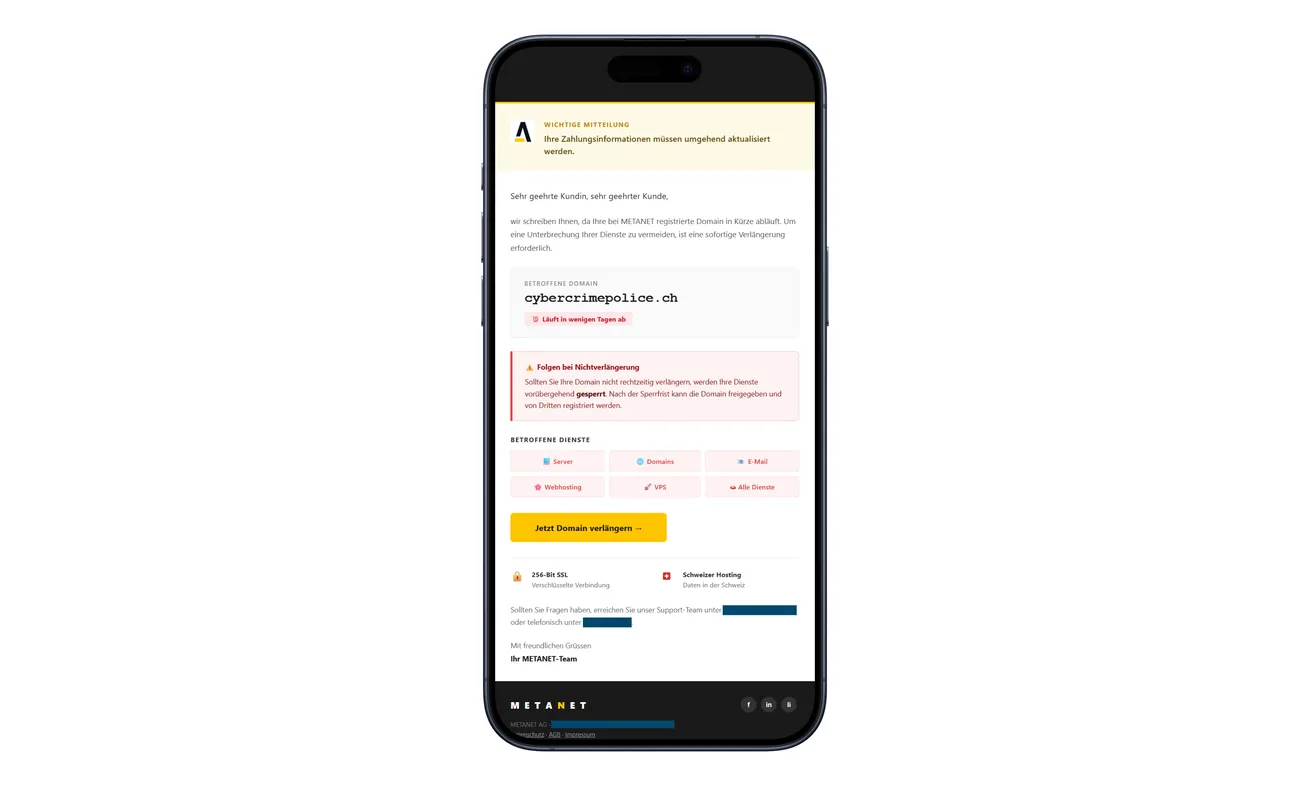
The message warns about interruption of services and possible release of the domain. Its button says Jetzt Domain verlängern, or renew the domain now.
Those consequences sound serious because a domain can be central to a business. That doesn’t make the sender entitled to collect your card information.
METANET is a real provider whose identity is being abused. This warning concerns the impersonating email and linked pages, not an accusation against its legitimate service.
A confirmed phishing route, not a billing disagreement
The police campaign notice documents a fake METANET-style website requesting a renewal fee, credit-card details, and an SMS confirmation code.
The code is presented as part of 3-D Secure payment approval. Criminals can try to use the collected information to authenticate an unauthorized payment.
The email image above is the published fraudulent message. Its warnings, branding, and renewal button help explain the pressure, without making its expiration claim true.
Check the domain through your own account
You don’t have to choose between paying a suspicious sender and abandoning your website. A separate account check lets you handle a genuine renewal safely.
- Open your provider’s customer portal independently.
- Match the exact domain with the services you actually manage.
- Check invoices and renewal information available inside the account.
- Ask your administrator before changing business billing details.
- Contact the card issuer promptly if the fake form already received your card.
The suspicious message supplies the pressure and the shortcut. Your existing account records provide the more useful answer.
Why Losing a Domain Is Such an Effective Threat
A domain isn’t just a web address to its owner. It can appear on packaging, invoices, search listings, email signatures, and years of customer correspondence.
That makes a renewal warning feel urgent in a way ordinary advertising doesn’t. You picture the disruption before you examine the request.
For a small company, the email may arrive in a shared inbox rather than with the person who normally handles hosting.
The recipient sees a technical problem and tries to be helpful. Paying a modest-looking fee seems easier than risking an interruption or bothering a busy colleague.
That’s the moment to slow down. A believable consequence doesn’t establish that this particular sender has authority over your domain.
Real renewal notices also exist. METANET’s own phishing guidance explicitly says not every domain-expiry message is fraudulent.
The practical answer isn’t to delete every renewal reminder. It’s to verify the account without using the reminder’s payment route.
If the genuine account shows a payment due, handle it there. Separating those two decisions protects both the domain and the card.
How the METANET Domain Renewal Email Scam Works
Step 1: An expiring-domain warning creates an immediate job
The warning makes a renewal button feel like the way to save your website. Check the real deadline before treating the sender’s shortcut as a solution.
A business address in the recipient field can add credibility. But receiving a message at your company inbox doesn’t establish a customer relationship with the sender.
Ask who owns the domain account and where its actual bills normally appear. An unexpected request should fit those records before it gets near a card.
For personal sites, check your own saved account bookmark. Don’t try to resolve the matter through a phone number supplied by the warning.
Step 2: The sender makes its button look like the fastest solution
The renewal button reduces the task to one tap. It also chooses the website where you’ll be asked to act.
That convenience is the part to refuse. You can investigate the claim without giving the email control over your destination.
A printed domain name inside the message isn’t enough. It can be text placed there by the sender, rather than confirmation from your registrar.
Don’t forward the button to a colleague with an instruction to pay. Forward a screenshot and ask them to check the established account instead.
Step 3: A copied provider page asks for the renewal payment
The linked website borrows METANET’s appearance. Its payment request relies on the trust created by the email rather than an independently verified invoice.
Before typing anything, compare the situation with your normal billing arrangements. Have you opened the account yourself, or only followed the sender’s instructions?
Even a plausible amount won’t answer that question. An invented small fee can still be attached to a form designed to collect sensitive information.
Don’t use a spare card to test whether the renewal works. The safe test is a conversation with the genuine provider through its published support route.
Step 4: Payment authentication is folded into the renewal story
After the card request comes an SMS code. The fake process describes it as payment approval, making the next disclosure look expected.
This is where the bank’s real security message needs your attention, not the explanation on the suspicious site.
EMVCo describes 3-D Secure as a way for merchants and card issuers to authenticate online card use.
That protection doesn’t mean a page using the words 3-D Secure belongs to your hosting provider. A scam can try to manipulate you into completing authentication.
Read any transaction details presented by the issuer. If you don’t recognize the payment, reject it and contact the bank through a separate channel.
Sender Names, Domain Names, and the Details That Can Mislead You
Don’t make a sender-address checklist your only defense. METANET warns that even an apparent address ending in its own domain can be forged.
A personal greeting or encrypted connection also isn’t enough. Those details can coexist with a fraudulent request for passwords or card information.
On the other hand, an unfamiliar sender address is a useful reason to stop. It just shouldn’t become the only detail you examine.
Read the destination’s actual domain, not merely a provider’s name somewhere in a long address. Avoid opening it if you’re unsure.
The easiest approach is usually less technical: close the message and open your saved portal. You don’t need to investigate the sender like a forensic analyst.
METANET also cautions that receiving phishing doesn’t automatically mean its customer data was exposed. Public business contact information can be enough to attract deceptive mail.
Keep a reported incident focused on what happened. The message alone doesn’t identify a data breach, the criminal’s location, or who controls every related website.
For Businesses: Protect the Domain Without Paying the Impersonator
Give domain renewals a named owner. If everyone assumes someone else manages them, an urgent email can reach a person who lacks the context to challenge it.
Keep the provider’s name, account contact, and billing route in your internal records. Staff shouldn’t have to discover those details inside an unexpected payment demand.
When a suspicious reminder arrives, compare it with an existing invoice or contract. Don’t use the message itself as the source for both sides of the comparison.
If an outside web agency manages the domain, contact your usual person using previously saved details. Ask them to confirm status before any money moves.
A working website isn’t a complete renewal check. It tells you the site is available now, not whether an invoice needs attention later.
Likewise, a short outage doesn’t prove the warning was genuine. Investigate the account and the outage separately rather than paying whoever offers an immediate fix.
If a staff member entered a company card, involve finance promptly. They need to know which card was exposed, even if no employee sees a charge yet.
Make reporting easy and blame-free. A quick internal warning can stop another colleague from acting on the same message while the card issue is being handled.
What a Successful Payment Would Actually Need to Resolve
Before paying any renewal, you should be able to connect it to a specific domain and the account that manages it.
A receipt from an unfamiliar website doesn’t establish that the registrar received a renewal instruction. The account’s own records need to reflect the action.
If you’ve already used the fake form, don’t pay it again because the domain still appears unchanged. Ask the genuine provider to explain its status.
The same applies to a warning that payment is processing. A message controlled by the suspected scammer isn’t independent evidence that your renewal is underway.
For multiple domains, check the exact spelling and extension. A request mentioning one name doesn’t explain the status of every other service in your account.
Keep the decision practical: identify the actual account, identify any genuine bill, and let the provider explain a discrepancy. Don’t improvise a transfer or cancellation.
If the person who normally handles renewal is unavailable, contact the provider rather than guessing. The urgency of an email isn’t permission to bypass your normal controls.
These checks aren’t a reason to wait on card protection. When payment information has been disclosed, the financial report and domain verification can proceed in parallel.
That way, the business can protect the domain without letting an invented deadline dictate what happens to its money.
What to Do if You Have Fallen Victim to This Scam
-
Leave the fake renewal process unfinished. Don’t provide another card, repeat a code, or accept a new instruction to keep your website online.
If you only received the email, preserve it if needed for reporting, then mark it as phishing. You don’t need to negotiate with the sender.
-
Check your real domain account. Open the official customer portal using your established bookmark or an address confirmed from earlier legitimate records.
Ask the genuine provider to clarify anything you can’t match. Don’t let the scam distract you from a real invoice that happens to be due.
-
Protect an exposed card immediately. Call its issuer through the bank’s app or the number printed on the card.
Explain that the supposed renewal site collected card details. Ask about blocking the card, replacing it, and reviewing any attempted payments.
If a company card was used, tell the person responsible for its statements. Agree who will follow up so the report doesn’t get lost between teams.
-
Report the authentication step accurately. Tell the issuer whether you entered an SMS code or approved a request, and what details you remember seeing.
Ask how to dispute each unwanted transaction and when evidence must be submitted. Reimbursement depends on the circumstances; don’t accept a stranger’s guarantee.
-
Change credentials only where they’re affected. If you typed a portal password into the counterfeit site, replace it through the genuine account.
Change that password wherever else it was reused. Tell your administrator if the account controls business hosting or email services.
Ask the provider to review account access or unauthorized changes if you have reason to suspect them. A card disclosure alone doesn’t prove a domain transfer occurred.
-
Keep evidence outside the affected inbox. Store the original message, its headers, destination address, bank alerts, and relevant invoices securely.
Record the sequence of actions while it’s fresh. Don’t include full passwords or codes in a document circulated to colleagues.
Share a warning internally without making the malicious button clickable. Staff need to recognize the request, not reproduce the risky journey.
-
Assess any download or installation separately. If the page persuaded you to install software, use a trusted device for urgent account changes.
Malwarebytes can help inspect suspicious files or software. AdGuard may block some dangerous web traffic and advertising, but it cannot recover a payment or renew your domain.
Merely reading the warning isn’t evidence of infection. Match cleanup to what you actually opened or installed.
-
Notify the provider and the appropriate authorities. Use METANET’s independently opened support information to report the impersonation.
For loss or account misuse, contact your local police. A web-based incident tip doesn’t necessarily count as a formal criminal complaint.
Ignore follow-up services demanding a rescue payment to release your domain or recover funds. Continue through the genuine provider and your financial institution.
Frequently Asked Questions
Is every METANET domain-expiry email a scam?
No. METANET sends legitimate domain notices. Verify the domain and any bill through the real customer portal instead of relying on an unexpected email’s payment button.
Why does the message name a real domain?
A domain name can be placed inside a deceptive email. Its presence doesn’t prove the sender controls its registration or knows the actual renewal status.
Does an apparent METANET sender address prove authenticity?
No. The provider warns that sender addresses can be forged. Personalization and HTTPS also don’t replace checking your account independently.
Can the SMS code really authorize a payment?
The police warning describes that risk. Treat bank authentication as a sensitive action and read the transaction details before approving anything.
Should I change hosting companies because I received this?
The message is an impersonation attempt, not proof the provider is dishonest. First secure any exposed information and verify your legitimate account.
What if I paid but my website still works?
A working website doesn’t show where your payment went. Contact the issuer about the fake payment route and check real renewal status separately.
The Bottom Line
Don’t pay through the METANET domain renewal scam email. Verify the actual deadline inside your genuine account, where a real renewal can be handled safely.
If the copied site received card details or an approval code, call the issuer promptly. Protect the card while the legitimate provider checks your domain.

Join the discussion
0 commentsShare your experience or ask a question about this article.
Discussion
Start the conversation
Have a question or something useful to share? Add the first comment.