

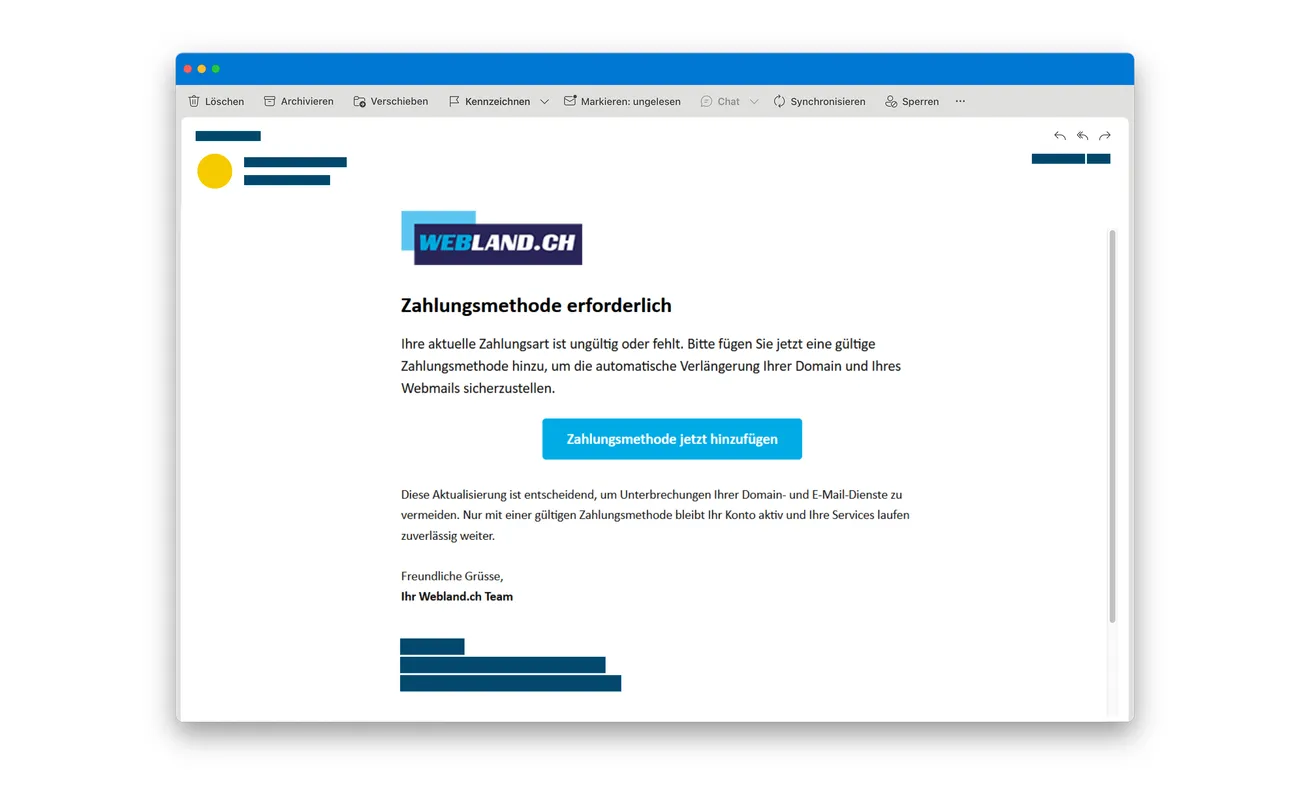
A Webland-branded email says your payment method is missing or invalid. Unless you fix it, your domain and email services could be interrupted.
For someone running a website, that sounds like a problem to handle now. Before adding a card, check what the supposed fix asks you to reveal.
Overview
A billing problem used to pull you into a false login
The Webland payment update email scam combines two valuable targets: your hosting-account credentials and the information used to make card payments.
The opening claim is that the saved payment method needs attention. The consequence sounds immediate because domain and email services are presented as being at risk.
A button offers to add the missing method. It leads to a counterfeit website rather than establishing that your genuine account needs a change.
Webland is the real provider being impersonated. This report concerns the fraudulent email and copied pages, not an allegation that the company runs the scheme.
The account form comes before the card request
The police campaign warning describes a fake account login followed by requests for card details, a mobile number, and an SMS confirmation code.
Even if you never reached the card page, the fake login may already have your password. Tell the provider about that first form.
The original email above shows the initial payment-method demand. It doesn’t establish that your actual domain, mailbox, or renewal arrangement has a fault.
Two exposures need two separate checks
Don’t reduce the incident to whether a charge appears. Ask what the fake site received, then contact the organizations responsible for those items.
- Entered a Webland password: secure the genuine account and report the disclosure.
- Entered a card: ask the issuer about blocking and replacement.
- Supplied a code: tell the issuer or provider exactly what it related to.
- Shared a phone number: be wary of later contacts repeating the same billing story.
- Only read the email: check any real concern independently, without using its button.
Both checks can be necessary. Replacing a card doesn’t repair an exposed account password, and changing a hosting password doesn’t secure an exposed card.
Why This Threat Hits Website Owners at a Bad Moment
A domain or mailbox problem can affect more than one person. Customers might lose contact, orders could be missed, and colleagues may depend on the same services.
That makes an administrative warning feel urgent even when it doesn’t mention a large debt. You want to keep the business running.
The email’s German heading says a payment method is required. Its central button makes adding one look like the shortest path back to normal.
The message also connects payment with automatic renewal. A reader may worry that doing nothing will quietly break something important later.
Don’t let that possibility authenticate the sender. A real business dependency doesn’t prove an unexpected email has accurately described its status.
Before acting, ask who normally handles the account and how invoices are checked. The colleague receiving the message may not be the account administrator.
If the usual administrator is unavailable, that isn’t a reason to improvise through the email. Contact the provider using records your organization already trusts.
A short delay for verification is different from ignoring a genuine invoice. You can investigate the account without following the suspicious payment route.
How the Webland Payment Update Email Scam Works
Step 1: The email invents a reason to repair billing
The sender claims a saved payment method is absent or invalid. It pairs that claim with the prospect of interrupted services.
You’re invited to treat the email as a maintenance task, rather than a request from someone whose authority still needs to be established.
Open your actual customer account separately. If a billing issue exists, it should be investigated through the provider’s genuine account and support arrangements.
Don’t reply with a customer number or card information to help the sender identify you. That gives an unverified contact more context to use.
Step 2: The counterfeit page asks for account credentials
A familiar-looking sign-in screen fits the story. To update billing, you would expect to identify the account first.
But that expectation doesn’t establish where the password is going. The police identify this linked website as a fake.
If you typed your password and then stopped, report that disclosure. Don’t assume the failed or unfinished sign-in protected the information.
A login error is only a statement from the page. It isn’t proof that the person operating it discarded what you submitted.
Step 3: The supposed update collects financial details
The process then requests card information and a mobile number. Those fields appear to complete the small account task introduced by the email.
At this point, the risk isn’t limited to access to hosting. The card information itself needs protection from its issuer.
Don’t try another card if the first appears to fail. Report every card you already entered rather than treating only the final attempt as relevant.
You also don’t need to wait for a successful account-update confirmation. The disclosure matters even when the screen never says the job is done.
Step 4: A confirmation code is folded into the repair
The documented route also requests an SMS confirmation code. The police warn that the collected information can support account misuse or unauthorized payments.
Read a code’s accompanying message before using it. A code associated with a financial operation isn’t merely proof that a hosting setting was corrected.
If you already supplied one, tell the relevant institution what you saw. Include the approximate time and any action or amount named in the message.
Don’t request another code to test whether the form works. Leave the fake process and let genuine support assess what happened.
Why the Password Matters Even When No Money Has Left
A hosting account isn’t the same thing as a payment card. It can hold access to services you depend on for your website and communications.
That doesn’t mean this campaign successfully stole every domain or mailbox. It means a disclosed password deserves attention independently of your bank statement.
Tell Webland that credentials were entered on an impersonating site. Ask support to help review the account and identify anything that needs securing.
If you notice changed contact details, unfamiliar settings, or trouble signing in, describe those observations rather than guessing what the attacker did.
For a business, involve the person authorized to manage hosting. They may need to review access that an ordinary mailbox user cannot see.
Also identify where that password was reused. An unrelated service using the same password needs its own change through its genuine website.
Don’t send the old password in an email to explain the incident. Support needs to know it was exposed, not receive another copy of it.
If the account’s contact email may also be affected, ask about a secure alternate recovery route. Don’t rely exclusively on messages reaching a questionable inbox.
Not Every Webland Invoice Email Is Fake
Webland’s own information page warns about impersonating emails while also describing legitimate emailed invoices and an online payment portal.
Those two facts belong together. The sensible rule is to verify a bill through the provider, not to assume email can never be used for billing.
An invoice attached to an established customer relationship should still be checked against your account records before an unexpected change is made.
Likewise, a copied logo doesn’t become trustworthy because you’ve previously received real email from the company. The sender can imitate a familiar format.
Don’t trust the display name alone. Read the actual address and the destination, while remembering that a plausible sender line isn’t conclusive authentication.
If you aren’t comfortable inspecting links, skip that exercise. Use the provider address from a saved bookmark or earlier independently verified record.
Webland’s official pages distinguish its previous platform from newer infrastructure. Follow the route appropriate to your account rather than assuming every customer uses one sign-in screen.
A different genuine platform can be confusing, but confusion isn’t permission to trust a surprise link. Ask the provider which account route is yours.
A Better Internal Handoff Than “Please Pay This”
When a warning reaches a shared inbox, forward the concern to the person who handles hosting without forwarding an instruction to click and pay.
Include the claimed issue, the time received, and a screenshot if useful. Ask them to inspect the genuine account.
For finance staff, keep the alleged bill and any actual bank transaction separately identified. A fake payment reminder isn’t proof the provider issued that charge.
If an employee already entered a company card, tell the card administrator promptly. They can coordinate the issuer report and statement review.
Keep that conversation factual. A request for help shouldn’t become a reason for the employee to hide whether a password or code was shared.
Agree who will contact Webland and who will contact the bank. Otherwise, each person may assume the other has handled both problems.
Record the outcome of each contact in your normal internal system. Don’t place passwords, full card numbers, or SMS codes in a shared incident note.
Finally, warn other recipients about the specific payment-method story. They need enough detail to recognize it, not a live link that restarts the trap.
Keep the Account Check and the Invoice Check Together
Once the genuine provider has helped you secure access, ask it to clarify any actual billing issue that remains. The fake warning may have been entirely unrelated.
Record the verified answer in your normal account notes. That gives colleagues something more reliable than a suspicious email when the next reminder arrives.
Don’t leave an internal task marked paid merely because someone completed the counterfeit form. Finance needs to distinguish a real invoice from a reported phishing incident.
That distinction prevents the scam response from creating a separate mistake in your organization’s ordinary payment records.
What to Do if You Have Fallen Victim to This Scam
-
Leave the fake account-update page. Don’t finish its remaining checks or ask its chat contact to cancel the operation.
If the email was your only exposure, report it as phishing and check any genuine billing concern through your established provider route.
-
Secure disclosed Webland credentials. Reach the genuine account independently and change the password, or contact support if you can’t safely regain access.
Ask what account access or settings should be reviewed. Describe changes you’ve actually noticed without assuming the entire hosting service was taken over.
Replace reused passwords on other services. If you’re acting for a business, coordinate with its authorized administrator before making wider account changes.
-
Notify the card issuer if payment information was entered. Use a verified bank contact, not information displayed by the phishing page.
Ask about blocking, replacing, and monitoring the affected card. Include any additional card you supplied after the form appeared to reject the first.
Tell the issuer whether an SMS code or other approval was provided. That detail may change which activity it needs to investigate.
-
Identify actual unwanted payments. Keep each amount, currency, statement descriptor, and date connected with its own report.
Ask the bank which dispute deadlines apply and what evidence it requires. Don’t rely on the fake site’s receipt or failure message as the transaction record.
-
Keep the email and your timeline. Save sender details, the destination address, relevant alerts, and the actions you remember taking.
Store sensitive evidence privately. If you warn colleagues, remove personal information and avoid making the suspicious destination an easy-to-click instruction.
-
Check device exposure if the page added another step. Report any download, installation, notification permission, or remote access separately from the account form.
Malwarebytes can help inspect suspicious files or software. AdGuard can provide another barrier against some malicious web content, without guaranteeing that every impersonating site is blocked.
A scan doesn’t change a stolen password or stop a card payment. Complete the account and issuer reports even if the device check finds nothing.
-
Report through the real organizations. Notify Webland using its official support information and contact local police about financial loss or account misuse.
Cybercrimepolice accepts incident information, but filing a formal criminal complaint requires the responsible police service. Don’t mistake one reporting route for the other.
Reject a later offer to recover the account or money for another urgent payment. Continue with the provider and issuer already handling the incident.
Frequently Asked Questions
Is Webland itself operating this payment-update scam?
No. The confirmed campaign impersonates the real provider. Its email and linked counterfeit pages are separate from legitimate Webland services and billing.
I entered a password but no card. Do I still need to act?
Yes. Secure the genuine account and report the credential disclosure. Stopping before the payment form doesn’t undo information entered at the earlier login stage.
Does receiving this mean my domain is about to expire?
The fake message doesn’t establish your real account status. Verify any actual renewal or billing issue through the provider independently.
Can a genuine Webland invoice arrive by email?
Yes. The provider describes emailed invoices. That doesn’t authenticate this particular update demand; compare unexpected requests with your genuine customer account.
What if the page rejected my card?
Contact the issuer about the information you supplied. A rejection displayed by a fraudulent website doesn’t prove that its operator failed to collect the details.
Will changing my hosting password protect my card too?
No. Those are separate exposures. The provider can help secure account access, while the card issuer handles the payment-information risk.
The Bottom Line
Don’t add a payment method through the Webland scam email. Check the real account independently rather than trusting its threat of service interruption.
If you supplied credentials and a card, address both: secure Webland access and contact the issuer. Neither action replaces the other.

Join the discussion
0 commentsShare your experience or ask a question about this article.
Discussion
Start the conversation
Have a question or something useful to share? Add the first comment.