

A small website bill can be easy to wave through between payroll, deliveries and everything else. Web Envy invoices rely on exactly that kind of busy day.
Before anyone files it under marketing expenses, take a closer look at what the invoice actually represents, and who supposedly agreed to the service.
Overview
The $98.57 bill that businesses didn’t recognize
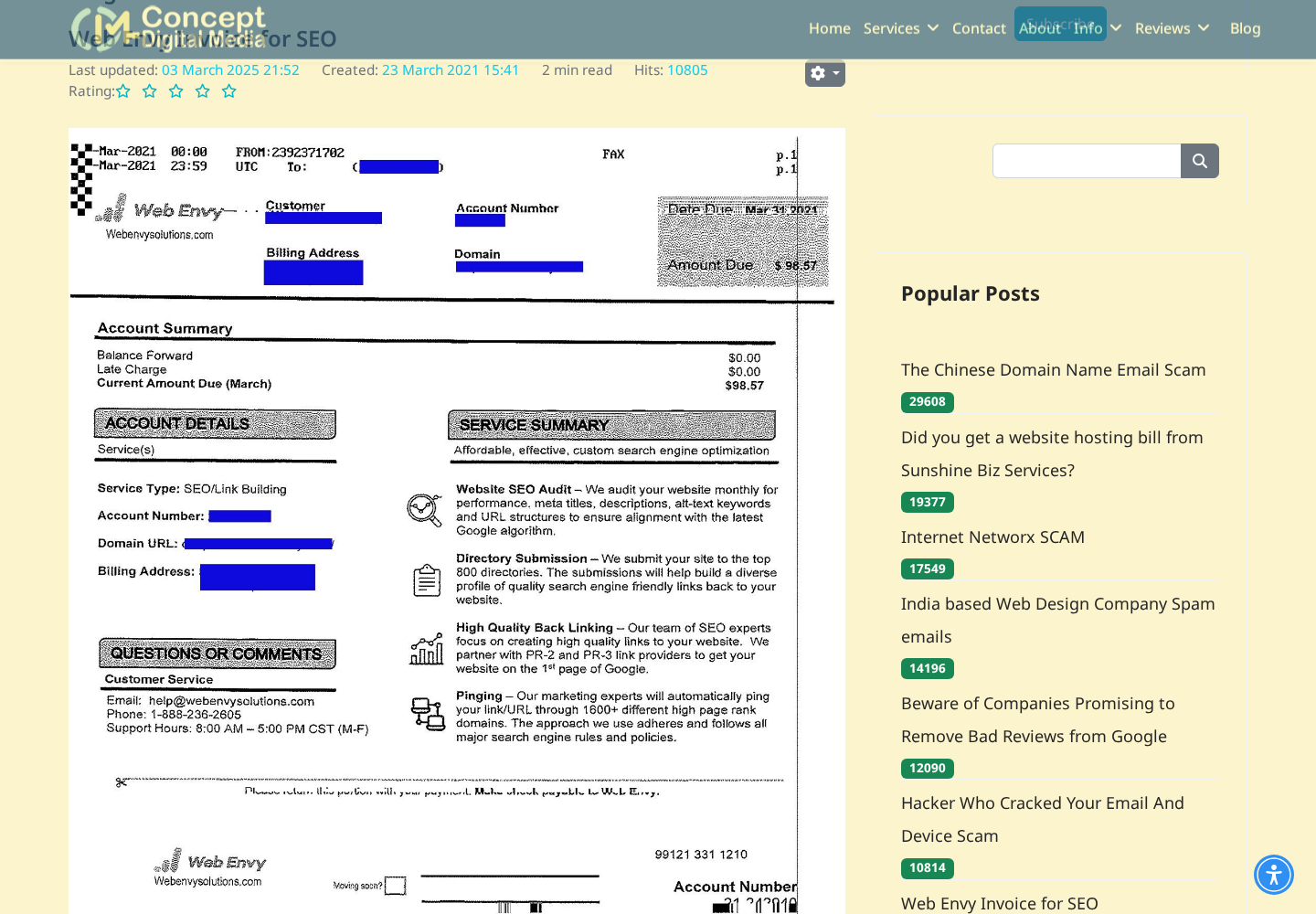
Web Envy is a name appearing on reported unsolicited invoices for website-related services. Earlier examples billed $98.57 for SEO and link building.
Concept Digital Media described two clients receiving those invoices by fax in 2021. SQ Productions separately warned its clients about similar bills that year.
Later complaints used webenvydns.com and described charges for services never ordered. The recurring issue is an apparent debt presented without an approved underlying purchase.
This isn’t a warning against paying genuine website expenses. It’s a warning against treating an unfamiliar invoice as proof that your business owes the sender money.
The invoice is the sales pitch
A conventional advertisement asks whether you want a service. A fabricated bill skips that decision and behaves as though the agreement already exists.
Your business name, website and an account number make that claim look established. Yet those details don’t identify a person who approved the work.
Before paying, the accounts team needs a connection between the vendor, an authorized purchase and something actually supplied. A convincing layout is not that connection.
- Hold an unfamiliar Web Envy invoice outside the payment queue.
- Ask the person responsible for your website whether the service was ordered.
- Verify domain and hosting renewals in your existing provider account.
- Use saved supplier contacts, not the number printed on the questionable bill.
The warning has a documented history
These reports span years, rather than establishing a newly discovered outbreak. A recent article about the scheme doesn’t make an old invoice newly issued.
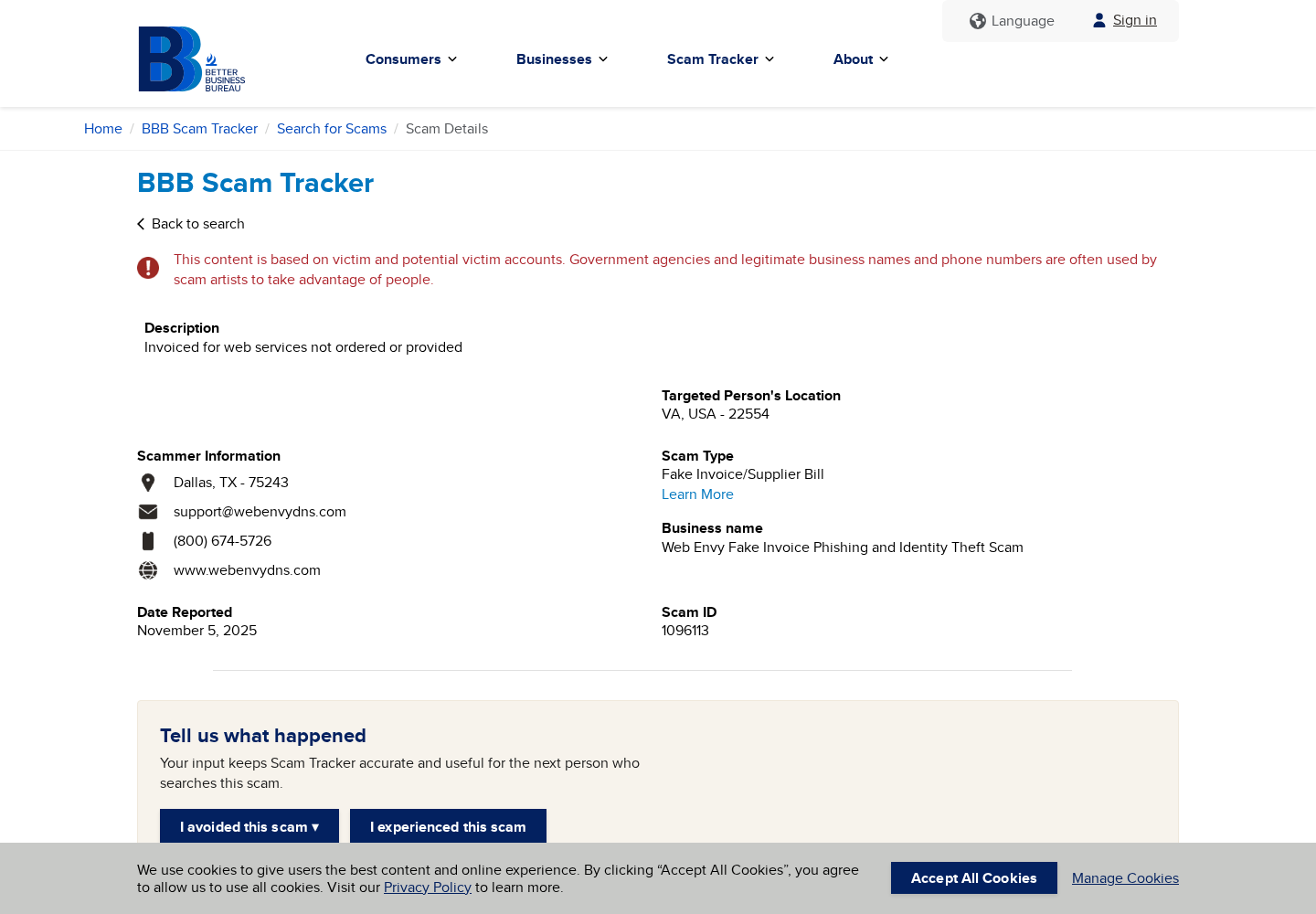
A November 2025 BBB Scam Tracker submission names webenvydns.com and reports billing for unordered web services. That is a recipient’s report, not a judicial finding.
The established scam mechanism is an unapproved service dressed up as an amount owed. This article doesn’t accuse every unrelated business using similar words.
Why This Invoice Can Pass a Quick Glance
The amount feels too small for a formal investigation
A $98.57 charge may look less alarming than a demand for thousands. Someone might spend more time clearing the inbox than checking a minor marketing expense.
A small false bill still costs you money. Worse, the payment may sit in your records as apparent approval when another employee checks a later invoice.
Set the check by the supplier relationship, not just the amount. An unknown $98.57 invoice needs a purchase record as much as a larger one.
Technical descriptions discourage the wrong person from asking questions
SEO, DNS, domain registration and hosting sound related, but they are different services. A business may pay separate legitimate providers for each.
SEO concerns search visibility. DNS helps direct traffic to internet services. Registration maintains a domain, while hosting provides the infrastructure serving a website.
A bill for link building isn’t automatically needed to keep your domain registered. Don’t let a vague website-services description create a threat that the document never substantiates.
Bring in the person who manages the relevant account. They should be able to match a renewal to a provider, contract and service period.
Public business information can look confidential
A website address and trading name may be available to anyone. A sender can place them into a billing template without accessing your hosting account.
An account number can be invented just as easily. Its presence shows that the document has a number, not that you previously became a customer.
Correct information therefore doesn’t answer the decisive question: who in your organization requested this particular service from this particular supplier?
How the Web Envy Invoice Scam Works
Step 1: An unexpected invoice enters an ordinary business channel
The documented early examples arrived by fax. That matters because a faxed page can be handled like routine office paperwork, rather than recognized as an unsolicited pitch.
A fax service may also deliver documents as email attachments. How the page reaches you doesn’t prove that the sender has a commercial relationship with your business.
Route the item for verification instead of straight to accounting. Mark it as disputed or unverified so a colleague doesn’t pay while you’re checking.
Step 2: Familiar details make a new sender look established
The redacted example published by Concept Digital Media includes a customer field, billing address, account number, domain field and amount due.
Those are normal invoice features. Here, they support the appearance of an existing customer relationship even though the provider said its clients hadn’t ordered the service.
The useful test isn’t whether the template resembles other bills. It’s whether your own records independently confirm the relationship the template claims.
Step 3: A service description supplies a plausible expense category
The earlier bill labels the service SEO/link building. That gives a busy recipient somewhere to classify it without explaining how it was authorized.
A technically worded service summary may make the charge feel beyond the accounts team’s expertise. That’s when a quick internal question is more useful than guessing.
Ask for the purchase order, engagement email or named approver. Also compare the billing period with the contract, rather than accepting an invoice date alone.
Step 4: The payment route substitutes for purchase evidence
A remittance section tells the recipient how to pay. It doesn’t explain why payment is due or establish that anyone bought the advertised work.
Likewise, a customer-service phone number can make a document feel accountable without authenticating the debt. Calling the sender asks the claimant to verify its own claim.
Check with your existing web provider first. If you need to challenge an alleged debt, preserve the document and use a controlled written process.
Step 5: Payment can create a misleading internal precedent
If the first bill is paid, your accounting records may now show a transaction with that payee. A later employee could mistake that payment for approval.
This is a bookkeeping risk, not proof that every reported invoice automatically generates another bill. The available records don’t establish one universal follow-up sequence.
Correct the vendor record when a payment is disputed. Otherwise, stopping today’s bill may leave tomorrow’s reviewer relying on the same mistaken history.
Review standing payment instructions too. If someone added a recurring bank payment while handling the invoice, cancel that instruction through your bank rather than the invoice sender.
This is a check for what your staff actually set up, not a claim that every Web Envy bill creates automatic billing.
Step 6: Verification moves the decision back to your records
The scheme loses its leverage when the invoice cannot produce an authorized purchase. Your records, not the sender’s urgency, determine whether a genuine obligation exists.
Keep legitimate renewals separate while checking. Refusing a suspicious SEO bill should not mean ignoring a real domain renewal from your established registrar.
Where a signed agreement or collection demand creates a genuine legal dispute, seek qualified advice. Don’t pay merely to make an unfamiliar document disappear.
Domains, Phone Numbers and the Limits of a Lookup
The reported domains aren’t your registrar by default
Earlier provider warnings identify webenvysolutions.com. Later BBB reports name webenvydns.com. These are historical identifiers associated with the reports, not recommended payment destinations.
A domain containing DNS doesn’t become the authority over your own domain. You can check the real registrar and renewal status through accounts you already use.
Nor does a newly registered domain alone prove a company is fraudulent. An older business may adopt a new address; the missing approved order is stronger evidence.
A published phone complaint is not a current call test
Older provider accounts describe numbers being disconnected or ending in automated messages. Those observations belong to the providers and the period they described.
BBB report 1096113 lists (800) 674-5726 with webenvydns.com. That historical submission doesn’t tell you who answers the number today.
Numbers can change hands or be spoofed. The safest action isn’t finding one permanent bad number; it’s refusing to verify a questionable bill through its own contacts.
A mailing address cannot prove the service was supplied
Historical reports mention Texas locations. Even an address belonging to a real office would not demonstrate that your organization ordered SEO work from the sender.
A directory entry, map result or company filing can help identify a party. None replaces the purchase and delivery records for the specific charge.
Don’t accuse an unrelated occupant at a listed address. Give your payment provider the invoice details and let the transaction evidence guide any investigation.
What Later Reports Add
The November 2025 BBB submission is brief: a recipient says web services were billed without being ordered or supplied. Its classification is fake invoice/supplier bill.
That complaint supports checking for later variations of the billing approach. It doesn’t establish that every domain, phone or person across the years shares one operator.
Keep these distinctions when warning colleagues. Share the actual document received, the missing purchase record and the requested destination, rather than an unsupported story about ownership.
What to Do if You Have Fallen Victim to This Scam
-
Stop the invoice from being paid twice.
Notify accounts payable and the person managing your website. Identify the invoice number, amount and payee, and mark the bill pending review in the shared system.
If a payment already exists, add the dispute note to that record. A private warning in your own inbox won’t help the next colleague processing bills.
-
Confirm the actual website expenses.
Open your known registrar, hosting or agency account independently. Match genuine invoices to the account, service period and internal approval before paying those separately.
-
Preserve the document and its delivery details.
Keep the original email or fax, attachment, envelope if applicable, timestamps and any payment instructions. Save the relevant purchase records showing what was actually authorized.
Don’t publish account numbers, business banking information or unredacted customer data while seeking advice online. A clean evidence file is more useful than a public argument.
-
Contact the payment provider immediately if money was sent.
For a card, ask the issuer about an appropriate dispute. For a bank transfer or check, ask the bank whether stopping or recalling it remains possible.
State whether the payment was authorized under a false invoice. Recovery depends on the payment method and timing; nobody should promise you a guaranteed reversal.
-
Handle any digital exposure separately.
If someone entered credentials through a linked page, reset that account through its real provider, review access and enable multifactor authentication where available.
If a suspicious attachment was downloaded or executed, ask your IT team to assess it. A reported invoice alone doesn’t prove malware infected your computer.
-
Report the attempted billing and repair the approval process.
US businesses can report the invoice to the FTC and submit a factual BBB Scam Tracker report. Include the identifiers from your own document.
Require a named approver for unfamiliar vendors, even for small charges. Make it easy for staff to pause a bill without being blamed for slowing payment.
A Short Check Before the Next Website Bill
Put three questions beside the payment queue: who approved this supplier, what was supplied, and does the payment destination match the approved vendor record?
If the answers aren’t available, park the invoice. A colleague responsible for website services can resolve it before the payment leaves your account.
For small teams, one shared list of legitimate registrars, hosts and marketing suppliers can prevent confusion. Record trusted contacts alongside renewal dates.
Give temporary staff the same list. The fraud depends less on technical sophistication than on a plausible bill reaching someone without the relationship history.
The FTC’s business-invoice warning describes the same practical problem: unfamiliar charges can reach staff who assume another colleague approved them.
Frequently Asked Questions
Is the Web Envy $98.57 invoice a genuine bill?
Provider reports describe that amount on unsolicited SEO invoices. Unless your own records establish an approved service, don’t treat the document as a valid payment instruction.
Does knowing my website mean the sender manages it?
No. Your public domain and business details can be copied onto an invoice. Verify control and any contract through the provider account you already trust.
Will ignoring the bill make my website disappear?
An unknown sender’s SEO invoice doesn’t establish control over your website. Check genuine domain, hosting and service renewals independently so legitimate obligations aren’t missed.
Are all Web Envy invoice attachments infected?
That isn’t established. Historical warnings mention malware reports, but no file analysis here proves that every attachment, or your particular document, contains malicious code.
Should I call the number printed on the invoice?
Not to authenticate the bill. Start with your existing web provider and internal purchase records. The sender’s own representative cannot supply independent confirmation.
What if an employee already paid?
Contact the bank or card issuer quickly, retain the invoice and record the dispute internally. Don’t pay a second fee to someone promising guaranteed recovery.
The Bottom Line
Do not pay an unsolicited Web Envy invoice without an authorized order behind it. Business details and an amount due cannot create a purchase you never made.
If money has already gone out, contact the payment provider now and preserve the paperwork. Then correct the vendor record so the same false bill doesn’t pass again.

Join the discussion
0 commentsShare your experience or ask a question about this article.
Discussion
Start the conversation
Have a question or something useful to share? Add the first comment.