

A PayPal receipt arrives for a $942 purchase from Gunshers Ltd. You never placed that order, and the message says your time to dispute it is running out.
Before dialing the help number, look closer at what the email actually shows. There is an important difference between a convincing receipt and a real payment.
Overview
The receipt creates a problem you want fixed immediately
The Gunshers Ltd PayPal scam uses a supposed purchase confirmation to make an unfamiliar charge feel urgent. Its apparent solution is a support contact inside the message.
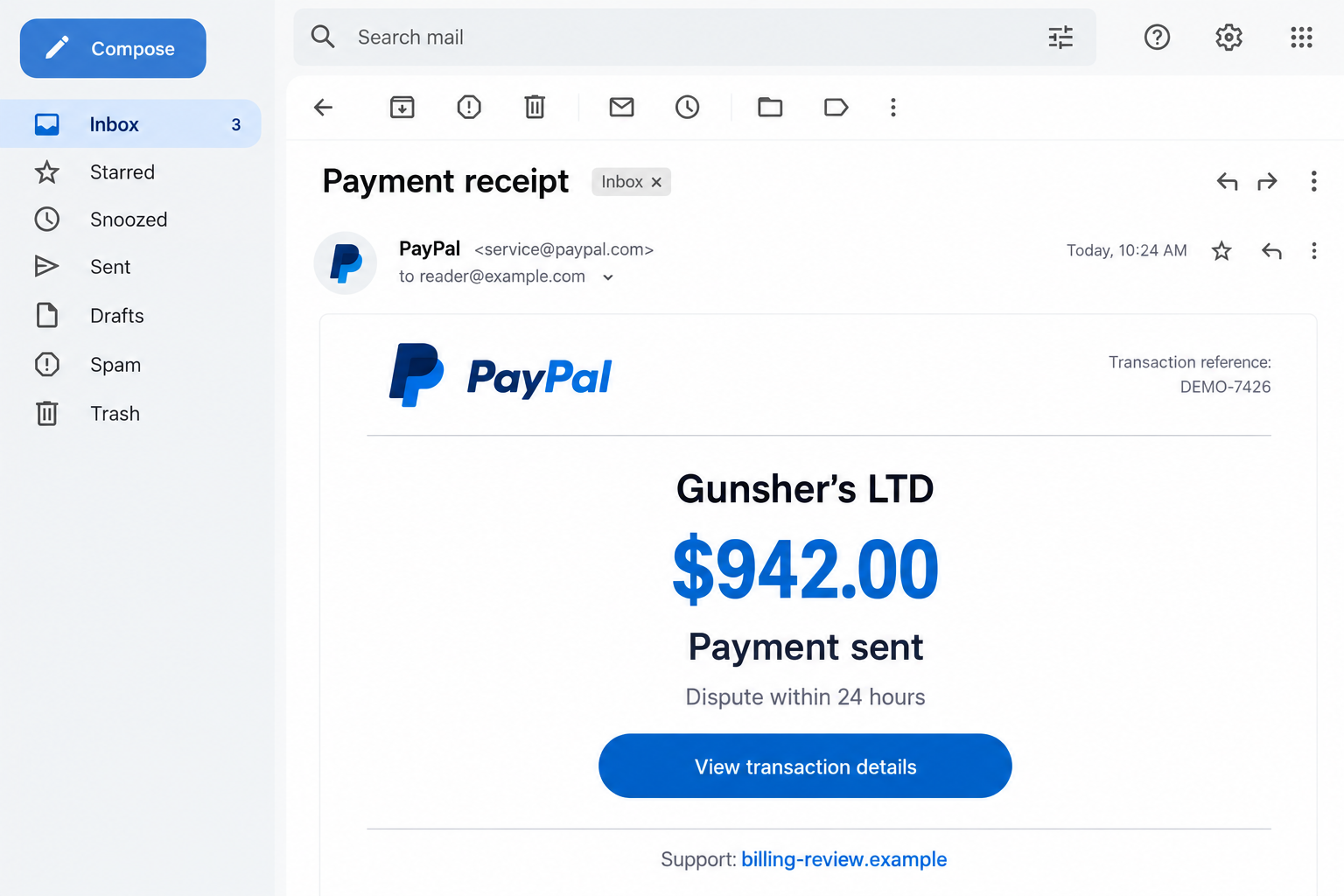
One reported receipt names Gunsher’s LTD, describes a firearm purchase, and claims $942 was paid. It supplies transaction-style references and a short window for disputing the order.
The opening image is a fictional illustration of that kind of message. Its contact details are nonfunctional; it is not an original email or account record.
The support route matters more than the invoice design
A worried reader may think calling is safer than clicking. But an attacker-controlled telephone conversation can be the next stage of the same deception.
PayPal’s invoice and money-request warning describes fake support numbers inside alarming requests, including requests delivered through its real service.
A genuine notification system cannot make every instruction written by another user trustworthy. The request still needs to match something you actually authorized.
- An email receipt is not your account’s transaction history.
- A payment request is not necessarily a completed charge.
- A support number in the message is not independently verified.
- An invented deadline should not decide whom you trust.
The name on the receipt does not identify the criminal
This warning concerns the fraudulent PayPal-style message and refund contact, not a finding that a business called Gunshers Ltd operates the scheme.
Names, references, and purchase descriptions can be inserted into a fabricated receipt. They are clues for recognizing the message, not reliable proof of who sent it.
Check the Payment, Not the Picture of a Payment
A forged receipt and an unpaid request are different problems
Start by putting the email aside. Open the PayPal app you normally use, or enter the official website address yourself.
Check Activity for the alleged purchase. Read its status and payment details rather than searching only for a matching amount.
If there is no matching transaction, the receipt has not established a debit. Do not pay someone to cancel a purchase that exists only in an email.
If you find an invoice or money request, check whether it is unpaid. Someone asking for money is different from someone having already taken it.
There can also be a genuine unfamiliar payment. A household purchase, an automatic payment, or a recognizable merchant’s billing name may explain it.
Investigate through the account and your payment provider. Do not let the suspicious sender become the person who interprets the evidence for you.
A real unauthorized debit needs its own response
Finding a suspicious email does not mean every account concern is imaginary. If an actual payment was made without permission, report that transaction promptly.
Keep the email claim separate from the transaction you can see. That distinction helps support staff understand whether you received spam or experienced account misuse.
PayPal provides an unauthorized-activity reporting procedure through its Resolution Center. Follow the route that describes what happened, not the fake receipt’s cancellation instructions.
How the Gunshers Ltd PayPal Scam Works
Step 1: An unexpected order grabs your attention
The message begins with a purchase you cannot place. Instead of asking whether you want something, it presents the transaction as a completed event.
That framing changes the question in your mind. You stop considering whether the sender is trustworthy and start wondering how to undo the damage.
An unfamiliar seller makes the problem feel harder to resolve. You have no order confirmation, shopping account, or remembered conversation to compare with the receipt.
The product description adds another distraction. You may worry about a delivery, a card being misused, or an order connected to your name.
None of those concerns proves the email is genuine. They explain why the message can interrupt your normal habit of checking before responding.
Step 2: Routine receipt details make the story look settled
Reference numbers, totals, and a shipping line give the page the familiar appearance of ordinary purchase paperwork. They make it look processed rather than proposed.
A receipt number is easy to type into an email, however. It becomes useful evidence only when it matches a record inside the real service.
The reported version also suggests the payment may take time to appear. That claim gives a worried reader a reason to distrust an empty account history.
Do not resolve that contradiction by calling the email’s helpline. Ask PayPal through an independent route if you need help checking what is actually recorded.
Step 3: A short dispute window pushes you toward the sender’s contact
The urgency is attached to a helpful-sounding action: contest the purchase before the window closes. Calling starts to feel like protecting yourself.
The problem is not simply that the message mentions a deadline. It couples that pressure with a contact supplied by the very party making the claim.
One reported receipt lists 888-330-5329 as its helpline. That is an identifier from the historical message, not a recommended or verified current support number.
Do not dial it to investigate. A number’s present routing can change, and reaching someone who says they are support would not authenticate the receipt anyway.
Use the app’s help options instead. You can act quickly without accepting the sender’s choice of telephone number.
Step 4: A refund conversation can become a request for access
Once a person reaches fake support, the discussion can shift from one purchase to account verification, banking details, or a supposed technical problem.
A caller might ask for a password, payment-card information, a security code, or permission to view the screen. Those requests introduce risks the email alone did not create.
Remote-support software can be legitimate software while its use in that conversation is abusive. A familiar application name does not establish the caller’s identity.
Never open online banking while an unverified person can watch or control the device. A support-sounding explanation does not make that exposure necessary.
The next stages describe common refund-fraud tactics. An individual call may stop at data collection or take a different route.
Step 5: The promised refund can turn into a second payment demand
In broader refund scams, the supposed helper claims a refund went wrong. The victim is told too much money arrived and must return the difference.
The FTC’s tech-support guidance describes this progression, including demands involving gift cards, bank transfers, cryptocurrency, or payment apps.
A screen shared by the caller is not independent confirmation of a refund. Stop the session and ask your own bank to check the transaction.
Do not send a separate payment because someone says their job depends on correcting an error. Emotional pressure cannot verify an account balance.
The supposed remedy has now created a new loss risk. You may be authorizing a real transfer to solve a purchase that was never real.
Step 6: Delay gives the impersonator more opportunities
After information or money changes hands, the caller may ask you to wait, keep a connection open, or avoid discussing the matter with anyone else.
That leaves you following the same person’s instructions at the point when independent help matters most. Break that connection before taking another account action.
If the conversation returns as an offer to recover your money for a fee, treat it as a separate warning sign, not unfinished customer service.
Keep the useful details, such as payment references and call times, but stop negotiating. The next conversation should be with your actual payment provider.
Warning Signs That Matter More Than Spelling
The message discourages an independent account check
Bad grammar can make a fake easier to notice, but a polished receipt can still be fraudulent. Focus on the action it wants you to take.
A claim that you must use one special number, remain on the line, or avoid your bank should outweigh a professional logo or courteous voice.
You can leave an unfamiliar receipt unresolved for a few minutes while you open the real account. There is no need to interview the sender first.
The cancellation requires something unrelated to the purchase
A request to reveal a login code, surrender screen control, or buy gift cards is not an ordinary way to investigate an unfamiliar receipt.
Ask what the requested action actually does. Does it reveal access information, move funds, or let another person operate your device?
If so, stop before completing it. A convincing explanation cannot reverse the consequences of an authorized transfer or an exposed password.
What to Do if You Have Fallen Victim to This Scam
Choose the actions that match your exposure. Receiving the email is different from sharing a password, installing software, or sending money.
- End the conversation and retain the message.
Hang up or close the chat. Save the email, its full headers if available, and any instructions you received before reporting and deleting it.
Record what you actually did: called, downloaded, entered a password, shared a code, or made a payment. That timeline will guide the next steps.
- Check PayPal through your own route.
Look at Activity and distinguish an unpaid request from a completed payment. Do not pay the request merely to make the warning disappear.
Report an unwanted invoice through the account. For a payment you did not authorize, use the unauthorized-activity process and preserve its case reference.
If you authorized a payment because of deception, describe that accurately. Do not label it unauthorized simply because the person receiving it was dishonest.
- Contact the provider that handled any money you sent.
Give your bank, card issuer, or payment service the amount, time, recipient information, and transaction reference. Ask whether it can stop or recover the funds.
If gift cards were involved, keep the cards and receipts and contact the issuer. For cryptocurrency, notify the exchange or service you used.
Recovery depends on the circumstances. Ask about applicable reporting deadlines immediately rather than relying on the invoice’s made-up dispute window.
- Replace exposed credentials from a trusted device.
Change a disclosed PayPal password and any other account using it. If someone watched your email login, protect that account too.
Review recovery contacts and security settings for changes you do not recognize. Ask support to help remove unfamiliar access or sessions where available.
Turn on additional sign-in protection. It improves account security, but it does not make codes safe to share with an incoming caller.
- Remove remote access if you allowed it.
Disconnect the affected device from the internet to interrupt an active remote session. Use a different trusted device to contact your financial providers.
Note the application’s name, then remove the software and unattended access you enabled. Ask a trusted technician if you cannot confirm the connection is disabled.
Scan with updated security software if untrusted files were downloaded. A clean scan is not proof that a legitimate remote-support account has been disconnected.
Do not erase the device impulsively. Preserve payment evidence and get appropriate technical advice before changes that could destroy records or work files.
- Match identity protection to the information shared.
A disclosed email address does not call for the same response as an exposed Social Security number. List the specific details the caller obtained.
If sensitive identity information was exposed, use official identity-theft guidance and ask your financial providers what additional safeguards fit the situation.
Watch for changes to contact details, new account notices, and unfamiliar activity. Keep following up on a real loss even after the threatening email is gone.
- Send reports through established channels.
Forward the suspicious email to phishing@paypal.com. Reporting helps the service investigate; it does not replace an urgent account or payment report.
For U.S. readers, the FTC’s recovery guidance explains actions for different payment methods and types of exposure.
Keep report numbers together with your transaction evidence. If the device belongs to your employer, tell its IT team about any access you granted.
- Reject paid recovery promises.
Do not send another payment to unlock a refund or release recovered funds. An unsolicited helper should not become your next financial commitment.
The FTC warns about recovery scams targeting people who have already lost money. Be especially wary of guaranteed outcomes and advance fees.
Frequently Asked Questions
Does the Gunshers Ltd email mean PayPal charged me $942?
No. The email makes that claim, but a receipt image cannot verify it. Check the actual payment history and your funding account independently.
Is Gunshers Ltd the company behind the scam?
The name in the message does not establish who controls the sender or callback. This warning is about impersonation, not proven wrongdoing by a named business.
Can a real PayPal notification contain a scam request?
Yes. A user can submit a misleading invoice or request through the service. Delivery by PayPal does not validate the purchase or the sender’s instructions.
Should I call the helpline just to check?
Use PayPal’s app or a contact route you obtain independently instead. Calling the message’s contact hands the conversation back to the unverified sender.
Do I need to wipe my computer after opening the email?
Not merely because you read it. Downloads, credential entry, and remote access require different responses; take cleanup steps that match what you actually did.
Can I still report the loss after the email’s deadline?
Yes. Contact the payment provider promptly and ask about the real deadline for your situation. The sender’s countdown does not define your reporting options.
The Bottom Line
Do not call the refund helpline in a Gunshers Ltd PayPal scam message. Verify the alleged purchase inside your own account, not through the receipt’s contact.
If you already shared access or sent money, stop the conversation and contact the relevant provider now. Secure exposed accounts and address remote access separately.

Join the discussion
0 commentsShare your experience or ask a question about this article.
Discussion
Start the conversation
Have a question or something useful to share? Add the first comment.