

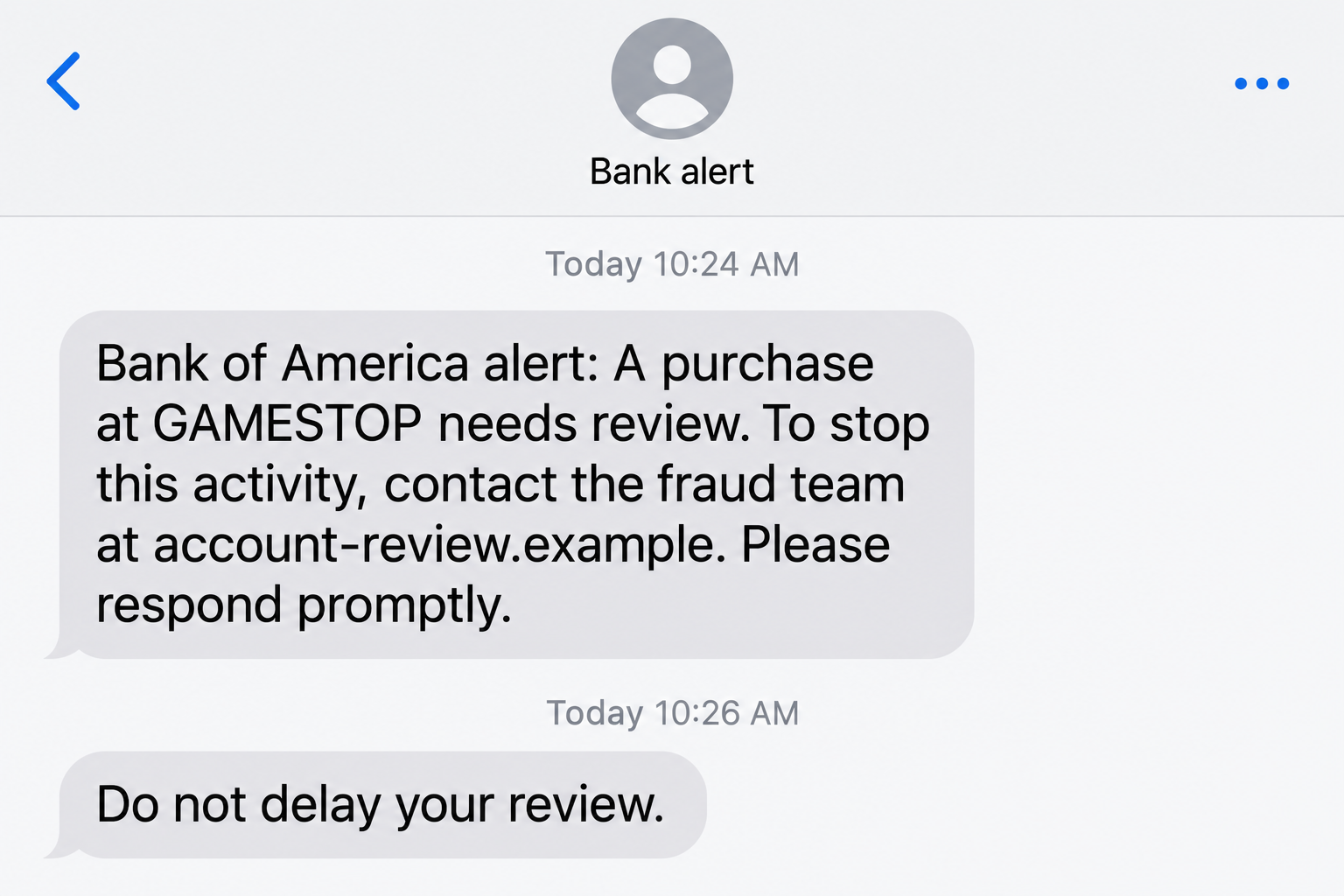
Your screen lights up with a Bank of America alert about a GameStop purchase. You haven’t bought anything there, and another message is asking you to respond.
It feels as though someone at the bank has caught a problem in time. Before following their instructions, check who is actually starting the conversation.
Overview
An ordinary purchase alert becomes the opening story
The Bank of America GameStop scam begins with a supposed card transaction. A text, email, or call presents the bank as the person helping you stop it.
GameStop supplies a familiar merchant name. You can picture the purchase immediately, even when the message provides very little information that you can independently verify.
The image above is an illustrative message, not a captured bank notification. Its wording and nonfunctional address are fictional examples of the lure.
The dangerous part is the proposed security procedure
Reported versions move from the purchase claim to a request for account information, an authorization code, or a transfer that supposedly protects the balance.
Bank of America’s scam guidance draws an important distinction: it may send activity checks, but it will not contact you demanding money as fraud protection.
That means the words fraud alert do not settle the matter. What the contact asks you to reveal or authorize is much more useful.
- Watch for requests to read out an authorization code.
- Reject transfers described as protecting or securing your money.
- Do not treat caller ID as an identity check.
- Verify the purchase through a banking route you choose.
The impersonation is not evidence against either business
Bank of America and GameStop are the names used in the story. Their appearance does not establish that either company sent the fraudulent instructions.
This warning addresses the fake alert and caller. A real GameStop transaction or a genuine bank notification still needs to be assessed on its own facts.
There is no single amount, sender number, or script that identifies every attempt. Do not wait for your message to match an online example word for word.
Why This Alert Can Catch a Careful Person Off Guard
The caller appears to be preventing the very thing you fear
You do not have to want a prize or a bargain to become involved. The message asks you to do something sensible: challenge a purchase you don’t recognize.
The difficulty is that the person offering help may also be the person who invented the problem. Following their security instructions can create the real loss.
A calm voice can make the exchange feel routine. It may sound more convincing than an obvious threat, especially when the caller repeats details from the text.
Repeated details show that the messages share a story. They do not independently establish access to the bank’s records or authority to operate your account.
A familiar number is reassuring, but it is not verification
Incoming caller information can be spoofed. Recognizing a bank name or number on the screen should not replace contacting the bank yourself.
Search results are not the best shortcut either. Use the number printed on your card or statement, or the help route inside your established banking app.
The difference is simple: you choose the bank’s contact details, instead of letting an unexpected caller choose them for you.
If a caller objects to that simple step, the objection is valuable information. You do not need their permission to end an unexpected conversation.
How the Bank of America GameStop Scam Works
Step 1: A message claims your card was used at GameStop
The first contact introduces a transaction that seems out of place. It might describe the purchase as suspicious, declined, or awaiting confirmation.
Those terms create different impressions, but each gives you a reason to respond. The message may be brief enough that you cannot check much from it.
Do not fill those gaps with assumptions. A message about a declined attempt does not establish that money left your account.
Likewise, an unexpected warning does not mean the bank itself has suffered a breach. The contact has made a claim; the actual account record comes next.
If you do not use Bank of America, there is even less reason to engage with the sender. Check your own provider if you have a separate concern.
Step 2: A reply or callback moves you into a live conversation
The message gives you an easy next action. Calling a support contact or replying that you did not make the purchase feels like closing the issue.
A follow-up call may then sound expected because you have already responded. The caller can present the next request as part of the same case.
At that point, the exchange is no longer just a suspicious text. A person can listen to your questions and adjust their explanation as you hesitate.
Replying once does not automatically hand over your balance. The important boundary is what you do next, particularly with credentials, codes, downloads, and payments.
Step 3: The supposed fraud agent expands the concern
The discussion can move beyond the original purchase. The caller may claim that more activity is pending or that the account needs an urgent security review.
That escalation makes an unusual instruction feel proportionate. A simple card question becomes a larger emergency that supposedly requires immediate cooperation.
Someone may know your name or part of a card number. Information about you is not the same thing as authority over your banking relationship.
Keep asking a practical question: have I verified this person through the bank, or am I still relying on the contact that reached me?
You do not need to argue about every detail. End the call and explain the original concern to the bank through your own contact route.
Step 4: A code request is disguised as proof that you own the account
An impersonator may ask you to repeat a code sent to your phone. They can describe it as verifying your identity or canceling the disputed activity.
But the code belongs to the action described by its actual message. It may relate to account access or another approval, not the caller’s explanation.
Read that message carefully. A legitimate-looking code arriving during a suspicious call does not establish that the person on the phone generated it for your benefit.
The bank’s Security Center warning says Bank of America will not text, email, or call asking for an authorization code.
Do not disclose the digits or approve an unfamiliar prompt to reassure the caller. Refusing is a security decision, not a failure to cooperate.
Step 5: A safe-account story tries to turn reassurance into a transfer
Another branch tells you to move money somewhere supposedly protected. The payment may be framed as temporary, reversible, or necessary to stop a larger loss.
The destination still matters more than the description. Money sent to a recipient chosen by the caller is not secured merely because they name it a safe account.
Be especially wary of a transfer described as sending money to yourself. Check the actual enrolled recipient rather than relying on the caller’s label.
The FTC warns against moving funds for supposed protection. This instruction is a danger sign even when the caller knows convincing personal details.
You can end the attempted payment before solving every mystery about the contact. Nothing in an incoming call requires you to authorize a transfer.
Step 6: Pressure keeps you away from independent help
The caller benefits if you continue following one set of instructions. They may insist the line stay open while you work through the app.
Bank warnings can be reframed as obstacles to an investigation. You might be told to ignore a notice because the agent is already handling the risk.
Do not let someone coach you around a warning or choose inaccurate answers for a payment. Those prompts exist to help you understand what you are approving.
If access or money was already exposed, end the contact and report the specific action. Continuing the conversation cannot substitute for the real bank’s containment work.
How to Check a GameStop Charge Without Following the Alert
Look at the transaction and its status
Open your normal banking app without using the message link. Check the relevant card, amount, merchant details, and whether the transaction is pending or posted.
If you recognize the purchase after checking household activity, that answers a different question from whether the incoming caller is genuine.
Even a real disputed charge does not make a stranger’s code request safe. Resolve the charge and verify the contact as separate issues.
If there is nothing matching, do not manufacture a payment to cancel it. Ask your bank directly if you remain concerned about attempted activity.
Use the card’s contact route, not the caller’s alternative
Tell the bank what the contact claimed and what you were asked to do. Mention a code request or transfer instruction before discussing cosmetic details.
You do not need to contact GameStop to follow the supposed bank agent’s procedure. An urgent account-security concern belongs with your card issuer first.
If a purchase dispute later needs merchant information, follow the issuer’s advice. That is different from trusting contact details inserted into a threatening message.
What to Do if You Have Fallen Victim to This Scam
If you went beyond reading the alert, start with the step that addresses the immediate exposure. Do not wait for the caller to confirm the case is closed.
- Stop the incoming exchange.
Disconnect the call and do not follow further links, prompts, or transfer instructions. You can preserve evidence without continuing to negotiate.
If you only replied to the text, do not assume the account is already taken over. Tell your bank about any additional information or action.
- Reach the actual bank promptly.
Call the number on your card or bank statement. Explain that someone impersonated the fraud team and name the precise exposure.
Say whether you shared credentials, read a code, approved a prompt, installed an application, or sent funds. The bank needs that detail to assess access.
If you do not bank there, contact the institution whose information you disclosed instead. Do not open a new relationship with the caller to clear things up.
- Report the specific payment, including how it happened.
For a transfer, supply its reference, recipient, time, and amount. Ask the bank about available containment, investigation, and reimbursement options.
Zelle’s reporting guidance distinguishes payments made without permission from payments someone was tricked into sending. Explain the circumstances honestly.
Neither a stranger’s refund promise nor a blanket claim that recovery is impossible should decide your response. Report quickly and ask what applies to your case.
- Secure the account behind any shared code or password.
From a trusted device, replace a disclosed password and check recovery details. Tell the bank which code or approval message arrived during the call.
Ask it to review unfamiliar devices, access changes, recipients, or other settings relevant to the attempted action. A password change alone may not address every permission.
If the same password protects your email or another financial account, change those credentials too. Use different passwords rather than repeating the replacement everywhere.
- Ask about the right card and wallet protections.
If card details were exposed, ask whether the card needs replacement and whether any unfamiliar digital-wallet access should be removed.
A temporary card lock is not a complete fraud response. Bank of America notes that a physical-card lock does not necessarily stop digital-wallet transactions.
Keep reporting real unauthorized activity even if you have locked the plastic card. Follow the bank’s instructions for the particular card and account.
- Deal separately with software or screen access.
If you installed a remote-control application, disconnect the affected device and seek independent help removing the access you allowed.
Do not sign back into banking while someone may still control the screen. Use another trusted device to speak with the bank.
Downloading a file or granting remote access warrants a technical review. Merely receiving this text does not establish malware infection or justify an automatic device wipe.
- Keep a clear record of the attempt.
Save the text, voicemail, call history, payment reference, and any instructions to ignore warnings. Note when you contacted the real bank.
Keep full details for official reports, but redact account numbers and codes before showing anyone else. Publicly posting sensitive screenshots can create another problem.
- Report the impersonation without delaying urgent support.
Bank of America’s reporting page lists abuse@bofa.com for suspicious messages using its name. It also recommends forwarding suspicious texts to 7726.
Forwarding a message does not secure an exposed account. Contact the bank directly first when codes, access, card information, or money are at risk.
U.S. readers can also report the attempt to the FTC. Keep the bank’s case number and follow its instructions for supplying additional evidence.
- Expect follow-up pressure, not a guaranteed refund.
Be cautious if another caller offers to finish the investigation or recover the loss for an upfront fee. Verify any claimed connection independently.
Check future account notices through the bank itself. A new reference number, different caller, or reassuring message does not revive trust in the original contact.
Frequently Asked Questions
Is every Bank of America GameStop fraud alert fake?
No. Banks can check unusual purchases. The warning concerns impersonators who use the alert to obtain codes, account access, or a supposedly protective transfer.
What if the caller ID matches my bank?
Incoming caller details can be spoofed. End the exchange and call through the number on your card or statement instead of authenticating the displayed number.
Did replying NO give the scammer my banking password?
Not by itself. The risk depends on later actions, such as opening a fake login page, sharing a code, or approving a payment.
Can I transfer money to myself to stop the fraud?
Do not follow that instruction from an incoming caller. A payment destination can be misrepresented, and your bank does not require that transfer as protection.
Does GameStop need my bank verification code?
No. Do not give a banking authorization code to someone claiming to investigate this purchase. Work through your card issuer’s independently verified support route.
Will the bank return money sent through this scam?
Ask it to investigate promptly. Outcomes depend on the transaction and circumstances; report accurately and do not pay another person who guarantees reimbursement.
The Bottom Line
A Bank of America GameStop scam turns concern about one purchase into permission for something else. Reject code requests and transfers presented as financial protection.
Check the charge through your own banking access. If you already followed the caller’s instructions, contact the real bank now and explain exactly what you approved or shared.

Join the discussion
0 commentsShare your experience or ask a question about this article.
Discussion
Start the conversation
Have a question or something useful to share? Add the first comment.