

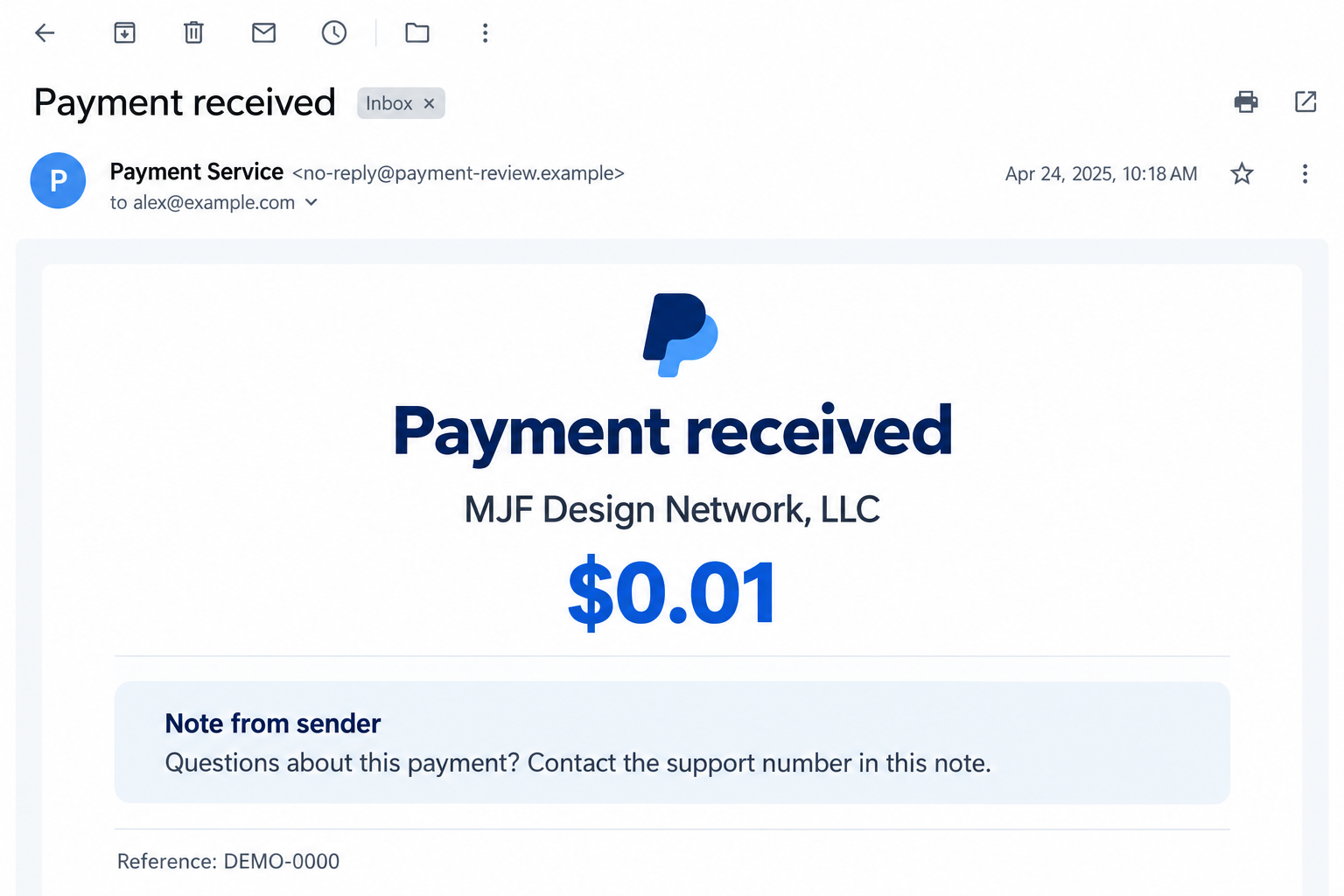
A PayPal notification says MJF Design Network, LLC sent you $0.01. The amount is tiny, but an unexpected payment still gives you a reason to look.
Then you notice the sender’s note. Suddenly, the penny seems less important than the account question someone wants you to resolve.
Overview
The reported payment is a reason to call, not a meaningful payout
The MJF Design Network PayPal scam uses a reported $0.01 payment notification to draw attention to a supposed customer-support instruction.
Rather than asking you to pay a large invoice immediately, this version starts with money apparently coming in. That small difference can lower your guard.
The trap is the instruction accompanying the transaction. A sender-controlled note directs the recipient toward a phone contact presented as support.
The image above illustrates the payment-and-note arrangement. It is not an authenticated original email, account record, or screenshot of an actual MJF transaction.
A genuine payment notification cannot authenticate the sender’s instructions
A real payment service can transmit content supplied by another user. The service delivering a message does not make every statement inside it trustworthy.
PayPal’s invoice and money-request warning explains how alarmist notes can steer recipients toward fake support numbers.
PayPal’s warning concerns invoice and money-request abuse. The one-cent MJF example is a reported variant, not proof that a particular company operated it.
The safest check happens outside the notification
Open PayPal through its official app or a trusted address you enter yourself. Check the transaction status without calling a number supplied in a note.
- A received payment is not the same as an outgoing charge.
- An invoice or money request is different from a completed transfer.
- A sender’s description does not prove an account has been linked or compromised.
- Unexpected support instructions need independent verification, even inside a familiar-looking notification.
Do not send a separate payment to resolve the penny. If the transaction needs attention, ask PayPal through a support route you locate independently.
Why Such a Small Amount Can Get Your Attention
A $0.01 payment creates a puzzle rather than an obvious financial threat. You may wonder whether it is a test, a mistake, or something connected to an account.
You are already wondering what happened when the note offers an explanation. Calling its number can feel like clearing up a minor account mystery.
Some recipients may assume that sending even a penny required the sender to know private account information. A notification alone does not establish that.
Nor does recognizing your own name prove the note came from PayPal support. Personalization and delivery authenticity answer different questions from whether an instruction is safe.
The practical question is not whether the penny has value. It is whether someone is using it to move you into an unverified conversation.
There is no reason to let a stranger define the significance of a transaction. The official account record and genuine support provide a separate route.
If no matching transaction appears, that is another reason to stop using the email as your guide. It could be an imitation rather than a real notification.
How the MJF Design Network PayPal Scam Works
Step 1: An unexpected payment creates a believable starting point
The reported example begins with $0.01 apparently arriving from MJF Design Network, LLC. The amount is specific enough to make the notification feel concrete.
Unlike an invented bill for a purchase you never made, an incoming penny may not trigger an immediate refusal. You may simply want to identify its origin.
The sender name can add a businesslike appearance. Still, a name displayed in a transaction is not a verified explanation of who sent it or why.
Before doing anything else, separate what the notification says from what your account actually shows. Enter PayPal independently and read the transaction type and status.
Do not follow an email’s support instruction to perform that check. Otherwise, the same message supplies both the suspicious event and the person supposedly verifying it.
Step 2: The note turns curiosity into an account concern
The payment becomes a delivery vehicle for a note. Its purpose is to make contacting the listed number seem relevant to your account.
A message may imply that the transaction represents a payout or some other action requiring clarification. The exact claims should be read as sender assertions.
They are not proof that your bank has been connected, a withdrawal is scheduled, or a larger debit has already occurred.
This distinction matters because the note can sound more authoritative than the transaction data. A dramatic explanation may overshadow the small, incoming amount actually recorded.
Read the payment direction carefully. Money received does not become money owed merely because a note uses urgent language or presents a support number.
Step 3: A support number moves the conversation away from the account
The reported MJF example directs recipients to a phone number presented as customer service. The dangerous transition is from checking a payment to trusting that contact.
A number typed into a transaction note is not authenticated by the surrounding PayPal branding. Other users can supply text without becoming service representatives.
Do not call to find out whether the caller sounds convincing. Professional greetings, account terminology, and a calm voice cannot independently prove an affiliation.
Numbers can also change or be reassigned. The durable warning is the support route embedded in an unsolicited payment note, not one telephone number alone.
Find assistance from the official app or PayPal’s Contact Us page instead. Available options can depend on your location and account.
Step 4: The impersonator can ask for information that enables access
Once a recipient accepts the fake support role, requests for login information or banking details may appear to be ordinary verification.
That is where a harmless-looking notification can become an account-security problem. The penny is only the opening; the conversation seeks something more useful.
Do not disclose your password or repeat a one-time security code to the caller. Codes can authorize access or actions you did not intend.
Read any genuine approval prompt in full. A caller’s description of it as a cancellation or safety check does not change what the prompt actually authorizes.
The available MJF report does not establish a complete recorded call script. These are callback-fraud risks, not claims that every recipient encountered identical requests.
Step 5: A supposed fix may require another action you never needed
A recipient trying to resolve the issue may be asked to approve a transfer, provide further account information, or follow instructions outside PayPal.
Do not move money to prove ownership or protect a balance. The sender’s note has not established that any protective transfer is necessary.
If someone asks you to return an unexpected payment, do not create a separate transfer to a different account supplied in the conversation.
Ask genuine support how to handle the recorded transaction. Keeping the issue attached to the original account entry avoids accepting a stranger’s replacement instructions.
Likewise, do not send identification simply because the person claims to be escalating the case. Verify who is requesting it before disclosing anything further.
Step 6: Official account checks replace the caller’s story with records
Close the suspicious conversation. Review activity through your genuine PayPal account and check whether any transaction differs from what you recognize.
Look for outgoing payments, changed contact information, or unfamiliar security activity where those records are available. Save relevant details for support.
If the only entry is an unexpected incoming penny, report the suspicious note and ask what action is appropriate. Do not manufacture a refund process yourself.
If there is an unauthorized outgoing transaction, use PayPal’s official reporting process. Describe the transaction you actually found rather than the caller’s explanation.
This returns control to verifiable records. You can address a real problem without accepting the stranger’s claim that their number is the only route to help.
Three Details Worth Checking Before You React
Payment direction and status answer different questions
Incoming, outgoing, pending, requested, and invoiced are not interchangeable. Confusing them can make a sender’s threatening note seem consistent with a transaction it does not describe.
A request for money does not by itself mean your account was debited. An incoming amount does not mean a larger outgoing payment has been authorized.
If the labels are unclear, ask official support to explain the specific entry. Do not rely on the contact named by the unknown sender.
Email authenticity does not establish instruction authenticity
There are two separate possibilities: a fabricated email imitating PayPal, or a service-generated notification carrying content supplied by another user.
Looking at the sender address alone cannot settle every issue. Even a genuine notification may contain a note that PayPal did not write.
Checking your account independently handles both possibilities better than debating the email’s appearance. It establishes what exists in the account without following the note.
A familiar business name does not identify the fraudster
The MJF name helps readers recognize the reported message. It should not be treated as proof that a particular registered company operated the callback scheme.
Do not contact unrelated employees or publish accusations about people sharing a name. Give payment identifiers and the original message to the service investigating it.
Focus your response on the instruction and the account exposure. That is more useful than trying to identify an operator from a display name.
What to Do if You Have Fallen Victim to This Scam
-
End the call and preserve the notification. Save the email, transaction reference, sender note, and the number you contacted.
Record what you told the caller and any approvals you made. A short timeline helps distinguish a suspicious message from actual unauthorized account activity.
Keep full details private. If warning relatives, redact names, email addresses, transaction identifiers, and any link that might invite another interaction.
-
Review PayPal through a trusted route. Open the official app or enter the service’s address yourself rather than using the suspicious notification.
Check whether the $0.01 entry exists and whether anything else happened. Look for outgoing payments or account changes that you do not recognize.
Report the suspicious note through genuine support. Follow the service’s instructions for the original transaction instead of sending a separate “return” payment.
-
Secure credentials if you shared them. Change your PayPal password through the genuine service and use a unique replacement.
If that password was reused elsewhere, replace it on those accounts too. Protect the associated email account if its credentials were exposed.
Review available login and security settings. Tell support if you disclosed a code or approved an unexpected request; a password change may not address every action.
-
Report transactions according to what actually occurred. PayPal provides an unauthorized activity reporting process for payments you did not authorize.
If you personally approved a payment after being deceived, explain that accurately. Ask support which reporting or dispute route fits the circumstances.
Contact your bank or card issuer if its account was involved. Keep transaction references and ask about recovery options without assuming reimbursement is guaranteed.
-
Ask the card issuer about exposed card information. Use the number printed on the card or the issuer’s genuine app.
Explain which details you provided and whether a charge occurred. The issuer can advise on blocking, replacement, and monitoring for your particular situation.
Do not provide extra card data to the supposed support agent to “reverse” the first disclosure. That keeps the same unverified party involved.
-
Forward the suspicious email using PayPal’s published reporting route. Its current invoice-scam guidance directs suspicious emails and websites to phishing@paypal.com.
Preserve a private copy first if needed for a bank dispute or police report. Then follow your email provider’s spam-reporting and blocking options.
For a US fraud report, use ReportFraud.ftc.gov. Include actual losses and actions rather than assuming every recipient experienced the same outcome.
-
Check subsequent messages carefully. Someone may contact you again claiming to be support, an investigator, or a specialist who can recover lost funds.
Use independently located contacts to confirm any claimed case. Do not share security codes or pay a release fee because the caller knows earlier details.
A genuine report does not make every follow-up genuine. Keep your evidence and handle recovery through the payment provider, bank, or verified authorities.
Frequently Asked Questions
Why would someone send me $0.01 through PayPal?
In the reported MJF example, the tiny payment draws attention to a support instruction. It does not establish that a legitimate payout needs your intervention.
Does seeing the penny in my account make the note trustworthy?
No. A recorded transaction and a trustworthy explanation are separate things. A sender’s note does not become official support guidance because the payment exists.
Has my account been hacked just because I received this message?
The notification alone does not establish unauthorized access. Check account activity independently and respond to any actual disclosures, approvals, or unfamiliar transactions.
Should I call the number in the payment note?
No. Locate PayPal support through its genuine app or website. A contact supplied by an unknown sender cannot independently verify that sender’s claims.
Should I send the penny back in a new payment?
Do not create a separate transfer following a stranger’s instructions. Ask official support how to handle the original recorded transaction.
Does the display name prove MJF Design Network operated the scam?
No. The name identifies the reported notification, not a verified operator. Avoid attributing criminal conduct to a real business solely from a displayed name.
The Bottom Line
Do not call the support contact supplied in the MJF Design Network PayPal scam message. An incoming penny cannot authenticate the instructions attached to it.
Check the original transaction through PayPal itself. If you already shared credentials or approved a payment, contact genuine support and the relevant financial provider promptly.

Join the discussion
0 commentsShare your experience or ask a question about this article.
Discussion
Start the conversation
Have a question or something useful to share? Add the first comment.