

A file arrives looking like the bank statement you need to check. Its name mentions a PDF, and the accompanying instructions make opening it sound routine.
Before you follow those instructions, check the actual file type. In this campaign, the name on the package hides a very different kind of access.
Overview
MyCERT confirmed malicious bank-document packages
On October 24, 2026, Malaysia’s MyCERT published an analysis of bank-themed archives tracked under the SilverFox label.
The analyzed packages used disk images, including VHDX and ISO files, behind document-like names. Running their contents installed an unauthorized remote-management agent and forged trusted root certificates.
MyCERT examined three builds and listed 151 initial archive hashes. Those figures describe analyzed material and indicators, not a verified number of infected customers.
A legitimate management product was enrolled to an attacker
The installed software included genuine ManageEngine UEMS Agent 6.0.3, configured to report to attacker-controlled infrastructure. Its legitimate identity did not make that enrollment authorized.
This is not evidence that ManageEngine, Zoho, or every organization using remote-management software is fraudulent. Who controls the agent and how it arrived are crucial.
MyCERT did not establish a link to a particular threat group. Treat SilverFox here as the report’s tracking label, not proof of a named operator’s identity.
The document-to-installation switch to watch for
- A supposedly ordinary statement arrives inside a ZIP and disk image.
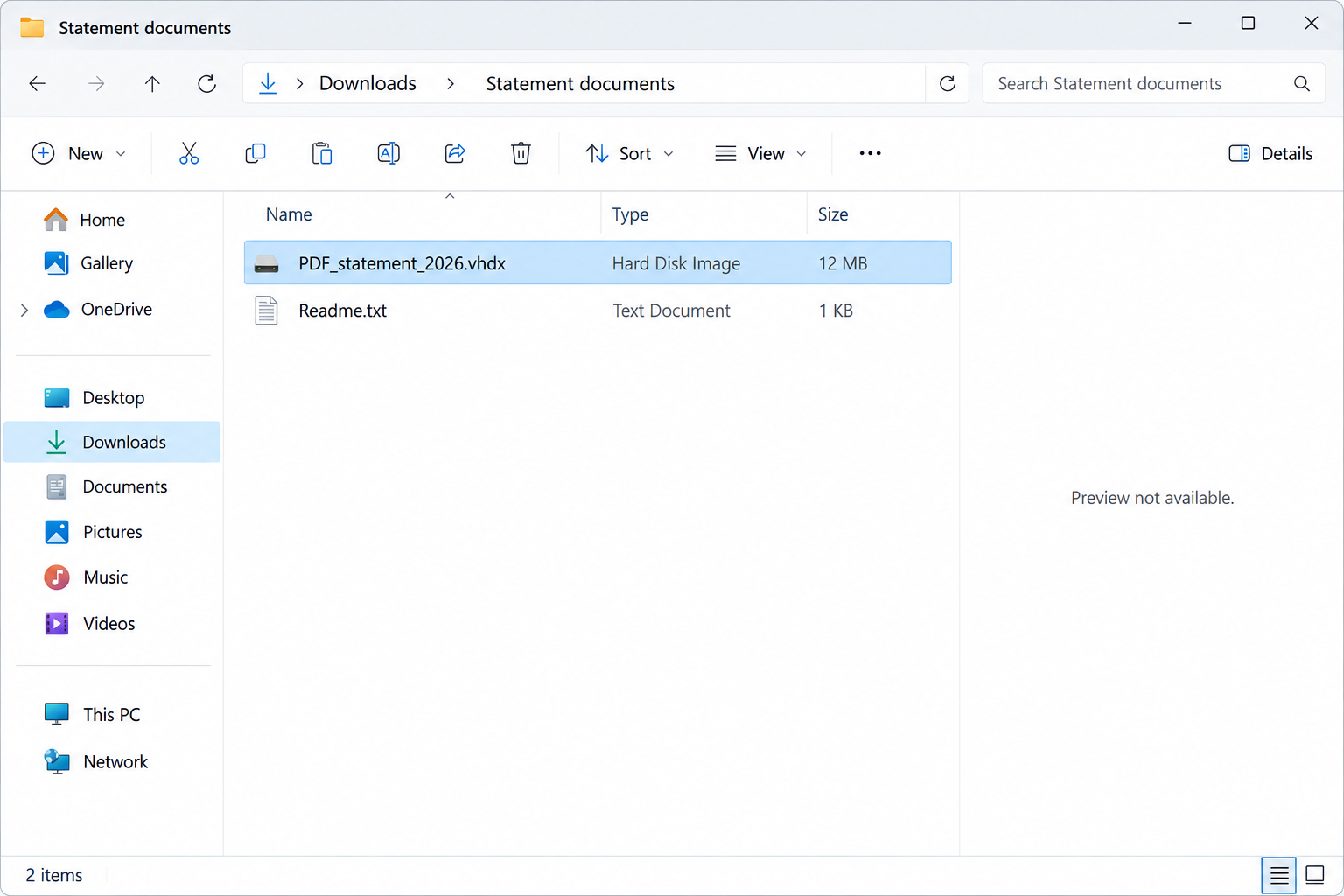
- The filename contains PDF, but Windows identifies the object as a disk image or executable content.
- Reading a statement suddenly requires running a program or approving system changes.
- A new management agent appears without approval from you or your organization’s IT team.
The image is an illustration, not a recovered sample. PDF_statement_2026.vhdx, the folder labels, and the displayed sizes are fictional examples, not campaign indicators.
How the Fake Bank Statement Scam Works
Step 1: A document name gives the package an everyday purpose
Bank statements are files people expect to receive and retain. That expectation can make an archive seem like administrative paperwork rather than a software download.
A familiar bank name or a PDF-like filename is easy to copy. Neither establishes who prepared the package or what its contents will do.
The advisory does not establish one delivery channel for every analyzed sample. Do not assume the package is safe because it arrived somewhere other than email.
A file supplied by a known contact still needs checking if the format is wrong. Ask about it through a separate conversation before opening anything further.
Step 2: The archive leads to a virtual disk
A VHDX or ISO contains a disk image. Opening it can expose a virtual drive and another set of files, adding a layer between the message and execution.
The useful question is not whether the filename starts with PDF. Look at the full extension and the type Windows reports.
Do not change a filename to force it into a document viewer. Renaming the object does not change the code or contents it carries.
If the package includes a password, that also does not verify its source. Password protection can conceal content from inspection while giving the recipient a sense of confidentiality.
Step 3: A trusted-looking program brings in malicious code
The analyzed chain abused a signed host alongside a malicious DLL. The signature belonged to the legitimate component, not to the attacker’s entire arrangement.
That is another reason not to judge the package from one publisher field. The software beside the signed program can change what happens when it starts.
A request to install components to view a statement is the point to stop. Ordinary curiosity about the document should not become approval for computer administration.
Step 4: Remote-management software connects to the wrong controller
A management agent can be perfectly appropriate on a company computer when IT installed and controls it. Secret enrollment through fake paperwork is a different situation.
The attacker benefits from software that already supports remote administration. Searching for a product name and finding a genuine vendor does not validate this installation.
On managed equipment, ask IT whether the agent belongs to its environment. Do not disable a legitimate company service merely because the same product appears in an advisory.
On a personal computer, an unexpected management agent after opening a bank-themed package needs investigation. You should not have to guess who has administrative access.
Step 5: Changes to certificate trust survive a casual uninstall
Root certificates help define which certificates a computer trusts. Adding forged trusted roots changes something deeper than a shortcut or visible application icon.
MyCERT warns that ordinary agent removal leaves the forged certificates behind. A disappearing program entry therefore cannot serve as proof of full recovery.
Do not delete random certificates from Windows while following instructions from an unknown helper. Legitimate workplace and system certificates may also be present.
The right recovery plan must account for the system’s trust settings and the attacker’s administrative reach, not just the file that first attracted attention.
Step 6: The affected machine can no longer be assumed trustworthy
Unauthorized remote administration creates a serious exposure for anything done on the device. Banking activity, saved credentials, and work data all deserve attention during the investigation.
That does not prove a particular payment was stolen or every password was copied. It means the response should not wait for visible theft.
MyCERT recommends isolating confirmed affected hosts and rebuilding from clean media. A scan or routine uninstall is not an equivalent response to this documented chain.
How to Check a Statement Without Opening the Package
Use the bank’s existing app or your usual bookmark on a trusted device. Look for the statement through the account’s normal document area.
If the document is not there, ask the bank through an established number or secure message channel. Describe the unusual package without opening it for them.
Do not use a support number included in the suspicious message. A caller who supplied the file can also supply a convincing explanation for why you must run it.
When a coworker sent the archive, confirm the exact filename and purpose outside the original thread. Their account or conversation may need investigation too.
Keep full filename extensions visible when reviewing downloads. A label that begins with PDF is less useful than knowing the object actually ends in .vhdx or .iso.
Do not upload confidential bank documents to a public scanning site without considering the data they contain. Your bank or IT team can advise on safer reporting.
There is no need to execute the package to prove that it is dangerous. An unexplained disk image presented as a statement is enough reason to stop.
What to Do if You Opened the Package
- Establish how far you went. Record whether you saved the archive, mounted its disk image, ran a program, or approved administrator access. Avoid repeating those actions.
- Disconnect a potentially affected device. Remove its network connection and stop using it for banking or work. Use a different trusted device to obtain help.
- Tell workplace IT about the remote agent. Mention the bank-themed archive and possible unauthorized enrollment. Let them distinguish company-managed software from the attacker’s installation.
- Contact your bank independently. Explain any banking activity performed after the suspected launch. Ask about account protection and report transactions you do not recognize.
- Secure exposed accounts elsewhere. Review account access, revoke unfamiliar sessions, and change potentially exposed passwords. Do not enter replacement credentials on the suspect Windows installation.
- Keep evidence without spreading executables. Retain message details, file names, approximate times, and detection records. Ask responders how they want the original archive preserved.
- Arrange a clean rebuild if compromise is confirmed. Follow the incident team’s plan or seek qualified assistance. Uninstalling the visible agent does not address all documented changes.
If you downloaded the file but never opened or ran its contents, do not automatically label the computer infected. Report the attempt and keep the package closed.
If a mounted image appeared but you are unsure what launched, provide that uncertainty to the responder. A screen closing quickly is not reliable evidence of failure.
For a family PC, explain who else used it after the incident. That can help prioritize account checks without assuming everyone suffered identity theft.
Why Confirmed Infections Need a Clean Recovery Plan
This is the point where a generic removal checklist falls short. The advisory describes administrative access, persistent services, tamper protection, and changes to certificate trust.
Recovery needs to produce a system you can reasonably trust again. Simply making the suspicious application disappear does not demonstrate that outcome.
- Have the exposure assessed while isolated. Provide the original timeline and let qualified responders inspect enrollment, services, certificates, and other changes through their approved tools.
- Preserve essential evidence first. Do not wipe a business computer before IT decides what records are needed. Personal users should ask what to retain before reinstalling.
- Plan a safe data backup. Preserve necessary personal documents without restoring unknown installers, archives, scripts, or disk images. Have suspicious files handled separately.
- Reinstall using clean media. Confirmed affected systems should follow MyCERT’s rebuild recommendation. Reinstallation can erase data, so obtain help and verify the backup plan beforehand.
- Patch before returning to normal use. Restore trusted security software and approved applications. Company devices need IT’s enrollment and validation process, not a personal workaround.
- Recheck accounts after device recovery. Review banking and sign-in activity from the clean system. A rebuilt computer does not reverse transactions or invalidate every stolen session automatically.
Scanners remain useful for investigation and later checks, but genuine management software may not be treated as malicious solely because an attacker enrolled it.
Windows offers full and offline scans through Windows Security. Their results cannot certify that unauthorized certificate trust or remote enrollment has been resolved.
A responder may also use Malwarebytes from the verified site route as a supplementary check. Avoid reconnecting a compromised PC just to install it yourself.
Malwarebytes currently lists Custom Scan as a free feature. Its paid Premium option is not required to justify professional recovery or a clean Windows rebuild.
Do not buy a tool because an unknown caller says it can magically remove every trace. Ask what concrete evidence will establish that the machine is ready to use.
What an Unexpected Management Agent Can Tell You
Ask IT who controls the installation. Finding the product on a genuine vendor website does not tell you whether your computer was enrolled with permission.
Useful information includes when it appeared, which package preceded it, and whether your IT team recognizes its enrollment. Avoid publishing internal controller details in public comments.
A trustworthy helper will not need your banking password to inspect a management installation. Keep financial recovery with the bank through your established contact route.
Ask the technician to explain the difference between finding suspicious software and proving recovery. For this campaign, the certificate changes are a concrete reason that distinction matters.
Be Selective About What Returns From Backup
A rebuild loses its value if the suspicious package is restored and opened again. Tell your helper where the original archive and any extracted copies were saved.
Keep essential personal documents separate from downloaded programs, scripts, and disk images. Do not assume a folder is safe merely because its name sounds financial or work-related.
Have questionable material assessed before putting it back into ordinary use. Recovery should preserve needed data without carrying the original execution chain into the clean installation.
For business systems, use approved backups and software deployment. Personal copies of management agents or old setup folders should not substitute for IT’s trusted installation process.
After restoration, retrieve a fresh statement through your bank’s genuine account portal. You do not need the suspicious archive to finish the task that first drew you in.
Keep the incident records somewhere safe for the bank or response team. Retaining evidence does not mean keeping executable samples available for accidental reuse.
Frequently Asked Questions
Why does a filename say PDF when Windows shows a disk image?
The name can contain misleading text. The full extension and actual file type are more informative. The analyzed packages used virtual-disk formats behind document-like naming.
Is ManageEngine itself a scam?
No. The advisory describes abuse of a genuine management agent enrolled to attacker-controlled infrastructure. That does not establish wrongdoing by the legitimate vendor or its normal customers.
Does SilverFox identify the people responsible?
Not in this report. MyCERT uses the tracking label but does not establish a particular threat-group link. Do not turn that label into a certain attribution.
Were 151 people infected?
The report lists 151 initial archive hashes. Hashes identify files; they are not a count of victims, compromised accounts, or confirmed financial losses.
Can I just uninstall the remote-management agent?
Do not treat that as complete recovery. MyCERT says forged root certificates remain after ordinary removal and recommends isolation and clean-media rebuilding for confirmed affected hosts.
Is every bank statement attachment malicious?
No. The concern is the deceptive archive and disk-image execution chain. Obtain your statement through the bank’s established app or website rather than testing suspicious files.
The Bottom Line
A bank-statement label does not justify running a disk image or installing a management agent. Leave the package closed and retrieve the document through your bank.
If this chain ran on your computer, contain it and arrange qualified recovery. Confirmed infections need a clean rebuild plan, alongside bank and account checks.

Join the discussion
0 commentsShare your experience or ask a question about this article.
Discussion
Start the conversation
Have a question or something useful to share? Add the first comment.