

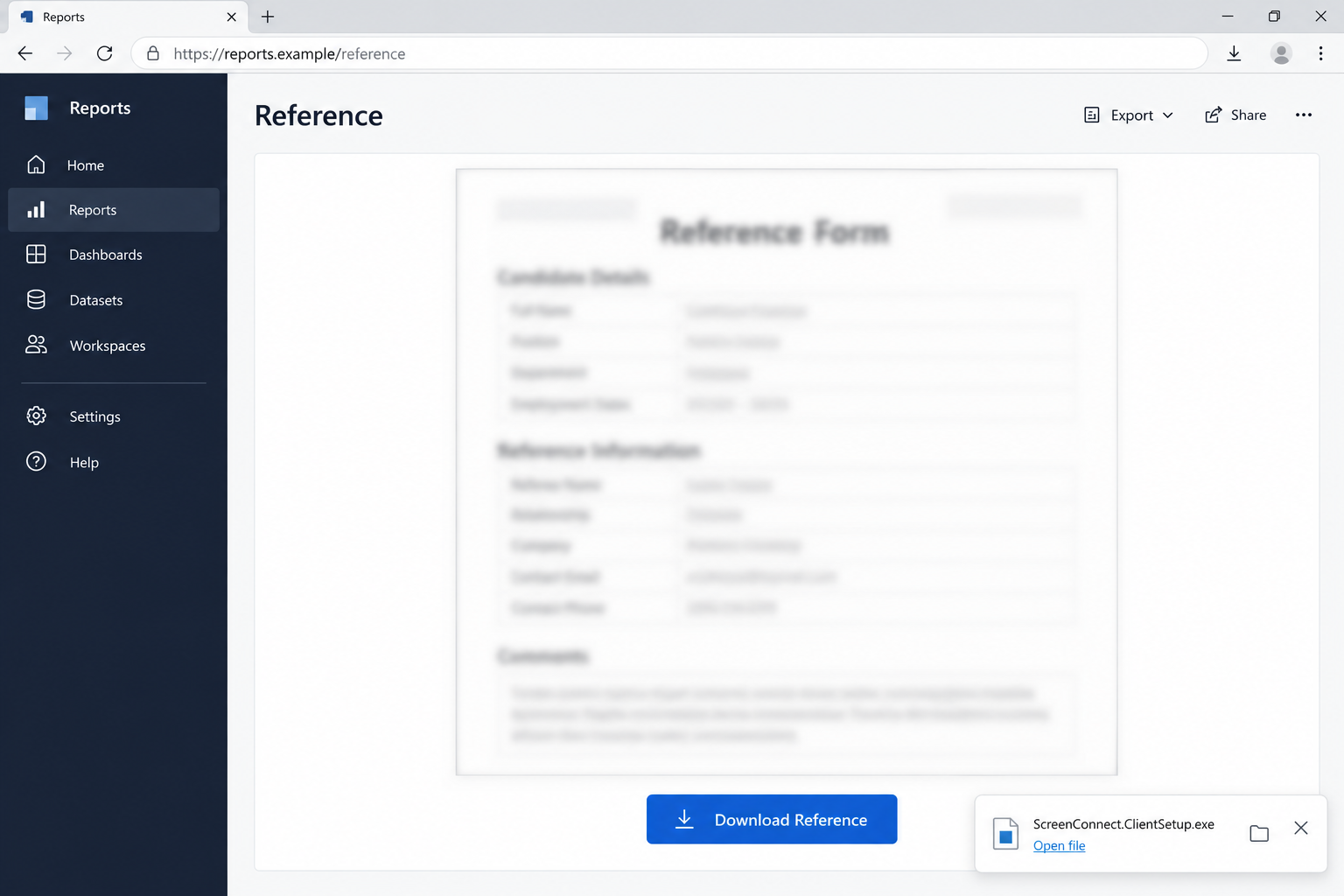
A shared reference document opens on a Microsoft Power BI page. The form is blurred, but a clear download button promises to give you the readable version.
It looks like a small extra step before you can get back to work. Before opening the download, check what kind of file has actually arrived.
Overview
A real Microsoft page hosted the document lure
Huntress documented phishing that abused public Power BI pages to direct recipients toward an unauthorized ScreenConnect installation.
The page presented a blurred form and a Download Reference button. A subsequent site checked the visitor’s environment before triggering a delayed installer download.
Focus on the switch from viewing a report to opening an executable. That is where an ordinary document request becomes a decision to install software.
The downloaded software created remote access, not a readable document
The analyzed chain installed one rogue ScreenConnect client and then another. Researchers also observed concealment activity and a scheduled task that could rerun part of the installation.
Microsoft Power BI and ScreenConnect are legitimate products. The danger lies in attacker-created content and unauthorized remote-access enrollment, not normal use of either service.
A related configuration appeared on 22 additional endpoints across separate incidents. That finding is not a count of 22 confirmed victims of this exact phishing route.
The point where a document becomes a software decision
- A blurred reference form sends you to another website before providing a file.
- The page reports a successful download without clearly explaining that it is an executable installer.
- A supposed document arrives as ScreenConnect.ClientSetup.exe.
- Opening the reference begins a remote-management installation you did not request from your IT team.
The lead image is a fictional interface illustration using reports.example. It shows the document-versus-installer mismatch and is not an original Power BI capture.
How the Power BI Document Scam Works
Step 1: The shared reference gives the email a work-related purpose
A reference document sounds like something you might need for a project, transaction, or business discussion. Opening it can feel like a routine part of your job.
That doesn’t establish who created the content or whether the sender’s account is being used honestly. The actual business context still needs to fit.
Ask the supposed sender about the specific file through an established conversation. Do that before accepting a new installation as the price of viewing it.
Step 2: Microsoft’s domain makes the first page reassuring
The reported lure used app.powerbi[.]com, the real Power BI service. Attackers can publish content through legitimate platforms without owning those platforms.
A familiar hosting domain answers where a page is served. It does not establish that Microsoft approved a particular author’s reference form or its outbound download.
This matters when organizations routinely allow trusted cloud links. The destination can pass an initial reputation check while its content asks the employee to do something unsafe.
The practical check is what happens next. A reference document should not unexpectedly become a reason to give someone administrative access to your computer.
Step 3: The download button leaves the trusted page
The Download Reference control opened another tab on attacker-controlled infrastructure. The first legitimate hostname therefore did not remain the destination throughout the journey.
When a new tab opens, notice the change. Do not mentally carry the first site’s reputation over to every website it links to.
If the original sender can provide the document through an approved sharing route, use that instead. You do not need to test the new tab’s download.
Step 4: The staging page decides what to show the visitor
The researched pages checked browser and device characteristics before delivering the installer. Some visitors could be redirected away instead.
That means a coworker or automated checker may not see the same result you did. A blank page elsewhere does not make your downloaded file harmless.
Do not bypass a failed check by changing devices or weakening protection. Stop and provide the original link and download details to the appropriate security team.
Step 5: An automatic download is presented as successful document delivery
After a short delay, page code triggered the download and displayed a success message. The notification encouraged the recipient to find the file in Downloads.
An automatic download can make the next action feel predetermined. You assume the file is the promised reference because the page just said it was.
Check the file type before opening it. ScreenConnect.ClientSetup.exe is an executable installer, not a plain reference document you can read like a PDF.
Saving that file and running it are different exposure levels. If it appeared in Downloads unexpectedly, leave it unopened and report the route.
Step 6: More than one remote client makes a casual uninstall incomplete
The documented activity established a second ScreenConnect client. In one incident, the earlier client was then uninstalled as part of the sequence.
A disappearing application entry could therefore be misleading. It does not establish that remote access ended or that the device is ready for sensitive work.
The scheduled activity adds another question for recovery: what can restart the unwanted installation? A visible program list cannot answer that alone.
Let responders identify the controllers, services, and persistence involved. Do not delete every ScreenConnect file indiscriminately on a machine that may also have approved workplace support.
What the Genuine Products Do
Power BI is used for reports, dashboards, and data visualization. A public report can contain content supplied by someone outside your organization.
ScreenConnect is used for remote support and administration. Its presence can be appropriate when your IT provider installed it and controls the connection with your knowledge.
This scam links those two forms of trust. A genuine hosting service helps the reference look credible, and a genuine administration product supplies the unwanted access.
The question is not whether ScreenConnect has a real website. Ask whether this particular installation was authorized, which controller it uses, and why a reference file introduced it.
If you are unsure, contact your normal help desk through established details. The reference page’s proposed support route cannot independently approve its own download.
What to Do if You Opened the Download
- Stop interacting with the reference page. Do not fetch another copy or run the installer again because the promised document did not appear.
- Record the execution point. Note whether you merely saved the file, launched it, or approved a Windows permission prompt. Approximate times help responders.
- Contain a device that ran the installer. Disconnect it from the network and tell workplace security that an unexpected ScreenConnect client may have been installed.
- Preserve the delivery details. Keep the original message, Power BI link, later destination, filename, and any existing detection report. Do not forward the installer casually.
- Secure important access from a clean device. Review potentially exposed accounts and sessions. Coordinate business credentials with the responsible administrator.
- Ask about every remote client. Tell the responder that the research documented multiple installations and replacement behavior. Removing one entry is not a sufficient recovery test.
- Assess persistence and system trust. Have the team investigate scheduled activity, remote controllers, and other changes. Discuss rebuilding if reliable recovery cannot be established.
- Check any financial consequences separately. If you find an unauthorized payment or exposed banking access, contact the actual provider without waiting for the technical investigation to finish.
If the executable never ran, don’t describe a confirmed remote takeover. Report the suspicious download and preserve the distinction between receipt and execution.
If the computer belongs to an employer, do not begin an improvised cleanup before IT decides what evidence to retain. Its response may include other affected systems.
Use another communication channel if you think the attacker can see the desktop. Avoid typing replacement passwords or sensitive incident notes into the potentially controlled machine.
Checking and Recovering an Affected Windows Computer
The goal is to remove unauthorized access and establish a trustworthy system. Finding a legitimate product name or one clean scan is not enough to do that.
- Keep the machine isolated during triage. Use separate equipment to reach your established help desk or qualified technician. Explain the unexpected reference-document installation.
- Identify authorized support first. Have IT distinguish its approved clients from unknown enrollments. Do not dismantle legitimate management software based only on the product name.
- Inspect persistence with qualified help. Ask about additional clients, startup services, and scheduled repair activity. Avoid deleting individual tasks by guesswork.
- Use security scans as supporting checks. Windows Security provides full and offline scan options. Preserve actual detections and investigate recurring findings rather than restoring flagged files.
- Use verified secondary tooling when appropriate. Malwarebytes can supplement the assessment, but an unauthorized instance of genuine remote software may require controller and enrollment investigation.
- Rebuild if the installation cannot be trusted. Plan evidence retention and backups first because reinstalling Windows can erase data. Restore approved applications rather than the suspicious download.
In the Windows Security app, open the Virus & threat protection area and look for Scan options. An available offline scan restarts the computer, so save work first.
Microsoft’s official scan instructions explain that process. Review Protection history afterward, but do not use a clean result to dismiss documented remote enrollment.
If advised to use Malwarebytes, obtain it through the site’s verified download link. Avoid any tool the reference page or an unknown caller recommends.
Open Malwarebytes and use the Scanner tile’s three-dot menu. Select Advanced Scan, choose Custom Scan, and configure the folders or drives to examine.
Review the results, quarantine confirmed threats, and follow any requested restart. A technician should evaluate findings you cannot confidently identify.
The current Custom Scan feature is free. Malwarebytes Premium adds optional paid protection; buying it does not settle whether all remote access has been removed.
What to Ask Before Returning the Computer to Work
Ask which unauthorized clients were found, who controlled them, and what allowed them to return. The answer should address the installation chain, not just an application icon.
Find out whether sensitive accounts were used while the device was exposed. Account recovery may need to continue after the computer itself has been rebuilt.
Keep the recovery record with the incident details. That helps if another notification, scheduled task, or suspicious sign-in appears later.
Do not restore the original executable because you still need the reference document. Ask the real sender to provide the material through an approved sharing method.
If a managed support client remains installed, IT should be able to explain why it belongs there. Authorized remote support and covert attacker enrollment require different decisions.
For a personal device, ask your helper what remains uncertain. A clear explanation of recovery limits is more useful than a blanket promise that a cleaner fixed everything.
Keep Useful Evidence Without Testing the Installer
Start with the email and the download timeline. A responder can use those to connect the document request with later installation or service activity.
Retain any existing security alert and its detection name. A cropped message saying threat removed may leave out which component was actually found.
For this campaign, investigators may check scheduled activity associated with SCAutoRepairEvery2Min and SCAutoFix.ps1. Those names are investigation leads, not a complete home-removal checklist.
Do not create, run, or delete tasks merely because you recognize the names. Let qualified support examine the actual file, location, controller, and execution history.
Likewise, finding one known indicator does not establish that every other change matches the published case. Your computer’s recovery should follow its own findings.
If you need personal-device assistance, the MalwareTips removal-help section provides an established place to ask. Keep company incidents with your organization’s security team.
Describe the installation without posting private documents or active download instructions. Do not ask other readers to run the sample to see what happens.
After the investigation, keep a clear record of the recovery decision. If an unexpected client returns, that history is more useful than starting another isolated uninstall.
Frequently Asked Questions
Was the first page really on Microsoft’s service?
Yes. The documented lure abused a public Power BI page. Genuine hosting does not establish that the page’s author or its download instructions are trustworthy.
Is Download Reference a guarantee of a document file?
No. The button label describes the lure. The reported route delivered an executable ScreenConnect installer, which could establish unauthorized remote access when run.
Is ScreenConnect always malicious?
No. It is legitimate remote-support software. Investigate the specific installation, its controller, and whether your IT team authorized it.
Why isn’t uninstalling one client enough?
The analyzed chain used multiple clients and persistence activity. Removing a single installation does not establish that another client or a repair mechanism is gone.
Were the 22 other endpoints all infected through Power BI?
The researchers linked a configuration to those endpoints across separate incidents. They did not establish that every one followed this exact phishing route.
Did merely viewing the report infect my computer?
The documented chain involved downloading and running an installer. Viewing the page, saving the file, and executing it should be treated as different actions.
The Bottom Line
Do not run a remote-support installer to open a reference document. Verify the sender and obtain the file through an approved route.
If the installer already ran, isolate the device and get qualified help. Recovery must check for every unauthorized client and persistence mechanism before normal use resumes.

Join the discussion
0 commentsShare your experience or ask a question about this article.
Discussion
Start the conversation
Have a question or something useful to share? Add the first comment.