


A flight email arrives with details you recognize. Your name looks right, the trip sounds familiar, and suddenly an ordinary travel update deserves your attention.
Before using its payment button, take a closer look. With the Frontier Airlines email scam, the most reassuring detail can distract from the question that matters.
Overview
Frontier has warned customers about an active phishing campaign
This warning concerns criminals impersonating Frontier Airlines, not the airline operating a fraudulent booking service. The distinction matters when you need to check an actual reservation.
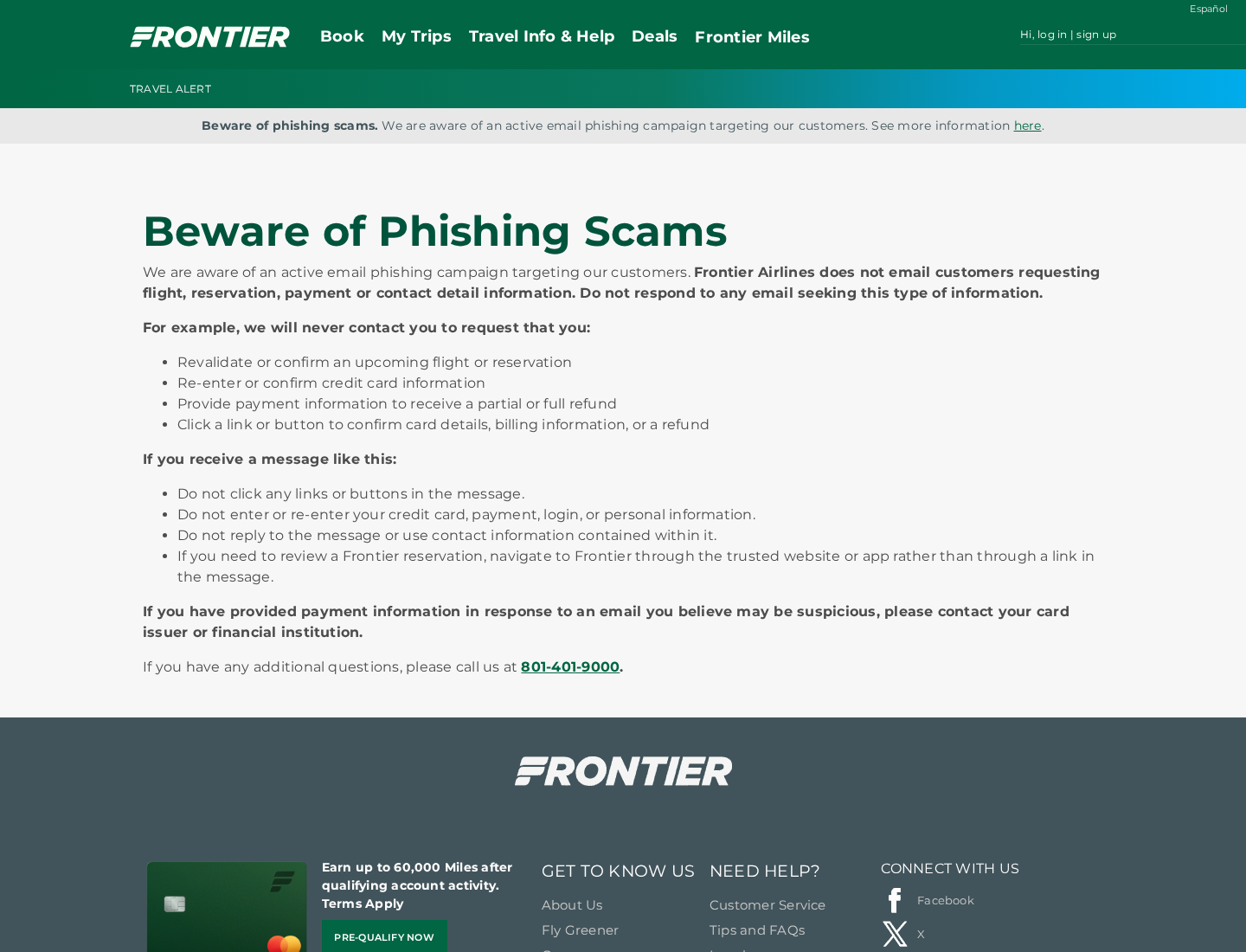
Frontier’s official phishing advisory confirms an active campaign. It rejects email requests to reconfirm reservations, repeat card details, or supply payment information for refunds.
A message claiming your booking needs payment verification therefore deserves an independent check, even when its layout resembles a travel confirmation.
Accurate booking information does not authenticate the sender
Reports about this campaign describe messages containing real reservation details. The reported route includes the lookalike domain flyfrontiercrs.com and a sender displayed as noreply@reviewpro.com.
Those observations identify reported warning signs. They do not establish how the information was obtained, who controlled a particular mailbox, or that Frontier suffered a new breach.
The dependable check is whether the airline’s independently opened booking system shows the same problem. A stranger repeating your itinerary cannot replace that check.
The immediate risk is sharing payment or account information
The bait can be an unresolved payment, a reservation confirmation, or money supposedly owed back. Each version gives you a reason to act before traveling.
- Do not submit card information through an unexpected travel email.
- Open Frontier’s trusted website or existing app yourself.
- Keep payment recovery separate from checking whether your flight is still booked.
- Contact your card issuer promptly if card details reached the suspicious page.
A familiar flight number is useful context for identifying your trip. It is not permission for an unfamiliar website to collect your financial details.
Why This Email Can Feel More Convincing Than Ordinary Spam
Most people can dismiss a random airline message when they have no travel planned. An email arriving around a real booking creates a different reaction.
You may already expect schedule updates, baggage reminders, check-in instructions, or receipts. A payment notice blends into a busy collection of legitimate travel messages.
There is also a practical fear behind it: missing a flight can affect hotels, work, family plans, and another passenger’s itinerary. Scammers exploit that disruption.
Instead of asking whether the message sounds plausible, separate its two claims. It may correctly identify your journey while falsely claiming you must provide payment details.
The second claim needs independent verification. The first does not make it true.
Think of it like someone reading a parcel label and then demanding your banking password. Knowing where a package belongs does not authorize the demand.
Likewise, an email conversation is not safer merely because an earlier message contained accurate information. Judge the new request, destination, and transaction on their own.
How the Frontier Airlines Email Scam Works
Step 1: An unexpected travel notice interrupts a real booking
The approach starts with a message presented as airline administration. Reported versions discuss an unconfirmed booking, payment verification, or a billing adjustment.
The wording encourages you to treat the notice as part of managing your trip rather than a separate request from an unknown party.
That is the first decision point. You do not need to determine the criminal’s identity before refusing the email’s proposed route.
Leave the message open only long enough to preserve useful evidence. Then use your existing airline app or a separately entered trusted address.
Step 2: Familiar trip details make the demand seem routine
A name, route, departure date, or booking reference can lower your guard. You may assume a person with that information must represent the airline.
But information and authority are different things. Booking details can pass through multiple travel communications, accounts, documents, and people.
Without an established incident investigation, blaming one specific breach would be speculation. The practical lesson does not depend on identifying the leak.
Check whether the notice asks you to do something Frontier expressly warns against. Accurate details cannot cancel an explicit warning about the requested behavior.
Step 3: The button moves you away from your trusted airline session
The link is the handoff. Its wording may mention checking a reservation or resolving payment, while the browser opens a different website.
The reported flyfrontiercrs.com address illustrates the problem: adding letters to an airline’s name creates a separate domain, not a subdivision of its genuine site.
A logo or copied navigation menu can make that distinction easy to miss. A padlock only concerns the connection, not the site’s right to collect information.
Do not experiment by opening several suspicious links to compare them. The safer comparison is with a trusted reservation session you started independently.
Step 4: A supposed booking fix becomes a request for sensitive details
The reported aim is to obtain card and personal information. A refund story can make the same request seem beneficial instead of threatening.
You may be told that repeating a card number is necessary to restore a booking or return an overpayment. Neither claim becomes valid through repetition.
Stop if the form requests a card number, security code, account password, or bank verification code. Do not supply invented details as a test.
If you already typed sensitive information, tell the relevant provider what you entered. Do not assume that leaving before the final button guarantees privacy.
Step 5: Follow-up messages try to keep you inside the false process
A further email or call may arrive after you interact. It can claim that the payment failed, the refund stalled, or your reservation remains at risk.
Such follow-up is a possibility to recognize, not confirmation that every recipient receives a call. The same safety rule applies to each new contact.
Do not share a one-time banking code or approve a transaction because someone describes it as a reversal. Read what your bank says the approval authorizes.
Once the original route looks suspicious, end that conversation. Start any necessary contact through your airline or financial provider’s independently verified channel.
Sender, Domain, and Reservation Checks That Actually Help
Look beyond the displayed sender name
An inbox can show an airline name without making the message authentic. Expand the sender details and preserve the actual address when reporting it.
A third-party address alone does not identify the person responsible. Legitimate services can be impersonated, abused, or have their names inserted into forged messages.
Full message headers can help an email provider or security team investigate. You do not need to interpret every header yourself before declining a payment request.
Separate a booking reference from an account password
A reservation reference helps locate a trip. An account password can grant broader access, especially when reused elsewhere.
Do not publish booking codes alongside surnames in screenshots or public complaints. Share complete details privately with the airline when necessary.
If another traveler forwarded the notice, ask them not to circulate the original widely. A redacted warning is more useful than exposing everyone’s itinerary.
Check the reservation without creating a second purchase
Use Frontier’s trusted booking tools to establish the reservation’s current status. If the information is unclear, ask official support to inspect that booking.
Do not buy another ticket solely because an unexpected email threatens cancellation. First separate a genuine itinerary problem from the message attempting to exploit it.
If departure is close, explain that urgency to official support. It is a reason to verify promptly, not to trust the suspicious payment link.
What to Do if You Have Fallen Victim to This Scam
-
Stop the interaction and identify what you shared. Write down whether you only read the message, visited a page, entered information, approved payment, or installed anything.
This short timeline helps the airline and your bank act on the actual exposure. You do not need a perfect technical explanation to ask for help.
-
Check the real flight separately. Open Frontier through its trusted website or installed app. Confirm your reservation there, not through the email button.
If necessary, use the contact information published in the airline’s official phishing advisory. Do not rely on a number supplied by the suspicious sender.
-
Tell your card issuer if card details were entered. Use your banking app or the number printed on your card to reach the fraud team.
Explain which details were exposed, when it happened, and whether any charge appeared. Ask about locking or replacing the card and preventing unauthorized transactions.
A temporary card lock may be useful while you contact the issuer. Let the issuer explain its available protections rather than assuming one setting resolves everything.
-
Report payments accurately. If money moved, distinguish an unauthorized charge from a payment you approved because you were deceived.
Provide the amount, merchant description, time, and supporting message. Ask what investigation or dispute route applies, and keep the case reference.
Do not promise yourself an automatic refund. Recovery options depend on the payment method, timing, and circumstances, so contacting the provider quickly matters.
-
Secure accounts only where credentials were exposed. If you entered your Frontier password, change it through the genuine service and check account details.
Change other accounts using that same password. If your email password was shared, prioritize the email account because it may control password resets elsewhere.
Review available sign-in history, recovery settings, and active sessions. Enable stronger authentication where supported, without approving unexpected prompts.
-
Handle downloads as a separate device concern. Merely receiving this email does not establish a malware infection. Card theft and device compromise are different problems.
If you installed a file or allowed remote access, stop using that device for banking and seek qualified technical help. Tell the bank about that exposure.
A trusted security scan can assist with suspected malicious software. It cannot cancel a card transaction, retrieve a password, or guarantee that accounts remain secure.
-
Preserve evidence without publishing private travel data. Save the original email, its headers, the destination address, relevant screenshots, and payment records.
Keep an untouched private copy. For public warnings, redact names, reservation references, contact details, card information, and any codes that could expose the trip.
-
Report the impersonation and ignore recovery offers. Flag the email as phishing and notify Frontier through an official route.
US recipients can report internet fraud through IC3.gov. Outside the US, use the appropriate local police or fraud-reporting service.
Anyone demanding an advance payment to recover a stolen airline refund introduces another risk. Do not give a stranger remote access or banking credentials.
If You Only Read the Email or Opened the Page
If you are helping another passenger, agree who will contact the airline and who will call the bank. Two separate tasks can otherwise be mistaken for one.
The airline can clarify the booking. The card issuer handles exposed payment details and suspicious charges. Neither conversation automatically completes the other organization’s work.
When explaining the incident, lead with what happened: an unexpected flight message led to a different website, and particular information was entered there.
That description is more useful than saying only that an email looked strange. Keep any reference numbers from the genuine support conversations with your private records.
There is no need to treat every interaction as the worst possible outcome. Receiving or reading the message alone does not demonstrate compromised banking or airline accounts.
If you clicked but entered nothing and installed nothing, close the page. Check for unexpected downloads or permissions, and keep your browser current.
Then return to the trusted booking system. The goal is to establish what happened, not to run a long list of unrelated recovery steps.
If you cannot remember whether autofill supplied information, mention that uncertainty to your card issuer. It can advise on the details potentially exposed.
Frequently Asked Questions
Is the Frontier Airlines payment verification email real?
Frontier warns against emails asking customers to reconfirm reservations or provide payment details for refunds. Verify the booking independently before acting on any such message.
Why does the suspicious email know my actual flight?
Accurate trip details do not establish the sender’s authority. The information’s origin has not been confirmed for this campaign, so do not assume a particular breach.
Is flyfrontiercrs.com the same website as flyfrontier.com?
No. They are different domains. The extra letters do not make the reported lookalike address an official part of Frontier’s website.
Should I replace my card after only opening the email?
Opening the message alone does not establish card exposure. Contact the issuer if you entered card details, approved a suspicious transaction, or noticed unauthorized activity.
Does the message mean my flight has been canceled?
Not by itself. Check the reservation through the genuine airline service. Do not let a fraudulent payment demand determine your travel arrangements.
What if I entered information but never pressed submit?
Treat sensitive details typed into the suspicious page as potentially exposed. Explain what you entered to your card issuer or account provider and follow its advice.
The Bottom Line
Do not use the Frontier Airlines email scam’s payment or refund link. The airline’s own warning is clear, and a correct itinerary does not authenticate a demand.
Check your trip through Frontier independently. If sensitive information reached the suspicious page, contact the relevant provider promptly and preserve the evidence privately.

Join the discussion
0 commentsShare your experience or ask a question about this article.
Discussion
Start the conversation
Have a question or something useful to share? Add the first comment.