


A recruiter says you’re nearly through the hiring process. There’s just an identity check to complete before the interview or onboarding can move forward.
That request deserves more than a quick selfie. The fictional message below shows how an ordinary hiring conversation can introduce a very different kind of access.
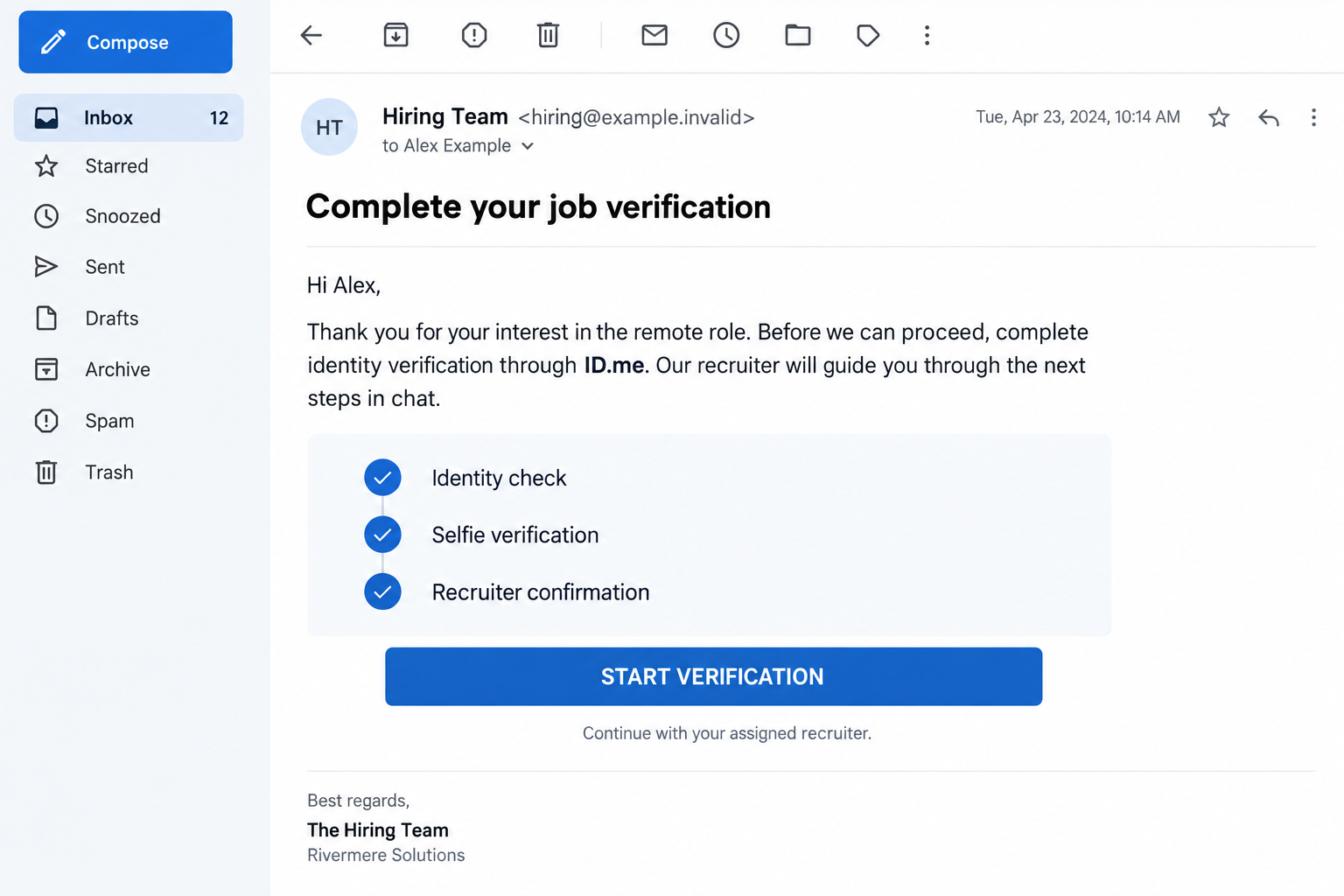
Overview
A job opportunity becomes an identity-verification request
The ID.me job verification scam uses a false employment opportunity to persuade someone to reveal identity information or give another person control of an ID.me account.
The service itself is legitimate. The deception comes from the supposed recruiter and the reason they give for needing your participation.
A job application can involve sensitive information, which makes the request sound plausible. That doesn’t give an unknown recruiter authority over your personal identity account.
ID.me warns about fake employment checks
ID.me’s own scam guidance includes fake job messages asking people to verify employment, follow a link, or provide a selfie.
It also warns against sharing passwords or multi-factor authentication codes, and against letting someone else create or manage your ID.me Wallet.
The danger isn’t limited to a visibly fake login page. A genuine identity service can be misused when a scammer controls the purpose or account.
Keep the employer check separate from the identity check
Before supplying documents or joining a verification session, establish which employer is hiring and why this particular process is needed.
- Contact the employer through an independently located channel.
- Keep your ID.me password and authentication methods under your own control.
- Don’t send a recruiter security codes to finish a supposed background check.
- Report suspected misuse through ID.me’s official help process.
A legitimate hiring conversation should be distinguishable from someone asking you to create an identity account they can use. The difference matters before you upload anything.
Why a Fake Recruiter Asks for Verification Instead of Money
The request can sound like progress
A job seeker expects hiring to involve forms and checks. After searching, applying, and waiting, another required step may feel like good news.
The scammer uses that expectation. Instead of asking you to buy something, they present an identity task as a condition for receiving an opportunity.
That changes the emotional calculation. You may worry that questioning the request will delay the job or make you look difficult.
You are allowed to verify the employer. Pausing before sharing sensitive information is not the same as refusing a genuine hiring requirement.
The account can matter as much as the documents
An ID document is sensitive, but so are the email address, password, recovery options, and authentication methods attached to a verified identity account.
Don’t focus only on whether you uploaded a passport or driver’s license. Also consider who can sign in afterward and what service the verification actually concerns.
A recruiter who offers to handle everything may be asking you to surrender the very controls that should keep the account personal.
If you can’t tell which account you’re creating or why a recruiter needs it, you have enough reason to pause.
How the ID.me Job Verification Scam Works
Step 1: A supposed hiring contact creates a reason to continue
The conversation begins around work: an application, interview, remote role, or onboarding step. The contact presents themselves as someone who can move the process forward.
They don’t need to persuade you to seek identity services independently. They only need to connect verification with the job you want.
If the contact came unexpectedly, confirm the position before discussing personal documents. A professional-looking message is not an employment contract or proof of recruitment authority.
Step 2: Identity verification is presented as the next requirement
The supposed recruiter asks for a link to be opened, a selfie to be taken, or an identity process to be completed.
The instruction may be described as a background check or employment verification. Those familiar labels can discourage closer questions about the account being created.
Ask what organization needs the verification and how it relates to the role. An unexplained service or account is not a detail to overlook.
Don’t assume the recruiter knows best merely because they describe the steps confidently. Confidence is not permission to manage your identity.
Step 3: The scammer guides a process you don’t fully control
In one form of the deception, the person provides a false destination to collect information. Another risk is being guided through genuine verification for the wrong purpose.
ID.me warns that a request for a selfie or video call without setting up your own Wallet may involve someone creating one in your name.
That is why checking the service’s name isn’t enough. You should know whose account is involved, which email controls it, and what you are authorizing.
If the explanation stops making sense, stop the session. Don’t finish a sensitive task simply because you’ve already completed several earlier steps.
Step 4: A request for access is framed as recruiter assistance
The contact may ask for a password, authentication code, or help completing the process. Treat those requests differently from an ordinary scheduling question.
A security code belongs to a particular account action. Sending it to another person can give them the ability to continue that action.
Keep your own email and authentication methods in place. Don’t replace them with details supplied by the supposed recruiter.
If someone says sharing access is the only way to get hired, don’t negotiate an exception. Verify the employer outside that conversation.
Step 5: The applicant is left with an identity problem, not a job
Once information or access has been surrendered, the concern extends beyond the original vacancy. The person may have material to impersonate the applicant elsewhere.
OnlineThreatAlerts identifies possible misuse for fraudulent benefit or loan claims. That is a risk to investigate, not proof that every targeted applicant has such a claim.
Don’t wait for a promised start date before protecting an exposed account. The appropriate response depends on the information and control you actually shared.
Check the Employer Without Sharing Another Document
Find the organization independently
Start with the employer’s established website or contact route, not the signature or link in the recruiting message. Ask whether the role and contact are genuine.
Give the organization enough information to identify the approach. You do not need to provide your Social Security number to ask whether a recruiter works there.
If a real company’s name was borrowed, report the impersonation to that company. Don’t treat its existence as confirmation of the person messaging you.
Ask what the verification is actually for
A genuine employer may have a legitimate identity or background-check process. That possibility is why a blanket rule against every verification request would be misleading.
Instead, ask about the provider, purpose, timing, and account ownership. Confirm the answer with the employer through a separate channel.
A request tied to a service unrelated to the job deserves an explanation before you proceed. Don’t let a vague reference to compliance replace one.
Don’t use a selfie as a casual reply
A selfie can be part of legitimate verification. It isn’t ordinary conversation material to send to an unknown recruiter who says they will upload it for you.
The same applies to identity-document photographs. Keep them out of informal chats while you establish the employer and the process.
Don’t post those documents publicly when asking whether the offer is real. You can describe the request and redact the evidence.
What If the Verification Page Is Genuine?
A real service can be involved in a dishonest request. Recognizing the website answers only part of the question; it doesn’t verify the recruiter or the claimed job.
Read the purpose of the verification before continuing. If a supposed hiring task suddenly concerns an unfamiliar organization or benefit service, stop and ask why.
You shouldn’t have to guess what relationship you’re creating. Ask the independently verified employer to explain the provider and purpose in plain language.
Keep that explanation with your application records. A position title, application reference, and verified HR contact make it easier to compare later requests with the actual process.
Confirm the person too, not just the vacancy. A scammer can point to a real job listing without having permission to recruit for it.
Likewise, a document bearing the employer’s name doesn’t settle the issue. Check whether its verification instructions came from the employer through the channel you independently confirmed.
During a legitimate process, stay in control of your own account. Don’t agree to hand it over afterward because the recruiter calls that the final onboarding step.
If you’ve already completed verification under someone else’s guidance, tell official support what you did and what service was named. Don’t repeat the session as a test.
This is about protecting consent and access, not avoiding legitimate identity checks forever. You can continue a genuine job application through a process the actual employer confirms.
What to Do if You Have Fallen Victim to This Scam
- Stop the recruiter-led verification.
Don’t send another code, selfie, document, or password. Save the conversation before blocking the account or reporting the listing.
If a meeting or start date is approaching, don’t let that deadline keep you engaged. Protect the information first and verify the job separately.
- Work out which account was involved.
List the email address used, what you created, which documents you supplied, and whether anyone else received sign-in or authentication details.
If you never controlled the account, say that clearly when contacting support. Don’t try to recover it through another link supplied by the recruiter.
- Secure your own ID.me access through official support.
Follow ID.me’s response instructions to protect the Wallet and report suspected fraud. Review the password and authentication methods if you can sign in.
If you can no longer sign in, use the official sign-in help. Don’t pay a stranger to restore access.
An unexpected reset message alone doesn’t prove a takeover. Tell support what you observed rather than guessing which actions succeeded.
- Report account creation or verification you did not authorize.
ID.me provides a suspicious-activity reporting process for someone using your information or accessing your Wallet. Reach it from the official help article.
Describe the employer claim, dates, and information shared. Its instructions say not to attach government identification or other sensitive information to that report.
- Protect the email account linked to the process.
If you shared or reused its password, change it independently. Check for unfamiliar access, recovery changes, and rules that redirect your mail.
Google’s account-security instructions cover compromised Gmail accounts. For another provider, use that provider’s own recovery and session-review guidance.
Keep a new password private even if the supposed recruiter says changing it interrupted onboarding. That is not a reason to restore their access.
- Address exposed identity information.
If an ID document or Social Security number was shared, use IdentityTheft.gov for a U.S. recovery plan. Record exactly which information was exposed.
A credit freeze can help prevent new-account identity theft. Contact all three credit bureaus and keep the records needed to manage the freezes yourself.
A freeze doesn’t secure the ID.me account or erase stolen documents. Continue the account-specific steps and investigate any unfamiliar notices or applications.
- Contact the affected institution if misuse appears.
If you receive a notice about an unfamiliar benefit claim, loan, or financial account, contact the issuing organization through its verified channel.
Explain the suspected identity misuse and ask how to dispute the particular record. Don’t assume that reporting to one service automatically alerts every other organization.
- Report the recruitment approach and watch for follow-ups.
Notify the job platform and the genuine employer, if one was impersonated. Keep the listing URL, recruiter username, and relevant messages with your incident timeline.
You can also report the deception at ReportFraud.ftc.gov. Avoid anyone offering guaranteed identity recovery in exchange for money or another verification session.
Frequently Asked Questions
Is ID.me itself a fake recruitment service?
No. ID.me is a legitimate identity service. This warning concerns false recruiters who misuse its name or persuade people to surrender identity information and account control.
Can a real identity check involve a selfie?
Yes. The problem is not the existence of a selfie step. Confirm the employer, the service purpose, and whose account you are verifying before participating.
Should a recruiter receive my ID.me authentication code?
No. Keep authentication codes and passwords private. A hiring explanation does not make another person entitled to access your personal Wallet.
What if the link opened the genuine ID.me website?
Check the purpose and account ownership too. A real website cannot establish that the recruiter is genuine or that the requested verification is appropriate.
Does one suspicious email prove my account was hacked?
No. Assess what you shared and any account changes. Use official support to investigate suspected access rather than assuming that every attempted scam succeeded.
Will changing my password undo a stolen identity document?
No. It can help protect account access, but copies already shared need a separate identity-recovery response. Keep records and monitor for misuse.
The Bottom Line
Don’t give a recruiter control of your ID.me account or complete an identity process whose employer and purpose you cannot verify.
If you already shared documents, codes, or access, stop the conversation and use official ID.me support. Protect exposed email and identity information without waiting for the promised job.

Reviews & discussion
0 commentsShare a firsthand experience, or ask a question.
Community reviews
id.me
Moderated reader experiences, not an editorial verdict.
Start the conversation
Have a question or something useful to share? Add the first comment.