A sudden burst of chat messages promising “free Robux,” “instant rewards,” or a “working generator” that sounds almost too good to be real.
Recently, many players have reported a familiar name showing up in that spam: Blox.Promo.
It is not showing up as a normal website recommendation from real players. It is showing up like a coordinated campaign. Repeated messages. Copy-paste lines. The same “I just got paid” claims across multiple public servers. Sometimes even messages that appear to come from accounts you cannot find in the player list.
And that is the point.
This article breaks down what Blox.Promo Robux spam in Roblox servers really is, why it spreads the way it does, what risks it creates for players (especially kids), and exactly what to do if you clicked or interacted with it.
Scam Overview
Robux scams do not usually look like a classic scam at first.
They look like opportunity.
They look like a shortcut around the boring part of Roblox, which is saving Robux, buying gift cards, or asking parents. They also hit players at the exact moment their guard is down, inside a game they already trust.
That is why spam campaigns like Blox.Promo are so effective. They do not rely on one convincing message. They rely on repetition, social pressure, and curiosity.
What “Blox.Promo Robux spam” typically looks like in Roblox
Players report patterns like these:
The same line appearing in chat across multiple servers
Messages posted at a steady rhythm, like a script
The “sender” leaving immediately or never appearing in the player list
Multiple accounts repeating the same claim: “This works,” “I got Robux,” “Use my code”
Links or prompts that push you off Roblox to an external site
The messages often use psychological triggers that work well on younger players:
“Limited time” language
“Only today” rewards
“I just got paid” social proof
“Don’t miss it” urgency
“It’s legit” reassurance
Even if the site name changes, the approach stays the same. Blox.Promo is part of a broader wave of “free Robux” spam that has existed for years, rotating domains and branding as previous names get reported or blocked.
Why spam inside Roblox is a major red flag
A legitimate rewards program does not need to invade chat.
It does not need bots. It does not need invisible accounts. It does not need to disrupt random servers with copy-paste scripts.
Spam campaigns do, because their success depends on volume.
They know most players will ignore it. So they flood as many servers as possible to catch the small percentage that clicks. That small percentage is enough to generate profit, data, or traffic.
This is a key point that many parents and players miss.
Robux scams are not always trying to “steal everything” from every person. Many operate like funnels:
A huge number of players see spam
A smaller number click
A smaller number enter details, install apps, or complete offers
A smaller number pay money or hand over account access
The operator profits from that subset
When you understand the funnel, the spam makes sense. It is not “random.” It is engineered.
The biggest lie behind “free Robux” websites
Here is the uncomfortable truth:
Robux do not come from nowhere.
Robux are part of Roblox’s economy. When Robux are added to an account, they come from:
Buying Robux through official Roblox payment methods
Redeeming gift cards
Earning Robux through legitimate sales (like game passes, developer products, marketplace sales)
Roblox-approved programs
A random third-party site cannot simply “generate” Robux for you. If they claim they can, one of these things is happening:
They are trying to earn money from you through tasks, subscriptions, or deposits
They are trying to harvest personal information
They are trying to trick you into giving your Roblox login details
They are pushing you into installing risky software or browser extensions
They are showing fake progress bars to keep you clicking
Sometimes they mix several of these.
The “free Robux” promise is bait. The business model is something else.
Why kids are targeted so heavily
Roblox has a massive young player base. That is not an insult, it is simply the reality of the platform.
Scammers target kids because:
Kids want Robux badly
Kids are more likely to trust what they see in chat
Kids respond to urgency and excitement
Kids often do not recognize affiliate funnels or subscription traps
Kids might not tell parents when something goes wrong
Spam campaigns also exploit embarrassment.
A lot of kids do not want to admit they clicked. They worry they will get in trouble. That silence makes these campaigns last longer.
“The accounts aren’t in the server” problem
One of the creepiest reports players mention is this: the accounts posting about Blox.Promo are not visible in the player list, or they never seem to exist.
There are several reasons this can happen in spam waves:
Bots join, spam, then leave fast, before you can click their name
Display names can change quickly across bot accounts, making them hard to track
Multiple bots rotate through servers in rapid cycles
Some spam tools aim to mimic “system-like” chat behavior, which confuses players
You do not need to know the technical details to understand the implication.
If chat messages appear repeatedly and the “people” behind them cannot be found, you are not witnessing normal gameplay. You are witnessing an automated campaign.
Why these sites often look polished
Many people assume scams look cheap.
In 2025, that is not true.
A modern scam site can have:
Clean design and fast performance
Fake “live” chats showing wins
Fake counters showing “users online”
Fake payout screenshots
Influencer-style videos and shorts
A Discord server filled with bots or scripted hype
A polished site is not proof of safety. It is proof of optimization.
Scam operators know that if the site looks trustworthy, more people will follow the steps.
Common risks tied to Blox.Promo-style Robux spam
Even if a site does not immediately ask for your password, the risk can still be real.
Players can run into problems like:
Being pushed into shady “verification” steps
Getting trapped in subscription offers
Downloading unwanted software
Allowing browser notifications that spam them later
Sharing email, phone, or other personal data
Entering Roblox credentials into a look-alike login page
Losing Robux through “deposit to withdraw” tricks
Having accounts targeted for takeover attempts
Not every user experiences every outcome. That is how these campaigns survive.
A small number of users might claim “it worked,” while many others lose time, money, or security. The scam does not need a 100% failure rate to be dangerous. It only needs enough confusion and enough victims.
The most important takeaway from the overview
Blox.Promo spam in Roblox servers is not normal promotion.
It is a behavior pattern strongly associated with Robux scams:
Bot-driven chat flooding
Repeated “I got paid” claims
Urgency and peer pressure language
Off-platform links
Lack of official Roblox verification
If you see it in chat, treat it as unsafe.
How The Scam Works
Robux spam campaigns like Blox.Promo tend to follow a predictable structure.
The domain name may change. The colors may change. The “offer” may change.
But the mechanics are usually the same.
Below is a step-by-step breakdown of how these scams typically operate, with clear subheadings so you can recognize the pattern quickly.
Step 1: The bot invasion inside Roblox servers
The campaign starts where the audience already is.
Bots or scripted accounts join public servers and post messages like:
“Blox.Promo is legit, I got Robux”
“Free Robux, click Blox.Promo”
“Use code for bonus”
“I just won a ton of Robux”
“Working generator, no human verification”
These messages are designed to do two things:
Spark curiosity
Normalize the link through repetition
A single spam message is easy to ignore. Thirty messages across different servers feels “real” to some players, especially kids.
That is why the spam is relentless.
Step 2: Social proof pressure and the “everyone is winning” effect
Scam campaigns do not only sell the reward.
They sell the idea that other people are already succeeding.
That is why the messages often include:
“I just redeemed”
“Got paid instantly”
“This is the goat”
“Not a scam”
“It works”
This is social proof, and it is incredibly effective on younger audiences.
If a child sees multiple “players” claiming success, their brain tags it as safe, even when those “players” are bots.
Step 3: The click to an off-platform funnel
Once a player clicks, the scam now controls the environment.
On Roblox, you have some safety features, familiar UI, and a stronger sense of what is normal.
On an external site, the scam can do whatever it wants:
Redirect you through multiple pages
Track your device and browser behavior
Push popups and notifications
Ask for personal details
Serve affiliate offers
Show fake progress indicators
The first goal is simple: keep you on the site long enough to start the “process.”
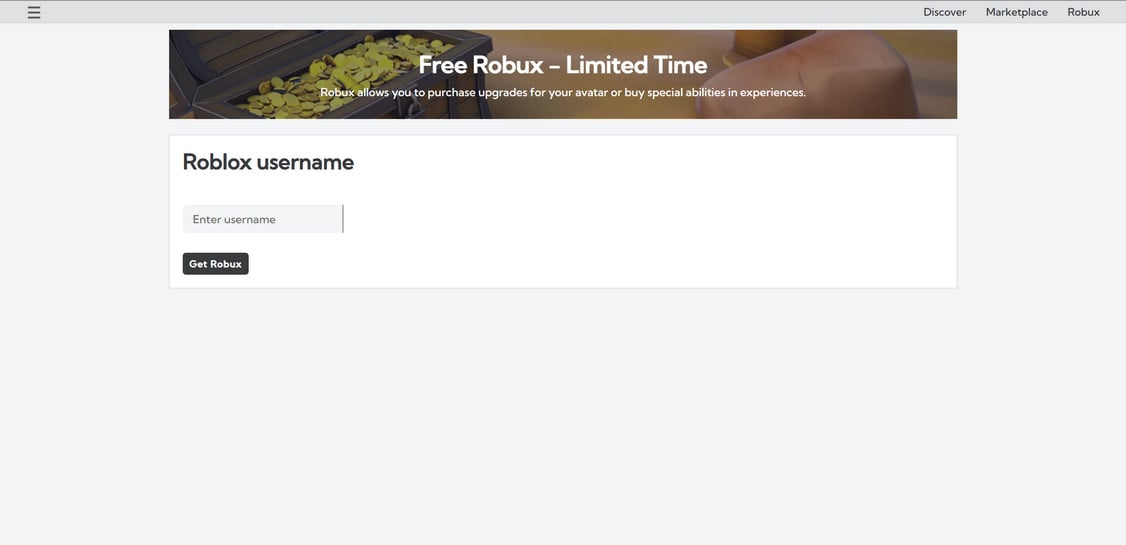
Step 4: The fake “Robux generator” flow
Most of these sites use a similar script:
Choose how much Robux you want
Enter your Roblox username
Watch a loading bar or “connecting to Roblox” animation
See a message like “Success, now verify”
This is theater.
The loading bars and “connecting” animations are there to create trust. They make it feel technical and official, even though nothing real is happening behind the scenes.
At this point, many users think they are already halfway to getting Robux.
That is when the scam introduces the trap.
Step 5: The “verification” step that is really the money step
Almost every free Robux scam eventually hits you with a requirement:
Complete offers
Install apps
Sign up for a trial
Enter an email and confirm
Enable notifications
Download something
Pay a small fee
Deposit Robux “to unlock withdrawal”
They call it verification.
But the real purpose is profit.
There are two common models here.
Model A: Offerwall and affiliate revenue
The site gets paid when users complete tasks, such as:
Installing apps and keeping them for a set time
Subscribing to services
Taking surveys
Signing up for “free trials” that turn into paid plans
Entering personal data
The user often receives nothing. The site still profits.
Even when a task claims “no payment required,” it can still cost the user time, data, privacy, or future subscription charges.
Model B: The deposit trap
Some sites push a darker tactic:
“Deposit Robux to verify you are real”
“Pay $1 to unlock payout”
“Complete payment to prevent bots”
This is a scam technique that works because it feels small.
A kid might think $1 is harmless.
But once someone pays once, the scam can:
Ask for more
Keep the withdrawal pending
Claim the payment “did not go through”
Push the user into repeated tries
Small payments can add up quickly, especially if the site keeps looping the verification step.
Step 6: The endless loop that keeps users stuck
Many victims describe the same experience:
They do the verification step, then the site says:
“One more task needed”
“Verification failed, try again”
“Complete 2 offers”
“Wait 24 hours”
“System busy, retry”
This is not an accident.
It is how the scam protects its profit.
If the site actually paid out reliably, it would lose money and get shut down faster. The loop ensures most users never reach any real “reward.”
Step 7: The optional phishing pivot
Not every Robux spam campaign uses phishing directly, but it is common enough to mention.
Some versions of these scams eventually present:
A Roblox login page that looks real
A prompt to “connect your account”
A fake “verify your Roblox password” step
If a user enters their credentials, the scam can attempt account takeover:
Changing the password
Changing the email
Stealing limited items
Draining Robux
Using the account to spam others
Even if Blox.Promo itself does not always do this, the spam ecosystem around these domains often does. That is why clicking any “free Robux” link is unsafe by default.
Step 8: Why the spam never stops, even when people complain
These campaigns survive because they are easy to scale.
Operators can:
Generate new bot accounts
Rotate messages and domains
Move from one game to another
Target trending experiences where chat is fast
When a domain gets reported heavily, a new one appears.
The spam continues.
That is why your best defense is not “waiting for Roblox to fix it.”
Your best defense is knowing what it looks like and refusing to engage.
Step 9: The long-tail damage people don’t expect
Even when someone does not lose their Roblox account, they can still get harmed.
Common long-tail issues include:
Subscription charges from “free trials”
Increased spam to email or phone
Browser notification spam that becomes constant
Data being sold to other marketers or scammers
Kids becoming more willing to click future scams
Robux spam is not just annoying. It is training.
It trains players to accept off-platform links as normal. That mindset is exactly what scammers want.
What To Do If You Have Fallen Victim to This Scam
If you clicked Blox.Promo or interacted with a “free Robux” flow, do not panic.
Most of the time, you can secure your account and limit damage quickly.
Use the steps below as a calm checklist.
1. Secure your Roblox account immediately
Even if you never entered your password, treat this as a security incident.
Do these steps right away:
Change your Roblox password to something strong and unique
Enable 2-step verification in Roblox settings
Check the email linked to your Roblox account and confirm it is still yours
Review your active sessions or logged-in devices (log out of others if you can)
Check your Robux balance and recent transactions for anything unfamiliar
If anything looks wrong, act fast. The earlier you respond, the better your chances.
2. If you entered your Roblox password anywhere, assume compromise
If you typed your Roblox password into any external page, even once:
Change the password immediately
Change the email password too (email is the real key)
Enable 2-step verification on your email account
Check for email forwarding rules you did not set
Check Roblox account settings for changes (email, phone, security)
This step matters because many account takeovers happen through email access, not just Roblox login.
3. Remove browser notification permissions
A common trick on these sites is to ask for notification access.
If you allowed it, you can stop the spam:
Open your browser settings
Find Notifications permissions
Remove or block any unknown domains connected to the click
If you are helping a child, do this on their device too. Notification spam is one of the fastest ways scammers keep attention.
4. Uninstall suspicious extensions and downloads
If the site pushed you to install anything:
Uninstall it immediately
Remove any new browser extensions you do not recognize
Run a trusted security scan on the device
Restart the browser and clear site data for that domain
If you are not sure whether something is safe, it is safer to remove it and reinstall only what you trust later.
5. Check for subscriptions or charges if money was involved
If you paid money, even $1, take it seriously.
Do this:
Check your bank or card statement for charges you do not recognize
Look for “trial” charges that might turn into monthly billing
Cancel any subscriptions you did not intend to start
Contact your payment provider and ask about disputing the charge
If a child used a parent’s card, act quickly. The sooner you dispute, the more likely you can stop future billing.
6. Talk to kids without shame or blame
If you are a parent, your tone matters.
Kids often hide clicks because they fear punishment.
A better approach:
Make it clear that scams are designed to trick people
Praise them for telling you, even late
Explain the one simple rule: no free Robux links, ever
Encourage them to ask first if something feels exciting or urgent
This reduces repeat incidents and keeps communication open.
7. Report the spam in Roblox
Reporting helps Roblox identify bot patterns and remove accounts faster.
When you see Blox.Promo spam:
Report the message in chat
Report the account if it is visible
Leave the server if chat is flooded and move to another
Even if the sender disappears fast, reporting still helps because patterns matter.
8. Save evidence if you need support or refunds
If you are dealing with charges or account issues, documentation helps.
Save:
Screenshots of the chat spam
The site page you landed on
Any “verification” prompts
Receipts or transaction screenshots
Emails related to subscriptions
This can support a dispute, a refund request, or a Roblox support ticket.
Is Your Device Infected? Scan for Malware
If your computer or phone is slow, showing unwanted pop-ups, or acting strangely, malware could be the cause. Running a scan with Malwarebytes Anti-Malware Free is one of the most reliable ways to detect and remove harmful software. The free version can identify and clean common infections such as adware, browser hijackers, trojans, and other unwanted programs.
Malwarebytes works on Windows, Mac, and Android devices. Choose your operating system below and follow the steps to scan your device and remove any malware that might be slowing it down.
Malwarebytes for WindowsMalwarebytes for MacMalwarebytes for Android
Run a Malware Scan with Malwarebytes for Windows
Malwarebytes stands out as one of the leading and widely-used anti-malware solutions for Windows, and for good reason. It effectively eradicates various types of malware that other programs often overlook, all at no cost to you. When it comes to disinfecting an infected device, Malwarebytes has consistently been a free and indispensable tool in the battle against malware. We highly recommend it for maintaining a clean and secure system.
Download Malwarebytes
Download the latest version of Malwarebytes for Windows using the official link below. Malwarebytes will scan your computer and remove adware, browser hijackers, and other malicious software for free.
(The above link will open a new page from where you can download Malwarebytes)
Install Malwarebytes
After the download is complete, locate the MBSetup file, typically found in your Downloads folder. Double-click on the MBSetup file to begin the installation of Malwarebytes on your computer. If a User Account Control pop-up appears, click “Yes” to continue the Malwarebytes installation.
Follow the On-Screen Prompts to Install Malwarebytes
When the Malwarebytes installation begins, the setup wizard will guide you through the process.
You’ll first be prompted to choose the type of computer you’re installing the program on—select either “Personal Computer” or “Work Computer” as appropriate, then click on Next.
Malwarebytes will now begin the installation process on your device.
When the Malwarebytes installation is complete, the program will automatically open to the “Welcome to Malwarebytes” screen.
On the final screen, simply click on the Open Malwarebytes option to start the program.
Enable “Rootkit scanning”.
Malwarebytes Anti-Malware will now start, and you will see the main screen as shown below. To maximize Malwarebytes’ ability to detect malware and unwanted programs, we need to enable rootkit scanning. Click on the “Settings” gear icon located on the left of the screen to access the general settings section.
In the settings menu, enable the “Scan for rootkits” option by clicking the toggle switch until it turns blue.
Now that you have enabled rootkit scanning, click on the “Dashboard” button in the left pane to get back to the main screen.
Perform a Scan with Malwarebytes.
To start a scan, click the Scan button. Malwarebytes will automatically update its antivirus database and begin scanning your computer for malicious programs.
Wait for the Malwarebytes scan to complete.
Malwarebytes will now scan your computer for browser hijackers and other malicious programs. This process can take a few minutes, so we suggest you do something else and periodically check the status of the scan to see when it is finished.
Quarantine detected malware
Once the Malwarebytes scan is complete, it will display a list of detected malware, adware, and potentially unwanted programs. To effectively remove these threats, click the “Quarantine” button.
Malwarebytes will now delete all of the files and registry keys and add them to the program’s quarantine.
Restart your computer.
When removing files, Malwarebytes may require a reboot to fully eliminate some threats. If you see a message indicating that a reboot is needed, please allow it. Once your computer has restarted and you are logged back in, you can continue with the remaining steps.
Once the scan completes, remove all detected threats. Your Windows computer should now be clean and running smoothly again, free of trojans, adware, and other malware.
If your current antivirus allowed this malicious program on your computer, you may want to consider purchasing Malwarebytes Premium to protect against these types of threats in the future. If you are still having problems with your computer after completing these instructions, then please follow one of the steps:
Malwarebytes for Mac is an on-demand scanner that can destroy many types of malware that other software tends to miss without costing you absolutely anything. When it comes to cleaning up an infected device, Malwarebytes has always been free, and we recommend it as an essential tool in the fight against malware.
Download Malwarebytes for Mac.
You can download Malwarebytes for Mac by clicking the link below.
When Malwarebytes has finished downloading, double-click on the setup file to install Malwarebytes on your computer. In most cases, downloaded files are saved to the Downloads folder.
Follow the on-screen prompts to install Malwarebytes.
When the Malwarebytes installation begins, you will see the Malwarebytes for Mac Installer which will guide you through the installation process. Click “Continue“, then keep following the prompts to continue with the installation process.
When your Malwarebytes installation completes, the program opens to the Welcome to Malwarebytes screen. Click the “Get started” button.
Select “Personal Computer” or “Work Computer”.
The Malwarebytes Welcome screen will first ask you what type of computer are you installing this program, click either Personal Computer or Work Computer.
Click on “Scan”.
To scan your computer with Malwarebytes, click on the “Scan” button. Malwarebytes for Mac will automatically update the antivirus database and start scanning your computer for malware.
Wait for the Malwarebytes scan to complete.
Malwarebytes will scan your computer for adware, browser hijackers, and other malicious programs. This process can take a few minutes, so we suggest you do something else and periodically check on the status of the scan to see when it is finished.
Click on “Quarantine”.
When the scan has been completed, you will be presented with a screen showing the malware infections that Malwarebytes has detected. To remove the malware that Malwarebytes has found, click on the “Quarantine” button.
Restart computer.
Malwarebytes will now remove all the malicious files that it has found. To complete the malware removal process, Malwarebytes may ask you to restart your computer.
After scanning, delete any detected threats. Your Mac should now be free from adware, unwanted extensions, and other potentially harmful software.
If your current antivirus allowed a malicious program on your computer, you might want to consider purchasing the full-featured version of Malwarebytes Anti-Malware to protect against these types of threats in the future. If you are still experiencing problems while trying to remove a malicious program from your computer, please ask for help in our Mac Malware Removal Help & Support forum.
Run a Malware Scan with Malwarebytes for Android
Malwarebytes for Android automatically detects and removes dangerous threats like malware and ransomware so you don’t have to worry about your most-used device being compromised. Aggressive detection of adware and potentially unwanted programs keeps your Android phone or tablet running smooth.
Download Malwarebytes for Android.
You can download Malwarebytes for Android by clicking the link below.
In the Google Play Store, tap “Install” to install Malwarebytes for Android on your device.
When the installation process has finished, tap “Open” to begin using Malwarebytes for Android. You can also open Malwarebytes by tapping on its icon in your phone menu or home screen.
Follow the on-screen prompts to complete the setup process
When Malwarebytes will open, you will see the Malwarebytes Setup Wizard which will guide you through a series of permissions and other setup options. This is the first of two screens that explain the difference between the Premium and Free versions. Swipe this screen to continue. Tap on “Got it” to proceed to the next step. Malwarebytes for Android will now ask for a set of permissions that are required to scan your device and protect it from malware. Tap on “Give permission” to continue. Tap on “Allow” to permit Malwarebytes to access the files on your phone.
Update database and run a scan with Malwarebytes for Android
You will now be prompted to update the Malwarebytes database and run a full system scan.
Click on “Update database” to update the Malwarebytes for Android definitions to the latest version, then click on “Run full scan” to perform a system scan.
Wait for the Malwarebytes scan to complete.
Malwarebytes will now start scanning your phone for adware and other malicious apps. This process can take a few minutes, so we suggest you do something else and periodically check on the status of the scan to see when it is finished.
Click on “Remove Selected”.
When the scan has been completed, you will be presented with a screen showing the malware infections that Malwarebytes for Android has detected. To remove the malicious apps that Malwarebytes has found, tap on the “Remove Selected” button.
Restart your phone.
Malwarebytes for Android will now remove all the malicious apps that it has found. To complete the malware removal process, Malwarebytes may ask you to restart your device.
When the scan is finished, remove all detected threats. Your Android phone should now be free of malicious apps, adware, and unwanted browser redirects.
If your current antivirus allowed a malicious app on your phone, you may want to consider purchasing the full-featured version of Malwarebytes to protect against these types of threats in the future. If you are still having problems with your phone after completing these instructions, then please follow one of the steps:
Restore your phone to factory settings by going to Settings > General management > Reset > Factory data reset.
After cleaning your device, it’s important to protect it from future infections and annoying pop-ups. We recommend installing an ad blocker such as AdGuard. AdGuard blocks malicious ads, prevents phishing attempts, and stops dangerous redirects, helping you stay safe while browsing online.
The Bottom Line
Blox.Promo Robux spam in Roblox servers fits a well-known pattern: automated chat flooding, fake “I got paid” claims, and pressure that pushes players off Roblox toward an external “free Robux” funnel.
Robux do not work that way. Random sites cannot generate them safely or legitimately, and the “verification” steps usually exist to profit from users through offers, subscriptions, downloads, or deposit traps.
If you see Blox.Promo in chat, the safest move is simple: do not click, do not engage, and warn others in the server.
If you already interacted with it, secure your Roblox account, clean up your browser permissions, check for charges, and take a calm, practical approach to damage control.
Robux shortcuts are exactly what these scams sell.
FAQ
What is Blox.Promo?
Blox.Promo is a name being pushed through repeated “free Robux” style chat spam inside public Roblox servers. It typically directs players to an off-platform site that promises rewards, then funnels them into risky steps like offers, “verification,” or downloads.
Is Blox.Promo legit?
No. The promotion method alone is a major red flag: bot-like spam across multiple games, copy-paste messages, and sometimes “ghost” accounts that are not visible in the player list. That pattern matches long-running Robux scam waves.
Why am I seeing Blox.Promo messages in so many Roblox games?
Because it’s likely an automated bot campaign designed to flood public servers at scale. These campaigns rely on volume, not trust. They spam widely so a small percentage of players click.
How can messages appear from accounts that are not in the player list?
In many spam waves, bots join and leave quickly, rotate accounts, or use scripted behavior that makes the “sender” hard to identify. Regardless of the technical method, it’s not normal, and it’s a strong warning sign.
Does Roblox partner with Blox.Promo to give out free Robux?
No. Roblox does not verify random third-party “free Robux” sites promoted through public chat. If a site claims it can give Robux outside official Roblox methods, assume it’s unsafe.
Can Blox.Promo steal my Roblox account?
It can lead to account risk. Some versions of these campaigns push users toward fake login pages, “connect your account” prompts, or shady downloads/extensions. Even if you did not enter your password, interacting with off-platform Robux sites increases exposure to phishing and takeover attempts.
I clicked the link but didn’t type anything. Am I safe?
Your risk is much lower, but you should still:
Close the page immediately
Do not allow notifications
Do not install anything
Clear site data for that domain if you want to be extra safe
Why do these sites make you do “verification” steps?
Because that’s where they profit. “Verification” usually means offer tasks, app installs, survey walls, subscriptions, or payments. The reward promise is bait, the verification is the business model.
Can I get charged money even if it looked “free”?
Yes. Many offer steps involve “free trials” that turn into paid subscriptions. If a card was used, check statements, cancel any unknown subscriptions, and dispute charges quickly if needed.
What should I do if I entered my Roblox password on a site like this?
Treat it as urgent:
Change your Roblox password immediately
Change the password on the email linked to Roblox
Enable 2-step verification on both Roblox and your email
Review Roblox settings and recent transactions
How do I stop the spam messages in Roblox?
You can’t fully stop them platform-wide, but you can reduce exposure:
Report the chat messages
Block any visible spam accounts
Switch servers
Use private servers when available
What is the safest way to get Robux?
Only through official Roblox methods: purchasing Robux directly, redeeming gift cards, or earning Robux through legitimate Roblox systems (like selling items or developer products). Any chat-spammed “free Robux” link is a risk and should be avoided.
Thomas is an expert at uncovering scams and providing in-depth reporting on cyber threats and online fraud. As an editor, he is dedicated to keeping readers informed on the latest developments in cybersecurity and tech.