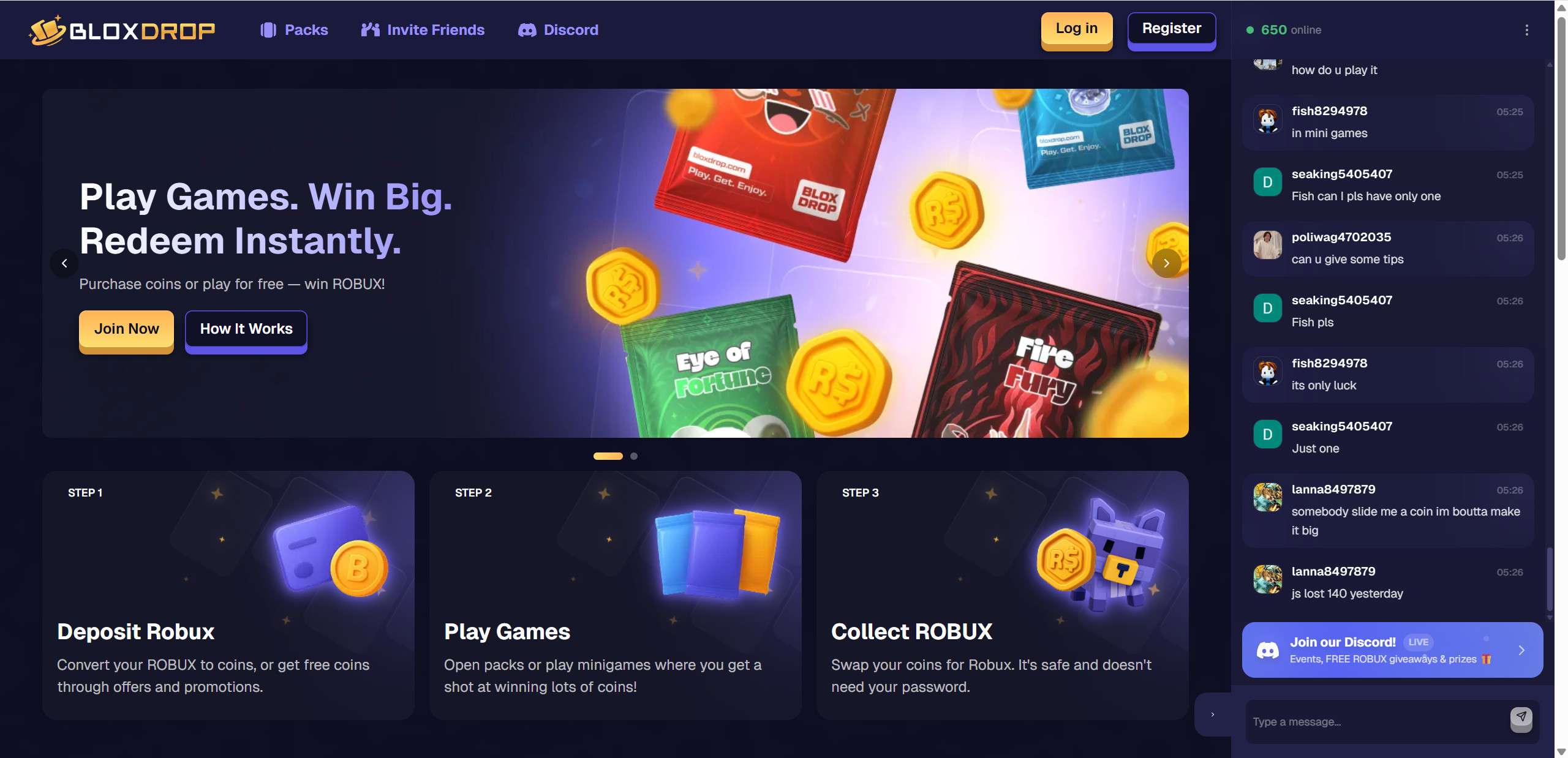
Bloxdrop.com has been appearing everywhere online, from in-game Roblox chat messages to YouTube shorts, TikTok promotions, and Discord mentions. It markets itself as a platform where users can earn or win Robux almost instantly through minigames, paid packs, reward offers, and coins. The promise is simple and attractive. Play a game, open a case, or complete an offer and receive Robux faster than through official Roblox options.
But the more a platform advertises quick rewards, especially to younger players, the more important it becomes to examine how it works, what users report, and what risks may be involved. Many Roblox players have started questioning whether Bloxdrop is safe, reliable, or potentially misleading. This article explores everything from domain transparency to payout behavior, user complaints, and game mechanics that resemble chance based systems.
By the end, you will have a clear understanding of what Bloxdrop offers, what warning signs users should notice, and why caution is strongly advised before using any unofficial Robux reward site.
Overview
Bloxdrop is not a typical reward platform. It operates in a space that attracts very large numbers of young players who want Robux quickly and without going through official channels. While some users claim to receive payouts successfully, many others describe difficulties that raise concerns about reliability, transparency, and long term safety.
Aggressive Promotion Across Roblox Games
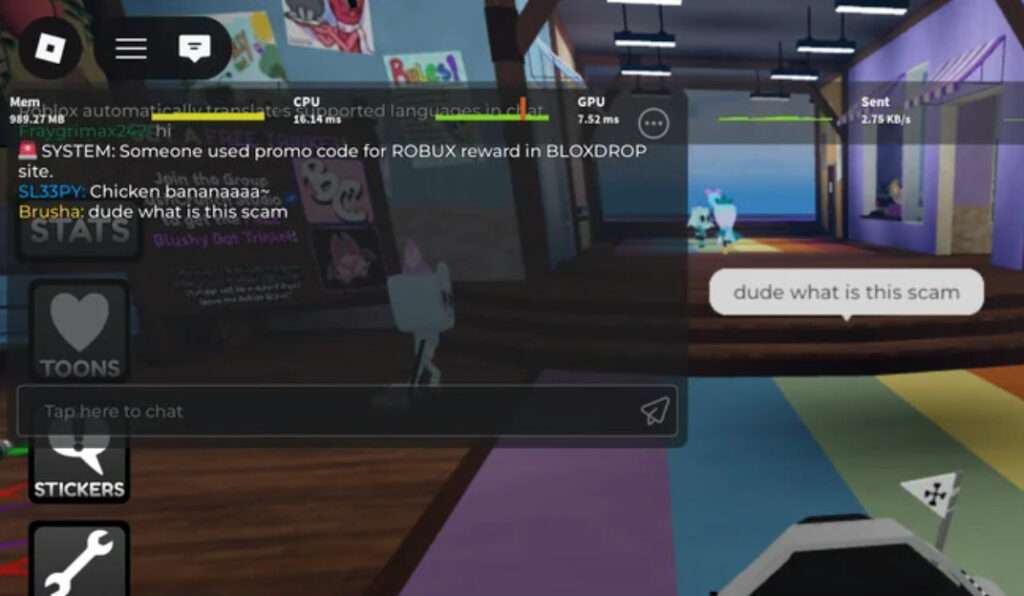
One of the first major concerns is Bloxdrop’s method of promotion. Players report that automated bots appear inside Roblox games, sending messages that advertise the website, display promo codes, or claim someone just redeemed a reward. These bots quickly leave the server before they can be reported.
This type of promotion pattern creates several risks:
It exposes younger players to external websites without supervision
It encourages impulsive behavior by promising quick rewards
It bypasses normal advertising rules within the Roblox ecosystem
It suggests heavy reliance on scripted automation rather than organic growth
Most legitimate digital services do not need to flood game chats with automated messages. When a platform repeatedly uses in-game bots to reach users, it signals that the operators prioritize rapid traffic growth over respectful marketing. From a safety perspective, this is a red flag.
Trustpilot Activity That Appears Unbalanced
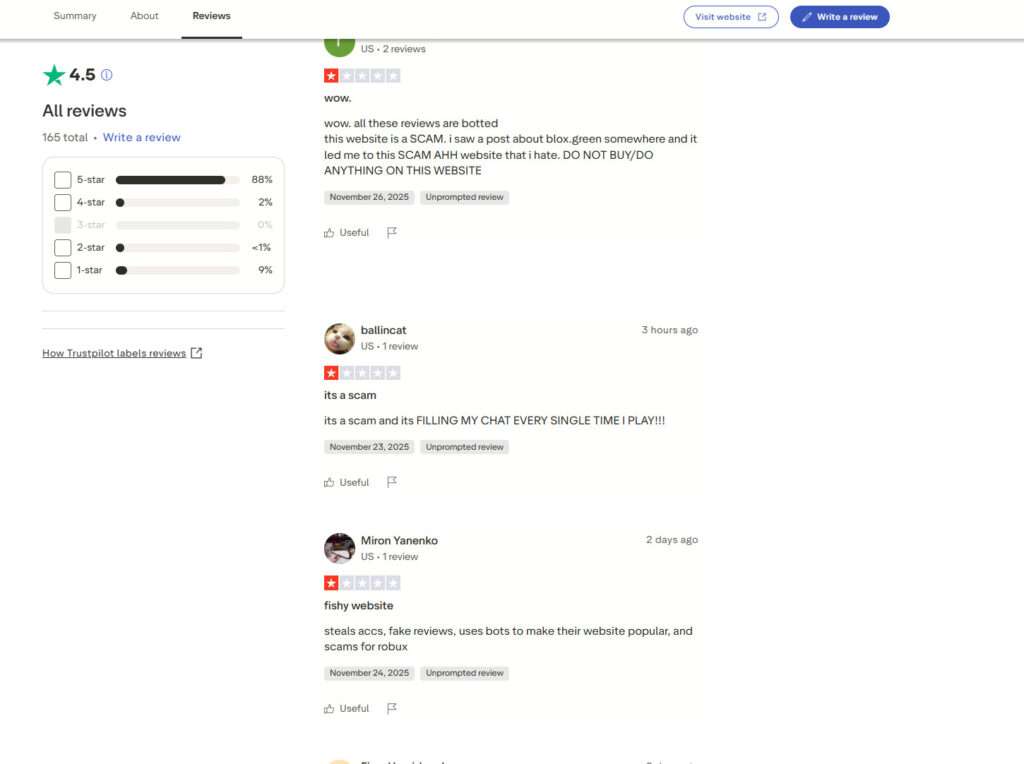
Bloxdrop currently shows a high Trustpilot score. However, the pattern of reviews raises questions. The majority of positive reviews are extremely short, generic, and similar to each other. These short reviews often sound almost identical, with vague praise and no specific details.
Examples of typical five star reviews include:
Very good site
Fast payout
It works great
Got Robux instantly
Meanwhile, negative reviews tend to be much longer, more detailed, and more consistent. These reports mention issues such as:
Delayed or missing payouts
Problems with deposits
Difficulty getting support responses
In-game spam messages promoting the site
Suspicious chat activity within the platform
Concerns about the fairness of case opening systems
These contrasting review styles create an imbalance that careful readers should pay attention to. A healthy review ecosystem always contains a mix of detailed positive and negative experiences. When positive reviews feel repetitive while negative reviews are rich in detail, it suggests the possibility of boosted reputation rather than organic satisfaction.
In-Site Chat Activity That Appears Automated
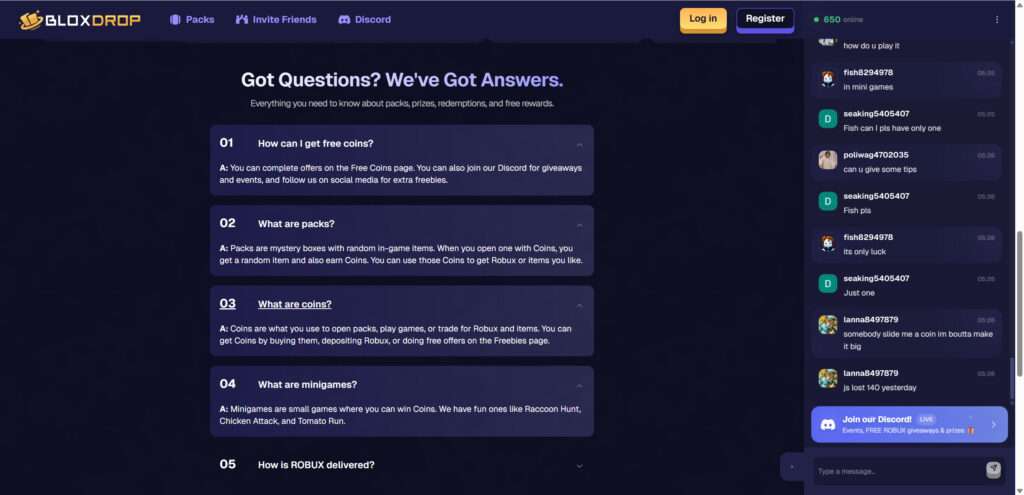
Bloxdrop features a live chat feed on the right side of the website, showing hundreds of users talking at any given moment. However, many messages follow repetitive patterns such as:
Asking for coins
Claiming they won large amounts
Talking about doubling someone’s coin
Sharing simplistic reactions
The speed and style of these messages resemble automated scripts rather than normal user conversations. This type of artificial social proof is commonly used by high pressure reward platforms to create an illusion of activity and success, even when real user interactions might be minimal.
The presence of automated chat behavior does not automatically prove wrongdoing, but it does raise concerns about transparency and trustworthiness.
A Gambling Style System Targeted at Younger Users
The core of Bloxdrop revolves around opening packs, spinning cases, and participating in chance based minigames. These mechanics heavily resemble gambling. Players spend coins to open cases and the result is determined by internal algorithms that users cannot verify.
Important safety concerns include:
Younger players may develop gambling tendencies
Users may spend more coins than intended
Odds are not regulated or publicly disclosed
Rare wins can psychologically encourage further spending
These types of systems are not inherently illegal, but they require careful examination when they involve younger audiences who may not understand the risks.
Reports of Payout Problems
While some users state that they received Robux successfully, many others report unresolved issues. These include:
Pending withdrawals that stay stuck
Missing Robux after completing offers
Low support responsiveness
Repeated verification requests
Unclear payout timelines
A platform can still appear active and legitimate while failing to deliver consistent payouts. Mixed user experiences are one of the strongest reasons people urge caution.
Why Players Should Be Careful
Bloxdrop offers attractive promises and uses polished visuals to look trustworthy. But a combination of:
Automated promotion
Repetitive positive reviews
Complex withdrawal requirements
Chance based mechanics
New domain age
Lack of company transparency
Repeated user complaints
creates a situation where it is wise to approach the platform cautiously. This does not mean the site is entirely nonfunctional, but it does mean that users should protect themselves and carefully consider the risks before depositing Robux or linking accounts.
How the Operation Works
This section provides a detailed, step by step breakdown of how the Bloxdrop system operates, why it draws in so many users, and how the platform benefits even when it pays out a small percentage of players.
Step 1: Attraction Through Bots, Ads, and Social Media
Bloxdrop’s first objective is to get users onto the site. It does this using several aggressive techniques:
Bots inside Roblox games
Sponsored influencer videos
TikTok clips showing fake winnings
Discord promotional messages
YouTube shorts showing instant Robux withdrawals
Most Roblox players encounter Bloxdrop involuntarily when chat bots flood game lobbies with promo codes or discount offers. This is not standard marketing. It is closer to spam networking, which is commonly used by scam websites.
Step 2: The Initial Signup Process
Once a user arrives on the site, the design and atmosphere are intentionally friendly, colorful, and familiar. It looks like a typical gaming platform. This reduces suspicion. The signup process usually requires:
Linking your Roblox username
Creating an account on Bloxdrop
Agreeing to the terms
The site does not normally request your Roblox password, but some versions of these platforms in the past have been known to run phishing variations. Even without requesting a password, linking your username is enough for them to track participation and direct payouts if needed.
Step 3: The Introduction to Coins and Packs
The platform uses its own virtual currency, called coins. To get coins, users can:
Deposit Robux
Deposit money with card or crypto
Complete offers
Enter promo codes
Participate in in-site minigames
Once users earn coins, they can spend them on:
Packs
Cases
Minigames
Chance based drops
All of these function similarly to gambling mechanics. You pay coins to open a case, and the result is determined by internal programmed odds. These odds are not certified by any regulatory authority, which means the site can freely manipulate outcomes.
Step 4: The Illusion of Frequent Wins
Sites like Bloxdrop rely on a psychological effect that makes players believe they are winning frequently. This is accomplished by:
Showing win animations
Highlighting big wins in the chat
Allowing small early wins
Offering bonus coins for the first deposit
However, the algorithm is built to favor the platform long term. Players may win a few times at the beginning, but once they spend real Robux or money, the odds typically decrease. This is similar to casino behavior where early wins encourage more investment.
Step 5: Withdrawal Requirements
When users want to withdraw Robux, they encounter the next step of the system. Withdrawals require:
Completing promo tasks
Reaching a certain coin balance
Waiting periods
Completing verification steps
Entering your Roblox username
Joining a specific gamepass group
These additional steps create friction and reduce the number of users who successfully withdraw. In many cases, users report that withdrawals:
Stay pending
Require extra fees
Are denied due to unspecified reasons
Never arrive
Some users do receive payouts. This is intentional. Providing a small percentage of successful withdrawals keeps the site looking legitimate and encourages users to submit positive reviews.
Step 6: The Economic Model Behind the Platform
Reward sites tend to operate using three main profit channels:
1. Affiliate reward offers
The site earns money when users complete tasks from advertisers. These tasks generate revenue for Bloxdrop. The user, however, may not receive the promised Robux because the site keeps most of the revenue.
2. Case opening losses
Players often spend more money on coins than they receive in return. The gambling system is designed to favor the house.
3. Deposits
Some users deposit Robux directly into the system. These deposits can be used to fund small payouts for others, creating a cycle where a few are paid to make the platform look legitimate.
Step 7: Why the Website Appears Legit at First
The website looks legitimate for several reasons:
Professional graphic design
Well structured interface
Fast loading speeds
Paid advertisements
A Discord community
A high Trustpilot rating
Visible payouts in chat
Streamer promotions
These layers of legitimacy help hide the risks. However, many scam operations today invest in polished design. Professional visuals do not guarantee trustworthiness.
Step 8: The Real Secret of the System
The main reason Bloxdrop is controversial is that it does not need to scam every user. It only needs to:
Pay a small portion of users
Create the illusion of large consistent payouts
Attract massive traffic from Roblox players
Profit from deposits and affiliate tasks
Use a percentage of revenue to pay a few winners
This hybrid model allows the site to continue operating without being considered fully fake. It is not a total scam, but it is not a transparent, regulated, or reliable platform either.
Step 9: Why Many Users Lose More Than They Gain
Most users do not receive meaningful payouts. This happens because:
Odds are unfavorable
Withdrawals fail
Tasks do not credit properly
Verification loops delay payments
The system wants users to deposit repeatedly
Players end up spending more time and money than they gain, which is the hallmark of a high risk reward operation.
What To Do If You Encounter Problems
If you attempted to use Bloxdrop and experienced missing payouts, delayed withdrawals, suspicious activity, or account problems, take the following steps to protect your Roblox account and financial information.
1. Strengthen Your Roblox Account Security
Even if the website never requested your password, it is wise to secure your account. Take the following actions:
Change your Roblox password
Enable two factor authentication
Review your account’s authorized devices
Check your purchase history
This prevents any potential risk of unauthorized access.
2. Stop Interacting With the Platform
If you notice any warning signs such as:
Pending withdrawals
Missing Robux
Repeated verification loops
Requests to deposit more
Confusing payout instructions
Discontinue all activity immediately.
3. Contact Your Bank or Payment Provider
If you paid using a card or payment app, contact your financial institution. Explain that:
You paid for digital goods
The goods were not delivered
You would like to dispute the transaction
Chargebacks for non delivered digital goods are often successful.
4. Warn Friends or Children
Many affected users are younger players. If a child in your household used the site:
Explain how these sites work
Encourage them not to trust quick reward promises
Warn their friends
Prevent them from linking accounts to unofficial platforms
Education is one of the most important protection methods.
5. Report In-Game Spam
Roblox does not approve third party reward platforms. If you see Bloxdrop messages inside games:
Report the message
Report the user or bot if visible
Notify Roblox Support
Roblox regularly removes accounts that spam external promotions.
6. Reset Browser Settings
Some reward websites prompt users to:
Enable notifications
Install extensions
Visit numerous external pages
Remove any suspicious browser extensions and clear your cache.
Is Your Device Infected? Scan for Malware
If your computer or phone is slow, showing unwanted pop-ups, or acting strangely, malware could be the cause. Running a scan with Malwarebytes Anti-Malware Free is one of the most reliable ways to detect and remove harmful software. The free version can identify and clean common infections such as adware, browser hijackers, trojans, and other unwanted programs.
Malwarebytes works on Windows, Mac, and Android devices. Choose your operating system below and follow the steps to scan your device and remove any malware that might be slowing it down.
Malwarebytes for WindowsMalwarebytes for MacMalwarebytes for Android
Run a Malware Scan with Malwarebytes for Windows
Malwarebytes stands out as one of the leading and widely-used anti-malware solutions for Windows, and for good reason. It effectively eradicates various types of malware that other programs often overlook, all at no cost to you. When it comes to disinfecting an infected device, Malwarebytes has consistently been a free and indispensable tool in the battle against malware. We highly recommend it for maintaining a clean and secure system.
Download Malwarebytes
Download the latest version of Malwarebytes for Windows using the official link below. Malwarebytes will scan your computer and remove adware, browser hijackers, and other malicious software for free.
(The above link will open a new page from where you can download Malwarebytes)
Install Malwarebytes
After the download is complete, locate the MBSetup file, typically found in your Downloads folder. Double-click on the MBSetup file to begin the installation of Malwarebytes on your computer. If a User Account Control pop-up appears, click “Yes” to continue the Malwarebytes installation.
Follow the On-Screen Prompts to Install Malwarebytes
When the Malwarebytes installation begins, the setup wizard will guide you through the process.
You’ll first be prompted to choose the type of computer you’re installing the program on—select either “Personal Computer” or “Work Computer” as appropriate, then click on Next.
Malwarebytes will now begin the installation process on your device.
When the Malwarebytes installation is complete, the program will automatically open to the “Welcome to Malwarebytes” screen.
On the final screen, simply click on the Open Malwarebytes option to start the program.
Enable “Rootkit scanning”.
Malwarebytes Anti-Malware will now start, and you will see the main screen as shown below. To maximize Malwarebytes’ ability to detect malware and unwanted programs, we need to enable rootkit scanning. Click on the “Settings” gear icon located on the left of the screen to access the general settings section.
In the settings menu, enable the “Scan for rootkits” option by clicking the toggle switch until it turns blue.
Now that you have enabled rootkit scanning, click on the “Dashboard” button in the left pane to get back to the main screen.
Perform a Scan with Malwarebytes.
To start a scan, click the Scan button. Malwarebytes will automatically update its antivirus database and begin scanning your computer for malicious programs.
Wait for the Malwarebytes scan to complete.
Malwarebytes will now scan your computer for browser hijackers and other malicious programs. This process can take a few minutes, so we suggest you do something else and periodically check the status of the scan to see when it is finished.
Quarantine detected malware
Once the Malwarebytes scan is complete, it will display a list of detected malware, adware, and potentially unwanted programs. To effectively remove these threats, click the “Quarantine” button.
Malwarebytes will now delete all of the files and registry keys and add them to the program’s quarantine.
Restart your computer.
When removing files, Malwarebytes may require a reboot to fully eliminate some threats. If you see a message indicating that a reboot is needed, please allow it. Once your computer has restarted and you are logged back in, you can continue with the remaining steps.
Once the scan completes, remove all detected threats. Your Windows computer should now be clean and running smoothly again, free of trojans, adware, and other malware.
If your current antivirus allowed this malicious program on your computer, you may want to consider purchasing Malwarebytes Premium to protect against these types of threats in the future. If you are still having problems with your computer after completing these instructions, then please follow one of the steps:
Malwarebytes for Mac is an on-demand scanner that can destroy many types of malware that other software tends to miss without costing you absolutely anything. When it comes to cleaning up an infected device, Malwarebytes has always been free, and we recommend it as an essential tool in the fight against malware.
Download Malwarebytes for Mac.
You can download Malwarebytes for Mac by clicking the link below.
When Malwarebytes has finished downloading, double-click on the setup file to install Malwarebytes on your computer. In most cases, downloaded files are saved to the Downloads folder.
Follow the on-screen prompts to install Malwarebytes.
When the Malwarebytes installation begins, you will see the Malwarebytes for Mac Installer which will guide you through the installation process. Click “Continue“, then keep following the prompts to continue with the installation process.
When your Malwarebytes installation completes, the program opens to the Welcome to Malwarebytes screen. Click the “Get started” button.
Select “Personal Computer” or “Work Computer”.
The Malwarebytes Welcome screen will first ask you what type of computer are you installing this program, click either Personal Computer or Work Computer.
Click on “Scan”.
To scan your computer with Malwarebytes, click on the “Scan” button. Malwarebytes for Mac will automatically update the antivirus database and start scanning your computer for malware.
Wait for the Malwarebytes scan to complete.
Malwarebytes will scan your computer for adware, browser hijackers, and other malicious programs. This process can take a few minutes, so we suggest you do something else and periodically check on the status of the scan to see when it is finished.
Click on “Quarantine”.
When the scan has been completed, you will be presented with a screen showing the malware infections that Malwarebytes has detected. To remove the malware that Malwarebytes has found, click on the “Quarantine” button.
Restart computer.
Malwarebytes will now remove all the malicious files that it has found. To complete the malware removal process, Malwarebytes may ask you to restart your computer.
After scanning, delete any detected threats. Your Mac should now be free from adware, unwanted extensions, and other potentially harmful software.
If your current antivirus allowed a malicious program on your computer, you might want to consider purchasing the full-featured version of Malwarebytes Anti-Malware to protect against these types of threats in the future. If you are still experiencing problems while trying to remove a malicious program from your computer, please ask for help in our Mac Malware Removal Help & Support forum.
Run a Malware Scan with Malwarebytes for Android
Malwarebytes for Android automatically detects and removes dangerous threats like malware and ransomware so you don’t have to worry about your most-used device being compromised. Aggressive detection of adware and potentially unwanted programs keeps your Android phone or tablet running smooth.
Download Malwarebytes for Android.
You can download Malwarebytes for Android by clicking the link below.
In the Google Play Store, tap “Install” to install Malwarebytes for Android on your device.
When the installation process has finished, tap “Open” to begin using Malwarebytes for Android. You can also open Malwarebytes by tapping on its icon in your phone menu or home screen.
Follow the on-screen prompts to complete the setup process
When Malwarebytes will open, you will see the Malwarebytes Setup Wizard which will guide you through a series of permissions and other setup options. This is the first of two screens that explain the difference between the Premium and Free versions. Swipe this screen to continue. Tap on “Got it” to proceed to the next step. Malwarebytes for Android will now ask for a set of permissions that are required to scan your device and protect it from malware. Tap on “Give permission” to continue. Tap on “Allow” to permit Malwarebytes to access the files on your phone.
Update database and run a scan with Malwarebytes for Android
You will now be prompted to update the Malwarebytes database and run a full system scan.
Click on “Update database” to update the Malwarebytes for Android definitions to the latest version, then click on “Run full scan” to perform a system scan.
Wait for the Malwarebytes scan to complete.
Malwarebytes will now start scanning your phone for adware and other malicious apps. This process can take a few minutes, so we suggest you do something else and periodically check on the status of the scan to see when it is finished.
Click on “Remove Selected”.
When the scan has been completed, you will be presented with a screen showing the malware infections that Malwarebytes for Android has detected. To remove the malicious apps that Malwarebytes has found, tap on the “Remove Selected” button.
Restart your phone.
Malwarebytes for Android will now remove all the malicious apps that it has found. To complete the malware removal process, Malwarebytes may ask you to restart your device.
When the scan is finished, remove all detected threats. Your Android phone should now be free of malicious apps, adware, and unwanted browser redirects.
If your current antivirus allowed a malicious app on your phone, you may want to consider purchasing the full-featured version of Malwarebytes to protect against these types of threats in the future. If you are still having problems with your phone after completing these instructions, then please follow one of the steps:
Restore your phone to factory settings by going to Settings > General management > Reset > Factory data reset.
After cleaning your device, it’s important to protect it from future infections and annoying pop-ups. We recommend installing an ad blocker such as AdGuard. AdGuard blocks malicious ads, prevents phishing attempts, and stops dangerous redirects, helping you stay safe while browsing online.
The Bottom Line
Bloxdrop is a highly visible Robux reward platform that attracts many users through fast paced advertising, in-game promotions, and social media presence. While some users claim they received payouts, many others describe issues that raise significant concerns. These include inconsistent withdrawals, complex verification steps, automated chat behavior, aggressive promotion through bots, and gambling style case opening mechanics aimed at younger audiences.
The platform’s limited transparency, unusual review patterns, and repeated reports of payout problems make it necessary to approach it with caution. Bloxdrop presents itself with a polished design and strong marketing strategies, but surface level polish should never replace user safety.
The most reliable and secure way to purchase Robux is through official Roblox channels. Any external platform that promises quick and easy rewards introduces unnecessary risk. For safety, privacy, and account protection, users are strongly encouraged to avoid depositing Robux or money into any unofficial reward site.
Hello! I'm Lapain Epuran, your go-to source for detailed and honest product reviews. From tech gadgets to miracle cures, I provide insights to help you make informed choices. Join me as we discover what's truly worth your time and money.