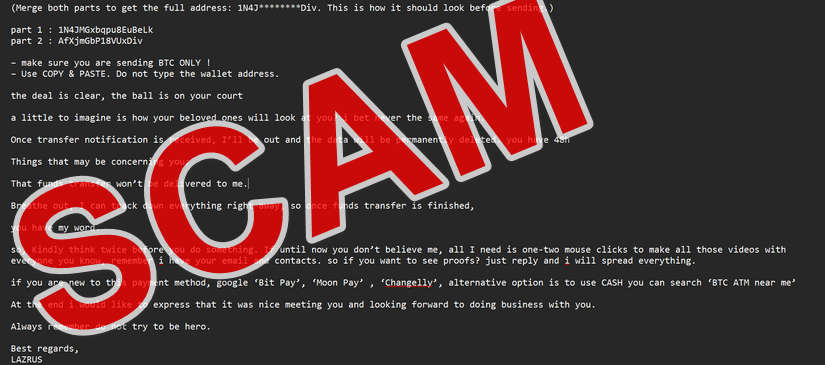
It begins with an email that seems oddly personal. The sender introduces themselves casually: “Hello there. I know that your are and this email is yours.” The message claims the sender, someone named LAZRUS, has hacked your device, captured your webcam, and recorded you in compromising situations. The email says your family, colleagues, and friends will see this supposed footage unless you pay $1,200 in Bitcoin within 48 hours.
If you’ve received this message, you’re not alone. This is part of a growing global campaign known as the LAZRUS Email Scam, a form of sextortion email that preys on fear, shame, and confusion. The scammer uses psychological manipulation, technical-sounding language, and urgency to pressure victims into sending cryptocurrency payments.
This guide will explain everything you need to know — what the LAZRUS email scam is, how it works, what you should do if you’ve received it, and how to protect yourself from future threats. Once you understand the mechanics behind it, the fear disappears, and the power returns to you.
Scam Overview
The LAZRUS email scam is a type of sextortion scam that combines fake hacking claims, emotional manipulation, and demands for cryptocurrency. The message appears threatening, but in nearly every documented case, it is entirely fabricated. No actual hacking, filming, or spreading of malware occurred.
How the Scam Presents Itself
The email usually arrives from a spoofed email address, which means it might appear as if it came from your own inbox. The message often contains the following elements:
A familiar greeting like “hello there” or “I know that your are and this email is yours.”
Claims of hacking your device, accessing your files, and spreading malware across your network.
Explicit accusations, such as recording you through your webcam while visiting adult websites.
A ransom demand — typically $1,200 in Bitcoin.
Detailed payment instructions, often referencing legitimate services like MoonPay, BitPay, or BTC ATMs.
A strict 48-hour deadline.
Threats of exposure, saying your family, friends, or coworkers will see the alleged footage.
An intimidating signature — “Best regards, LAZRUS.”
The scam’s purpose is to shock and panic the recipient. The attacker relies on embarrassment and fear to override rational thinking. Victims who believe the story may rush to pay, hoping to make the problem disappear.
The Truth Behind the Threat
In reality, the scammer does not have any video, data, or access to your computer. The claims about remote hacking and spreading ransomware are completely false. The attacker uses mass email tools to send identical messages to thousands of people at once. These emails are designed to look personal but are entirely automated.
The scam’s success relies on how people react emotionally — not on technical skill. Even well-informed users can feel frightened or violated when they read a message that mentions their device, internet history, or webcam. This is what makes sextortion scams so effective.
Why People Fall for It
The LAZRUS email scam exploits human psychology more than technology. Its effectiveness depends on three emotional triggers:
Fear of exposure: The threat of having intimate or embarrassing information shared publicly is powerful, even when unfounded.
Urgency: The 48-hour countdown creates panic and discourages the recipient from seeking help or verifying facts.
Shame: The explicit language used in the email taps into feelings of guilt or embarrassment, even if the recipient has done nothing wrong.
By combining these elements, scammers manipulate victims into making quick, irrational decisions — primarily sending money.
Common Variations of the Scam
There are multiple versions of the LAZRUS email scam in circulation. Some variants use slightly different names or remove the “LAZRUS” signature but follow the same formula. Others alter payment amounts or add small details like location-based hints to make the threat feel more personal. Common variations include:
“I recorded you using your webcam.”
“I hacked your router and have full access.”
“Your private moments will be revealed unless you pay.”
“I spread myself across all your devices.”
Each variant uses the same psychological weapon: fear. The goal remains the same — to pressure you into transferring Bitcoin quickly.
Why Bitcoin?
Bitcoin is the preferred payment method for these scams because it is pseudonymous and irreversible. Once you send Bitcoin to the provided wallet, the funds cannot be retrieved. The blockchain records the transaction, but identifying who controls the wallet is difficult. Scammers move funds through multiple wallets or use “mixers” to hide the trail. This makes it nearly impossible for victims to recover their money.
The Role of Leaked Data
Many victims ask, “How did they get my email?” The answer is simple: your email address likely came from a data breach. Over the years, countless websites have been hacked, exposing millions of email addresses and passwords. Scammers purchase or download these breach lists to use in bulk campaigns.
Sometimes, the attacker includes an old password in the email to make the threat feel real. However, that password usually came from a years-old breach unrelated to your current accounts. The inclusion of real information is a social-engineering trick, not proof of hacking.
The Scope of the Scam
Reports of the LAZRUS email scam have surfaced worldwide. Victims have been found in North America, Europe, Asia, and Australia. Law enforcement agencies, including the FBI, the U.K. National Cyber Security Centre (NCSC), and the Australian Cyber Security Centre (ACSC), have confirmed that these scams are part of large-scale international operations.
Sextortion scams like LAZRUS are often managed by organized cybercrime groups or individuals operating out of countries with limited extradition laws. The same email template may be used by hundreds of different scammers.
Why You Should Never Pay
No matter how convincing the email sounds, you should never pay the ransom. Here’s why:
There is no video or data to delete.
Paying encourages the scammer to target you again.
Your payment may be shared among other cybercriminals.
Law enforcement cannot refund cryptocurrency payments.
Instead, your energy is better spent strengthening your accounts, reporting the scam, and learning how to recognize similar threats in the future.
How the Scam Works
To defeat the LAZRUS email scam, it helps to understand exactly how it’s built and deployed. The following is a detailed breakdown of the process from start to finish.
Step 1: Data Harvesting
The scam begins with collecting email addresses. Cybercriminals gather massive databases of addresses from:
Data breaches (such as those involving social media, retail, or entertainment sites)
Public records and social networks
Email scraping tools that collect visible addresses online
Stolen marketing databases
These lists can contain millions of entries. Some include additional information like names, passwords, or company affiliations. Scammers buy, trade, or download these lists freely.
Step 2: Message Creation
Once scammers have their target list, they craft the email template. The LAZRUS version is a polished variation of earlier sextortion scams. It includes several clever design features:
A conversational opening: “Hello there. I know that your are and this email is yours.”
Technical-sounding claims: “I managed to access your device and spread myself across all your devices.”
Moral pressure: “I am sure your family, colleagues, and all your contacts would be interested in joining me to watch.”
A fake sense of mercy: “I am not that kind of person.”
Clear instructions: How to buy and send Bitcoin.
Urgency and finality: “You have 48h” and “Always remember do not try to be hero.”
Every sentence is designed to elicit an emotional reaction rather than provide facts.
Here is how the email looks:
hello there
I know that your are and this email is yours
You might be wondering how I know this.
let me get straight to my point, a while ago i managed to access to your device and from there i spread myself across all the devices.
during this period i have managed to collect your internet history, and captured webcam footage of you playing with yourself while watching high controversial genre adult movies. ( with audio of course )
we both know what i’am talking about.
I believe you are starting to understand the gravity of this situation. I am sure your family, colleagues, and all your contacts would be interested in joining me to watch such disgraceful footage. My initial plan was to release this data and expose this side of you, which cannot be undone. However, I am not that kind of person.
Here is the deal: a small payment to save a reputation that has taken years to build.
transfer exactly $1200 worth of bit.coins to the wallet below.
For security purposes, the address is split into two parts that you need to combine:
(Merge both parts to get the full address: 1N4J********Div. This is how it should look before sending.)
part 1 : 1N4JMGxbqpu8EuBeLk part 2 : AfXjmGbP18VUxDiv
– make sure you are sending BTC ONLY ! – Use COPY & PASTE. Do not type the wallet address.
the deal is clear, the ball is on your court
a little to imagine is how your beloved ones will look at you? i bet never the same again.
Once transfer notification is received, I’ll be out and the data will be permanently deleted. you have 48h
Things that may be concerning you:
That funds transfer won’t be delivered to me.
Breathe out, I can track down everything right away, so once funds transfer is finished,
you have my word.
so, Kindly think twice before you do something. If until now you don’t believe me, all I need is one-two mouse clicks to make all those videos with everyone you know, remember i have your email and contacts. so if you want to see proofs? just reply and i will spread everything.
if you are new to this payment method, google ‘Bit Pay’, ‘Moon Pay’ , ‘Changelly’, alternative option is to use CASH you can search ‘BTC ATM near me’
At the end i would like to express that it was nice meeting you and looking forward to doing business with you.
Always remember do not try to be hero.
Best regards, LAZRUS
Step 3: Email Spoofing and Distribution
To send the email, scammers use spoofing software or hacked email servers. Spoofing allows the attacker to change the “From” field so that the email appears to come from your own address or a legitimate-looking account. This makes victims believe their inbox has been compromised.
The scammer then uses bulk email software or botnets to distribute the message to hundreds of thousands of recipients. The cost to send these emails is minimal, but the potential profit is enormous. Even if 1 in 10,000 people pay the ransom, the scammers make thousands of dollars.
Step 4: Psychological Triggering
The moment the recipient opens the email, the scam begins to work. The tone of the message is designed to trigger:
Fear — of being exposed or judged.
Shame — over private online behavior.
Urgency — because of the short deadline.
Isolation — because the scammer warns not to tell anyone.
Scammers know that fear and shame cause people to act impulsively. Victims may delete their browsing history, cover their webcams, or immediately try to send Bitcoin to make the problem disappear.
Step 5: Payment and Tracking
Each email contains a unique Bitcoin address. This allows scammers to track which victims have paid. Once payment is received, the scammer transfers the funds through multiple wallets or exchanges, often across different cryptocurrencies, to hide their identity.
Victims rarely hear from the scammer again after payment. Occasionally, scammers send a brief follow-up message claiming the “data has been deleted,” but this is only to reassure and silence the victim.
Step 6: Secondary Targeting
Victims who pay are often added to a “responsive” list that scammers sell to other criminals. This list includes people who have already sent money and may be more likely to pay again. New scams — often different in theme but identical in structure — target these individuals weeks or months later.
Step 7: Repeat Campaigns
The LAZRUS email scam continues in waves. When one campaign loses effectiveness, scammers slightly alter the text, change Bitcoin wallets, and start again. Automated systems handle the distribution, while human operators collect payments and manage crypto transfers.
Step 8: Lack of Real Hacking
Despite the detailed claims, LAZRUS scammers almost never hack anyone. Real hacking requires skill, time, and tools — all unnecessary for this type of scam. Instead, the attackers rely on social engineering — convincing you they’ve done something they haven’t.
Even the claim “I spread myself across all your devices” is nonsense. It’s technical gibberish intended to sound credible. Most people don’t understand how malware actually works, and scammers exploit that lack of knowledge.
Step 9: Exploiting Shame and Secrecy
The final psychological lever is shame. Many victims hesitate to report the scam because they feel embarrassed, even though they’ve done nothing wrong. This silence benefits scammers by reducing public awareness and making others more vulnerable.
Step 10: Law Enforcement and Traceability
Law enforcement agencies around the world monitor these scams, track wallet addresses, and sometimes identify criminal networks. However, because attackers operate internationally and payments are in cryptocurrency, arrests are rare. The most effective deterrent is education and awareness — understanding that the scam is fake and refusing to pay.
What to Do If You Have Fallen Victim to This Scam
If you’ve received the LAZRUS email or a similar sextortion message, follow these steps immediately. Each action strengthens your security and limits further risk.
1. Do Not Reply
Do not respond to the email under any circumstances. Engaging confirms that your address is active and could lead to additional threats or demands.
2. Do Not Pay
No matter how real the email feels, never send money. The scammer does not have any footage or data to delete. Paying only encourages them and other scammers.
3. Document Everything
Take screenshots of the entire email, including the sender’s address and Bitcoin wallet. Save a copy of the message with its full headers (most email providers allow you to view these details). This evidence will be useful for reporting to authorities.
4. Run Antivirus and Anti-Malware Scans
Even though these scams usually don’t include malware, it’s wise to run a full scan on all your devices. Use reputable software like Malwarebytes, Bitdefender, or Norton to ensure your system is clean.
5. Change All Passwords
If the email includes an old password, assume it’s compromised. Change your email, banking, and social media passwords immediately. Use strong, unique passwords for each account, and consider using a password manager.
6. Enable Two-Factor Authentication (2FA)
Turn on 2FA wherever possible. This adds a second layer of protection, making it almost impossible for hackers to log in even if they have your password.
7. Check for Breaches
Visit HaveIBeenPwned.com and check if your email or passwords appear in known data breaches. If so, update those credentials and enable alerts for future exposures.
8. Report the Scam
Report the LAZRUS email scam to your local cybercrime authorities. Here’s how to do it depending on your country:
United States: Report to the FBI Internet Crime Complaint Center (IC3.gov) and the Federal Trade Commission (ReportFraud.ftc.gov).
Australia: Report to Scamwatch.gov.au or Cyber.gov.au.
Canada: Contact the Canadian Anti-Fraud Centre.
Reporting helps authorities monitor trends and issue public warnings.
9. Notify Your Email Provider
Most providers like Gmail and Outlook have a “Report phishing” option. Use it to flag the message. This helps filter similar scams from reaching others.
10. If You Paid, Take Immediate Action
If you already sent Bitcoin:
Save the transaction ID, wallet address, and payment receipt.
Report the payment to local police and your national cybercrime unit.
Contact the cryptocurrency exchange used to purchase the Bitcoin — they may cooperate with investigators.
Although Bitcoin payments are difficult to trace, coordinated reporting can help track criminal groups.
Is Your Device Infected? Scan for Malware
If your computer or phone is slow, showing unwanted pop-ups, or acting strangely, malware could be the cause. Running a scan with Malwarebytes Anti-Malware Free is one of the most reliable ways to detect and remove harmful software. The free version can identify and clean common infections such as adware, browser hijackers, trojans, and other unwanted programs.
Malwarebytes works on Windows, Mac, and Android devices. Choose your operating system below and follow the steps to scan your device and remove any malware that might be slowing it down.
Malwarebytes for WindowsMalwarebytes for MacMalwarebytes for Android
Run a Malware Scan with Malwarebytes for Windows
Malwarebytes stands out as one of the leading and widely-used anti-malware solutions for Windows, and for good reason. It effectively eradicates various types of malware that other programs often overlook, all at no cost to you. When it comes to disinfecting an infected device, Malwarebytes has consistently been a free and indispensable tool in the battle against malware. We highly recommend it for maintaining a clean and secure system.
Download Malwarebytes
Download the latest version of Malwarebytes for Windows using the official link below. Malwarebytes will scan your computer and remove adware, browser hijackers, and other malicious software for free.
(The above link will open a new page from where you can download Malwarebytes)
Install Malwarebytes
After the download is complete, locate the MBSetup file, typically found in your Downloads folder. Double-click on the MBSetup file to begin the installation of Malwarebytes on your computer. If a User Account Control pop-up appears, click “Yes” to continue the Malwarebytes installation.
Follow the On-Screen Prompts to Install Malwarebytes
When the Malwarebytes installation begins, the setup wizard will guide you through the process.
You’ll first be prompted to choose the type of computer you’re installing the program on—select either “Personal Computer” or “Work Computer” as appropriate, then click on Next.
Malwarebytes will now begin the installation process on your device.
When the Malwarebytes installation is complete, the program will automatically open to the “Welcome to Malwarebytes” screen.
On the final screen, simply click on the Open Malwarebytes option to start the program.
Enable “Rootkit scanning”.
Malwarebytes Anti-Malware will now start, and you will see the main screen as shown below. To maximize Malwarebytes’ ability to detect malware and unwanted programs, we need to enable rootkit scanning. Click on the “Settings” gear icon located on the left of the screen to access the general settings section.
In the settings menu, enable the “Scan for rootkits” option by clicking the toggle switch until it turns blue.
Now that you have enabled rootkit scanning, click on the “Dashboard” button in the left pane to get back to the main screen.
Perform a Scan with Malwarebytes.
To start a scan, click the Scan button. Malwarebytes will automatically update its antivirus database and begin scanning your computer for malicious programs.
Wait for the Malwarebytes scan to complete.
Malwarebytes will now scan your computer for browser hijackers and other malicious programs. This process can take a few minutes, so we suggest you do something else and periodically check the status of the scan to see when it is finished.
Quarantine detected malware
Once the Malwarebytes scan is complete, it will display a list of detected malware, adware, and potentially unwanted programs. To effectively remove these threats, click the “Quarantine” button.
Malwarebytes will now delete all of the files and registry keys and add them to the program’s quarantine.
Restart your computer.
When removing files, Malwarebytes may require a reboot to fully eliminate some threats. If you see a message indicating that a reboot is needed, please allow it. Once your computer has restarted and you are logged back in, you can continue with the remaining steps.
Once the scan completes, remove all detected threats. Your Windows computer should now be clean and running smoothly again, free of trojans, adware, and other malware.
If your current antivirus allowed this malicious program on your computer, you may want to consider purchasing Malwarebytes Premium to protect against these types of threats in the future. If you are still having problems with your computer after completing these instructions, then please follow one of the steps:
Malwarebytes for Mac is an on-demand scanner that can destroy many types of malware that other software tends to miss without costing you absolutely anything. When it comes to cleaning up an infected device, Malwarebytes has always been free, and we recommend it as an essential tool in the fight against malware.
Download Malwarebytes for Mac.
You can download Malwarebytes for Mac by clicking the link below.
When Malwarebytes has finished downloading, double-click on the setup file to install Malwarebytes on your computer. In most cases, downloaded files are saved to the Downloads folder.
Follow the on-screen prompts to install Malwarebytes.
When the Malwarebytes installation begins, you will see the Malwarebytes for Mac Installer which will guide you through the installation process. Click “Continue“, then keep following the prompts to continue with the installation process.
When your Malwarebytes installation completes, the program opens to the Welcome to Malwarebytes screen. Click the “Get started” button.
Select “Personal Computer” or “Work Computer”.
The Malwarebytes Welcome screen will first ask you what type of computer are you installing this program, click either Personal Computer or Work Computer.
Click on “Scan”.
To scan your computer with Malwarebytes, click on the “Scan” button. Malwarebytes for Mac will automatically update the antivirus database and start scanning your computer for malware.
Wait for the Malwarebytes scan to complete.
Malwarebytes will scan your computer for adware, browser hijackers, and other malicious programs. This process can take a few minutes, so we suggest you do something else and periodically check on the status of the scan to see when it is finished.
Click on “Quarantine”.
When the scan has been completed, you will be presented with a screen showing the malware infections that Malwarebytes has detected. To remove the malware that Malwarebytes has found, click on the “Quarantine” button.
Restart computer.
Malwarebytes will now remove all the malicious files that it has found. To complete the malware removal process, Malwarebytes may ask you to restart your computer.
After scanning, delete any detected threats. Your Mac should now be free from adware, unwanted extensions, and other potentially harmful software.
If your current antivirus allowed a malicious program on your computer, you might want to consider purchasing the full-featured version of Malwarebytes Anti-Malware to protect against these types of threats in the future. If you are still experiencing problems while trying to remove a malicious program from your computer, please ask for help in our Mac Malware Removal Help & Support forum.
Run a Malware Scan with Malwarebytes for Android
Malwarebytes for Android automatically detects and removes dangerous threats like malware and ransomware so you don’t have to worry about your most-used device being compromised. Aggressive detection of adware and potentially unwanted programs keeps your Android phone or tablet running smooth.
Download Malwarebytes for Android.
You can download Malwarebytes for Android by clicking the link below.
In the Google Play Store, tap “Install” to install Malwarebytes for Android on your device.
When the installation process has finished, tap “Open” to begin using Malwarebytes for Android. You can also open Malwarebytes by tapping on its icon in your phone menu or home screen.
Follow the on-screen prompts to complete the setup process
When Malwarebytes will open, you will see the Malwarebytes Setup Wizard which will guide you through a series of permissions and other setup options. This is the first of two screens that explain the difference between the Premium and Free versions. Swipe this screen to continue. Tap on “Got it” to proceed to the next step. Malwarebytes for Android will now ask for a set of permissions that are required to scan your device and protect it from malware. Tap on “Give permission” to continue. Tap on “Allow” to permit Malwarebytes to access the files on your phone.
Update database and run a scan with Malwarebytes for Android
You will now be prompted to update the Malwarebytes database and run a full system scan.
Click on “Update database” to update the Malwarebytes for Android definitions to the latest version, then click on “Run full scan” to perform a system scan.
Wait for the Malwarebytes scan to complete.
Malwarebytes will now start scanning your phone for adware and other malicious apps. This process can take a few minutes, so we suggest you do something else and periodically check on the status of the scan to see when it is finished.
Click on “Remove Selected”.
When the scan has been completed, you will be presented with a screen showing the malware infections that Malwarebytes for Android has detected. To remove the malicious apps that Malwarebytes has found, tap on the “Remove Selected” button.
Restart your phone.
Malwarebytes for Android will now remove all the malicious apps that it has found. To complete the malware removal process, Malwarebytes may ask you to restart your device.
When the scan is finished, remove all detected threats. Your Android phone should now be free of malicious apps, adware, and unwanted browser redirects.
If your current antivirus allowed a malicious app on your phone, you may want to consider purchasing the full-featured version of Malwarebytes to protect against these types of threats in the future. If you are still having problems with your phone after completing these instructions, then please follow one of the steps:
Restore your phone to factory settings by going to Settings > General management > Reset > Factory data reset.
After cleaning your device, it’s important to protect it from future infections and annoying pop-ups. We recommend installing an ad blocker such as AdGuard. AdGuard blocks malicious ads, prevents phishing attempts, and stops dangerous redirects, helping you stay safe while browsing online.
The Bottom Line
The LAZRUS email scam is not about hacking — it’s about fear. Scammers rely on emotional manipulation, not technical intrusion. Their goal is simple: make you panic, believe their story, and send Bitcoin. Once you understand that the threat is empty, you regain power.
If you receive this or any similar email:
Stay calm.
Do not pay.
Strengthen your security.
Report the message.
Frequently Asked Questions
1. What is the LAZRUS email scam?
The LAZRUS email scam is a type of sextortion or blackmail scam that falsely claims a hacker named “LAZRUS” has gained access to your device, recorded webcam footage of you, and plans to share it with your family or coworkers unless you pay a ransom in Bitcoin. The email typically demands around $1,200 and includes detailed instructions on how to buy and send cryptocurrency. It also threatens to expose you within 48 hours if you don’t comply. In reality, there is no hacker, no video, and no malware infection. The scam is a mass email campaign that targets thousands of people at once, using fear, urgency, and shame to pressure victims into paying.
2. Is the LAZRUS email scam real?
No, it is completely fake. Cybersecurity experts and law enforcement confirm that these emails are fabricated and that the sender has no actual access to your webcam, files, or personal data. The scammer’s goal is to scare you into making a quick payment before you have time to verify the claims. The technical details in the email, such as spreading across all your devices or tracking when you open the message, are lies designed to sound convincing. The sender did not hack your system; they simply sent the same message to thousands of email addresses.
3. Why is it called the LAZRUS scam?
The name comes from the sign-off used by the scammer in the message, “Best regards, LAZRUS.” This pseudonym may have been chosen to make the message sound personal or professional, as if it came from an individual rather than a faceless criminal. It’s worth noting that this scam has no connection to the North Korean hacking group known as “Lazarus Group.” The name LAZRUS in this case is just a fake alias used in mass sextortion emails.
4. How does the LAZRUS email scam work?
The scam follows a predictable pattern. First, scammers gather email addresses from old data breaches or public sources. Then they use automated tools to send the same threatening message to millions of recipients. The email claims that malware was installed on your computer and that the scammer recorded you through your webcam. It gives you a short time limit—usually 48 hours—to pay a ransom in Bitcoin. Once you pay, the scammer keeps the money and disappears, because there was never any recording or hacking in the first place. The entire scheme relies on fear, not technology.
5. How did the scammer get my email address?
Your email address likely came from a data breach. When websites or companies are hacked, large lists of user information—including email addresses and passwords—are leaked online. Scammers buy or download these lists and use them for phishing and extortion campaigns like the LAZRUS scam. If the email includes one of your old passwords, it probably came from one of these breaches. That does not mean your device has been hacked. You can check if your information was exposed by visiting HaveIBeenPwned.com and entering your email address.
6. Why does the email say it has footage of me?
The mention of compromising webcam footage is purely a psychological tactic. Scammers know that most people use their devices privately, and the idea of being filmed without consent is terrifying. By making this claim, they exploit natural embarrassment and fear of exposure. However, unless you have recently installed suspicious files or allowed remote access to your device, it is extremely unlikely anyone has recorded you. The claim is fake.
7. Can the scammer really access my webcam or files?
No, not from sending a single email. The LAZRUS scam message itself does not contain malware unless you click on a link or download an attachment, which you should never do. In almost every reported case, the sender has no access to webcams, files, or accounts. To be cautious, you can run a full malware scan with reputable antivirus software and review app permissions for your webcam and microphone. If you have not noticed your webcam light turning on unexpectedly, your privacy is intact.
8. Why do they demand Bitcoin?
Bitcoin is used because it is nearly impossible to reverse or trace. Once a victim sends Bitcoin to the scammer’s wallet, the transaction cannot be canceled. Criminals also use Bitcoin mixers and multiple wallets to hide their financial trail. The anonymity and irreversibility of cryptocurrency make it the preferred payment method for online extortionists.
9. Why does the scammer split the Bitcoin address into two parts?
Splitting the address into two sections is a trick used to bypass spam filters and detection systems. Many email providers automatically flag messages containing full cryptocurrency addresses as potential scams. By splitting the address and asking the victim to “merge both parts,” the scammer increases the likelihood that the message lands in your inbox rather than the spam folder.
10. What should I do if I receive the LAZRUS email?
Stay calm and take the following steps:
Do not reply or engage with the sender.
Do not send any money.
Take screenshots of the email, including the Bitcoin address.
Run a full virus and malware scan on your computer.
Change your passwords, especially if the email includes one you recognize.
Enable two-factor authentication on all your accounts.
Report the scam to your national cybercrime agency or local police.
Mark the email as phishing in your email client.
Delete the message after reporting it. By following these steps, you protect yourself and help stop the scam from spreading.
11. Should I pay the ransom?
No. Paying the ransom is the worst thing you can do. It will not make the scammer delete anything, because they never had anything to begin with. In fact, paying only confirms that you are willing to comply and may lead to future targeting. Scammers often share lists of “paying victims” with other criminals, resulting in more extortion attempts later. Law enforcement agencies worldwide strongly advise against paying.
12. What happens if I ignore the email?
If you ignore it, nothing happens. Because there is no actual video or data, the scammer cannot follow through on the threat. Many recipients who ignored the email never heard from the sender again. Once scammers realize you are not responding, they move on to other targets. The best response is no response at all.
13. Can opening the email infect my computer?
Simply opening the email will not infect your device. However, you should avoid clicking on links, downloading attachments, or copying and pasting anything from the message. Those actions could expose you to malware or phishing. If you opened the email but did not interact with it, you are safe. As a precaution, disable automatic image loading in your email settings. That prevents senders from confirming that you opened the message.
14. What if the email appears to come from my own address?
This is called email spoofing. Scammers manipulate the “From” field to make it look like the message came from your account. This trick makes victims believe their email has been hacked. In reality, the scammer did not access your inbox. You can confirm by logging in directly and checking your sent folder for any suspicious messages. If there are none, your account is secure.
15. What should I do if I already paid?
If you sent the payment, you should:
Save all evidence, including transaction IDs, wallet addresses, and screenshots of the email.
Report the incident immediately to your local police and your country’s cybercrime authority.
Notify the cryptocurrency exchange you used to buy the Bitcoin. They may be able to flag or freeze the wallet involved.
Change all your passwords and enable two-factor authentication.
Stay alert for follow-up scams. While it’s difficult to recover cryptocurrency, your report helps investigators track wallet activity and identify larger criminal networks.
16. How can I protect myself from scams like this in the future?
Follow these best practices:
Use strong, unique passwords for every account.
Turn on two-factor authentication.
Keep your software and antivirus up to date.
Avoid reusing old passwords.
Be cautious about what you share online.
Check if your email appears in known data breaches.
Learn to recognize signs of phishing and extortion scams. Good cybersecurity habits make you a far less attractive target for future attacks.
17. Who should I report the LAZRUS email scam to?
Where you report depends on your country:
In the United States, report to the FBI Internet Crime Complaint Center (IC3.gov) and the Federal Trade Commission (ReportFraud.ftc.gov).
In the United Kingdom, forward the email to report@phishing.gov.uk and contact Action Fraud.
In Australia, report to Scamwatch.gov.au or the Australian Cyber Security Centre (Cyber.gov.au).
In Canada, report to the Canadian Anti-Fraud Centre. Reporting is important even if you did not lose money. It helps law enforcement collect data and issue public warnings.
18. Why is this scam so common?
Because it’s cheap, scalable, and profitable. Sending thousands of emails costs scammers almost nothing. If even a few people send Bitcoin, they make money. The combination of fear, shame, and urgency makes sextortion scams one of the easiest ways for cybercriminals to profit without needing technical hacking skills. Until awareness becomes universal, scammers will continue to exploit this tactic.
19. How can I tell others about this scam?
The best way to stop sextortion scams is through education. Share accurate information about the LAZRUS scam with friends, family, and coworkers. Post a short warning on social media or discuss it during cybersecurity awareness sessions at work. The more people recognize this type of message, the fewer victims scammers will find.
20. What if I feel anxious or embarrassed after receiving the email?
That reaction is normal. These scams are designed to make you feel frightened and ashamed. Remember that you have done nothing wrong. The sender’s claims are false, and many others have received identical messages. If the anxiety lingers, talk to someone you trust or a professional counselor. Sharing your experience helps reduce fear and breaks the stigma around these scams.
Final Takeaway
The LAZRUS email scam is a modern form of digital extortion built on lies, not hacking. The scammer has no footage, no access to your devices, and no control over your information. Their only weapon is fear. If you receive this message, stay calm, do not pay, and report it. By understanding how this scam works and sharing what you learn, you not only protect yourself but also help others avoid becoming victims of online extortion.
Thomas is an expert at uncovering scams and providing in-depth reporting on cyber threats and online fraud. As an editor, he is dedicated to keeping readers informed on the latest developments in cybersecurity and tech.