Your phone buzzes and the message looks official.
It says your “ParkMobile Payment Reminder” is overdue, the deadline is close, and penalties are coming if you do not pay today.
The amount is small, so your brain does the math fast: “It’s under $10. I’ll just clear it.”
That is exactly the trap.
Over the last few months, a wave of “outstanding parking fees” texts has been hitting people from many different phone numbers. The messages use urgent language, official-sounding consequences, and a link that looks like it belongs to ParkMobile, but does not.
If you click, you land on a clean checkout-style page that asks for your name, address, phone number, and then your card details, including the CVV.
The “ticket” is often $4.96 or $9.96, sometimes a little more, and it is presented as a quick fix to avoid late fees and account termination.
In reality, the small charge is just the pretext.
The real goal is to harvest your payment information and personal details, so scammers can run fraudulent charges, sell your card data, or try follow-up identity scams later.
This guide breaks down what the scam looks like, how it works step by step, the red flags people miss in the moment, and exactly what to do if you clicked or paid.
Scam Overview
What the scam is trying to imitate
ParkMobile is a legitimate parking payment service used in many U.S. cities and lots.
That legitimacy is the whole reason the scam works.
The scam texts are designed to look like routine account notices: a quick reminder that you forgot to pay for parking, plus a link to fix it. They copy the tone of automated billing messages and sprinkle in consequences that sound bureaucratic enough to be believable.
A common version reads like a formal warning, with lines about “outstanding parking fees,” a “final payment deadline,” and punishments if you ignore it.
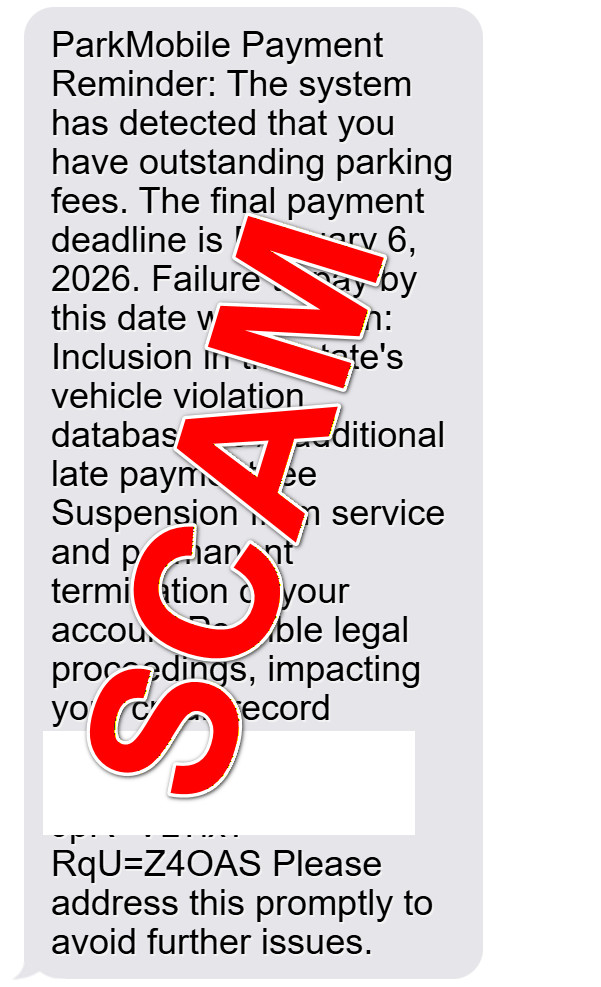
In the screenshot you provided, the message claims:
- “ParkMobile Payment Reminder”
- A final payment deadline (shown as February 6, 2026)
- Threats like inclusion in a “state’s vehicle violation database”
- A “35% additional late payment fee”
- “Suspension from service and permanent termination of your account”
- “Possible legal proceedings, impacting your credit record”
- A link that clearly is not a normal ParkMobile domain (example shown as something like
parkmobile.io-sowak.cc/...)
That structure is not accidental.
It is engineered to push you into fast compliance.
Why people receive these texts even if they never used ParkMobile
Many victims report that the message arrives out of the blue.
They do not remember unpaid parking. They might not even use the app.
That is normal in smishing campaigns (SMS phishing). Scammers blast messages to huge lists of phone numbers, betting that a percentage of people will have parked recently, be unsure, or simply pay to avoid hassle.
Parking is a perfect theme because it is plausible, common, and hard to disprove instantly.
Even people who are careful can think:
- “Maybe I forgot.”
- “Maybe I used a different lot.”
- “Maybe my spouse used my number.”
- “It’s small, I’ll just pay.”
The scam does not need you to be careless.
It only needs you to be busy.
What makes this ParkMobile scam different from older “toll fee” scams
A lot of people are familiar with fake toll texts.
This one uses a similar blueprint, but the details are tuned to parking behavior:
- The amount is usually small, often under $10.
- The threat is framed as account termination, late fees, and “vehicle violation” reporting.
- The payment page often asks for more identity data than a simple checkout should require.
Those extra fields matter.
When a site asks for name, address, and phone number before you pay a tiny “ticket,” that is a sign it is not a normal payment flow.
It is data collection.
The real goal: card data and personal information
The scam’s main objective is to steal card details.
Victims are pushed toward a payment form where they are asked to enter:
- Card number
- Expiration date
- CVV
- Billing name and address
- Sometimes ZIP code, email, or phone confirmation
Once scammers have that information, they can:
- Attempt immediate fraudulent charges, often in small “test” amounts first
- Use the card data for online purchases
- Sell the card details to other criminals
- Combine the personal details with other leaked data to build a stronger identity profile for future fraud
Even if the site only charges $4.96, that does not mean you are safe.
Small charges are often used as a “validation” step to confirm the card works.
Why the amount is often $4.96 or $9.96
The pricing is a psychological tactic.
A demand for $250 might trigger suspicion and careful verification.
A demand for $4.96 feels like a nuisance fee. It sounds like the kind of odd total you might see for “parking plus processing.”
Scammers also know that smaller amounts are:
- More likely to be approved instantly by the bank
- Less likely to trigger fraud alerts immediately
- Less likely to make the victim stop and investigate
- Less likely to be disputed quickly, since people do not notice every small charge
Sometimes the scam page will offer multiple amounts or “fee tiers,” or it will present the charge as the last step to avoid a 35% late fee.
The point is the same: get you to type your card details.
Why the link looks “kind of” right but is still fake
A major red flag in these texts is the domain.
The fake links often include the word “parkmobile,” but the real control of the domain is elsewhere.
In your screenshot, the link includes something like parkmobile.io-sowak.cc.
That is not a normal company domain.
Scammers commonly use:
- Lookalike domains that contain a brand name but end in a different domain
- Random subdomains and paths to make the link seem technical and official
- Shortened URLs that hide the final destination
- Strings of characters after the link to make it look like a secure payment session
A quick rule that prevents most losses:
If the domain is not the official domain you already know, do not enter payment information.
Why the message threatens “legal proceedings” and credit damage
This is pure pressure.
Real parking issues are handled by the city, the lot operator, or a specific citation process. A random text message warning about legal proceedings and credit record impact, tied to a tiny fee, is a classic intimidation tactic.
The scam wants you to feel:
- Urgency (deadline today)
- Fear (legal trouble, credit impact)
- Shame (you did not pay)
- Relief (a quick payment fixes everything)
Once your emotions are engaged, your verification habits drop.
Common patterns reported by victims
While the exact text varies, most versions share these features:
- A generic “Payment Reminder” subject line
- A deadline within 24 to 72 hours
- A threat of penalties or account consequences
- A link that includes “parkmobile” in the text but uses an unrelated domain
- A payment page that asks for personal details first, then card details
- A small charge amount like $4.96 or $9.96
Many people also report receiving multiple versions over time, from different numbers, sometimes even after blocking earlier ones.
That is another hallmark of mass smishing operations.
Scammers rotate phone numbers and domains constantly to evade carrier filters and takedowns.
The biggest danger: it does not end with one payment
Victims often assume the risk ends after disputing a single small charge.
But scammers rarely stop at one attempt.
Once they have your card details, they may try:
- Larger charges later
- Charges from multiple merchants
- Subscription-style billing that repeats monthly
- “Card testing” sequences where many small charges appear in a short window
And if they collected your name, address, and phone number, you may also receive:
- Follow-up scam calls pretending to be your bank’s fraud department
- “Refund processing” scams that try to get more details
- Identity verification scams using your real information to sound credible
In other words, the payment page is not just a checkout.
It is the beginning of a longer fraud chain.
How The Scam Works
Step 1: Mass texting from rotating phone numbers
This scam starts with volume.
Scammers send the same template message to thousands or millions of numbers. They use rotating phone numbers and messaging services so that blocking one sender does not stop the campaign.
Some messages arrive as standard SMS.
Others arrive as RCS-style messages (the modern chat-style protocol on some Android devices), which can make them look more official.
The sender number is not proof of legitimacy.
Numbers can be spoofed, recycled, or simply rented for short periods.
Here is how the text usually looks:
ParkMobile Payment Reminder:
The system has detected that you have outstanding parking fees.
The final payment deadline is [date]. Failure to pay by this date will result in:
Inclusion in the state’s vehicle violation database
35% additional late payment fee
Suspension from service and permanent termination of your account
Possible legal proceedings, impacting your credit record
[malicious link]Please address this promptly to avoid further issues.
Step 2: A believable hook tied to real-world behavior
Parking is a daily activity.
Most people have parked somewhere in the last week, and many do not keep perfect memory of every meter, lot, or app used.
Scammers exploit that uncertainty.
They do not need you to remember a specific incident.
They only need you to believe it is possible.
This is why the message is vague.
It usually does not include:
- A specific location
- A real citation number you can verify
- Your license plate
- A date and time tied to a real record
Instead, it uses general authority language: “system detected outstanding fees.”
That vagueness is protective for the scammer.
If they make it too specific, it becomes easier to disprove.
Step 3: Urgency and intimidation to short-circuit verification
After the hook comes the push.
The scam text creates a tight deadline and piles on consequences:
- “Final payment deadline”
- “35% additional late payment fee”
- “Suspension from service”
- “Permanent termination”
- “Legal proceedings”
- “Credit record impact”
These are not there to inform you.
They are there to stop you from thinking.
The scam wants you to do one thing: click.
Step 4: The link leads to a brand-themed phishing page
When you click, you are taken to a webpage designed to look like a quick payment portal.
Often it has:
- Simple branding or parking-themed visuals
- A “Pay Now” flow
- A neat, mobile-friendly design
- A small fee amount shown as a “ticket” or “outstanding charge”
This clean presentation is intentional.
Many people still assume that scam sites look obviously broken.
Modern phishing kits are polished. The page can look more professional than some legitimate government websites.
Step 5: Personal details are collected before payment
A key move in this scam is the order of questions.
Before you even reach the card form, the site may ask for:
- Full name
- Home address
- Phone number
- Email address
This serves two purposes.
First, it makes the process feel “official.”
Second, it gives scammers extra identity data they can reuse.
Even if your bank blocks a fraudulent transaction, your identity details still have value.
They can be paired with other breached data to build a profile that makes future scams more convincing.
Step 6: The payment form harvests card number and CVV
Next comes the real prize.
The page asks for full card details, including the CVV.
For scammers, that CVV is critical because it enables many types of card-not-present fraud.
At this point, one of two things usually happens:
- The site shows a “payment successful” message, regardless of whether a real charge occurs.
- The site processes a small charge through a shady payment setup, then shows success.
Either way, you are encouraged to believe the problem is resolved, so you do not immediately contact your bank.
Step 7: “Test charges,” then larger fraud attempts
Once scammers have working card data, they often begin with small tests.
You may see:
- A tiny charge from an unfamiliar merchant
- Several small charges close together
- Charges that look like digital services or online storefronts
If those go through, the scammer may escalate.
Larger charges might appear hours or days later, sometimes when you are less likely to notice.
Some victims report fraud waves that hit after business hours or on weekends.
The timing is deliberate.
Step 8: Domain and website rotation to avoid takedowns
Smishing campaigns are constantly moving.
As reports pile up, carriers block certain senders and security teams flag certain domains. Scammers respond by switching:
- Phone numbers
- Domains
- Website templates
- Page paths and query strings
That is why people see “ParkMobile” links pointing to many different websites.
It is not one site.
It is a rotating ecosystem.
This also explains why the scam can feel widespread: multiple groups may be running similar templates, and they copy what works.
Step 9: Follow-up scams using the information you provided
If you entered personal details, the scam can evolve.
A common follow-up pattern looks like this:
- You receive a call claiming to be from your bank’s fraud department.
- The caller already knows your name and address.
- They claim suspicious activity was detected and ask you to “verify” your card number or a one-time code.
That second step is how scammers bypass real bank protections.
They use you to authorize fraud.
If you recently fell for the parking fee scam, you are at higher risk for follow-up contact because you are now labeled as responsive.
Step 10: The victim is left with confusion and mixed signals
One reason this scam is effective is that it often creates uncertainty after the fact.
Victims may not know:
- Whether the payment went through
- Whether they truly owed a fee
- Whether their card is compromised or it was “just a small charge”
That confusion delays action.
And delays are what scammers rely on.
If you respond quickly, you can usually limit the damage.
What To Do If You Have Fallen Victim to This Scam
If you received one of these texts, treat it like a credit card compromise risk, even if the charge was small.
Use the checklist below based on what happened to you.
1) If you entered card details, contact your bank or card issuer immediately
Tell them you entered your card information on a suspected phishing site.
Ask for:
- A card replacement with a new number
- A review of recent transactions
- Blocks on card-not-present transactions if available
- A fraud note added to your account
Do not wait for a large charge.
Small “test” charges can be the warning sign.
2) If you see any unauthorized charges, dispute them right away
Most issuers let you dispute in-app, but calling is often faster for active fraud.
Ask whether the card should be fully closed and reissued.
If the scam used a subscription-style charge, also ask the issuer to block future charges from that merchant.
3) Lock down your accounts and watch for follow-up scams
If you typed personal info on the scam site, assume scammers may try again.
Be cautious of calls or texts that claim to help you fix the issue.
Your bank will not ask for:
- Your full card number
- Your online banking password
- A one-time verification code to “reverse” charges
If someone asks for those, it is almost certainly fraud.
4) If you only clicked the link but did not enter anything, still take precautions
Clicking alone is usually not enough to compromise a phone, but it can lead to tracking and increased targeting.
Do this anyway:
- Close the page
- Clear your browser history and website data for peace of mind
- Do not return to the site
- Monitor your card and accounts for the next few days if you previously had any card stored in autofill
The key is to avoid entering data.
5) Remove saved card autofill if you are worried about accidental reuse
On many phones, saved payment methods can autofill with one tap.
That is convenient, but it increases the risk of accidental entry on a fake site.
Consider temporarily disabling card autofill, especially for family members who might click quickly.
6) Freeze your credit if you shared enough personal information
If you gave your full name, address, and phone number, your risk of identity-based fraud increases.
A credit freeze is a strong protective move because it prevents new credit accounts from being opened in your name without authorization.
In the U.S., you can freeze credit with the three major bureaus:
Equifax
Experian
TransUnion
A freeze does not affect your current credit cards, but it can stop new-account fraud.
If you do not want a full freeze, consider a fraud alert instead.
7) Change passwords if you reused them or entered them anywhere
Most versions of this scam focus on card data, not passwords.
Still, if you typed any login credentials or if you tend to reuse passwords, take a minute to:
- Change your email password
- Change your banking password
- Turn on two-factor authentication where possible
Email security matters because email access can be used to reset other accounts.
8) Report the scam to improve blocking and takedowns
Reporting helps carriers and security teams shut down domains faster.
Useful reporting options include:
- Your mobile carrier’s spam reporting (often forwarding the text to 7726, which spells SPAM)
- Federal Trade Commission complaint reporting for phishing texts
- Internet Crime Complaint Center (IC3) if you lost money or shared sensitive data
- Federal Bureau of Investigation resources on scams and cybercrime
You can also notify the legitimate company being impersonated so they can warn users and coordinate takedowns.
9) Keep evidence before you delete anything
Before deleting the text, take screenshots of:
- The full message
- The sender number
- The link
- Any payment confirmation pages
- Any charges that appear on your statement
If you file disputes or reports, this documentation is helpful.
10) Watch your statements for the next 30 days
Scammers do not always act instantly.
Set a calendar reminder to review:
- Card transactions
- Bank account activity
- Email for “receipt” messages you do not recognize
- Any new login alerts
If anything looks off, act fast.
Speed is your advantage.
11) If you are helping someone else who clicked, simplify the response
For parents, older relatives, or less technical friends, keep it practical:
- Replace the card
- Dispute the charge
- Freeze credit if personal info was shared
- Report the message as spam
- Block the sender
The biggest mistake is doing nothing because the amount was “only $4.96.”
That small number is often the beginning, not the end.
The Bottom Line
The ParkMobile “outstanding parking fees” text is a classic smishing scam built for speed.
It uses a familiar brand, a believable scenario, and a small payment amount to make you act before you verify.
The link leads to a fake payment portal that collects personal details and, most importantly, your card information and CVV. The “ticket” is just the excuse. The real product is your data.
If you received one of these texts, do not click and do not pay through the link. Instead, check any real parking balance through the official app or website you already use, or through the parking operator directly.
If you already clicked or paid, move quickly: replace the card, dispute any fraud, and consider freezing your credit if you shared personal details. Most damage can be contained when you respond fast.
FAQ
Is the “ParkMobile outstanding parking fees” text real?
In most cases, no. These messages are typically smishing attempts that impersonate ParkMobile and push you to click a link and enter payment details. The biggest red flag is the link: it usually goes to an unrelated domain, not a legitimate ParkMobile site.
How can I tell if a ParkMobile text is fake?
Look for these warning signs:
- The message creates urgency with threats like legal action, credit damage, or account termination.
- It does not include verifiable details (real location, date/time, your license plate, or a real citation number).
- The link domain is strange, misspelled, or includes extra words and random characters.
- It asks for personal info (name, address, phone) before you can “pay.”
- It requests full card details including CVV for a tiny amount like $4.96 or $9.96.
I do use ParkMobile. Could I still get a scam text?
Yes. Scammers target everyone because they do not know who uses ParkMobile. If you do use it, the scam can feel more believable, which is why you should verify by opening the official app directly rather than clicking any text link.
Why is the amount usually $4.96 or $9.96?
Small amounts feel harmless and are more likely to be paid quickly. Scammers also use small charges as “test transactions” to confirm a card works before attempting larger fraud or selling the card details.
What happens if I clicked the link but did not enter any information?
Usually, you are fine. Clicking alone is typically not enough to compromise your phone. Still, you should close the page, avoid returning to it, and monitor your accounts for suspicious activity. If your browser autofilled anything and you submitted it, treat it like a data exposure.
What if I entered my card number and CVV?
Assume your card is compromised. Contact your bank or card issuer immediately, explain you entered your details on a fraudulent payment page, and request a replacement card. Then review recent transactions and dispute anything you do not recognize.
What if I paid and the site showed “success”?
A success message does not prove anything. Scam sites can display fake confirmations. Even if the $4.96 or $9.96 charge appears, the primary risk is that your card details may now be used for additional fraud.
How soon do fraudulent charges show up after I pay?
It varies. Some victims see charges within minutes or hours. Others see fraud days later. That delay is intentional in many cases, since it reduces the chance you connect the fraud to the scam page immediately.
Why does the text mention “legal proceedings” or “credit record impact”?
That language is designed to scare you into acting fast. Real parking issues are usually handled through a city, lot operator, or official citation process, not a random text demanding immediate payment through a strange link.
Can scammers do anything with my name and address if I entered them?
Yes. Those details can be used for follow-up scams, identity-based fraud attempts, or social engineering calls pretending to be your bank or a “collections department.” If you shared personal information, consider placing a fraud alert or freezing your credit.
Should I freeze my credit if I entered information on the site?
If you entered your full name, address, phone number, and any additional identifying data, a credit freeze is a strong protective step. At minimum, monitor your credit and consider a fraud alert.
I received multiple messages from different numbers. Why?
Smishing campaigns rotate phone numbers and domains to evade blocking. Blocking one sender helps, but it does not stop the overall campaign. Reporting spam to your carrier can improve filtering.
What is the safest way to check if I actually owe a parking fee?
Do not use the text link. Instead:
- Open the ParkMobile app directly (from your home screen, not from a link).
- Check your session history and any notices inside the app.
- If the message mentions a specific city or operator, verify through that operator’s official site or phone number (found independently, not inside the text).
Should I reply “STOP” to unsubscribe?
Usually not. Replying can confirm your number is active, which may increase future scam attempts. It is safer to report as spam and block the sender.
How do I report this scam?
You can:
- Report as spam in your messaging app.
- Forward the text to 7726 (SPAM) in the U.S. (supported by many carriers).
- Report the incident to the Federal Trade Commission (FTC) if you are in the U.S.
- If you lost money, consider reporting to IC3 (FBI internet crime reporting).
Can I get my money back if I paid?
Often, yes, but act quickly. Contact your card issuer, dispute the charge as unauthorized or as fraud, and request a new card number. If the charge posted as a “subscription” or repeats, ask the issuer to block future charges from the merchant.
What if the scam site captured my card but no charge appears?
That can still be dangerous. Scammers may hold the card data and use it later or sell it. Treat it as compromised and replace the card.
Will installing antivirus on my phone fix this?
This scam is primarily phishing, not malware. Antivirus can be helpful generally, but the most important actions are canceling the compromised card, disputing charges, and monitoring accounts.