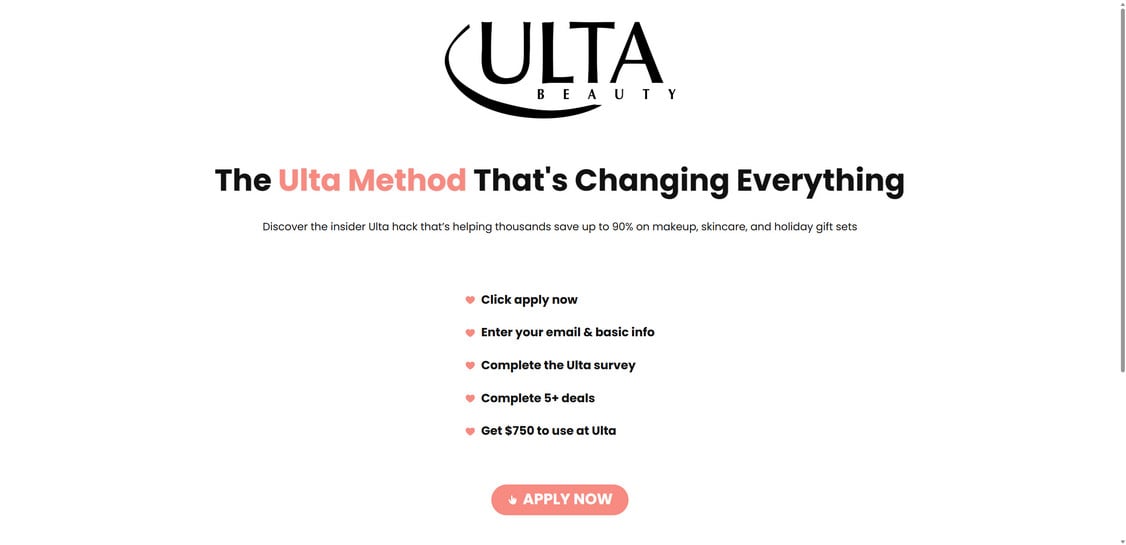
It looks like a quiet little shortcut, the kind shoppers whisper about when they find a deal too good to post publicly. A clean page, a simple checklist, and one tempting promise: follow a few steps and you could walk away with $750 to use at Ulta.
But the real story starts after you click “Apply Now.”
Because hidden inside those “easy steps” is a system designed to pull you deeper, one harmless action at a time, until you realize you’re no longer chasing a reward. You’re feeding something else.
And once you see how Ulthauls.com really works, you’ll never look at these offers the same way again.
Scam Overview
Ulthauls.com is part of a growing wave of “brand reward” and “review program” scam pages that impersonate major companies to make fake offers look legitimate. Instead of selling a product directly, these sites sell a story: a limited-time opportunity, a special method, or an exclusive promotion that supposedly unlocks a high-value reward.
In Ulthauls.com’s case, the pitch usually revolves around Ulta Beauty. The wording is designed to trigger curiosity and urgency at the same time. Phrases like “The Ulta Method That’s Changing Everything” or “insider hack” position the site as a hidden shortcut that regular shoppers do not know about.
The site typically features a simple checklist that feels harmless:
Click apply now
Enter your email and basic info
Complete the Ulta survey
Complete 5+ deals
Get $750 to use at Ulta
On paper, it reads like a straightforward reward process. In reality, the “deals” are the entire point of the site. Those deals are not there to qualify you for a real Ulta reward. They are there to generate revenue for the people running the funnel.
How these scams actually make money
Ulthauls.com is structured like an affiliate offer funnel.
That means the site earns money when a visitor completes specific actions, such as:
signing up for trial subscriptions
downloading sponsored apps
entering contact details into lead forms
registering for promotions
completing surveys routed through ad networks
sometimes entering payment info for “free trials”
Each completed step can produce an affiliate payout to the operator. Some offers pay small commissions, others pay more, especially if a user signs up for a subscription trial that requires a card.
The visitor, however, usually gets nothing. The promised Ulta reward rarely arrives, and if the site mentions delivery timing at all, it is commonly buried in vague language or fine print that gives the operator an easy exit.
Why the Ulta branding is so effective
Ulta Beauty is a recognizable name with a loyal audience. Scammers know that using a well-known brand lowers skepticism. The visitor thinks, “Ulta is huge, so maybe this is real.”
But Ulthauls.com is not Ulta. It is not a verified Ulta domain. And legitimate brand promotions do not require you to complete random third-party app installs or trial offers as a condition for receiving $750.
Real promotions also do not hide critical information, such as:
who runs the promotion
how winners are chosen
official terms and eligibility
how and when rewards are delivered
customer support contact details
legal disclaimers that match the brand
Ulthauls.com typically lacks the transparent corporate structure you would expect from a real Ulta promotion. The site is built for conversion, not accountability.
The “survey and deals” structure is a classic red flag
If you have investigated similar scams before, Ulthauls.com will feel familiar. The structure is nearly identical to many other fake reward pages:
big reward promise
quick form capture
survey questions that feel like onboarding
escalating “required deals”
endless loops where tasks “do not track”
no payout, no reward, no real support
The “Complete 5+ deals” requirement is especially revealing. The scam depends on volume. Even if only a fraction of users complete paid offers, the operator still profits because the funnel is designed to attract many clicks.
What victims often experience afterward
People who interact with these reward funnels frequently report:
increased spam emails
unwanted marketing calls or texts
being signed up for newsletters they never requested
recurring charges from trial offers they forgot about
difficulty cancelling subscriptions tied to third-party offers
being routed to more scam pages with different brand names
Even if you never enter payment information, your email and phone number alone can be valuable to lead brokers and aggressive marketing networks.
The bottom line is simple: Ulthauls.com is not a “shopping hack.” It is a monetization funnel disguised as a reward program.
How The Scam Works
Ulthauls.com uses a predictable, step-by-step flow that relies on psychology more than technology. The process is engineered to push you forward with small commitments until you are deep in the offer loop.
Here is the typical scam flow, broken down clearly.
Step 1: You see the hook
Most people find Ulthauls.com through:
social media ads
influencer-style posts
clickbait “Ulta deal” links
pop-ups or redirects from other pages
promotional pages pretending to be a limited-time Ulta offer
The hook usually emphasizes a big number, like $750, or huge discounts such as “up to 90%.” The promise is framed as easy and fast.
Step 2: The landing page builds trust fast
When you land on the page, it is designed to feel official enough, without offering details that could be fact-checked.
Common trust signals include:
Ulta-style branding
a clean layout with lots of white space
simple bullet steps
a bold “Apply Now” button
claims that thousands are using the method
quick FAQ snippets that make it feel legitimate
The goal here is not to prove legitimacy. The goal is to reduce hesitation.
Step 3: You are asked for personal information
The first real step is usually entering:
email address
name
sometimes phone number or basic demographic info
This is a key moment. Once you submit contact details, the funnel has already gained value, even if you leave immediately after.
Your information can be:
routed into marketing systems
sold to third-party lead networks
used to retarget you with ads
used to send more scam offers later
Step 4: You are pushed into a “survey” or “eligibility” step
The survey often feels harmless. It may ask questions about shopping preferences or beauty products.
This step serves two purposes:
it makes the process feel structured and official
it keeps you moving forward long enough to commit mentally
It also helps segment users for marketing.
Step 5: The “deals” requirement appears
This is where the scam reveals its true design.
You are told you must complete “5+ deals” or similar tasks, such as:
app downloads
trial subscriptions
account signups
survey completions
product trials
newsletter registrations
The language often implies these are quick and easy, like 10 to 20 minutes per deal.
In reality, many offers are time-consuming, repetitive, or loaded with conditions.
Step 6: The offer wall begins, and the rules get slippery
Once you start completing offers, you may encounter common problems:
the system says an offer did not track
you complete one task, but it still shows incomplete
you are told to complete additional offers
you are redirected to different offer providers
requirements change depending on location or device
This “tracking issue” problem is not accidental. It is a built-in escape hatch. It allows the operator to keep users completing tasks without ever being obligated to deliver a reward.
Step 7: Some offers try to pull in payment details
This is a major danger point.
Certain offers are “free trials” that require a credit card. Many convert into paid subscriptions automatically after a short period.
Even if the site claims “no purchase necessary,” the third-party offers may still require payment details.
That is where real financial harm can happen.
Step 8: The reward never arrives, or it becomes impossible to claim
When users reach the end, they are often met with:
vague messaging about reward delivery
instructions to “wait for verification”
more requirements
dead-end pages
missing support contact
endless loops
This is where many people realize the truth: there is no $750 Ulta reward coming.
The entire flow was built to keep you completing paid actions until you quit.
What To Do If You Have Fallen Victim to This Scam
If you interacted with Ulthauls.com, the right response is calm, practical, and fast. The goal is to reduce future risk and undo any damage from the offers you completed.
1. Stop engaging with the site and any linked offer pages
Close all tabs and do not return to “finish” the process. Scams rely on follow-through.
2. Document what happened while it is still fresh
Take screenshots of:
the Ulthauls.com page
any offers you completed
any confirmation emails or subscription receipts
any charges you see
This helps if you need refunds or disputes later.
3. Check your email for subscriptions and confirmations
Search your inbox for keywords like:
“welcome”
“trial”
“subscription”
“receipt”
“billing”
“thank you for signing up”
Unsubscribe where possible, but be cautious about clicking unknown links. If the email looks suspicious, go directly to the legitimate company site rather than using links in the message.
4. Review your bank and card statements carefully
Look for:
small test charges
monthly subscription fees
unfamiliar merchant names
charges that start a few days after signup
If you see anything suspicious, contact your bank immediately.
5. Cancel any trials you accidentally started
If you intentionally or accidentally entered payment info for a trial, cancel it as soon as possible. Many trials auto-renew quickly.
Also check PayPal and digital wallets if you used them.
6. Change your passwords if you reused any login info
If you used the same password you use elsewhere, change it now.
Focus on:
email accounts
banking logins
shopping accounts
social media accounts
Then enable 2-factor authentication for your email, since email is often the gateway to password resets.
7. Expect spam, and protect yourself from follow-up scams
After joining one reward funnel, people often receive more scam pitches.
Be cautious about messages claiming:
you “won” something
you need to “verify” again
your reward is “waiting”
you need to pay a fee to receive the reward
Those are common next-stage scams.
8. Run a quick security scan on your device
If you downloaded apps, browser extensions, or files during the process, scan your device and remove anything you do not recognize.
9. Report the scam
Reporting helps platforms and watchdogs take action faster.
You can report:
the website to your browser’s phishing report option
the ad to the platform where you saw it
the scam to consumer protection agencies in your country
10. Warn others without blaming yourself
These scams are designed to be persuasive. Sharing the warning can prevent friends and family from falling for the same trap.
Is Your Device Infected? Scan for Malware
If your computer or phone is slow, showing unwanted pop-ups, or acting strangely, malware could be the cause. Running a scan with Malwarebytes Anti-Malware Free is one of the most reliable ways to detect and remove harmful software. The free version can identify and clean common infections such as adware, browser hijackers, trojans, and other unwanted programs.
Malwarebytes works on Windows, Mac, and Android devices. Choose your operating system below and follow the steps to scan your device and remove any malware that might be slowing it down.
Malwarebytes for WindowsMalwarebytes for MacMalwarebytes for Android
Run a Malware Scan with Malwarebytes for Windows
Malwarebytes stands out as one of the leading and widely-used anti-malware solutions for Windows, and for good reason. It effectively eradicates various types of malware that other programs often overlook, all at no cost to you. When it comes to disinfecting an infected device, Malwarebytes has consistently been a free and indispensable tool in the battle against malware. We highly recommend it for maintaining a clean and secure system.
Download Malwarebytes
Download the latest version of Malwarebytes for Windows using the official link below. Malwarebytes will scan your computer and remove adware, browser hijackers, and other malicious software for free.
(The above link will open a new page from where you can download Malwarebytes)
Install Malwarebytes
After the download is complete, locate the MBSetup file, typically found in your Downloads folder. Double-click on the MBSetup file to begin the installation of Malwarebytes on your computer. If a User Account Control pop-up appears, click “Yes” to continue the Malwarebytes installation.
Follow the On-Screen Prompts to Install Malwarebytes
When the Malwarebytes installation begins, the setup wizard will guide you through the process.
You’ll first be prompted to choose the type of computer you’re installing the program on—select either “Personal Computer” or “Work Computer” as appropriate, then click on Next.
Malwarebytes will now begin the installation process on your device.
When the Malwarebytes installation is complete, the program will automatically open to the “Welcome to Malwarebytes” screen.
On the final screen, simply click on the Open Malwarebytes option to start the program.
Enable “Rootkit scanning”.
Malwarebytes Anti-Malware will now start, and you will see the main screen as shown below. To maximize Malwarebytes’ ability to detect malware and unwanted programs, we need to enable rootkit scanning. Click on the “Settings” gear icon located on the left of the screen to access the general settings section.
In the settings menu, enable the “Scan for rootkits” option by clicking the toggle switch until it turns blue.
Now that you have enabled rootkit scanning, click on the “Dashboard” button in the left pane to get back to the main screen.
Perform a Scan with Malwarebytes.
To start a scan, click the Scan button. Malwarebytes will automatically update its antivirus database and begin scanning your computer for malicious programs.
Wait for the Malwarebytes scan to complete.
Malwarebytes will now scan your computer for browser hijackers and other malicious programs. This process can take a few minutes, so we suggest you do something else and periodically check the status of the scan to see when it is finished.
Quarantine detected malware
Once the Malwarebytes scan is complete, it will display a list of detected malware, adware, and potentially unwanted programs. To effectively remove these threats, click the “Quarantine” button.
Malwarebytes will now delete all of the files and registry keys and add them to the program’s quarantine.
Restart your computer.
When removing files, Malwarebytes may require a reboot to fully eliminate some threats. If you see a message indicating that a reboot is needed, please allow it. Once your computer has restarted and you are logged back in, you can continue with the remaining steps.
Once the scan completes, remove all detected threats. Your Windows computer should now be clean and running smoothly again, free of trojans, adware, and other malware.
If your current antivirus allowed this malicious program on your computer, you may want to consider purchasing Malwarebytes Premium to protect against these types of threats in the future. If you are still having problems with your computer after completing these instructions, then please follow one of the steps:
Malwarebytes for Mac is an on-demand scanner that can destroy many types of malware that other software tends to miss without costing you absolutely anything. When it comes to cleaning up an infected device, Malwarebytes has always been free, and we recommend it as an essential tool in the fight against malware.
Download Malwarebytes for Mac.
You can download Malwarebytes for Mac by clicking the link below.
When Malwarebytes has finished downloading, double-click on the setup file to install Malwarebytes on your computer. In most cases, downloaded files are saved to the Downloads folder.
Follow the on-screen prompts to install Malwarebytes.
When the Malwarebytes installation begins, you will see the Malwarebytes for Mac Installer which will guide you through the installation process. Click “Continue“, then keep following the prompts to continue with the installation process.
When your Malwarebytes installation completes, the program opens to the Welcome to Malwarebytes screen. Click the “Get started” button.
Select “Personal Computer” or “Work Computer”.
The Malwarebytes Welcome screen will first ask you what type of computer are you installing this program, click either Personal Computer or Work Computer.
Click on “Scan”.
To scan your computer with Malwarebytes, click on the “Scan” button. Malwarebytes for Mac will automatically update the antivirus database and start scanning your computer for malware.
Wait for the Malwarebytes scan to complete.
Malwarebytes will scan your computer for adware, browser hijackers, and other malicious programs. This process can take a few minutes, so we suggest you do something else and periodically check on the status of the scan to see when it is finished.
Click on “Quarantine”.
When the scan has been completed, you will be presented with a screen showing the malware infections that Malwarebytes has detected. To remove the malware that Malwarebytes has found, click on the “Quarantine” button.
Restart computer.
Malwarebytes will now remove all the malicious files that it has found. To complete the malware removal process, Malwarebytes may ask you to restart your computer.
After scanning, delete any detected threats. Your Mac should now be free from adware, unwanted extensions, and other potentially harmful software.
If your current antivirus allowed a malicious program on your computer, you might want to consider purchasing the full-featured version of Malwarebytes Anti-Malware to protect against these types of threats in the future. If you are still experiencing problems while trying to remove a malicious program from your computer, please ask for help in our Mac Malware Removal Help & Support forum.
Run a Malware Scan with Malwarebytes for Android
Malwarebytes for Android automatically detects and removes dangerous threats like malware and ransomware so you don’t have to worry about your most-used device being compromised. Aggressive detection of adware and potentially unwanted programs keeps your Android phone or tablet running smooth.
Download Malwarebytes for Android.
You can download Malwarebytes for Android by clicking the link below.
In the Google Play Store, tap “Install” to install Malwarebytes for Android on your device.
When the installation process has finished, tap “Open” to begin using Malwarebytes for Android. You can also open Malwarebytes by tapping on its icon in your phone menu or home screen.
Follow the on-screen prompts to complete the setup process
When Malwarebytes will open, you will see the Malwarebytes Setup Wizard which will guide you through a series of permissions and other setup options. This is the first of two screens that explain the difference between the Premium and Free versions. Swipe this screen to continue. Tap on “Got it” to proceed to the next step. Malwarebytes for Android will now ask for a set of permissions that are required to scan your device and protect it from malware. Tap on “Give permission” to continue. Tap on “Allow” to permit Malwarebytes to access the files on your phone.
Update database and run a scan with Malwarebytes for Android
You will now be prompted to update the Malwarebytes database and run a full system scan.
Click on “Update database” to update the Malwarebytes for Android definitions to the latest version, then click on “Run full scan” to perform a system scan.
Wait for the Malwarebytes scan to complete.
Malwarebytes will now start scanning your phone for adware and other malicious apps. This process can take a few minutes, so we suggest you do something else and periodically check on the status of the scan to see when it is finished.
Click on “Remove Selected”.
When the scan has been completed, you will be presented with a screen showing the malware infections that Malwarebytes for Android has detected. To remove the malicious apps that Malwarebytes has found, tap on the “Remove Selected” button.
Restart your phone.
Malwarebytes for Android will now remove all the malicious apps that it has found. To complete the malware removal process, Malwarebytes may ask you to restart your device.
When the scan is finished, remove all detected threats. Your Android phone should now be free of malicious apps, adware, and unwanted browser redirects.
If your current antivirus allowed a malicious app on your phone, you may want to consider purchasing the full-featured version of Malwarebytes to protect against these types of threats in the future. If you are still having problems with your phone after completing these instructions, then please follow one of the steps:
Restore your phone to factory settings by going to Settings > General management > Reset > Factory data reset.
After cleaning your device, it’s important to protect it from future infections and annoying pop-ups. We recommend installing an ad blocker such as AdGuard. AdGuard blocks malicious ads, prevents phishing attempts, and stops dangerous redirects, helping you stay safe while browsing online.
The Bottom Line
Ulthauls.com is not a legitimate Ulta promotion or an “Ulta method.” It is a reward-style affiliate funnel that uses Ulta branding and a big-dollar promise to push users into completing surveys, app installs, and trial offers.
The real product is not a $750 reward. The real product is your data, your attention, and your completed offers.
If you have already interacted with the site, focus on protecting your accounts, reviewing your subscriptions, and monitoring your finances. And going forward, treat any “complete deals to claim a reward” offer attached to a major brand as a major red flag.
Ulthauls.com Scam FAQs
What is Ulthauls.com?
Ulthauls.com is a deceptive reward-style website that uses Ulta-themed branding and big promises, like getting $750 to use at Ulta, to lure visitors into completing surveys and “deals.” The site is designed to monetize users through affiliate offers, not to deliver real Ulta rewards.
Is Ulthauls.com affiliated with Ulta Beauty?
No. Ulthauls.com is not an official Ulta Beauty website and is not affiliated with Ulta. Legitimate Ulta promotions are hosted on official Ulta domains and are backed by clear terms, eligibility rules, and customer support.
Is the “Ulta Method That’s Changing Everything” real?
No. That phrase is marketing bait. It is meant to make the offer feel like an insider trick or secret hack. In reality, it is a common scam tactic used to trigger curiosity and encourage fast signups.
What does Ulthauls.com mean by “complete 5+ deals”?
“Deals” usually refer to third-party offers such as app downloads, trial subscriptions, surveys, and signups. These tasks generate affiliate commissions for the site operators when you complete them.
Does completing the deals actually get you $750?
In most cases, no. These offer funnels commonly keep users stuck in a loop where offers do not “track,” requirements change, or additional steps are added. The reward is typically delayed indefinitely or never delivered.
Why does Ulthauls.com ask for my email and basic information?
Collecting contact information is a core goal of the scam. Your email, phone number, and demographic data can be used for marketing, spam campaigns, retargeting ads, or sold to lead brokers and third-party networks.
What are the biggest red flags that Ulthauls.com is a scam?
Common warning signs include:
promises of a large reward for minimal effort
Ulta branding on a non-Ulta domain
vague instructions with no official promotion details
required “deals” involving third-party offers
lack of clear company ownership and contact details
fine print that is vague or hard to find
pressure tactics like urgency, limited-time claims, or quick-step checklists
Can Ulthauls.com lead to unwanted subscriptions or charges?
Yes. Some offers linked in these funnels include “free trials” that require a credit card. Many of those trials auto-renew into paid subscriptions. This can lead to recurring charges if not canceled promptly.
I entered my email. What should I expect next?
You may notice an increase in:
promotional emails
spam newsletters
marketing calls or texts if a phone number was entered
follow-up scam offers using different brand names
It is a good idea to tighten spam filters and be cautious with future messages.
I completed one or more offers. What should I do now?
Take these steps:
check your email for confirmation messages and trial signups
review your bank and card statements for unfamiliar charges
cancel any subscriptions you did not intend to keep
change passwords if you reused any login details
enable 2-factor authentication on your email account
How can I cancel subscriptions I accidentally started?
Start by searching your email for receipts or “welcome” messages from services you signed up for. If you used a credit card, you can also call your bank to identify merchants and block recurring billing if needed.
Is it safe to click “Apply Now” on Ulthauls.com?
It is not recommended. Even if you do not enter payment information, the funnel can still collect personal data and push you into risky third-party offers.
How do I report Ulthauls.com?
You can report it through:
your browser’s “Report phishing” or “Report unsafe site” option
the platform where you saw the ad
consumer protection agencies in your country
scam reporting sites that track fraudulent domains
How can I avoid scams like this in the future?
Use these simple rules:
Only trust promotions hosted on official brand websites
Avoid offers that require completing multiple “deals” to claim rewards
Treat big reward promises as suspicious, especially $500, $750, or $1,000 claims
Never enter payment details for a reward qualification step
Search the site name plus “scam” or “review” before engaging
What is the safest way to find real Ulta deals and promotions?
Use official channels only:
Ulta’s official website and app
verified Ulta email newsletters you opted into
Ulta’s verified social media accounts
If a promotion is real, you will be able to confirm it through official Ulta sources with clear terms and conditions.
Thomas is an expert at uncovering scams and providing in-depth reporting on cyber threats and online fraud. As an editor, he is dedicated to keeping readers informed on the latest developments in cybersecurity and tech.