It looks like a dream deal, especially if you have ever priced a real Yeti Tundra cooler.
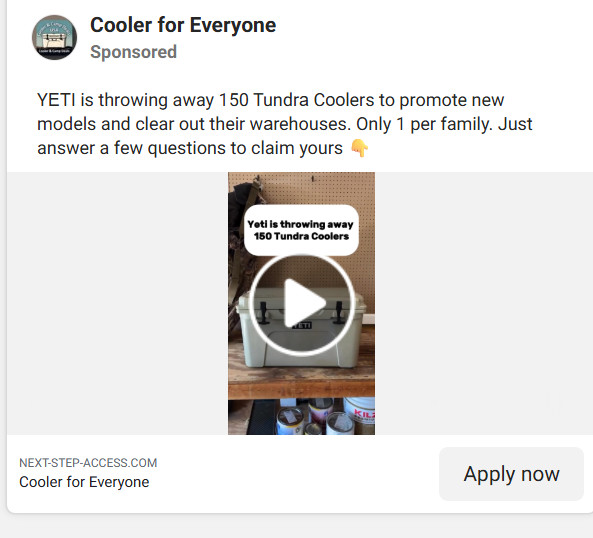
A sponsored post shows up in your feed claiming YETI is “throwing away” 150 Tundra Coolers to clear warehouse space or promote new models. Only 1 per family. Just answer a few questions to claim yours.
You click “Apply now” expecting a quick form, maybe a shipping payment, then a cooler on the way.
What you actually walk into is a carefully built giveaway scam that uses the Yeti name, urgency tricks, and multiple redirects to push you into hidden subscriptions and recurring charges.
This article breaks down the Yeti Tundra Cooler Giveaway Scam in detail, step by step, so you can spot it instantly, avoid it, and protect yourself if you already entered your information.
Scam Overview
The Yeti Tundra Cooler Giveaway Scam is a social media driven subscription trap that pretends to offer a high value cooler in exchange for completing a short survey or “application.” The ad copy varies, but the structure stays remarkably consistent.
One common version claims YETI is “throwing away” a limited number of Tundra coolers to promote new models and clear warehouses. Another version frames it as an “exclusive family offer,” a “new product launch giveaway,” or a “warehouse cleanout.” Sometimes it claims the cooler is free and you only pay shipping. Other times it suggests you are applying to be a tester or reviewer.
The pitch is designed to feel both rare and reasonable.
Rare, because it claims there are only 150 available and only 1 per household.
Reasonable, because the explanation sounds like something companies might do during a product refresh or end of season push.
The scam spreads because it hits several emotional triggers at once:
People love giveaways, especially for expensive outdoor gear.
The cooler looks real in the video or photo.
The steps seem simple and low risk.
The deadline language makes you act before you think.
And because Yeti products are widely recognized and heavily counterfeited, many people already know they are valuable, but they do not always know what a legitimate Yeti promotion looks like.
The core lie
The giveaway is not run by YETI. It is not connected to Yeti Holdings, Inc., the official Yeti website, or authorized retailers. It is run by third parties who use Yeti branding and “limited stock” messaging to harvest personal information and bill credit cards through shady subscription offers.
In most cases, the scam is not primarily about sending any cooler at all.
The real goal is to get you to do one of the following:
Enter your email, phone number, and address so you can be targeted again later
Enter your payment details under the promise of a small shipping fee
“Confirm” your identity by paying a small amount that becomes the gateway to recurring charges
Accept terms that enroll you into a monthly membership billed every 30 days
The payment step is where the real damage happens.
Victims think they are paying a one time fee to ship a free cooler. The scam operators quietly enroll the card into subscriptions that can run $50 to $82 every 30 days, sometimes more. The charges are often labeled with vague merchant names that do not mention Yeti.
That confusion is not an accident. It is part of the design.
Why the ads look so convincing
These campaigns are built to blend into the same environment as real brand ads. They often include:
A sponsored post label
A page name that sounds harmless, like “Cooler for Everyone”
A short video clip showing a cooler in a home or garage
A confident claim about limited availability and a simple application
Sometimes they use “apply now” instead of “buy now,” which makes the interaction feel safer. People are more willing to fill out an “application” than they are to buy from an unknown site.
The language also uses familiar giveaway patterns. “Answer a few questions” feels like market research. “Only 1 per family” feels like fairness. “Limited to 150” feels like a real inventory cap.
The visuals do the rest. A cooler sitting on a table, a garage background, a hand opening a lid, a product close up. Even if the clip is stolen from a legitimate review, it still works as proof in your brain.
The giveaway story changes, but the funnel stays the same
The story is the costume.
The funnel is the scam.
You will often see the same steps repeat across different versions of the Yeti Tundra cooler giveaway scam:
A “survey” page with a few quick questions
A progress bar that pretends to check your eligibility
A “congratulations” message that tells you that you won
A countdown timer and a stock counter
A shipping fee page that collects your card details
Small print that enrolls you into subscriptions
Redirects through multiple domains along the way
These giveaways are often part of larger affiliate style networks. The scam pages are designed to push you into third party “trial offers” that pay the scammer a commission. The cooler is simply the bait that gets you to the checkout page.
Once you understand that, the pattern becomes easy to spot.
The “survey” is a distraction
A legitimate product test program would not ask three questions and then immediately declare you a winner. A real promotion would typically:
Be hosted on an official brand domain
Have clear terms, eligibility rules, and contact information
Not require you to enter payment details on a random site
Not rely on a countdown timer to pressure you
The scam “survey” does the opposite. It moves fast, asks meaningless questions, and rewards you instantly.
This is done for a reason.
The longer you think, the more likely you are to notice red flags such as:
The domain name has nothing to do with Yeti
The page has no real company address or customer service
The fine print talks about membership billing
The shipping fee is oddly specific, like $9.96 or $9.95
The checkout page does not look like a legitimate ecommerce platform
The stock counter never changes in a believable way
The survey keeps you moving. It gives you a feeling of progress. It also makes you feel like you have invested effort, which increases the chance that you continue.
Red flags that show it is a scam
Here are the most common warning signs found in Yeti Tundra cooler giveaway scam pages and ads:
The ad is from a random page, not Yeti, not an authorized retailer
The link goes to a strange domain, often a newly created site
The site heavily uses Yeti logos and product photos but has no official verification
The process includes a meaningless survey
You “win” no matter what answers you give
The page uses timers, scarcity, and “limited stock” claims
The checkout page asks for credit card details for “shipping”
The fine print mentions “membership,” “trial,” or “billing every 30 days”
You are redirected to multiple domains before payment
There is no real order tracking, no clear refund policy, and no honest customer support
The biggest red flag is simple:
A real Yeti Tundra cooler is expensive. If someone is offering it for “free” and only asking for shipping on an unknown website, you are not looking at a warehouse giveaway. You are looking at a monetization funnel.
What victims typically experience
People who fall for the scam often report a similar timeline:
They pay a small shipping charge and get a confirmation email with vague details.
Nothing arrives within the promised delivery window.
A larger charge appears after a short “trial,” often between $50 and $82.
The charge repeats monthly.
Customer service is difficult to reach or intentionally confusing.
Canceling is frustrating, and sometimes the charges continue until the card is replaced.
Even when the fine print technically mentions the membership, the presentation is designed to hide it. That is what makes this a scam, not a simple misunderstanding.
It is deceptive by design.
This scam has been also investigated by Jordan Liles on his YouTube channel, where he offers a detailed video on the subject. We recommend watching his content for a comprehensive understanding of the scam.
Next, let’s break down exactly how scammers carry out this scam from start to finish.
How The Scam Works
This scam is most dangerous when you only look at the first step.
From the outside, it is just a giveaway ad.
From the inside, it is a multi step funnel engineered to get your payment details and enroll you into recurring billing.
Below is the full step by step breakdown, with the common tricks used at each stage.
Step 1: The sponsored ad that looks like a harmless giveaway
You see a sponsored post on Facebook, Instagram, or another platform. The page name might sound friendly, generic, or community based, like “Cooler for Everyone.”
The ad copy usually includes:
A claim that YETI is giving away Tundra coolers
A specific quantity, such as 150 units
A reason that sounds plausible, such as clearing warehouses or promoting new models
A fairness limit, like 1 per family
A simple call to action, like “Answer a few questions to claim yours”
The button often says “Apply now.”
That wording matters. It implies you are not purchasing from an unknown company. You are simply applying for a giveaway.
Step 2: The first landing page on a non Yeti domain
When you click, you do not land on yeti.com.
You land on a different domain that is often unrelated to Yeti. Sometimes the domain name tries to sound official. Sometimes it is completely generic. Either way, it is not controlled by the brand.
This landing page often includes:
Yeti logos or product images
A headline repeating the giveaway claim
A short explanation of why the giveaway exists
A “Start” button for a survey or eligibility check
The page might include a footer with vague legal links and a privacy policy that does not clearly identify a real company.
This is where the scam separates people who are cautious from people who click quickly.
If you check the URL, you can often stop the scam right here.
Step 3: The “eligibility survey” that is designed to be meaningless
Next comes the survey. It usually has 3 to 6 questions.
These questions are often generic, such as:
What is your age range?
Do you own a cooler now?
How often do you go camping, fishing, or tailgating?
Have you heard of Yeti before?
The questions do not determine eligibility. The survey is designed to push everyone forward.
The purpose of this step is psychological:
It gives you the feeling that you are earning the reward.
It creates a small time investment, so you feel committed.
It keeps you clicking, which reduces the chance you back out.
Some versions add a progress bar. It might show “Checking availability in your area” or “Confirming eligibility.”
This is theater.
Step 4: The instant “You qualify” message
After the survey, you get a success message.
It might say:
“Congratulations, you qualify for today’s offer”
“You have been selected”
“You are one of the lucky winners”
Sometimes it pretends you are completing a final verification step. It might say “Complete your claim within 5 minutes” or “Confirm shipping details before your slot expires.”
You may also see fake social proof:
A scrolling list of names claiming rewards
Fake comments about people receiving theirs fast
Star ratings and testimonials
This is meant to replace your doubt with excitement.
Step 5: The urgency trap with timers and stock counters
Now the scam starts applying pressure.
You see:
A countdown timer, often between 3 and 10 minutes
A stock counter, like “100 left in stock”
A warning that the offer expires soon
This is one of the most important parts of the funnel, because it makes you rush past the fine print.
The timer is usually fake. The stock count is usually fake. If you refresh the page, you may see it reset or behave in an unrealistic way.
The goal is not accuracy. The goal is urgency.
Step 6: The “shipping fee only” checkout page
This is the moment where the scam turns from annoying to expensive.
The page tells you that your cooler is free, but you must pay a small shipping fee. Common amounts are:
$9.95
$9.96
$7.95
$12.99
The exact number is chosen to feel like a real carrier fee, not a round number like $10.
The form asks for personal details:
Full name
Address
City and state
Zip code
Email address
Phone number
Then it asks for your credit card details.
This is the step where victims often think, “It’s just shipping.”
But the shipping fee is not the real product.
Your card is the product.
Step 7: The hidden subscription terms and recurring billing
Somewhere near the checkout button, there is fine print.
It may be:
In tiny font below the payment form
Behind a “Terms” link
Embedded in a long paragraph that people skip
Written in vague language like “membership benefits”
This fine print typically states that:
You are being enrolled into a monthly membership program
After a trial period, you will be charged every 30 days
The billing amount can be $50 to $82, sometimes more
The subscription continues until canceled
Cancellation requires contacting customer service through specific steps
Sometimes there is also a second billing timeline. For example, a smaller charge after 7 days, then a larger one after 21 days.
These details are designed to be missed.
The page headline still screams “Free Yeti Tundra Cooler.”
Your eyes are on the prize, not the terms.
Step 8: Multiple redirects and tracking links
Many victims do not notice that they are being moved across different websites.
The flow might look like this:
Social media ad
Landing page
Survey page
Congratulations page
Checkout page
Payment processor page
Confirmation page
Some of these pages may use different domain names.
That is intentional. It makes the scam harder to report and easier to rebuild if one domain is taken down.
It also helps affiliate networks track conversions and route victims into different subscription offers based on location, device, or other factors.
Step 9: The confirmation page that feels vague and unfinished
After payment, the site often shows a generic confirmation.
It might say:
“Your order is being processed”
“Your claim has been accepted”
“You will receive an email shortly”
But the details are often missing.
You may not get:
A real order number from a legitimate retailer
A clear shipping carrier name
A tracking link that works
A clear delivery timeline backed by a real company
Instead, you may receive an email that looks like a membership confirmation, not a cooler shipment.
Some victims never receive any meaningful confirmation at all.
Step 10: The recurring charges begin
This is when most people realize what happened.
After the trial period ends, recurring charges hit the card.
Common patterns include:
A charge around $50 to $82 every 30 days
Charges from merchant names you do not recognize
Multiple smaller charges that look like add ons
Charges that repeat even after attempting cancellation
The billing description often avoids the word “Yeti” entirely. That is why victims do not always connect it to the giveaway immediately.
Step 11: Cancellation friction and customer service games
If you attempt to cancel through the merchant, you may encounter tactics such as:
Slow responses to email
Phone lines that keep you on hold
Agents who offer discounts instead of cancellation
Requirements to provide extra information
Claims that cancellation takes time while charges continue
This is not accidental. It is a strategy.
The longer the billing continues, the more money the scam collects.
Step 12: Why the scam keeps coming back
Even when platforms remove some ads, the operators rotate:
New page names
New domains
New videos
New giveaway stories
The underlying funnel stays the same. That is why you may see the same scam used for:
Yeti tumblers
Yeti coolers
Dick’s Sporting Goods giveaways
Costco meat box giveaways
Tool kits, grills, and other high value items
The product changes. The trap stays.
Quick checklist to identify the Yeti Tundra cooler giveaway scam
If you want a fast way to spot it, use this checklist:
Is the ad from Yeti or a verified retailer? If not, be cautious.
Does the link go to yeti.com? If not, assume it is not official.
Does it use a survey, “apply now,” or “lucky winner” language? Red flag.
Does it use a timer or limited stock counter? Red flag.
Does it require a card for shipping on a random site? Major red flag.
Is there any mention of membership or recurring billing in the fine print? Stop immediately.
If two or more of those are true, you are almost certainly looking at a scam.
What To Do If You Have Fallen Victim to This Scam
If you already clicked the ad and entered your details, take a breath. This is fixable, especially if you act quickly.
The steps below are calm, practical, and designed to minimize damage.
Check your card activity immediately Look for the initial shipping charge and any other transactions you do not recognize. Write down:
Date
Amount
Merchant name
Whether it is pending or posted
Keep this list. It helps you explain the situation clearly to your bank.
Call your bank or card issuer and report deceptive billing Tell them you were misled by a giveaway offer and now suspect a subscription scam. Ask for:
A block on future charges from the merchant
A new card number if you provided full card details
Guidance on disputing charges
If recurring billing has already started, ask about filing a chargeback for deceptive subscription enrollment.
Freeze or replace the card if advised If the bank recommends replacing the card, do it. This is often the fastest way to stop repeated billing.If you use the card for important subscriptions, update those after you receive the new card.
Search your email for confirmation messages Check the inbox you used on the giveaway form. Search for keywords like:
subscription
membership
trial
billing
welcome
support
Save any emails you find. Screenshot them. They can contain details about the merchant name and billing terms.
Try to cancel the membership if you can identify it Some victims can find a cancellation link in the email or on the website. If you try to cancel:
Take screenshots at each step
Save the cancellation confirmation page
Keep copies of any support emails
Even if the cancellation process feels shady, having proof that you attempted to cancel can help during disputes.
Dispute unauthorized or deceptive charges If charges posted that you did not knowingly agree to, dispute them. Provide your bank with:
The original offer claim, such as “free Yeti Tundra cooler, pay shipping only”
Evidence that the subscription terms were hidden or unclear
Screenshots of the page if you have them
Any emails showing membership enrollment
Be clear that you did not intend to enroll in a monthly program.
Monitor your statements for at least 60 days Some scams bill quickly. Others wait 14 to 21 days. Keep checking.Look for:
New merchant names
Small test charges
Monthly repeating charges
Charges that match the “membership” amount
If you see anything new, report it immediately.
Secure your personal information moving forward You likely provided your address, phone number, and email. That can lead to spam and follow up scams.Practical steps:
Be cautious with emails claiming to “help” you claim your cooler
Do not click new links from unknown senders
Consider enabling spam filters and blocking suspicious numbers
If you reused any password on that site, change it everywhere you use it.
Report the ad and the page Go back to the platform where you saw the ad and report it as a scam.Also consider reporting the website to:
Your browser’s phishing report option
Your domain registrar’s abuse contact, if you can identify it
Consumer protection agencies in your country
Each report increases the chance the campaign gets disrupted.
Warn others, especially people most likely to trust giveaways These ads often target everyday shoppers who just want a deal. Share a simple warning with friends or family:
The Yeti giveaway is not real
The shipping fee leads to recurring charges
Do not enter card information
One message can prevent multiple victims.
Is Your Device Infected? Scan for Malware
If your computer or phone is slow, showing unwanted pop-ups, or acting strangely, malware could be the cause. Running a scan with Malwarebytes Anti-Malware Free is one of the most reliable ways to detect and remove harmful software. The free version can identify and clean common infections such as adware, browser hijackers, trojans, and other unwanted programs.
Malwarebytes works on Windows, Mac, and Android devices. Choose your operating system below and follow the steps to scan your device and remove any malware that might be slowing it down.
Malwarebytes for WindowsMalwarebytes for MacMalwarebytes for Android
Run a Malware Scan with Malwarebytes for Windows
Malwarebytes stands out as one of the leading and widely-used anti-malware solutions for Windows, and for good reason. It effectively eradicates various types of malware that other programs often overlook, all at no cost to you. When it comes to disinfecting an infected device, Malwarebytes has consistently been a free and indispensable tool in the battle against malware. We highly recommend it for maintaining a clean and secure system.
Download Malwarebytes
Download the latest version of Malwarebytes for Windows using the official link below. Malwarebytes will scan your computer and remove adware, browser hijackers, and other malicious software for free.
(The above link will open a new page from where you can download Malwarebytes)
Install Malwarebytes
After the download is complete, locate the MBSetup file, typically found in your Downloads folder. Double-click on the MBSetup file to begin the installation of Malwarebytes on your computer. If a User Account Control pop-up appears, click “Yes” to continue the Malwarebytes installation.
Follow the On-Screen Prompts to Install Malwarebytes
When the Malwarebytes installation begins, the setup wizard will guide you through the process.
You’ll first be prompted to choose the type of computer you’re installing the program on—select either “Personal Computer” or “Work Computer” as appropriate, then click on Next.
Malwarebytes will now begin the installation process on your device.
When the Malwarebytes installation is complete, the program will automatically open to the “Welcome to Malwarebytes” screen.
On the final screen, simply click on the Open Malwarebytes option to start the program.
Enable “Rootkit scanning”.
Malwarebytes Anti-Malware will now start, and you will see the main screen as shown below. To maximize Malwarebytes’ ability to detect malware and unwanted programs, we need to enable rootkit scanning. Click on the “Settings” gear icon located on the left of the screen to access the general settings section.
In the settings menu, enable the “Scan for rootkits” option by clicking the toggle switch until it turns blue.
Now that you have enabled rootkit scanning, click on the “Dashboard” button in the left pane to get back to the main screen.
Perform a Scan with Malwarebytes.
To start a scan, click the Scan button. Malwarebytes will automatically update its antivirus database and begin scanning your computer for malicious programs.
Wait for the Malwarebytes scan to complete.
Malwarebytes will now scan your computer for browser hijackers and other malicious programs. This process can take a few minutes, so we suggest you do something else and periodically check the status of the scan to see when it is finished.
Quarantine detected malware
Once the Malwarebytes scan is complete, it will display a list of detected malware, adware, and potentially unwanted programs. To effectively remove these threats, click the “Quarantine” button.
Malwarebytes will now delete all of the files and registry keys and add them to the program’s quarantine.
Restart your computer.
When removing files, Malwarebytes may require a reboot to fully eliminate some threats. If you see a message indicating that a reboot is needed, please allow it. Once your computer has restarted and you are logged back in, you can continue with the remaining steps.
Once the scan completes, remove all detected threats. Your Windows computer should now be clean and running smoothly again, free of trojans, adware, and other malware.
If your current antivirus allowed this malicious program on your computer, you may want to consider purchasing Malwarebytes Premium to protect against these types of threats in the future. If you are still having problems with your computer after completing these instructions, then please follow one of the steps:
Malwarebytes for Mac is an on-demand scanner that can destroy many types of malware that other software tends to miss without costing you absolutely anything. When it comes to cleaning up an infected device, Malwarebytes has always been free, and we recommend it as an essential tool in the fight against malware.
Download Malwarebytes for Mac.
You can download Malwarebytes for Mac by clicking the link below.
When Malwarebytes has finished downloading, double-click on the setup file to install Malwarebytes on your computer. In most cases, downloaded files are saved to the Downloads folder.
Follow the on-screen prompts to install Malwarebytes.
When the Malwarebytes installation begins, you will see the Malwarebytes for Mac Installer which will guide you through the installation process. Click “Continue“, then keep following the prompts to continue with the installation process.
When your Malwarebytes installation completes, the program opens to the Welcome to Malwarebytes screen. Click the “Get started” button.
Select “Personal Computer” or “Work Computer”.
The Malwarebytes Welcome screen will first ask you what type of computer are you installing this program, click either Personal Computer or Work Computer.
Click on “Scan”.
To scan your computer with Malwarebytes, click on the “Scan” button. Malwarebytes for Mac will automatically update the antivirus database and start scanning your computer for malware.
Wait for the Malwarebytes scan to complete.
Malwarebytes will scan your computer for adware, browser hijackers, and other malicious programs. This process can take a few minutes, so we suggest you do something else and periodically check on the status of the scan to see when it is finished.
Click on “Quarantine”.
When the scan has been completed, you will be presented with a screen showing the malware infections that Malwarebytes has detected. To remove the malware that Malwarebytes has found, click on the “Quarantine” button.
Restart computer.
Malwarebytes will now remove all the malicious files that it has found. To complete the malware removal process, Malwarebytes may ask you to restart your computer.
After scanning, delete any detected threats. Your Mac should now be free from adware, unwanted extensions, and other potentially harmful software.
If your current antivirus allowed a malicious program on your computer, you might want to consider purchasing the full-featured version of Malwarebytes Anti-Malware to protect against these types of threats in the future. If you are still experiencing problems while trying to remove a malicious program from your computer, please ask for help in our Mac Malware Removal Help & Support forum.
Run a Malware Scan with Malwarebytes for Android
Malwarebytes for Android automatically detects and removes dangerous threats like malware and ransomware so you don’t have to worry about your most-used device being compromised. Aggressive detection of adware and potentially unwanted programs keeps your Android phone or tablet running smooth.
Download Malwarebytes for Android.
You can download Malwarebytes for Android by clicking the link below.
In the Google Play Store, tap “Install” to install Malwarebytes for Android on your device.
When the installation process has finished, tap “Open” to begin using Malwarebytes for Android. You can also open Malwarebytes by tapping on its icon in your phone menu or home screen.
Follow the on-screen prompts to complete the setup process
When Malwarebytes will open, you will see the Malwarebytes Setup Wizard which will guide you through a series of permissions and other setup options. This is the first of two screens that explain the difference between the Premium and Free versions. Swipe this screen to continue. Tap on “Got it” to proceed to the next step. Malwarebytes for Android will now ask for a set of permissions that are required to scan your device and protect it from malware. Tap on “Give permission” to continue. Tap on “Allow” to permit Malwarebytes to access the files on your phone.
Update database and run a scan with Malwarebytes for Android
You will now be prompted to update the Malwarebytes database and run a full system scan.
Click on “Update database” to update the Malwarebytes for Android definitions to the latest version, then click on “Run full scan” to perform a system scan.
Wait for the Malwarebytes scan to complete.
Malwarebytes will now start scanning your phone for adware and other malicious apps. This process can take a few minutes, so we suggest you do something else and periodically check on the status of the scan to see when it is finished.
Click on “Remove Selected”.
When the scan has been completed, you will be presented with a screen showing the malware infections that Malwarebytes for Android has detected. To remove the malicious apps that Malwarebytes has found, tap on the “Remove Selected” button.
Restart your phone.
Malwarebytes for Android will now remove all the malicious apps that it has found. To complete the malware removal process, Malwarebytes may ask you to restart your device.
When the scan is finished, remove all detected threats. Your Android phone should now be free of malicious apps, adware, and unwanted browser redirects.
If your current antivirus allowed a malicious app on your phone, you may want to consider purchasing the full-featured version of Malwarebytes to protect against these types of threats in the future. If you are still having problems with your phone after completing these instructions, then please follow one of the steps:
Restore your phone to factory settings by going to Settings > General management > Reset > Factory data reset.
After cleaning your device, it’s important to protect it from future infections and annoying pop-ups. We recommend installing an ad blocker such as AdGuard. AdGuard blocks malicious ads, prevents phishing attempts, and stops dangerous redirects, helping you stay safe while browsing online.
The Bottom Line
The Yeti Tundra Cooler Giveaway Scam is not a warehouse cleanout and not a limited family promotion from YETI. It is a social media giveaway trap designed to push you through a survey, pressure you with timers and “limited stock,” and collect your card details under the promise of a small shipping fee.
The real outcome is often recurring subscription charges, confusing merchant names, and a cancellation process that feels intentionally difficult. Many victims never receive any cooler at all.
If you see a sponsored post claiming YETI is giving away 150 Tundra coolers and you only need to answer a few questions to claim one, treat it as a warning sign. Verify promotions through official channels, distrust random domains, and never enter payment details for a “free” product unless you are on a site you fully trust.
A real Yeti cooler is valuable. Your card details are even more valuable. Protect them like it matters, because it does.
FAQ
Is the Yeti Tundra Cooler Giveaway real?
No. The viral “YETI is giving away 150 Tundra coolers” ads on social media are not official YETI promotions. They are typically run by third parties using Yeti branding to lure people into subscription charges.
Does YETI actually “throw away” or “give away” coolers to clear warehouses?
That claim is a common storyline used in scams. Real brands do not usually distribute expensive products through random sponsored posts and unknown websites that require payment details. Legitimate promotions are announced through official brand channels.
Why does the ad say “Only 1 per family” and “150 left”?
Those phrases are pressure tactics. They create urgency and scarcity so you feel rushed to act before thinking. In many cases, the “stock” and countdown timers are fake and reset when you refresh the page.
What is the purpose of the “survey” or “application”?
The survey is a distraction. It makes you feel like you are earning the reward and keeps you moving through the funnel. Most of the time, everyone “qualifies” no matter what answers they give.
Why do these giveaway links redirect through multiple websites?
Multiple domain redirects are used to hide who is behind the offer, track victims, and make it easy for scammers to switch domains when one gets reported or shut down. A real Yeti giveaway would not bounce you across random websites.
What happens after I pay the “shipping fee”?
In many cases, you will not receive any cooler. Instead, your card may be enrolled in a monthly membership program. Victims often report recurring charges that can be $50 to $82 every 30 days, sometimes with additional surprise charges after 14 to 21 days.
Where are the hidden subscription terms usually located?
They are often buried in small print near the checkout button or inside a terms and conditions link. The language may mention “trial,” “membership,” “benefits,” or “recurring billing every 30 days.”
Will my bank statement say “Yeti” on the charge?
Usually not. That is part of the trick. Charges often appear under vague merchant names that do not mention Yeti, making it harder to connect the billing to the giveaway quickly.
I entered my card details. What should I do immediately?
Take action quickly:
Contact your bank or card issuer and report a deceptive subscription enrollment
Ask about blocking the merchant and replacing your card
Monitor for new charges over the next 30 to 60 days
Save any confirmation emails and take screenshots if possible
Can I get my money back if I was charged?
Often, you have a chance, especially if you report it quickly. Many banks will investigate and may reverse charges through disputes or chargebacks when the offer was misleading and the subscription terms were hidden.
How can I tell if a Yeti giveaway is legitimate?
Use a simple rule: if it is not on an official Yeti domain and it is not promoted through verified Yeti channels, do not trust it. Real promotions should have clear terms, real contact information, and should never require your card details on an unknown site for a “free” product.
What other scams use the same pattern?
This same funnel is used for many “free gift” offers, including:
Yeti tumblers and coolers
Dick’s Sporting Goods “survey rewards”
Costco meat box “shipping only” offers
Tool sets, grills, and electronics giveaways
If you learn the pattern, you can spot the next version faster, even when the brand and product change.
Thomas is an expert at uncovering scams and providing in-depth reporting on cyber threats and online fraud. As an editor, he is dedicated to keeping readers informed on the latest developments in cybersecurity and tech.