Detour Dog: DNS Malware Powers Strela Stealer Campaigns
30k sites infected with DNS malware by Detour Dog. Now linked to Strela Stealer, StarFish backdoor, REM Proxy, and Tofsee in global spam campaigns.
 blogs.infoblox.com
blogs.infoblox.com
blogs.infoblox.com

A new malware family dubbed Detour Dog is being used by cybercriminals to deliver the Strela Stealer in a recent wave of phishing campaigns. This multi-stage attack leverages DNS manipulation to compromise systems and steal sensitive information.Detour Dog: DNS Malware Powers Strela Stealer Campaigns
30k sites infected with DNS malware by Detour Dog. Now linked to Strela Stealer, StarFish backdoor, REM Proxy, and Tofsee in global spam campaigns.


1. Setup/Lock DNS via policies in Browser/WindowsObviously, what I use isn't enough to protect against such threats;

only awareness of the fake CAPTCHA tactic "saved" me

Do you have recommendations for Firefox?1. Setup/Lock DNS via policies in Browser/Windows
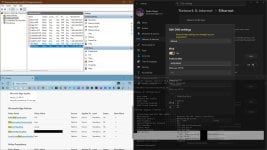
2. Disable/Block default DNS (UDP via port 53) in the firewall
3. Allow to connect only to the dedicated DNS IPs in the firewall, when using UDP via port 53 or DoT via port 853. Obviously DoH via port 443 has to be allowed for any IP
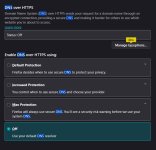
You can setup DOH in FF as well, even if it is the same, since malware typically changes Windows DNS and browser's settings are better protected.Do you have recommendations for Firefox?
YesI suppose blocking UDP at ports 53 and 853, except to the dedicated DNS, would block malware from using their own DNS servers as vectors. Is this right?
I am not sure why, but Firefox already has NextDNS (and Cloudflare) listed, maybe because my system DNS is set up to point to it.You can setup DOH in FF as well

Sadly No. Malware can use encrypted dns through port 443 with hardcoded dns server addresses. When malware has hardcoded dns server address and doh capabilities, dedicated dns is not needed to resolve the ips. It can circumvent the whole doh of the system. So what you need is either a system level application that can decrypt https traffic or a hardware firewall that can decrypt https traffic and perform ids/ips. The second option is obviously going to cost you some money.I suppose blocking UDP at ports 53 and 853, except to the dedicated DNS, would block malware from using their own DNS servers as vectors. Is this right?
Thanks for stating this explicitly. I sort of understand the idea that once malware gets on your system, your hardened configurations will most likely work against some malware and not against others.Malware can use encrypted dns through port 443 with hardcoded dns server addresses.
I don't think this is easy to do with the default Windows Firewall configuration. The often suggested configuration to achieve this doesn't work in at least some setups (including mine). The suggestion involves adding two rules, one to block all outbound access to the port and another to allow for some IP addresses. Unfortunately, with "Allow (default)" for outbound connections, the "Allow" rule can be added but isn't effective: Windows Firewall seems to ignore all Allow rules for outbound connections.Allow to connect only to the dedicated DNS IPs in the firewall, when using UDP via port 53 or DoT via port 853.
Block overrules Allow rules. You could probably block all IP ranges except the DNS, but using 3rd party firewall is better to handle this.The suggestion involves adding two rules, one to block all outbound access to the port and another to allow for some IP addresses. Unfortunately, with "Allow (default)" for outbound connections, the "Allow" rule can be added but isn't effective: Windows Firewall seems to ignore all Allow rules for outbound connections.
The exceptions specified in a Block rule aren't IP addresses, and they seem to have to be authenticated by IPSec. You need 3rd-party firewalls, or default-deny outbound connections like in this Victor M's post.You could probably block all IP ranges except the DNS, but using 3rd party firewall is better to handle this.
It works just fine, allowing only DNS IPs by blocking the rest of the internet.The exceptions specified in a Block rule aren't IP addresses,
This is over my head, but maybe I can learn. Let me ask you about the details of your setup, which is atypical (not by default) Windows firewall configuration.It works just fine, allowing only DNS IPs by blocking the rest of the internet.
Haha, honestly, working with the built-in Windows tools (Windows Defender, Windows Firewall, etc.) feels like getting inducted into a secret society with secret handshakes. The available, apparently authoritative online documents are often unreliable, leading you to ask inane questions just to get things to work the way you want. These are things that you could probably set up in seconds or minutes using third-party tools.I am not trying to get exhausted for firewall setup anymore


 It's the price of being "free," readily available, and "safe."
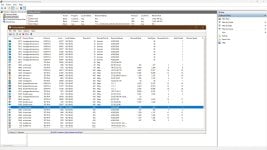
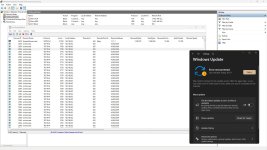
Yes, I remove all rules daily, since apps can add them randomly, still block rules overrule allow rules, so it is not much of a concern. I setup all rules like this:You have set Windows firewall's Outbound Connections to: Allow (default)?
You have deleted all the "Allow" Outbound Rules set up by the OS and software?
netsh advfirewall set allprofiles state on

rem Block all inbound network traffic and all outbound except allowed apps
netsh advfirewall set DomainProfile firewallpolicy blockinboundalways,blockoutbound
netsh advfirewall set PrivateProfile firewallpolicy blockinboundalways,blockoutbound
netsh advfirewall set PublicProfile firewallpolicy blockinboundalways,allowoutbound

rem Remove All Windows Firewall Rules
netsh advfirewall firewall delete rule name=all

rem Windows Firewall Block Rules (TCP43-IPInfo/UDP123-TimeSync/TCPUDP443-QUIC/TCP587-SMTP/TCP993-IMAP)
rem https://www.bleepingcomputer.com/news/security/new-windows-pingback-malware-uses-icmp-for-covert-communication
netsh advfirewall firewall add rule name="TCP Block" dir=out action=block protocol=TCP remoteport=1-42,44-79,81-442,444-852,854-1024,1025-3073,3075-5227,5229-27014,27051-65535
netsh advfirewall firewall add rule name="UDP Block" dir=out action=block protocol=UDP remoteport=1-122,124-442,444-1024

netsh advfirewall firewall add rule name="TCP DoT Block" dir=out action=block protocol=TCP remoteport=853 remoteip=0.0.0.0-45.90.28.98,45.90.28.100-45.90.30.98,45.90.30.100-76.76.2.1,76.76.2.3-255.255.255.255

netsh advfirewall firewall add rule name="Brave TCP" dir=out action=block protocol=TCP remoteport=1-442,444-5227,5229-65535 program="%LocalAppData%\BraveSoftware\Brave-Browser\Application\brave.exe"
netsh advfirewall firewall add rule name="Brave UDP" dir=out action=block protocol=UDP remoteport=1-442,444-65535 program="%LocalAppData%\BraveSoftware\Brave-Browser\Application\brave.exe"
netsh advfirewall firewall add rule name="Edge TCP" dir=out action=block protocol=TCP remoteport=1-442,444-65535 program="%ProgramFiles(x86)%\Microsoft\Edge\Application\msedge.exe"
netsh advfirewall firewall add rule name="Edge UDP" dir=out action=block protocol=UDP program="%ProgramFiles(x86)%\Microsoft\Edge\Application\msedge.exe"
netsh advfirewall firewall add rule name="LibreWolf TCP" dir=out action=block protocol=TCP remoteport=1-442,444-65535 program="%ProgramFiles%\LibreWolf\librewolf.exe"
netsh advfirewall firewall add rule name="LibreWolf UDP" dir=out action=block protocol=UDP program="%ProgramFiles%\LibreWolf\librewolf.exe"
netsh advfirewall firewall add rule name="OneDrive TCP" dir=out action=block protocol=TCP remoteport=1-442,444-65535 program="%ProgramFiles%\Microsoft OneDrive\OneDrive.exe"
netsh advfirewall firewall add rule name="IceDrive TCP" dir=out action=block protocol=TCP remoteport=1-442,444-65535 program="%LocalAppData%\Temp\IcedrivePortable\Icedrive.exe"I have disabled IPv6 for security, privacy and performance reasons.You are also not set up for IPv6?
Windows 11 allows to use DoT without additional software, you just have to use commands.You are not using DoH, but DoT, so you have set up a separate non-OS DNS proxy like ...?
netsh dns set global doh=no
netsh dns add global dot=yes
netsh dns add encryption server=76.76.2.2 dothost=p2.freedns.controld.com:853 autoupgrade=yes udpfallback=noYes, I would never use an unencrypted DNS, so I block it all. Sadly, Chromium browsers try to leak through port 53 and it causes 5 secs lag every 5 min.For ports 53 (DNS UDP) and 853 (DoT), in the "UDP Block" rule above, you have set up to block all outbound traffic to all IP addresses for 53 and 853?
Add Custom rule, that will allow you to add IP ranges and just let it slip in. I have NextDNS and Free Controld for troubleshooting.For ports 53 (DNS UDP) and 853 (DoT), where and how do you set up to allow the two IPv4 IPs (or the two TLS names which presumably resolve to the 2 IP addresses)?
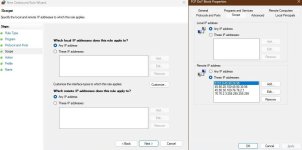
Even 3rd party tools are not great; try using WFC after deleting all rules (including recommended rules); it will start prompting for svchost linked services one by one; that is fine (similar to fort firewall), but there is a catch, it will miss prompting some services such as deliver optimization, and then boom, no MD update.These are things that you could probably set up in seconds or minutes using third-party tools
You might need to add port 5353 too to the list as it often get used by the system for mDns ( muti cast dns). But if you don't want to configure all those rules, there is an alternative way to deal with dns, its not a 100% perfect but well nothing is. You can install yogadns app with nextdns doh ( it has builtin nextdns support) and enable its Windows Service Mode option and enable all the features under the tab "security" and also enable "block bypass methods" under Parental Control tab of Nextdns configuration page. By using this method all your dns queries will be intercepted by yogadns app even before logon and all other dns services will be blocked by nextdns doh.This is over my head, but maybe I can learn. Let me ask you about the details of your setup, which is atypical (not by default) Windows firewall configuration.
- You have set Windows firewall's Outbound Connections to: Allow (default)?
- You have deleted all the "Allow" Outbound Rules set up by the OS and software?
- You have set up the "Block" Outbound Rules as shown in the above #4 post?
- You are not using DoH, but DoT, so you have set up a separate non-OS DNS proxy like ...?
- You are also not set up for IPv6?
- For ports 53 (DNS UDP) and 853 (DoT), in the "UDP Block" rule above, you have set up to block all outbound traffic to all IP addresses for 53 and 853?
- For ports 53 (DNS UDP) and 853 (DoT), where and how do you set up to allow the two IPv4 IPs (or the two TLS names which presumably resolve to the 2 IP addresses)?
I don't think I need to do exactly what @TairikuOkami is doing. I just need to add a single Block rule specifying the complete network ranges, including the IPv6 addresses, for all other DNS servers that I want to block, including port 5353. Thanks for the tips on using YogaDNS/NextDNS.But if you don't want to configure all those rules... You can install yogadns app ...