

The FBI MoneyPak Ransomware is a computer virus, which will display a bogus alert, that pretends to be from the Federal Bureau of Investigation and states that your computer has been blocked due to it being involved with the distribution of pornographic material, SPAM and copyrighted content.
The FBI virus will lock you out of your computer and applications, so whenever you’ll try to log on into your Windows operating system or Safe Mode with Networking, it will display instead a lock screen asking you to pay a non-existing fine of 100$ in the form of a MoneyPak code.
Furthermore, to make this alert seem more authentic, this virus also has the ability to access your installed webcam so that the alert shows what is happening in the room.
If your computer is infected with FBI virus,then you are seeing any of the below screens:

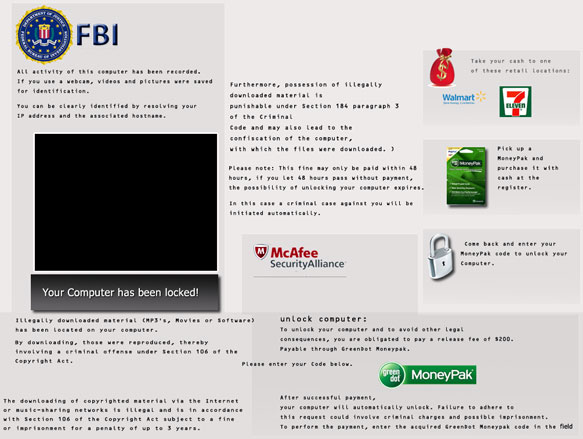
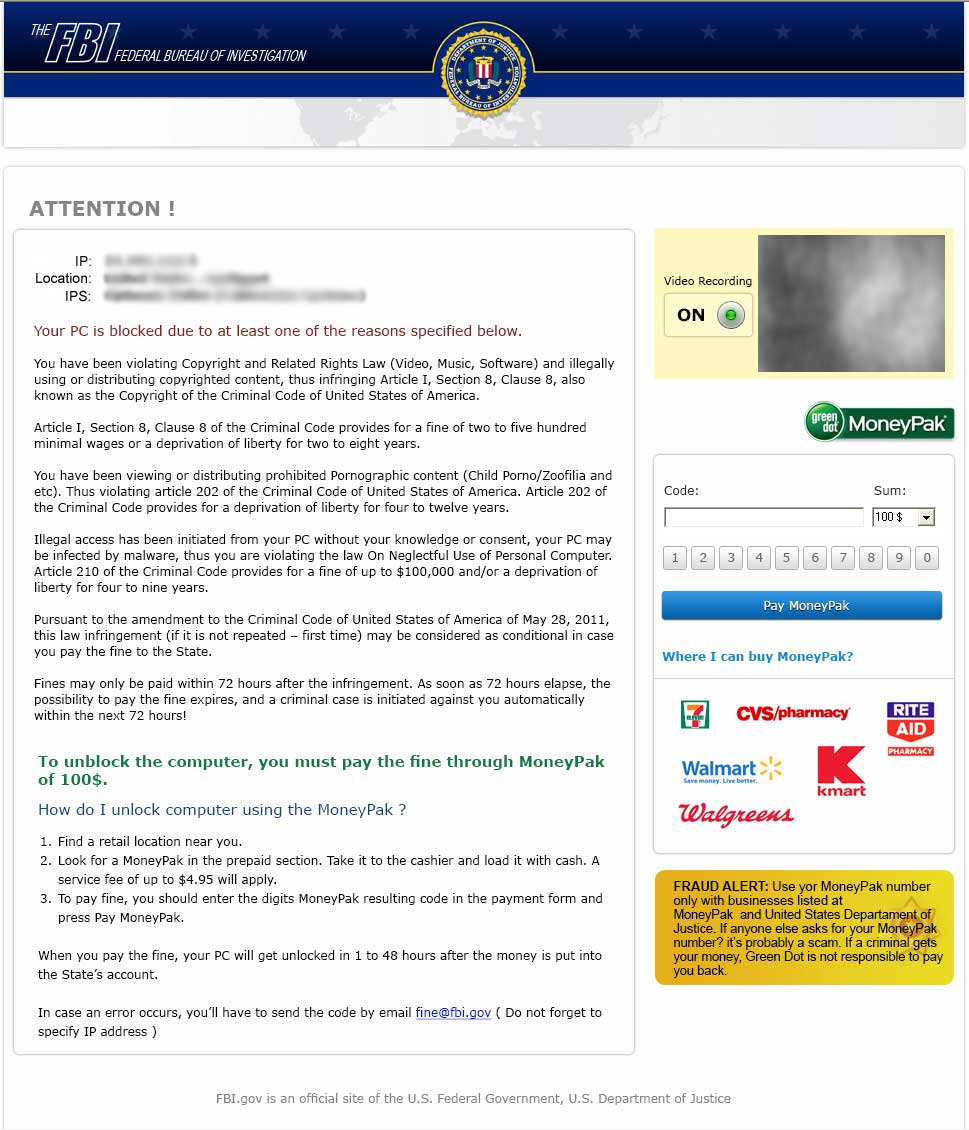
The bogus notification from the FBI will display the following message:
The FBI
Federal Bureau of Investigation
ATTENTION!
IP: xxx.xxx.xxx
Location: Your Country Here
IPS: Your ISP Here
Your PC is blocked due to at least one of the reasons specified below.
You have been violation Copyright and Related Rights Law (Video, Music, Software) and illegally using or distributing copyrighted content, thus infringing Article I, Section 8, Clause 8, also known as the Copyright of the Criminal Code of United States of America.
Article I, Section 8, Clause 8 of the Criminal Code provides for a fine of two to five hundred minimal wages or a deprivation of liberty for two to eight years.
You have been viewing or distributing prohibited Pornographic content (Child Porno, Zoofilia and etc). Thus violating article 202 of the Criminal Code of United States of America. Article 202 of the Criminal Code provides for a deprivation of liberty for four to twelve years.
Illegal access has been initiated from your PC without your knowledge or consent, your PC may be infected by malware, thus you are violating the law of Neglectful Use of Personal Computer. Article 210 of the Criminal Code provides for a fine of up to $100,000 and/or a deprivation of liberty for four to nine years.
Pursuant to the amendment to the Criminal Code of United States of America of May 28, 2011, this law infringement (if it is not repeated – first time) may be considered as conditional in case you pay the fine to the State.
Fines may be paid within 72 hours after the infringement. As soon as 72 hours elapse, the possibility to pay the fine expires, and a criminal case is initiated against you automatically within the next 72 hours!
To unblock the computer, you must pay the fine through MoneyPak of 100$.
The FBI notification is a scam, and you should ignore any alert that this malicious software might generate.
Under no circumstance should you send any money via MoneyPak to these cyber criminals, as this could lead to identity theft,and if you have, you can request a refund from MoneyPak stating that the payment was due to a scam and a computer virus.
FBI MoneyPak Virus Removal Guide
This page is a comprehensive guide, which will remove the FBI Computer Locked infection from your your computer. Please perform all the steps in the correct order. If you have any questions or doubt at any point STOP and ask for our assistance.
The FBI Computer Locked will start automatically when you login to your computer and display its screenlocker so that you are unable to access your computer, therefore we will need to remove this infection by using any of the below methods:
OPTION 1: Remove FBI Computer Locked lock screen virus with System Restore
OPTION 2: Remove FBI Computer Locked virus with with HitmanPro Kickstart
OPTION 3: Remove FBI Computer Locked virus with Kaspersky Rescue Disk
OPTION 1: Remove FBI Computer Locked lock screen virus with System Restore
System Restore helps you restore your computer’s system files to an earlier point in time. It’s a way to undo system changes to your computer without affecting your personal files, such as e‑mail, documents, or photos.
Because the FBI Computer Locked virus will not allow you to start the computer in Windows regular mode, we will need to start System Restore from the Safe Mode with Command Prompt mode.
STEP 1: Restore Windows to a previous state using System Restore
- Reboot your computer into Safe Mode with Command Prompt. To do this, turn your computer off and then back on and immediately when you see anything on the screen, start tapping the F8 key on your keyboard.
![[Image: F8 key]](//malwaretips.com/blogs/wp-content/uploads/2013/06/F8-key.jpg.png "Windows F8 key")
If you are using Windows 8, the trick is to hold the Shift button and gently tap the F8 key repeatedly, this will sometimes boot you into the new advanced “recovery mode”, where you can choose to see advanced repair options. On the next screen, you will need to click on the Troubleshoot option, then select Advanced Options and select Windows Startup Settings. Click on the Restart button, and you should now be able to see the Advanced Boot Options screen. - Using the arrow keys on your keyboard, select Safe Mode with Command Prompt and press Enter on your keyboard.
![[Image: Starting computer in Safe Mode with Command Prompt]](//malwaretips.com/blogs/wp-content/uploads/2013/06/Safe-Mode-with-Command-Prompt.jpg "Advanced Boot Options screen")
- At the command prompt, type rstrui.exe, and then press ENTER.
![[Image: Start System Restore to remove lock screen virus]](//malwaretips.com/blogs/wp-content/uploads/2013/06/system-restore-command.jpg "rstrui.exe command in Safe Mode with Command Prompt")
Alternatively, if you are using Windows Vista, 7 and 8, you can type: C:\windows\system32\rstrui.exe , and press Enter. And if you are a Windows XP user, type C:\windows\system32\restore\rstrui.exe, then press Enter. - System Restore should start, and you will display also a list of restore points. Try using a restore point created just before the date and time the FBI Computer Locked lock screen virus has infected your computer.
![[Image: Restore settings to remove ransomware]](//malwaretips.com/blogs/wp-content/uploads/2013/06/system-restore.jpg "Restore your computer's system files to an earlier point in time")
- When System Restore has completed its task, start your computer in Windows regular mode, and perform a scan with Malwarebytes Anti-Malware and HitmanPro, as seen in the next step.
![[Image: F8 key]](http://malwaretips.com/blogs/wp-content/uploads/2013/06/F8-key.jpg.png "Windows F8 key")
![[Image: Starting computer in Safe Mode with Command Prompt]](http://malwaretips.com/blogs/wp-content/uploads/2013/06/Safe-Mode-with-Command-Prompt.jpg "Advanced Boot Options screen")
![[Image: Start System Restore to remove lock screen virus]](http://malwaretips.com/blogs/wp-content/uploads/2013/06/system-restore-command.jpg "rstrui.exe command in Safe Mode with Command Prompt")
![[Image: Restore settings to remove ransomware]](http://malwaretips.com/blogs/wp-content/uploads/2013/06/system-restore.jpg "Restore your computer's system files to an earlier point in time")
STEP 2: Remove FBI Computer Locked malicious files with Malwarebytes Anti-Malware Free
Even after using System Restore,
- You can download Malwarebytes Anti-Malware Free from the below link, then double-click on the icon named mbam-setup.exe to install this program.
MALWAREBYTES ANTI-MALWARE DOWNLOAD LINK(This link will open a download page in a new window from where you can download Malwarebytes Anti-Malware Free) - When the installation begins, keep following the prompts in order to continue with the setup process, then at the last screen click on the Finish button.
![[Image: Malwarebytes Anti-Malware final installation screen]](//malwaretips.com/blogs/wp-content/uploads/2013/01/malwarebytes-installation.jpg "Malwarebytes Anti-Malware installation screen")
- On the Scanner tab, select Perform quick scan, and then click on the Scan button to start searching for the FBI Computer Locked malicious files.
![[Image: Malwarebytes Anti-Malware Quick Scan]](//malwaretips.com/blogs/wp-content/uploads/2013/01/malwarebytes-quick-scan.jpg "Run a Quick Scan with Malwarebytes Anti-Malware")
- Malwarebytes’ Anti-Malware will now start scanning your computer for FBI Computer Locked virus as shown below.
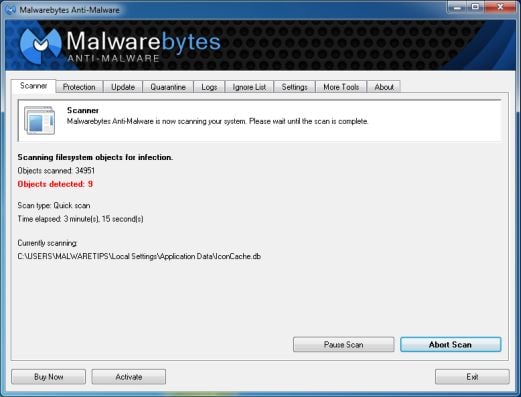
- When the Malwarebytes Anti-Malware scan has finished, click on the Show Results button.
![[Image: Malwarebytes Anti-Malware scan results]](//malwaretips.com/blogs/wp-content/uploads/2013/01/malwarebytes-scan-results.jpg "Malwarebytes when the system scan has completed")
- You will now be presented with a screen showing you the computer infections that Malwarebytes Anti-Malware has detected. Make sure that everything is Checked (ticked), then click on the Remove Selected button.
![[Image: Malwarebytes Anti-Malwar removing FBI Computer Locked virus]](//malwaretips.com/blogs/wp-content/uploads/2013/01/malwarebytes-virus-removal.jpg "Malwarebytes Anti-Malwar removing FBI Computer Locked virus")
![[Image: Malwarebytes Anti-Malware final installation screen]](http://malwaretips.com/blogs/wp-content/uploads/2013/01/malwarebytes-installation.jpg "Malwarebytes Anti-Malware installation screen")
![[Image: Malwarebytes Anti-Malware Quick Scan]](http://malwaretips.com/blogs/wp-content/uploads/2013/01/malwarebytes-quick-scan.jpg "Run a Quick Scan with Malwarebytes Anti-Malware")

![[Image: Malwarebytes Anti-Malware scan results]](http://malwaretips.com/blogs/wp-content/uploads/2013/01/malwarebytes-scan-results.jpg "Malwarebytes when the system scan has completed")
![[Image: Malwarebytes Anti-Malwar removing FBI Computer Locked virus]](http://malwaretips.com/blogs/wp-content/uploads/2013/01/malwarebytes-virus-removal.jpg "Malwarebytes Anti-Malwar removing FBI Computer Locked virus")
STEP 3: Double-check for the FBI Computer Locked virus with HitmanPro
- You can download HitmanPro from the below link:
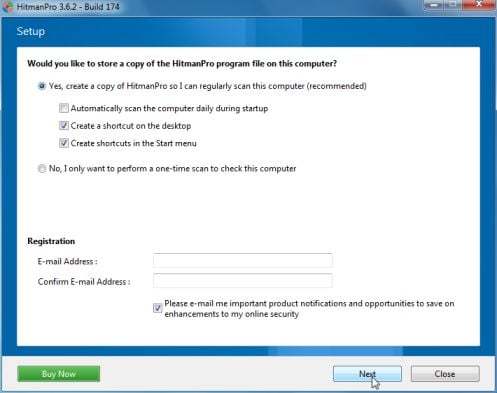
HITMANPRO DOWNLOAD LINK (This link will open a web page from where you can download HitmanPro) - Double-click on the file named HitmanPro.exe (for 32-bit versions of Windows) or HitmanPro_x64.exe (for 64-bit versions of Windows). When the program starts you will be presented with the start screen as shown below.
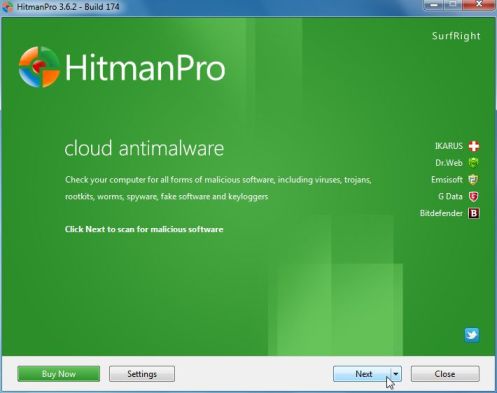
Click on the Next button, to install HitmanPro on your computer.
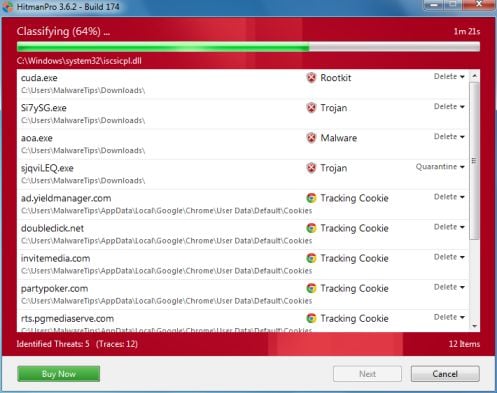
- HitmanPro will now begin to scan your computer for FBI Computer Locked malicious files.
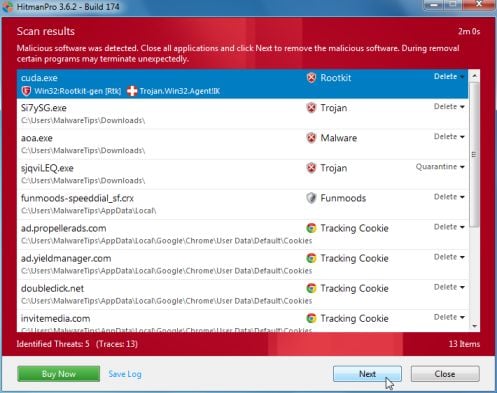
- When it has finished it will display a list of all the malware that the program found as shown in the image below. Click on the Next button, to remove FBI Computer Locked virus.
- Click on the Activate free license button to begin the free 30 days trial, and remove all the malicious files from your computer.
![[Image: HitmanPro 30 days activation button]](//malwaretips.com/blogs/wp-content/uploads/2012/11/hitmanpro-activation.jpg "HitmanPro free 30 days trial")




![[Image: HitmanPro 30 days activation button]](http://malwaretips.com/blogs/wp-content/uploads/2012/11/hitmanpro-activation.jpg "HitmanPro free 30 days trial")
OPTION 2: Remove FBI Computer Locked virus with with HitmanPro Kickstart
If you cannot start your computer into Safe Mode with Command Prompt mode, we can use the HitmanPro Kickstart program to bypass FBI Computer Locked lock screen.
As the FBI Computer Locked ransomware infection locks you out of your computer, you will need to create a bootable USB drive that contains the HitmanPro Kickstart program.
We will then boot your computer using this bootable USB drive and use it to clean the infection so that you are able to access Windows normally again.
You will also need a USB drive, which will have all of its data erased and will then be formatted. Therefore, only use a USB drive that does not contain any important data.
- Using a “clean” (non-infected) computer, please download HitmanPro Kickstart from the below link.
HITMANPRO DOWNLOAD LINK (This link will open a download page in a new web page from where you can download HitmanPro Kickstart) - Once HitmanPro has been downloaded, please insert the USB flash drive that you would like to erase and use for the installation of HitmanPro Kickstart. Then double-click on the file named HitmanPro.exe (for 32-bit versions of Windows) or HitmanPro_x64.exe (for 64-bit versions of Windows).
To create a bootable HitmanPro USB drive, please follow the instructions from this video:
- Now, remove the HitmanPro Kickstart USB drive and insert it into the FBI Computer Locked infected computer.
- Once you have inserted the HitmanPro Kickstart USB drive, turn off the infected computer and then turn it on. As soon as you power it on, look for text on the screen that tells you how to access the boot menu.
![[Image: Windows Boot Menu screens]](//malwaretips.com/blogs/wp-content/uploads/2013/06/windows-boot-manager.jpg "Windows Boot Menu screens")
The keys that are commonly associated with enabling the boot menu are F10, F11 or F12. - Once you determine the proper key (usually the F11 key) that you need to press to access the Boot Menu, restart your computer again and start immediately tapping that key. Next, please perform a scan with HitmanPro Kickstart as shown in the video below.
- HitmanPro will now reboot your computer and Windows should start normally. Then please Malwarebytes Anti-Malware and HitmanPro, and scan your computer for any left over infections.
![[Image: Windows Boot Menu screens]](http://malwaretips.com/blogs/wp-content/uploads/2013/06/windows-boot-manager.jpg "Windows Boot Menu screens")
OPTION 3: Remove FBI Computer Locked virus with Kaspersky Rescue Disk
If any of the above methods did not clean your infected computer, we can use a Kaspersky Rescue Disk Bootable to clean the Windows registry and to perform a system scan to remove the FBI Computer Locked virus.
To create a bootable Kaspersky Rescue Disk, we will need the following items:
- A clean (non-infected) computer with Internet access
- A blank DVD or CD
- A computer with a DVD or CD burner
STEP 1: Download and create a bootable Kaspersky Rescue Disk CD
- You can download Kaspersky Rescue Disk utility from link below:
KASPERSKY RESCUE DISK DOWNLOAD LINK (This link will automatically download Kaspersky Rescue Disk (kav_rescue_10.iso) on your computer.) - To create the bootable rescue disk, we will need to use the ImgBurn program. You can download ImgBurn from the below link, then install this program.
IMGBURN DOWNLOAD LINK (This link will open a new page from where you can download the ImgBurn program) - Insert your blank DVD or CD in your burner, then start ImgBurn and click on the Write image file to disc button.
- Under Source click on the Browse for file button, then navigate to the location where you previously saved the Kaspersky Rescue Disk utility (kav_rescue_10.iso), then click on the Write button.
![[Image: Bootable Kaspersky Rescue CD]](//malwaretips.com/blogs/wp-content/uploads/2013/06/creating-bootable-kaspersky-rescue-disk.jpg "Creating Kaspersky Rescue Disk bootable CD")
That’s it, ImgBurn will now begin writing your bootable Kaspersky Rescue Disk.
![[Image: Bootable Kaspersky Rescue CD]](http://malwaretips.com/blogs/wp-content/uploads/2013/06/creating-bootable-kaspersky-rescue-disk.jpg "Creating Kaspersky Rescue Disk bootable CD")
STEP 2: Start your computer using the Kaspersky Rescue Disk
- Once you’ve got the Kasperky Rescue Disk in hand, insert it into the infected computer, and turn off and then turn it on again.
- As soon as you power it on, you will see a screen that tells you to press any key to enter the menu, so please tap any key to boot your machine from the Kaspersky Rescue Disk.
![[Image: Starting infected computer from Kaspersky Rescue Disk]](//malwaretips.com/blogs/wp-content/uploads/2013/06/Kaspersky-Rescue-Disk-boot.png "Starting infected computer from Kaspersky Rescue Disk")
- In the next screen, you will need to chose a language, then you click on Kaspersky Rescue Disk. Graphic Mode and press ENTER, to start the Kaspersky Rescue Disk.
![[Image: Kaspersky Rescue Disk Graphic Mode screen]](//malwaretips.com/blogs/wp-content/uploads/2013/06/Kaspersky-Rescue-Disk-graphic-mode.png "Kaspersky Rescue Disk Graphic Mode screen")
![[Image: Starting infected computer from Kaspersky Rescue Disk]](http://malwaretips.com/blogs/wp-content/uploads/2013/06/Kaspersky-Rescue-Disk-boot.png "Starting infected computer from Kaspersky Rescue Disk")
![[Image: Kaspersky Rescue Disk Graphic Mode screen]](http://malwaretips.com/blogs/wp-content/uploads/2013/06/Kaspersky-Rescue-Disk-graphic-mode.png "Kaspersky Rescue Disk Graphic Mode screen")
STEP 3: Scan your system with Kaspersky Rescue Disk
- Within a few short seconds you should see the full working environment, with the Kaspersky Rescue Disk screen front and center as shown below.
![[Image: Kaspersky Rescue Disk scanner]](//malwaretips.com/blogs/wp-content/uploads/2013/06/Kaspersky-Rescue-Disk.jpg "Kaspersky Rescue Disk scanner")
- Switch tabs over to the My Update Center, and then click the Start update button to load the latest anti-virus definitions. Please be patience while this process its completed.
![[Image: Updating Kaspersky Rescue Disk antivirus definitions]](//malwaretips.com/blogs/wp-content/uploads/2013/06/Kaspersky-Rescue-Disk-update.jpg "Updating Kaspersky Rescue Disk antivirus definitions")
- Switch back over to the Objects Scan tab, select the drives you want to scan, and then click the Start Objects Scan button.
![[Image: Kaspersky Rescue Disk scan]](//malwaretips.com/blogs/wp-content/uploads/2013/06/Kaspersky-Rescue-Disk-scan.jpg "Kaspersky Rescue Disk scan")
- When Kaspersky Antivirus will detect the FBI Computer Locked virus, you’ll be prompted to select an action. When this happens, please select Quarantine or Delete to remove this infection from your computer.
![[Image: Kaspersky Rescue Disk prompt]](//malwaretips.com/blogs/wp-content/uploads/2013/06/Kaspersky-Rescue-Disk-alarm.png "Kaspersky Rescue Disk when detecting malware")
- When the antivirus scan has completed, you can restart back into Windows regular mode, by clicking on the Kaspersky Start button
![[Image: Kaspersky Rescue Disk Restart button]](//malwaretips.com/blogs/wp-content/uploads/2013/06/Kaspersky-Rescue-Disk-restart.jpg "Kaspersky Rescue Disk Restart button") (lower left corner), and selecting Restart.
(lower left corner), and selecting Restart.
Once your computer will start in Windows regular more, download Malwarebytes Anti-Malware and HitmanPro, and scan your computer for any left over infections.
![[Image: Kaspersky Rescue Disk scanner]](http://malwaretips.com/blogs/wp-content/uploads/2013/06/Kaspersky-Rescue-Disk.jpg "Kaspersky Rescue Disk scanner")
![[Image: Updating Kaspersky Rescue Disk antivirus definitions]](http://malwaretips.com/blogs/wp-content/uploads/2013/06/Kaspersky-Rescue-Disk-update.jpg "Updating Kaspersky Rescue Disk antivirus definitions")
![[Image: Kaspersky Rescue Disk scan]](http://malwaretips.com/blogs/wp-content/uploads/2013/06/Kaspersky-Rescue-Disk-scan.jpg "Kaspersky Rescue Disk scan")
![[Image: Kaspersky Rescue Disk prompt]](http://malwaretips.com/blogs/wp-content/uploads/2013/06/Kaspersky-Rescue-Disk-alarm.png "Kaspersky Rescue Disk when detecting malware")
![[Image: Kaspersky Rescue Disk Restart button]](http://malwaretips.com/blogs/wp-content/uploads/2013/06/Kaspersky-Rescue-Disk-restart.jpg "Kaspersky Rescue Disk Restart button") (lower left corner), and selecting Restart.
(lower left corner), and selecting Restart.Your computer should now be free of the FBI Computer Locked infection. If your current anti-virus solution let this infection through, you may want to consider purchasing the PRO version of Malwarebytes Anti-Malware to protect against these types of threats in the future, and perform regular computer scans with HitmanPro.
If you are still experiencing problems while trying to remove FBI Computer Locked Ukash virus from your machine, please start a new thread in our Malware Removal Assistance forum.