

A irresistible deal for a coveted Dyson vacuum at an unbelievable $3 shipping fee has rapidly spread across social media. But our investigation uncovered this viral sensation is actually a sophisticated scam extracting financial data for ruinous recurring credit card fees.
By hijacking trusted retailer names like Amazon and Costco, fraudsters have crafted an elaborate ruse promising near-free top-of-the-line Dyson vacuums. Even the most skeptical deal hunters are falling prey, lured by the polished phishing techniques exploiting household brands. In this urgent warning, we blow the whistle on how this seasonal scam ensnares victims in recurring billing nightmares. Don’t get suckered by fraudulent social media posts dangling deeply discounted Dysons – keep reading to uncover their deceitful tactics, and learn how to guard your wallet. The $3 Dyson vacuum scam’s false bargains could end up costing you thousands if you don’t heed this timely alert.
Scam Overview
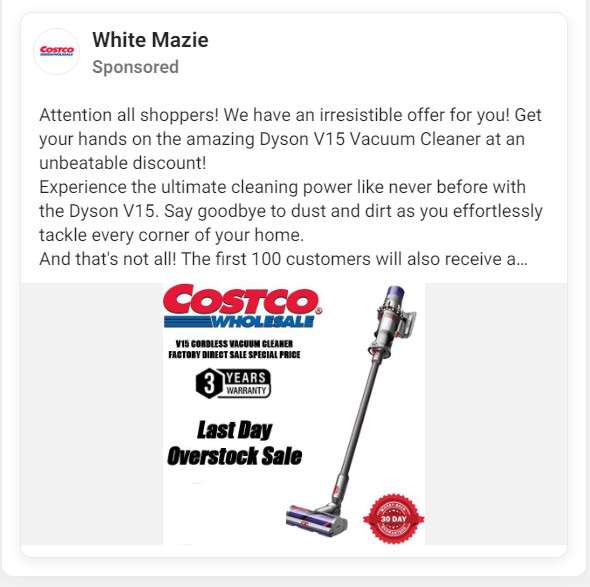
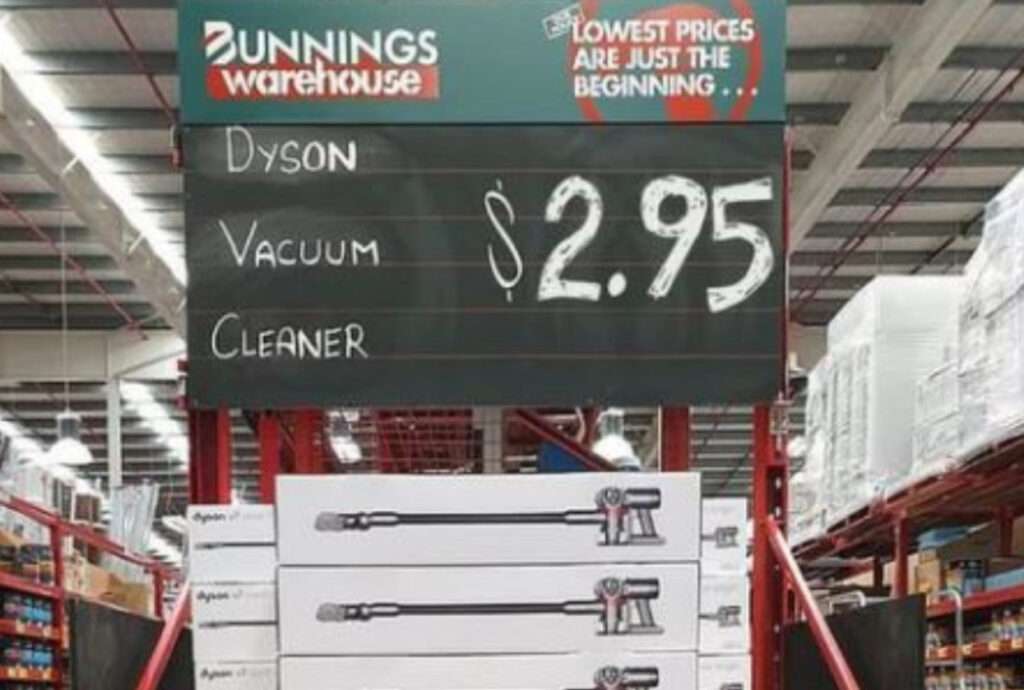
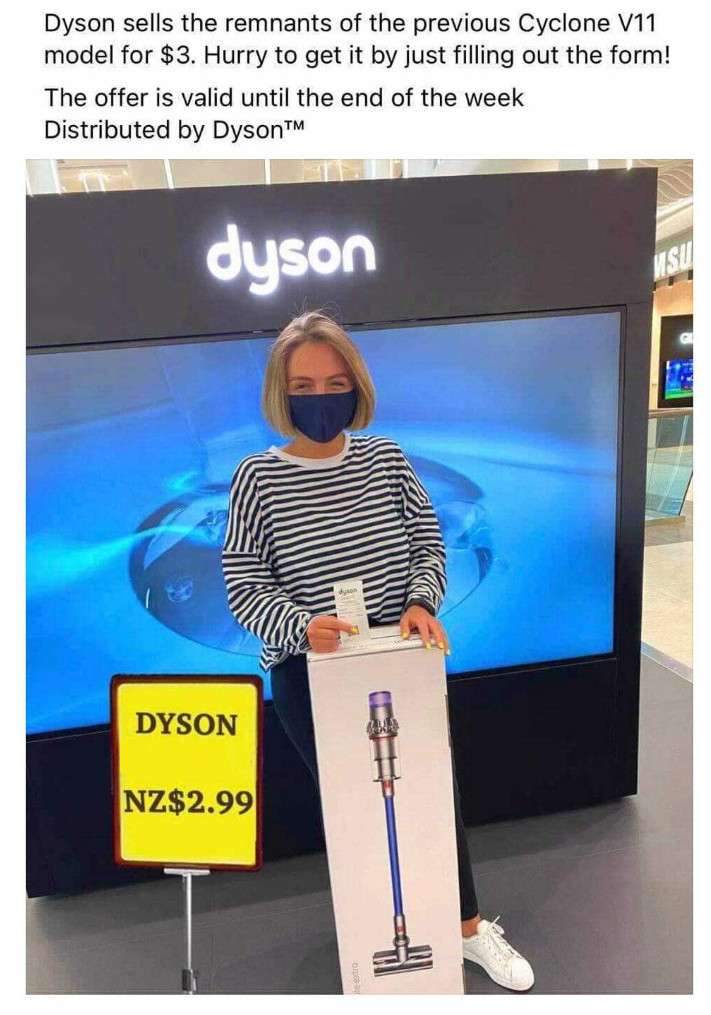
A prolific subscription scam promotion currently infiltrating social platforms like Facebook, Instagram, and TikTok promises $500+ Dyson cordless stick vacuums available for a ludicrous $3 shipping fee. This outlandish bait aims to secure users’ financial and personal data for fraudulent recurring credit card billing.
By directing victims through polished phishing websites impersonating legitimate retailers like Walmart, Costco, and Amazon, scammers operating this scheme are siphoning untold amounts through undisclosed monthly subscription fees ranging from $100 to $250 per victim.
These criminal operations rely on the household name reputation of major retailers and viral interest in unbelievable deals to drive engagement to their scam pages. Examples of the deceptive techniques used include:
- Mocking up phishing order pages identical to real Costco, Walmart and Amazon checkouts using stolen branding
- Claiming special early access pricing for Black Friday and holiday deals to create false urgency
- Touting $500+ Dyson cordless stick vacuums as attainable for a mere $3 shipping fee
- Burying obscure terms and recurring billing disclaimers in tiny unreadable text on checkout pages
- Integrating fake security badges, https imagery and Norton seals to boost legitimacy
- Making vacuum images unclickable so users cannot cross-reference actual prices on real sites
- Fabricating 5-star reviews and posting stock photos of smiling customers to falsely signal social proof
- Auto-checking boxed disclosures that terms were read and agreed to in order to charge users unaware
- Providing fake customer service numbers and contacts unable to cancel or refund deceptive charges
The reality is that no legitimate retailers would ever offer $500 products for just $3. And no authorized Costco, Walmart or Amazon store would hide egregious unexpected subscription fees in fine print. By recognizing these and other hallmarks of phishing scams, social media users can steer clear of being deceived by even the most creatively fabricated vacuum promotions. Scrutiny and vigilance are crucial to avoiding comprising sensitive payment data and identity information.
By understanding the sheer depth of manipulation and deception underpinning these viral $3 Dyson vacuum deals, we can inoculate ourselves against their financial hazards. Caution and prevention are essential to sidestepping increasingly sophisticated social media phishing tactics.
How the $3 Dyson Vacuum Scam Works to Ensnare Victims
While minor variations exist, the $3 Dyson vacuum scams follow similar patterns and techniques to dupe social media users. Here is an overview of the deception funnel fraudsters use:
1. Viral Social Media Posts
- Scammers run Facebook ads, Instagram posts and TikToks promoting the $3 Dyson vacuum deal.
- These integrate unauthorized logos of Costco, Walmart, Lidl and other retailers to appear legitimate.
- Designed to go viral through sharing, these posts leverage FOMO and urgency with claims of limited supply.
2. Phishing Retailer Websites
- Clicking these posts sends users to sophisticated fake retailer websites recently registered by scammers.
- These sites capture users’ info through phishing order forms disguised as legitimate checkout flows.
- Fake security badges, https, padlocks and other trust signals aim to reassure visitors.
3. Subscription Fee Hidden In Fine Print
- After users input credit card info expecting a single small charge, the fraud begins.
- Monthly subscriptions ranging from $50-$250 are charged by scammers to the cards on file without consent.
- These illegal auto-billings typically recur for months before victims detect something is wrong.
- Disclosures about these false “rebate membership fees” are buried in tiny print unlikely to be noticed when users purchase.
4. No Products Shipped Out
- Despite promotions showing Dyson cordless stick vacuums, no actual items are shipped to victims.
- Any products displayed are used only to drive urgency around the false bargain being offered.
- The only purpose is to secure users’ payment information for recurring fee extraction by scammers.
5. Difficulty Canceling and Obtaining Refunds
- Fake customer service numbers and contacts are provided, making canceling impossible.
- Banks often won’t refund since users technically gave their information willingly.
- Victims without recourse frequently must cancel entire cards to halt monthly subscription losses.
By recognizing these scammer techniques, we can avoid falling into their trap when unbelievable vacuum deals pop up in social feeds promising deeply discounted Dysons. Caution and verification are crucial before blindly trusting such viral posts.
What to Do If You Fell Victim to the $3 Dyson Vacuum Subscription Scam
If you already entered payment information through one of the $3 Dyson vacuum scam websites falsely posing as Costco, Amazon or other retailers, immediately take these steps:
- Contact your credit card provider and report the charges as fraudulent – emphasize you did not agree to any monthly fees. Request they block the scammer from future billing.
- Check statements closely over the next weeks for the undisclosed subscription charges and swiftly dispute each instance with your card issuer.
- Monitor your credit reports at AnnualCreditReport.com to ensure no accounts were opened without authorization using your data.
- Call the scam company at the phone number provided in their site terms in an attempt to cancel the account and request a refund, although this likely will be unsuccessful.
- Follow up with your bank and card provider repeatedly to re-dispute any recurring subscription fees and emphasize lack of consent.
- Be prepared to request a new card number or close the account entirely if the company continues attempting unauthorized charges.
- Where applicable, report the seller to PayPal or Amazon for referral to their fraud divisions for recovery assistance.
- File detailed complaints with the FTC, state attorneys general, and FBI IC3 documenting the scheme specifics, phishing techniques used, and any financial losses incurred.
- Post warnings about the scam on social media feeds warning others from falling victim and hampering the scammers’ outreach.
- Enroll in credit monitoring to protect your identity and financial data after having details compromised through phishing.
Frequently Asked Questions About the $3 Dyson Vacuum Subscription Scam
1. What exactly is the $3 Dyson vacuum scam?
The $3 Dyson vacuum scam is a viral social media campaign using fake ads and websites to trick users into providing payment information under the guise of a one-time $3 shipping fee. In reality, this compromises data for recurring subscription fees.
2. How does the $3 Dyson vacuum scam work?
Scammers promote $500 Dyson vacuums attainable for just $3 shipping on Facebook and Instagram. Users enter payment info expecting only a small authorized charge but are actually enrolled in expensive monthly subscriptions.
3. What are some red flags of the $3 Dyson vacuum scam?
Red flags include too good to be true pricing, recently created domains, fake reviews/security badges, pre-checked forms, and disclosures about hidden fees in tiny unreadable text.
4. Are major retailers like Walmart and Costco affiliated with this scam?
No. Scammers fake endorsement from retailers by using their brands without consent. None of the ads originate from the retailers themselves.
5. Where do I report the $3 Dyson vacuum scam?
Report to your credit card provider, the FTC, state attorney general, IC3.gov, social media platforms, and retailers whose logos were misused without permission.
6. What should I do if I entered payment information into a $3 Dyson scam website?
Immediately contact your card issuer to report fraudulent charges, block the seller from future billing, closely monitor statements for recurrences, and be prepared to request a new card number.
7. How can I get a refund after falling for the $3 Dyson vacuum scam?
Unfortunately, refunds are difficult since you technically submitted payment willingly. Escalate urgently with your bank and card provider emphasizing lack of consent for recurring fees.
8. How can I cancel unwanted subscription charges from the $3 Dyson scam?
Call provided scam company contacts demanding cancellation, but likely no viable avenue exists. Proactively cancel the compromised card to halt further unauthorized billing.
9. Could I actually receive a discounted Dyson vacuum from this scam?
Highly unlikely. The $3 vacuum ads and websites are purely a pretext to phish for financial data. No Dysons or other physical products are actually delivered to victims.
10. How can I avoid viral subscription scams like the $3 Dyson vacuum trap?
Carefully scrutinize unbelievable prices and exaggerated savings claims. Check site legitimacy and read all terms thoroughly before submitting payment information.
The Bottom Line
The viral $3 Dyson vacuum deal preying on social media users through phishing links is a prime example of unbelievable offers being too good to be true. By dangling hugely discounted prices on coveted brands, scammers coerce consumers into compromising sensitive personal information that enables recurring billing scams.
With vigilance and awareness of common retail scam techniques, we can avoid entrapment when these fraudulent promotions inevitably infiltrate our social feeds. A healthy skepticism of deceitful viral posts can help protect our wallets and identities from ambitious phishing ploys predicated on tricking the unwary. Through caution and prevention, we can counter these endless illicit schemes aiming to financially exploit social media users.








