

AdpeakProxy.exe is an adware program that will display pop-up ads and advertising banners within Internet Explorer, Firefox and Google Chrome.
This infection is designed specifically to make money. It generates web traffic, collects sales leads for other dubious sites, and will display advertisements and sponsored links within your web browser.
AdpeakProxy.exe it’s technically not a virus, but it does exhibit plenty of malicious traits, such as rootkit capabilities to hook deep into the operating system, browser hijacking, and in general just interfering with the user experience. The industry generally refers to it as a “PUP,” or potentially unwanted program.
![[Image: AdpeakProxy.exe virus]](http://malwaretips.com/blogs/wp-content/uploads/2013/12/AdpeakProxy-exe-virus.png "AdpeakProxy.exe by Adpeak")
AdpeakProxy.exe is part of the Adpeak adware, and is typically added when you install another free software (video recording/streaming, download-managers or PDF creators) that had bundled into their installation this malicious program. When you install these free programs, they will also install AdpeakProxy.exe as well. Some of the programs that are known to bundle AdpeakProxy.exe include ScorpionSaver, GetSavin, DealCabby, and CouponAmazing and many other adware programs.
Once installed, AdpeakProxy.exe runs automatically every time Windows starts, and it stays active in the background and checks for software updates.
The AdpeakProxy.exe malicious process may be visible in Task Manager (CTRL+ALT+DEL), and you may find two or more AdpeakProxy.exe running at the safe time.
When its running the AdpeakProxy.exe process, will display advertising banners and sponsored links on the web pages that you are visiting.
You should always pay attention when installing software because often, a software installer includes optional installs, such as this AdpeakProxy.exe adware. Be very careful what you agree to install.
Always opt for the custom installation and deselect anything that is not familiar, especially optional software that you never wanted to download and install in the first place. It goes without saying that you should not install software that you don’t trust.
How to remove eAdpeakProxy.exe virus (Removal Guide)
This page is a comprehensive guide, which will remove AdpeakProxy.exe from Windows 8, Windows 7, Windows Vista and Windows XP.
Please perform all the steps in the correct order. If you have any questions or doubt at any point, STOP and ask for our assistance.
STEP 1: Remove AdpeakProxy.exe adware with AdwCleaner
STEP 2: Remove AdpeakProxy.exe browser hijacker with Junkware Removal Tool
STEP 3: Remove AdpeakProxy.exe virus with Malwarebytes Anti-Malware Free
STEP 4: Double-check for the AdpeakProxy.exe infection with HitmanPro
STEP 1: Remove AdpeakProxy.exe adware with AdwCleaner
The AdwCleaner utility will scan your computer for AdpeakProxy.exe malicious files and registry keys, that may have been installed on your computer without your knowledge.
- You can download AdwCleaner utility from the below link.
ADWCLEANER DOWNLOAD LINK (This link will automatically download AdwCleaner on your computer) - Before starting AdwCleaner, close all open programs and internet browsers, then double-click on the AdwCleaner icon.
![[Image: AdwCleaner Icon]](data:image/gif;base64,R0lGODlhAQABAAAAACH5BAEKAAEALAAAAAABAAEAAAICTAEAOw== "AdwCleaner Icon")
If Windows prompts you as to whether or not you wish to run AdwCleaner, please allow it to run. - When the AdwCleaner program will open, click on the Scan button as shown below.
AdwCleaner will now start to search for AdpeakProxy.exe malicious files that may be installed on your computer. - To remove the AdpeakProxy.exe malicious files that were detected in the previous step, please click on the Clean button.
AdwCleaner will now prompt you to save any open files or data as the program will need to reboot the computer. Please do so and then click on the OK button.
![[Image: AdwCleaner Icon]](http://malwaretips.com/blogs/wp-content/uploads/2013/08/adwcleaner-icon.jpg "AdwCleaner Icon")
![[Image: Adwcleaner Scan]](http://malwaretips.com/blogs/wp-content/uploads/2013/08/adwcleaner-scan.jpg "Click on Scan button to search for AdpeakProxy.exe infection")
![[Image: AdwCleaner removing infections]](http://malwaretips.com/blogs/wp-content/uploads/2013/08/adwcleaner-cleanup.jpg "Click on the Clean button to remove AdpeakProxy.exe")
STEP 2: Remove AdpeakProxy.exe browser hijack with Junkware Removal Tool
Junkware Removal Tool is a powerful utility, which will remove AdpeakProxy.exe virus from Internet Explorer, Firefox or Google Chrome.
- You can download the Junkware Removal Tool utility from the below link:
JUNKWARE REMOVAL TOOL DOWNLOAD LINK (This link will automatically download the Junkware Removal Tool utility on your computer) - Once Junkware Removal Tool has finished downloading, please double-click on the JRT.exe icon as seen below.
If Windows prompts you as to whether or not you wish to run Junkware Removal Tool, please allow it to run. - Junkware Removal Tool will now start, and at the Command Prompt, you’ll need to press any key to perform a scan for the AdpeakProxy.exe.
Please be patient as this can take a while to complete (up to 10 minutes) depending on your system’s specifications. - When the scan Junkware Removal Tool will be completed, this utility will display a log with the malicious files and registry keys that were removed from your computer.
![[Image: Junkware Removal Tool]](http://malwaretips.com/blogs/wp-content/uploads/2013/06/Junkware-icon.jpg "Double-click on the Junkware Removal Tool utility")
![[Image: Junkware Removal Tool scanning for AdpeakProxy.exe virus]](http://malwaretips.com/blogs/wp-content/uploads/2013/06/junkware-removal-tool.jpg "Junkware Removal Tool scanning for AdpeakProxy.exe")
![[Image: Junkware Removal Tool final log]](http://malwaretips.com/blogs/wp-content/uploads/2013/06/Junkware-log.jpg "Junkware Removal Tool final log")
STEP 3: Remove AdpeakProxy.exe virus with Malwarebytes Anti-Malware Free
Malwarebytes Anti-Malware Free utilizes Malwarebytes powerful technology to detect and remove all traces of malware including worms, trojans, rootkits, rogues, dialers, spyware and more.
- You can download Malwarebytes Anti-Malware Free from the below link, then double-click on the icon named mbam-setup.exe to install this program.
MALWAREBYTES ANTI-MALWARE DOWNLOAD LINK(This link will open a download page in a new window from where you can download Malwarebytes Anti-Malware Free) - When the installation begins, keep following the prompts in order to continue with the setup process, then at the last screen click on the Finish button.
- On the Scanner tab, select Perform full scan, and then click on the Scan button to start searching for the AdpeakProxy.exe malicious files.
- Malwarebytes’ Anti-Malware will now start scanning your computer for AdpeakProxy.exe as shown below.
- When the Malwarebytes Anti-Malware scan has finished, click on the Show Results button.
- You will now be presented with a screen showing you the computer infections that Malwarebytes Anti-Malware has detected. Make sure that everything is Checked (ticked), then click on the Remove Selected button.
![[Image: Malwarebytes Anti-Malware final installation screen]](http://malwaretips.com/blogs/wp-content/uploads/2013/01/malwarebytes-installation.jpg "Malwarebytes Anti-Malware installation screen")
![[Image: Malwarebytes Anti-Malware Quick Scan]](http://malwaretips.com/blogs/wp-content/uploads/2013/01/malwarebytes-quick-scan.jpg "Run a Full System Scan with Malwarebytes Anti-Malware")
![[Image: Malwarebytes Anti-Malware scanning for AdpeakProxy.exe virus]](http://malwaretips.com/blogs/wp-content/uploads/2013/01/malwarebytes-scan.jpg "Malwarebytes Anti-Malware scanning for AdpeakProxy.exe")
![[Image: Malwarebytes Anti-Malware scan results]](http://malwaretips.com/blogs/wp-content/uploads/2013/01/malwarebytes-scan-results.jpg "Malwarebytes when the system scan has completed")
![[Image: Malwarebytes Anti-Malware removing AdpeakProxy.exe]](http://malwaretips.com/blogs/wp-content/uploads/2013/01/malwarebytes-virus-removal.jpg "Malwarebytes Anti-Malwar removing AdpeakProxy.exe")
STEP 4: Double-check for the AdpeakProxy.exe infection with HitmanPro
HitmanPro is a second opinion scanner, designed to rescue your computer from malware (viruses, trojans, rootkits, etc.) that have infected your computer despite all the security measures you have taken (such as anti virus software, firewalls, etc.).
- You can download HitmanPro from the below link:
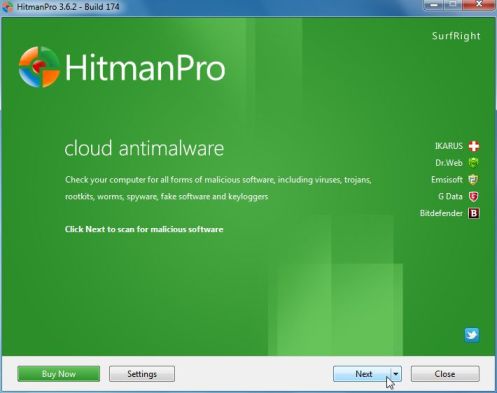
HITMANPRO DOWNLOAD LINK (This link will open a web page from where you can download HitmanPro) - Double-click on the file named HitmanPro.exe (for 32-bit versions of Windows) or HitmanPro_x64.exe (for 64-bit versions of Windows). When the program starts you will be presented with the start screen as shown below.
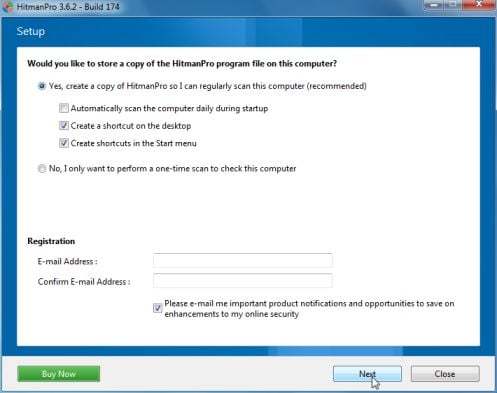
Click on the Next button, to install HitmanPro on your computer.
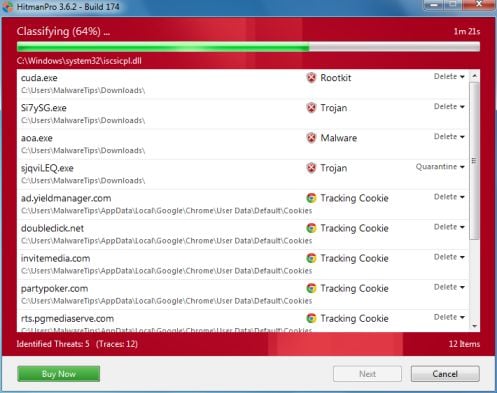
- HitmanPro will now begin to scan your computer for AdpeakProxy.exe malicious files.
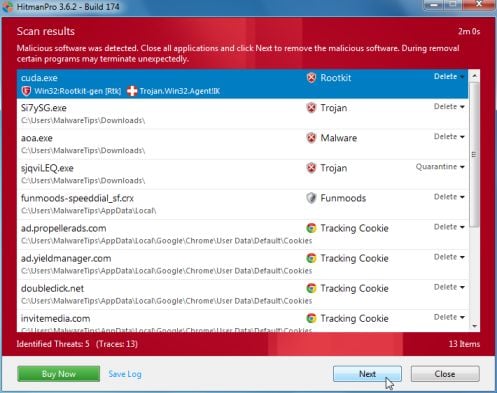
- When it has finished it will display a list of all the malware that the program found as shown in the image below. Click on the Next button, to remove AdpeakProxy.exe adware.
- Click on the Activate free license button to begin the free 30 days trial, and remove all the malicious files from your computer.
![[Image: HitmanPro 30 days activation button]](http://malwaretips.com/blogs/wp-content/uploads/2012/11/hitmanpro-activation.jpg "HitmanPro free 30 days trial")
Your computer should now be free of the AdpeakProxy.exe infection. If your current anti-virus solution let this infection through, you may want to consider purchasing the PRO version of Malwarebytes Anti-Malware to protect against these types of threats in the future, and perform regular computer scans with HitmanPro.
If you are still experiencing problems while trying to remove AdpeakProxy.exe from your machine, please start a new thread in our Malware Removal Assistance forum.









No joke, I took this guys advice out of desperation and this stuff actually worked. Thank you sir for actually helping out.