

Texas drivers beware – scammers are sending fake texts claiming you have unpaid TxTag toll fees. Don’t let them trick you into paying bogus charges.
These “past due toll” texts mimic TxTag to steal your money and information. But armed with awareness, you can protect yourself.
An Overview of the TxTag Scam Texts
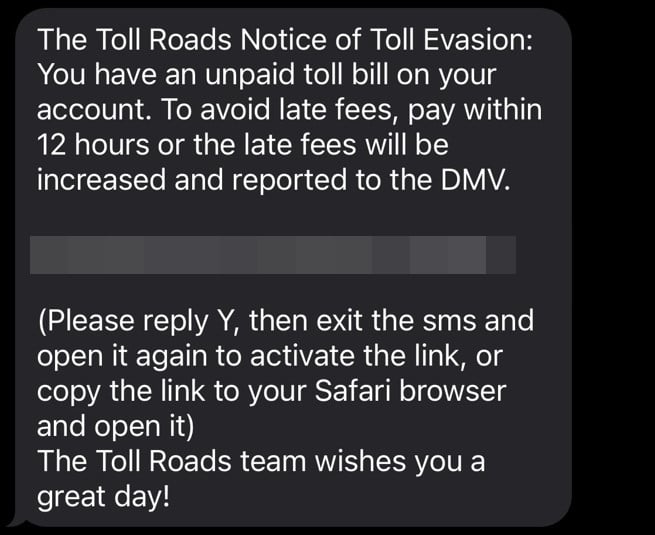
The TxTag scam texts state:
The Toll Roads Notice of Toll Evasion: You have an unpaid toll bill on your account. To avoid late fees, pay within 12 hours or the late fees will be increased and reported to the DMV.
<website>
(Please reply Y, then exit the sms and open it again to activate the link, or copy the link to your Safari browser and open it) The Toll Roads team wishes you a great day!
The text also includes a link supposedly to the TxTag site so you can immediately pay the past due toll.
However, the link sends you to a fake website run by scammers impersonating TxTag. If you enter your information, they can steal your identity and drain your bank account.
This scam combines:
- Fear – Threatening imminent late fees and DMV reporting
- Urgency – Demanding payment within 12 hours
- Confusion – Citing an unpaid toll you likely never incurred
- Trust – Pretending to be a legitimate state toll agency
It’s designed to panic you into paying without thinking – don’t fall for it!
Hallmarks of the Scam
These TxTag scam texts share distinct red flags:
- Addresses you personally
- Claims you have unpaid toll bills
- Threatens late fees and DMV consequences
- Includes a link to pay the supposed toll
- Uses the TxTag name to appear credible
Don’t Take the Bait
The scammers cannot penalize you or impact your driving record. You maintain full control as long as you avoid their link and providing personal information.
Remember:
- TxTag only contacts drivers about tolls via mail.
- Scammers can’t impose fees or report you to the DMV.
- Clicking links or calling phone numbers in suspicious texts puts you at risk.
How the TxTag Toll Scam Works
Here’s how scammers execute this scam step-by-step:
Step 1: You Receive a Text Out of Nowhere
You’ll get a text message claiming to be from TxTag. It’ll say you have unpaid toll bills and threaten consequences if you don’t pay within 12 hours.
It will provide a link supposedly to resolve the unpaid toll immediately.
This unsolicited text is a huge red flag. TxTag doesn’t initiate contact by text.
Step 2: The Link Goes to a Fake Website
If you click the link, it takes you to a sophisticated fake TxTag website. The site uses:
- Official branding and logos
- Photos of Texas toll roads
- Identical layout as the real TxTag site
In reality, scammers designed the site to deceive you into thinking it’s the legitimate TxTag site.
The URL will not match TxTag’s official website.
Step 3: You’re Directed to Enter Personal Details
The fake website presents a form demanding personal information to pay the fee:
- Full name
- Home address
- Phone number
- Email address
- Payment card details
- Social Security number
If you try submitting without entering details, you get an error message to provide the missing info – just like a real site.
No legitimate site would require this much personal data just for paying a toll bill.
Step 4: Scammers Steal Your Money and Identity
Armed with your details, scammers can now:
- Drain your bank account through excessive bogus “late” fees
- Commit identity theft using your SSN and birthdate
- Sell your payment information on the dark web
- Charge you repeatedly even months later
Handing over any information starts you down the path of financial and identity theft.
Step 5: You Realize You’ve Been Scammed
Victims typically realize they’re scammed once:
- They see unauthorized charges on their card statement.
- They contact the DMV and find their license unchanged.
- They become victim to identity theft or card fraud.
But by then the damage is done and scammers have your information. They are very difficult to track down and prosecute.
Avoiding harm means identifying the scam before submitting payment or personal details.
What To Do If You Get a TxTag Scam Text
If you receive a text demanding TxTag payment, take these steps right away:
1. Don’t Click the Link
This allows scammers to access your phone, data, and location. Never click links in suspicious texts.
2. Delete the Text
Delete the text to sever connection between your device and scammers. This also removes it from your messaging app.
3. Call TxTag
Look up the official TxTag customer support number online. Verify with a representative whether you actually have unpaid toll bills.
4. Contact Your Bank
If you already shared information or paid, tell your bank about the potential scam. They can monitor for and prevent fraudulent charges.
5. Report the Scam Text
File reports about the text scam with:
- Texas Attorney General
- FTC
- Local police
- Phone carrier
Reporting aids pursuing legal action against scammers.
6. Change Account Passwords
Change passwords immediately on all financial accounts if you entered them on the fake site. Use new, complex passwords.
7. Set Up Account Alerts
Enable text/email alerts on bank accounts to monitor transactions for fraud.
8. Consider Identity Theft Protection
Look into services like LifeLock that alert you about unauthorized use of your personal information. They can detect identity theft early.
9. Spread Awareness
Share this scam alert with friends and family so they know to ignore these texts. Post it online and report scam texts to protect more potential victims.
Beware of TxTag Scam Texts and Emails Demanding Payment
TxTag has issued an alert on their website warning customers about an ongoing scam involving fraudulent texts and emails.
Scammers are sending messages claiming to be from TxTag stating you have an outstanding balance or unpaid toll fees. The messages threaten consequences like account suspension if you don’t pay immediately. They include a link to click to resolve the supposed balance.
However, these messages are not really from TxTag. As per their warning:
“TxTag and TxDOT are aware of continued smishing/phishing scams targeting TxTag customers regarding outstanding toll charges. TxTag does not send email or SMS text messages to customers regarding balances due. Please do not click on any links or respond to any suspicious messages.”
The links in scam emails and texts send customers to fraudulent websites impersonating TxTag. If you enter your information, scammers can steal your money and identity.
TxTag reminds customers that any communication regarding unpaid toll notices comes via postal mail only. Legitimate TxTag emails or texts will never threaten consequences for unpaid balances or ask you to click a link to pay.
If you receive a suspicious email or text demanding TxTag payment, report it immediately to TxTag customer support online or by calling 1-888-468-9824. Do not click any links, provide personal information, or make payments outside TxTag’s official website. Stay vigilant and warn others to protect yourself from financial harm.
The Bottom Line
The TxTag scam texts demonstrate the danger of sophisticated phishing texts today. No Texas driver is safe from scams as texting gives scammers direct access to deceive us.
Remember, legitimate agencies won’t threaten consequences out of nowhere by text. Always independently verify texts before providing personal information – no matter how real they seem. Staying vigilant requires work but can keep you from losing money and your identity. Please share this scam warning so fewer drivers get tricked.
Frequently Asked Questions
How do I know if a text is really from TxTag?
TxTag only sends violation notices by postal mail. Texts are never legitimate. Additionally, TxTag won’t threaten license suspension immediately via text.
What if I lost the mailed notice from TxTag?
If you can’t find the notice but worry you missed paying a toll, call TxTag directly. Never pay tolls through an unsolicited text, even if you believe it’s real.
I clicked the link but didn’t submit my details. Am I safe?
Unfortunately no. Clicking likely downloaded malware allowing scammers to access your data and activity. Run antivirus software right away and contact your bank in case they already stole financial information.
I entered my information into the fake site. What now?
Contact your bank immediately to report the charges as fraudulent. Cancel any compromised cards and request replacements. Closely monitor all accounts for signs of identity theft moving forward.
How can I get my money back if I paid?
Contact your bank to dispute the charges and get a refund under federal law. Explain it was due to a scam TxTag text. TxTag may also be able to help recover lost payments.
How do I avoid text scams in the future?
Remember legitimate companies won’t threaten you unexpectedly through text. Verify texts by calling the company directly. Never provide personal or financial information in response to unsolicited messages.
Where can I report scam texts?
Report to your state attorney general, FTC, local police, and phone carrier. Reporting helps investigators pursue legal action against text scams.
What are red flags of a scam text?
Watch for texts threatening consequences, requesting unusual personal details, containing typos/errors, asking you to click a link, coming from an unknown sender, or referencing urgent unpaid bills you don’t recognize.

Join the discussion
0 commentsShare your experience or ask a question about this article.
Discussion
Start the conversation
Have a question or something useful to share? Add the first comment.