

If you drive on toll roads, watch out for a new text scam claiming you committed toll evasion. Scammers are sending fake violation notices mimicking The Toll Roads to trick unsuspecting drivers into paying bogus late fees. Don’t take the bait.
An Overview of The Toll Roads Notice of Toll Evasion Scam Texts
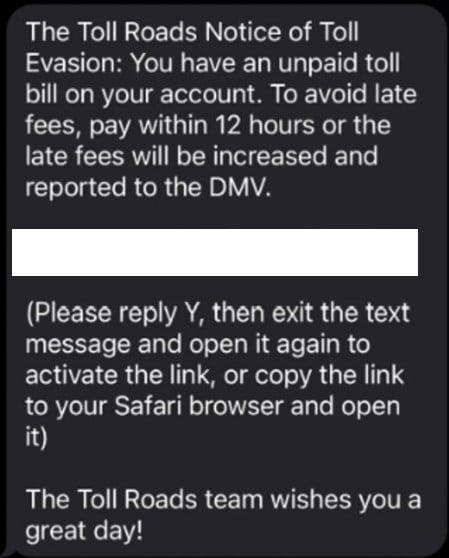
Across the country, drivers are reporting receiving scam texts stating:
The Toll Roads Notice of Toll Evasion: You have an unpaid toll bill on your account. To avoid late fees, pay within 12 hours or the late fees will be increased and reported to the DMV.
<website>
(Please reply Y, then exit the sms and open it again to activate the link, or copy the link to your Safari browser and open it) The Toll Roads team wishes you a great day!
The message includes a link supposedly leading to The Toll Roads website so you can pay the unpaid toll immediately.
However, the link actually directs to a fake website run by scammers posing as The Toll Roads. If you input your information, scammers can steal your money and identity.
This seamless scam combines:
- Fear – Threatening immediate late fees and DMV reporting
- Confusion – Referencing an unpaid toll most don’t remember
- Urgency – Demanding payment within 12 hours
- Trust – Impersonating a legitimate toll agency by name
It’s designed to panic recipients into paying without scrutiny. But remember, it’s all lies intended to steal from you.
Hallmarks of The The Toll Roads Notice of Toll Evasion Scam
These Toll Roads scam texts share distinct characteristics:
- Addresses the recipient directly
- Claims you have an “unpaid toll bill”
- Threatens “late fees” and DMV reporting within 12 hours
- Provides a link to pay the supposed unpaid toll
- Uses The Toll Roads name to pose as the official toll agency
Don’t Take the Bait
The scammers have zero authority over you or your driving record. You maintain full control – as long as you don’t click their link or provide personal information.
Remember:
- Toll agencies contact drivers about violations via mail only.
- Only a court can impose fees or suspend a license for unpaid tolls.
- The scammers cannot report you to the DMV or impose penalties.
- The scammers don’t have your personal or payment data.
Avoid clicking or calling numbers in scam texts to stay safe.
How The Toll Roads Notice of Toll Evasion Scam Works
Here’s exactly how scammers execute this scam step-by-step:
Step 1: You Receive an Unsolicited Text Message
You’ll receive a text message out of the blue claiming to be from The Toll Roads. It will address you directly and claim you have an unpaid toll violation on your account.
The text warns immediate late fees and DMV reporting if you don’t pay within 12 hours. It provides a link to resolve the alleged violation.
This is your first red flag. Legitimate toll agencies do not initiate contact via unsolicited text.
Step 2: The Link Goes to a Fake Website
If you click the link, it takes you to a near perfect replica of The Toll Roads website. The sophisticated site incorporates:
- Official branding and logos
- Images of toll roads and infrastructure
- Identical web layout as the real site
In reality, scammers engineered the website to deceive you into thinking it’s legitimate.
The big red flag is that the URL does not match The Toll Roads’ official website.
Step 3: You Are Directed to Enter Personal Information
The fake site presents a payment form for you to submit personal details including:
- Full name
- Home address
- Phone number
- Email address
- Payment card number
- Card expiration date
- CVV security code
If you try submitting without entering all information, an error message demands the missing data – just like a real site.
No legitimate website would require this much personal data just to pay a toll fee.
Step 4: Scammers Steal Your Money and Identity
With your information, scammers can:
- Drain your bank account through excessive “late” fees
- Commit identity theft using your name, DOB, address
- Sell your payment information on the dark web
- Charge you repeatedly even months later
Sharing any piece of data begins the process of financial and identity theft.
Step 5: You Realize You’ve Been Scammed
Victims typically realize they’ve been scammed once:
- Unauthorized charges appear on their card statement
- They contact the DMV and learn their license is unchanged
- They become victim to identity theft or card fraud
But by then, the damage is done and scammers have your sensitive information. They are very hard to track down and prosecute.
What To Do If You Receive A Toll Roads Scam Text
If you get a text claiming you committed toll evasion, take these steps immediately:
1. Do Not Click the Link
This allows scammers to access your data, location, and device. Never click links in suspicious texts.
2. Delete the Text
Delete the text to sever connection between your phone and scammers’ operation. This also clears it from your messaging app.
3. Call The Toll Roads
Lookup the official customer service number for The Toll Roads. Verify with a representative whether you actually have any unpaid toll bills or violations.
4. Contact Your Bank
If you already provided information or paid, alert your bank about the potential scam. They can monitor for and prevent fraudulent charges.
5. Report the Scam Text
File reports about the scam text with:
- State attorney general
- FTC
- Local police
- Phone carrier
Reporting helps authorities pursue legal action against scammers.
6. Update Account Passwords
Change passwords on all financial accounts immediately if you provided them on the fake site. Use distinct, complex passwords.
7. Enable Account Alerts
Set up text/email alerts for every bank account transaction so you can monitor for fraud.
8. Sign Up For Identity Theft Protection
Consider services like LifeLock that alert you about suspicious use of your identity and personal information. They can catch identity theft early.
9. Spread Awareness
Share this scam alert with friends and family so they know to ignore these texts. Post it online and report the scam texts to prevent more victims.
The Bottom Line
The Toll Roads evasion notice scam shows the danger in today’s sophisticated phishing texts. No driver is safe from scams as texting provides scammers direct access to our phones and lives.
Remember, legitimate companies won’t threaten legal action out of nowhere via text. Slow down and verify every text before providing personal information – no matter how convincing. Avoiding this reflex reaction takes vigilance, but it can keep you from losing your hard-earned money and identity. Please share this scam alert today so fewer drivers fall victim tomorrow.
Frequently Asked Questions
How do I know a text is really from The Toll Roads?
The Toll Roads only sends toll violation notices via postal mail. Texts are never legitimate. Additionally, The Toll Roads will not threaten immediate license suspension via text.
What if I lost the mailed notice from The Toll Roads?
If you can’t find the postal notice but worry you missed a toll, call The Toll Roads directly. Never pay a toll through an unsolicited text, even if you think it’s real.
I clicked the link but didn’t submit information. Am I safe?
Unfortunately no. Clicking likely downloaded malware letting scammers access your data and activity. Run antivirus software immediately. Contact your bank in case they already stole financial information.
I entered my information into the fake site. What now?
Contact your bank immediately to report the charges as fraudulent. Cancel any compromised cards and request replacements. Monitor all accounts closely for signs of identity theft.
How do I get my money back if I paid?
Contact your bank to dispute the charges and earn a refund under federal law. Provide details that it resulted from a scam toll violation text. The Toll Roads may also be able to assist in recovering lost payment.
How can I avoid text scams in the future?
Remember legitimate companies won’t threaten you out of nowhere via text. Verify texts by calling the company directly. Never provide personal or financial data in response to unsolicited messages.
Where can I report scam texts?
Report to your state attorney general, FTC, local police, and phone carrier. Reporting aids investigators in pursuing legal action against text scams.
What are red flags of a scam text?
Watch for texts threatening consequences, requesting unusual personal information, containing typos/grammatical errors, asking you to click a link, coming from an unknown sender, or referencing urgent unpaid bills you don’t recognize.

Join the discussion
0 commentsShare your experience or ask a question about this article.
Discussion
Start the conversation
Have a question or something useful to share? Add the first comment.