

Imagine checking your email and finding a message from Chase Bank alerting you to a $350 transfer scheduled to be deducted from your account. Panic sets in as you don’t recall authorizing such a transaction. The email provides a link to stop the transfer. What do you do? Before clicking, it’s crucial to pause and assess the situation. This scenario is a common tactic used by cybercriminals to deceive individuals into revealing sensitive information. In this article, we’ll delve deep into the “Chase – Transfer Is Processing And Will Be Deducted” scam emails, exploring how they operate, how to identify them, and the steps to take if you’ve fallen victim.
Scam Overview
The “Chase – Transfer Is Processing And Will Be Deducted” email scam is a phishing attempt where fraudsters impersonate Chase Bank to trick recipients into divulging personal and financial information. These emails are meticulously crafted to appear legitimate, often incorporating official logos, formatting, and language that closely resemble genuine communications from Chase.
Anatomy of the Scam Email
A typical scam email of this nature contains the following elements:
- Subject Line: Often reads “You have a new secured message” or a similar variation to grab attention.
- Sender Information: The email may use a forged address that appears to come from Chase Bank. However, upon closer inspection, the sender’s email address often reveals inconsistencies or deviations from official Chase domains.
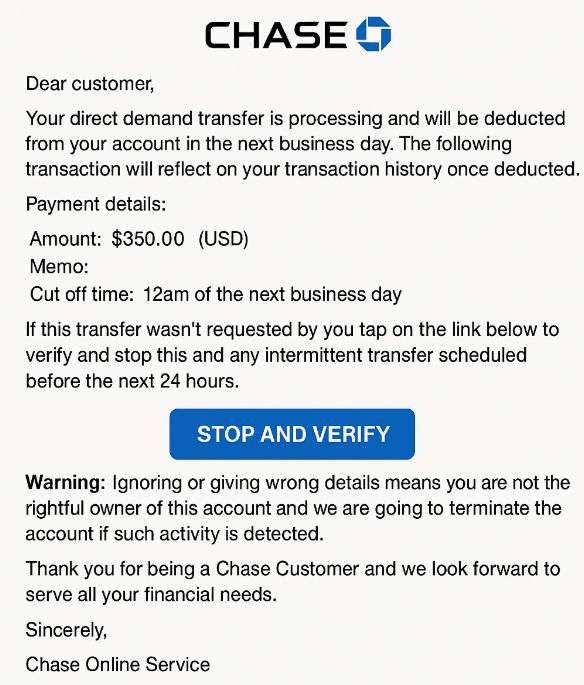
- Message Content: The body of the email informs the recipient that a direct transfer of $350 is being processed and will be deducted from their account the next business day. It provides transaction details, including the amount and a cutoff time.
- Call to Action: If the recipient does not recognize the transaction, they are prompted to click on a link labeled “STOP AND VERIFY” to cancel the transfer.
- Threatening Language: The email warns that ignoring the message or providing incorrect details may result in account termination, adding a sense of urgency and pressure.
The Deceptive Tactics Used
Scammers employ several psychological tactics to manipulate recipients:
- Urgency and Fear: By stating that funds will be deducted imminently and threatening account termination, the email induces panic, prompting hasty actions without thorough consideration.
- Authority: Impersonating a reputable institution like Chase Bank lends credibility to the fraudulent message.
- Convenience: Providing a direct link to “STOP AND VERIFY” makes it easy for recipients to fall into the trap, especially when under stress.
Here is how a scam email scam:
Text presented in the “Chase – Transfer Is Processing And Will Be Deducted” spam email letter:
Subject: You have a new secured message
View Online | Email Security Information
Chase Logo
Dear customer, Your direct demand transfer is processing and will be deducted from your account in the next business day. The following transaction will reflect on your transaction history once deducted.
Payment details:
Amount: $350.00 (USD)
Memo:
Cut off time: 12am of the next business dayIf this transfer wasn’t requested by you tap on the link below to verify and stop this and any intermittent transfer scheduled before the next 24 hours.
STOP AND VERIFY
Warning: Ignoring or giving wrong details means you are not the rightful owner of this account and
we are going to terminate the account if such activity is detected.Thank you for being a Chase Customer and we look forward to serve all your financial needs.
Sincerely,
Chase Online Service
Real-World Implications
Falling for such scams can have severe consequences:
- Financial Loss: Entering login credentials into the phishing site grants scammers access to your bank account, leading to unauthorized transactions.
- Identity Theft: Personal information can be harvested and used to commit further fraud or sold on the dark web.
- Emotional Distress: Victims often experience significant stress and anxiety as they navigate the aftermath of the scam.
How the Scam Works
Understanding the mechanics of this scam is vital to recognizing and avoiding it. Here’s a detailed, step-by-step breakdown:
Step 1: The Unsolicited Email
You receive an unexpected email purportedly from Chase Bank, alerting you to a pending transfer of $350 from your account.
Step 2: Inducing Panic
The email emphasizes the urgency of the situation, stating that the transfer will occur the next business day and providing a cutoff time of 12 a.m.
Step 3: The Call to Action
To prevent the unauthorized transfer, the email instructs you to click on a link labeled “STOP AND VERIFY.”
Step 4: The Phishing Website
Clicking the link redirects you to a counterfeit Chase login page designed to capture your username and password.
Step 5: Harvesting Credentials
Once you enter your login details, the scammers capture this information, granting them access to your real Chase account.
Step 6: Exploiting the Information
With access to your account, scammers can:
- Initiate Unauthorized Transactions: Transfer funds to their accounts or make purchases.
- Steal Personal Information: Access sensitive data that can be used for identity theft.
- Lock You Out: Change your account passwords, preventing you from accessing your own account.
Step 7: Further Exploitation
Scammers may use your compromised account to target others, sending phishing emails to your contacts or using your identity for additional fraudulent activities.
What to Do If You Have Fallen Victim to This Scam
If you suspect that you’ve been targeted or have inadvertently provided your information to scammers, it’s crucial to act swiftly. Here’s a comprehensive list of steps to take:
- Contact Chase Bank Immediately:
- Call Chase’s official customer service at 1-800-935-9935 to report the incident.robokiller.com
- Inform them of the unauthorized access and follow their guidance to secure your account.
- Change Your Passwords:
- Update your Chase account password immediately.
- If you use the same password for other accounts, change those as well to prevent further breaches.
- Enable Two-Factor Authentication (2FA):
- Activate 2FA on your Chase account and any other accounts that offer this feature for an added layer of security.
- Monitor Your Accounts:
- Regularly review your bank statements and account activity for any unauthorized transactions.
- Set up account alerts to receive notifications of any suspicious activity.
- Report the Scam:
- To Chase: Forward the phishing email to phishing@chase.com.
- To Authorities: File a report with the Federal Trade Commission (FTC) at ftc.gov/complaint.
- Check for Malware:
- Run a comprehensive antivirus scan on your devices to ensure no malware or keyloggers have been installed.
- Place Fraud Alerts and Monitor Credit Reports
- Contact one of the three major credit bureaus (Experian, TransUnion, Equifax) and request a fraud alert.
- This will make it harder for scammers to open new accounts in your name.
- Review your credit reports for unfamiliar activity. You’re entitled to a free report annually from each bureau at AnnualCreditReport.com.
- Freeze Your Credit (if necessary)
- If your personal identifying information was stolen (e.g., Social Security number), consider placing a credit freeze.
- This prevents new creditors from accessing your credit report entirely, effectively blocking new credit accounts from being opened in your name.
- File a Police Report (if funds were stolen)
- Your local police department can help create an official incident report.
- This report may be necessary for insurance claims or dispute resolutions with your bank or other institutions.
- Inform Your Employer or Payroll Department
- If you use your Chase account for direct deposit or business-related transactions, notify your employer.
- They may want to verify payroll details or update account info to prevent further issues.
The Bottom Line
The “Chase – Transfer Is Processing And Will Be Deducted” scam is a dangerous phishing attempt crafted to exploit fear and urgency. It uses alarming language and false authority to trick recipients into giving up sensitive login details. Despite its convincing appearance, the email is not from Chase Bank and should be treated as a fraud attempt.
The best defense is awareness. Know what to look for—unexpected messages, urgent tones, suspicious links, and requests for sensitive information. If something feels off, it probably is.
If you’ve already clicked or shared your details, act quickly. The sooner you respond, the better your chances of minimizing the damage and recovering securely.
Remember: Chase will never ask you to verify your account through email links or threaten termination if you don’t respond. Always go directly to their official website or app to verify account activity.

Join the discussion
0 commentsShare your experience or ask a question about this article.
Discussion
Start the conversation
Have a question or something useful to share? Add the first comment.